MEDIA BLOGS.


During a media lesson, we had been given an opportunity to go around the campus and take images
that could be inspiring and to perhaps use for our film poster or magazine cover.
I had formed up a quick list of potential shots I could take. Things that were included on this list
were:
- Close up shot of a girl with a menacing facial expression
- Girl with face shadowed
- Birds eye shot of person looking up, trying to grab camera, screaming
- Wide shot. Of boy sitting, and can see girl trying to grab him
- Close up of boy looking down (emotional) hood up.

[FIND PICTURES FROM PHOTOSHOOT -&PUT IN BLOG!!!! & comment on which ones worked well
etc.]
After looking through the images, I chose the ones I thought looked most effective in showing the
emotions I want to create from my trailer, and started on looking for ideas on how I could start to
edit them…
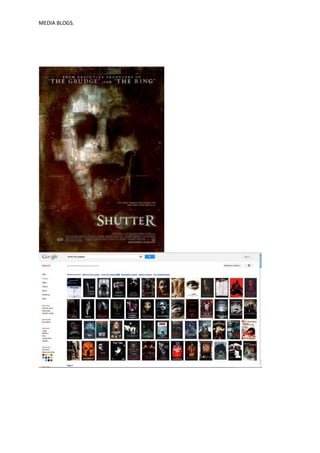
I searched for werewolf images, to see if I could grab any inspiration from images in the same genre
already.

Images I found:
MEDIA BLOGS.


I looked on YouTube to try and find any relevant and useful tutorial videos that could help me
achieve a ghost like effect.


Once I found a video I felt would get me the
right effect, I uploaded my image and started
to get to work…


First I adjusted the brightness/contrast to get a darker image and to enhance the shadowing on
Tammy’s (girl in image) face.
MEDIA BLOGS.


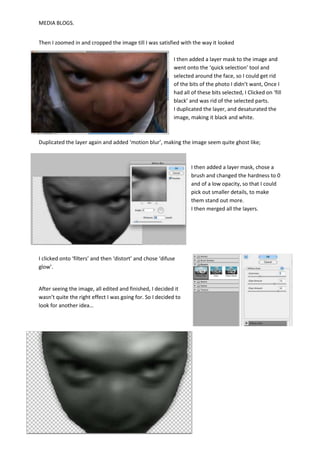
Then I zoomed in and cropped the image till I was satisfied with the way it looked

                                                            I then added a layer mask to the image and
                                                            went onto the ‘quick selection’ tool and
                                                            selected around the face, so I could get rid
                                                            of the bits of the photo I didn’t want, Once I
                                                            had all of these bits selected, I Clicked on ‘fill
                                                            black’ and was rid of the selected parts.
                                                            I duplicated the layer, and desaturated the
                                                            image, making it black and white.


Duplicated the layer again and added ‘motion blur’, making the image seem quite ghost like;


                                                                    I then added a layer mask, chose a
                                                                    brush and changed the hardness to 0
                                                                    and of a low opacity, so that I could
                                                                    pick out smaller details, to make
                                                                    them stand out more.
                                                                    I then merged all the layers.


I clicked onto ‘filters’ and then ‘distort’ and chose ‘difuse
glow’.


After seeing the image, all edited and finished, I decided it
wasn’t quite the right effect I was going for. So I decided to
look for another idea…
MEDIA BLOGS.


                          -INSPIRATION. I found a drawn/cartoon image of a woman and half of her
                          face had been formed into a werewolf face. As soon as I saw this picture,
                          it instantly reminded me of my groups film/trailer idea. So I decided to try
                          and recreate it.

                          Half skull face-
                          First I opened the picture of Tammy and repeated the first few steps from
                          my previous idea, where I used the ‘quick selection’ tool and got rid of the
                          background.


                                                       I then added a new layer and added a skull
                                                       picture I found on the internet and placed it
                                                       on top of Tammy’s photo.


                                                       I then reduced the transparency of the skull
                                                       image and made it the same size of Tammy’s
                                                       face and moved it around till it managed to fit
                                                       to the size on Tammy’s face.


I was extremely happy with the results and the way this image looked and I am considering using it
for my film poster.
MEDIA BLOGS.
MEDIA BLOGS.
MEDIA BLOGS.


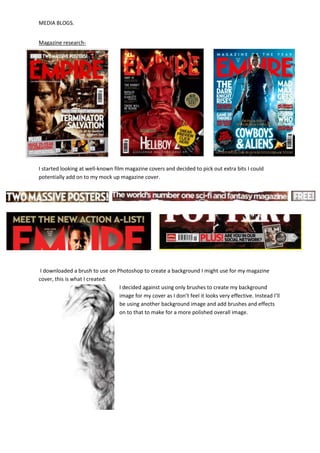
Magazine research-


I started looking at well-known film magazine covers and decided to pick out extra bits I could
potentially add on to my mock up magazine cover.


 I downloaded a brush to use on Photoshop to create a background I might use for my magazine
cover, this is what I created:
                                 I decided against using only brushes to create my background
                                 image for my cover as I don’t feel it looks very effective. Instead I’ll
                                 be using another background image and add brushes and effects
                                 on to that to make for a more polished overall image.
MEDIA BLOGS.


FIRST MAGAZINE COVER MOCK UP-

Picture editing- How To

  • 1.
    MEDIA BLOGS. During amedia lesson, we had been given an opportunity to go around the campus and take images that could be inspiring and to perhaps use for our film poster or magazine cover. I had formed up a quick list of potential shots I could take. Things that were included on this list were: - Close up shot of a girl with a menacing facial expression - Girl with face shadowed - Birds eye shot of person looking up, trying to grab camera, screaming - Wide shot. Of boy sitting, and can see girl trying to grab him - Close up of boy looking down (emotional) hood up. [FIND PICTURES FROM PHOTOSHOOT -&PUT IN BLOG!!!! & comment on which ones worked well etc.] After looking through the images, I chose the ones I thought looked most effective in showing the emotions I want to create from my trailer, and started on looking for ideas on how I could start to edit them… I searched for werewolf images, to see if I could grab any inspiration from images in the same genre already. Images I found:
  • 2.
    MEDIA BLOGS. I lookedon YouTube to try and find any relevant and useful tutorial videos that could help me achieve a ghost like effect. Once I found a video I felt would get me the right effect, I uploaded my image and started to get to work… First I adjusted the brightness/contrast to get a darker image and to enhance the shadowing on Tammy’s (girl in image) face.
  • 3.
    MEDIA BLOGS. Then Izoomed in and cropped the image till I was satisfied with the way it looked I then added a layer mask to the image and went onto the ‘quick selection’ tool and selected around the face, so I could get rid of the bits of the photo I didn’t want, Once I had all of these bits selected, I Clicked on ‘fill black’ and was rid of the selected parts. I duplicated the layer, and desaturated the image, making it black and white. Duplicated the layer again and added ‘motion blur’, making the image seem quite ghost like; I then added a layer mask, chose a brush and changed the hardness to 0 and of a low opacity, so that I could pick out smaller details, to make them stand out more. I then merged all the layers. I clicked onto ‘filters’ and then ‘distort’ and chose ‘difuse glow’. After seeing the image, all edited and finished, I decided it wasn’t quite the right effect I was going for. So I decided to look for another idea…
  • 4.
    MEDIA BLOGS. -INSPIRATION. I found a drawn/cartoon image of a woman and half of her face had been formed into a werewolf face. As soon as I saw this picture, it instantly reminded me of my groups film/trailer idea. So I decided to try and recreate it. Half skull face- First I opened the picture of Tammy and repeated the first few steps from my previous idea, where I used the ‘quick selection’ tool and got rid of the background. I then added a new layer and added a skull picture I found on the internet and placed it on top of Tammy’s photo. I then reduced the transparency of the skull image and made it the same size of Tammy’s face and moved it around till it managed to fit to the size on Tammy’s face. I was extremely happy with the results and the way this image looked and I am considering using it for my film poster.
  • 5.
  • 6.
  • 7.
    MEDIA BLOGS. Magazine research- Istarted looking at well-known film magazine covers and decided to pick out extra bits I could potentially add on to my mock up magazine cover. I downloaded a brush to use on Photoshop to create a background I might use for my magazine cover, this is what I created: I decided against using only brushes to create my background image for my cover as I don’t feel it looks very effective. Instead I’ll be using another background image and add brushes and effects on to that to make for a more polished overall image.
  • 8.