Using GIS as an OSP Fiber Design tool creates
efficiencies and ultimately project cost savings
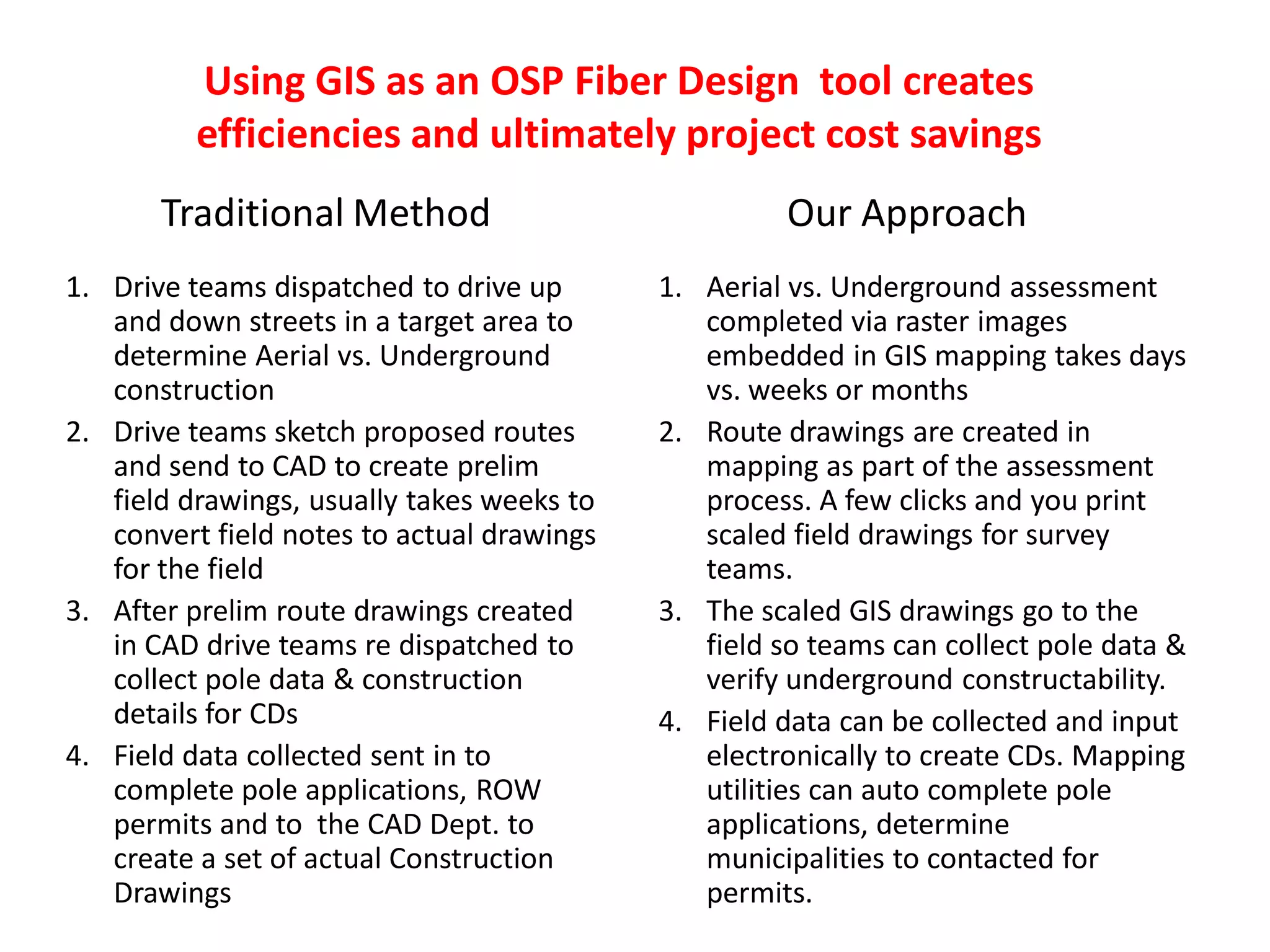
1. Drive teams dispatched to drive up
and down streets in a target area to
determine Aerial vs. Underground
construction
2. Drive teams sketch proposed routes
and send to CAD to create prelim
field drawings, usually takes weeks to
convert field notes to actual drawings
for the field
3. After prelim route drawings created
in CAD drive teams re dispatched to
collect pole data & construction
details for CDs
4. Field data collected sent in to
complete pole applications, ROW
permits and to the CAD Dept. to
create a set of actual Construction
Drawings
1. Aerial vs. Underground assessment
completed via raster images
embedded in GIS mapping takes days
vs. weeks or months
2. Route drawings are created in
mapping as part of the assessment
process. A few clicks and you print
scaled field drawings for survey
teams.
3. The scaled GIS drawings go to the
field so teams can collect pole data &
verify underground constructability.
4. Field data can be collected and input
electronically to create CDs. Mapping
utilities can auto complete pole
applications, determine
municipalities to contacted for
permits.
Traditional Method Our Approach
Aerial & Underground Fiber Build Cost Synopsis
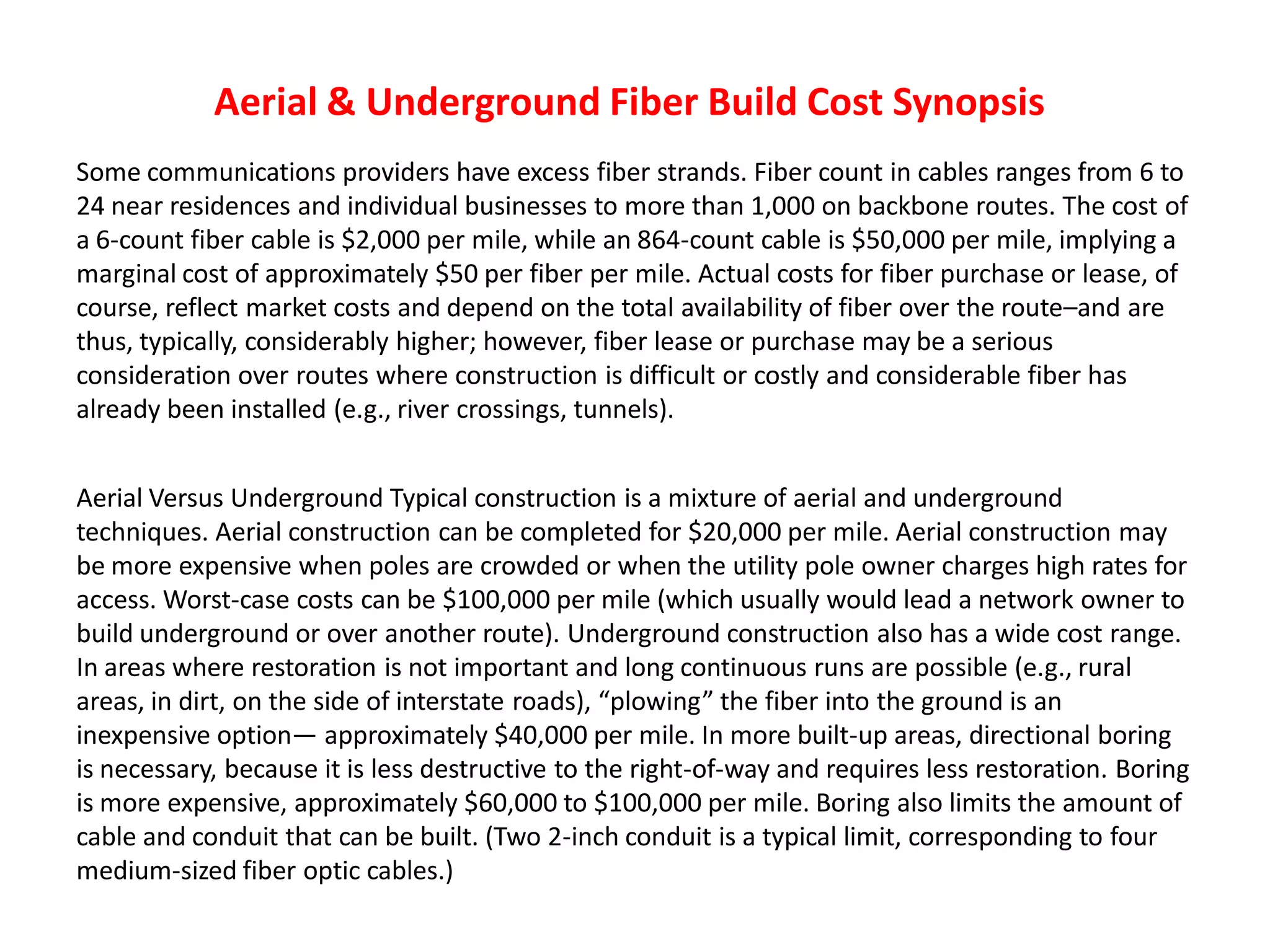
Some communications providers have excess fiber strands. Fiber count in cables ranges from 6 to
24 near residences and individual businesses to more than 1,000 on backbone routes. The cost of
a 6-count fiber cable is $2,000 per mile, while an 864-count cable is $50,000 per mile, implying a
marginal cost of approximately $50 per fiber per mile. Actual costs for fiber purchase or lease, of
course, reflect market costs and depend on the total availability of fiber over the route–and are
thus, typically, considerably higher; however, fiber lease or purchase may be a serious
consideration over routes where construction is difficult or costly and considerable fiber has
already been installed (e.g., river crossings, tunnels).
Aerial Versus Underground Typical construction is a mixture of aerial and underground
techniques. Aerial construction can be completed for $20,000 per mile. Aerial construction may
be more expensive when poles are crowded or when the utility pole owner charges high rates for
access. Worst-case costs can be $100,000 per mile (which usually would lead a network owner to
build underground or over another route). Underground construction also has a wide cost range.
In areas where restoration is not important and long continuous runs are possible (e.g., rural
areas, in dirt, on the side of interstate roads), “plowing” the fiber into the ground is an
inexpensive option— approximately $40,000 per mile. In more built-up areas, directional boring
is necessary, because it is less destructive to the right-of-way and requires less restoration. Boring
is more expensive, approximately $60,000 to $100,000 per mile. Boring also limits the amount of
cable and conduit that can be built. (Two 2-inch conduit is a typical limit, corresponding to four
medium-sized fiber optic cables.)
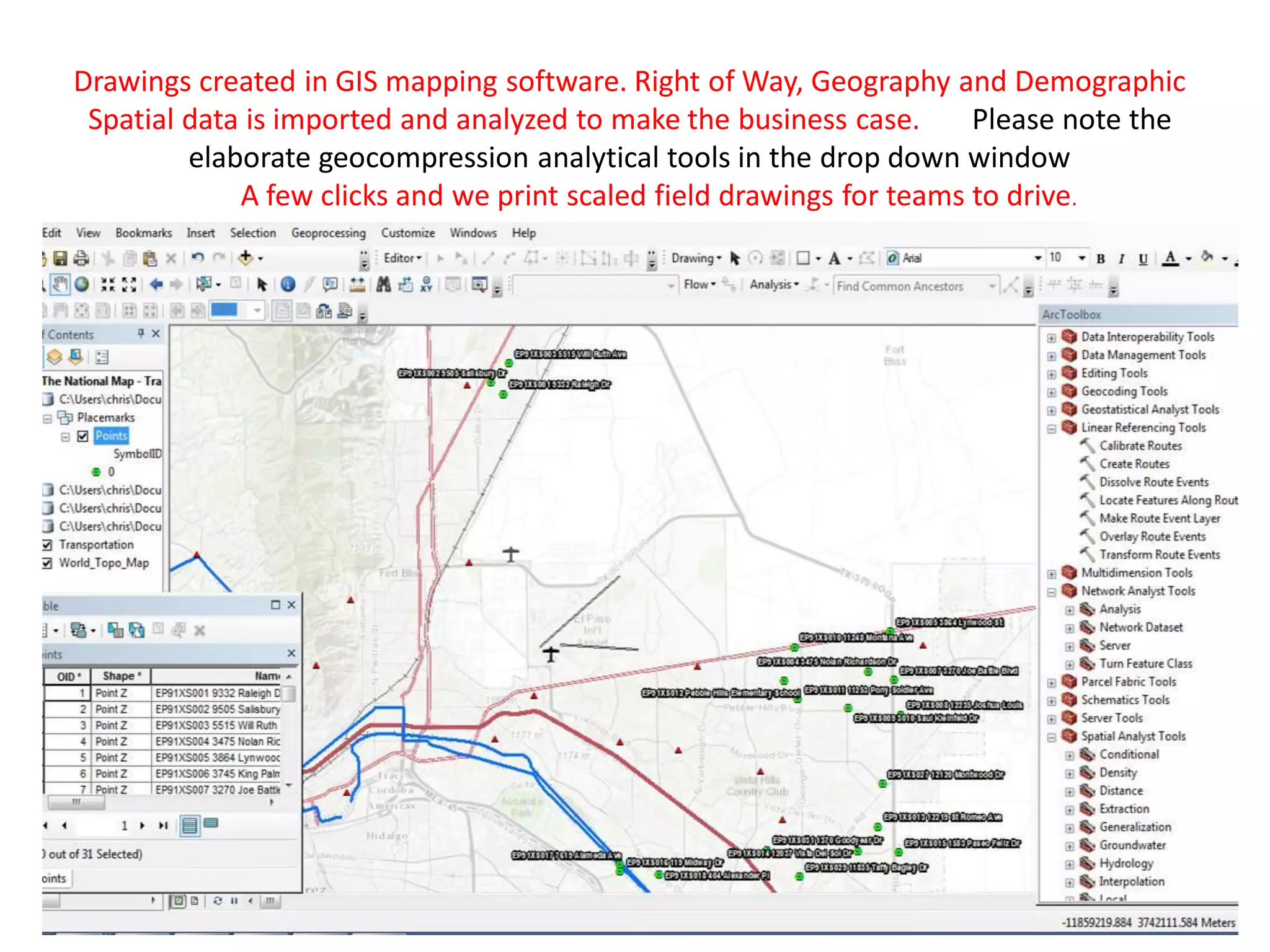
Drawings created in GIS mapping software. Right of Way, Geography and Demographic
Spatial data is imported and analyzed to make the business case. Please note the
elaborate geocompression analytical tools in the drop down window
A few clicks and we print scaled field drawings for teams to drive.
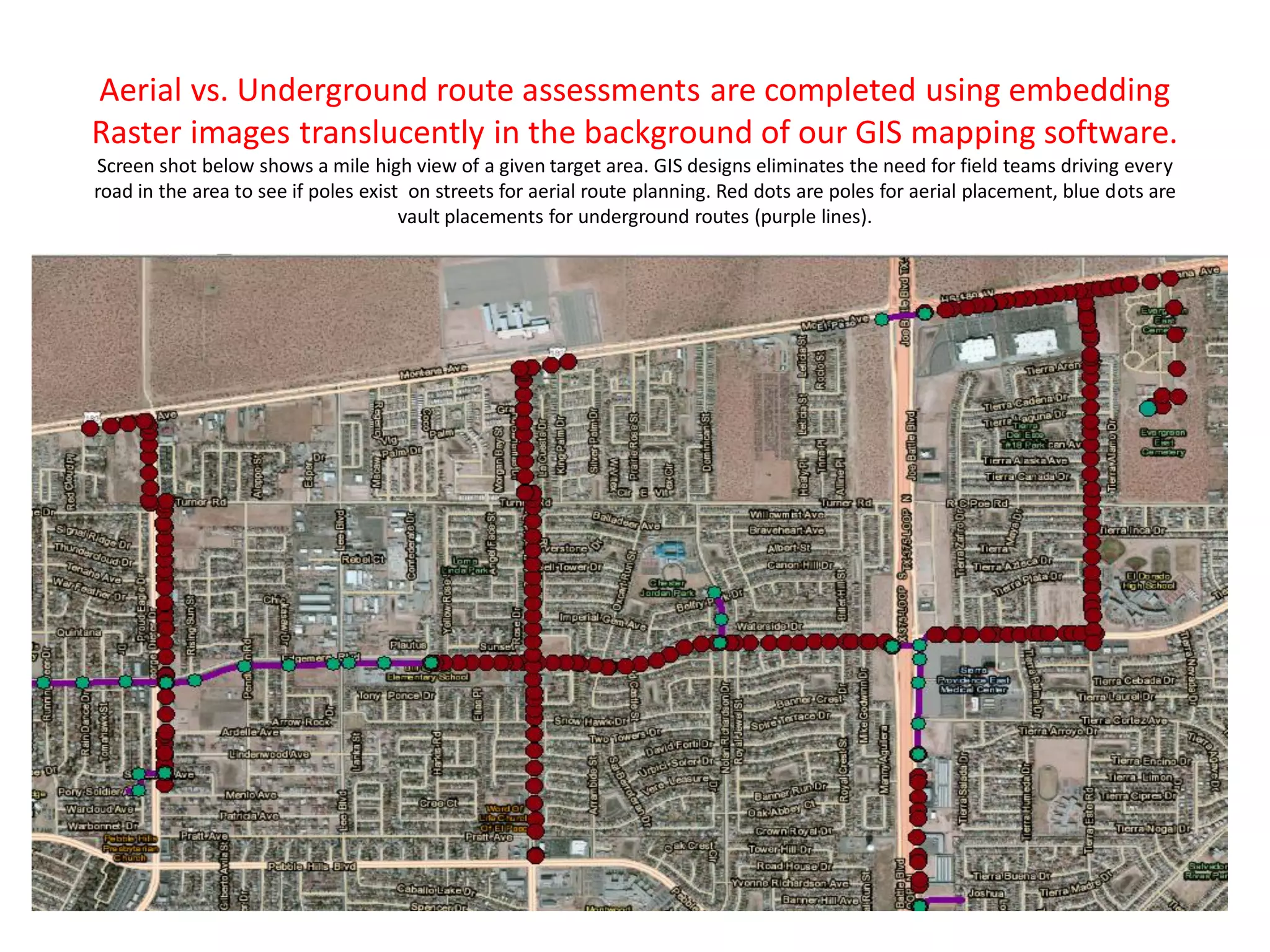
Aerial vs. Underground route assessments are completed using embedding
Raster images translucently in the background of our GIS mapping software.
Screen shot below shows a mile high view of a given target area. GIS designs eliminates the need for field teams driving every
road in the area to see if poles exist on streets for aerial route planning. Red dots are poles for aerial placement, blue dots are
vault placements for underground routes (purple lines).
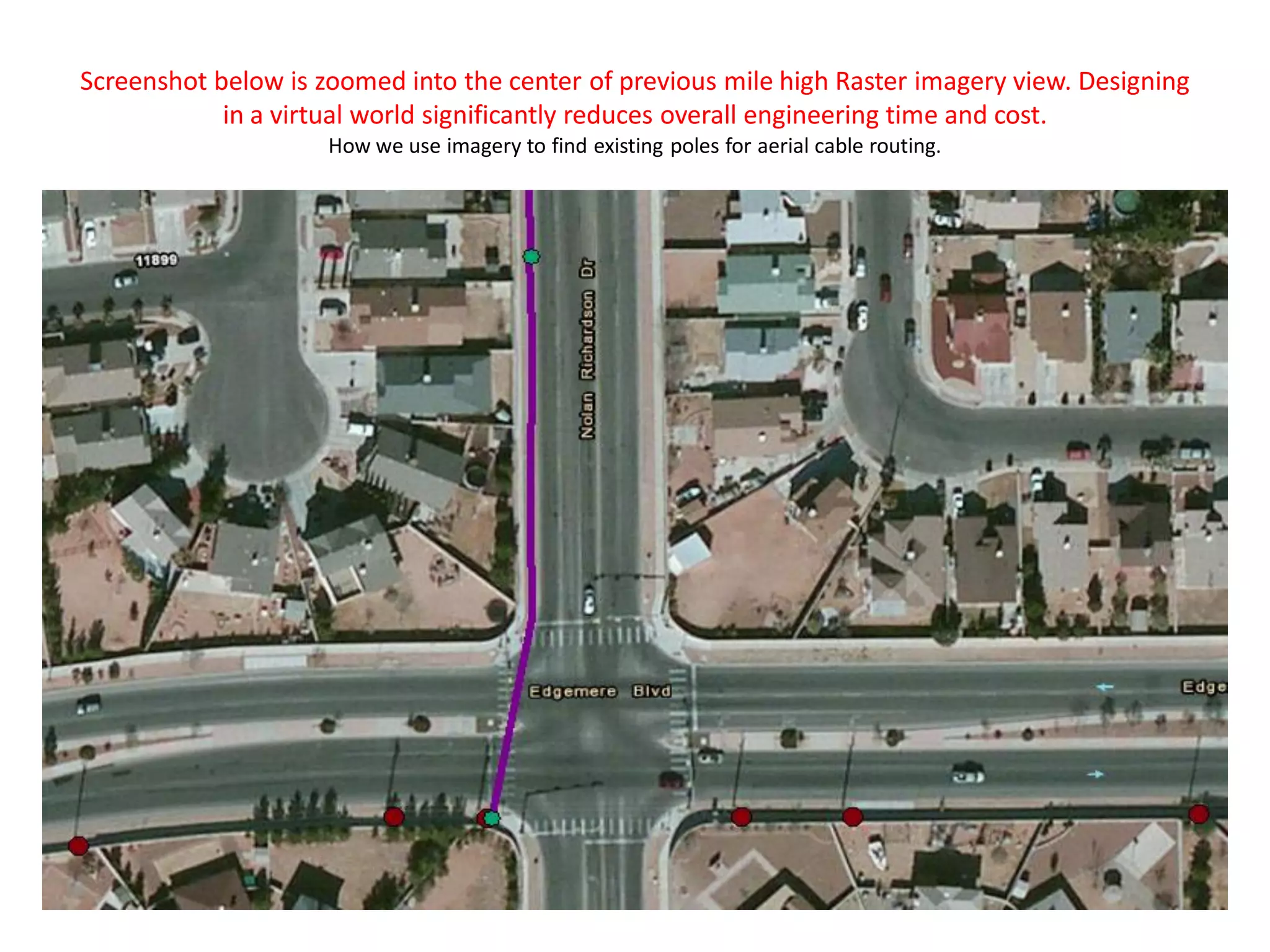
Screenshot below is zoomed into the center of previous mile high Raster imagery view. Designing
in a virtual world significantly reduces overall engineering time and cost.
How we use imagery to find existing poles for aerial cable routing.
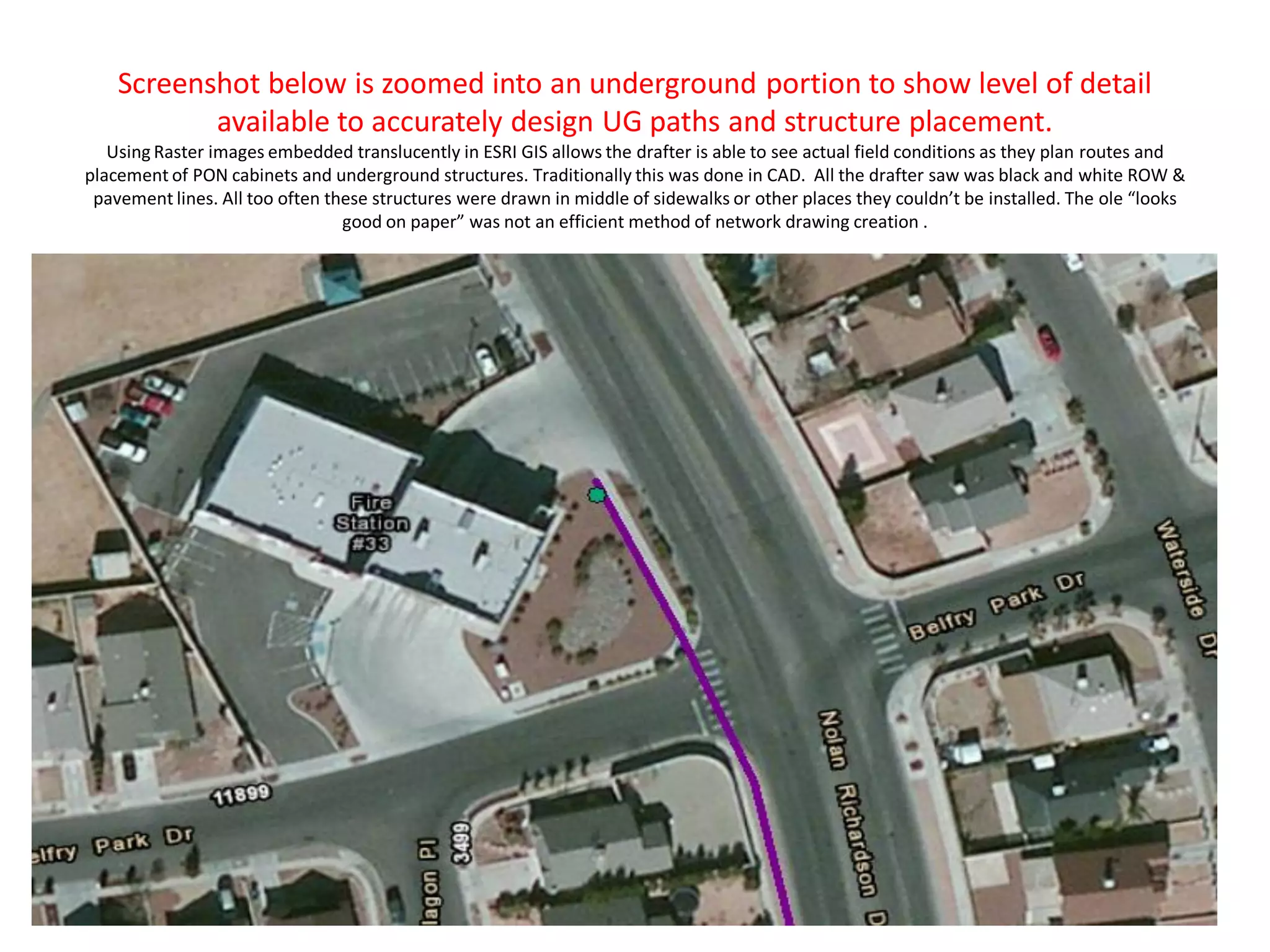
Screenshot below is zoomed into an underground portion to show level of detail
available to accurately design UG paths and structure placement.
Using Raster images embedded translucently in ESRI GIS allows the drafter is able to see actual field conditions as they plan routes and
placement of PON cabinets and underground structures. Traditionally this was done in CAD. All the drafter saw was black and white ROW &
pavement lines. All too often these structures were drawn in middle of sidewalks or other places they couldn’t be installed. The ole “looks
good on paper” was not an efficient method of network drawing creation .
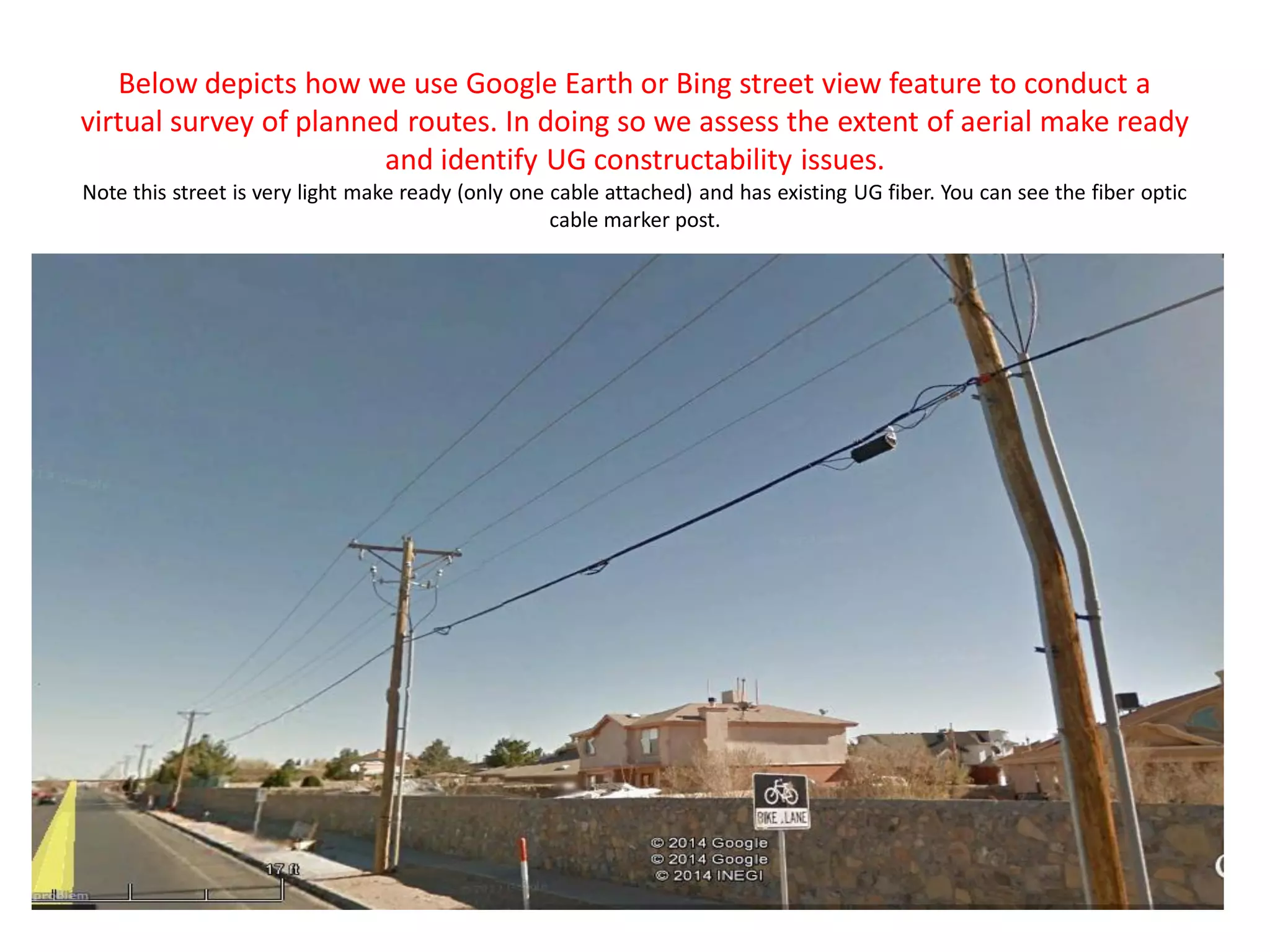
Below depicts how we use Google Earth or Bing street view feature to conduct a
virtual survey of planned routes. In doing so we assess the extent of aerial make ready
and identify UG constructability issues.
Note this street is very light make ready (only one cable attached) and has existing UG fiber. You can see the fiber optic
cable marker post.
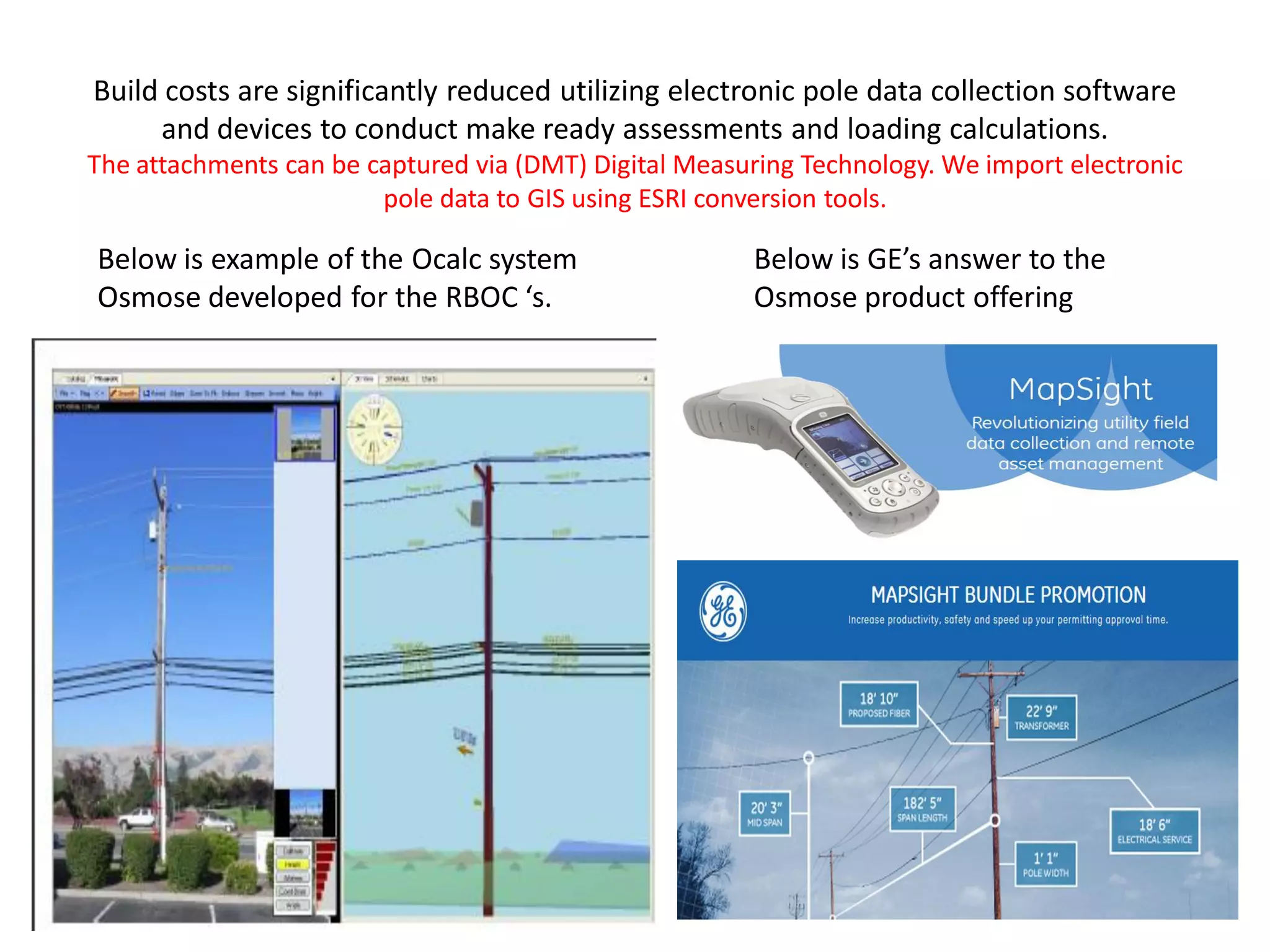
Build costs are significantly reduced utilizing electronic pole data collection software
and devices to conduct make ready assessments and loading calculations.
The attachments can be captured via (DMT) Digital Measuring Technology. We import electronic
pole data to GIS using ESRI conversion tools.
Below is example of the Ocalc system
Osmose developed for the RBOC ‘s.
Below is GE’s answer to the
Osmose product offering
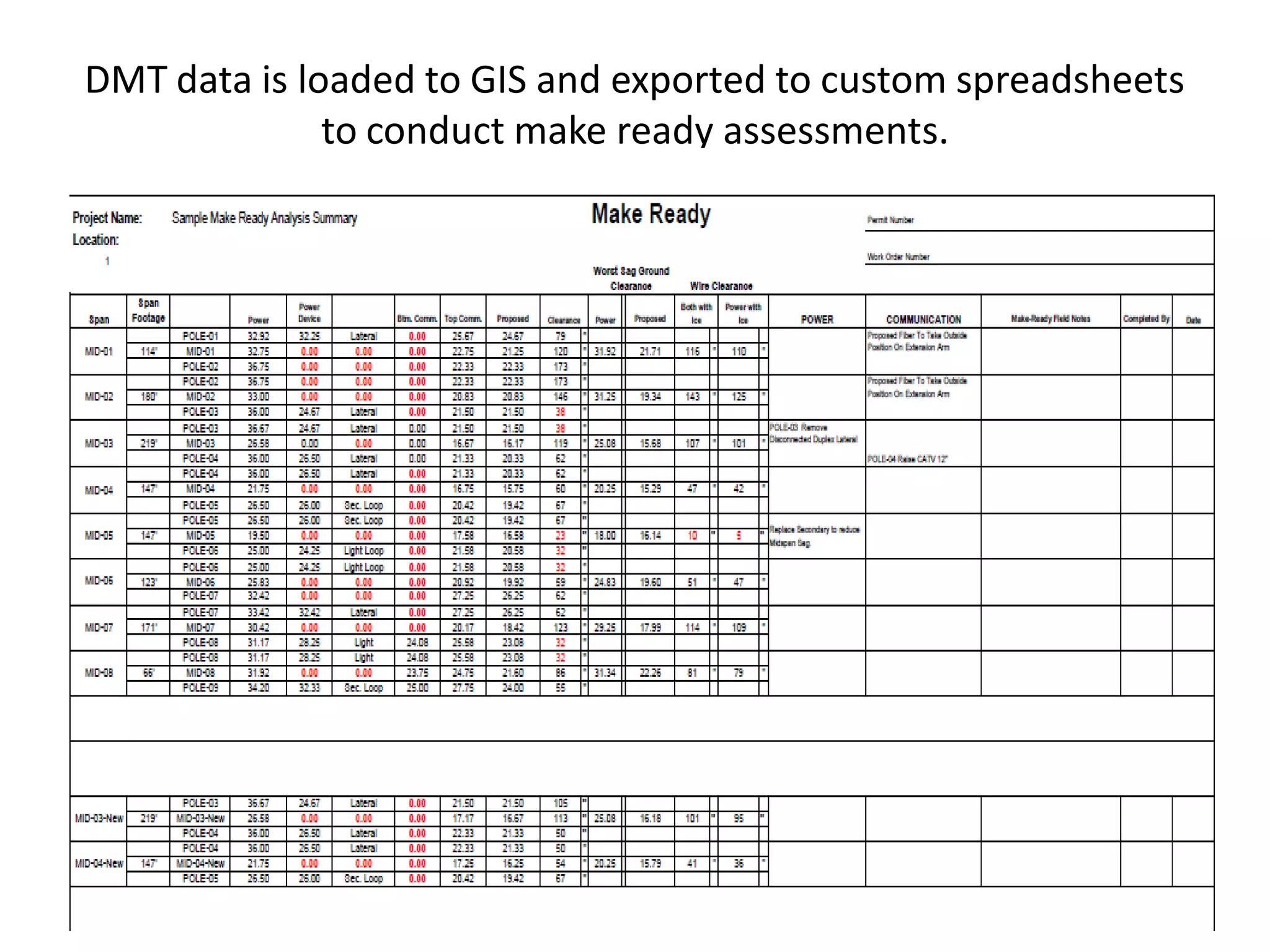
DMT data is loaded to GIS and exported to custom spreadsheets
to conduct make ready assessments.
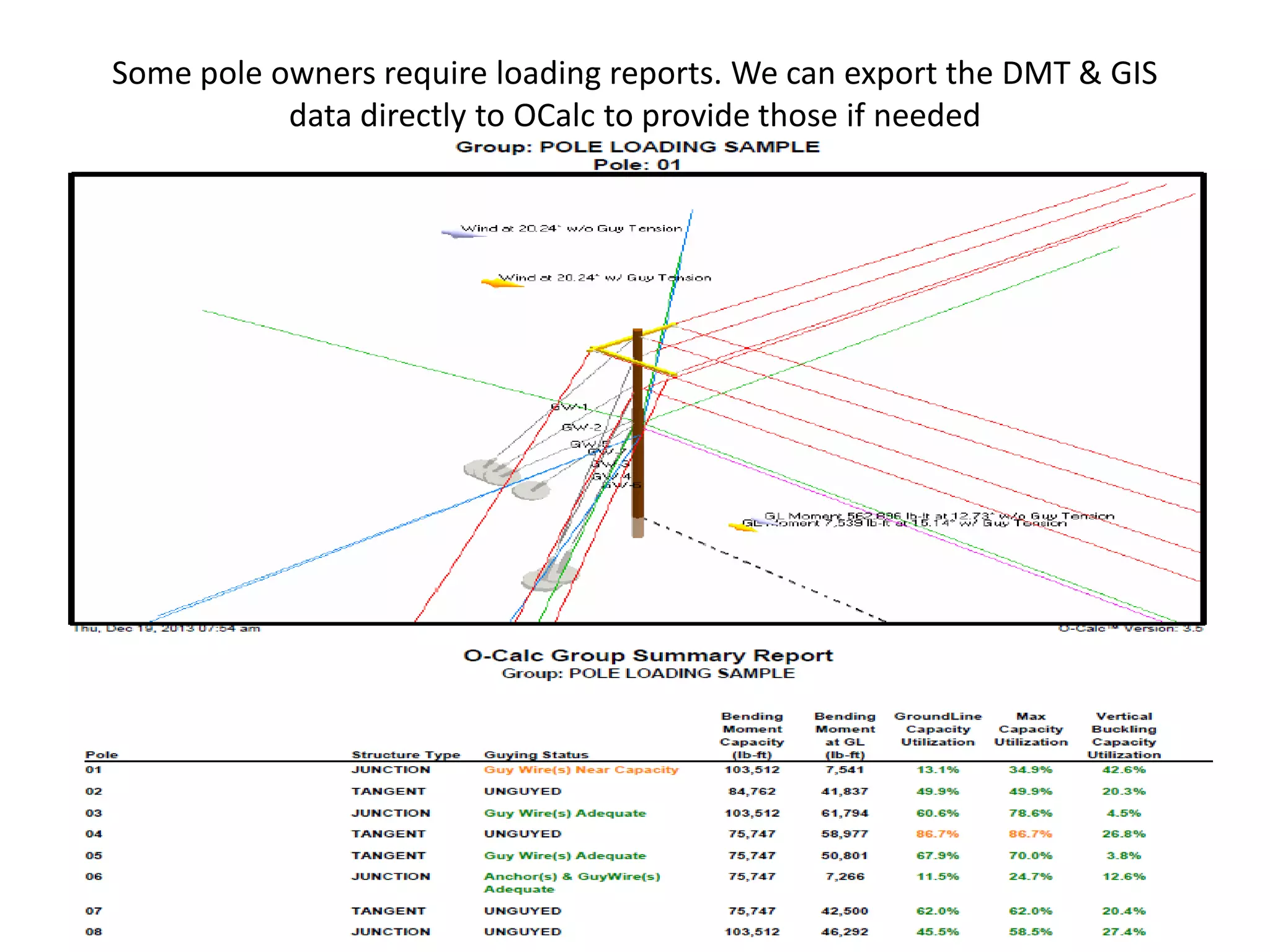
Some pole owners require loading reports. We can export the DMT & GIS
data directly to OCalc to provide those if needed
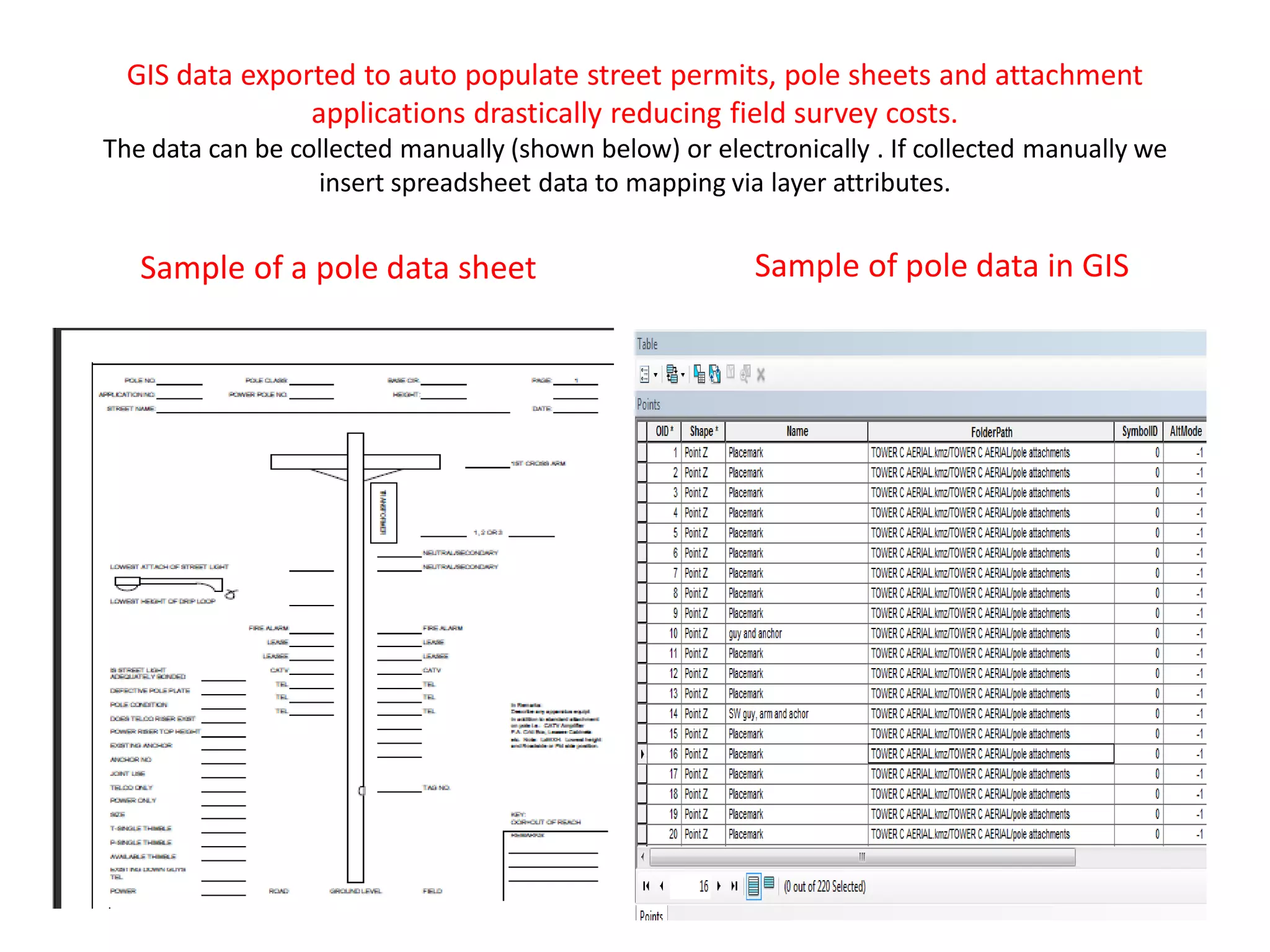
GIS data exported to auto populate street permits, pole sheets and attachment
applications drastically reducing field survey costs.
The data can be collected manually (shown below) or electronically . If collected manually we
insert spreadsheet data to mapping via layer attributes.
Sample of a pole data sheet Sample of pole data in GIS
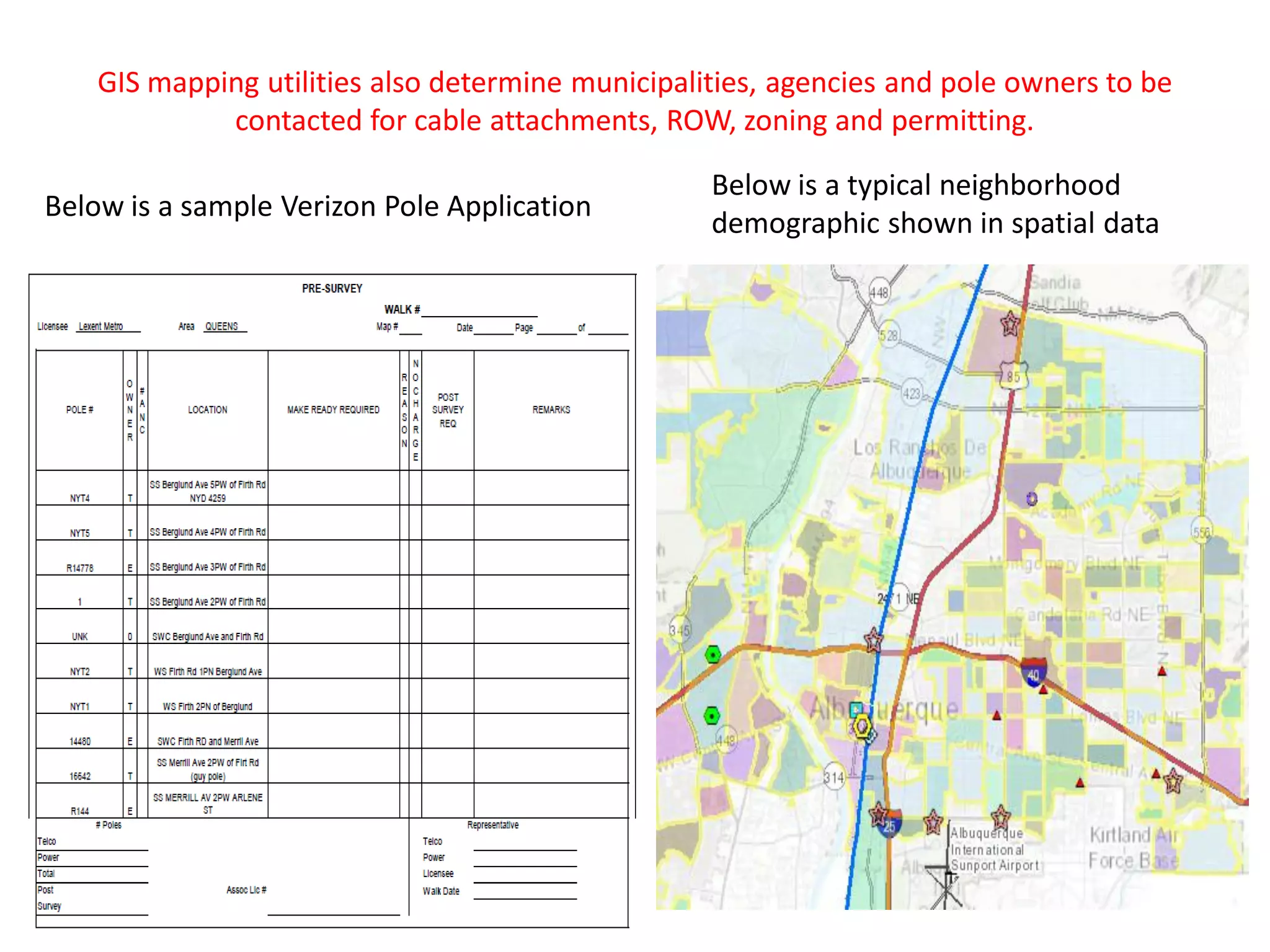
GIS mapping utilities also determine municipalities, agencies and pole owners to be
contacted for cable attachments, ROW, zoning and permitting.
Below is a sample Verizon Pole Application
Below is a typical neighborhood
demographic shown in spatial data
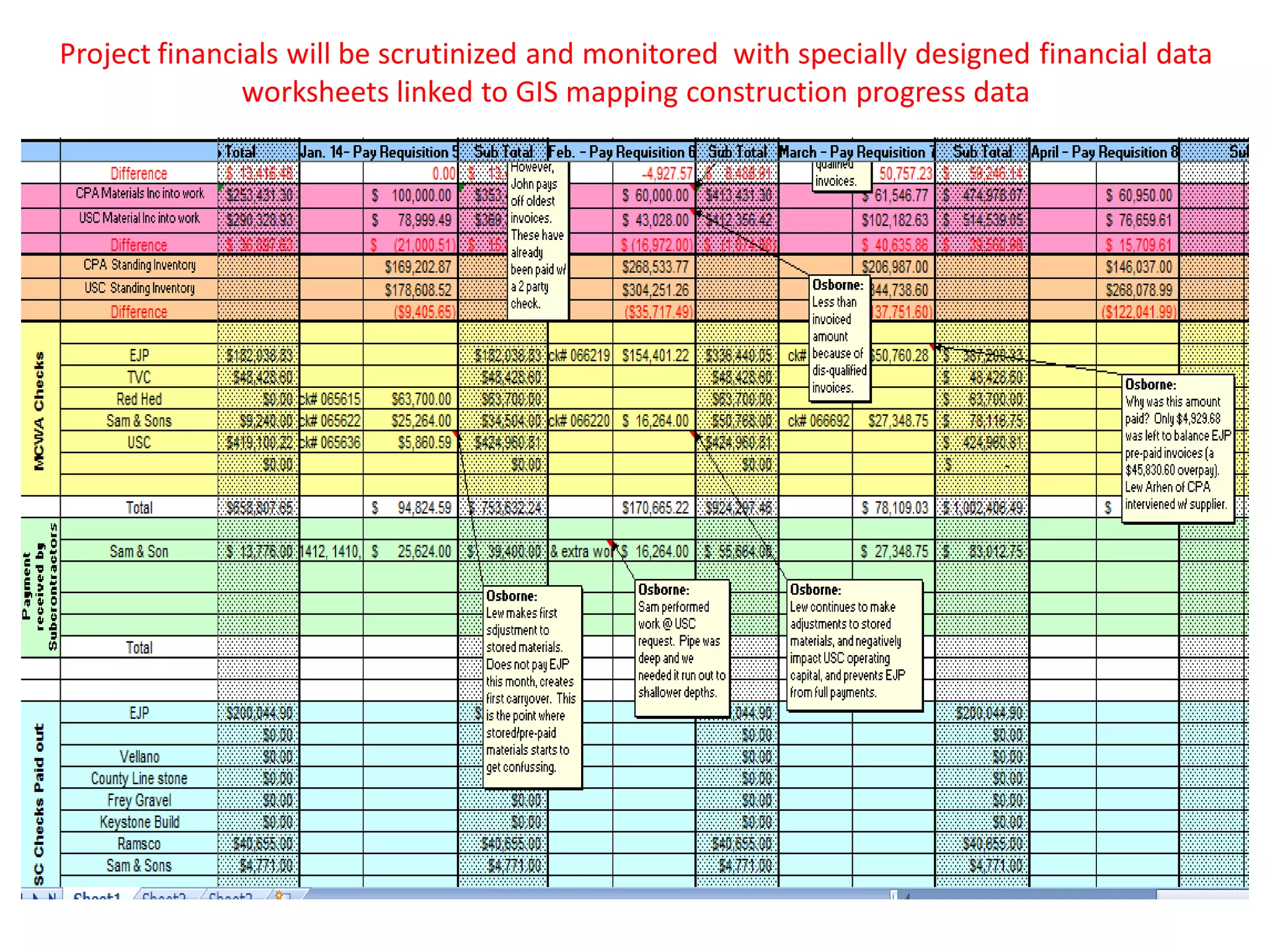
Project financials will be scrutinized and monitored with specially designed financial data
worksheets linked to GIS mapping construction progress data
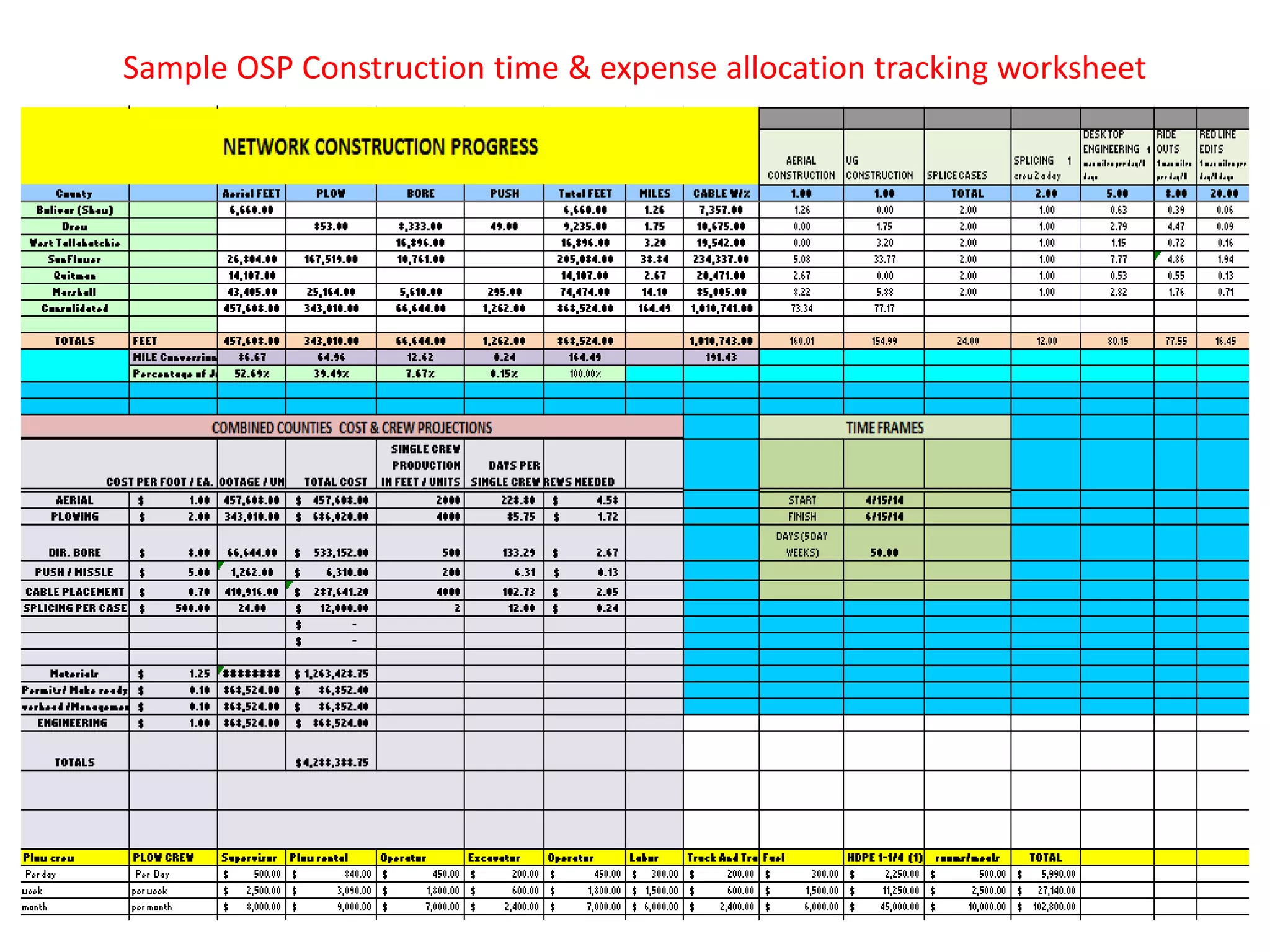
Sample OSP Construction time & expense allocation tracking worksheet
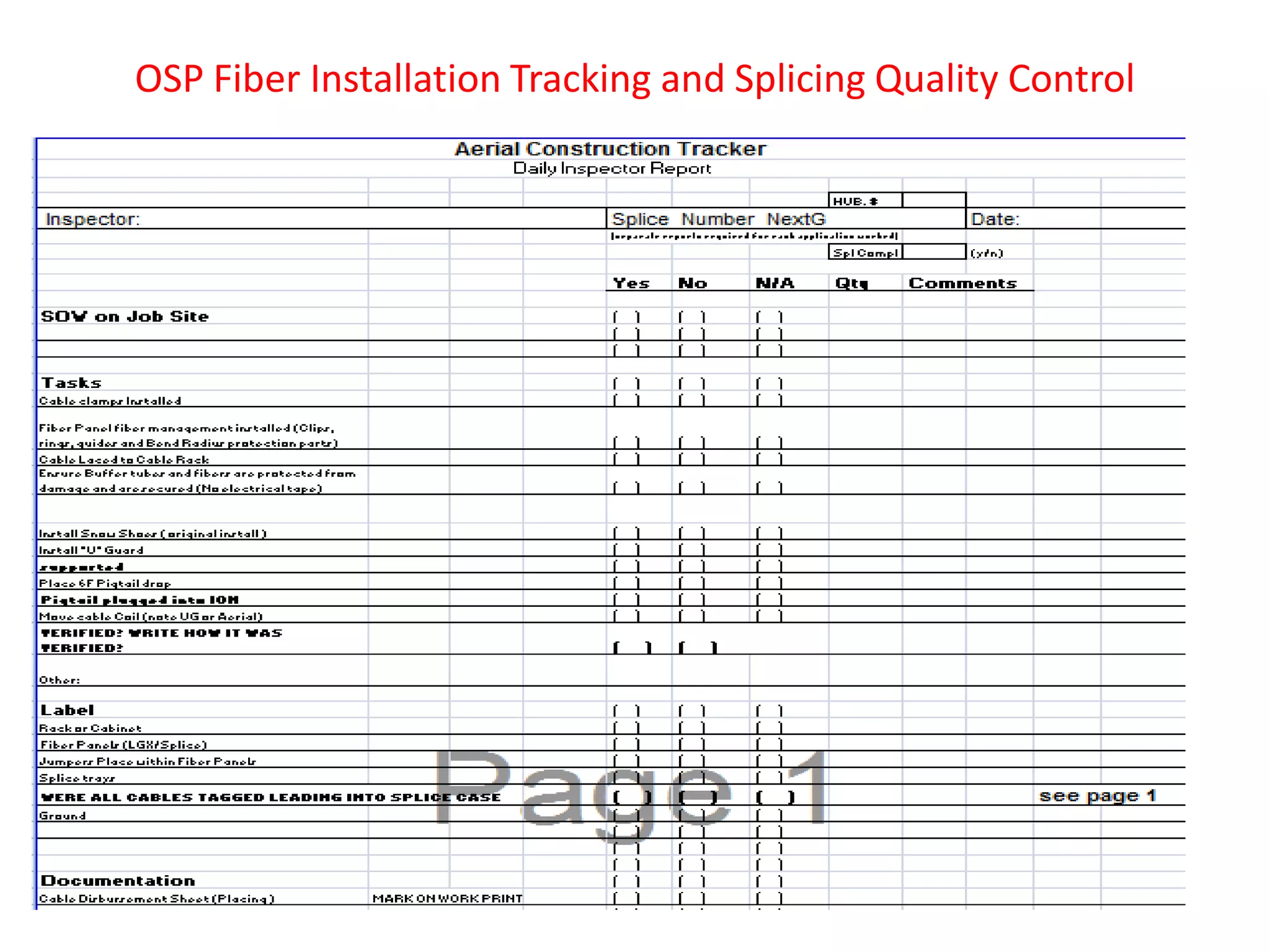
OSP Fiber Installation Tracking and Splicing Quality Control
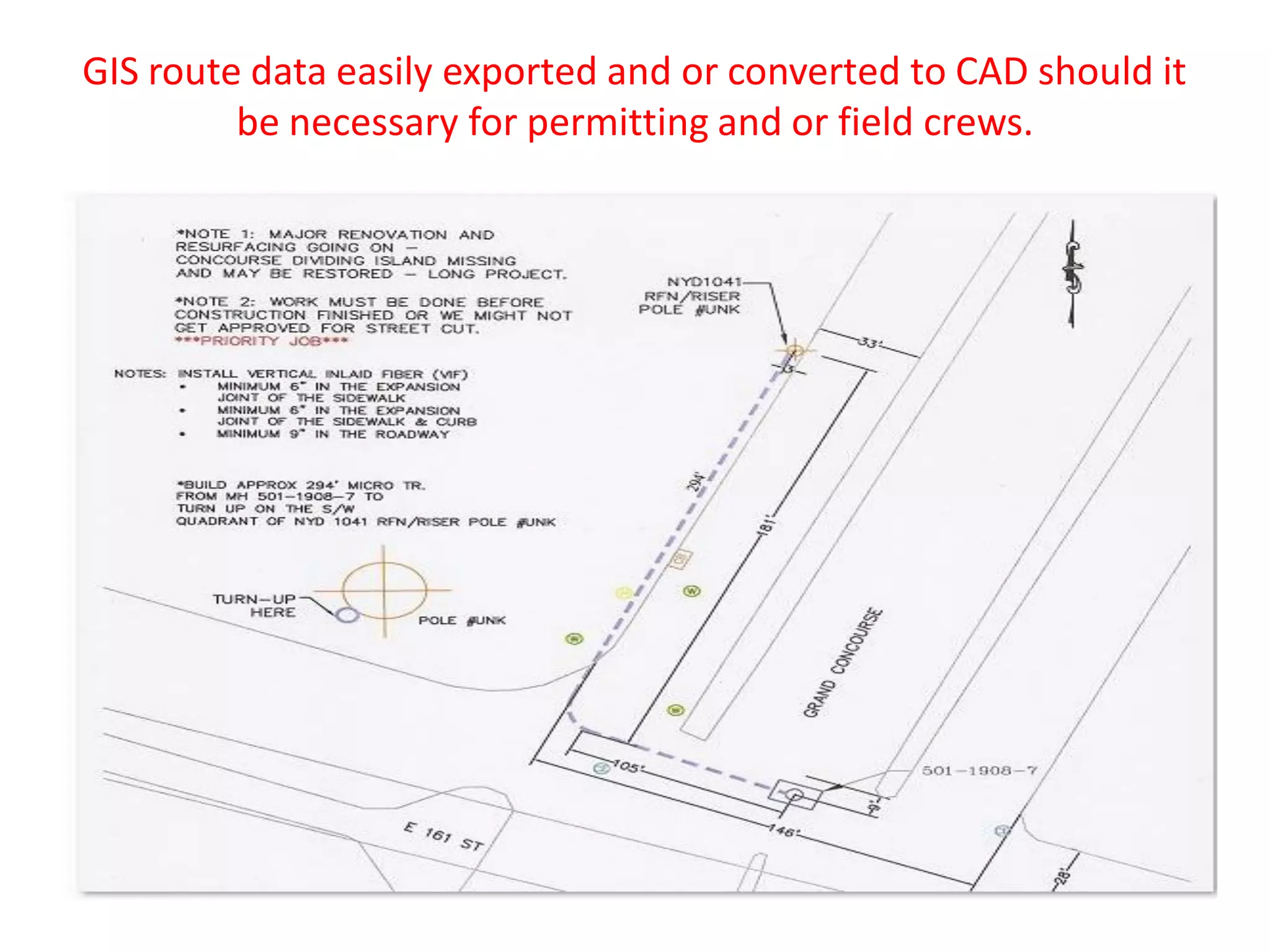
GIS route data easily exported and or converted to CAD should it
be necessary for permitting and or field crews.
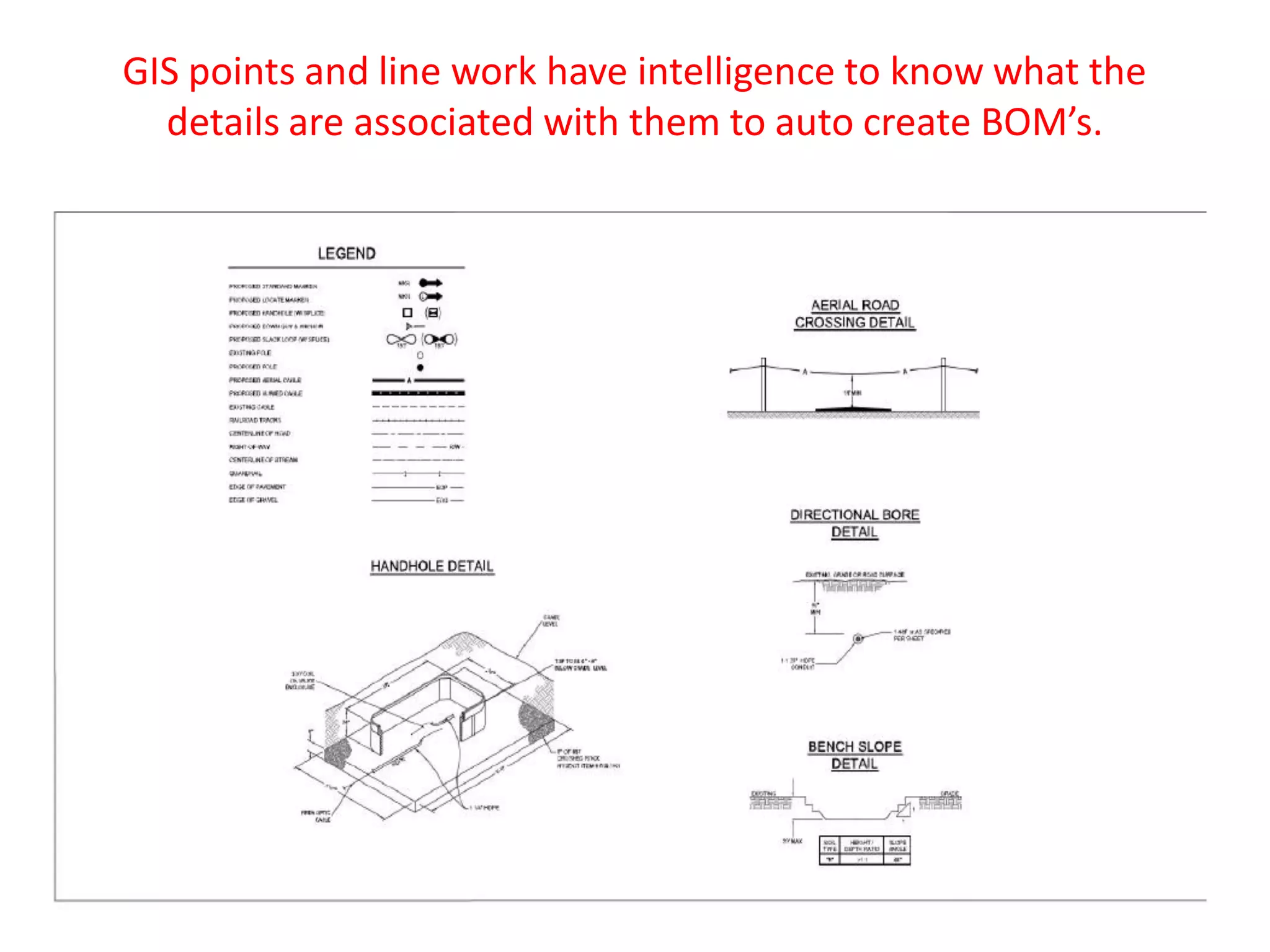
GIS points and line work have intelligence to know what the
details are associated with them to auto create BOM’s.
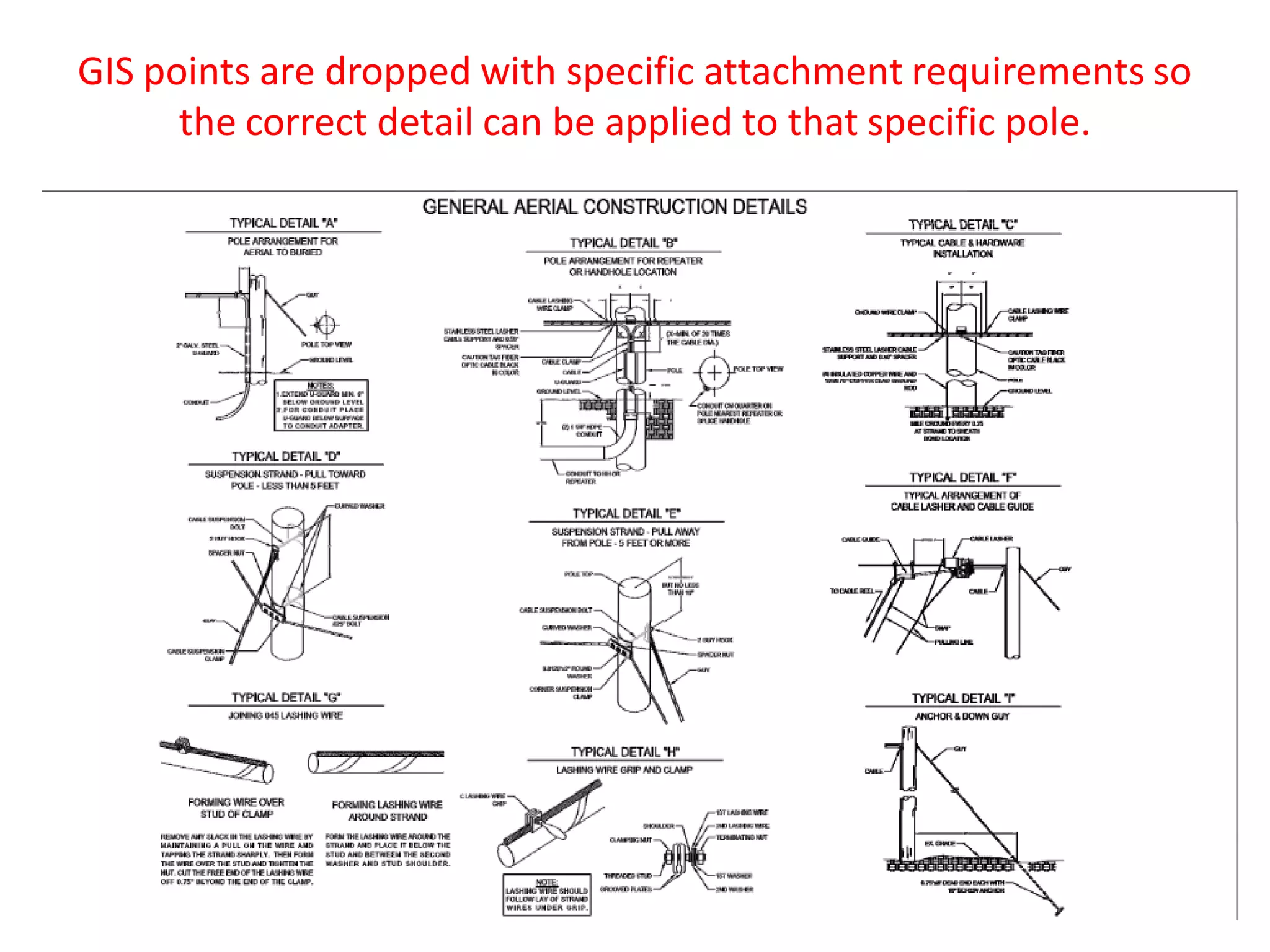
GIS points are dropped with specific attachment requirements so
the correct detail can be applied to that specific pole.

Madcom osp design & engineering capabilities

  • 1.
    Using GIS asan OSP Fiber Design tool creates efficiencies and ultimately project cost savings 1. Drive teams dispatched to drive up and down streets in a target area to determine Aerial vs. Underground construction 2. Drive teams sketch proposed routes and send to CAD to create prelim field drawings, usually takes weeks to convert field notes to actual drawings for the field 3. After prelim route drawings created in CAD drive teams re dispatched to collect pole data & construction details for CDs 4. Field data collected sent in to complete pole applications, ROW permits and to the CAD Dept. to create a set of actual Construction Drawings 1. Aerial vs. Underground assessment completed via raster images embedded in GIS mapping takes days vs. weeks or months 2. Route drawings are created in mapping as part of the assessment process. A few clicks and you print scaled field drawings for survey teams. 3. The scaled GIS drawings go to the field so teams can collect pole data & verify underground constructability. 4. Field data can be collected and input electronically to create CDs. Mapping utilities can auto complete pole applications, determine municipalities to contacted for permits. Traditional Method Our Approach
  • 2.
    Aerial & UndergroundFiber Build Cost Synopsis Some communications providers have excess fiber strands. Fiber count in cables ranges from 6 to 24 near residences and individual businesses to more than 1,000 on backbone routes. The cost of a 6-count fiber cable is $2,000 per mile, while an 864-count cable is $50,000 per mile, implying a marginal cost of approximately $50 per fiber per mile. Actual costs for fiber purchase or lease, of course, reflect market costs and depend on the total availability of fiber over the route–and are thus, typically, considerably higher; however, fiber lease or purchase may be a serious consideration over routes where construction is difficult or costly and considerable fiber has already been installed (e.g., river crossings, tunnels). Aerial Versus Underground Typical construction is a mixture of aerial and underground techniques. Aerial construction can be completed for $20,000 per mile. Aerial construction may be more expensive when poles are crowded or when the utility pole owner charges high rates for access. Worst-case costs can be $100,000 per mile (which usually would lead a network owner to build underground or over another route). Underground construction also has a wide cost range. In areas where restoration is not important and long continuous runs are possible (e.g., rural areas, in dirt, on the side of interstate roads), “plowing” the fiber into the ground is an inexpensive option— approximately $40,000 per mile. In more built-up areas, directional boring is necessary, because it is less destructive to the right-of-way and requires less restoration. Boring is more expensive, approximately $60,000 to $100,000 per mile. Boring also limits the amount of cable and conduit that can be built. (Two 2-inch conduit is a typical limit, corresponding to four medium-sized fiber optic cables.)
  • 3.
    Drawings created inGIS mapping software. Right of Way, Geography and Demographic Spatial data is imported and analyzed to make the business case. Please note the elaborate geocompression analytical tools in the drop down window A few clicks and we print scaled field drawings for teams to drive.
  • 4.
    Aerial vs. Undergroundroute assessments are completed using embedding Raster images translucently in the background of our GIS mapping software. Screen shot below shows a mile high view of a given target area. GIS designs eliminates the need for field teams driving every road in the area to see if poles exist on streets for aerial route planning. Red dots are poles for aerial placement, blue dots are vault placements for underground routes (purple lines).
  • 5.
    Screenshot below iszoomed into the center of previous mile high Raster imagery view. Designing in a virtual world significantly reduces overall engineering time and cost. How we use imagery to find existing poles for aerial cable routing.
  • 6.
    Screenshot below iszoomed into an underground portion to show level of detail available to accurately design UG paths and structure placement. Using Raster images embedded translucently in ESRI GIS allows the drafter is able to see actual field conditions as they plan routes and placement of PON cabinets and underground structures. Traditionally this was done in CAD. All the drafter saw was black and white ROW & pavement lines. All too often these structures were drawn in middle of sidewalks or other places they couldn’t be installed. The ole “looks good on paper” was not an efficient method of network drawing creation .
  • 7.
    Below depicts howwe use Google Earth or Bing street view feature to conduct a virtual survey of planned routes. In doing so we assess the extent of aerial make ready and identify UG constructability issues. Note this street is very light make ready (only one cable attached) and has existing UG fiber. You can see the fiber optic cable marker post.
  • 8.
    Build costs aresignificantly reduced utilizing electronic pole data collection software and devices to conduct make ready assessments and loading calculations. The attachments can be captured via (DMT) Digital Measuring Technology. We import electronic pole data to GIS using ESRI conversion tools. Below is example of the Ocalc system Osmose developed for the RBOC ‘s. Below is GE’s answer to the Osmose product offering
  • 9.
    DMT data isloaded to GIS and exported to custom spreadsheets to conduct make ready assessments.
  • 10.
    Some pole ownersrequire loading reports. We can export the DMT & GIS data directly to OCalc to provide those if needed
  • 11.
    GIS data exportedto auto populate street permits, pole sheets and attachment applications drastically reducing field survey costs. The data can be collected manually (shown below) or electronically . If collected manually we insert spreadsheet data to mapping via layer attributes. Sample of a pole data sheet Sample of pole data in GIS
  • 12.
    GIS mapping utilitiesalso determine municipalities, agencies and pole owners to be contacted for cable attachments, ROW, zoning and permitting. Below is a sample Verizon Pole Application Below is a typical neighborhood demographic shown in spatial data
  • 13.
    Project financials willbe scrutinized and monitored with specially designed financial data worksheets linked to GIS mapping construction progress data
  • 14.
    Sample OSP Constructiontime & expense allocation tracking worksheet
  • 15.
    OSP Fiber InstallationTracking and Splicing Quality Control
  • 16.
    GIS route dataeasily exported and or converted to CAD should it be necessary for permitting and or field crews.
  • 17.
    GIS points andline work have intelligence to know what the details are associated with them to auto create BOM’s.
  • 18.
    GIS points aredropped with specific attachment requirements so the correct detail can be applied to that specific pole.