BITS Pilani
Pilani Campus
Data Storage Technologies
& Networks
Dr. Virendra Singh Shekhawat
Department of Computer Science and Information Systems
BITS Pilani, Pilani Campus
Topics
• SAN Components
– Addressing
– Zoning
– Multi-pathing
– Trunking
– LUN Masking
• FC-SAN Performance Issues
2
BITS Pilani, Pilani Campus
SAN Addressing[1]
• World Wide Names (WWNs)
– unique World Wide Name per N-port (also
referred as WWPNs)
– Devices may have a WWN (independent of the
adapters/ports)
– Defined and maintained by IEEE
– 64-bit long
– 24-bit port addresses may be used locally to
reduce overhead.
3
BITS Pilani, Pilani Campus
SAN Addressing[2]
• 24-bit addressing - in a switched fabric
– Assigned by switch
– At login, each WWN is assigned (mapped) to a 24-bit
address by Simple Name Service (SNS)
• SNS is a component of the fabric OS – acts as a
registry/database
• Address format:
– Domain address (bits 23-16) identifies the switch
• Some addresses are reserved e.g. broadcast
• 239 possible address.
– Area address (bits 15-8) identifies a group of F-ports,
– Port address (bits 7-0) identifies a specific N-port
• Total addressible ports: 239x256x256
4
BITS Pilani, Pilani Campus
SAN-Addressing[3]
• 24-bit addressing - in an AL
– Obtained at loop initiation time and re-assigned at
login to the switch
– Address Format:
• Fabric loop address (bits 23-8) identifies the loop
– All 0s denotes a private loop i.e., not connected to any fabric
• Port address (bits 7-0) identifies a specific NL-port
– Only 126 addresses are usable (for NL-ports):
– 8B/10B encoding is used for signal balancing
– Out of the 256 bit patterns only 134 have neutral running
disparity – 7 are reserved for FC protocol usage; 1 for an FL-port
(so that the loop can be on the fabric)
5
BITS Pilani, Pilani Campus
SAN Routing
• Routing
– Analogous to switching in a LAN
– Goal:
• Keep a single path (bet. Any two ports) alive – no redundant paths or
loops
• Additional paths are held in reserve – may be used in case of failures.
– Fabric Shortest Path First (FSPF) protocol –
• Cost: hop count
• Link state protocol
• Link state database (or topology database) kept in switches
• Updated/Initialized when switch is turned on or new ISL comes up or
an ISL fails
– Switches use additional logic when hop count is same.
• Round Robin is often used for load sharing
6
BITS Pilani, Pilani Campus
SAN Zoning
• Zoning Controls device visibility in a SAN fabric
– Without zoning, initiator will probe and discover all
devices on the SAN fabric
• Zoning allows fabric segmentation
– Storage (traffic) isolation
• e.g. Scenario: Windows systems claim all visible storage
• Similar to Virtual LANs
– Broadcast isolation: each VLAN is a separate broadcast domain
– Zoning can be done based on WWN and Port
7
BITS Pilani, Pilani Campus
Zoning: Example
8
BITS Pilani, Pilani Campus
SAN Zoning
• Hardware Zoning: (1-1, 1-*, *-*)
– Based on ports connected to fabric switches
(switches-internal port numbering is used)
– A port may belong to multiple zones
– Advantage:
• Implemented into a routing engine by filtering – i.e. no
performance overhead
– Disadvantage:
• Device connections are tied to (physical) ports
9
BITS Pilani, Pilani Campus
SAN Zoning
• Software Zoning:
– Based on WWN – managed by the OS in the switch
– Number of members in a zone limited by memory
available
– A node may belong to more than one zone.
– More than one sets of zones can be defined in a
switch but only one set is active at a time
• Zone sets can be changed without bringing switch down
– Less secure :
• SZ is implemented using SNS
– Device may connect directly to switch without going through SNS
• WWN spoofing
• WWN numbers can be probed
10
BITS Pilani, Pilani Campus
SAN- Frame Filtering
• Process of inspecting each frame (i.e. header
information) at hardware level for access control
• Usually implemented as an ASIC with choice and
configuration of filter that can be done at switch
initialization/boot time.
– Allows zoning to be implemented with access control
performed at wire speed
– Port level Zoning, WWN level Zoning, Device level
Zoning, LUN level Zoning, and Protocol level Zoning can
be implemented using Frame Filtering
11
BITS Pilani, Pilani Campus
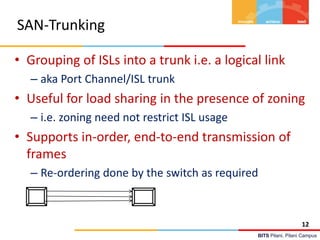
SAN-Trunking
• Grouping of ISLs into a trunk i.e. a logical link
– aka Port Channel/ISL trunk
• Useful for load sharing in the presence of zoning
– i.e. zoning need not restrict ISL usage
• Supports in-order, end-to-end transmission of
frames
– Re-ordering done by the switch as required
12
BITS Pilani, Pilani Campus
SAN-Multipathing
• Provide multiple paths between a host and a device (LUN).
– Redundancy for improved reliability and/or higher bandwidth for
improved availability / performance
• Channel subsystem of the kernel in switch OS handles multi-
pathing at software level
– Usually Separate device driver is used with following capabilities:
• Enhanced Data Availability
• Automatic path failover and recovery to alternative path
• Dynamic Load balancing
• Path selection policies
• Failures handled:
– Device Bus adapters, External SCSI cables, fibre connection cable,
host interface adapters
• Additional software needed for ensuring that the host sees a
single device.
13
BITS Pilani, Pilani Campus
SAN- LUN Masking
• LUN Masking
– Which servers (HBAs) can see which LUNs
– Performed on the storage array using WWPN of
host’s HBA in FC-SAN
• Zoning vs. Masking
– Zoning takes place at SAN switches where as LUN
masking takes place on the storage array
– LUN masking provides more detailed security than
zoning. How?
14
BITS Pilani, Pilani Campus
FC-SAN Performance Issues
• Hop-Count and Latency
• Over-subscription
– Device Over-subscription: Number of Computers that
need to access a storage device
– ISL Over-subscription: Total bandwidth requirements of
all end-to-end connections that are likely over an ISL
• Over-subscription will result in
– Congestion – Delayed Deliveries
– Blocking – Failed Deliveries
• Fan-out, Fan-in:
– Ratio of server-ports to a single storage port (Fan-out)
and Ratio of storage-ports to a single server-port (Fan-in)
15
BITS Pilani, Pilani Campus
Thank You!
16

M4 san features-4.3.1

  • 1.
    BITS Pilani Pilani Campus DataStorage Technologies & Networks Dr. Virendra Singh Shekhawat Department of Computer Science and Information Systems
  • 2.
    BITS Pilani, PilaniCampus Topics • SAN Components – Addressing – Zoning – Multi-pathing – Trunking – LUN Masking • FC-SAN Performance Issues 2
  • 3.
    BITS Pilani, PilaniCampus SAN Addressing[1] • World Wide Names (WWNs) – unique World Wide Name per N-port (also referred as WWPNs) – Devices may have a WWN (independent of the adapters/ports) – Defined and maintained by IEEE – 64-bit long – 24-bit port addresses may be used locally to reduce overhead. 3
  • 4.
    BITS Pilani, PilaniCampus SAN Addressing[2] • 24-bit addressing - in a switched fabric – Assigned by switch – At login, each WWN is assigned (mapped) to a 24-bit address by Simple Name Service (SNS) • SNS is a component of the fabric OS – acts as a registry/database • Address format: – Domain address (bits 23-16) identifies the switch • Some addresses are reserved e.g. broadcast • 239 possible address. – Area address (bits 15-8) identifies a group of F-ports, – Port address (bits 7-0) identifies a specific N-port • Total addressible ports: 239x256x256 4
  • 5.
    BITS Pilani, PilaniCampus SAN-Addressing[3] • 24-bit addressing - in an AL – Obtained at loop initiation time and re-assigned at login to the switch – Address Format: • Fabric loop address (bits 23-8) identifies the loop – All 0s denotes a private loop i.e., not connected to any fabric • Port address (bits 7-0) identifies a specific NL-port – Only 126 addresses are usable (for NL-ports): – 8B/10B encoding is used for signal balancing – Out of the 256 bit patterns only 134 have neutral running disparity – 7 are reserved for FC protocol usage; 1 for an FL-port (so that the loop can be on the fabric) 5
  • 6.
    BITS Pilani, PilaniCampus SAN Routing • Routing – Analogous to switching in a LAN – Goal: • Keep a single path (bet. Any two ports) alive – no redundant paths or loops • Additional paths are held in reserve – may be used in case of failures. – Fabric Shortest Path First (FSPF) protocol – • Cost: hop count • Link state protocol • Link state database (or topology database) kept in switches • Updated/Initialized when switch is turned on or new ISL comes up or an ISL fails – Switches use additional logic when hop count is same. • Round Robin is often used for load sharing 6
  • 7.
    BITS Pilani, PilaniCampus SAN Zoning • Zoning Controls device visibility in a SAN fabric – Without zoning, initiator will probe and discover all devices on the SAN fabric • Zoning allows fabric segmentation – Storage (traffic) isolation • e.g. Scenario: Windows systems claim all visible storage • Similar to Virtual LANs – Broadcast isolation: each VLAN is a separate broadcast domain – Zoning can be done based on WWN and Port 7
  • 8.
    BITS Pilani, PilaniCampus Zoning: Example 8
  • 9.
    BITS Pilani, PilaniCampus SAN Zoning • Hardware Zoning: (1-1, 1-*, *-*) – Based on ports connected to fabric switches (switches-internal port numbering is used) – A port may belong to multiple zones – Advantage: • Implemented into a routing engine by filtering – i.e. no performance overhead – Disadvantage: • Device connections are tied to (physical) ports 9
  • 10.
    BITS Pilani, PilaniCampus SAN Zoning • Software Zoning: – Based on WWN – managed by the OS in the switch – Number of members in a zone limited by memory available – A node may belong to more than one zone. – More than one sets of zones can be defined in a switch but only one set is active at a time • Zone sets can be changed without bringing switch down – Less secure : • SZ is implemented using SNS – Device may connect directly to switch without going through SNS • WWN spoofing • WWN numbers can be probed 10
  • 11.
    BITS Pilani, PilaniCampus SAN- Frame Filtering • Process of inspecting each frame (i.e. header information) at hardware level for access control • Usually implemented as an ASIC with choice and configuration of filter that can be done at switch initialization/boot time. – Allows zoning to be implemented with access control performed at wire speed – Port level Zoning, WWN level Zoning, Device level Zoning, LUN level Zoning, and Protocol level Zoning can be implemented using Frame Filtering 11
  • 12.
    BITS Pilani, PilaniCampus SAN-Trunking • Grouping of ISLs into a trunk i.e. a logical link – aka Port Channel/ISL trunk • Useful for load sharing in the presence of zoning – i.e. zoning need not restrict ISL usage • Supports in-order, end-to-end transmission of frames – Re-ordering done by the switch as required 12
  • 13.
    BITS Pilani, PilaniCampus SAN-Multipathing • Provide multiple paths between a host and a device (LUN). – Redundancy for improved reliability and/or higher bandwidth for improved availability / performance • Channel subsystem of the kernel in switch OS handles multi- pathing at software level – Usually Separate device driver is used with following capabilities: • Enhanced Data Availability • Automatic path failover and recovery to alternative path • Dynamic Load balancing • Path selection policies • Failures handled: – Device Bus adapters, External SCSI cables, fibre connection cable, host interface adapters • Additional software needed for ensuring that the host sees a single device. 13
  • 14.
    BITS Pilani, PilaniCampus SAN- LUN Masking • LUN Masking – Which servers (HBAs) can see which LUNs – Performed on the storage array using WWPN of host’s HBA in FC-SAN • Zoning vs. Masking – Zoning takes place at SAN switches where as LUN masking takes place on the storage array – LUN masking provides more detailed security than zoning. How? 14
  • 15.
    BITS Pilani, PilaniCampus FC-SAN Performance Issues • Hop-Count and Latency • Over-subscription – Device Over-subscription: Number of Computers that need to access a storage device – ISL Over-subscription: Total bandwidth requirements of all end-to-end connections that are likely over an ISL • Over-subscription will result in – Congestion – Delayed Deliveries – Blocking – Failed Deliveries • Fan-out, Fan-in: – Ratio of server-ports to a single storage port (Fan-out) and Ratio of storage-ports to a single server-port (Fan-in) 15
  • 16.
    BITS Pilani, PilaniCampus Thank You! 16