Anypoint Batch Processing and Polling
Scope With Mulesoft
JITENDRA BAFNA
Batch Job With MuleSoft
Mule has capability to process message in the batches and it split the large messages
into individual records that are processed asynchronously within batch job.
Batch processing is particularly useful when working with following scenarios
• Handling large quantities of incoming data fromAPI into Legacy systems.
• Extracting,Transforming and Loading (ETL) information into destination system
(e.g. uploading CSV or Flat File data into Hadoop System).
• Engineering "near Real-Time" data integration (e.g. between SaaS application).
• Integrating data sets, small or large, streaming or not, to parallel process records.
Poll Scheduler
Poll scope in mule is setup 1000ms by default to poll the resources for new data.
You can change default polling interval depending on your requirements. Polling
can be done in two ways
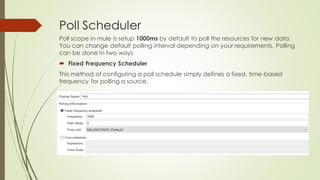
• Fixed Frequency Scheduler
This method of configuring a poll schedule simply defines a fixed, time-based
frequency for polling a source.
Poll Scheduler
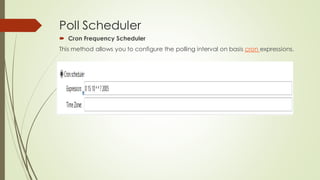
• Cron Frequency Scheduler
This method allows you to configure the polling interval on basis cron expressions.
Phases of Batch Job
Input
• It is optional phase.
• Triggers the flow via inbound endpoints.
• Modifies the payload before batch processing like Transform Message.
Load And Dispatch
• It is implicit phase.
• It work behind the scene.
• Split the payload into collection of records and creates a queue.
Process
• It is mandatory phase in batch job.
• It can have one or more batch steps.
• Asynchronously process the records.
On Complete
• It is optional phase.
• Provide summary report of records processed.
• Get insight into which records fails so you canaddress the issue.
Create Batch Job
• Drag and Drop Batch Scope to the Mule Design Palette. Batch scope have three
stages Input, Process and On Complete.
• Place a Poll scope at Input Stage and wrap-up database connector with Poll scope.
Configure the database connector.
• In this example we will connect to MySQL database and make sure you add mysql-
connector-java-5.0.8-bin.jarinto your build path of your project.
Create Batch Job
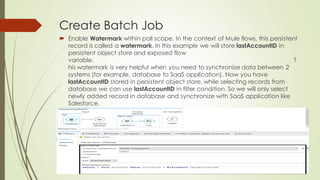
• Enable Watermark within poll scope. In the context of Mule flows, this persistent
record is called a watermark. In this example we will store lastAccountID in
persistent object store and exposed flow
variable. This watermark
is very helpful when you need to synchronize data between 2 systems (for
example, database to SaaS application). Now you have lastAccountID stored in
persistent object store, while selecting records from database we can use
lastAccountID in filter condition. So we will only select newly added record in
database and synchronize with SaaS application like Salesforce.
Create Batch Job
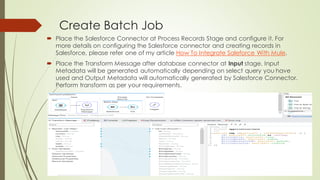
• Place the Salesforce Connector at Process Records Stage and configure it. For more
details on configuring the Salesforce connector and creating records in Salesforce,
please refer one of my article HowTo Integrate Saleforce With Mule.
• Place the Transform Message after database connector at Input stage. Input
Metadata will be generated automatically depending on select query you have
used and Output Metadata will automatically generated by Salesforce Connector.
Perform transform as per your requirements.
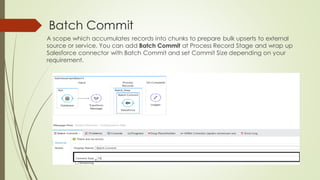
Batch Commit
A scope which accumulates records into chunks to prepare bulk upserts to
external source or service.You can add BatchCommit at Process Record
Stage and wrap up Salesforce connector with BatchCommit and set Commit
Size depending on your requirement.
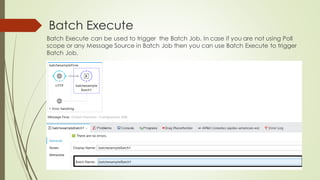
Batch Execute
Batch Execute can be used to trigger the Batch Job. In case if you are not using Poll
scope or any Message Source in BatchJob then you can use Batch Execute to trigger
BatchJob.
ThankYou.

Anypoint Batch Processing and Polling Scope With Mulesoft

  • 1.
    Anypoint Batch Processingand Polling Scope With Mulesoft JITENDRA BAFNA
  • 2.
    Batch Job WithMuleSoft Mule has capability to process message in the batches and it split the large messages into individual records that are processed asynchronously within batch job. Batch processing is particularly useful when working with following scenarios • Handling large quantities of incoming data fromAPI into Legacy systems. • Extracting,Transforming and Loading (ETL) information into destination system (e.g. uploading CSV or Flat File data into Hadoop System). • Engineering "near Real-Time" data integration (e.g. between SaaS application). • Integrating data sets, small or large, streaming or not, to parallel process records.
  • 3.
    Poll Scheduler Poll scopein mule is setup 1000ms by default to poll the resources for new data. You can change default polling interval depending on your requirements. Polling can be done in two ways • Fixed Frequency Scheduler This method of configuring a poll schedule simply defines a fixed, time-based frequency for polling a source.
  • 4.
    Poll Scheduler • CronFrequency Scheduler This method allows you to configure the polling interval on basis cron expressions.
  • 5.
    Phases of BatchJob Input • It is optional phase. • Triggers the flow via inbound endpoints. • Modifies the payload before batch processing like Transform Message. Load And Dispatch • It is implicit phase. • It work behind the scene. • Split the payload into collection of records and creates a queue. Process • It is mandatory phase in batch job. • It can have one or more batch steps. • Asynchronously process the records. On Complete • It is optional phase. • Provide summary report of records processed. • Get insight into which records fails so you canaddress the issue.
  • 6.
    Create Batch Job •Drag and Drop Batch Scope to the Mule Design Palette. Batch scope have three stages Input, Process and On Complete. • Place a Poll scope at Input Stage and wrap-up database connector with Poll scope. Configure the database connector. • In this example we will connect to MySQL database and make sure you add mysql- connector-java-5.0.8-bin.jarinto your build path of your project.
  • 7.
    Create Batch Job •Enable Watermark within poll scope. In the context of Mule flows, this persistent record is called a watermark. In this example we will store lastAccountID in persistent object store and exposed flow variable. This watermark is very helpful when you need to synchronize data between 2 systems (for example, database to SaaS application). Now you have lastAccountID stored in persistent object store, while selecting records from database we can use lastAccountID in filter condition. So we will only select newly added record in database and synchronize with SaaS application like Salesforce.
  • 8.
    Create Batch Job •Place the Salesforce Connector at Process Records Stage and configure it. For more details on configuring the Salesforce connector and creating records in Salesforce, please refer one of my article HowTo Integrate Saleforce With Mule. • Place the Transform Message after database connector at Input stage. Input Metadata will be generated automatically depending on select query you have used and Output Metadata will automatically generated by Salesforce Connector. Perform transform as per your requirements.
  • 9.
    Batch Commit A scopewhich accumulates records into chunks to prepare bulk upserts to external source or service.You can add BatchCommit at Process Record Stage and wrap up Salesforce connector with BatchCommit and set Commit Size depending on your requirement.
  • 10.
    Batch Execute Batch Executecan be used to trigger the Batch Job. In case if you are not using Poll scope or any Message Source in BatchJob then you can use Batch Execute to trigger BatchJob.
  • 11.