System Properties
Vasanthi
PROPERTIES
• A properties file is a simple collection of key-value pairs that can be parsed by
the java.util.Properties class. They are often used to store configuration or
localization data. In mule properties file can be configured using property
placeholders and system properties.
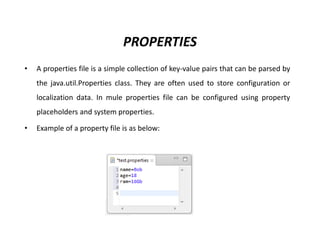
• Example of a property file is as below:
System Properties:
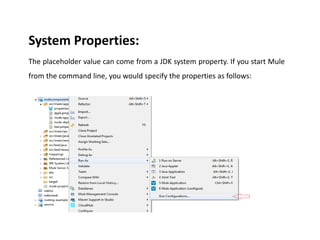
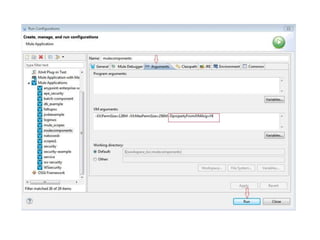
The placeholder value can come from a JDK system property. If you start Mule
from the command line, you would specify the properties as follows:
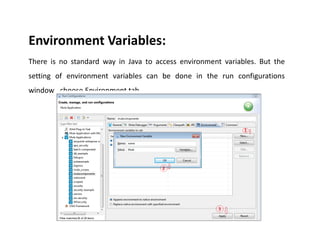
Environment Variables:
There is no standard way in Java to access environment variables. But the
setting of environment variables can be done in the run configurations
window…choose Environment tab.
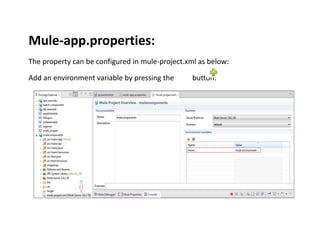
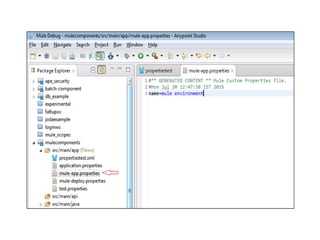
Mule-app.properties:
The property can be configured in mule-project.xml as below:
Add an environment variable by pressing the button:
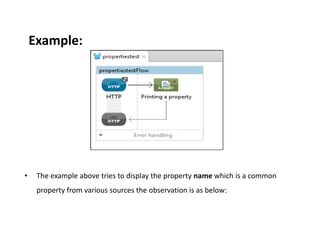
Example:
• The example above tries to display the property name which is a common
property from various sources the observation is as below:
Observation:
• The property in the mule-app.properties is prioritized the most, Global
variables is prioritized the next most and next is the run time arguments
followed by Environment Variables and then follows the property files in
alphabetical order.
•Thank You All

M system prop

  • 1.
  • 2.
    PROPERTIES • A propertiesfile is a simple collection of key-value pairs that can be parsed by the java.util.Properties class. They are often used to store configuration or localization data. In mule properties file can be configured using property placeholders and system properties. • Example of a property file is as below:
  • 3.
    System Properties: The placeholdervalue can come from a JDK system property. If you start Mule from the command line, you would specify the properties as follows:
  • 5.
    Environment Variables: There isno standard way in Java to access environment variables. But the setting of environment variables can be done in the run configurations window…choose Environment tab.
  • 6.
    Mule-app.properties: The property canbe configured in mule-project.xml as below: Add an environment variable by pressing the button:
  • 8.
    Example: • The exampleabove tries to display the property name which is a common property from various sources the observation is as below:
  • 9.
    Observation: • The propertyin the mule-app.properties is prioritized the most, Global variables is prioritized the next most and next is the run time arguments followed by Environment Variables and then follows the property files in alphabetical order.
  • 10.