ISQL Users Group September 2009 SQL Server   Locking and Concurrency [email_address] www.sqlserverutilities.com blogs.microsoft.co.il/blogs/yaniv_etrogi
Concurrency Models   Pessimistic Concurrency  Optimistic Concurrency
Pessimistic Concurrency   Locks are acquired on data being read Preventing other processes from modifying that data Other processes can still read the data Locks are acquired on data being modified Preventing other processes from modifying that data Preventing other processes from reading that data
Optimistic Concurrency  Readers see the state of the data before the modification occurred using Row versioning Writers are unaffected by Readers because all read operations are accessing a saved version of the data  Readers do not block Writers  Writers do not block Readers  Writers can block Writers which generates a conflict and then it is up to the application to handle the conflict.
Isolation Levels   Read Uncommitted (Pessimistic  Concurrency ) Read Committed (Pessimistic  Concurrency ) Repeatable Read (Pessimistic  Concurrency ) Serializable (Pessimistic  Concurrency ) Snapshot ( Optimistic Concurrency )
Isolation Levels 1   Read Uncommitted Readers read uncommitted data Read operations do not acquire share locks  Read operations disregard shared locks acquired by other connections Non-repeatable reads and phantoms are possible
Isolation Levels 2   Read Committed Readers can only read data that has been committed Read operations acquire share locks Share locks acquired by other processes are honored Non-repeatable reads and phantoms are possible  If the database setting READ_COMMITTED_SNAPSHOT is ON then the READ Committed isolation level works in an Optimistic Concurrency Model This is also known as READ Committed Snapshot
Isolation Levels 3   Repeatable   Read Does not allow a non-repeatable read Phantoms are possible  If a SELECT statement is reissued within the same transaction it is guaranteed to retrieve the same data as was retrieved in the previous SELECT but new rows can exist in the set of data retreived
Isolation Levels 4   Serializable   Phantoms are not possible  If a SELECT statement is reissued within the same transaction it is guaranteed to retrieve the same data as was retrieved in the previous SELECT and no new rows can exist in the set of data
Isolation Levels 5   Snapshot   Like in the Read Committed snapshot processes can read older versions of committed data if the current version is locked
Lock Modes http://msdn.microsoft.com/en-us/library/ms175519.aspx
Shared Locks Acquired when data is read Acquired on a table, page, index key or a row Many processes can acquire shared locks on the same data  No process can acquire an exclusive lock on data that has a shared lock on it  unless the process requesting the exclusive lock is the same process holding the shared lock
Exclusive Locks   Acquired on data when the data is modified by any DML statement (INSERT, UPDATE, DELETE, SELECT INTO, MERGE)  Only one process at a given time can hold an exclusive lock on the same data resource No locks of any kind can be acquired by a process if another process has the requested data resource exclusively locked Exclusive locks are held until the end of the transaction
Update Locks   Acquired when a data modification statement executes but first there is a need to search for the data behind the scenes before the actual DML can take place For example -  An INSERT into a table with a clustered index requires first to search the data in order to find the correct position at which to locate the new row. During that search time an UPDATE locks is acquired for the sake of protecting the data Using a hints a process can explicitly request an UPDATE lock
Intent Locks  Intent locks are a “mix” of the Locks modes previously discussed Intent locks serve as meta data for  cases such as when a process needs to lock  a table it first needs to determine if a row  or a page of that table is already locked
Schema Locks schema stability  schema modification bulk update schema stability locks and schema modification locks are acquired when a DDL statement such as ALTER TABLE is issued in order to protect the table structure while there are statements already issued that refer to the object in it’s current version, that is before the schema modification bulk update lock is acquired when using the bcp (in) utility or when a BULK INSERT command is issued
Conversion Locks Conversion locks are the result of a conversion from one lock mode to another SIX SIU UIX See example
Key Locks In the Read Committed, Repeatable Read and Snapshot isolation levels Key Locks are used to lock the index keys When a clustered index exists the data rows are the leaf level of the index and key locks are acquired When the table is a heap key locks can be acquired on the non-clustered indexes and row locks (RID) for the actual data  In the Serializable isolation level key-range locks are used to lock the entire range(s) in order to prevent phantoms See example
Key Locks Types There are nine types of  key-range locks  and each has a two-part name The first part indicates the type of lock on the range of data between index keys The second part indicates the type of lock on the key itself
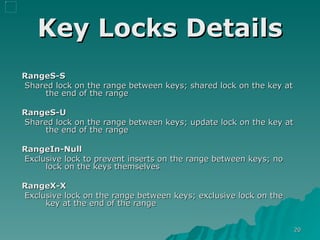
Key Locks Details RangeS-S   Shared lock on the range between keys; shared lock on the key at the end of the range RangeS-U Shared lock on the range between keys; update lock on the key at the end of the range RangeIn-Null Exclusive lock to prevent inserts on the range between keys; no lock on the keys themselves RangeX-X Exclusive lock on the range between keys; exclusive lock on the key at the end of the range
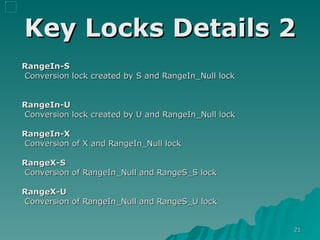
Key Locks Details 2 RangeIn-S Conversion lock created by S and RangeIn_Null lock RangeIn-U Conversion lock created by U and RangeIn_Null lock RangeIn-X Conversion of X and RangeIn_Null lock RangeX-S Conversion of RangeIn_Null and RangeS_S lock RangeX-U Conversion of RangeIn_Null and RangeS_U lock
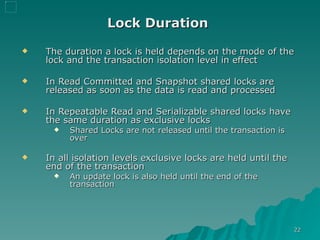
Lock Duration   The duration a lock is held depends on the mode of the lock and the transaction isolation level in effect In Read Committed and Snapshot shared locks are released as soon as the data is read and processed  In Repeatable Read and Serializable shared locks have the same duration as exclusive locks Shared Locks are not released until the transaction is over In all isolation levels exclusive locks are held until the end of the transaction An update lock is also held until the end of the transaction
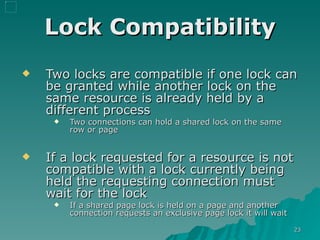
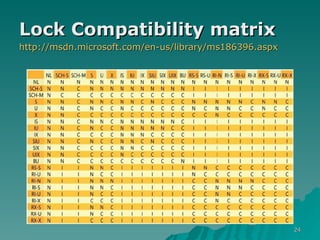
Lock Compatibility Two locks are compatible if one lock can be granted while another lock on the same resource is already held by a different process Two connections can hold a shared lock on the same row or page If a lock requested for a resource is not compatible with a lock currently being held the requesting connection must wait for the lock  If a shared page lock is held on a page and another connection requests an exclusive page lock it will wait
Lock Compatibility matrix   http://msdn.microsoft.com/en-us/library/ms186396.aspx
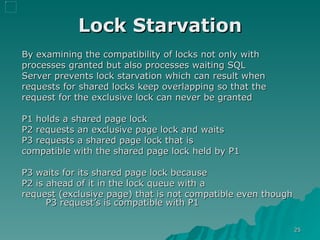
Lock Starvation By examining the compatibility of locks not only with  processes granted but also processes waiting SQL Server prevents lock starvation which can result when  requests for shared locks keep overlapping so that the  request for the exclusive lock can never be granted P1 holds a shared page lock P2 requests an exclusive page lock and waits P3 requests a shared page lock that is  compatible with the shared page lock held by P1 P3 waits for its shared page lock because  P2 is ahead of it in the lock queue with a  request (exclusive page) that is not compatible even though P3 request’s is compatible with P1
Lock Escalation SQL Server automatically escalates row, key, or page locks to table locks SQL Server never escalates to page locks and it is not possible to lock just a single partition of a table or index. The result of a lock escalation is always a full table lock SQL Server 2008 allows escalation at the partition level A statement that acquires many individual row locks can be escalated to a table lock  It is lighter to acquire and maintain a single table lock than to hold many individual row locks Lock escalation reduces locking overhead and keeps the system from running out of locks
Lock Escalation 2 The number of locks held by a single statement on one object (index or heap) exceeds a threshold (~5000)  Memory consumed by lock resources exceeds 40 percent of the non-AWE (32-bit) or regular (64-bit) enabled memory The server wide settings “Locks” effects the total memory available 0 = dynamically allocated A Lock escalation attempt can fall due to lock compatibility and in this case SQL Server will continue and try to escalate the lock every time the transaction acquires another 1,250 locks on the same object
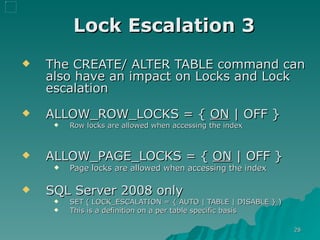
Lock Escalation 3 The CREATE/ ALTER TABLE command can also have an impact on Locks and Lock escalation ALLOW_ROW_LOCKS = {  ON  | OFF }   Row locks are allowed when accessing the index ALLOW_PAGE_LOCKS = {  ON  | OFF }   Page locks are allowed when accessing the index  SQL Server 2008 only  SET ( LOCK_ESCALATION = { AUTO | TABLE | DISABLE } ) This is a definition on a per table specific basis
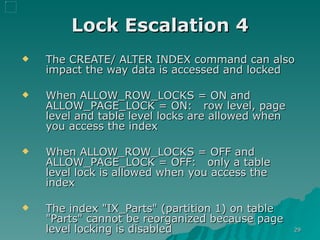
Lock Escalation 4 The CREATE/ ALTER INDEX command can also impact the way data is accessed and locked When ALLOW_ROW_LOCKS = ON and ALLOW_PAGE_LOCK = ON:  row level, page level and table level locks are allowed when you access the index When ALLOW_ROW_LOCKS = OFF and ALLOW_PAGE_LOCK = OFF:  only a table level lock is allowed when you access the index The index "IX_Parts" (partition 1) on table "Parts" cannot be reorganized because page level locking is disabled
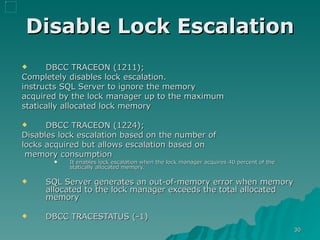
Disable Lock Escalation DBCC TRACEON (12 11); Completely disables lock escalation.  instructs SQL Server to ignore the memory  acquired by the lock manager up to the maximum  statically allocated lock memory DBCC TRACEON (12 24); Disables lock escalation based on the number of  locks acquired but allows escalation based on memory consumption It enables lock escalation when the lock manager acquires 40 percent of the statically allocated memory. SQL Server generates an out-of-memory error when memory allocated to the lock manager exceeds the total allocated memory DBCC TRACESTATUS (-1)
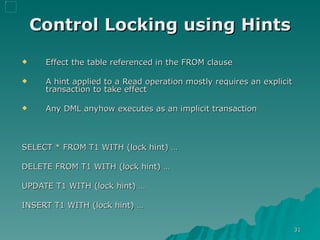
Control Locking using Hints Effect the table referenced in the FROM clause A hint applied to a Read operation mostly requires an explicit transaction to take effect Any DML anyhow executes as an implicit transaction  SELECT * FROM T1 WITH (lock hint) … DELETE FROM T1 WITH (lock hint) … UPDATE T1 WITH (lock hint) … INSERT T1 WITH (lock hint) …
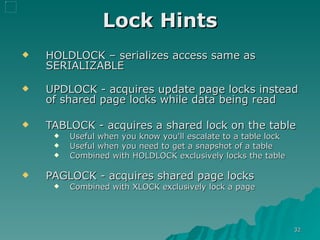
Lock Hints HOLDLOCK – serializes access same as SERIALIZABLE UPDLOCK - acquires update page locks instead of shared page locks while data being read TABLOCK - acquires a shared lock on the table Useful when you know you'll escalate to a table lock Useful when you need to get a snapshot of a table Combined with HOLDLOCK exclusively locks the table PAGLOCK - acquires shared page locks Combined with XLOCK exclusively lock a page
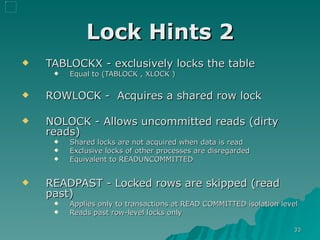
Lock Hints 2 TABLOCKX - exclusively locks the table  Equal to (TABLOCK , XLOCK ) ROWLOCK -  Acquires a shared row lock NOLOCK - Allows uncommitted reads (dirty reads) Shared locks are not acquired when data is read Exclusive locks of other processes are disregarded Equivalent to READUNCOMMITTED READPAST - Locked rows are skipped (read past) Applies only to transactions at READ COMMITTED isolation level  Reads past row-level locks only
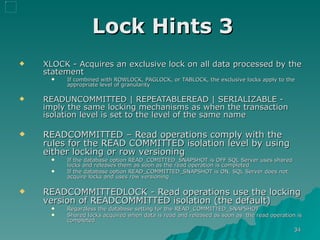
Lock Hints 3 XLOCK - Acquires an exclusive lock on all data processed by the statement  If combined with ROWLOCK, PAGLOCK, or TABLOCK, the exclusive locks apply to the appropriate level of granularity  READUNCOMMITTED | REPEATABLEREAD | SERIALIZABLE - imply the same locking mechanisms as when the transaction isolation level is set to the level of the same name READCOMMITTED – Read operations comply with the rules for the READ COMMITTED isolation level by using either locking or row versioning If the database option READ_COMITTED_SNAPSHOT is OFF SQL Server uses shared locks and releases them as soon as the read operation is completed If the database option READ_COMMITTED_SNAPSHOT is ON, SQL Server does not acquire locks and uses row versioning READCOMMITTEDLOCK - Read operations use the locking version of READCOMMITTED isolation (the default) Regardless the database setting for the READ_COMMITTED_SNAPSHOT Shared locks acquired when data is read and released as soon as  the read operation is completed
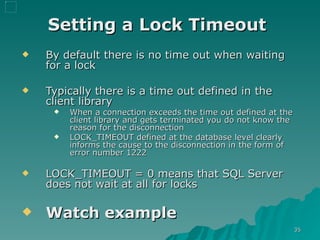
Setting a Lock Timeout   By default there is no time out when waiting for a lock Typically there is a time out defined in the client library When a connection exceeds the time out defined at the client library and gets terminated you do not know the reason for the disconnection  LOCK_TIMEOUT defined at the database level clearly informs the cause to the disconnection in the form of error number  1222 LOCK_TIMEOUT = 0 means that SQL Server does not wait at all for locks Watch example
Resolving Blocking   Writer/Writer Make write transactions as short as possible which reduces the time exclusive locks are held Verify you do not work in an isolation level stricter than required  Verify required indexes exist Perform mass operation in chunks to avoid lock escalation and possibly at off peak hours
Resolving Blocking   Reader/Writer   Use the READ UNCOMMITTED isolation level Only where applicable and after a through thinking Use Hints where applicable (always with care) Verify you do not work in an isolation level stricter than required  Direct heavy Read operations to read data from another database or another server  Use the row-versioning–based Snapshot Isolation levels
?
SQL Server BOL (Books Online) sys.dm_os_wait_stats  http://msdn.microsoft.com/en-us/library/ms179984.aspx sys.dm_tran_locks http://msdn.microsoft.com/en-us/library/ms190345.aspx Inside Microsoft SQL Server 2005  http://www.insidesqlserver.com/thebooks.html

Locking And Concurrency

  • 1.
    ISQL Users GroupSeptember 2009 SQL Server Locking and Concurrency [email_address] www.sqlserverutilities.com blogs.microsoft.co.il/blogs/yaniv_etrogi
  • 2.
    Concurrency Models Pessimistic Concurrency Optimistic Concurrency
  • 3.
    Pessimistic Concurrency Locks are acquired on data being read Preventing other processes from modifying that data Other processes can still read the data Locks are acquired on data being modified Preventing other processes from modifying that data Preventing other processes from reading that data
  • 4.
    Optimistic Concurrency Readers see the state of the data before the modification occurred using Row versioning Writers are unaffected by Readers because all read operations are accessing a saved version of the data Readers do not block Writers Writers do not block Readers Writers can block Writers which generates a conflict and then it is up to the application to handle the conflict.
  • 5.
    Isolation Levels Read Uncommitted (Pessimistic Concurrency ) Read Committed (Pessimistic Concurrency ) Repeatable Read (Pessimistic Concurrency ) Serializable (Pessimistic Concurrency ) Snapshot ( Optimistic Concurrency )
  • 6.
    Isolation Levels 1 Read Uncommitted Readers read uncommitted data Read operations do not acquire share locks Read operations disregard shared locks acquired by other connections Non-repeatable reads and phantoms are possible
  • 7.
    Isolation Levels 2 Read Committed Readers can only read data that has been committed Read operations acquire share locks Share locks acquired by other processes are honored Non-repeatable reads and phantoms are possible If the database setting READ_COMMITTED_SNAPSHOT is ON then the READ Committed isolation level works in an Optimistic Concurrency Model This is also known as READ Committed Snapshot
  • 8.
    Isolation Levels 3 Repeatable Read Does not allow a non-repeatable read Phantoms are possible If a SELECT statement is reissued within the same transaction it is guaranteed to retrieve the same data as was retrieved in the previous SELECT but new rows can exist in the set of data retreived
  • 9.
    Isolation Levels 4 Serializable Phantoms are not possible If a SELECT statement is reissued within the same transaction it is guaranteed to retrieve the same data as was retrieved in the previous SELECT and no new rows can exist in the set of data
  • 10.
    Isolation Levels 5 Snapshot Like in the Read Committed snapshot processes can read older versions of committed data if the current version is locked
  • 11.
  • 12.
    Shared Locks Acquiredwhen data is read Acquired on a table, page, index key or a row Many processes can acquire shared locks on the same data No process can acquire an exclusive lock on data that has a shared lock on it unless the process requesting the exclusive lock is the same process holding the shared lock
  • 13.
    Exclusive Locks Acquired on data when the data is modified by any DML statement (INSERT, UPDATE, DELETE, SELECT INTO, MERGE) Only one process at a given time can hold an exclusive lock on the same data resource No locks of any kind can be acquired by a process if another process has the requested data resource exclusively locked Exclusive locks are held until the end of the transaction
  • 14.
    Update Locks Acquired when a data modification statement executes but first there is a need to search for the data behind the scenes before the actual DML can take place For example - An INSERT into a table with a clustered index requires first to search the data in order to find the correct position at which to locate the new row. During that search time an UPDATE locks is acquired for the sake of protecting the data Using a hints a process can explicitly request an UPDATE lock
  • 15.
    Intent Locks Intent locks are a “mix” of the Locks modes previously discussed Intent locks serve as meta data for cases such as when a process needs to lock a table it first needs to determine if a row or a page of that table is already locked
  • 16.
    Schema Locks schemastability schema modification bulk update schema stability locks and schema modification locks are acquired when a DDL statement such as ALTER TABLE is issued in order to protect the table structure while there are statements already issued that refer to the object in it’s current version, that is before the schema modification bulk update lock is acquired when using the bcp (in) utility or when a BULK INSERT command is issued
  • 17.
    Conversion Locks Conversionlocks are the result of a conversion from one lock mode to another SIX SIU UIX See example
  • 18.
    Key Locks Inthe Read Committed, Repeatable Read and Snapshot isolation levels Key Locks are used to lock the index keys When a clustered index exists the data rows are the leaf level of the index and key locks are acquired When the table is a heap key locks can be acquired on the non-clustered indexes and row locks (RID) for the actual data In the Serializable isolation level key-range locks are used to lock the entire range(s) in order to prevent phantoms See example
  • 19.
    Key Locks TypesThere are nine types of key-range locks and each has a two-part name The first part indicates the type of lock on the range of data between index keys The second part indicates the type of lock on the key itself
  • 20.
    Key Locks DetailsRangeS-S Shared lock on the range between keys; shared lock on the key at the end of the range RangeS-U Shared lock on the range between keys; update lock on the key at the end of the range RangeIn-Null Exclusive lock to prevent inserts on the range between keys; no lock on the keys themselves RangeX-X Exclusive lock on the range between keys; exclusive lock on the key at the end of the range
  • 21.
    Key Locks Details2 RangeIn-S Conversion lock created by S and RangeIn_Null lock RangeIn-U Conversion lock created by U and RangeIn_Null lock RangeIn-X Conversion of X and RangeIn_Null lock RangeX-S Conversion of RangeIn_Null and RangeS_S lock RangeX-U Conversion of RangeIn_Null and RangeS_U lock
  • 22.
    Lock Duration The duration a lock is held depends on the mode of the lock and the transaction isolation level in effect In Read Committed and Snapshot shared locks are released as soon as the data is read and processed In Repeatable Read and Serializable shared locks have the same duration as exclusive locks Shared Locks are not released until the transaction is over In all isolation levels exclusive locks are held until the end of the transaction An update lock is also held until the end of the transaction
  • 23.
    Lock Compatibility Twolocks are compatible if one lock can be granted while another lock on the same resource is already held by a different process Two connections can hold a shared lock on the same row or page If a lock requested for a resource is not compatible with a lock currently being held the requesting connection must wait for the lock If a shared page lock is held on a page and another connection requests an exclusive page lock it will wait
  • 24.
    Lock Compatibility matrix http://msdn.microsoft.com/en-us/library/ms186396.aspx
  • 25.
    Lock Starvation Byexamining the compatibility of locks not only with processes granted but also processes waiting SQL Server prevents lock starvation which can result when requests for shared locks keep overlapping so that the request for the exclusive lock can never be granted P1 holds a shared page lock P2 requests an exclusive page lock and waits P3 requests a shared page lock that is compatible with the shared page lock held by P1 P3 waits for its shared page lock because P2 is ahead of it in the lock queue with a request (exclusive page) that is not compatible even though P3 request’s is compatible with P1
  • 26.
    Lock Escalation SQLServer automatically escalates row, key, or page locks to table locks SQL Server never escalates to page locks and it is not possible to lock just a single partition of a table or index. The result of a lock escalation is always a full table lock SQL Server 2008 allows escalation at the partition level A statement that acquires many individual row locks can be escalated to a table lock It is lighter to acquire and maintain a single table lock than to hold many individual row locks Lock escalation reduces locking overhead and keeps the system from running out of locks
  • 27.
    Lock Escalation 2The number of locks held by a single statement on one object (index or heap) exceeds a threshold (~5000) Memory consumed by lock resources exceeds 40 percent of the non-AWE (32-bit) or regular (64-bit) enabled memory The server wide settings “Locks” effects the total memory available 0 = dynamically allocated A Lock escalation attempt can fall due to lock compatibility and in this case SQL Server will continue and try to escalate the lock every time the transaction acquires another 1,250 locks on the same object
  • 28.
    Lock Escalation 3The CREATE/ ALTER TABLE command can also have an impact on Locks and Lock escalation ALLOW_ROW_LOCKS = { ON | OFF } Row locks are allowed when accessing the index ALLOW_PAGE_LOCKS = { ON | OFF } Page locks are allowed when accessing the index SQL Server 2008 only SET ( LOCK_ESCALATION = { AUTO | TABLE | DISABLE } ) This is a definition on a per table specific basis
  • 29.
    Lock Escalation 4The CREATE/ ALTER INDEX command can also impact the way data is accessed and locked When ALLOW_ROW_LOCKS = ON and ALLOW_PAGE_LOCK = ON: row level, page level and table level locks are allowed when you access the index When ALLOW_ROW_LOCKS = OFF and ALLOW_PAGE_LOCK = OFF: only a table level lock is allowed when you access the index The index "IX_Parts" (partition 1) on table "Parts" cannot be reorganized because page level locking is disabled
  • 30.
    Disable Lock EscalationDBCC TRACEON (12 11); Completely disables lock escalation. instructs SQL Server to ignore the memory acquired by the lock manager up to the maximum statically allocated lock memory DBCC TRACEON (12 24); Disables lock escalation based on the number of locks acquired but allows escalation based on memory consumption It enables lock escalation when the lock manager acquires 40 percent of the statically allocated memory. SQL Server generates an out-of-memory error when memory allocated to the lock manager exceeds the total allocated memory DBCC TRACESTATUS (-1)
  • 31.
    Control Locking usingHints Effect the table referenced in the FROM clause A hint applied to a Read operation mostly requires an explicit transaction to take effect Any DML anyhow executes as an implicit transaction SELECT * FROM T1 WITH (lock hint) … DELETE FROM T1 WITH (lock hint) … UPDATE T1 WITH (lock hint) … INSERT T1 WITH (lock hint) …
  • 32.
    Lock Hints HOLDLOCK– serializes access same as SERIALIZABLE UPDLOCK - acquires update page locks instead of shared page locks while data being read TABLOCK - acquires a shared lock on the table Useful when you know you'll escalate to a table lock Useful when you need to get a snapshot of a table Combined with HOLDLOCK exclusively locks the table PAGLOCK - acquires shared page locks Combined with XLOCK exclusively lock a page
  • 33.
    Lock Hints 2TABLOCKX - exclusively locks the table Equal to (TABLOCK , XLOCK ) ROWLOCK - Acquires a shared row lock NOLOCK - Allows uncommitted reads (dirty reads) Shared locks are not acquired when data is read Exclusive locks of other processes are disregarded Equivalent to READUNCOMMITTED READPAST - Locked rows are skipped (read past) Applies only to transactions at READ COMMITTED isolation level Reads past row-level locks only
  • 34.
    Lock Hints 3XLOCK - Acquires an exclusive lock on all data processed by the statement If combined with ROWLOCK, PAGLOCK, or TABLOCK, the exclusive locks apply to the appropriate level of granularity READUNCOMMITTED | REPEATABLEREAD | SERIALIZABLE - imply the same locking mechanisms as when the transaction isolation level is set to the level of the same name READCOMMITTED – Read operations comply with the rules for the READ COMMITTED isolation level by using either locking or row versioning If the database option READ_COMITTED_SNAPSHOT is OFF SQL Server uses shared locks and releases them as soon as the read operation is completed If the database option READ_COMMITTED_SNAPSHOT is ON, SQL Server does not acquire locks and uses row versioning READCOMMITTEDLOCK - Read operations use the locking version of READCOMMITTED isolation (the default) Regardless the database setting for the READ_COMMITTED_SNAPSHOT Shared locks acquired when data is read and released as soon as the read operation is completed
  • 35.
    Setting a LockTimeout By default there is no time out when waiting for a lock Typically there is a time out defined in the client library When a connection exceeds the time out defined at the client library and gets terminated you do not know the reason for the disconnection LOCK_TIMEOUT defined at the database level clearly informs the cause to the disconnection in the form of error number 1222 LOCK_TIMEOUT = 0 means that SQL Server does not wait at all for locks Watch example
  • 36.
    Resolving Blocking Writer/Writer Make write transactions as short as possible which reduces the time exclusive locks are held Verify you do not work in an isolation level stricter than required Verify required indexes exist Perform mass operation in chunks to avoid lock escalation and possibly at off peak hours
  • 37.
    Resolving Blocking Reader/Writer Use the READ UNCOMMITTED isolation level Only where applicable and after a through thinking Use Hints where applicable (always with care) Verify you do not work in an isolation level stricter than required Direct heavy Read operations to read data from another database or another server Use the row-versioning–based Snapshot Isolation levels
  • 38.
  • 39.
    SQL Server BOL(Books Online) sys.dm_os_wait_stats http://msdn.microsoft.com/en-us/library/ms179984.aspx sys.dm_tran_locks http://msdn.microsoft.com/en-us/library/ms190345.aspx Inside Microsoft SQL Server 2005 http://www.insidesqlserver.com/thebooks.html