Specialties / Focus Areas / Passions:
• Performance Tuning & Troubleshooting
• Very Large Databases
• SQL Server Storage Engine
• High Availability
• Disaster Recovery
@sqlbob
bob@bobpusateri.com
heraflux.com
bobpusateri
• Concurrency Basics
• Isolation Levels
• In-Memory OLTP
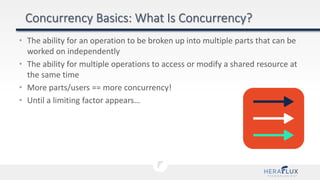
• The ability for an operation to be broken up into multiple parts that can be
worked on independently
• The ability for multiple operations to access or modify a shared resource at
the same time
• More parts/users == more concurrency!
• Until a limiting factor appears…
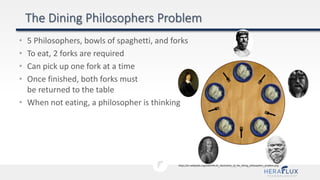
• 5 Philosophers, bowls of spaghetti, and forks
• To eat, 2 forks are required
• Can pick up one fork at a time
• Once finished, both forks must
be returned to the table
• When not eating, a philosopher is thinking
https://en.wikipedia.org/wiki/File:An_illustration_of_the_dining_philosophers_problem.png
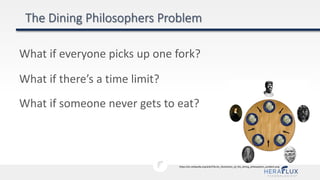
What if everyone picks up one fork?
https://en.wikipedia.org/wiki/File:An_illustration_of_the_dining_philosophers_problem.png
What if there’s a time limit?
What if someone never gets to eat?
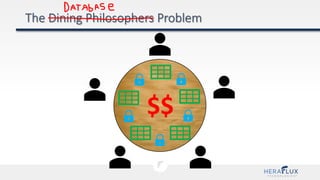
$$
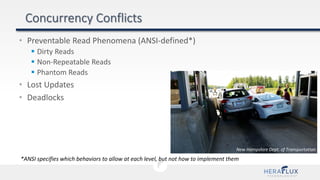
• Preventable Read Phenomena (ANSI-defined*)
 Dirty Reads
 Non-Repeatable Reads
 Phantom Reads
• Lost Updates
• Deadlocks
*ANSI specifies which behaviors to allow at each level, but not how to implement them
New Hampshire Dept. of Transportation
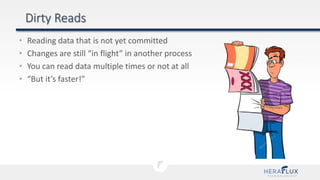
• Reading data that is not yet committed
• Changes are still “in flight” in another process
• You can read data multiple times or not at all
• “But it’s faster!”
• A.K.A. “Inconsistent Analysis”
• Multiple queries in the same transaction get differing results
• Cause: A different transaction commits changes between reads
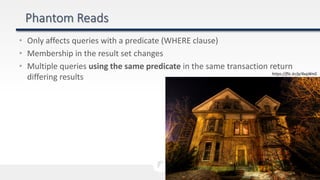
• Only affects queries with a predicate (WHERE clause)
• Membership in the result set changes
• Multiple queries using the same predicate in the same transaction return
differing results https://flic.kr/p/4xqWnG
• “Update Conflict”
• One user’s update overwrites another user’s (simultaneous) update
• Appears as though the first update never happened
*SQL Server will not permit lost updates in any isolation level
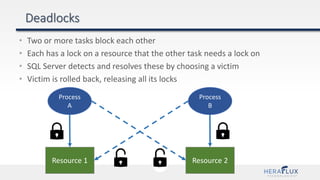
• Two or more tasks block each other
• Each has a lock on a resource that the other task needs a lock on
• SQL Server detects and resolves these by choosing a victim
• Victim is rolled back, releasing all its locks
Process
A
Process
B
Resource 1 Resource 2
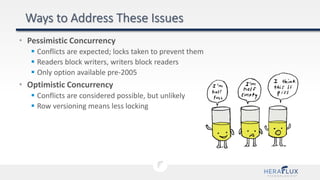
• Pessimistic Concurrency
 Conflicts are expected; locks taken to prevent them
 Readers block writers, writers block readers
 Only option available pre-2005
• Optimistic Concurrency
 Conflicts are considered possible, but unlikely
 Row versioning means less locking
• Concurrency Basics
• Isolation Levels
• In-Memory OLTP
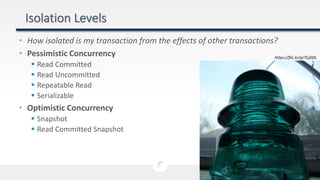
• How isolated is my transaction from the effects of other transactions?
• Pessimistic Concurrency
 Read Committed
 Read Uncommitted
 Repeatable Read
 Serializable
• Optimistic Concurrency
 Snapshot
 Read Committed Snapshot
https://flic.kr/p/7LjDDL
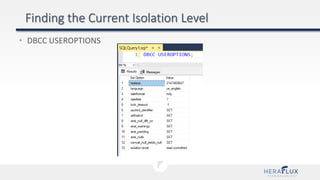
• DBCC USEROPTIONS
• Can be set at the connection or query level
• Cannot be changed server-wide
• Default isolation level is READ COMMITTED
• To change at connection level:
• Change applies to all queries for the current connection
SET TRANSACTION ISOLATION LEVEL {READ UNCOMMITTED
| READ COMMITTED | REPEATABLE READ | SNAPSHOT
| SERIALIZABLE } [;]
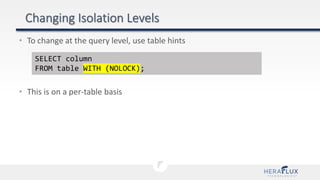
• To change at the query level, use table hints
• This is on a per-table basis
SELECT column
FROM table WITH (NOLOCK);
• Uses locking to prevent concurrency conflicts
• Classic locking model
 Readers don’t block readers
 Readers block writers
 Writers block readers
 Writers block writers
• PESSIMISTIC – we’re expecting problems
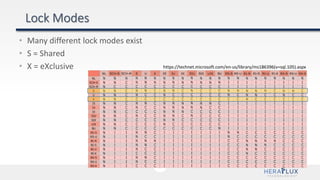
https://technet.microsoft.com/en-us/library/ms186396(v=sql.105).aspx
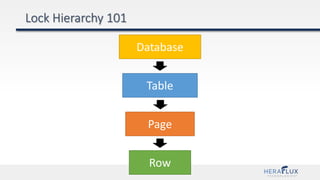
• Many different lock modes exist
• S = Shared
• X = eXclusive
Database
Table
Page
Row
Database
Table
Page
Row
[S] Shared Lock
[IS] Intent Shared Lock
[IS] Intent Shared Lock
[S] Shared Lock
Database
Table
Page
Row
[S] Shared Lock
[IX] Intent Exclusive Lock OR [IU] Intent Update Lock
[IX] Intent Exclusive Lock OR [IU] Intent Update Lock
[X] Exclusive Lock OR [U] Update Lock
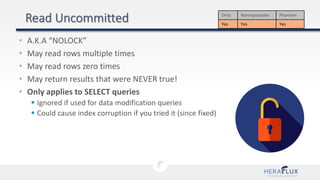
• A.K.A “NOLOCK”
• May read rows multiple times
• May read rows zero times
• May return results that were NEVER true!
• Only applies to SELECT queries
 Ignored if used for data modification queries
 Could cause index corruption if you tried it (since fixed)
Dirty Nonrepeatable Phantom
Yes Yes Yes
(public domain) https://commons.wikimedia.org/wiki/File:8_ball_break_time_lapse.jpg
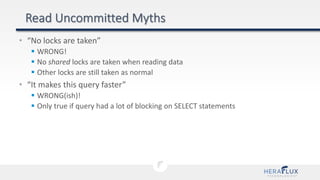
• “No locks are taken”
 WRONG!
 No shared locks are taken when reading data
 Other locks are still taken as normal
• “It makes this query faster”
 WRONG(ish)!
 Only true if query had a lot of blocking on SELECT statements
• Not a terrible setting, it exists for a reason
• BUT make sure you understand the risks and consequences
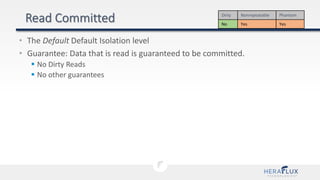
• The Default Default Isolation level
• Guarantee: Data that is read is guaranteed to be committed.
 No Dirty Reads
 No other guarantees
Dirty Nonrepeatable Phantom
No Yes Yes
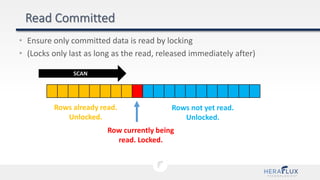
• Ensure only committed data is read by locking
• (Locks only last as long as the read, released immediately after)
Rows already read.
Unlocked.
Row currently being
read. Locked.
Rows not yet read.
Unlocked.
SCAN
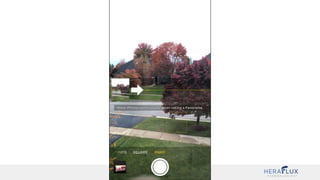
https://commons.wikimedia.org/wiki/File:Horizon202.jpg
https://commons.wikimedia.org/wiki/File:Horizon202sketch.png
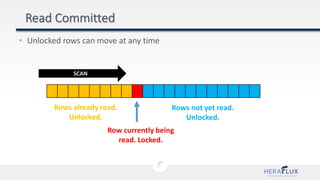
• Unlocked rows can move at any time
Rows already read.
Unlocked.
Row currently being
read. Locked.
Rows not yet read.
Unlocked.
SCAN
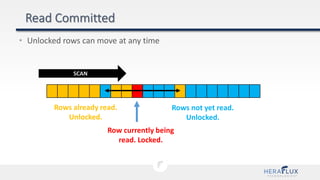
• Unlocked rows can move at any time
Rows already read.
Unlocked.
Row currently being
read. Locked.
Rows not yet read.
Unlocked.
SCAN
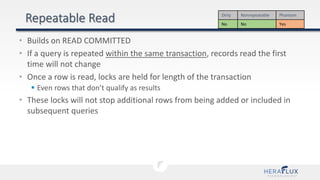
• Builds on READ COMMITTED
• If a query is repeated within the same transaction, records read the first
time will not change
• Once a row is read, locks are held for length of the transaction
 Even rows that don’t qualify as results
• These locks will not stop additional rows from being added or included in
subsequent queries
Dirty Nonrepeatable Phantom
No No Yes
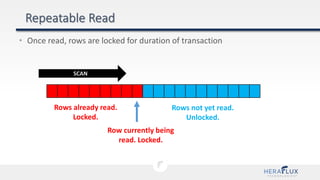
• Once read, rows are locked for duration of transaction
Rows already read.
Locked.
Row currently being
read. Locked.
Rows not yet read.
Unlocked.
SCAN
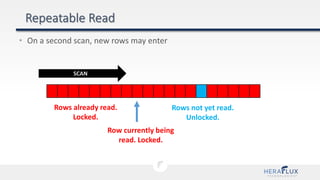
• On a second scan, new rows may enter
Rows already read.
Locked.
Row currently being
read. Locked.
Rows not yet read.
Unlocked.
SCAN
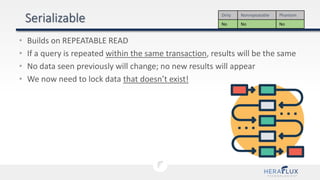
• Builds on REPEATABLE READ
• If a query is repeated within the same transaction, results will be the same
• No data seen previously will change; no new results will appear
• We now need to lock data that doesn’t exist!
Dirty Nonrepeatable Phantom
No No No
• Key-range locks
• Prevent phantom reads by defining a range that other transactions cannot
insert rows within
• If you select a row/range that doesn’t exist, that gets locked too
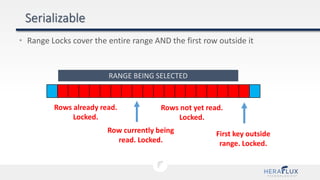
• Range Locks cover the entire range AND the first row outside it
Rows already read.
Locked.
Row currently being
read. Locked.
Rows not yet read.
Locked.
RANGE BEING SELECTED
First key outside
range. Locked.
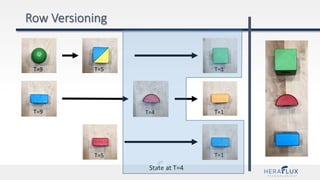
• Uses row versioning to prevent concurrency conflicts
• Fewer locks are needed, so blocking is reduced
 Readers no longer block writers
 Writers no longer block readers
 Writers still block writers
• Uses a version store to do this
• Version Store lives in tempdb
• Remember, it’s OPTIMISTIC!
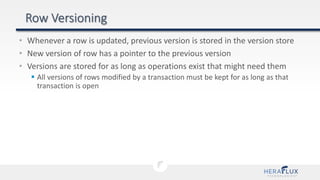
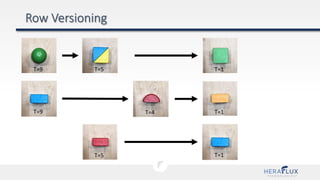
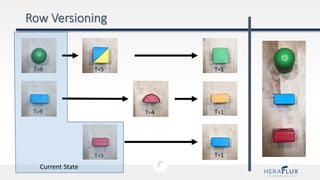
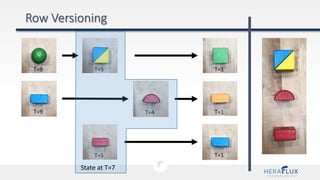
• Whenever a row is updated, previous version is stored in the version store
• New version of row has a pointer to the previous version
• Versions are stored for as long as operations exist that might need them
 All versions of rows modified by a transaction must be kept for as long as that
transaction is open
Current Version
(ID=6, Val=4) [T=n]
Previous Version
(ID=6, Val=7) [T=n-1]
Previous Version
(ID=6, Val=9) [T=n-5]
T=9
T=9
T=5 T=1
T=1
T=1T=5
T=4
T=9
T=9
T=5 T=1
T=1
T=1T=5
T=4
Current State
T=9
T=9
T=5 T=1
T=1
T=1T=5
T=4
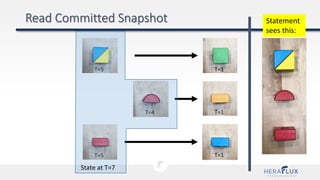
State at T=7
T=9
T=9
T=5 T=1
T=1
T=1T=5
T=4
State at T=4
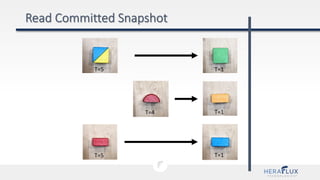
• Same guarantees as READ COMMITTED, just an optimistic implementation
• Statement-level snapshot isolation
 Queries will see the most recent committed values as of the beginning of that
statement (not the transaction)
Dirty Nonrepeatable Phantom
No Yes Yes
T=5 T=1
T=1
T=1T=5
T=4
T=5 T=1
T=1
T=1T=5
T=4
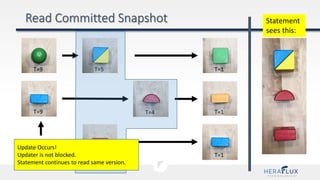
State at T=7
Statement
sees this:
T=9
T=9
T=5 T=1
T=1
T=1T=5
T=4
State at T=7
Statement
sees this:
Update Occurs!
Updater is not blocked.
Statement continues to read same version.
• When enabled, RCSI becomes the default isolation level for this database.
• Command will block if DB has other connections
 NO_WAIT will prevent blocking and just fail instead
 ROLLBACK_IMMEDIATE will rollback other transactions
Dirty Nonrepeatable Phantom
No Yes Yes
ALTER DATABASE <DB_NAME>
SET READ_COMMITTED_SNAPSHOT ON
[WITH (NO_WAIT | ROLLBACK IMMEDIATE)];
• Same guarantees as SERIALIZABLE, just an optimistic implementation
• Transaction-level snapshot isolation
 Queries will see the most recent committed values as of the beginning of that
transaction (the first data read in it)
Dirty Nonrepeatable Phantom
No No No
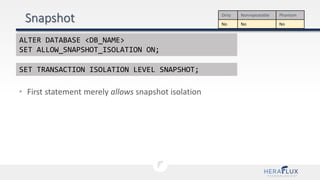
• First statement merely allows snapshot isolation
Dirty Nonrepeatable Phantom
No No No
ALTER DATABASE <DB_NAME>
SET ALLOW_SNAPSHOT_ISOLATION ON;
SET TRANSACTION ISOLATION LEVEL SNAPSHOT;
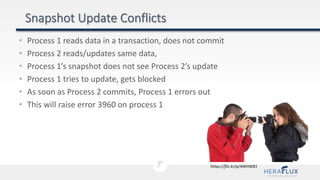
• Process 1 reads data in a transaction, does not commit
• Process 2 reads/updates same data,
• Process 1’s snapshot does not see Process 2’s update
• Process 1 tries to update, gets blocked
• As soon as Process 2 commits, Process 1 errors out
• This will raise error 3960 on process 1
https://flic.kr/p/4WHW81
• Everything I’ve covered here behaves the same in Azure SQL Database
• Exception: RCSI is enabled by default
• Concurrency Basics
• Isolation Levels
• In-Memory OLTP
• This could be its own presentation by itself
• Optimistic multi-version concurrency control
 No locks required at any time
 (Not even for data modification)
 No waiting because of blocking!
 No latches or spinlocks either
• Waits can still occur….
 (Waiting for log writes to disk following a transaction)
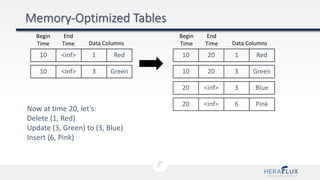
• No existing row is ever modified
 UPDATE creates a new version of a row
 There may be multiple versions in play at once
• Transactions needing to read are presented with the correct version
10 <inf> 1 Red
Begin
Time
End
Time Data Columns
10 <inf> 3 Green
Now at time 20, let’s:
Delete (1, Red)
Update (3, Green) to (3, Blue)
Insert (6, Pink)
10 20 1 Red
10 20 3 Green
20 <inf> 3 Blue
20 <inf> 6 Pink
Begin
Time
End
Time Data Columns
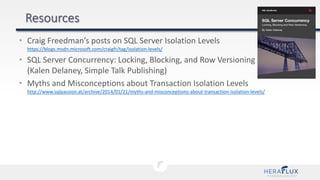
• Craig Freedman’s posts on SQL Server Isolation Levels
https://blogs.msdn.microsoft.com/craigfr/tag/isolation-levels/
• SQL Server Concurrency: Locking, Blocking, and Row Versioning
(Kalen Delaney, Simple Talk Publishing)
• Myths and Misconceptions about Transaction Isolation Levels
http://www.sqlpassion.at/archive/2014/01/21/myths-and-misconceptions-about-transaction-isolation-levels/
71
@sqlbob
bob@bobpusateri.com
bobpusateri.com
bobpusateri

Locks, Blocks, and Snapshots: Maximizing Database Concurrency (PASSDC User Group)

  • 2.
    Specialties / FocusAreas / Passions: • Performance Tuning & Troubleshooting • Very Large Databases • SQL Server Storage Engine • High Availability • Disaster Recovery @sqlbob bob@bobpusateri.com heraflux.com bobpusateri
  • 3.
    • Concurrency Basics •Isolation Levels • In-Memory OLTP
  • 4.
    • The abilityfor an operation to be broken up into multiple parts that can be worked on independently • The ability for multiple operations to access or modify a shared resource at the same time • More parts/users == more concurrency! • Until a limiting factor appears…
  • 5.
    • 5 Philosophers,bowls of spaghetti, and forks • To eat, 2 forks are required • Can pick up one fork at a time • Once finished, both forks must be returned to the table • When not eating, a philosopher is thinking https://en.wikipedia.org/wiki/File:An_illustration_of_the_dining_philosophers_problem.png
  • 6.
    What if everyonepicks up one fork? https://en.wikipedia.org/wiki/File:An_illustration_of_the_dining_philosophers_problem.png What if there’s a time limit? What if someone never gets to eat?
  • 7.
  • 8.
    • Preventable ReadPhenomena (ANSI-defined*)  Dirty Reads  Non-Repeatable Reads  Phantom Reads • Lost Updates • Deadlocks *ANSI specifies which behaviors to allow at each level, but not how to implement them New Hampshire Dept. of Transportation
  • 9.
    • Reading datathat is not yet committed • Changes are still “in flight” in another process • You can read data multiple times or not at all • “But it’s faster!”
  • 10.
    • A.K.A. “InconsistentAnalysis” • Multiple queries in the same transaction get differing results • Cause: A different transaction commits changes between reads
  • 11.
    • Only affectsqueries with a predicate (WHERE clause) • Membership in the result set changes • Multiple queries using the same predicate in the same transaction return differing results https://flic.kr/p/4xqWnG
  • 12.
    • “Update Conflict” •One user’s update overwrites another user’s (simultaneous) update • Appears as though the first update never happened *SQL Server will not permit lost updates in any isolation level
  • 13.
    • Two ormore tasks block each other • Each has a lock on a resource that the other task needs a lock on • SQL Server detects and resolves these by choosing a victim • Victim is rolled back, releasing all its locks Process A Process B Resource 1 Resource 2
  • 14.
    • Pessimistic Concurrency Conflicts are expected; locks taken to prevent them  Readers block writers, writers block readers  Only option available pre-2005 • Optimistic Concurrency  Conflicts are considered possible, but unlikely  Row versioning means less locking
  • 15.
    • Concurrency Basics •Isolation Levels • In-Memory OLTP
  • 16.
    • How isolatedis my transaction from the effects of other transactions? • Pessimistic Concurrency  Read Committed  Read Uncommitted  Repeatable Read  Serializable • Optimistic Concurrency  Snapshot  Read Committed Snapshot https://flic.kr/p/7LjDDL
  • 17.
  • 18.
    • Can beset at the connection or query level • Cannot be changed server-wide • Default isolation level is READ COMMITTED • To change at connection level: • Change applies to all queries for the current connection SET TRANSACTION ISOLATION LEVEL {READ UNCOMMITTED | READ COMMITTED | REPEATABLE READ | SNAPSHOT | SERIALIZABLE } [;]
  • 19.
    • To changeat the query level, use table hints • This is on a per-table basis SELECT column FROM table WITH (NOLOCK);
  • 20.
    • Uses lockingto prevent concurrency conflicts • Classic locking model  Readers don’t block readers  Readers block writers  Writers block readers  Writers block writers • PESSIMISTIC – we’re expecting problems
  • 21.
  • 22.
  • 23.
    Database Table Page Row [S] Shared Lock [IS]Intent Shared Lock [IS] Intent Shared Lock [S] Shared Lock
  • 24.
    Database Table Page Row [S] Shared Lock [IX]Intent Exclusive Lock OR [IU] Intent Update Lock [IX] Intent Exclusive Lock OR [IU] Intent Update Lock [X] Exclusive Lock OR [U] Update Lock
  • 25.
    • A.K.A “NOLOCK” •May read rows multiple times • May read rows zero times • May return results that were NEVER true! • Only applies to SELECT queries  Ignored if used for data modification queries  Could cause index corruption if you tried it (since fixed) Dirty Nonrepeatable Phantom Yes Yes Yes
  • 26.
  • 27.
    • “No locksare taken”  WRONG!  No shared locks are taken when reading data  Other locks are still taken as normal • “It makes this query faster”  WRONG(ish)!  Only true if query had a lot of blocking on SELECT statements
  • 29.
    • Not aterrible setting, it exists for a reason • BUT make sure you understand the risks and consequences
  • 30.
    • The DefaultDefault Isolation level • Guarantee: Data that is read is guaranteed to be committed.  No Dirty Reads  No other guarantees Dirty Nonrepeatable Phantom No Yes Yes
  • 31.
    • Ensure onlycommitted data is read by locking • (Locks only last as long as the read, released immediately after) Rows already read. Unlocked. Row currently being read. Locked. Rows not yet read. Unlocked. SCAN
  • 32.
  • 34.
    • Unlocked rowscan move at any time Rows already read. Unlocked. Row currently being read. Locked. Rows not yet read. Unlocked. SCAN
  • 35.
    • Unlocked rowscan move at any time Rows already read. Unlocked. Row currently being read. Locked. Rows not yet read. Unlocked. SCAN
  • 37.
    • Builds onREAD COMMITTED • If a query is repeated within the same transaction, records read the first time will not change • Once a row is read, locks are held for length of the transaction  Even rows that don’t qualify as results • These locks will not stop additional rows from being added or included in subsequent queries Dirty Nonrepeatable Phantom No No Yes
  • 39.
    • Once read,rows are locked for duration of transaction Rows already read. Locked. Row currently being read. Locked. Rows not yet read. Unlocked. SCAN
  • 40.
    • On asecond scan, new rows may enter Rows already read. Locked. Row currently being read. Locked. Rows not yet read. Unlocked. SCAN
  • 42.
    • Builds onREPEATABLE READ • If a query is repeated within the same transaction, results will be the same • No data seen previously will change; no new results will appear • We now need to lock data that doesn’t exist! Dirty Nonrepeatable Phantom No No No
  • 43.
    • Key-range locks •Prevent phantom reads by defining a range that other transactions cannot insert rows within • If you select a row/range that doesn’t exist, that gets locked too
  • 44.
    • Range Lockscover the entire range AND the first row outside it Rows already read. Locked. Row currently being read. Locked. Rows not yet read. Locked. RANGE BEING SELECTED First key outside range. Locked.
  • 46.
    • Uses rowversioning to prevent concurrency conflicts • Fewer locks are needed, so blocking is reduced  Readers no longer block writers  Writers no longer block readers  Writers still block writers • Uses a version store to do this • Version Store lives in tempdb • Remember, it’s OPTIMISTIC!
  • 47.
    • Whenever arow is updated, previous version is stored in the version store • New version of row has a pointer to the previous version • Versions are stored for as long as operations exist that might need them  All versions of rows modified by a transaction must be kept for as long as that transaction is open
  • 48.
    Current Version (ID=6, Val=4)[T=n] Previous Version (ID=6, Val=7) [T=n-1] Previous Version (ID=6, Val=9) [T=n-5]
  • 49.
  • 50.
  • 51.
  • 52.
  • 53.
    • Same guaranteesas READ COMMITTED, just an optimistic implementation • Statement-level snapshot isolation  Queries will see the most recent committed values as of the beginning of that statement (not the transaction) Dirty Nonrepeatable Phantom No Yes Yes
  • 54.
  • 55.
    T=5 T=1 T=1 T=1T=5 T=4 State atT=7 Statement sees this:
  • 56.
    T=9 T=9 T=5 T=1 T=1 T=1T=5 T=4 State atT=7 Statement sees this: Update Occurs! Updater is not blocked. Statement continues to read same version.
  • 57.
    • When enabled,RCSI becomes the default isolation level for this database. • Command will block if DB has other connections  NO_WAIT will prevent blocking and just fail instead  ROLLBACK_IMMEDIATE will rollback other transactions Dirty Nonrepeatable Phantom No Yes Yes ALTER DATABASE <DB_NAME> SET READ_COMMITTED_SNAPSHOT ON [WITH (NO_WAIT | ROLLBACK IMMEDIATE)];
  • 59.
    • Same guaranteesas SERIALIZABLE, just an optimistic implementation • Transaction-level snapshot isolation  Queries will see the most recent committed values as of the beginning of that transaction (the first data read in it) Dirty Nonrepeatable Phantom No No No
  • 60.
    • First statementmerely allows snapshot isolation Dirty Nonrepeatable Phantom No No No ALTER DATABASE <DB_NAME> SET ALLOW_SNAPSHOT_ISOLATION ON; SET TRANSACTION ISOLATION LEVEL SNAPSHOT;
  • 61.
    • Process 1reads data in a transaction, does not commit • Process 2 reads/updates same data, • Process 1’s snapshot does not see Process 2’s update • Process 1 tries to update, gets blocked • As soon as Process 2 commits, Process 1 errors out • This will raise error 3960 on process 1 https://flic.kr/p/4WHW81
  • 63.
    • Everything I’vecovered here behaves the same in Azure SQL Database • Exception: RCSI is enabled by default
  • 64.
    • Concurrency Basics •Isolation Levels • In-Memory OLTP
  • 65.
    • This couldbe its own presentation by itself • Optimistic multi-version concurrency control  No locks required at any time  (Not even for data modification)  No waiting because of blocking!  No latches or spinlocks either • Waits can still occur….  (Waiting for log writes to disk following a transaction)
  • 66.
    • No existingrow is ever modified  UPDATE creates a new version of a row  There may be multiple versions in play at once • Transactions needing to read are presented with the correct version
  • 67.
    10 <inf> 1Red Begin Time End Time Data Columns 10 <inf> 3 Green Now at time 20, let’s: Delete (1, Red) Update (3, Green) to (3, Blue) Insert (6, Pink) 10 20 1 Red 10 20 3 Green 20 <inf> 3 Blue 20 <inf> 6 Pink Begin Time End Time Data Columns
  • 68.
    • Craig Freedman’sposts on SQL Server Isolation Levels https://blogs.msdn.microsoft.com/craigfr/tag/isolation-levels/ • SQL Server Concurrency: Locking, Blocking, and Row Versioning (Kalen Delaney, Simple Talk Publishing) • Myths and Misconceptions about Transaction Isolation Levels http://www.sqlpassion.at/archive/2014/01/21/myths-and-misconceptions-about-transaction-isolation-levels/
  • 69.