Welcome to the nightmare of 
locking, blocking and isolation levels!
With thanks to our sponsors
So who am I? 
So who am I? 
@BorisHristov
Agenda… 
Locks. What is there for us? 
Troubleshooting locking problems 
Transaction Isolation Levels
Locks. What is there for us?
Methods of Concurrency Control 
1. Pessimistic 
– SQL Server uses locks, causes blocks and who said deadlocks? 
2. Optimistic 
– SQL Server generates versions for everyone, but the updates…
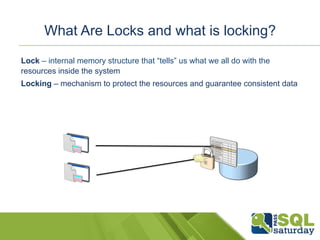
What Are Locks and what is locking? 
Lock – internal memory structure that “tells” us what we all do with the 
resources inside the system 
Locking – mechanism to protect the resources and guarantee consistent data
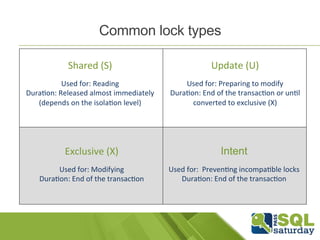
Common lock types 
Intent 
Used 
for: 
Preven-ng 
incompa-ble 
locks 
Dura-on: 
End 
of 
the 
transac-on 
Shared 
(S) 
Used 
for: 
Reading 
Dura-on: 
Released 
almost 
immediately 
(depends 
on 
the 
isola-on 
level) 
Update 
(U) 
Used 
for: 
Preparing 
to 
modify 
Dura-on: 
End 
of 
the 
transac-on 
or 
un-l 
converted 
to 
exclusive 
(X) 
Exclusive 
(X) 
Used 
for: 
Modifying 
Dura-on: 
End 
of 
the 
transac-on
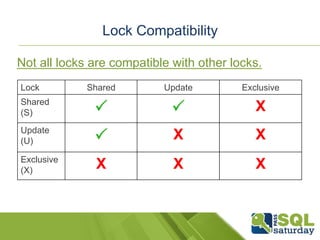
Lock Compatibility 
Not all locks are compatible with other locks. 
Lock Shared Update Exclusive 
Shared 
(S) P P X 
Update 
(U) P X X 
Exclusive 
(X) X X X
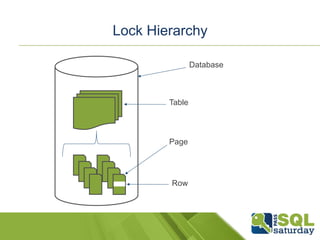
Lock Hierarchy 
Database 
Table 
Page 
Row
Let’s update a row! 
What do we need? 
USE AdventureWorks2012 
GO 
UPDATE [Person].[Address] 
SET AddressLine1=’Dublin, Ireland' 
WHERE AddressID=2 
S 
IX 
IX 
Header 
Row 
Row 
Row 
Row 
Row 
X
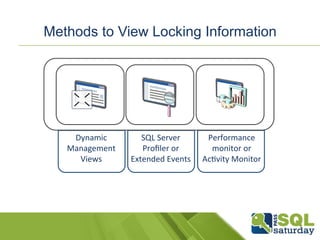
Methods to View Locking Information 
Dynamic 
Management 
Views 
SQL 
Server 
Profiler 
or 
Extended 
Events 
Performance 
monitor 
or 
Ac-vity 
Monitor
Troubleshooting locking problems
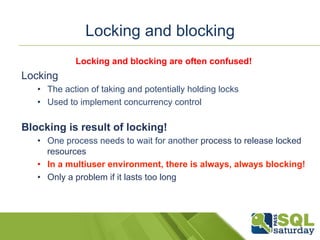
Locking and blocking 
Locking and blocking are often confused! 
Locking 
• The action of taking and potentially holding locks 
• Used to implement concurrency control 
Blocking is result of locking! 
• One process needs to wait for another process to release locked 
resources 
• In a multiuser environment, there is always, always blocking! 
• Only a problem if it lasts too long
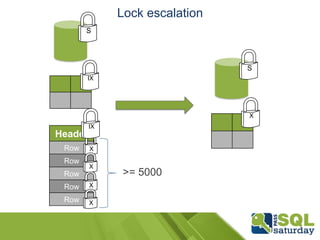
Lock escalation 
S 
S 
X 
>= 5000 
IX 
Header 
Row 
Row 
Row 
Row 
Row 
IX 
X 
X 
X 
X
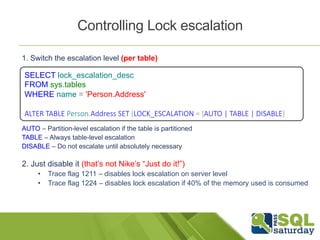
Controlling Lock escalation 
1. Switch the escalation level (per table) 
SELECT lock_escalation_desc 
FROM sys.tables 
WHERE name = 'Person.Address' 
ALTER TABLE Person.Address SET (LOCK_ESCALATION = {AUTO | TABLE | DISABLE} 
AUTO – Partition-level escalation if the table is partitioned 
TABLE – Always table-level escalation 
DISABLE – Do not escalate until absolutely necessary 
2. Just disable it (that’s not Nike’s “Just do it!”) 
• Trace flag 1211 – disables lock escalation on server level 
• Trace flag 1224 – disables lock escalation if 40% of the memory used is consumed
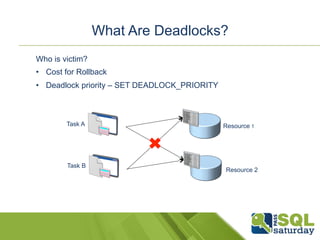
What Are Deadlocks? 
Task A 
Task B 
Resource 1 
Resource 2 
Who is victim? 
• Cost for Rollback 
• Deadlock priority – SET DEADLOCK_PRIORITY
Resolve blocking a.k.a live locking 
1. Keep the transactions as short as possible 
2. No user interactions required in the middle of the transaction 
3. Use indexes (proper ones) 
4. Consider a server to offload some of the workloads 
5. Choose isolation level
DEMO 
Monitor for locks with xEvents 
Lock escalation – both to table and partition 
Deadlock and the SET DEADLOCK_PRIORITY option
Transaction isolation levels
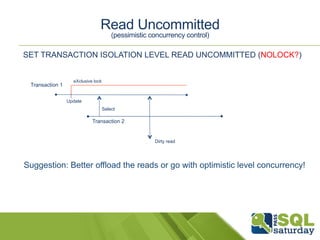
Read Uncommitted 
(pessimistic concurrency control) 
SET TRANSACTION ISOLATION LEVEL READ UNCOMMITTED (NOLOCK?) 
Transaction 1 
Select 
eXclusive lock 
Transaction 2 
Update 
Dirty read 
Suggestion: Better offload the reads or go with optimistic level concurrency!
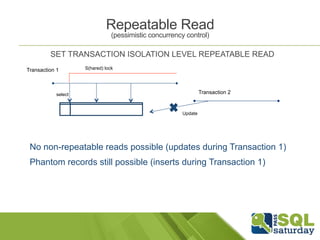
Repeatable Read 
(pessimistic concurrency control) 
SET TRANSACTION ISOLATION LEVEL REPEATABLE READ 
Transaction 1 S(hared) lock 
select 
Update 
Transaction 2 
No non-repeatable reads possible (updates during Transaction 1) 
Phantom records still possible (inserts during Transaction 1)
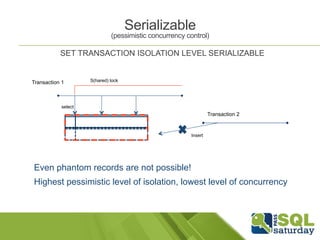
(pessimistic concurrency control) 
SET TRANSACTION ISOLATION LEVEL SERIALIZABLE 
Transaction 1 S(hared) lock 
select 
Serializable 
Insert 
Transaction 2 
Even phantom records are not possible! 
Highest pessimistic level of isolation, lowest level of concurrency
Optimistic Concurrency 
Based on Row versioning (stored inside tempdb’s version store area) 
• No dirty, non-repeatable reads or phantom records 
• Every single modification is versioned even if not used 
• Adds 14 bytes per row 
Readers do not block writers and writers do not block readers 
Writers can and will block writers, this can cause conflicts
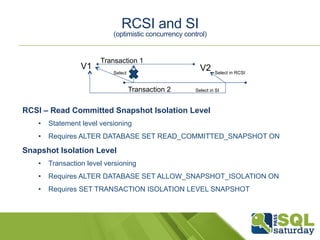
RCSI and SI 
(optimistic concurrency control) 
Transaction 1 
V1 V2 
Select Select in RCSI 
Transaction 2 
Select in SI 
RCSI – Read Committed Snapshot Isolation Level 
• Statement level versioning 
• Requires ALTER DATABASE SET READ_COMMITTED_SNAPSHOT ON 
Snapshot Isolation Level 
• Transaction level versioning 
• Requires ALTER DATABASE SET ALLOW_SNAPSHOT_ISOLATION ON 
• Requires SET TRANSACTION ISOLATION LEVEL SNAPSHOT
DEMO 
Playing around with the Isolation levels
Summary 
1. Blocking is something normal when it’s not for long 
2. There are numerous of ways to monitor locking and blocking 
3. Be extremely careful for lock escalations 
4. Choosing the Isolation level is also a business decision!
Resources 
MCM Readiness videos on locking lecture and demo 
MCM Readiness video on Snapshot Isolation Level 
http://blogs.msdn.com/b/bartd/archive/tags/sql+locking 
http://www.sqlskills.com/blogs/paul/category/locking/ 
Lock hints - 
http://www.techrepublic.com/article/control-sql-server-locking- 
with-hints/5181472
Feedback 
Your feedback is important to us 
& there will be a feedback prize draw @ 
http://www.sql.ie/feedback
10:10 - Next Session … 
§ Lady Windermere (Charlemont #1) 
§ Carmel Gunn & Bob Duffy – The Irish Economic Crisis Visualized with Power BI 
§ Dorian Gray (Charlemont #2) 
§ Mladen Prajdic – Digging into the .NET SQLClient 
§ Intentions (Charlemont #3) 
§ Chris Webb – Power Query: Beyond the Basics 
§ Ideal Husband (Charlemont #4) 
§ Ewan Fairweather – Shared technical learning for building highly scalable & 
available cloud apps 
§ Lord Arthur Saville (Charlemont #5) 
§ William Durkin – Replication Troubleshooting & Monitoring
Thank you!

The Nightmare of Locking, Blocking and Isolation Levels!

  • 1.
    Welcome to thenightmare of locking, blocking and isolation levels!
  • 2.
    With thanks toour sponsors
  • 3.
    So who amI? So who am I? @BorisHristov
  • 4.
    Agenda… Locks. Whatis there for us? Troubleshooting locking problems Transaction Isolation Levels
  • 5.
    Locks. What isthere for us?
  • 6.
    Methods of ConcurrencyControl 1. Pessimistic – SQL Server uses locks, causes blocks and who said deadlocks? 2. Optimistic – SQL Server generates versions for everyone, but the updates…
  • 7.
    What Are Locksand what is locking? Lock – internal memory structure that “tells” us what we all do with the resources inside the system Locking – mechanism to protect the resources and guarantee consistent data
  • 8.
    Common lock types Intent Used for: Preven-ng incompa-ble locks Dura-on: End of the transac-on Shared (S) Used for: Reading Dura-on: Released almost immediately (depends on the isola-on level) Update (U) Used for: Preparing to modify Dura-on: End of the transac-on or un-l converted to exclusive (X) Exclusive (X) Used for: Modifying Dura-on: End of the transac-on
  • 9.
    Lock Compatibility Notall locks are compatible with other locks. Lock Shared Update Exclusive Shared (S) P P X Update (U) P X X Exclusive (X) X X X
  • 10.
    Lock Hierarchy Database Table Page Row
  • 11.
    Let’s update arow! What do we need? USE AdventureWorks2012 GO UPDATE [Person].[Address] SET AddressLine1=’Dublin, Ireland' WHERE AddressID=2 S IX IX Header Row Row Row Row Row X
  • 12.
    Methods to ViewLocking Information Dynamic Management Views SQL Server Profiler or Extended Events Performance monitor or Ac-vity Monitor
  • 13.
  • 14.
    Locking and blocking Locking and blocking are often confused! Locking • The action of taking and potentially holding locks • Used to implement concurrency control Blocking is result of locking! • One process needs to wait for another process to release locked resources • In a multiuser environment, there is always, always blocking! • Only a problem if it lasts too long
  • 15.
    Lock escalation S S X >= 5000 IX Header Row Row Row Row Row IX X X X X
  • 16.
    Controlling Lock escalation 1. Switch the escalation level (per table) SELECT lock_escalation_desc FROM sys.tables WHERE name = 'Person.Address' ALTER TABLE Person.Address SET (LOCK_ESCALATION = {AUTO | TABLE | DISABLE} AUTO – Partition-level escalation if the table is partitioned TABLE – Always table-level escalation DISABLE – Do not escalate until absolutely necessary 2. Just disable it (that’s not Nike’s “Just do it!”) • Trace flag 1211 – disables lock escalation on server level • Trace flag 1224 – disables lock escalation if 40% of the memory used is consumed
  • 17.
    What Are Deadlocks? Task A Task B Resource 1 Resource 2 Who is victim? • Cost for Rollback • Deadlock priority – SET DEADLOCK_PRIORITY
  • 18.
    Resolve blocking a.k.alive locking 1. Keep the transactions as short as possible 2. No user interactions required in the middle of the transaction 3. Use indexes (proper ones) 4. Consider a server to offload some of the workloads 5. Choose isolation level
  • 19.
    DEMO Monitor forlocks with xEvents Lock escalation – both to table and partition Deadlock and the SET DEADLOCK_PRIORITY option
  • 20.
  • 21.
    Read Uncommitted (pessimisticconcurrency control) SET TRANSACTION ISOLATION LEVEL READ UNCOMMITTED (NOLOCK?) Transaction 1 Select eXclusive lock Transaction 2 Update Dirty read Suggestion: Better offload the reads or go with optimistic level concurrency!
  • 22.
    Repeatable Read (pessimisticconcurrency control) SET TRANSACTION ISOLATION LEVEL REPEATABLE READ Transaction 1 S(hared) lock select Update Transaction 2 No non-repeatable reads possible (updates during Transaction 1) Phantom records still possible (inserts during Transaction 1)
  • 23.
    (pessimistic concurrency control) SET TRANSACTION ISOLATION LEVEL SERIALIZABLE Transaction 1 S(hared) lock select Serializable Insert Transaction 2 Even phantom records are not possible! Highest pessimistic level of isolation, lowest level of concurrency
  • 24.
    Optimistic Concurrency Basedon Row versioning (stored inside tempdb’s version store area) • No dirty, non-repeatable reads or phantom records • Every single modification is versioned even if not used • Adds 14 bytes per row Readers do not block writers and writers do not block readers Writers can and will block writers, this can cause conflicts
  • 25.
    RCSI and SI (optimistic concurrency control) Transaction 1 V1 V2 Select Select in RCSI Transaction 2 Select in SI RCSI – Read Committed Snapshot Isolation Level • Statement level versioning • Requires ALTER DATABASE SET READ_COMMITTED_SNAPSHOT ON Snapshot Isolation Level • Transaction level versioning • Requires ALTER DATABASE SET ALLOW_SNAPSHOT_ISOLATION ON • Requires SET TRANSACTION ISOLATION LEVEL SNAPSHOT
  • 26.
    DEMO Playing aroundwith the Isolation levels
  • 27.
    Summary 1. Blockingis something normal when it’s not for long 2. There are numerous of ways to monitor locking and blocking 3. Be extremely careful for lock escalations 4. Choosing the Isolation level is also a business decision!
  • 28.
    Resources MCM Readinessvideos on locking lecture and demo MCM Readiness video on Snapshot Isolation Level http://blogs.msdn.com/b/bartd/archive/tags/sql+locking http://www.sqlskills.com/blogs/paul/category/locking/ Lock hints - http://www.techrepublic.com/article/control-sql-server-locking- with-hints/5181472
  • 29.
    Feedback Your feedbackis important to us & there will be a feedback prize draw @ http://www.sql.ie/feedback
  • 30.
    10:10 - NextSession … § Lady Windermere (Charlemont #1) § Carmel Gunn & Bob Duffy – The Irish Economic Crisis Visualized with Power BI § Dorian Gray (Charlemont #2) § Mladen Prajdic – Digging into the .NET SQLClient § Intentions (Charlemont #3) § Chris Webb – Power Query: Beyond the Basics § Ideal Husband (Charlemont #4) § Ewan Fairweather – Shared technical learning for building highly scalable & available cloud apps § Lord Arthur Saville (Charlemont #5) § William Durkin – Replication Troubleshooting & Monitoring
  • 31.