LiveMessage Partner Training
ConversationalMessaging Arrives as
A Service Channel
Jessica Boucher
Customer Success Manager, Salesforce
What You Will Learn Today
✓ What is LiveMessage?
✓ Discuss Common Use Cases
✓ Demo of LiveMessage
✓Implementing LiveMessage: Best Practices
✓Demo Org Access
✓Licensing Discussion
Agenda
Introduction to LiveMessage 5 Minutes
LiveMessage Common Use Cases 10 Minutes
Demo of LiveMessage 15 Minutes
Implementation Best Practices 10 Minutes
Demo Org Access & Licensing 10 Minutes
Q&A 10 Minutes
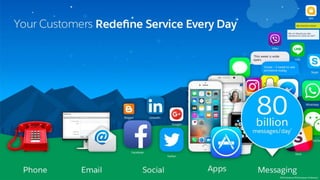
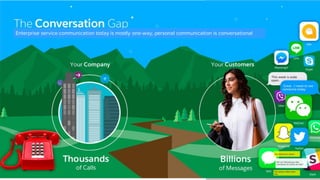
Enterprise service communication today is mostly one-way, personal communication is conversational
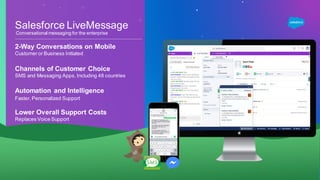
Salesforce LiveMessage
2-Way Conversations on Mobile
Customer or Business Initiated
Channels of Customer Choice
SMS and Messaging Apps, Including 48 countries
Automation and Intelligence
Faster, Personalized Support
Lower Overall Support Costs
Replaces Voice Support
Many New Features
You Ask and We Listen!
Conversational messaging for the enterprise
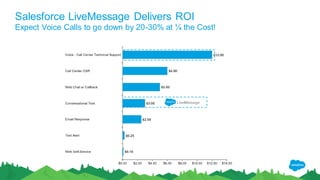
Salesforce LiveMessage Delivers ROI
Expect Voice Calls to go down by 20-30% at ¼ the Cost!
LiveMessage
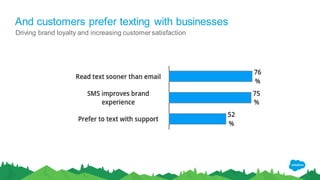
And customers prefer texting with businesses
Driving brand loyalty and increasing customersatisfaction
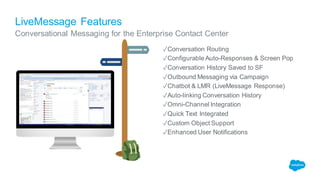
LiveMessage Features
✓Conversation Routing
✓Configurable Auto-Responses & Screen Pop
✓Conversation History Saved to SF
✓Outbound Messaging via Campaign
✓Chatbot & LMR (LiveMessage Response)
✓Auto-linking Conversation History
✓Omni-Channel Integration
✓Quick Text Integrated
✓Custom Object Support
✓Enhanced User Notifications
Conversational Messaging for the Enterprise Contact Center
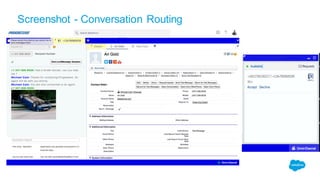
Screenshot - Conversation Routing
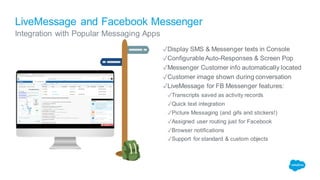
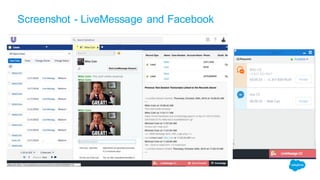
LiveMessage and Facebook Messenger
Integration with Popular Messaging Apps
✓Display SMS & Messenger texts in Console
✓Configurable Auto-Responses & Screen Pop
✓Messenger Customer info automatically located
✓Customer image shown during conversation
✓LiveMessage for FB Messenger features:
✓Transcripts saved as activity records
✓Quick text integration
✓Picture Messaging (and gifs and stickers!)
✓Assigned user routing just for Facebook
✓Browser notifications
✓Support for standard & custom objects
Screenshot - LiveMessage and Facebook
Customer Stories &
Common Use Cases
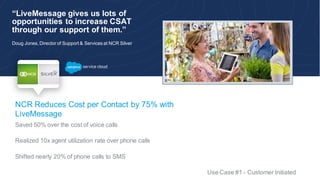
“LiveMessage gives us lots of
opportunities to increase CSAT
through our support of them.”
Doug Jones, Director of Support & Services at NCR Silver
NCR Reduces Cost per Contact by 75% with
LiveMessage
Saved 50% over the cost of voice calls
Realized 10x agent utilization rate over phone calls
Shifted nearly 20% of phone calls to SMS
Use Case #1 - Customer Initiated
c
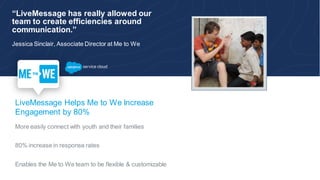
“LiveMessage has really allowed our
team to create efficiencies around
communication.”
Jessica Sinclair, Associate Director at Me to We
LiveMessage Helps Me to We Increase
Engagement by 80%
More easily connect with youth and their families
80% increase in response rates
Enables the Me to We team to be flexible & customizable
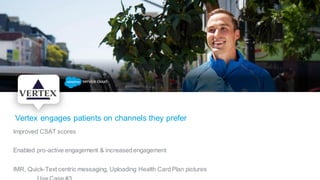
Vertex engages patients on channels they prefer
Improved CSAT scores
Enabled pro-active engagement & increasedengagement
IMR, Quick-Text centric messaging, Uploading Health Card Plan pictures
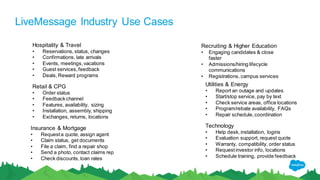
LiveMessage Industry Use Cases
Hospitality & Travel
• Reservations, status, changes
• Confirmations, late arrivals
• Events, meetings,vacations
• Guest services,feedback
• Deals, Reward programs
Recruiting & Higher Education
• Engaging candidates & close
faster
• Admissions/hiring lifecycle
communications
• Registrations, campus services
Retail & CPG
• Order status
• Feedbackchannel
• Features, availability, sizing
• Installation, assembly, shipping
• Exchanges, returns, locations
Technology
• Help desk, installation, logins
• Evaluation support, request quote
• Warranty, compatibility, order status
• Requestinvestor info, locations
• Schedule training, provide feedback
Utilities & Energy
• Report an outage and updates
• Start/stop service, pay by text
• Check service areas, office locations
• Program/rebate availability, FAQs
• Repair schedule,coordination
Insurance & Mortgage
• Requesta quote, assign agent
• Claim status, get documents
• File a claim, find a repair shop
• Send a photo, contact claims rep
• Check discounts, loan rates
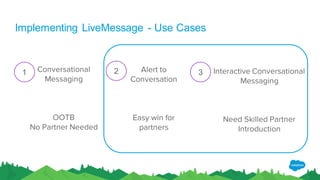
Conversational
Messaging
OOTB
No Partner Needed
Alert to
Conversation
Easy win for
partners
Interactive Conversational
Messaging
Need Skilled Partner
Introduction
1 2 3
Implementing LiveMessage - Use Cases
LiveMessage Demo
Implementation
Best Practices
Implementation Top Pain Points
1.Didn’t check if the number is able to be
text-enabled
Demo Org Access &
Licensing
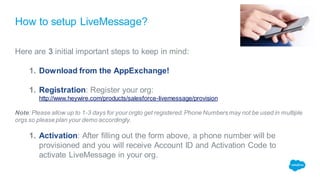
How to setup LiveMessage?
Here are 3 initial important steps to keep in mind:
1. Download from the AppExchange!
1. Registration: Register your org:
http://www.heywire.com/products/salesforce-livemessage/provision
Note: Please allow up to 1-3 days for your orgto get registered. Phone Numbers may not be used in multiple
orgs so please plan your demo accordingly.
1. Activation: After filling out the form above, a phone number will be
provisioned and you will receive Account ID and Activation Code to
activate LiveMessage in your org.
Resources & Next Steps
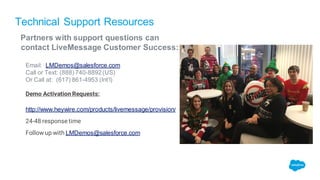
Technical Support Resources
Partners with support questions can
contact LiveMessage Customer Success:
Email: LMDemos@salesforce.com
Call or Text: (888) 740-8892(US)
Or Call at: (617) 861-4953 (Int’l)
Demo Activation Requests:
http://www.heywire.com/products/livemessage/provision/
24-48 response time
Follow up with LMDemos@salesforce.com
Q & A
Implementing LiveMessage - Use Case #1
#1 - Customer or Agent Starts the 1:1 Conversation (US, Canada and EU)
● Inbound SMS messaging to the LiveMessage widget (no Omni). Agents can start individual
outbound messages.
● Inbound Facebook messaging to the LiveMessage widget (No Omni). Agents can then
engage in conversational messaging. If also using Social Studio, all Facebook Direct Message
traffic must come to LiveMessage
● Customer completes installation and setup. Support for basic questions.
● Volume estimates:100,000 inbound SMS messagesper month
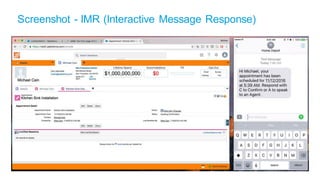
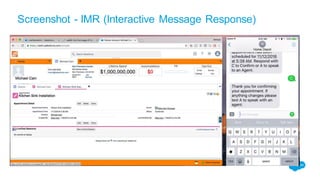
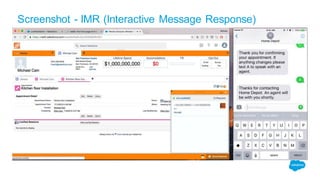
Screenshot - IMR (Interactive Message Response)
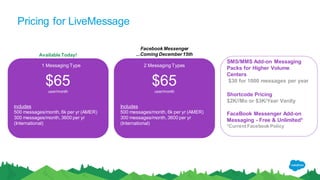
Pricing for LiveMessage
SMS/MMS Add-on Messaging
Packs for Higher Volume
Centers
$30 for 1000 messages per year
Shortcode Pricing
$2K//Mo or $3K/Year Vanity
FaceBook Messenger Add-on
Messaging - Free & Unlimited*
*Current Facebook Policy
$65user/month
Includes
500 messages/month, 6k per yr (AMER)
300 messages/month, 3600 per yr
(International)
$65user/month
Includes
500 messages/month, 6k per yr (AMER)
300 messages/month, 3600 per yr
(International)
1 Messaging Type 2 Messaging Types
Facebook Messenger
...Coming December 15thAvailable Today!
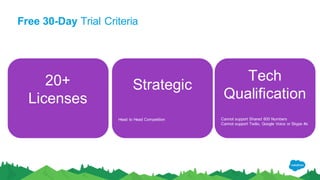
Free 30-Day Trial Criteria
20+
Licenses
Strategic
Head to Head Competition
Tech
Qualification
Cannot support Shared 800 Numbers
Cannot support Twilio, Google Voice or Skype #s

Live Message Partner Training (January 23, 2017)

  • 1.
    LiveMessage Partner Training ConversationalMessagingArrives as A Service Channel Jessica Boucher Customer Success Manager, Salesforce
  • 2.
    What You WillLearn Today ✓ What is LiveMessage? ✓ Discuss Common Use Cases ✓ Demo of LiveMessage ✓Implementing LiveMessage: Best Practices ✓Demo Org Access ✓Licensing Discussion
  • 3.
    Agenda Introduction to LiveMessage5 Minutes LiveMessage Common Use Cases 10 Minutes Demo of LiveMessage 15 Minutes Implementation Best Practices 10 Minutes Demo Org Access & Licensing 10 Minutes Q&A 10 Minutes
  • 5.
    Enterprise service communicationtoday is mostly one-way, personal communication is conversational
  • 7.
    Salesforce LiveMessage 2-Way Conversationson Mobile Customer or Business Initiated Channels of Customer Choice SMS and Messaging Apps, Including 48 countries Automation and Intelligence Faster, Personalized Support Lower Overall Support Costs Replaces Voice Support Many New Features You Ask and We Listen! Conversational messaging for the enterprise
  • 8.
    Salesforce LiveMessage DeliversROI Expect Voice Calls to go down by 20-30% at ¼ the Cost! LiveMessage
  • 9.
    And customers prefertexting with businesses Driving brand loyalty and increasing customersatisfaction
  • 10.
    LiveMessage Features ✓Conversation Routing ✓ConfigurableAuto-Responses & Screen Pop ✓Conversation History Saved to SF ✓Outbound Messaging via Campaign ✓Chatbot & LMR (LiveMessage Response) ✓Auto-linking Conversation History ✓Omni-Channel Integration ✓Quick Text Integrated ✓Custom Object Support ✓Enhanced User Notifications Conversational Messaging for the Enterprise Contact Center
  • 11.
  • 12.
    LiveMessage and FacebookMessenger Integration with Popular Messaging Apps ✓Display SMS & Messenger texts in Console ✓Configurable Auto-Responses & Screen Pop ✓Messenger Customer info automatically located ✓Customer image shown during conversation ✓LiveMessage for FB Messenger features: ✓Transcripts saved as activity records ✓Quick text integration ✓Picture Messaging (and gifs and stickers!) ✓Assigned user routing just for Facebook ✓Browser notifications ✓Support for standard & custom objects
  • 13.
  • 14.
  • 15.
    “LiveMessage gives uslots of opportunities to increase CSAT through our support of them.” Doug Jones, Director of Support & Services at NCR Silver NCR Reduces Cost per Contact by 75% with LiveMessage Saved 50% over the cost of voice calls Realized 10x agent utilization rate over phone calls Shifted nearly 20% of phone calls to SMS Use Case #1 - Customer Initiated c
  • 16.
    “LiveMessage has reallyallowed our team to create efficiencies around communication.” Jessica Sinclair, Associate Director at Me to We LiveMessage Helps Me to We Increase Engagement by 80% More easily connect with youth and their families 80% increase in response rates Enables the Me to We team to be flexible & customizable
  • 17.
    Vertex engages patientson channels they prefer Improved CSAT scores Enabled pro-active engagement & increasedengagement IMR, Quick-Text centric messaging, Uploading Health Card Plan pictures
  • 18.
    LiveMessage Industry UseCases Hospitality & Travel • Reservations, status, changes • Confirmations, late arrivals • Events, meetings,vacations • Guest services,feedback • Deals, Reward programs Recruiting & Higher Education • Engaging candidates & close faster • Admissions/hiring lifecycle communications • Registrations, campus services Retail & CPG • Order status • Feedbackchannel • Features, availability, sizing • Installation, assembly, shipping • Exchanges, returns, locations Technology • Help desk, installation, logins • Evaluation support, request quote • Warranty, compatibility, order status • Requestinvestor info, locations • Schedule training, provide feedback Utilities & Energy • Report an outage and updates • Start/stop service, pay by text • Check service areas, office locations • Program/rebate availability, FAQs • Repair schedule,coordination Insurance & Mortgage • Requesta quote, assign agent • Claim status, get documents • File a claim, find a repair shop • Send a photo, contact claims rep • Check discounts, loan rates
  • 19.
    Conversational Messaging OOTB No Partner Needed Alertto Conversation Easy win for partners Interactive Conversational Messaging Need Skilled Partner Introduction 1 2 3 Implementing LiveMessage - Use Cases
  • 20.
  • 21.
  • 22.
    Implementation Top PainPoints 1.Didn’t check if the number is able to be text-enabled
  • 23.
    Demo Org Access& Licensing
  • 24.
    How to setupLiveMessage? Here are 3 initial important steps to keep in mind: 1. Download from the AppExchange! 1. Registration: Register your org: http://www.heywire.com/products/salesforce-livemessage/provision Note: Please allow up to 1-3 days for your orgto get registered. Phone Numbers may not be used in multiple orgs so please plan your demo accordingly. 1. Activation: After filling out the form above, a phone number will be provisioned and you will receive Account ID and Activation Code to activate LiveMessage in your org.
  • 25.
  • 26.
    Technical Support Resources Partnerswith support questions can contact LiveMessage Customer Success: Email: LMDemos@salesforce.com Call or Text: (888) 740-8892(US) Or Call at: (617) 861-4953 (Int’l) Demo Activation Requests: http://www.heywire.com/products/livemessage/provision/ 24-48 response time Follow up with LMDemos@salesforce.com
  • 27.
  • 29.
    Implementing LiveMessage -Use Case #1 #1 - Customer or Agent Starts the 1:1 Conversation (US, Canada and EU) ● Inbound SMS messaging to the LiveMessage widget (no Omni). Agents can start individual outbound messages. ● Inbound Facebook messaging to the LiveMessage widget (No Omni). Agents can then engage in conversational messaging. If also using Social Studio, all Facebook Direct Message traffic must come to LiveMessage ● Customer completes installation and setup. Support for basic questions. ● Volume estimates:100,000 inbound SMS messagesper month
  • 30.
    Screenshot - IMR(Interactive Message Response)
  • 31.
    Screenshot - IMR(Interactive Message Response)
  • 32.
    Screenshot - IMR(Interactive Message Response)
  • 33.
    Pricing for LiveMessage SMS/MMSAdd-on Messaging Packs for Higher Volume Centers $30 for 1000 messages per year Shortcode Pricing $2K//Mo or $3K/Year Vanity FaceBook Messenger Add-on Messaging - Free & Unlimited* *Current Facebook Policy $65user/month Includes 500 messages/month, 6k per yr (AMER) 300 messages/month, 3600 per yr (International) $65user/month Includes 500 messages/month, 6k per yr (AMER) 300 messages/month, 3600 per yr (International) 1 Messaging Type 2 Messaging Types Facebook Messenger ...Coming December 15thAvailable Today!
  • 34.
    Free 30-Day TrialCriteria 20+ Licenses Strategic Head to Head Competition Tech Qualification Cannot support Shared 800 Numbers Cannot support Twilio, Google Voice or Skype #s