SLDS and
Lightning
Components
Stephanie Rewis
Lead Developer, Design Systems
@stefsull
Greg Rewis
Principal Developer Evangelist
@garazi
Forward Looking Statement
This presentation may contain forward-looking statements that involve risks, uncertainties, and assumptions. If any such uncertainties
materialize or if any of the assumptions proves incorrect, the results of salesforce.com, inc. could differ materially from the results expressed
or implied by the forward-looking statements we make. All statements other than statements of historical fact could be deemed forward-
looking, including any projections of product or service availability, subscriber growth, earnings, revenues, or other financial items and any
statements regarding strategies or plans of management for future operations, statements of belief, any statements concerning new,
planned, or upgraded services or technology developments and customer contracts or use of our services.
The risks and uncertainties referred to above include – but are not limited to – risks associated with developing and delivering new
functionality for our service, new products and services, our new business model, our past operating losses, possible fluctuations in our
operating results and rate of growth, interruptions or delays in our Web hosting, breach of our security measures, the outcome of
intellectual property and other litigation, risks associated with possible mergers and acquisitions, the immature market in which we operate,
our relatively limited operating history, our ability to expand, retain, and motivate our employees and manage our growth, new releases of
our service and successful customer deployment, our limited history reselling non-salesforce.com products, and utilization and selling to
larger enterprise customers. Further information on potential factors that could affect the financial results of salesforce.com, inc. is included
in our annual report on Form 10-Q for the most recent fiscal quarter. This documents and others containing important disclosures are
available on the SEC Filings section of the Investor Information section of our Web site.
Any unreleased services or features referenced in this or other presentations, press releases or public statements are not currently available
and may not be delivered on time or at all. Customers who purchase our services should make the purchase decisions based upon features
that are currently available. Salesforce.com, inc. assumes no obligation and does not intend to update these forward-looking statements.
Why did Salesforce need a Design System?
Lightning Experience
Hundreds of Developers
Small Team of Designers
Smaller Design Systems Team
How can my app
look like this?
Can I use the CSS in
my app?
Lightning Design System
The next generation of living style guides
Design System
Components
CSS Framework + UI Library
Design audit and inventory 

of all components in designer's
comps
Border Colors
Shadows
Spacing
Sizing
Animation Durations
Media Queries
z-indexes
Some Design Token Properties
Fonts
Font Sizes
Font Weights
Line Heights
Background Colors
Text Colors
.lookup__menu {
position: absolute;
margin-top: t(spacingXxSmall);
border: t(borderWidthThin) solid t(colorBorder);
border-radius: t(borderRadiusMedium);
padding: t(spacingXxSmall) 0;
background: t(colorBackgroundAlt);
z-index: t(zIndexDropdown);
}
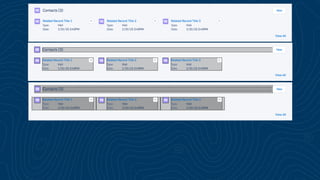
We broke the components
down to their smallest patterns
and objects.
SLDS Micropatterns
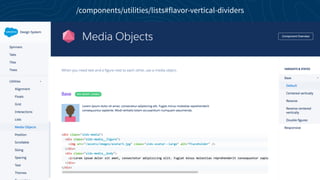
/components/utilities/lists#flavor-vertical-dividers
/components/utilities/lists#flavor-horizontal-dividers
Block
Element
Modifier
BEM Naming Convention
Let’s build a house!
.house
block or component name
.house__door

.house__window
element or component part
.house--gray
modifier or component variation
.house__door--fuschia
variation of a component part
Flexbox
CSS box model optimized for user interface design.
The SLDS grid system provides a flexible, mobile-first, device-
agnostic scaffolding system
The SLDS grid system provides a flexible,
mobile-first, device-agnostic scaffolding system
/components/utilities/grid/
Advantages of Flexbox Grids
Automatic Sizing 

Lowers the bar for error. Great for component layouts.

Manual Sizing

Great for page layouts and responsive design.

Direction can be Manipulated

Your content can flow from left to right, top to bottom, right to left, bottom to top.

Nested Grids

Nest grids inside grids. It’s fast and efficient.
<div	
  class="slds-­‐grid">	


   …	
  
</div>
<ul	
  class="slds-­‐grid">	


   …	
  
</ul>
<span	
  class="slds-­‐grid">	


   …	
  
</span>
Extensible
We provide a library of helpers that can modify the grid container or
individual grid regions.

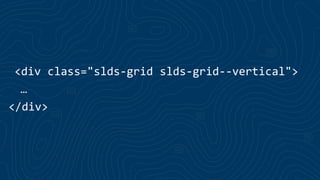
We use verbose, human-readable classes.
<div	
  class="slds-­‐grid	
  slds-­‐grid-­‐-­‐vertical">	
  
…	
  
</div>
<div	
  class="slds-­‐grid	
  slds-­‐grid-­‐-­‐vertical">	
  
…	
  
</div>
Flex-wrap
.slds-wrap { // This is placed on the .grid container
flex-wrap: wrap;
align-items: flex-start
}
<ul	
  class="slds-­‐grid">	
  
...	
  
<li>...</li>	
  
<li>...</li>	
  
...	
  
</ul>
<ul	
  class="slds-­‐grid">	
  
...	
  
<li	
  class="slds-­‐col">...</li>	
  
<li	
  class="slds-­‐col">...</li>	
  
...	
  
</ul>
<ul	
  class="slds-­‐grid">	
  
...	
  
<li	
  class="slds-­‐col">...</li>	
  
<li	
  class="slds-­‐col">...</li>	
  
...	
  
</ul>
<ul	
  class="slds-­‐grid">	
  
...	
  
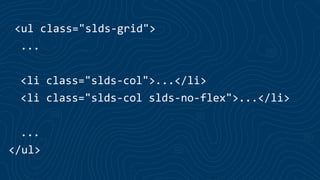
<li	
  class="slds-­‐col">...</li>	
  
<li	
  class="slds-­‐col	
  slds-­‐no-­‐flex">...</li>	
  
...	
  
</ul>
<ul	
  class="slds-­‐grid">	
  
...	
  
<li	
  class="slds-­‐col">...</li>	
  
<li	
  class="slds-­‐col	
  slds-­‐no-­‐flex">...</li>	
  
...	
  
</ul>
Sizing Helpers
Support for 2,3,4,5,6,8, & 12 Column Grids.
<...class="slds-­‐size-­‐-­‐1-­‐of-­‐3">	
  
<...class="slds-­‐size-­‐-­‐1-­‐of-­‐3">	
  
Column span numerator.
<...class="slds-­‐size-­‐-­‐1-­‐of-­‐3">	
  
Human friendly delimiter.
<...class="slds-­‐size-­‐-­‐1-­‐of-­‐3">	
  
Total column denominator.
.slds-­‐size-­‐-­‐1-­‐of-­‐3	
  {	
  
width:	
  33.3333333333%;	
  
}	


   Output
Responsive Sizing Helpers
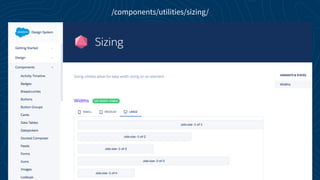
Sizing helpers have responsive technology baked into them
/components/utilities/sizing/
Mobile first approach
All responsive classes are additive.
Breakpoint Names:
x-small = Small phone
small = Phone
medium = Tablet
large = Desktop
<...class="slds-­‐large-­‐size-­‐-­‐1-­‐of-­‐3">	
  
<...class="[default]	
  [x-­‐small-­‐override]	
  [small-­‐override]	
  [medium-­‐override]	
  [large-­‐override]">
<...class="slds-­‐size-­‐-­‐1-­‐of-­‐1	
  slds-­‐small-­‐size-­‐-­‐1-­‐of-­‐2	
  slds-­‐medium-­‐size-­‐-­‐1-­‐of-­‐4">
100% width up to phone
50% width in between a phone and tablet
25% width on tablet and up (desktop)
<div	
  class="slds-­‐grid	
  slds-­‐wrap">	
  
<div	
  class="slds-­‐size-­‐-­‐1-­‐of-­‐1	
  slds-­‐small-­‐size-­‐-­‐1-­‐of-­‐2	
  slds-­‐medium-­‐size-­‐-­‐1-­‐of-­‐4">…</div>	
  
<div	
  class="slds-­‐size-­‐-­‐1-­‐of-­‐1	
  slds-­‐small-­‐size-­‐-­‐1-­‐of-­‐2	
  slds-­‐medium-­‐size-­‐-­‐1-­‐of-­‐4">…</div>	
  
<div	
  class="slds-­‐size-­‐-­‐1-­‐of-­‐1	
  slds-­‐small-­‐size-­‐-­‐1-­‐of-­‐2	
  slds-­‐medium-­‐size-­‐-­‐1-­‐of-­‐4">…</div>	
  
<div	
  class="slds-­‐size-­‐-­‐1-­‐of-­‐1	
  slds-­‐small-­‐size-­‐-­‐1-­‐of-­‐2	
  slds-­‐medium-­‐size-­‐-­‐1-­‐of-­‐4">…</div>	
  
</div>
Mobile:
Tablet:
Desktop:
bit.ly/1lJTr3z
Codepen Responsive Grid Example
• Lightning Component in Lightning Experience
• Lightning Component in Visualforce
• Lightning Component in a Lightning App
• Lightning Component in Lightning Out
Lightning Components and SLDS
Lightning Component in Lightning Experience
<ltng:require />
• Lightning Component in Visualforce
• Lightning Component in a Lightning App
• Lightning Component in Lightning Out
Lightning Components and SLDS
<ltng:require
styles="/resource/myScope/assets/styles/salesforce-lightning-design-system.css"
/>
<div class=“myScope”>
// your components/markup here
</div>
• Lightning Component in Visualforce
• Lightning Component in a Lightning App
• Lightning Component in Lightning Out
Lightning Components and SLDS
<ltng:require
styles="/resource/myScope/assets/styles/salesforce-lightning-design-system.css"
/>
<div class=“myScope”>
// your components/markup here
</div>
Scoping SLDS in Lightning Components
https://tools.lightningdesignsystem.com/css-customizer
Demo
thank y u
Go Social!
Salesforce Developers
+Salesforce Developers
Salesforce Developers
@SalesforceDevs
developers

SLDS and Lightning Components