Getting Started with Linux Administration
What will you learn today?
 Why you should learn Linux?
 Roles & Responsibilities of a Linux Administrator
 Installation and Upgradation in Linux
 Storage Migration using LVM
 User Administration in Linux
www.edureka.co/linux-admin
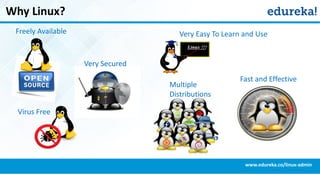
Why Linux?
www.edureka.co/linux-admin
Multiple
Distributions
Very Easy To Learn and Use
Very Secured
Freely Available
Fast and Effective
Virus Free
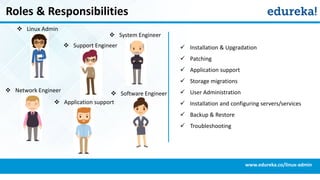
Roles & Responsibilities
www.edureka.co/linux-admin
 Installation & Upgradation
 Patching
 Application support
 Storage migrations
 User Administration
 Installation and configuring servers/services
 Backup & Restore
 Troubleshooting
 Network Engineer
 Linux Admin
 System Engineer
 Application support
 Support Engineer
 Software Engineer
Installation & Upgradation
www.edureka.co/linux-admin
 Performing manual & network based installations
 VMWare installations
 Implementation OS upgradation by performing
necessary tests
 Writing and implementing necessary pre & post
install scripts as a part of installation
Installation
www.edureka.co/linux-admin
 Power on your computer system.
 Go to BIOS setup and change your first boot device to CD/DVD
 Insert the CentOS CD/DVD disk into your computer
 Follow steps from the installation guide in LMS.
 For installing as a VM, install Virtual manager software for your OS.
 Start VM and select CentOS as guest OS.
 Insert the CentOS CD/DVD disk into your computer
 Follow steps from the installation guide in LMS.
Pre-requisites
OR
RPM Package Manager
www.edureka.co/linux-admin
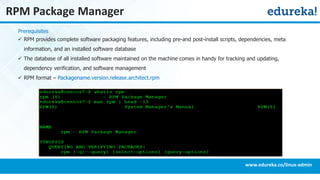
 RPM provides complete software packaging features, including pre-and post-install scripts, dependencies, meta
information, and an installed software database
 The database of all installed software maintained on the machine comes in handy for tracking and updating,
dependency verification, and software management
 RPM format – Packagename.version.release.architect.rpm
Prerequisites
RPM Package Manager (Contd.)
www.edureka.co/linux-admin
RPM Features :
 Provides package management:
»Install
»Remove or Uninstall
»Query
»Upgrade
»Verify
 Automatically verifies packages using GPG, MD5, SHA1SUMs
 Automatically reports on unresolved dependencies
Patching
www.edureka.co/linux-admin
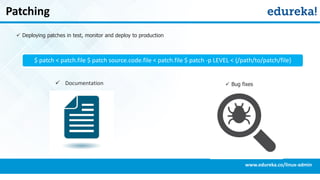
 Deploying patches in test, monitor and deploy to production
$ patch < patch.file $ patch source.code.file < patch.file $ patch -p LEVEL < {/path/to/patch/file}
 Documentation  Bug fixes
www.edureka.co/linux-admin
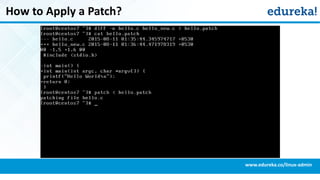
How to Apply a Patch?
Application Support
www.edureka.co/linux-admin
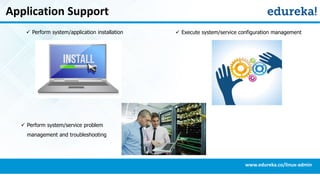
 Perform system/application installation
 Perform system/service problem
management and troubleshooting
 Execute system/service configuration management
Application Support
www.edureka.co/linux-admin
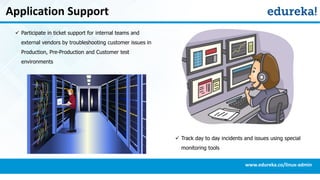
 Participate in ticket support for internal teams and
external vendors by troubleshooting customer issues in
Production, Pre-Production and Customer test
environments
 Track day to day incidents and issues using special
monitoring tools
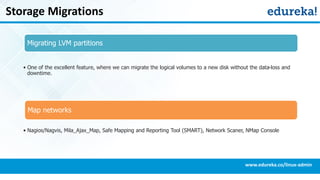
Storage Migrations
www.edureka.co/linux-admin
Migrating LVM partitions
• One of the excellent feature, where we can migrate the logical volumes to a new disk without the data-loss and
downtime.
Map networks
• Nagios/Nagvis, Mila_Ajax_Map, Safe Mapping and Reporting Tool (SMART), Network Scaner, NMap Console
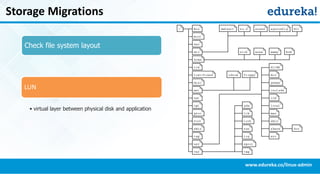
Storage Migrations
www.edureka.co/linux-admin
Check file system layout
LUN
• virtual layer between physical disk and application
User Administration
www.edureka.co/linux-admin
 Creating / Using groups
 Managing user accounts
 Automation if needed
User Administration
www.edureka.co/linux-admin
User Administration
 To manage users via command line, the following commands are used
» useradd
» usermod
» userdel
» passwd
 The user configuration files are stored in two files
» /etc/passwd
» /etc/shadow
User Administration – cat command (Contd.)
www.edureka.co/linux-admin
Adding a New User Account
 Syntax: useradd [options] username
 Command: useradd edureka1
To set password for a specific user
 Syntax: passwd username
 Command: passwd edureka1
passwd without argument defaults
to change the password of the
currently logged-in user
User Administration - Modifying Accounts
www.edureka.co/linux-admin
Modifying / Deleting User Accounts
Usermod command is used to edit/modify or
delete user accounts
 syntax: usermod [options] username
To change user’s home directory
 Command: usermod -d /home/edureka3
edureka3
 The usermod -d option changed the user’s
home directory from /tmp/edureka3 to
/home/edureka3
User Administration – Sudo users
www.edureka.co/linux-admin
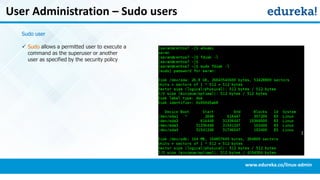
Sudo user
 Sudo allows a permitted user to execute a
command as the superuser or another
user as specified by the security policy
User Administration – Sudo users (Contd.)
www.edureka.co/linux-admin
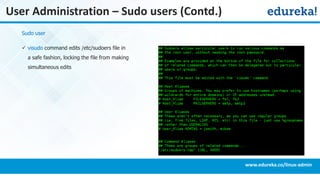
Sudo user
 visudo command edits /etc/sudoers file in
a safe fashion, locking the file from making
simultaneous edits
User Administration - Setting ACL
www.edureka.co/linux-admin
Access Control Lists (ACLs)
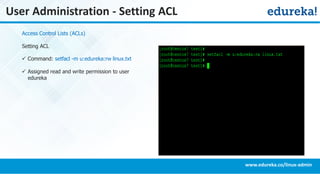
Setting ACL
 Command: setfacl -m u:edureka:rw linux.txt
 Assigned read and write permission to user
edureka
User Administration - Remove Permissions
www.edureka.co/linux-admin
Access Control Lists (ACLs)
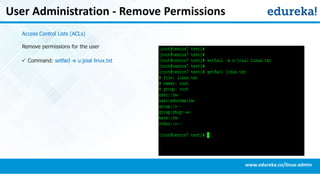
Remove permissions for the user
 Command: setfacl -x u:joial linux.txt
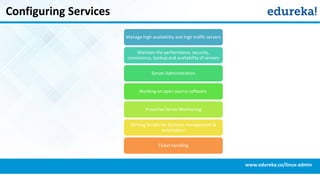
Configuring Services
www.edureka.co/linux-admin
Manage high availability and high traffic servers
Maintain the performance, security,
consistency, backup and availability of servers
Server Administration
Working on open source software
Proactive Server Monitoring
Writing Scripts for Systems management &
automation
Ticket handling
Course Details
www.edureka.co/linux-admin
Become an expert in Linux Administration
Go to www.edureka.co/linux-admin
Edureka's Linux Administration course:
• This course is designed to shape you as a Linux professional & help you to run applications, perform desired functions on your
system and networks, create a network configuration, and maintain security administration.
• You will work on a Project which involves performing some of the day-to-day activities you would need to do as a Linux
administrator.
• Online Live Courses: 42 hours
• Assignments: 25 hours
• Project: 20 hours
• Lifetime Access + 24 X 7 Support
Thank You
Questions/Queries/Feedback
Recording and presentation will be made available to you within 24 hours

Getting Started With Linux Administration

  • 1.
    Getting Started withLinux Administration
  • 2.
    What will youlearn today?  Why you should learn Linux?  Roles & Responsibilities of a Linux Administrator  Installation and Upgradation in Linux  Storage Migration using LVM  User Administration in Linux www.edureka.co/linux-admin
  • 3.
    Why Linux? www.edureka.co/linux-admin Multiple Distributions Very EasyTo Learn and Use Very Secured Freely Available Fast and Effective Virus Free
  • 4.
    Roles & Responsibilities www.edureka.co/linux-admin Installation & Upgradation  Patching  Application support  Storage migrations  User Administration  Installation and configuring servers/services  Backup & Restore  Troubleshooting  Network Engineer  Linux Admin  System Engineer  Application support  Support Engineer  Software Engineer
  • 5.
    Installation & Upgradation www.edureka.co/linux-admin Performing manual & network based installations  VMWare installations  Implementation OS upgradation by performing necessary tests  Writing and implementing necessary pre & post install scripts as a part of installation
  • 6.
    Installation www.edureka.co/linux-admin  Power onyour computer system.  Go to BIOS setup and change your first boot device to CD/DVD  Insert the CentOS CD/DVD disk into your computer  Follow steps from the installation guide in LMS.  For installing as a VM, install Virtual manager software for your OS.  Start VM and select CentOS as guest OS.  Insert the CentOS CD/DVD disk into your computer  Follow steps from the installation guide in LMS. Pre-requisites OR
  • 7.
    RPM Package Manager www.edureka.co/linux-admin RPM provides complete software packaging features, including pre-and post-install scripts, dependencies, meta information, and an installed software database  The database of all installed software maintained on the machine comes in handy for tracking and updating, dependency verification, and software management  RPM format – Packagename.version.release.architect.rpm Prerequisites
  • 8.
    RPM Package Manager(Contd.) www.edureka.co/linux-admin RPM Features :  Provides package management: »Install »Remove or Uninstall »Query »Upgrade »Verify  Automatically verifies packages using GPG, MD5, SHA1SUMs  Automatically reports on unresolved dependencies
  • 9.
    Patching www.edureka.co/linux-admin  Deploying patchesin test, monitor and deploy to production $ patch < patch.file $ patch source.code.file < patch.file $ patch -p LEVEL < {/path/to/patch/file}  Documentation  Bug fixes
  • 10.
  • 11.
    Application Support www.edureka.co/linux-admin  Performsystem/application installation  Perform system/service problem management and troubleshooting  Execute system/service configuration management
  • 12.
    Application Support www.edureka.co/linux-admin  Participatein ticket support for internal teams and external vendors by troubleshooting customer issues in Production, Pre-Production and Customer test environments  Track day to day incidents and issues using special monitoring tools
  • 13.
    Storage Migrations www.edureka.co/linux-admin Migrating LVMpartitions • One of the excellent feature, where we can migrate the logical volumes to a new disk without the data-loss and downtime. Map networks • Nagios/Nagvis, Mila_Ajax_Map, Safe Mapping and Reporting Tool (SMART), Network Scaner, NMap Console
  • 14.
    Storage Migrations www.edureka.co/linux-admin Check filesystem layout LUN • virtual layer between physical disk and application
  • 15.
    User Administration www.edureka.co/linux-admin  Creating/ Using groups  Managing user accounts  Automation if needed
  • 16.
    User Administration www.edureka.co/linux-admin User Administration To manage users via command line, the following commands are used » useradd » usermod » userdel » passwd  The user configuration files are stored in two files » /etc/passwd » /etc/shadow
  • 17.
    User Administration –cat command (Contd.) www.edureka.co/linux-admin Adding a New User Account  Syntax: useradd [options] username  Command: useradd edureka1 To set password for a specific user  Syntax: passwd username  Command: passwd edureka1 passwd without argument defaults to change the password of the currently logged-in user
  • 18.
    User Administration -Modifying Accounts www.edureka.co/linux-admin Modifying / Deleting User Accounts Usermod command is used to edit/modify or delete user accounts  syntax: usermod [options] username To change user’s home directory  Command: usermod -d /home/edureka3 edureka3  The usermod -d option changed the user’s home directory from /tmp/edureka3 to /home/edureka3
  • 19.
    User Administration –Sudo users www.edureka.co/linux-admin Sudo user  Sudo allows a permitted user to execute a command as the superuser or another user as specified by the security policy
  • 20.
    User Administration –Sudo users (Contd.) www.edureka.co/linux-admin Sudo user  visudo command edits /etc/sudoers file in a safe fashion, locking the file from making simultaneous edits
  • 21.
    User Administration -Setting ACL www.edureka.co/linux-admin Access Control Lists (ACLs) Setting ACL  Command: setfacl -m u:edureka:rw linux.txt  Assigned read and write permission to user edureka
  • 22.
    User Administration -Remove Permissions www.edureka.co/linux-admin Access Control Lists (ACLs) Remove permissions for the user  Command: setfacl -x u:joial linux.txt
  • 23.
    Configuring Services www.edureka.co/linux-admin Manage highavailability and high traffic servers Maintain the performance, security, consistency, backup and availability of servers Server Administration Working on open source software Proactive Server Monitoring Writing Scripts for Systems management & automation Ticket handling
  • 24.
    Course Details www.edureka.co/linux-admin Become anexpert in Linux Administration Go to www.edureka.co/linux-admin Edureka's Linux Administration course: • This course is designed to shape you as a Linux professional & help you to run applications, perform desired functions on your system and networks, create a network configuration, and maintain security administration. • You will work on a Project which involves performing some of the day-to-day activities you would need to do as a Linux administrator. • Online Live Courses: 42 hours • Assignments: 25 hours • Project: 20 hours • Lifetime Access + 24 X 7 Support
  • 25.
    Thank You Questions/Queries/Feedback Recording andpresentation will be made available to you within 24 hours