LINKEDIN
Brighton Chamber of Commerce
•Contract CMO
working for companies that don’t have
senior/strategic leadership, on a contract basis
•SMB Marketing Strategist
working with companies to align brand, develop
marketing plans to reach business goals, connect
with resources, assist/advise as needed
•LinkedIn Evangelist
helping companies and individuals
understand and effectively utilize LinkedIn
Today’s agenda
•UnderstandWHY LinkedIn is important for business
•Learn basics to gettingYOUR Profile and your
COMPANY Page set-up or improved
•Using LinkedIn to grow business
Why LinkedIn?
• B2B uses LinkedIn to find employees, sales leads, resources and
expertise
• Increase your company’s organic search
• Increase traffic to your company website
• Demonstrate your expertise; promote your company and offerings
• LinkedIn offers credibility
2 Components to know
Company Page
• Increases SEO
• Keeps company news current
• Highlight products & services in
Showcases
• Post job openings
• Customer testimonials
Your Profile
• Add to your brand –have a robust
profile
• Add your visibility and credibility
• Demonstrate your expertise
• Highlights career accomplishments
Top 5ThingsYour Profile Must Have
1. Keyword Descriptors
(words others would use to
look for someone with your
expertise)
2. Excellent picture
3. Contact details
Top 5ThingsYour Profile Must Have (con’t)
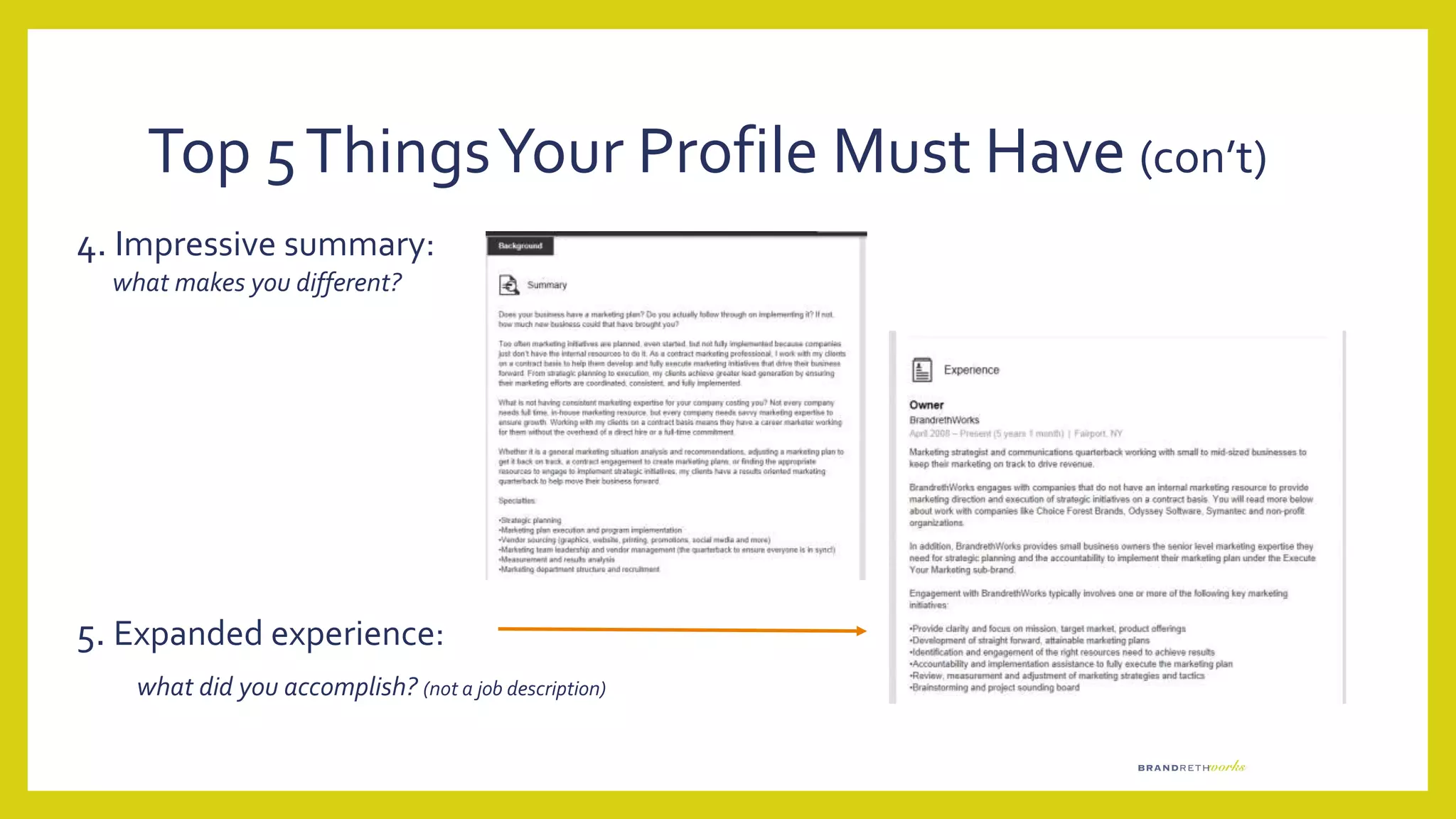
4. Impressive summary:
what makes you different?
5. Expanded experience:
what did you accomplish? (not a job description)
5 Features you should capitalize on
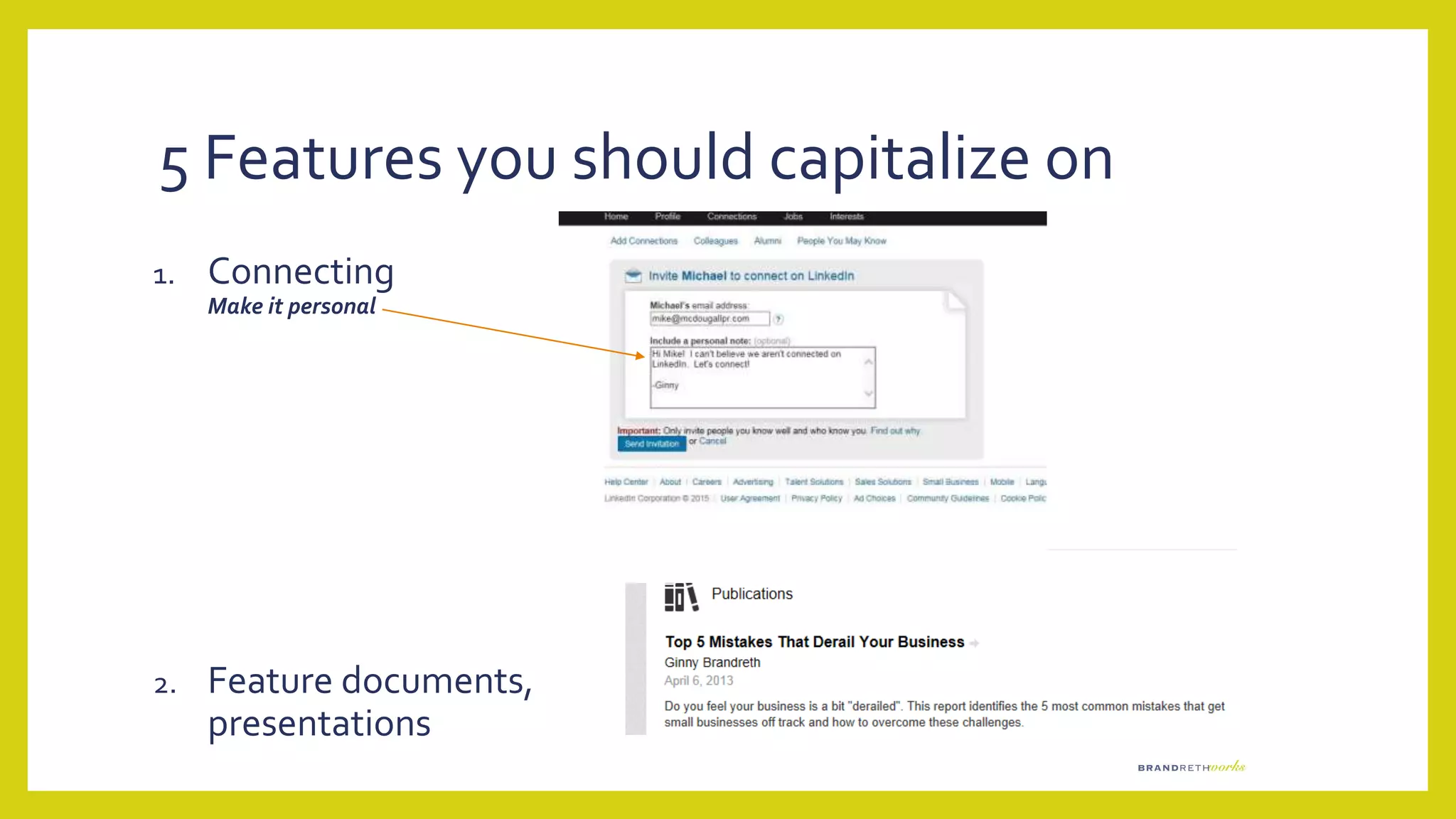
1. Connecting
Make it personal
2. Feature documents,
presentations
5 Features you should capitalize on
3. Recommendations
these are gold dust
4. Groups
Join,
but thoughtfully!!
Posting to Groups
EASY STEPS
• Set Google Alerts for content
• Post to LinkedIn main (home) page
• Share with your groups
or
• Re-post someone else’s post with a comment
or
• Post a question, statement or “thought for the day:
5 Features you should capitalize on
5. Projects
Link toYouTube, Slideshare
LinkedIn Premium
• 4 different pay-for plans
• Job Seeker- designed for job hunting
• Business Plus – expand network to the 3rd degree
• Sales Navigator – lead generation focused
• Recruiter Lite – tools for talent searching
Maintenance
• Check regularly
• Participate in discussions and/or post weekly/bi-weekly
Use “share”, re-post from other sides, or just toss out a quote
• Update profile regularly…while it’s fresh
Handy LittleTips
Tip #1: CheckTheir Message First
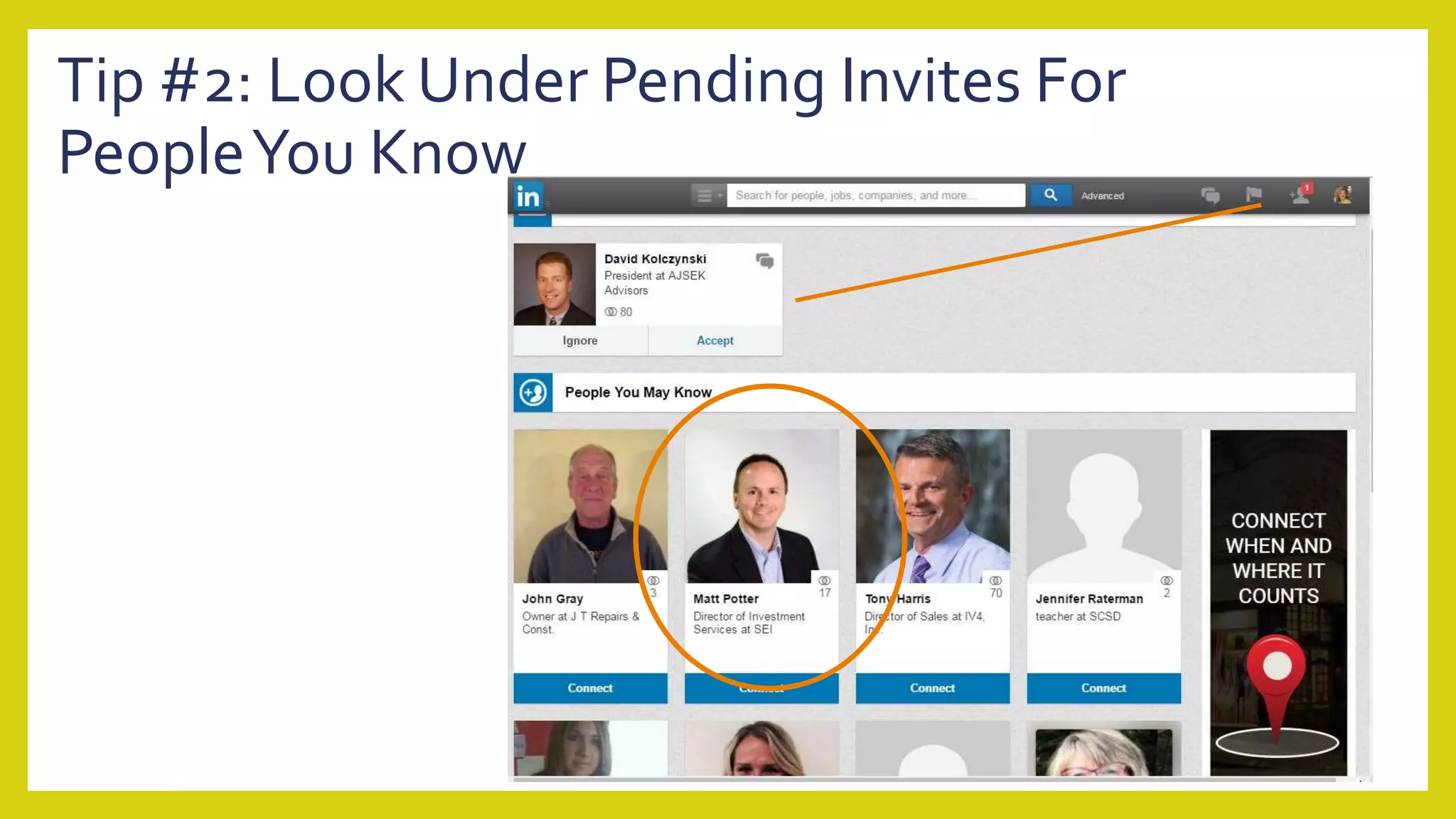
Tip #2: Look Under Pending Invites For
PeopleYou Know
Tip#3: Messaging FromWithin a GroupTo
Non-Contact
Tip #3:Turn Off Competitors Showing Up
InYour Profile
Tip #4:Turn Off “…also viewed” In Settings
Tip #5: CheckActivity and Number of Contacts
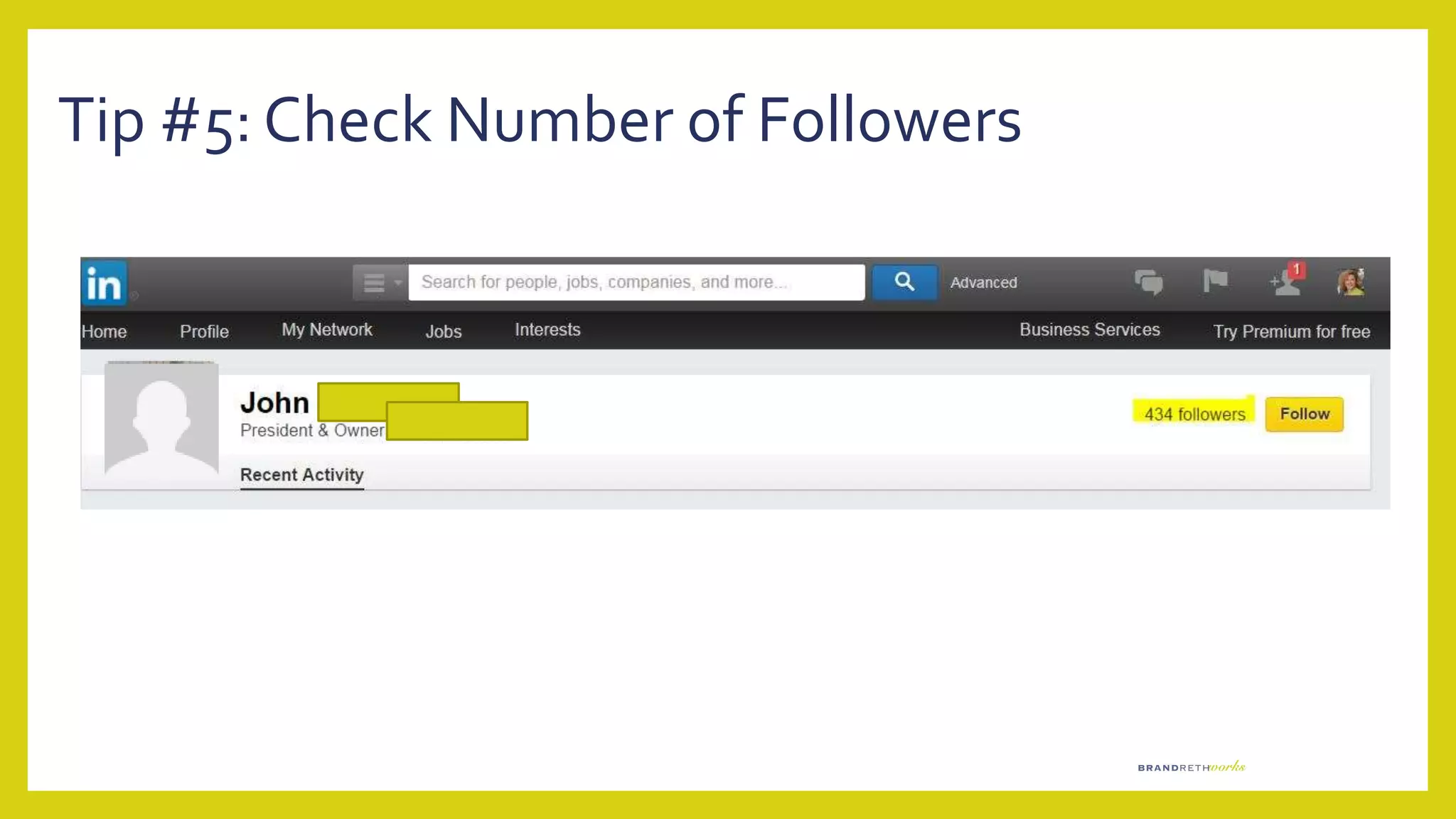
Tip #5: Check Number of Followers
Tip #6: Be Specific in Search
LinkedIn Company Pages
Top 6ThingsYour Company
Page MUST Have
1. Company Logo
2. Consistent Company
Name
3. Same image as your
Website
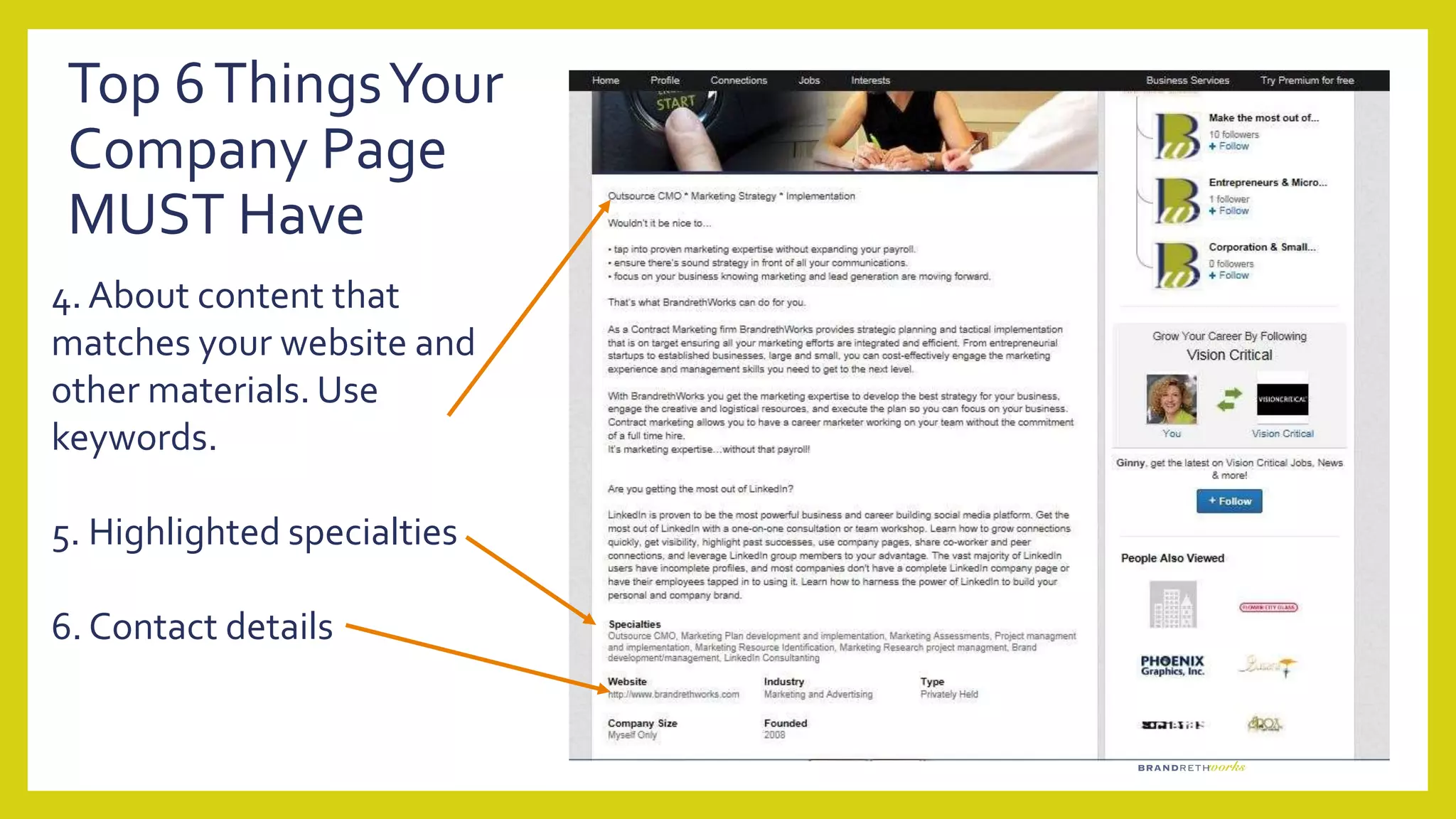
4. About content that
matches your website and
other materials. Use
keywords.
5. Highlighted specialties
6. Contact details
Top 6ThingsYour
Company Page
MUST Have
5ThingsYour Company
Page Should Have
1. Followers
2. Showcase pages
Top 5ThingsYour Company
Page Should Have
3. Regular
Updates
Top 5ThingsYour Company
Page Should Have
4. Groups your
company is following
Top 5ThingsYour Company
Page Should Have
5. Recommendations
Things to Add toYour Company Page
• Photo of products
• URL directly to the product or service page on your website
• Additional contacts in your company
• A promotion!
• An industry or other business event you’re attending
• AYouTube video – think demo or testimonial
• Employee opening and hiring
Putting It AllTogether
• Demonstrate your expertise; keep content current; utilize Google Alerts
• Join groups and be part of the discussion; offer advise, make connections
• Offer informative customize material via Slide Share,YouTube and webinars
• Use LinkedIn Mail to reach prospects with specific asks or offers but not
aggressively
• Use analytics to see what posts are reaching your audience, make adjustments
• Search by title, company, location to find prospects; use connections to get
introductions
Ginny Brandreth
ginny@brandrethworks.com
585.314.7364
Some images licensed under Creative Commons, other through paid permission
from FreeDigitalPhotos.com
• Connect with me on LinkedIn
• Follow BrandrethWorks
• Join Brighton Chamber of Commerce Group
Last But Not Least….

LinkedIn 101 - Brighton Chamber of Commerce

  • 1.
  • 2.
    •Contract CMO working forcompanies that don’t have senior/strategic leadership, on a contract basis
  • 3.
    •SMB Marketing Strategist workingwith companies to align brand, develop marketing plans to reach business goals, connect with resources, assist/advise as needed
  • 4.
    •LinkedIn Evangelist helping companiesand individuals understand and effectively utilize LinkedIn
  • 5.
    Today’s agenda •UnderstandWHY LinkedInis important for business •Learn basics to gettingYOUR Profile and your COMPANY Page set-up or improved •Using LinkedIn to grow business
  • 6.
    Why LinkedIn? • B2Buses LinkedIn to find employees, sales leads, resources and expertise • Increase your company’s organic search • Increase traffic to your company website • Demonstrate your expertise; promote your company and offerings • LinkedIn offers credibility
  • 7.
    2 Components toknow Company Page • Increases SEO • Keeps company news current • Highlight products & services in Showcases • Post job openings • Customer testimonials Your Profile • Add to your brand –have a robust profile • Add your visibility and credibility • Demonstrate your expertise • Highlights career accomplishments
  • 8.
    Top 5ThingsYour ProfileMust Have 1. Keyword Descriptors (words others would use to look for someone with your expertise) 2. Excellent picture 3. Contact details
  • 9.
    Top 5ThingsYour ProfileMust Have (con’t) 4. Impressive summary: what makes you different? 5. Expanded experience: what did you accomplish? (not a job description)
  • 10.
    5 Features youshould capitalize on 1. Connecting Make it personal 2. Feature documents, presentations
  • 11.
    5 Features youshould capitalize on 3. Recommendations these are gold dust 4. Groups Join, but thoughtfully!!
  • 12.
    Posting to Groups EASYSTEPS • Set Google Alerts for content • Post to LinkedIn main (home) page • Share with your groups or • Re-post someone else’s post with a comment or • Post a question, statement or “thought for the day:
  • 13.
    5 Features youshould capitalize on 5. Projects Link toYouTube, Slideshare
  • 14.
    LinkedIn Premium • 4different pay-for plans • Job Seeker- designed for job hunting • Business Plus – expand network to the 3rd degree • Sales Navigator – lead generation focused • Recruiter Lite – tools for talent searching
  • 15.
    Maintenance • Check regularly •Participate in discussions and/or post weekly/bi-weekly Use “share”, re-post from other sides, or just toss out a quote • Update profile regularly…while it’s fresh
  • 16.
  • 17.
    Tip #1: CheckTheirMessage First
  • 18.
    Tip #2: LookUnder Pending Invites For PeopleYou Know
  • 19.
    Tip#3: Messaging FromWithina GroupTo Non-Contact
  • 20.
    Tip #3:Turn OffCompetitors Showing Up InYour Profile
  • 21.
    Tip #4:Turn Off“…also viewed” In Settings
  • 22.
    Tip #5: CheckActivityand Number of Contacts
  • 23.
    Tip #5: CheckNumber of Followers
  • 24.
    Tip #6: BeSpecific in Search
  • 25.
  • 26.
    Top 6ThingsYour Company PageMUST Have 1. Company Logo 2. Consistent Company Name 3. Same image as your Website
  • 27.
    4. About contentthat matches your website and other materials. Use keywords. 5. Highlighted specialties 6. Contact details Top 6ThingsYour Company Page MUST Have
  • 28.
    5ThingsYour Company Page ShouldHave 1. Followers 2. Showcase pages
  • 29.
    Top 5ThingsYour Company PageShould Have 3. Regular Updates
  • 30.
    Top 5ThingsYour Company PageShould Have 4. Groups your company is following
  • 31.
    Top 5ThingsYour Company PageShould Have 5. Recommendations
  • 32.
    Things to AddtoYour Company Page • Photo of products • URL directly to the product or service page on your website • Additional contacts in your company • A promotion! • An industry or other business event you’re attending • AYouTube video – think demo or testimonial • Employee opening and hiring
  • 33.
    Putting It AllTogether •Demonstrate your expertise; keep content current; utilize Google Alerts • Join groups and be part of the discussion; offer advise, make connections • Offer informative customize material via Slide Share,YouTube and webinars • Use LinkedIn Mail to reach prospects with specific asks or offers but not aggressively • Use analytics to see what posts are reaching your audience, make adjustments • Search by title, company, location to find prospects; use connections to get introductions
  • 34.
    Ginny Brandreth ginny@brandrethworks.com 585.314.7364 Some imageslicensed under Creative Commons, other through paid permission from FreeDigitalPhotos.com • Connect with me on LinkedIn • Follow BrandrethWorks • Join Brighton Chamber of Commerce Group Last But Not Least….

Editor's Notes

  • #9 Keywords are vital. Hint: Search LinkedIn for others in the field with keywords you would use to find your peers. Use common keywords (Certified XXX) before promotional ones (i.e.: The IT guru) Having a professional photo sends the message you’re serious, paying attention to your career! Don’t forget contact details
  • #10 The summary is your opportunity to WOW people. Use keywords from your description repeatedly Focus on what benefit your expertise brings to an organization – why your expertise matters, what’s different about your approach, your style List your expertise and contact details (again) Add detail to your expertise; what did you do in general that was unique, beneficial, different; highlight major accomplishments
  • #11 Connect! Goal should be to reach 500 If you haven’t worked with or are friends with someone you’ll need the person’s email address. Use the message block to send a unique message WHY you want to connect. Post documents, presentations, etc. These documents have to reside on a website or database somewhere else. LinkedIn does not have a data base to store your files See PR section for more on this
  • #12 Recommendations are gold dust. They allow prospective employers to know more about you than they can get from calling previous employers. Ask people to recommend you. It’s often helpful to give them either some ideas of what to recommend you for or write what you would like them to say and have them re-write in their own words. You’ll get much better results of you do this. ALWAYS return the favor and write a recommendation for the other person. Consider writing a recommendation for someone then asking them to reciprocate. You can join up to 50 groups on LinkedIn… so start joining! Participate …even casually. Like, share, comment, post
  • #14 List significant projects with details in the description of what the outcome/benefit was to the organization. If it at all possible, link to an example of your work
  • #16 Check daily for messages from other members See who’s looking at your profile. If you are interested in them, message them noting they were looking at your profile Post, comment, like. Post when you are attending events, making a presentation. Changing your keywords and your summary sends a message to your connections that you’re on the move, doing something. Gives them reason to check your profile Don’t forget to post your accomplishments!