Government Engineering College
Ajmer
MCA VI Semester, 2020
Submitted by :
Abhay Tiwari
17CEAXX600
Submitted to :
Dr. Amit Kumar
Chaturvedi
 Introduction
 Purpose
 features
 Software requirements
 Data Tables
 Project Screenshots
 User Classes
 Mail API
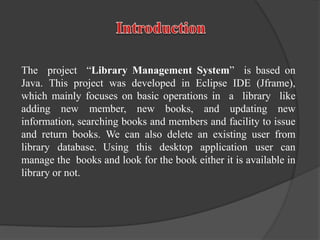
The project “Library Management System” is based on
Java. This project was developed in Eclipse IDE (Jframe),
which mainly focuses on basic operations in a library like
adding new member, new books, and updating new
information, searching books and members and facility to issue
and return books. We can also delete an existing user from
library database. Using this desktop application user can
manage the books and look for the book either it is available in
library or not.
 Reduce the workload of librarian.
 It provides "better and efficient" service to members.
 Faster retrieval of information about the desired book.
 Provide facility for proper monitoring reduce paper work
and provide data security.
 All details will be available on a click for both user and
librarian.
 Member (user) can issue and return book.
 User can search for various books by giving appropriate
search criteria.
 Admin can add, delete and update member records.
 Admin can add, delete and update book records.
 Admin can add, delete and update new admin details.
 Admin can control whole system by monitoring database
every activity.
FEATURES
Operating system require :–
 Microsoft windows 7 or higher version
 .NET framework 1.1
 Eclipse IDE
 JDK 8 or higher version
 MYSQL 5.5 or above version
Software Requirements
 Admin
 Librarian
 Books
 issued book record
Let’s see each & every table column and their field type by
Giving some examples of project screenshots
DATA TABLES
The complete library management system
application is categories into two main portion.
 Each part may have different task like the
admin part could be used to controlling the
whole system,
 The user can be work as an ordinary student
or people who can use many facilities which
are provided by library management system.
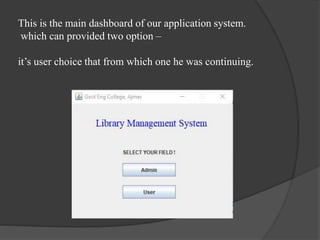
This is the main dashboard of our application system.
which can provided two option –
it’s user choice that from which one he was continuing.
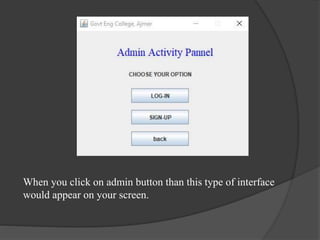
When you click on admin button than this type of interface
would appear on your screen.
Admin Table
Table : 1.1 [ Admin ]
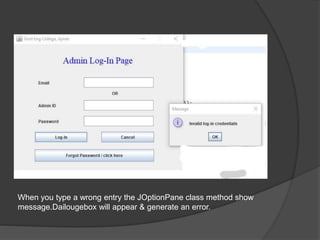
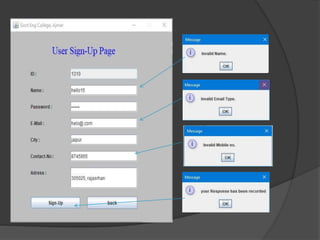
When you type a wrong entry the JOptionPane class method show
message.Dailougebox will appear & generate an error.
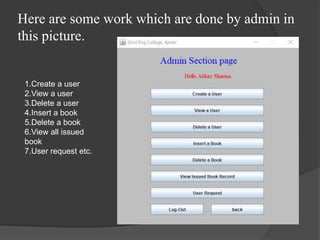
Here are some work which are done by admin in
this picture.
1.Create a user
2.View a user
3.Delete a user
4.Insert a book
5.Delete a book
6.View all issued
book
7.User request etc.
User Table
Table : 1.2 [ User ]
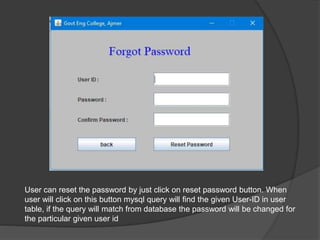
User can reset the password by just click on reset password button. When
user will click on this button mysql query will find the given User-ID in user
table, if the query will match from database the password will be changed for
the particular given user id
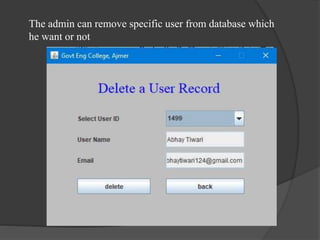
The admin can remove specific user from database which
he want or not
Books Table
Table : 1.3 [ Books ]
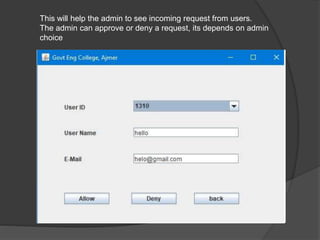
This will help the admin to see incoming request from users.
The admin can approve or deny a request, its depends on admin
choice
Issued Book Record Table
Table : 1.4 [ Issued book record ]
22

Library Management System

  • 1.
    Government Engineering College Ajmer MCAVI Semester, 2020 Submitted by : Abhay Tiwari 17CEAXX600 Submitted to : Dr. Amit Kumar Chaturvedi
  • 2.
     Introduction  Purpose features  Software requirements  Data Tables  Project Screenshots  User Classes  Mail API
  • 3.
    The project “LibraryManagement System” is based on Java. This project was developed in Eclipse IDE (Jframe), which mainly focuses on basic operations in a library like adding new member, new books, and updating new information, searching books and members and facility to issue and return books. We can also delete an existing user from library database. Using this desktop application user can manage the books and look for the book either it is available in library or not.
  • 4.
     Reduce theworkload of librarian.  It provides "better and efficient" service to members.  Faster retrieval of information about the desired book.  Provide facility for proper monitoring reduce paper work and provide data security.  All details will be available on a click for both user and librarian.
  • 5.
     Member (user)can issue and return book.  User can search for various books by giving appropriate search criteria.  Admin can add, delete and update member records.  Admin can add, delete and update book records.  Admin can add, delete and update new admin details.  Admin can control whole system by monitoring database every activity. FEATURES
  • 6.
    Operating system require:–  Microsoft windows 7 or higher version  .NET framework 1.1  Eclipse IDE  JDK 8 or higher version  MYSQL 5.5 or above version Software Requirements
  • 7.
     Admin  Librarian Books  issued book record Let’s see each & every table column and their field type by Giving some examples of project screenshots DATA TABLES
  • 8.
    The complete librarymanagement system application is categories into two main portion.  Each part may have different task like the admin part could be used to controlling the whole system,  The user can be work as an ordinary student or people who can use many facilities which are provided by library management system.
  • 9.
    This is themain dashboard of our application system. which can provided two option – it’s user choice that from which one he was continuing.
  • 10.
    When you clickon admin button than this type of interface would appear on your screen.
  • 11.
    Admin Table Table :1.1 [ Admin ]
  • 12.
    When you typea wrong entry the JOptionPane class method show message.Dailougebox will appear & generate an error.
  • 13.
    Here are somework which are done by admin in this picture. 1.Create a user 2.View a user 3.Delete a user 4.Insert a book 5.Delete a book 6.View all issued book 7.User request etc.
  • 14.
    User Table Table :1.2 [ User ]
  • 16.
    User can resetthe password by just click on reset password button. When user will click on this button mysql query will find the given User-ID in user table, if the query will match from database the password will be changed for the particular given user id
  • 17.
    The admin canremove specific user from database which he want or not
  • 18.
    Books Table Table :1.3 [ Books ]
  • 20.
    This will helpthe admin to see incoming request from users. The admin can approve or deny a request, its depends on admin choice
  • 21.
    Issued Book RecordTable Table : 1.4 [ Issued book record ]
  • 22.