LIBRARY
MANAGEMENT
SYSTEM: SOFTWARE
DEVELOPMENT
APPROACH
Group 9
Information System Analysis and Software
Engineering Lab
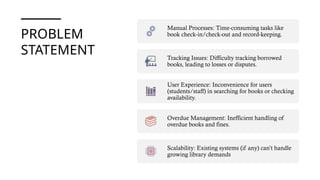
PROBLEM
STATEMENT
Manual Processes: Time-consuming tasks like
book check-in/check-out and record-keeping.
Tracking Issues: Difficulty tracking borrowed
books, leading to losses or disputes.
User Experience: Inconvenience for users
(students/staff) in searching for books or checking
availability.
Overdue Management: Inefficient handling of
overdue books and fines.
Scalability: Existing systems (if any) can’t handle
growing library demands
REQUIREMENT ANALYSIS
Divided into 3
sections:
Functional
Requirements
(What the
system must do)
Non-Functional
Requirements
(System
qualities)
Constraints
(Limitations &
challenges)
FUNCTIONAL
REQUIREMENTS
📚 Book Management
• Add new books.
• Update book details.
• Delete books.
• Search for books.
• View all books.
• Display book availability (issued or
available).
FUNCTIONAL REQUIREMENTS
👤 Student (User) Management
Add new students.
Update student details.
Delete students.
Search for students.
View all students.
FUNCTIONAL
REQUIREMENTS
Borrow/Return System
• View available books for issuing.
• Search for available books.
• Issue books to students.
• Return books.
• View issued books.
NON-
FUNCTIONAL
REQUIREMENT
S
1. Scalability: Handle large volumes of books and
users efficiently.
2. UI/UX Design: Simple, user-friendly, and
responsive.
3. Security: Encrypted storage, role-based access.
4. Performance: Fast query responses and
optimized operations.
5. Data Backup & Recovery: Prevent data loss
with regular backups.
6. Platform Compatibility: Accessible via desktop,
mobile, and web.
CONSTRAINTS
Time Constraint – Project must be completed by end of the
semester. Also, can’t invest too much time on the project.
Team Experience – First time developing software, with
varying programming skills among team members.
Team Collaboration – First time working as a team; potential
coordination and communication challenges.
Technology Constraint – Must be desktop/Android-based
development instead of web-based.
Learning Curve – Need to quickly learn UML, database
design, and software architecture while developing.
Scope Management – Balancing project scope to ensure
functional completion within time limits
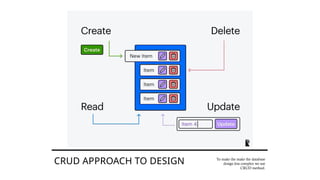
CRUD APPROACH TO DESIGN To make the make the database
design less complex we use
CRUD method.
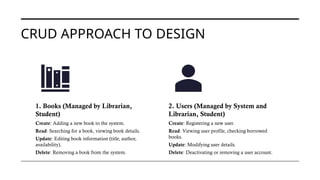
CRUD APPROACH TO DESIGN
1. Books (Managed by Librarian,
Student)
Create: Adding a new book to the system.
Read: Searching for a book, viewing book details.
Update: Editing book information (title, author,
availability).
Delete: Removing a book from the system.
2. Users (Managed by System and
Librarian, Student)
Create: Registering a new user.
Read: Viewing user profile, checking borrowed
books.
Update: Modifying user details.
Delete: Deactivating or removing a user account.
CRUD APPROACH TO DESIGN
3. Transactions (Reservations,
Borrowing, Fines)
Create: Reserving or borrowing a book.
Read: Checking due dates, reservation status,
and fines.
Update: Renewing a book, updating fine
status.
Delete: Canceling a reservation.
4. Notifications (Handled by
Database)
Create: Generating overdue or reservation
notifications.
Read: Retrieving past notifications.
Update: Modifying notification settings.
Delete: Removing expired notifications.
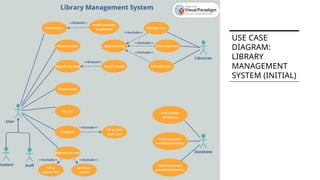
USE CASE
DIAGRAM:
LIBRARY
MANAGEMENT
SYSTEM (INITIAL)
ACTIVITY
DIAGRAM
(INITIAL)
CLASS
DIAGRAM
(INITIAL)
DEPLOYMENT
DIAGRAM
TECHNOLOGY STACK
Java and MySQL
Why Java?
• Object-oriented, secure, and platform-independent.
• Rich libraries for GUI (JavaFX, Swing) and backend (JDBC, Hibernate).
• Strong community support and scalability.
• We’ve more experience in this language than the alternatives
TECHNOLOGY STACK
Why MySQL?
• Reliable, efficient, and widely used relational database.
• Works well with Java using JDBC (Java Database Connectivity).
How Java & MySQL Work Together?
• Java application (frontend/backend) interacts with MySQL using JDBC.
• Queries are executed to fetch, insert, update, and delete data.
• Data is stored in MySQL tables for books, students, and transactions.
TECHNOLOGY STACK
System Architecture Overview
Java Application (GUI or Backend) Connects to
→ → MySQL Database
• Librarian/Student interacts via Java UI Queries run on
→ MySQL
Thank You!

Library-Management-System_software_dev_approach.pptx

  • 1.
  • 2.
    PROBLEM STATEMENT Manual Processes: Time-consumingtasks like book check-in/check-out and record-keeping. Tracking Issues: Difficulty tracking borrowed books, leading to losses or disputes. User Experience: Inconvenience for users (students/staff) in searching for books or checking availability. Overdue Management: Inefficient handling of overdue books and fines. Scalability: Existing systems (if any) can’t handle growing library demands
  • 3.
    REQUIREMENT ANALYSIS Divided into3 sections: Functional Requirements (What the system must do) Non-Functional Requirements (System qualities) Constraints (Limitations & challenges)
  • 4.
    FUNCTIONAL REQUIREMENTS 📚 Book Management •Add new books. • Update book details. • Delete books. • Search for books. • View all books. • Display book availability (issued or available).
  • 5.
    FUNCTIONAL REQUIREMENTS 👤 Student(User) Management Add new students. Update student details. Delete students. Search for students. View all students.
  • 6.
    FUNCTIONAL REQUIREMENTS Borrow/Return System • Viewavailable books for issuing. • Search for available books. • Issue books to students. • Return books. • View issued books.
  • 7.
    NON- FUNCTIONAL REQUIREMENT S 1. Scalability: Handlelarge volumes of books and users efficiently. 2. UI/UX Design: Simple, user-friendly, and responsive. 3. Security: Encrypted storage, role-based access. 4. Performance: Fast query responses and optimized operations. 5. Data Backup & Recovery: Prevent data loss with regular backups. 6. Platform Compatibility: Accessible via desktop, mobile, and web.
  • 8.
    CONSTRAINTS Time Constraint –Project must be completed by end of the semester. Also, can’t invest too much time on the project. Team Experience – First time developing software, with varying programming skills among team members. Team Collaboration – First time working as a team; potential coordination and communication challenges. Technology Constraint – Must be desktop/Android-based development instead of web-based. Learning Curve – Need to quickly learn UML, database design, and software architecture while developing. Scope Management – Balancing project scope to ensure functional completion within time limits
  • 9.
    CRUD APPROACH TODESIGN To make the make the database design less complex we use CRUD method.
  • 10.
    CRUD APPROACH TODESIGN 1. Books (Managed by Librarian, Student) Create: Adding a new book to the system. Read: Searching for a book, viewing book details. Update: Editing book information (title, author, availability). Delete: Removing a book from the system. 2. Users (Managed by System and Librarian, Student) Create: Registering a new user. Read: Viewing user profile, checking borrowed books. Update: Modifying user details. Delete: Deactivating or removing a user account.
  • 11.
    CRUD APPROACH TODESIGN 3. Transactions (Reservations, Borrowing, Fines) Create: Reserving or borrowing a book. Read: Checking due dates, reservation status, and fines. Update: Renewing a book, updating fine status. Delete: Canceling a reservation. 4. Notifications (Handled by Database) Create: Generating overdue or reservation notifications. Read: Retrieving past notifications. Update: Modifying notification settings. Delete: Removing expired notifications.
  • 12.
  • 13.
  • 14.
  • 15.
  • 16.
    TECHNOLOGY STACK Java andMySQL Why Java? • Object-oriented, secure, and platform-independent. • Rich libraries for GUI (JavaFX, Swing) and backend (JDBC, Hibernate). • Strong community support and scalability. • We’ve more experience in this language than the alternatives
  • 17.
    TECHNOLOGY STACK Why MySQL? •Reliable, efficient, and widely used relational database. • Works well with Java using JDBC (Java Database Connectivity). How Java & MySQL Work Together? • Java application (frontend/backend) interacts with MySQL using JDBC. • Queries are executed to fetch, insert, update, and delete data. • Data is stored in MySQL tables for books, students, and transactions.
  • 18.
    TECHNOLOGY STACK System ArchitectureOverview Java Application (GUI or Backend) Connects to → → MySQL Database • Librarian/Student interacts via Java UI Queries run on → MySQL Thank You!