LIBGUIDES:
USING THE DATA
M E L A N I E PA R L E T T E - S T E W A R T, B L E N D E D L E A R N I N G L I B R A R I A N
U N I V E R S I T Y O F G U E L P H
@ M PA R S T E W
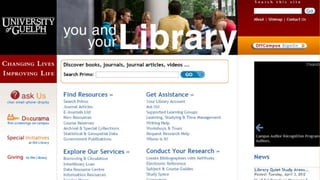
website redesign
2013
WHAT WE WANTED:
•A place where students could “get started”
•A consistent look and feel
•User-friendly navigation
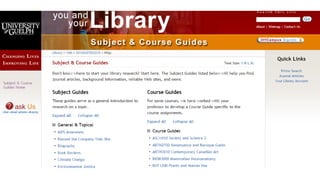
WHAT WE ENDED UP WITH (ROUND 1):
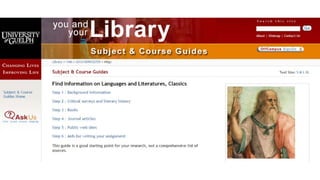
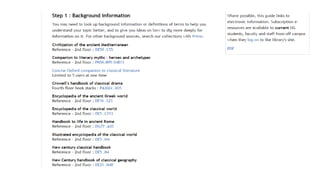
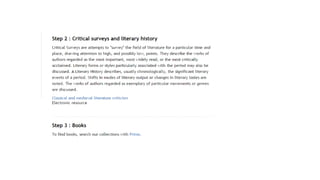
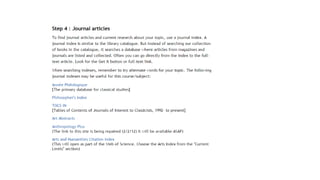
• Templated Course Guides
• Templated Subject Guides directly tied to all course areas
(i.e. HIST Subject guides for HIST (History courses)
• Topic Guides to meet the other needs (and allow for
consistent support of other needs such as APA,Time
Management, Finding Images)
• Controlled Language (HackYour Learning, CiteYour
Sources)
LESSONS LEARNED
•Tabs were confusing (people weren’t clicking
through to the second tab)
•Needed to simplify the content even more
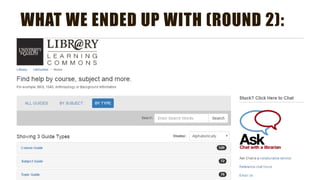
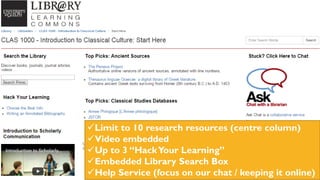
WHAT WE ENDED UP WITH (ROUND 2):
Limit to 10 research resources (centre column)
Video embedded
Up to 3 “HackYour Learning”
Embedded Library Search Box
Help Service (focus on our chat / keeping it online)
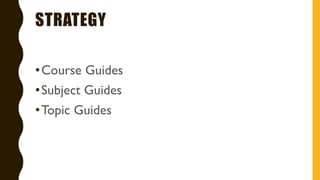
STRATEGY
•Course Guides
•Subject Guides
•Topic Guides
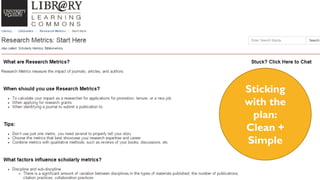
Sticking
with the
plan:
Clean +
Simple
DATA
G O O G L E / S P R I N G S H A R E A N A LY T I C S +
U X T E S T I N G
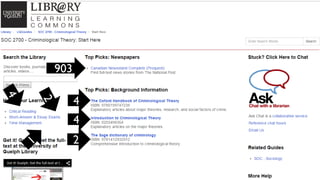
903
4
2
4
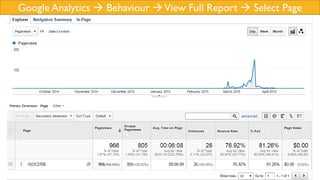
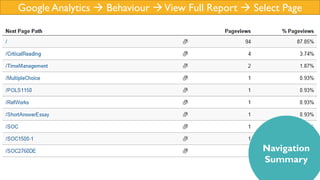
Google Analytics  Behaviour View Full Report  Select Page
Navigation
Summary
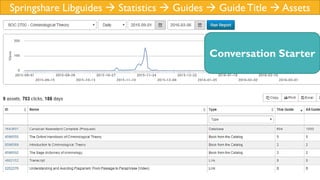
Springshare Libguides  Statistics  Guides  GuideTitle  Assets
Conversation Starter
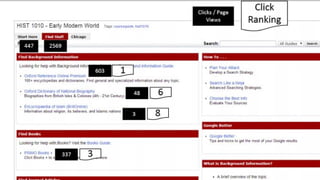
WHAT CAN WE LEARN FROM THIS?
•Popular links (remove the less popular /
distracting)
•Order matters
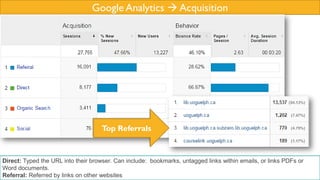
Google Analytics  Acquisition
Direct: Typed the URL into their browser. Can include: bookmarks, untagged links within emails, or links PDFs or
Word documents.
Referral: Referred by links on other websites
Top Referrals
WHAT CAN WE LEARN FROM THIS?
• Where our users are coming from
• Common access points to use / incorporate into
promotion
UX STUDY RESULTS
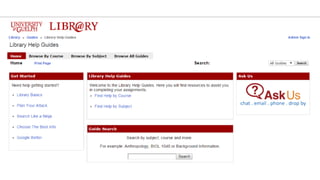
• Students were unaware of the function of our “Ask Us”
icon
• Increase scannability (they wanted larger font sizes)
• “Library Guides” is an unclear name for our LibGuides
instance
• Create or improve descriptions
HOW HAS THIS IMPACTED OUR
STRATEGY?
• Working with web librarian to improve web site linking
and adjust font sizes / CSS code
• Small Library Guides team
– Course guide requests go through a form (maintain
consistency)
• Focus on creating DIRECTIVE not DESCRIPTIVE
descriptions under resources (limited word count)
NEXT STEPS
• 100% of undergraduate course guides created
–Outreach to faculty, gathering course outlines to make better
• Continue to use the data to make changes to our template
–Google Analytics and User Experience (UX) Testing
• Increase ourTopic Guide content
–Interlinking is what makes the guides effective
–As new topics come up, working with academic unit partners
• Getting Buy In From Staff
–Teaching to the guides increases student use

LibGuides: Using the Data

  • 1.
    LIBGUIDES: USING THE DATA ME L A N I E PA R L E T T E - S T E W A R T, B L E N D E D L E A R N I N G L I B R A R I A N U N I V E R S I T Y O F G U E L P H @ M PA R S T E W
  • 10.
  • 11.
  • 12.
    WHAT WE WANTED: •Aplace where students could “get started” •A consistent look and feel •User-friendly navigation
  • 14.
    WHAT WE ENDEDUP WITH (ROUND 1): • Templated Course Guides • Templated Subject Guides directly tied to all course areas (i.e. HIST Subject guides for HIST (History courses) • Topic Guides to meet the other needs (and allow for consistent support of other needs such as APA,Time Management, Finding Images) • Controlled Language (HackYour Learning, CiteYour Sources)
  • 17.
    LESSONS LEARNED •Tabs wereconfusing (people weren’t clicking through to the second tab) •Needed to simplify the content even more
  • 18.
    WHAT WE ENDEDUP WITH (ROUND 2):
  • 19.
    Limit to 10research resources (centre column) Video embedded Up to 3 “HackYour Learning” Embedded Library Search Box Help Service (focus on our chat / keeping it online)
  • 20.
  • 21.
  • 22.
    DATA G O OG L E / S P R I N G S H A R E A N A LY T I C S + U X T E S T I N G
  • 23.
  • 24.
    Google Analytics Behaviour View Full Report  Select Page
  • 25.
    Google Analytics Behaviour View Full Report  Select Page Navigation Summary
  • 26.
    Springshare Libguides Statistics  Guides  GuideTitle  Assets Conversation Starter
  • 27.
    WHAT CAN WELEARN FROM THIS? •Popular links (remove the less popular / distracting) •Order matters
  • 28.
    Google Analytics Acquisition Direct: Typed the URL into their browser. Can include: bookmarks, untagged links within emails, or links PDFs or Word documents. Referral: Referred by links on other websites Top Referrals
  • 29.
    WHAT CAN WELEARN FROM THIS? • Where our users are coming from • Common access points to use / incorporate into promotion
  • 30.
    UX STUDY RESULTS •Students were unaware of the function of our “Ask Us” icon • Increase scannability (they wanted larger font sizes) • “Library Guides” is an unclear name for our LibGuides instance • Create or improve descriptions
  • 31.
    HOW HAS THISIMPACTED OUR STRATEGY? • Working with web librarian to improve web site linking and adjust font sizes / CSS code • Small Library Guides team – Course guide requests go through a form (maintain consistency) • Focus on creating DIRECTIVE not DESCRIPTIVE descriptions under resources (limited word count)
  • 32.
    NEXT STEPS • 100%of undergraduate course guides created –Outreach to faculty, gathering course outlines to make better • Continue to use the data to make changes to our template –Google Analytics and User Experience (UX) Testing • Increase ourTopic Guide content –Interlinking is what makes the guides effective –As new topics come up, working with academic unit partners • Getting Buy In From Staff –Teaching to the guides increases student use