Leveraging Alf for SysML
Part 1: Better Simulation Modeling
Copyright © 2019 Ed Seidewitz / Model Driven Solutions, Inc.
Ed Seidewitz
Model Driven Solutions, Inc. ● http://www.modeldriven.com
ed-s@modeldriven.com ● @Seidewitz
http://slideshare.net/seidewitz
Page 2
Goals
Part 1 –Simulation Modeling
• Learn the basics of the Alf action language for executable modeling.
• Learn how to use Alf as an action language in SysML models.
• Practice executing simulations of models that use Alf.
Part 2 – Trade Study Modeling
• Learn how to use the Trade Study Pattern.
• Use Alf together with parametric constraints in SysML models.
• Use simulation models in trade studies.
Copyright © 2019 Ed Seidewitz / Model Driven Solutions, Inc.
Page 3
Prerequisites
• Participant
– Knowledge of SysML modeling using MagicDraw or Cameo System Modeler
– Some experience with model execution using Cameo Simulation Toolkit
– Introductory understanding of using Alf with SysML (e.g., from Part 1 of this tutorial)
• System (for hands-on exercises)
– Cameo System Modeler 19.0 SP2 (or MagicDraw and SysML)
– Cameo Simulation Toolkit 19.0 SP2 (included in CSM Enterprise Edition)
– Alf Plugin 19.0 SP2
• Slides: Available at https://www.slideshare.net/seidewitz
Copyright © 2019 Ed Seidewitz / Model Driven Solutions, Inc.
Page 4
4
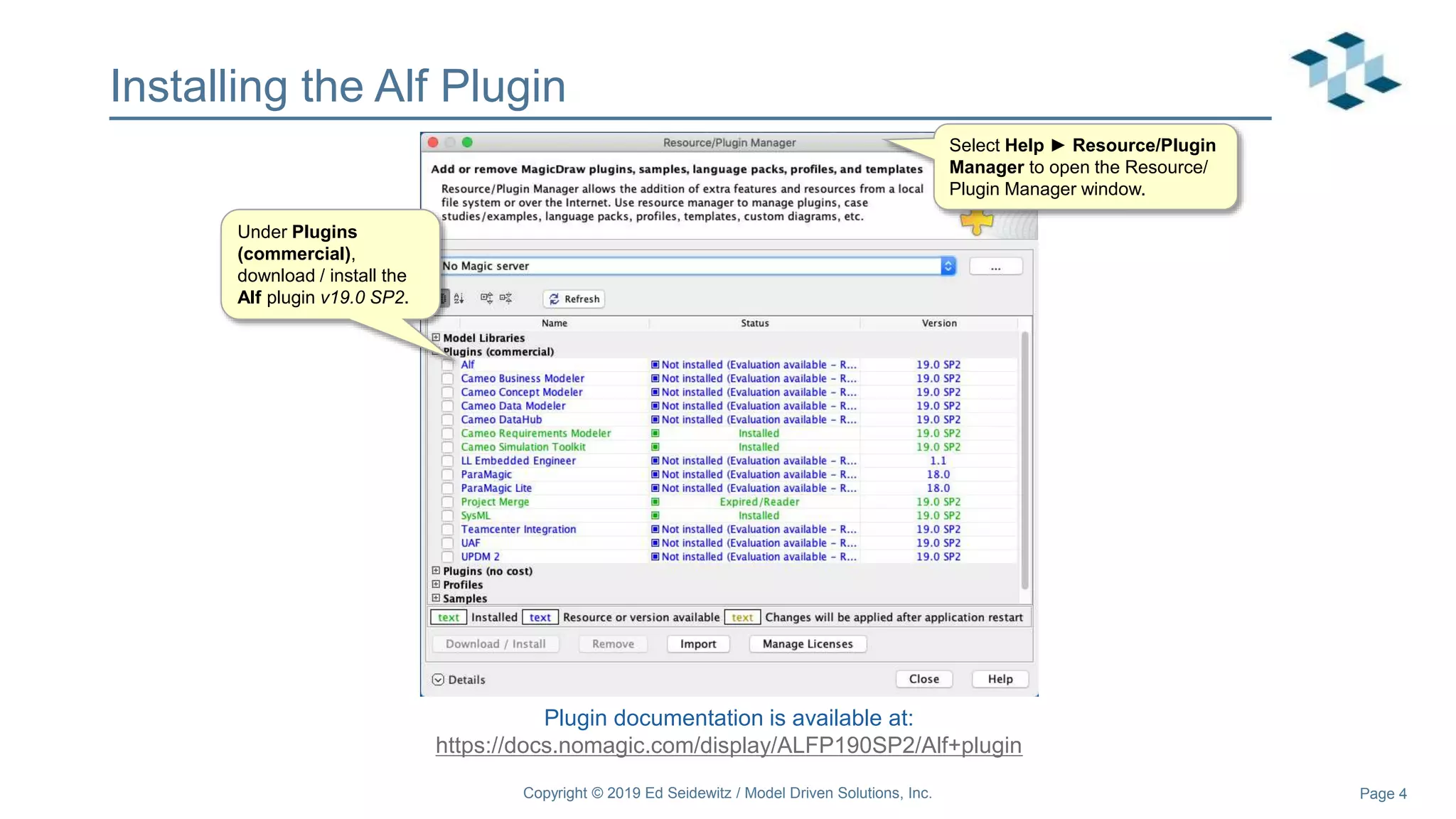
Installing the Alf Plugin
Plugin documentation is available at:
https://docs.nomagic.com/display/ALFP190SP2/Alf+plugin
Under Plugins
(commercial),
download / install the
Alf plugin v19.0 SP2.
Select Help ► Resource/Plugin
Manager to open the Resource/
Plugin Manager window.
Copyright © 2019 Ed Seidewitz / Model Driven Solutions, Inc.
Page 5
Background
Copyright © 2019 Ed Seidewitz / Model Driven Solutions, Inc.
Page 6
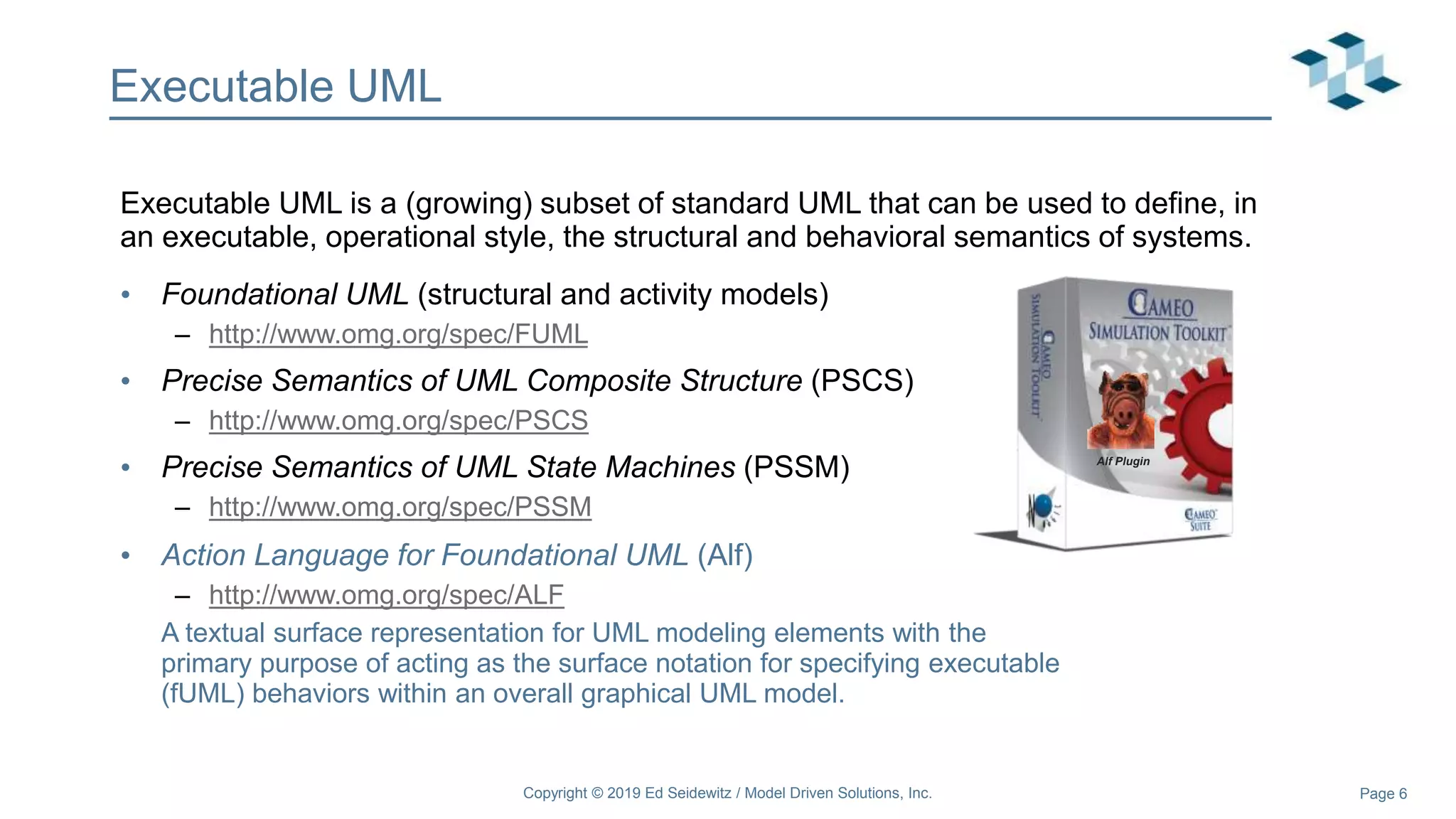
Executable UML
Executable UML is a (growing) subset of standard UML that can be used to define, in
an executable, operational style, the structural and behavioral semantics of systems.
• Foundational UML (structural and activity models)
– http://www.omg.org/spec/FUML
• Precise Semantics of UML Composite Structure (PSCS)
– http://www.omg.org/spec/PSCS
• Precise Semantics of UML State Machines (PSSM)
– http://www.omg.org/spec/PSSM
• Action Language for Foundational UML (Alf)
– http://www.omg.org/spec/ALF
A textual surface representation for UML modeling elements with the
primary purpose of acting as the surface notation for specifying executable
(fUML) behaviors within an overall graphical UML model.
Alf Plugin
Copyright © 2019 Ed Seidewitz / Model Driven Solutions, Inc.
Page 7
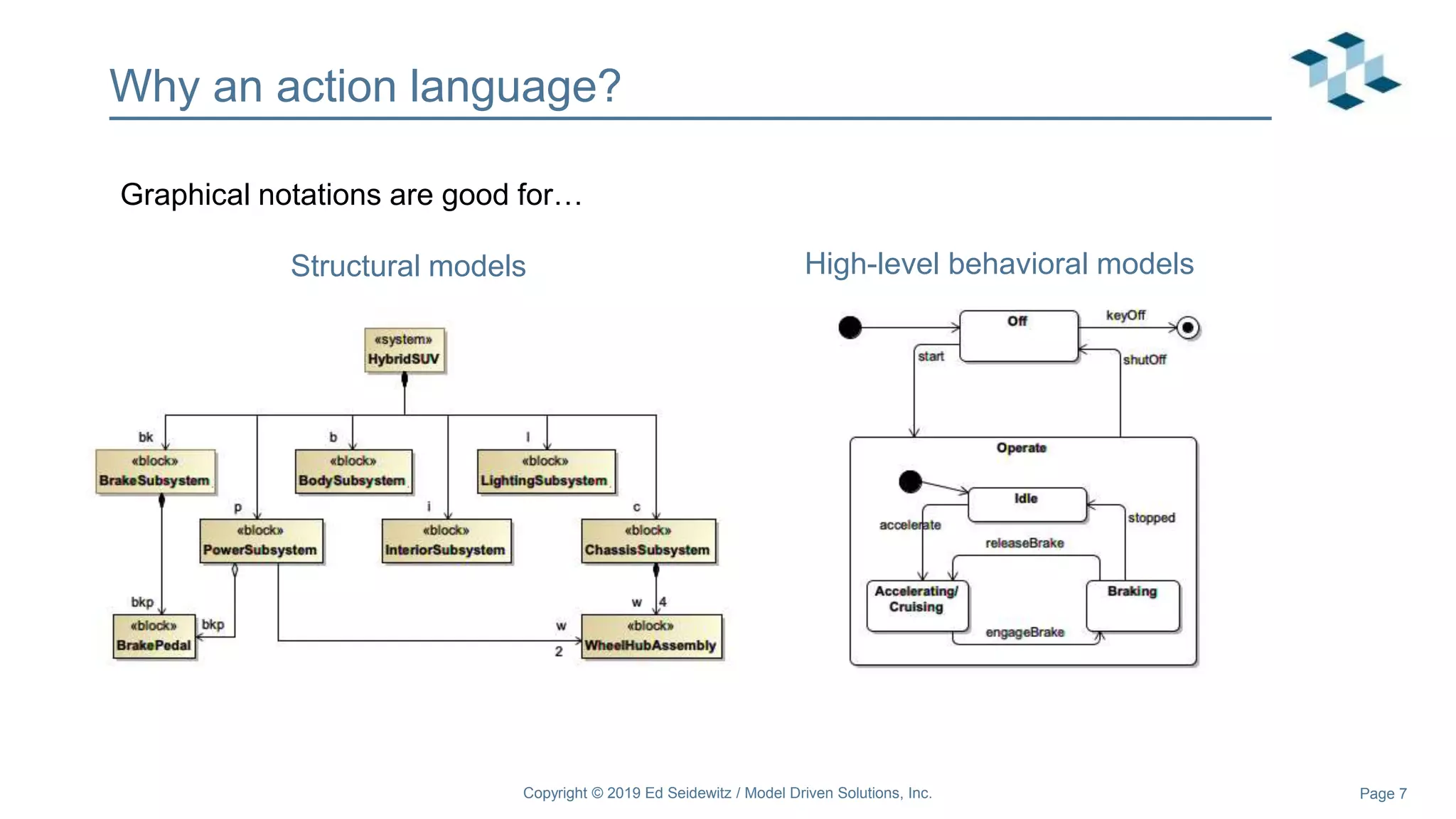
Why an action language?
Graphical notations are good for…
Copyright © 2019 Ed Seidewitz / Model Driven Solutions, Inc.
Structural models High-level behavioral models
Page 8
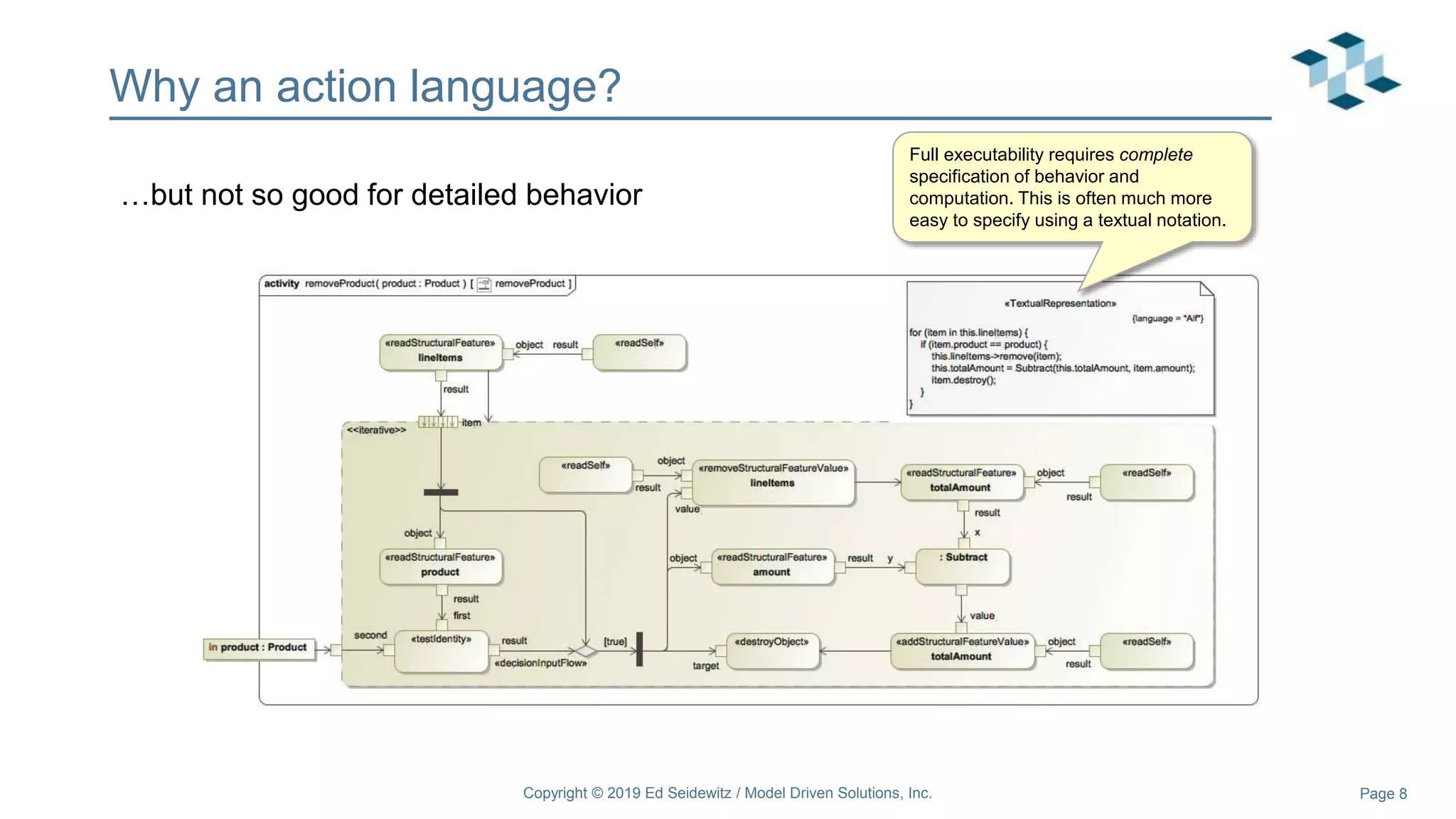
Why an action language?
…but not so good for detailed behavior
Full executability requires complete
specification of behavior and
computation. This is often much more
easy to specify using a textual notation.
Copyright © 2019 Ed Seidewitz / Model Driven Solutions, Inc.
Page 9
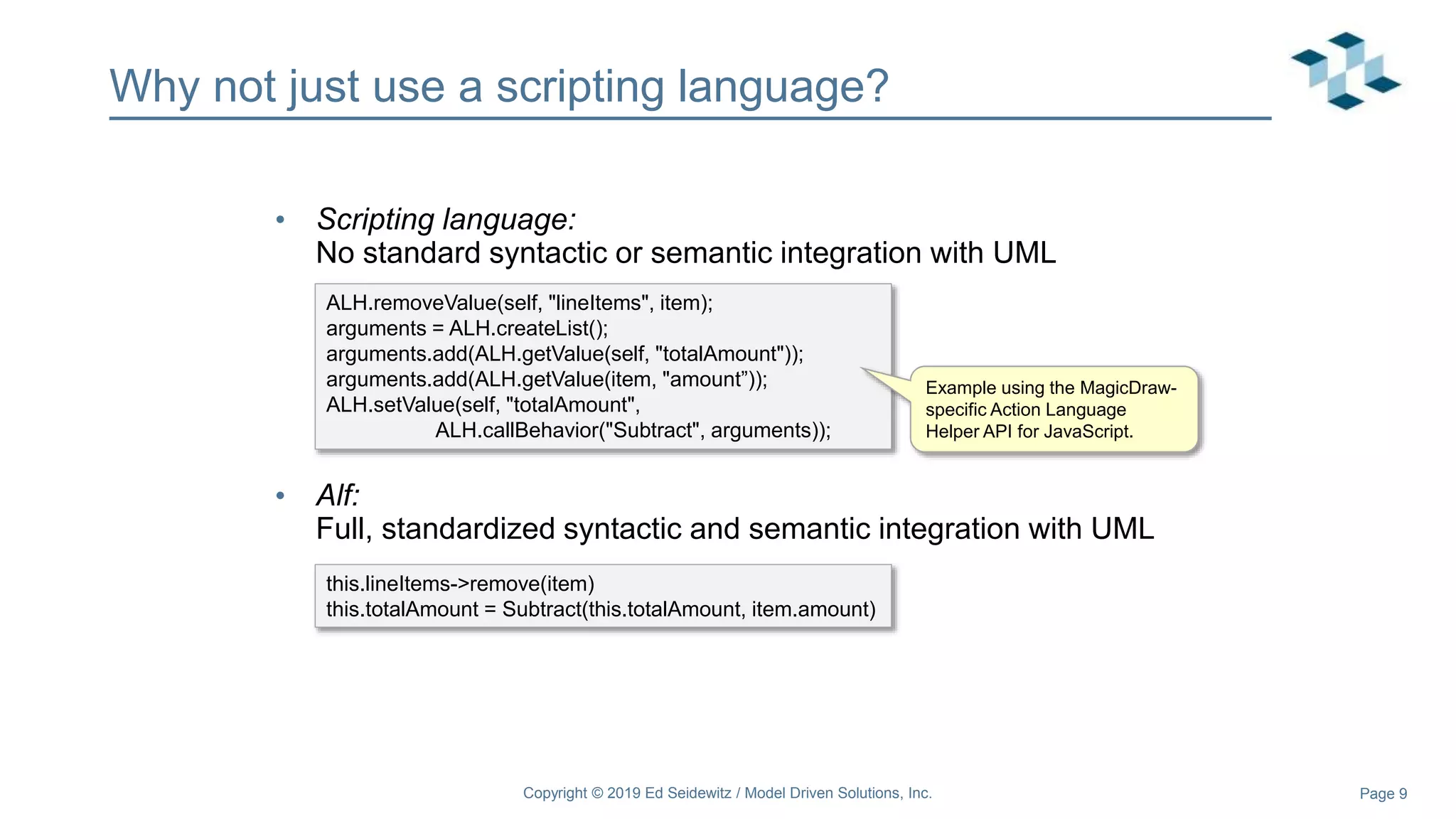
Why not just use a scripting language?
• Scripting language:
No standard syntactic or semantic integration with UML
• Alf:
Full, standardized syntactic and semantic integration with UML
this.lineItems->remove(item)
this.totalAmount = Subtract(this.totalAmount, item.amount)
ALH.removeValue(self, "lineItems", item);
arguments = ALH.createList();
arguments.add(ALH.getValue(self, "totalAmount"));
arguments.add(ALH.getValue(item, "amount”));
ALH.setValue(self, "totalAmount",
ALH.callBehavior("Subtract", arguments));
Example using the MagicDraw-
specific Action Language
Helper API for JavaScript.
Copyright © 2019 Ed Seidewitz / Model Driven Solutions, Inc.
Page 10
Hands On
SysML Hello
Copyright © 2019 Ed Seidewitz / Model Driven Solutions, Inc.
Page 11
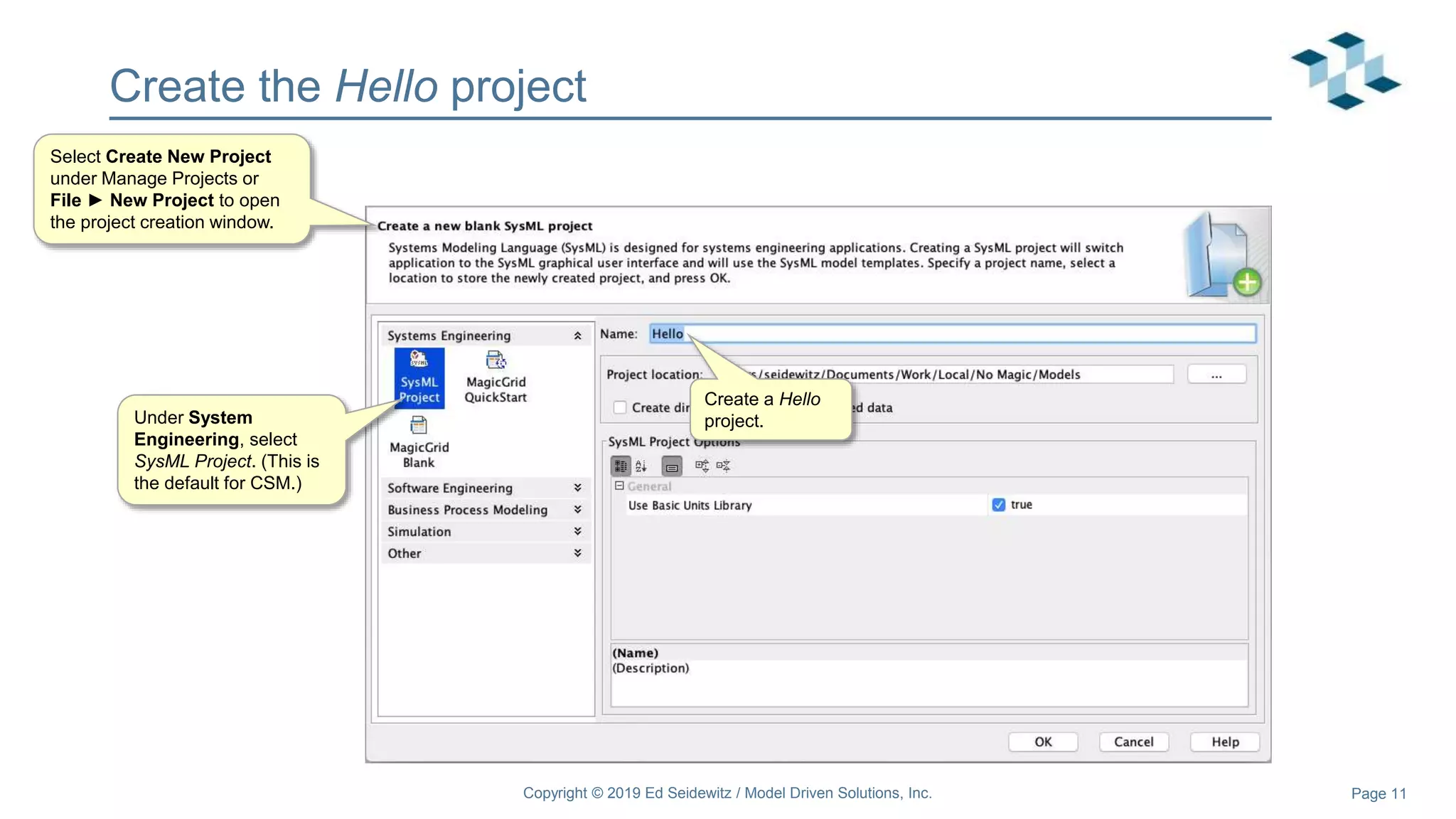
Create the Hello project
Select Create New Project
under Manage Projects or
File ► New Project to open
the project creation window.
Create a Hello
project.
Copyright © 2019 Ed Seidewitz / Model Driven Solutions, Inc.
Under System
Engineering, select
SysML Project. (This is
the default for CSM.)
Page 12
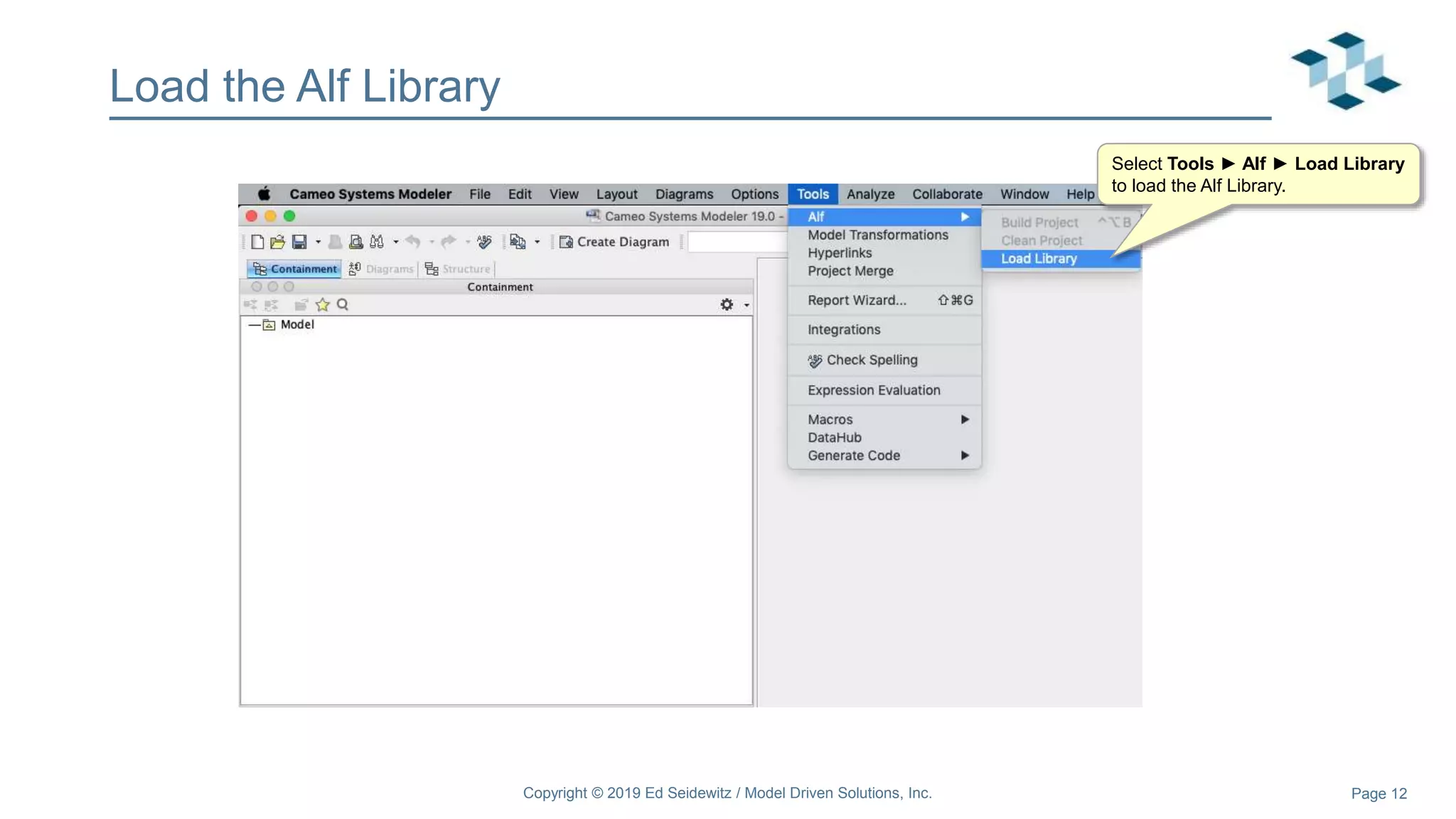
Load the Alf Library
Select Tools ► Alf ► Load Library
to load the Alf Library.
Copyright © 2019 Ed Seidewitz / Model Driven Solutions, Inc.
Page 13
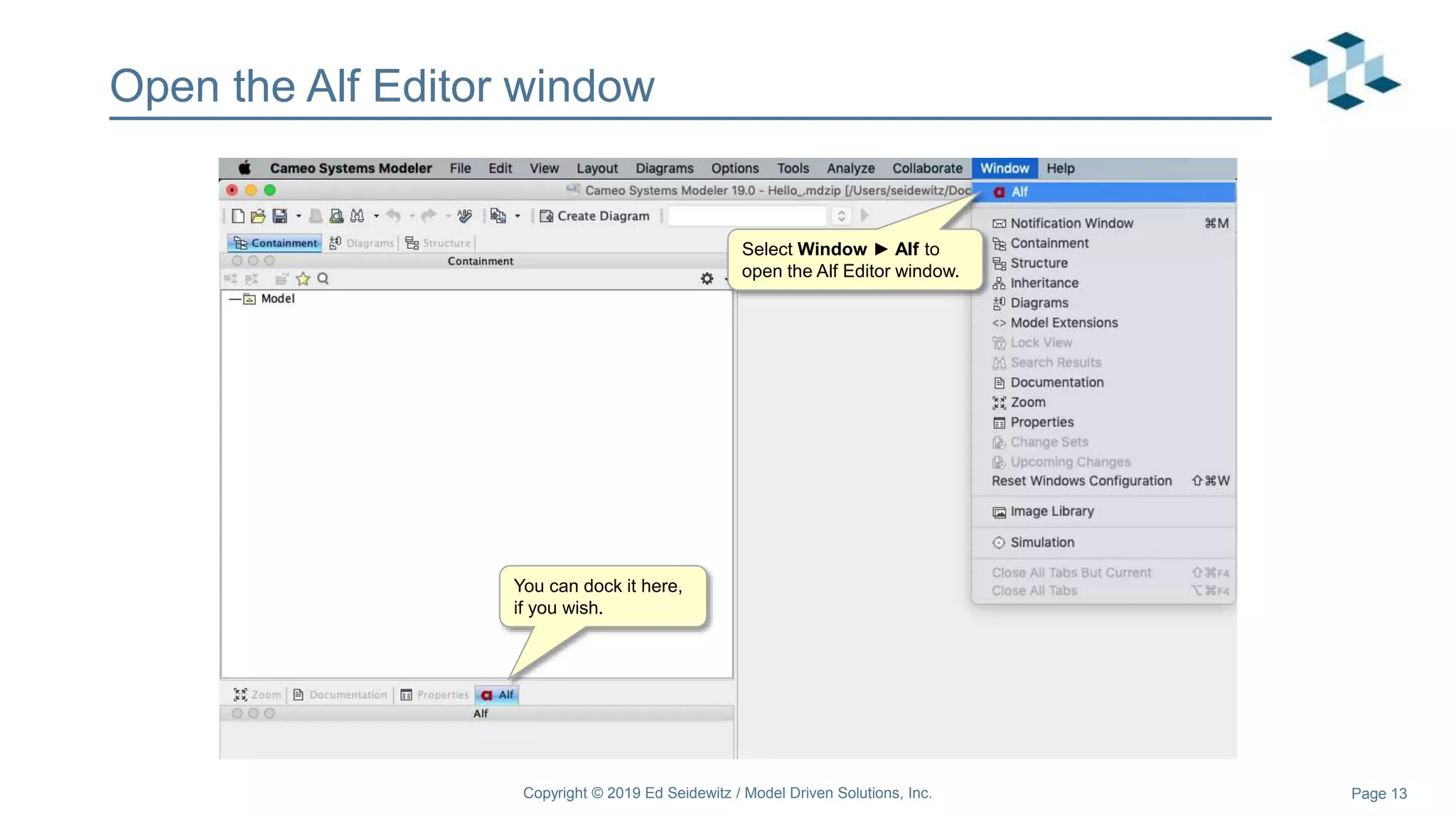
Open the Alf Editor window
Select Window ► Alf to
open the Alf Editor window.
You can dock it here,
if you wish.
Copyright © 2019 Ed Seidewitz / Model Driven Solutions, Inc.
Page 14
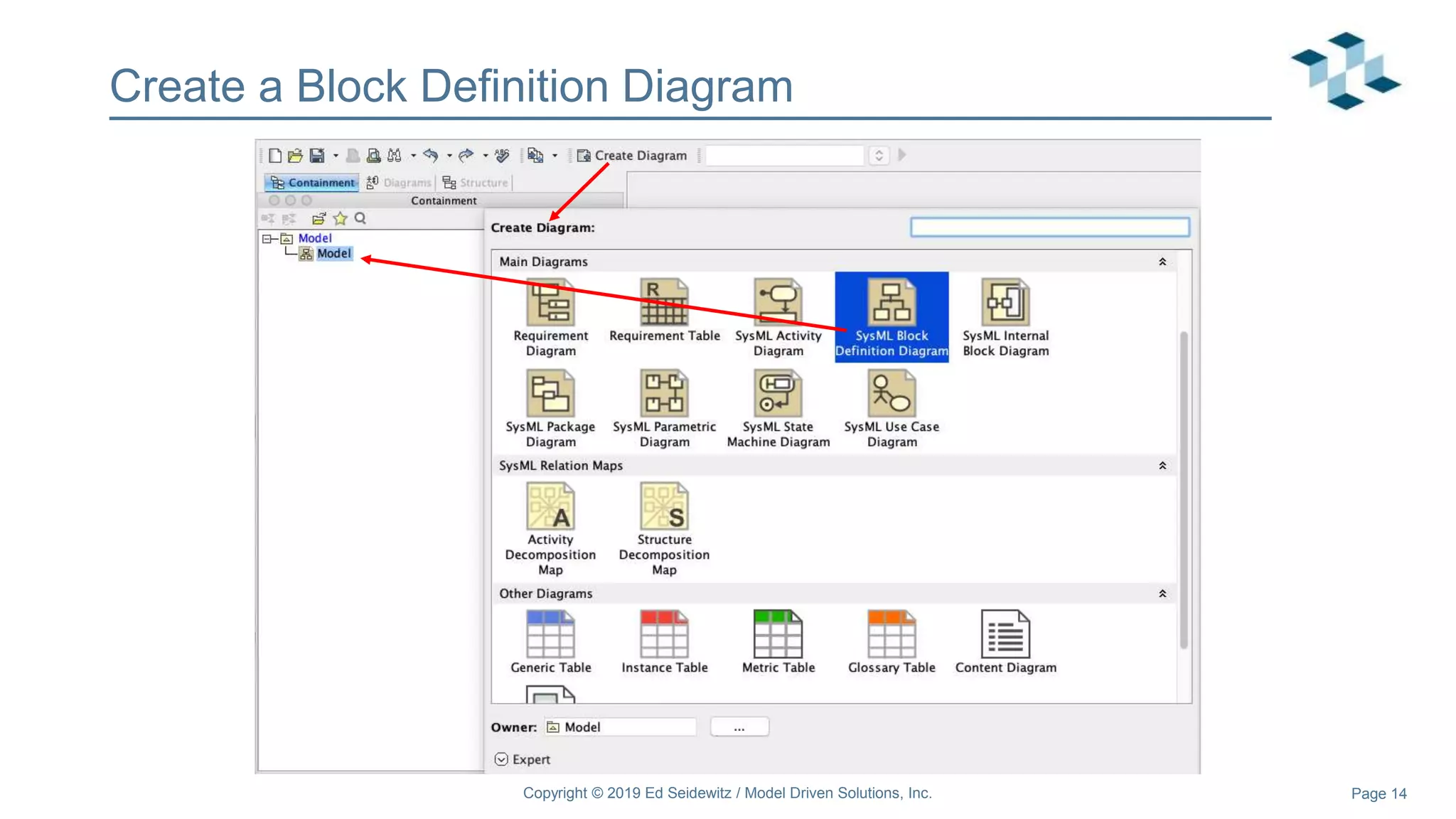
Create a Block Definition Diagram
Copyright © 2019 Ed Seidewitz / Model Driven Solutions, Inc.
Page 15
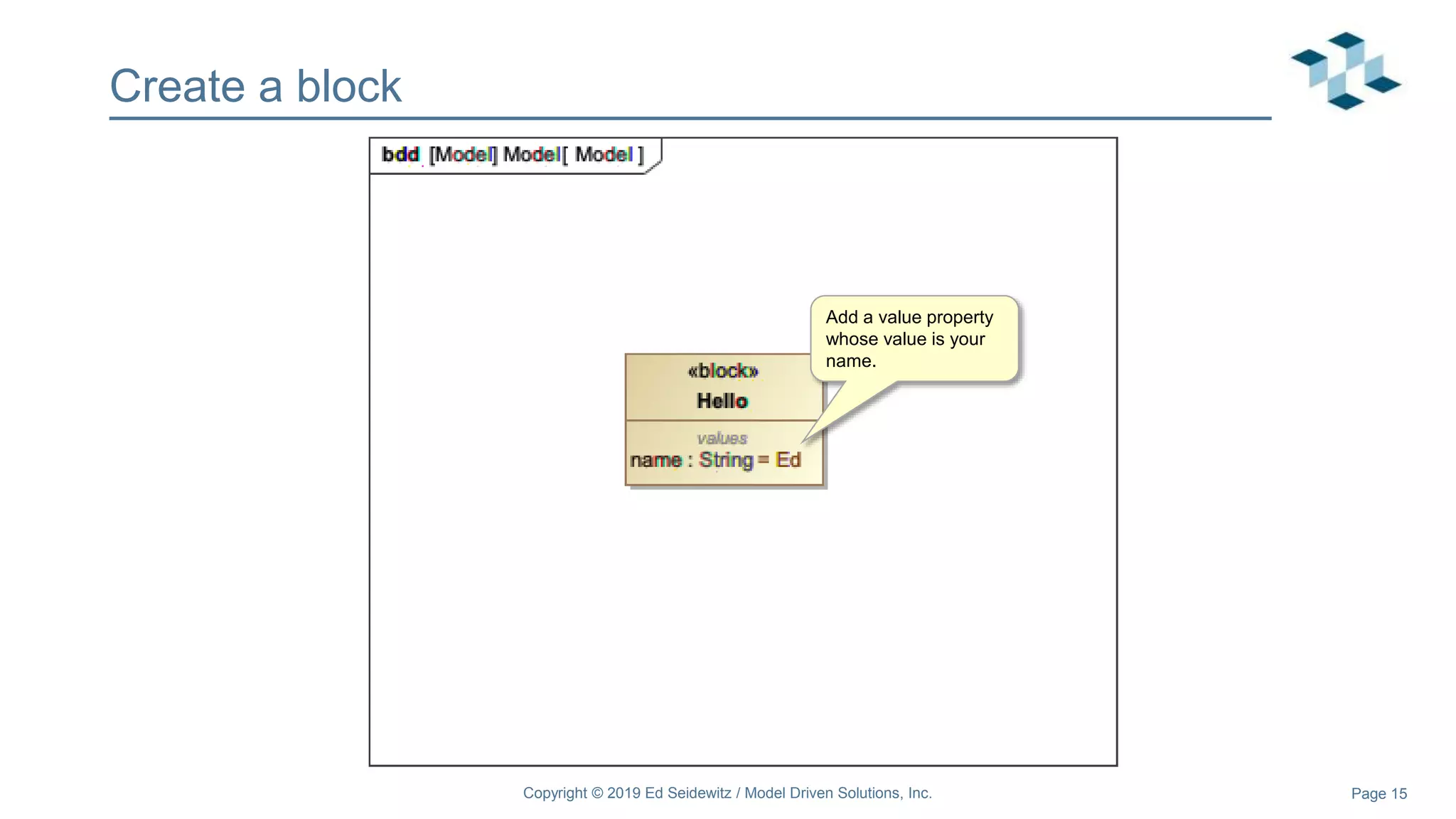
Create a block
Copyright © 2019 Ed Seidewitz / Model Driven Solutions, Inc.
Add a value property
whose value is your
name.
Page 16
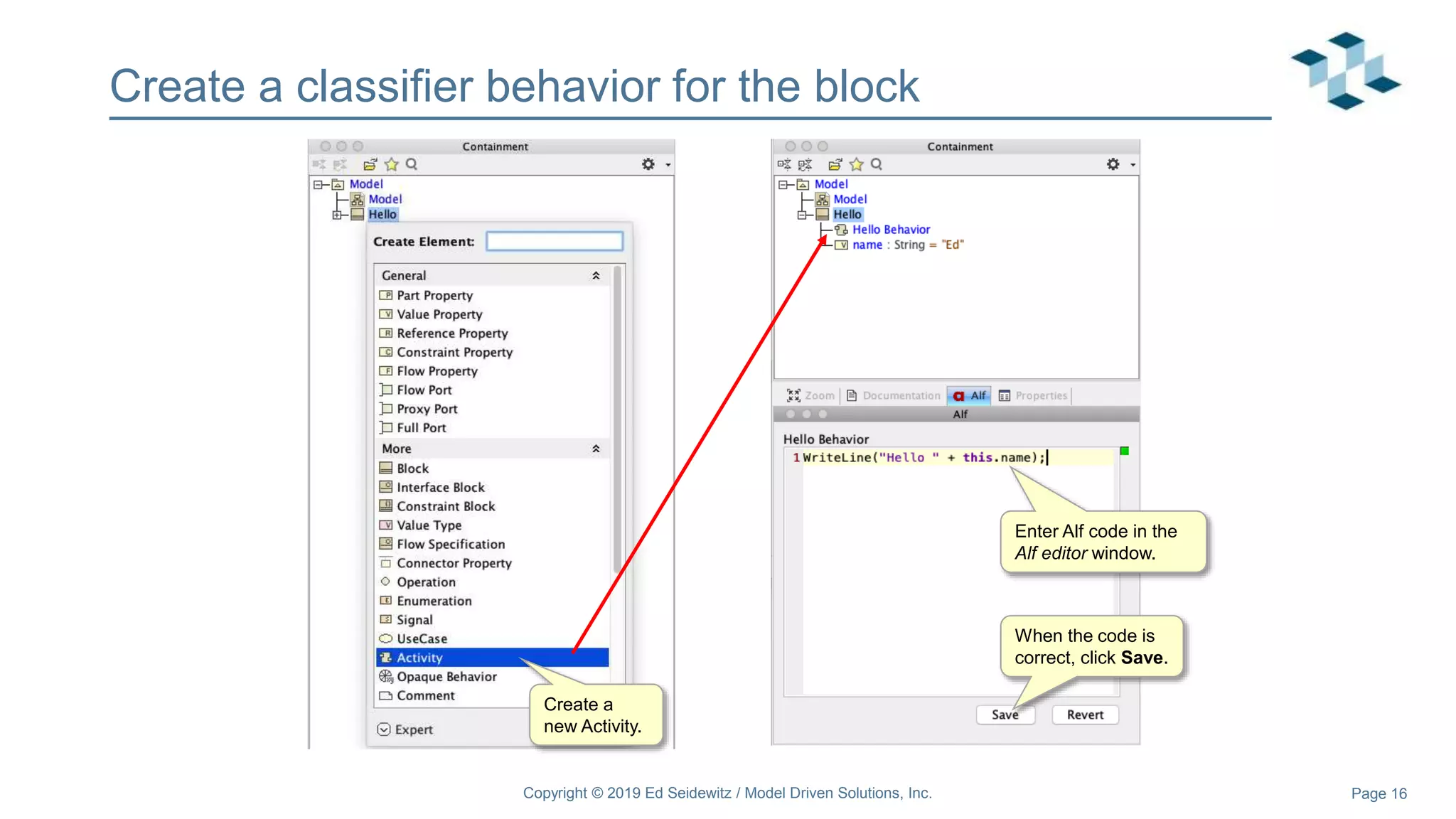
Create a classifier behavior for the block
Copyright © 2019 Ed Seidewitz / Model Driven Solutions, Inc.
Create a
new Activity.
Enter Alf code in the
Alf editor window.
When the code is
correct, click Save.
Page 17
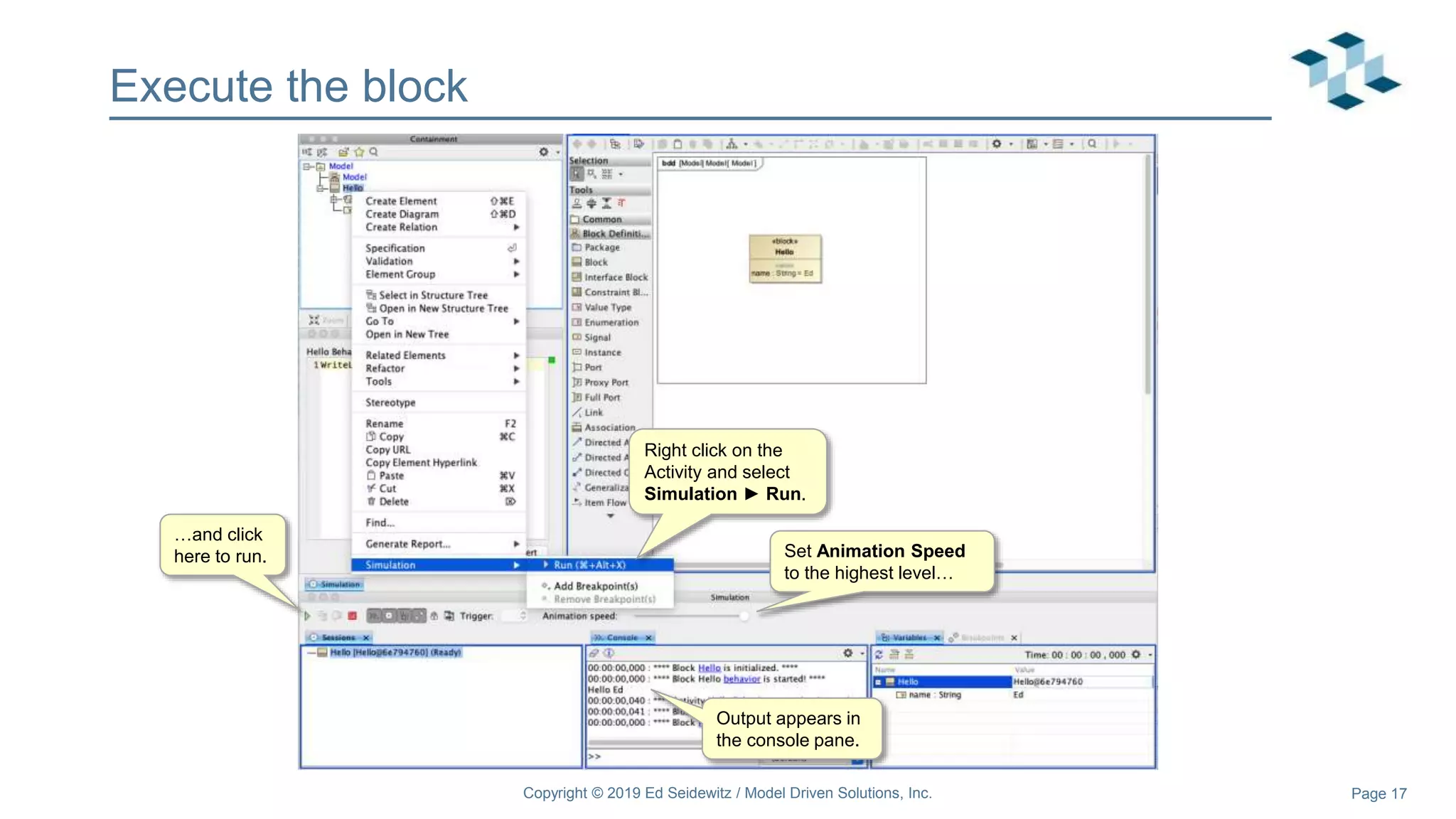
Execute the block
Right click on the
Activity and select
Simulation ► Run.
Set Animation Speed
to the highest level…
…and click
here to run.
Output appears in
the console pane.
Copyright © 2019 Ed Seidewitz / Model Driven Solutions, Inc.
Page 18
Introduction
Copyright © 2019 Ed Seidewitz / Model Driven Solutions, Inc.
Page 19
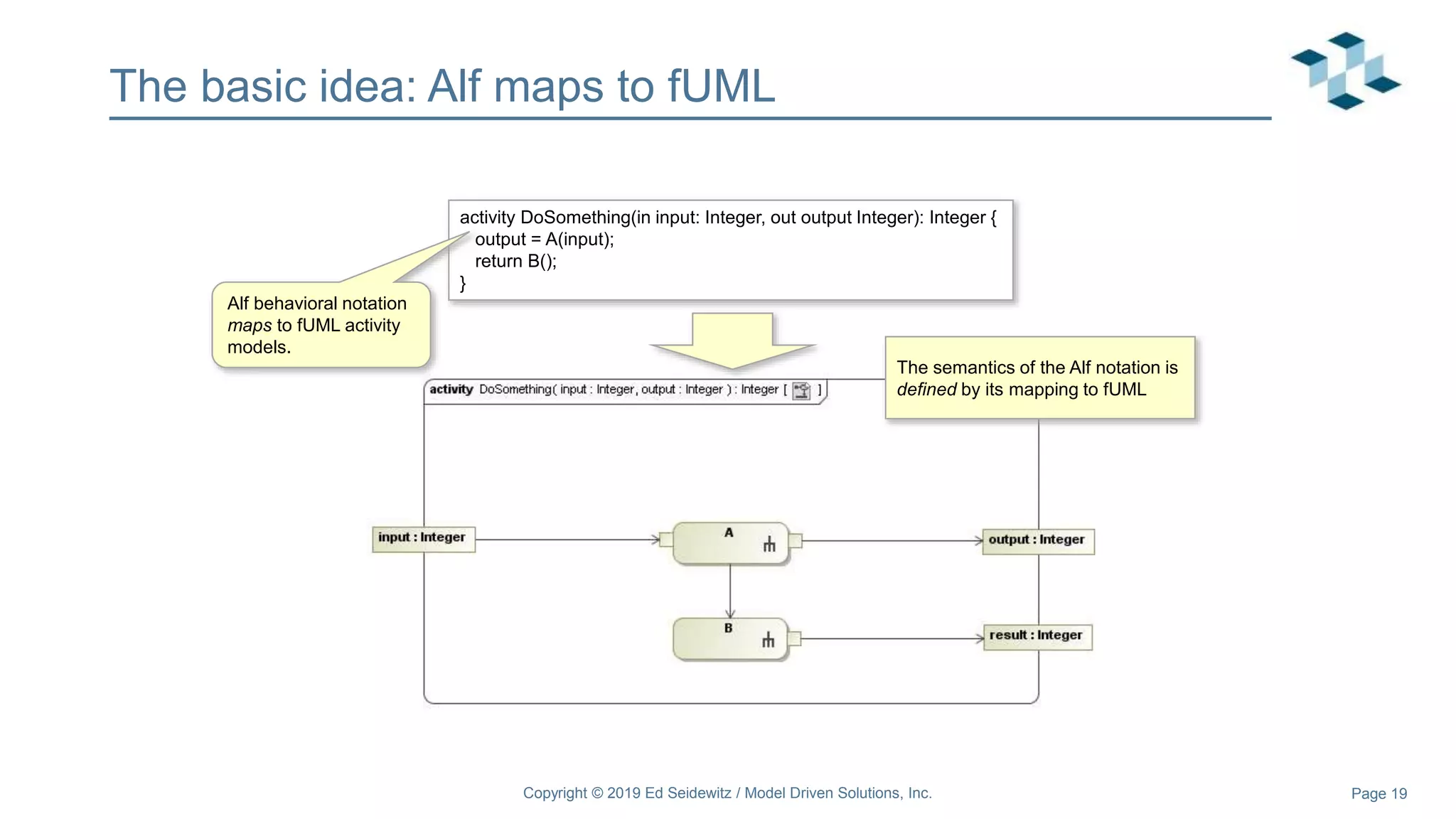
The basic idea: Alf maps to fUML
activity DoSomething(in input: Integer, out output Integer): Integer {
output = A(input);
return B();
}
Alf behavioral notation
maps to fUML activity
models.
The semantics of the Alf notation is
defined by its mapping to fUML
Copyright © 2019 Ed Seidewitz / Model Driven Solutions, Inc.
Page 20
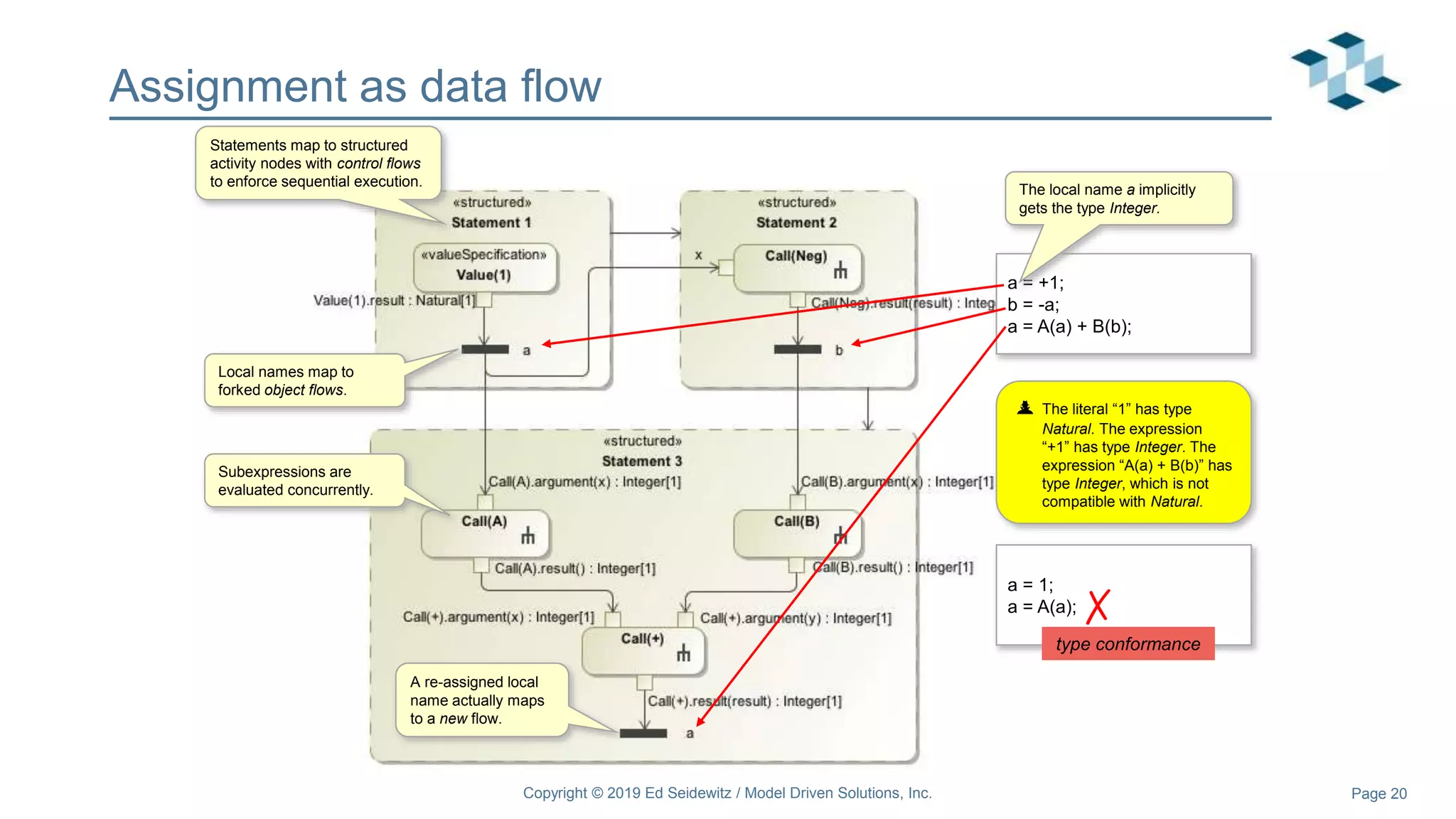
Assignment as data flow
a = +1;
b = -a;
a = A(a) + B(b);
Local names map to
forked object flows.
Subexpressions are
evaluated concurrently.
A re-assigned local
name actually maps
to a new flow.
 The literal “1” has type
Natural. The expression
“+1” has type Integer. The
expression “A(a) + B(b)” has
type Integer, which is not
compatible with Natural.
The local name a implicitly
gets the type Integer.
Statements map to structured
activity nodes with control flows
to enforce sequential execution.
a = 1;
a = A(a); ✗
type conformance
Copyright © 2019 Ed Seidewitz / Model Driven Solutions, Inc.
Page 21
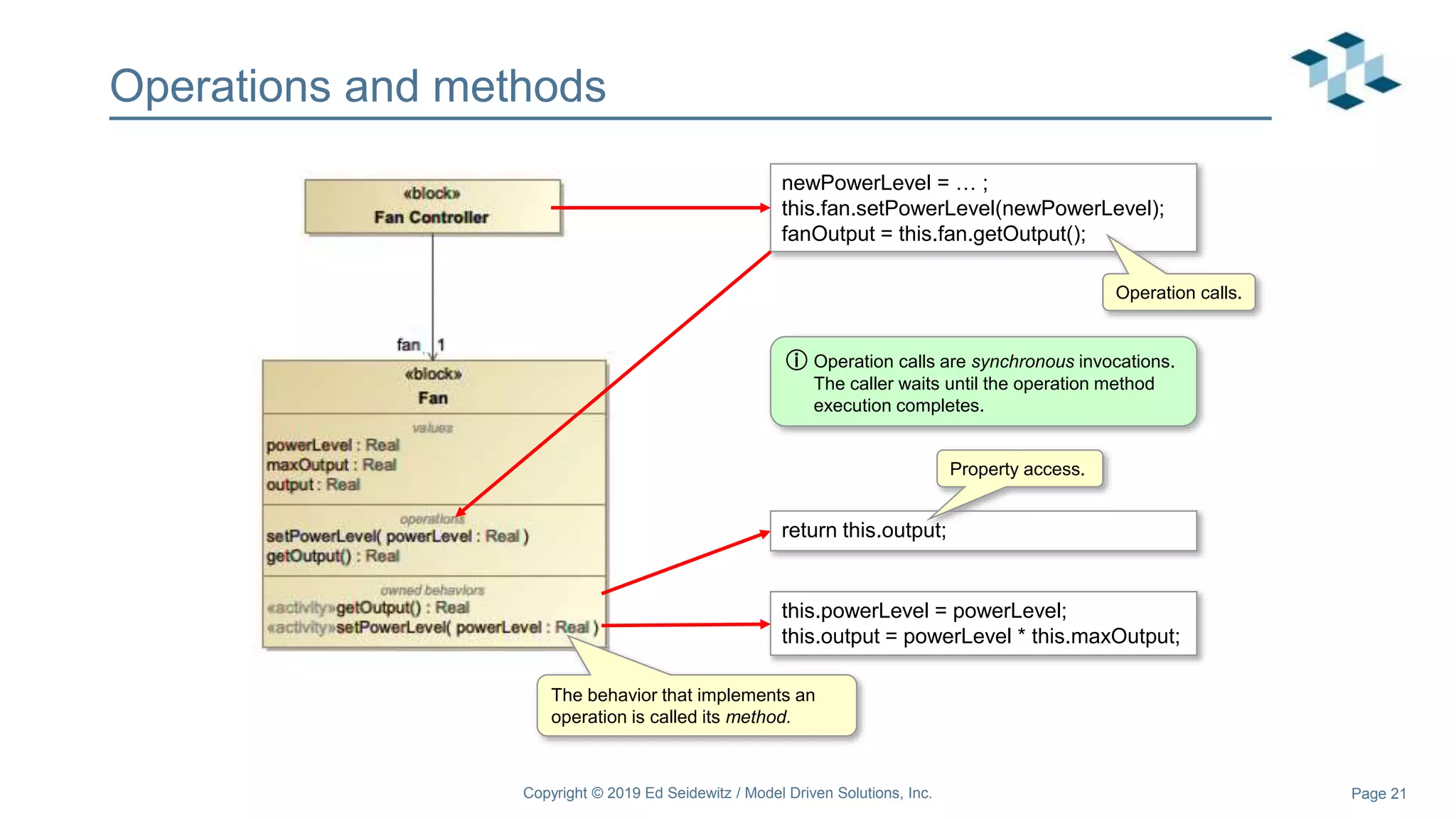
Operations and methods
this.powerLevel = powerLevel;
this.output = powerLevel * this.maxOutput;
return this.output;
newPowerLevel = … ;
this.fan.setPowerLevel(newPowerLevel);
fanOutput = this.fan.getOutput();
Operation calls.
The behavior that implements an
operation is called its method.
Property access.
ⓘ Operation calls are synchronous invocations.
The caller waits until the operation method
execution completes.
Copyright © 2019 Ed Seidewitz / Model Driven Solutions, Inc.
Page 22
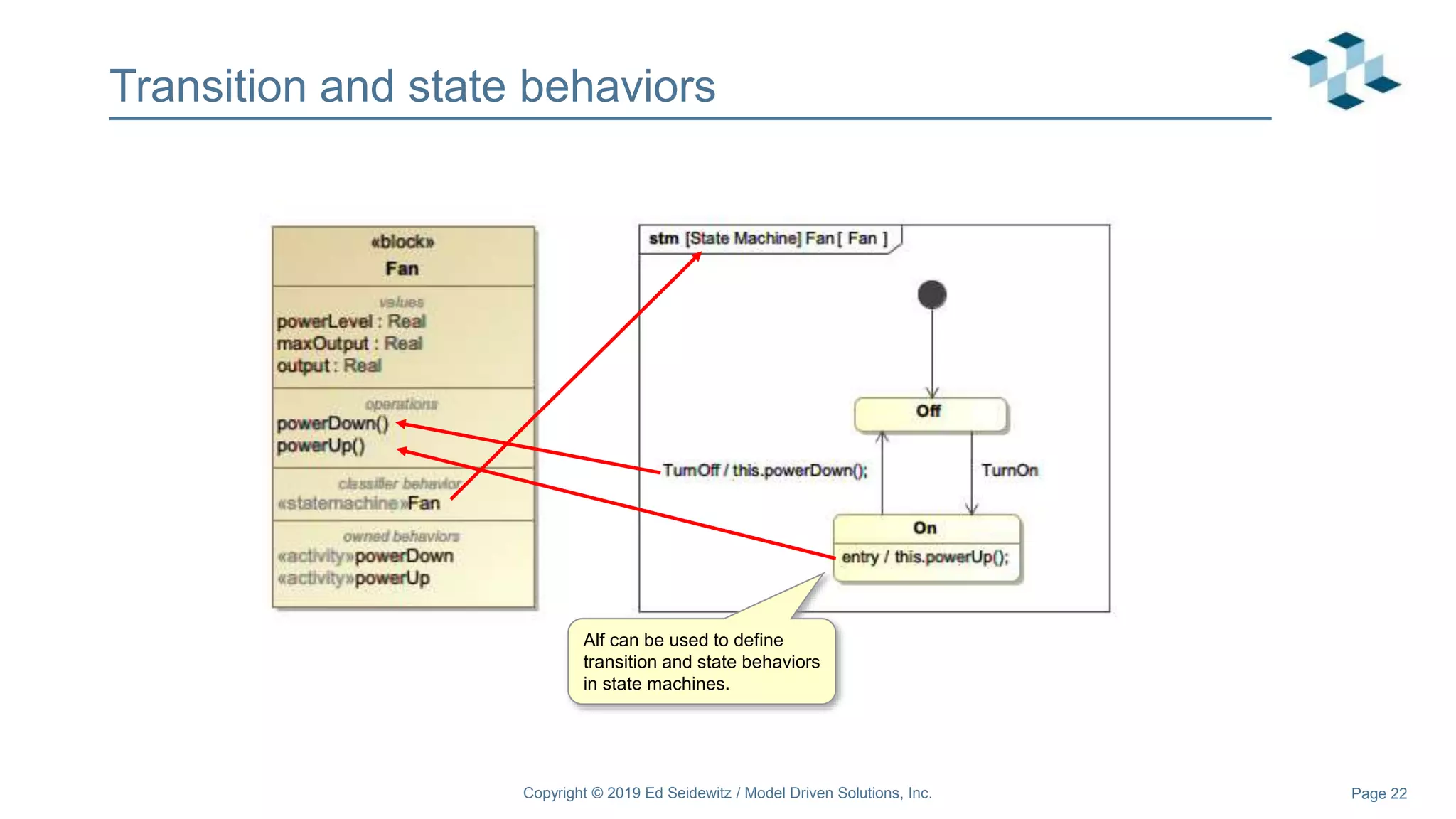
Transition and state behaviors
Copyright © 2019 Ed Seidewitz / Model Driven Solutions, Inc.
Alf can be used to define
transition and state behaviors
in state machines.
Page 23
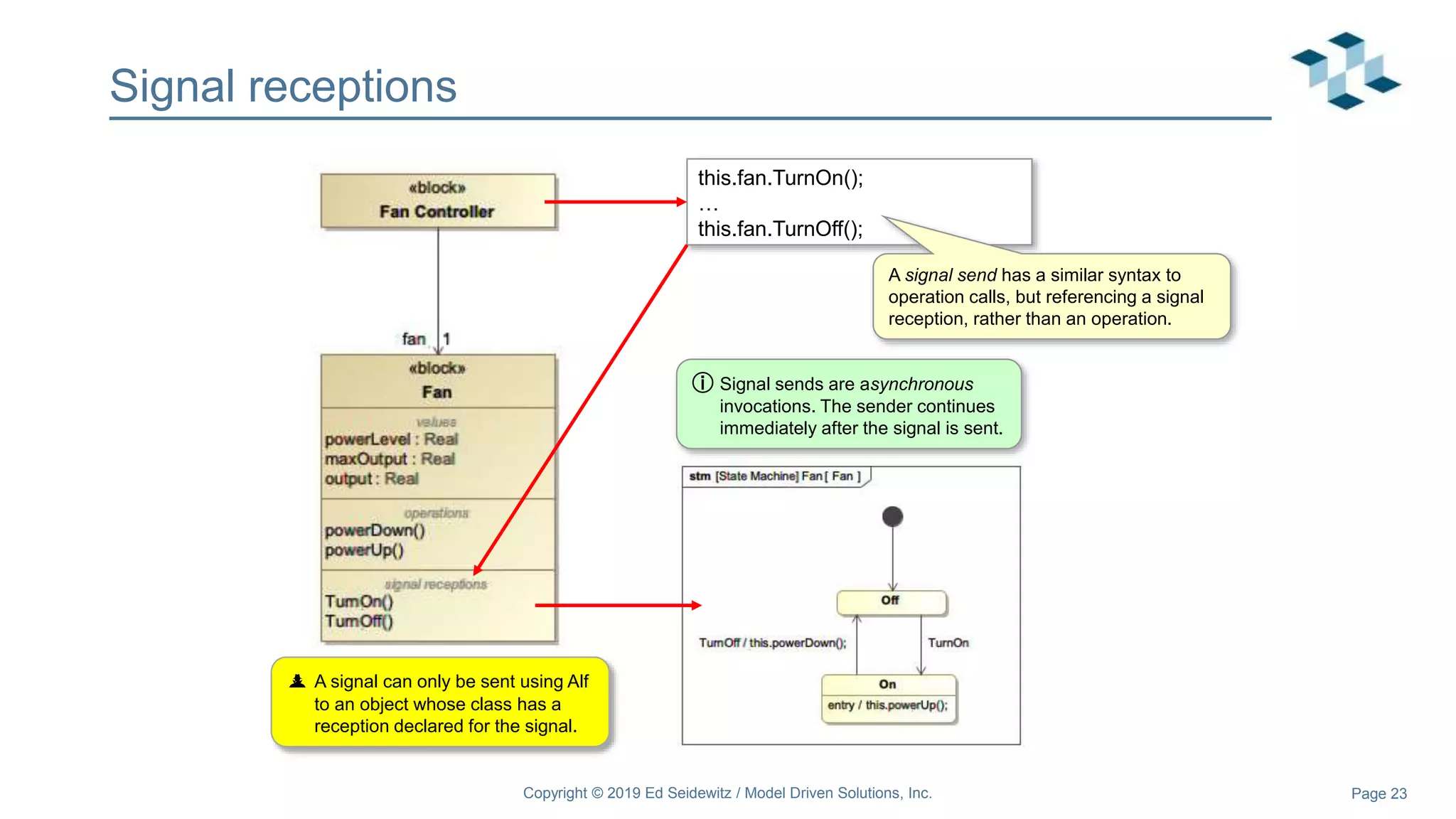
Signal receptions
this.fan.TurnOn();
…
this.fan.TurnOff();
A signal send has a similar syntax to
operation calls, but referencing a signal
reception, rather than an operation.
 A signal can only be sent using Alf
to an object whose class has a
reception declared for the signal.
ⓘ Signal sends are asynchronous
invocations. The sender continues
immediately after the signal is sent.
Copyright © 2019 Ed Seidewitz / Model Driven Solutions, Inc.
Page 24
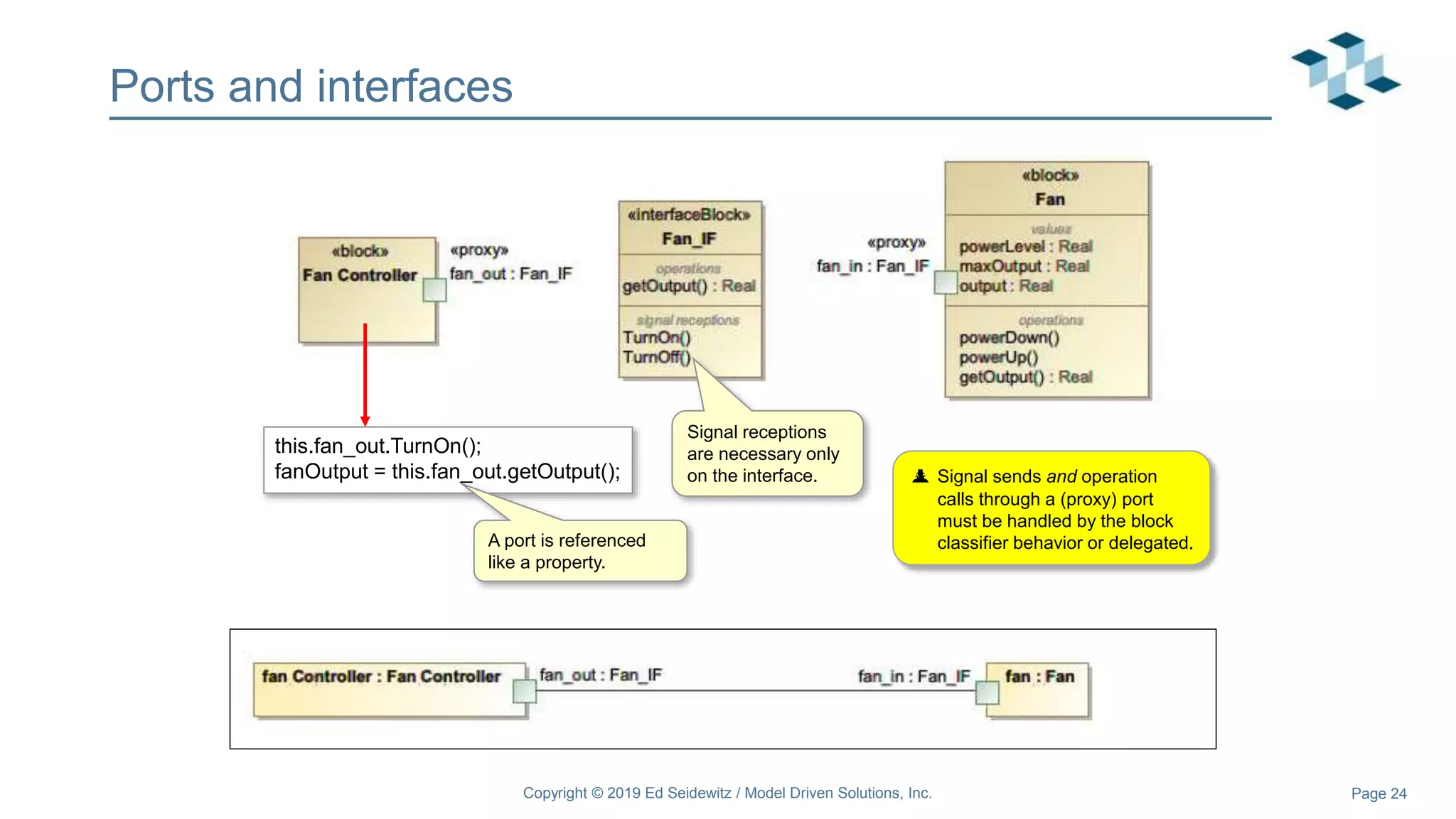
Ports and interfaces
this.fan_out.TurnOn();
fanOutput = this.fan_out.getOutput();
A port is referenced
like a property.
 Signal sends and operation
calls through a (proxy) port
must be handled by the block
classifier behavior or delegated.
Signal receptions
are necessary only
on the interface.
Copyright © 2019 Ed Seidewitz / Model Driven Solutions, Inc.
Page 25
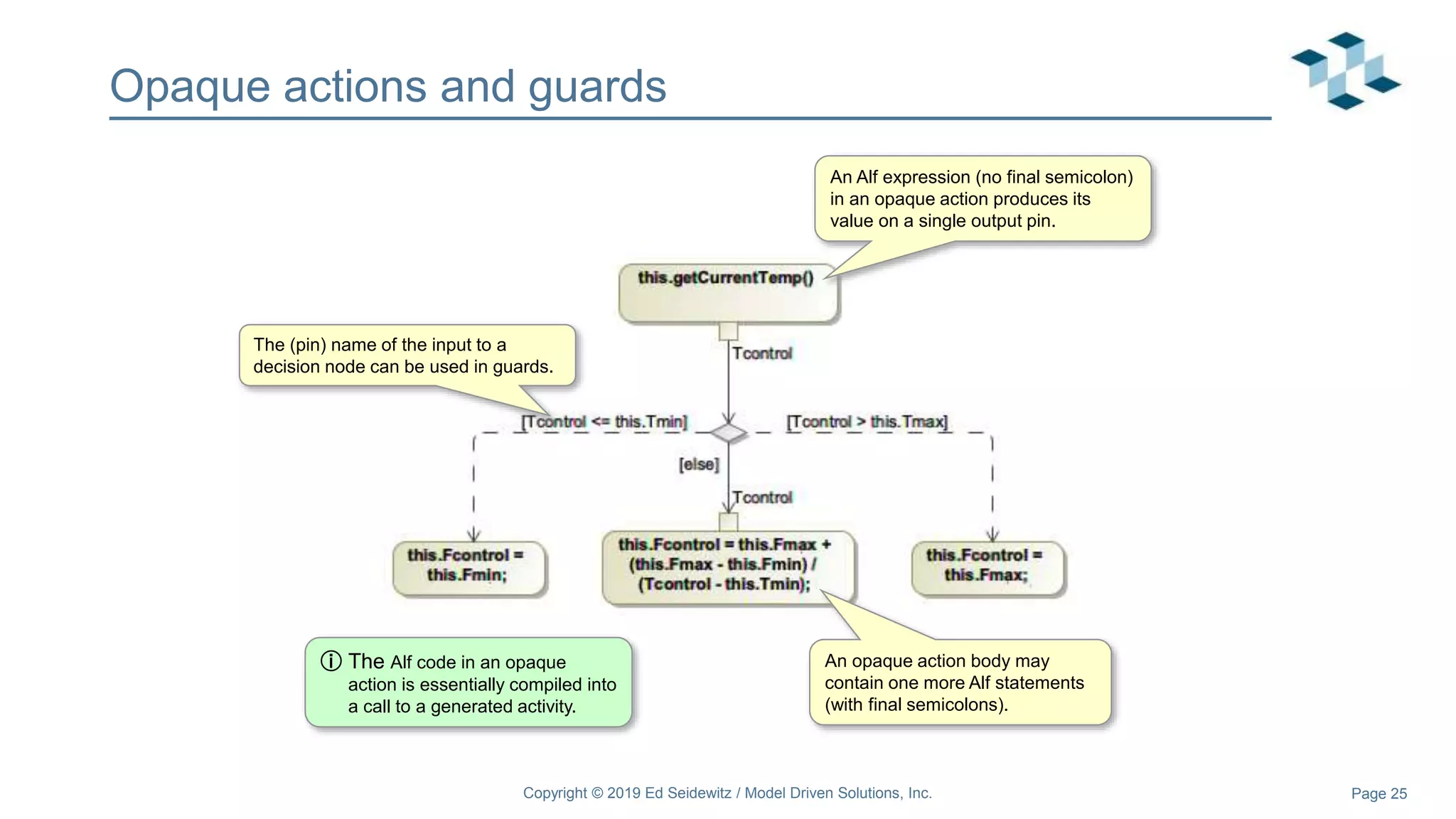
Opaque actions and guards
An Alf expression (no final semicolon)
in an opaque action produces its
value on a single output pin.
The (pin) name of the input to a
decision node can be used in guards.
An opaque action body may
contain one more Alf statements
(with final semicolons).
ⓘ The Alf code in an opaque
action is essentially compiled into
a call to a generated activity.
Copyright © 2019 Ed Seidewitz / Model Driven Solutions, Inc.
Page 26
Hands On
Heating Simulation
Copyright © 2019 Ed Seidewitz / Model Driven Solutions, Inc.
Page 27
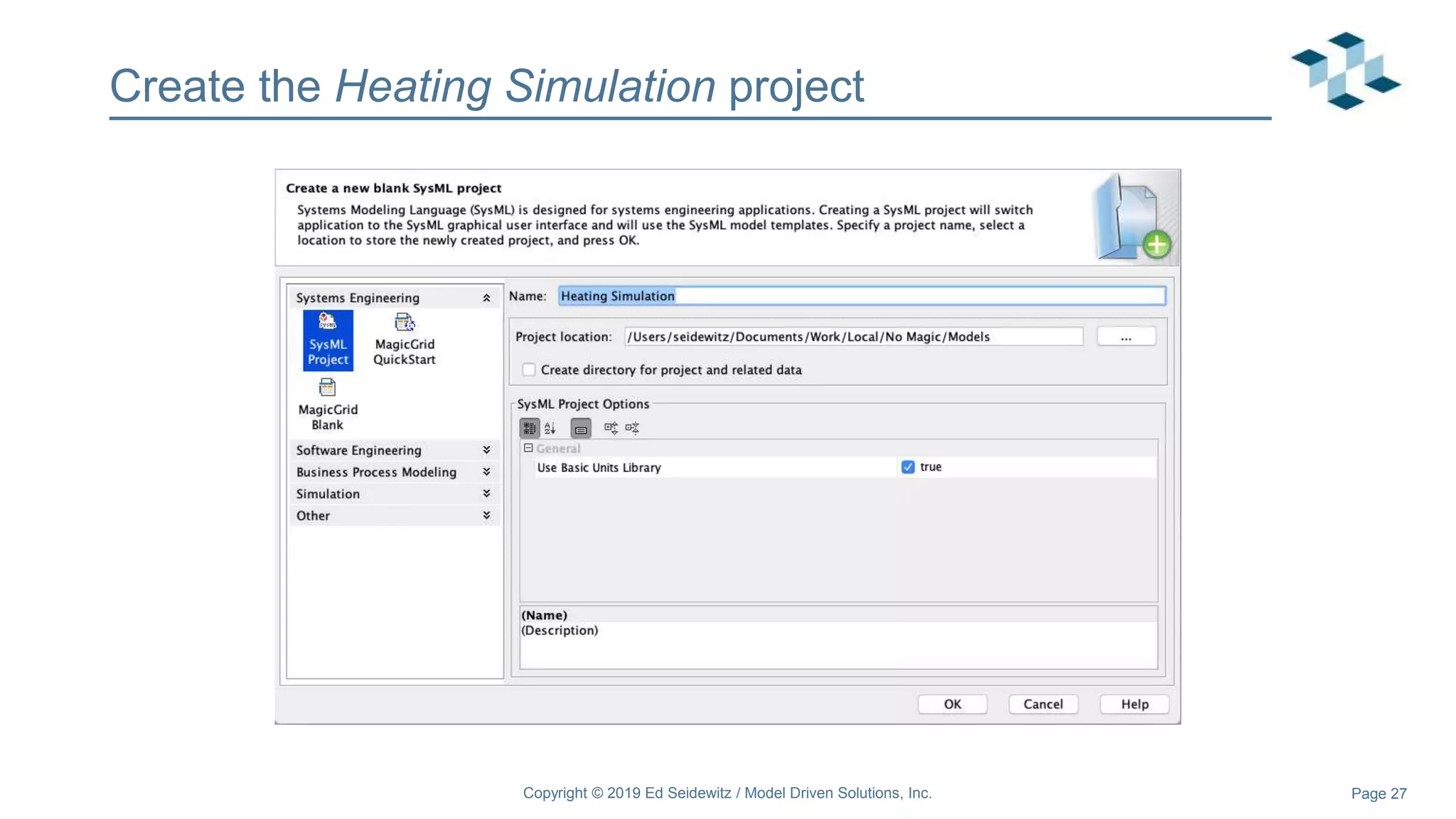
Create the Heating Simulation project
Copyright © 2019 Ed Seidewitz / Model Driven Solutions, Inc.
Page 28
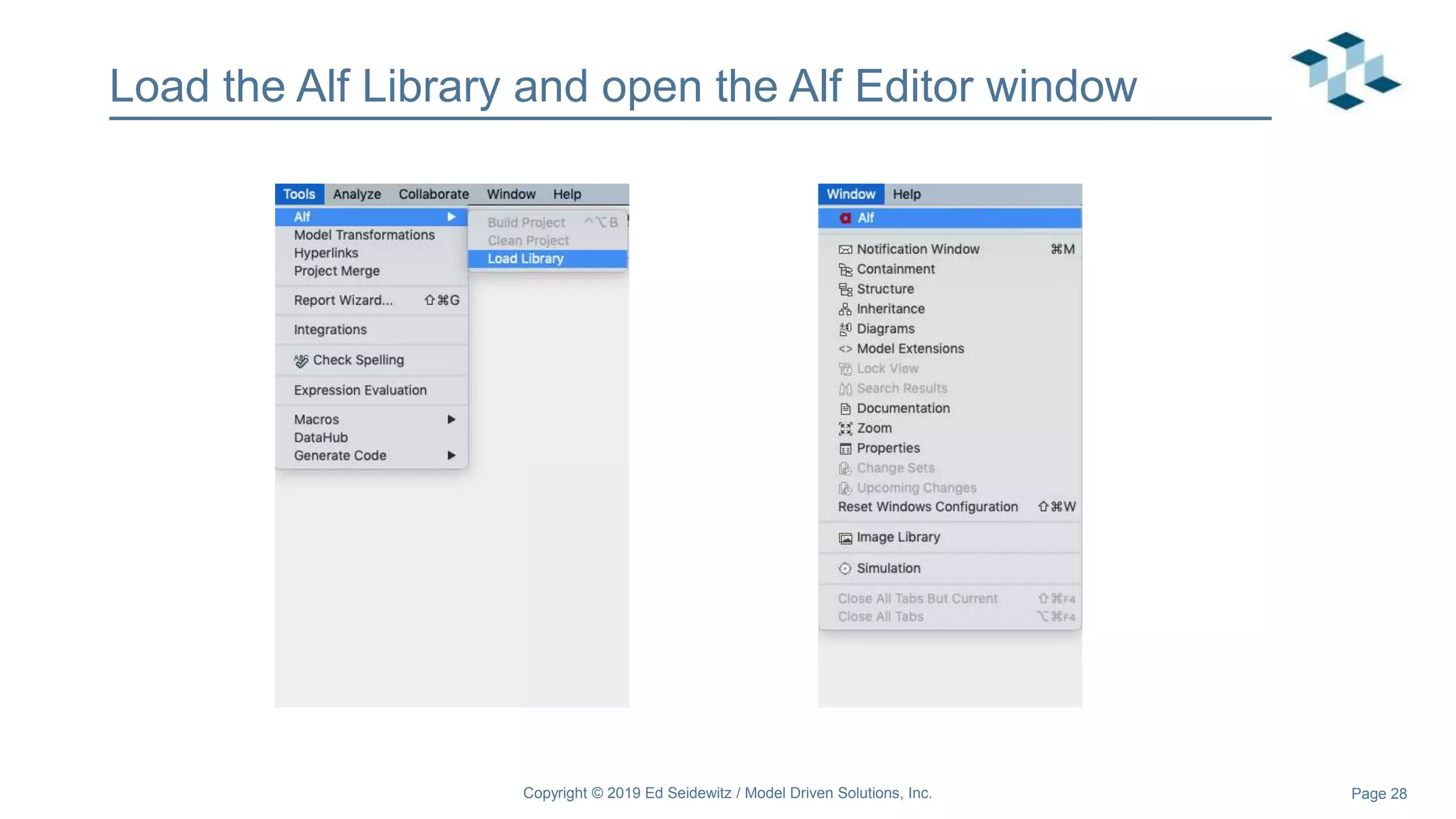
Load the Alf Library and open the Alf Editor window
Copyright © 2019 Ed Seidewitz / Model Driven Solutions, Inc.
Page 29
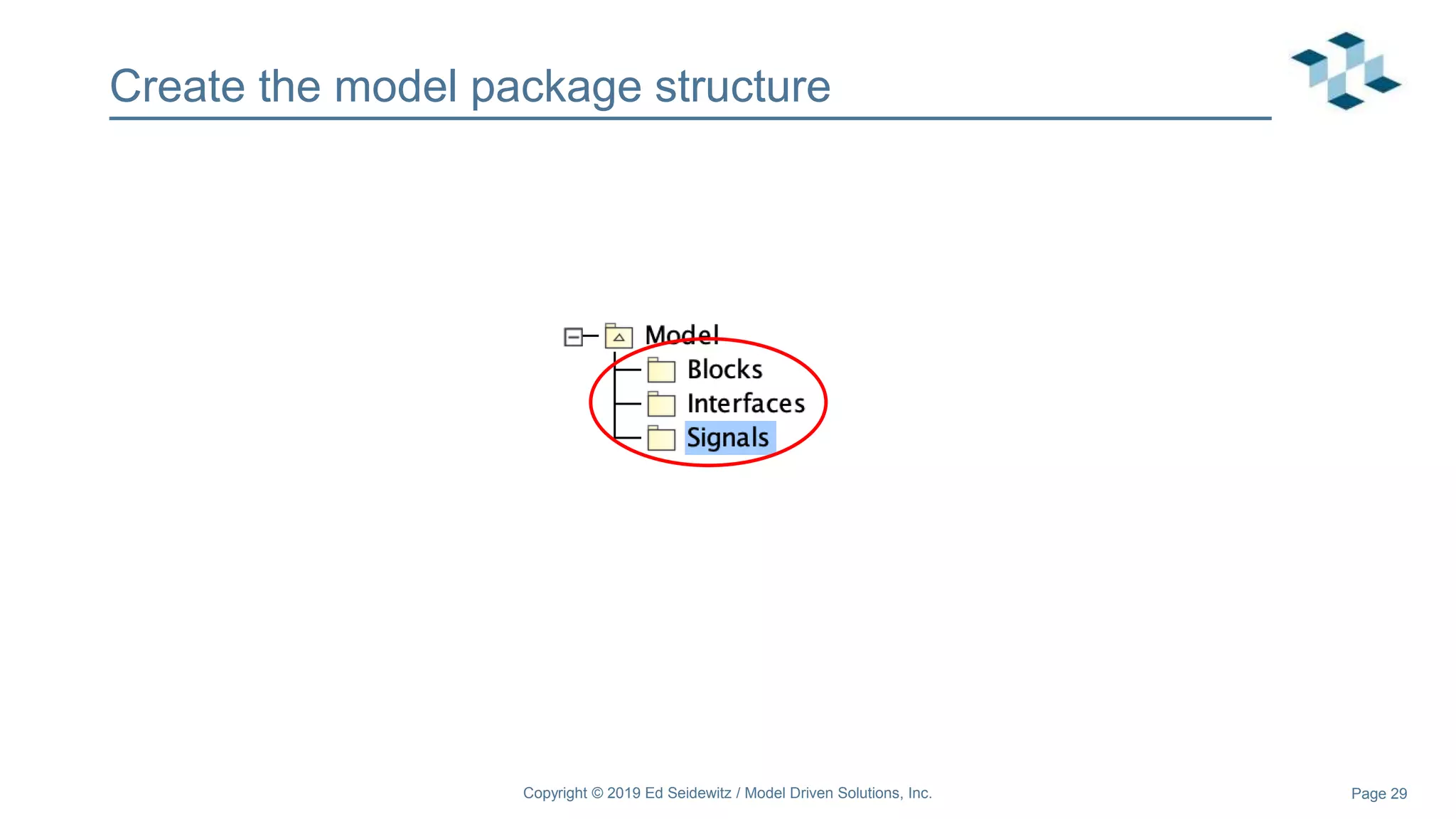
Create the model package structure
Copyright © 2019 Ed Seidewitz / Model Driven Solutions, Inc.
Page 30
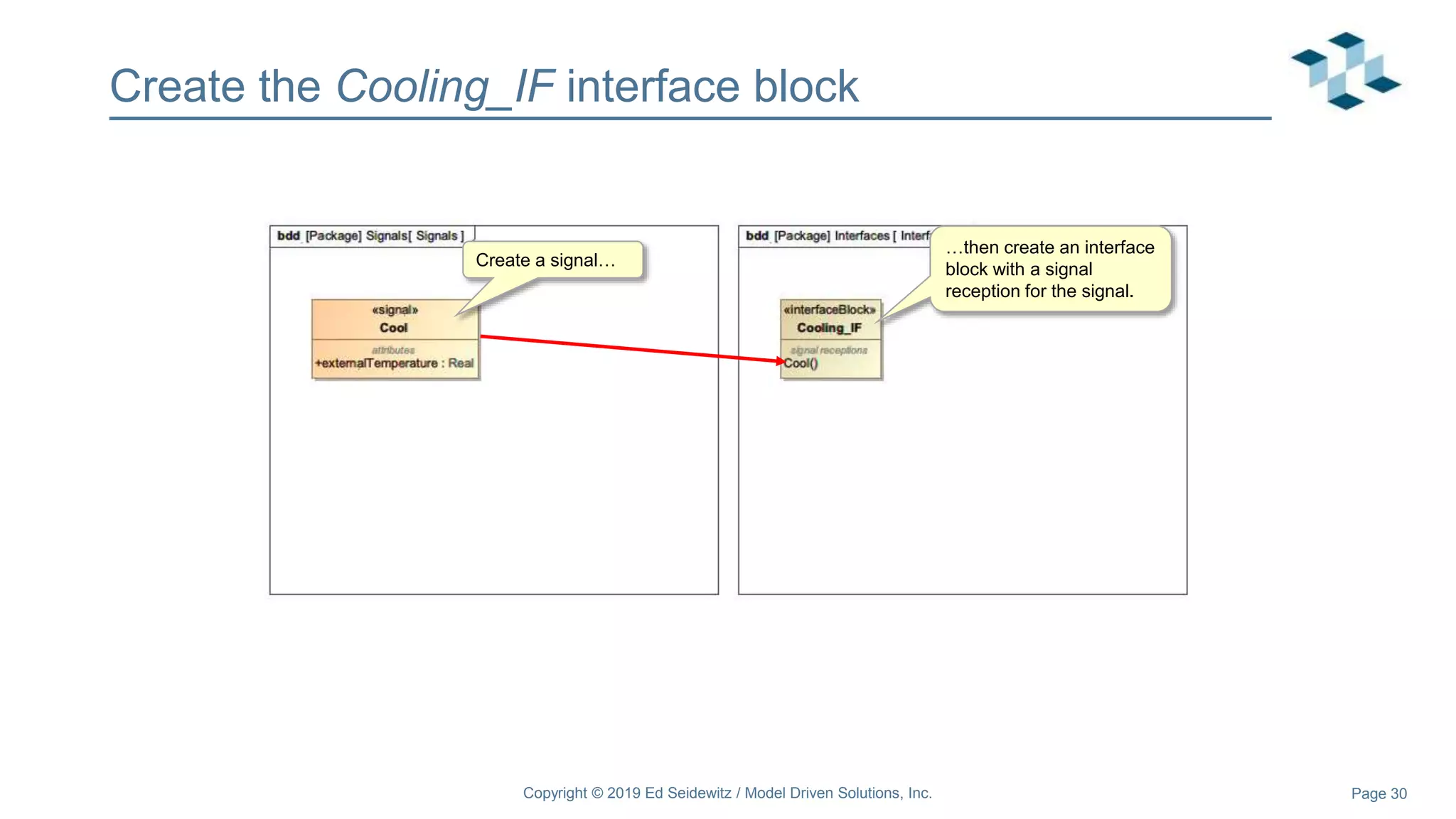
Create the Cooling_IF interface block
Create a signal…
…then create an interface
block with a signal
reception for the signal.
Copyright © 2019 Ed Seidewitz / Model Driven Solutions, Inc.
Page 31
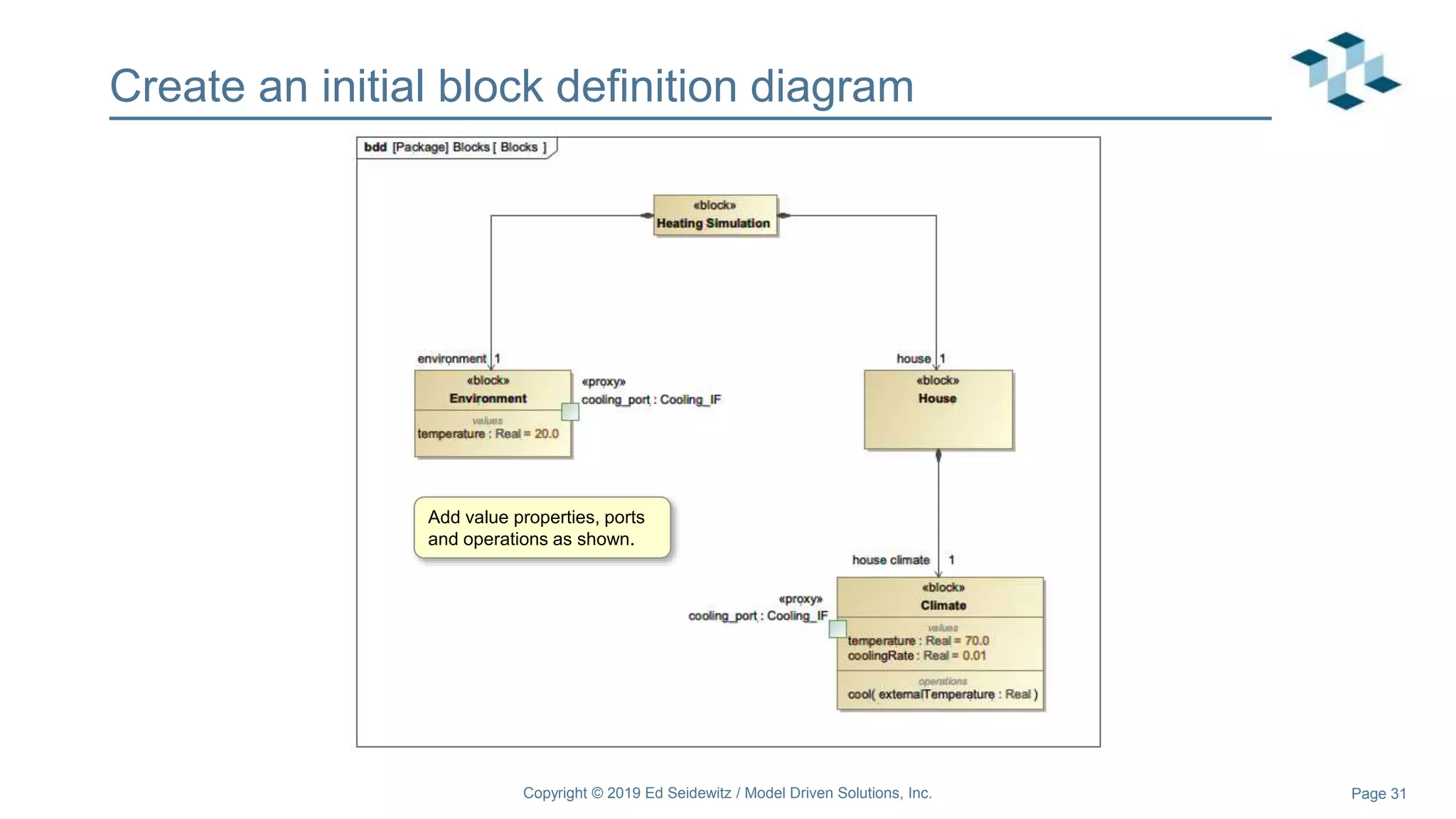
Create an initial block definition diagram
Add value properties, ports
and operations as shown.
Copyright © 2019 Ed Seidewitz / Model Driven Solutions, Inc.
Page 32
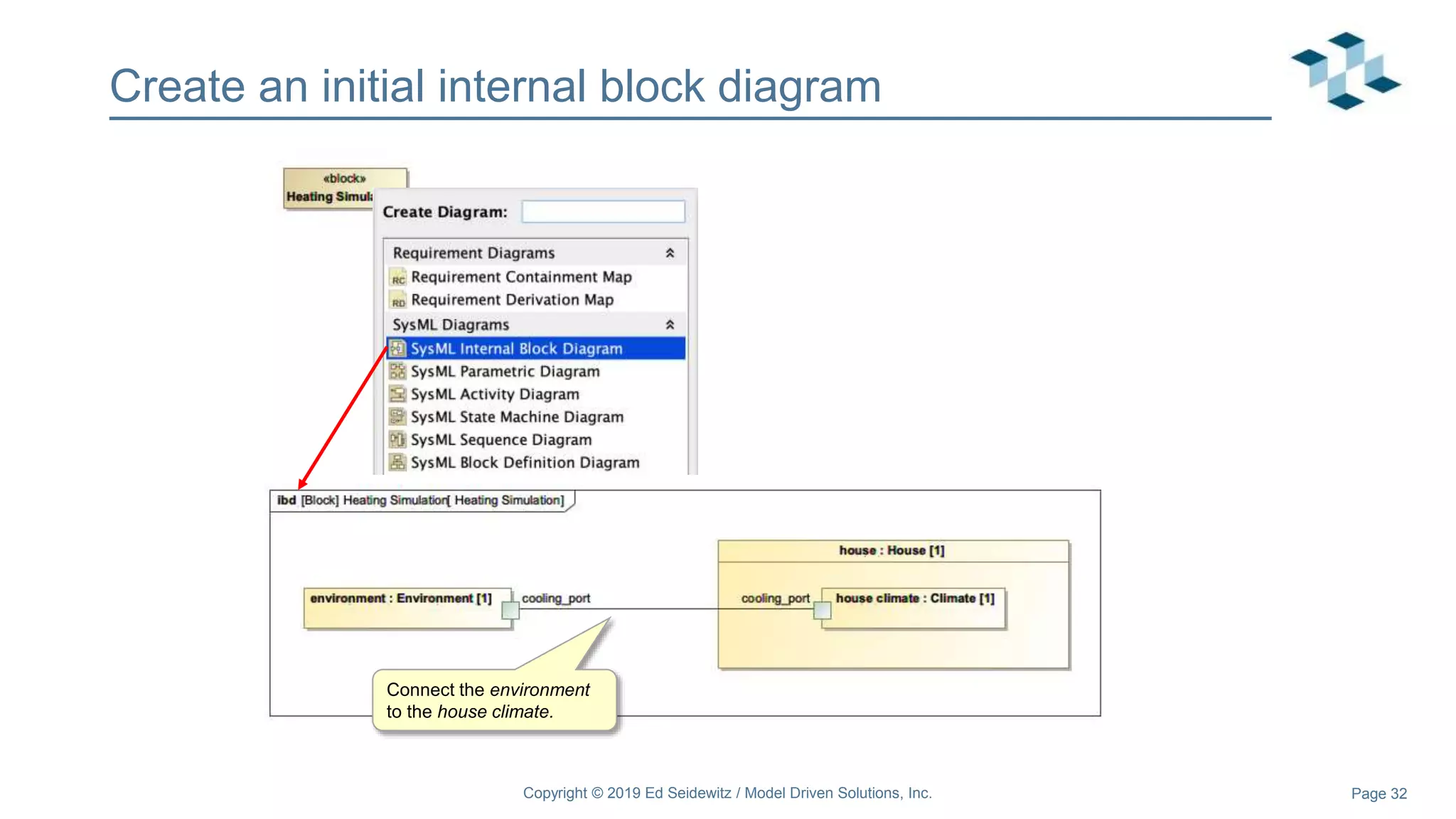
Create an initial internal block diagram
Connect the environment
to the house climate.
Copyright © 2019 Ed Seidewitz / Model Driven Solutions, Inc.
Page 33
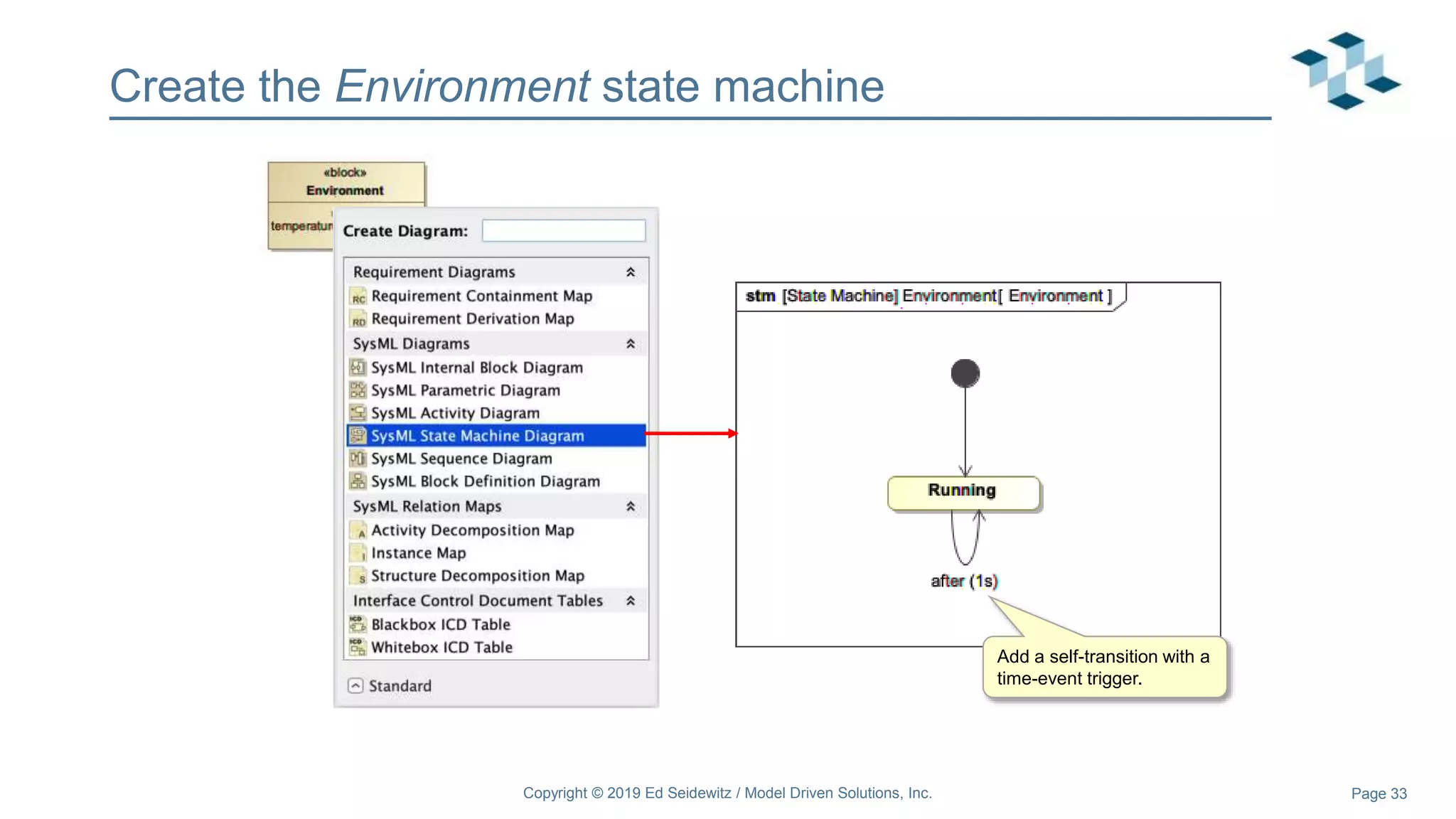
Create the Environment state machine
Add a self-transition with a
time-event trigger.
Copyright © 2019 Ed Seidewitz / Model Driven Solutions, Inc.
Page 34
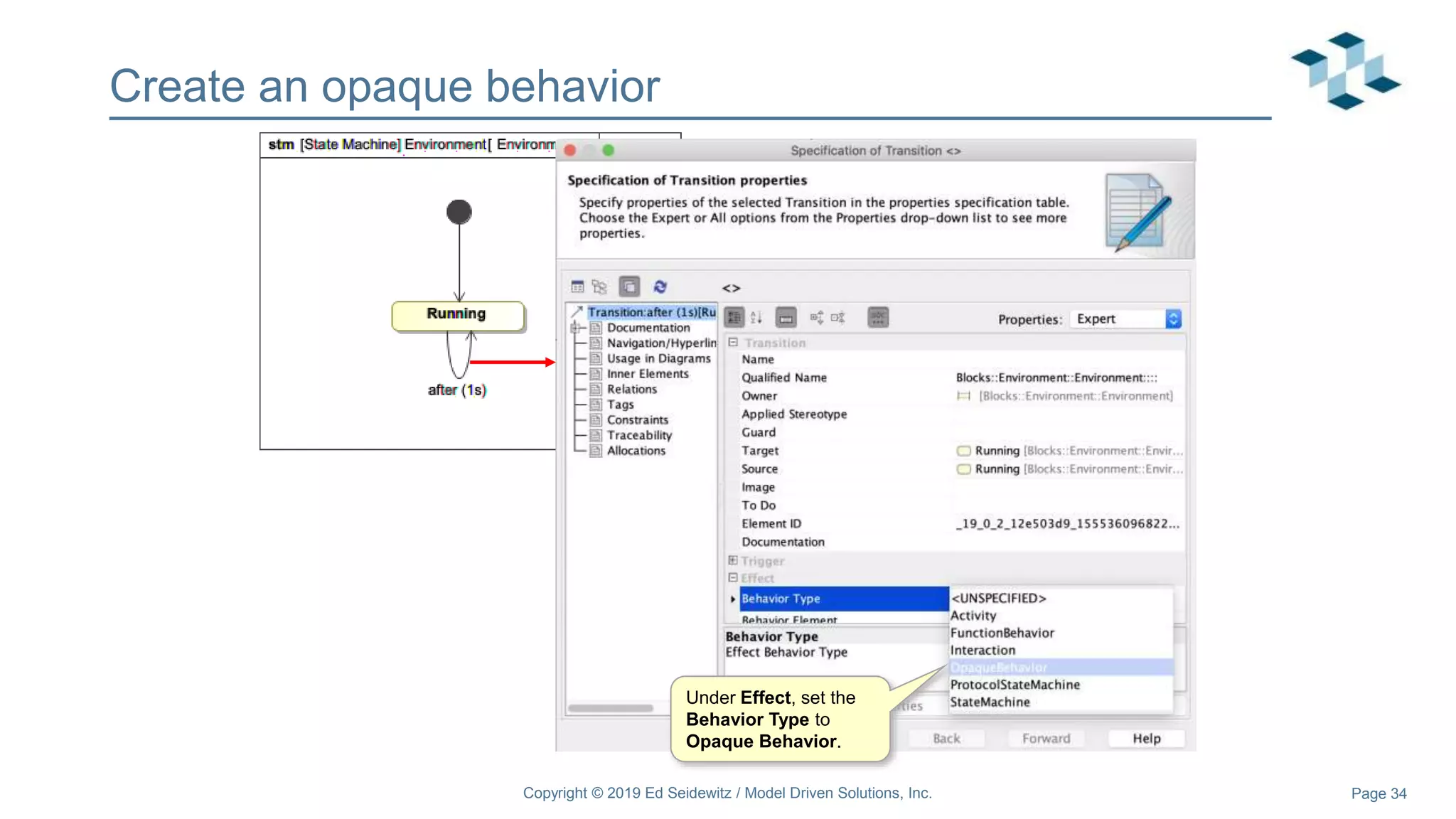
Create an opaque behavior
Under Effect, set the
Behavior Type to
Opaque Behavior.
Copyright © 2019 Ed Seidewitz / Model Driven Solutions, Inc.
Page 35
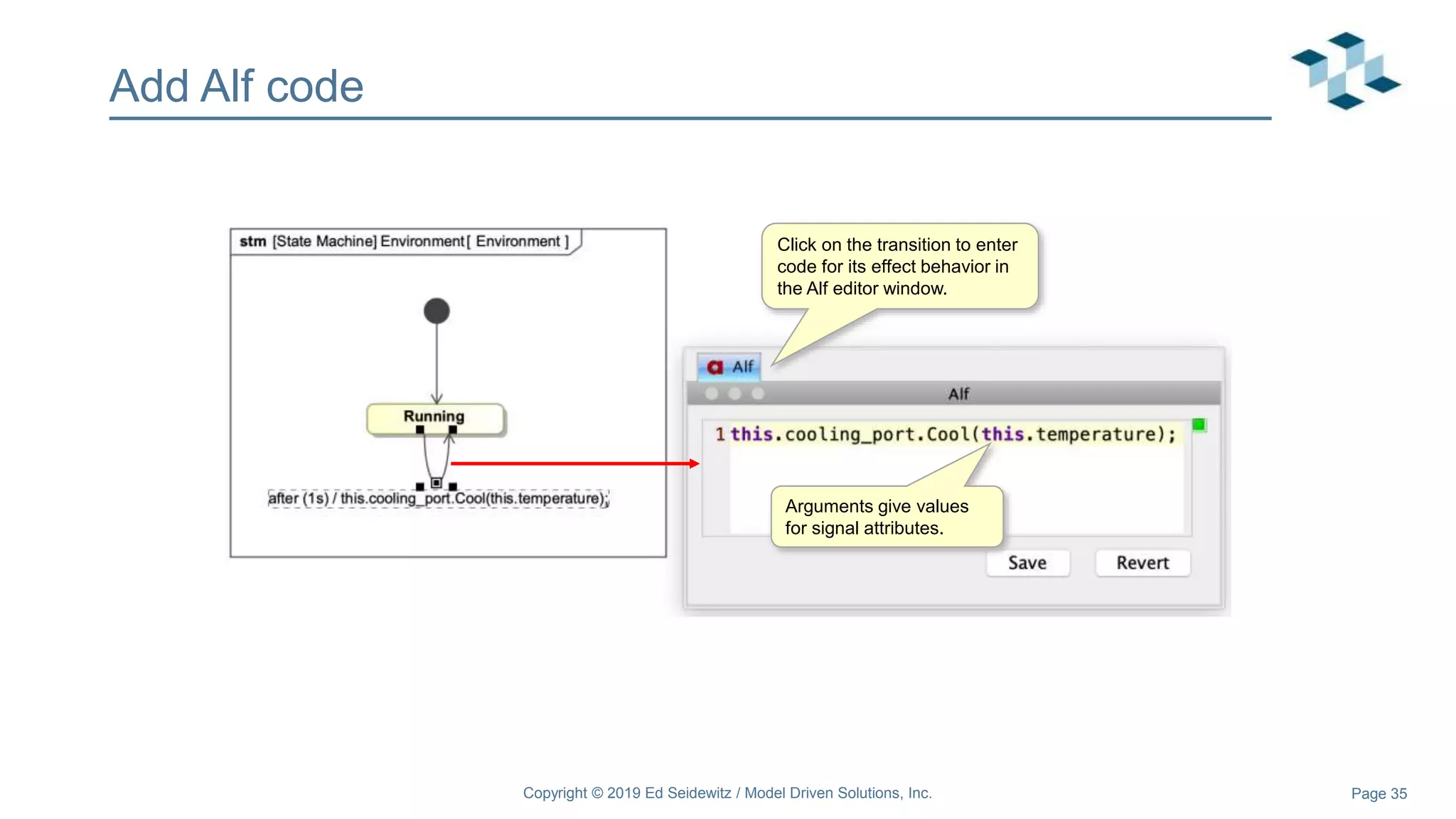
Add Alf code
Click on the transition to enter
code for its effect behavior in
the Alf editor window.
Arguments give values
for signal attributes.
Copyright © 2019 Ed Seidewitz / Model Driven Solutions, Inc.
Page 36
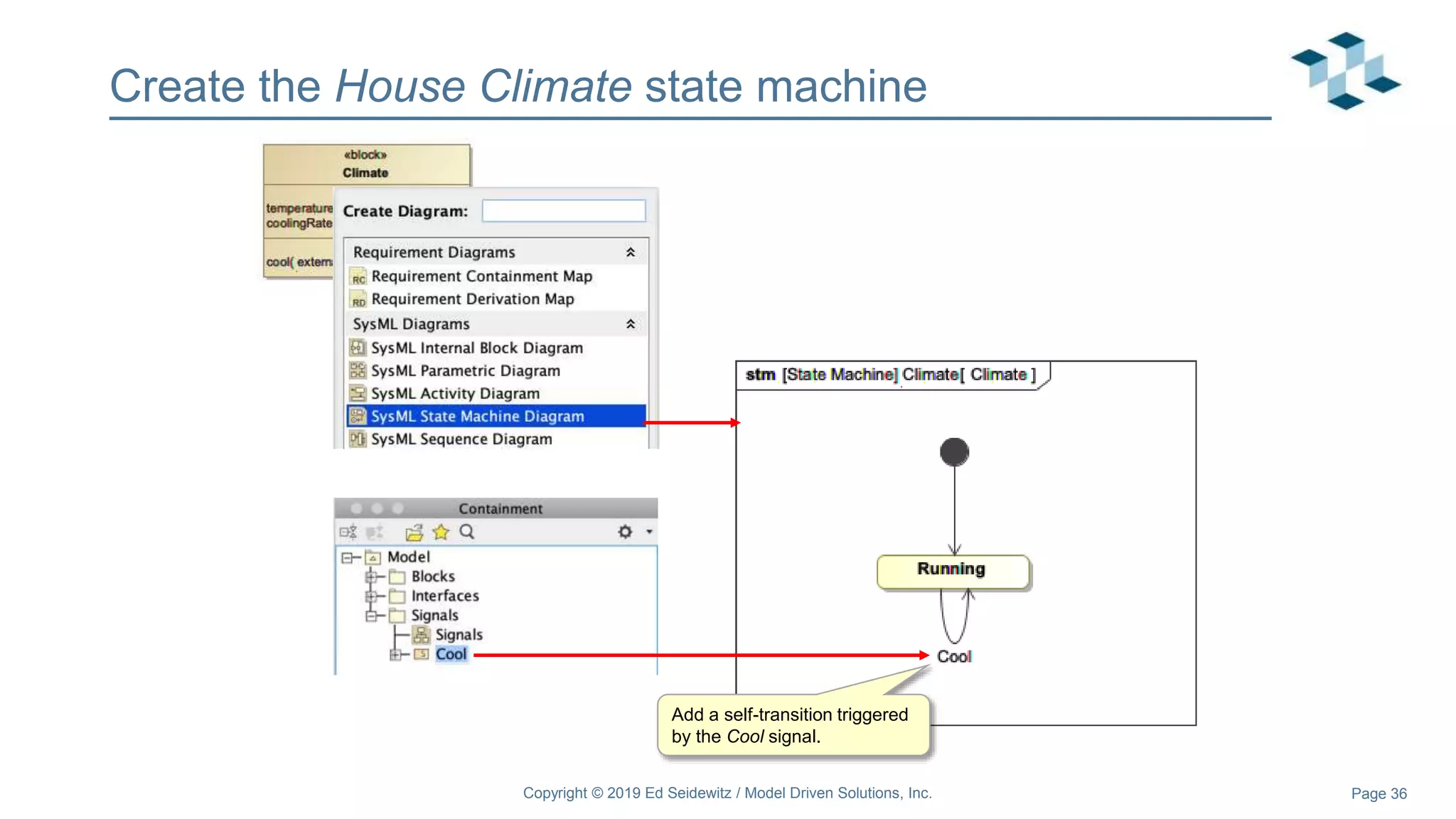
Create the House Climate state machine
Add a self-transition triggered
by the Cool signal.
Copyright © 2019 Ed Seidewitz / Model Driven Solutions, Inc.
Page 37
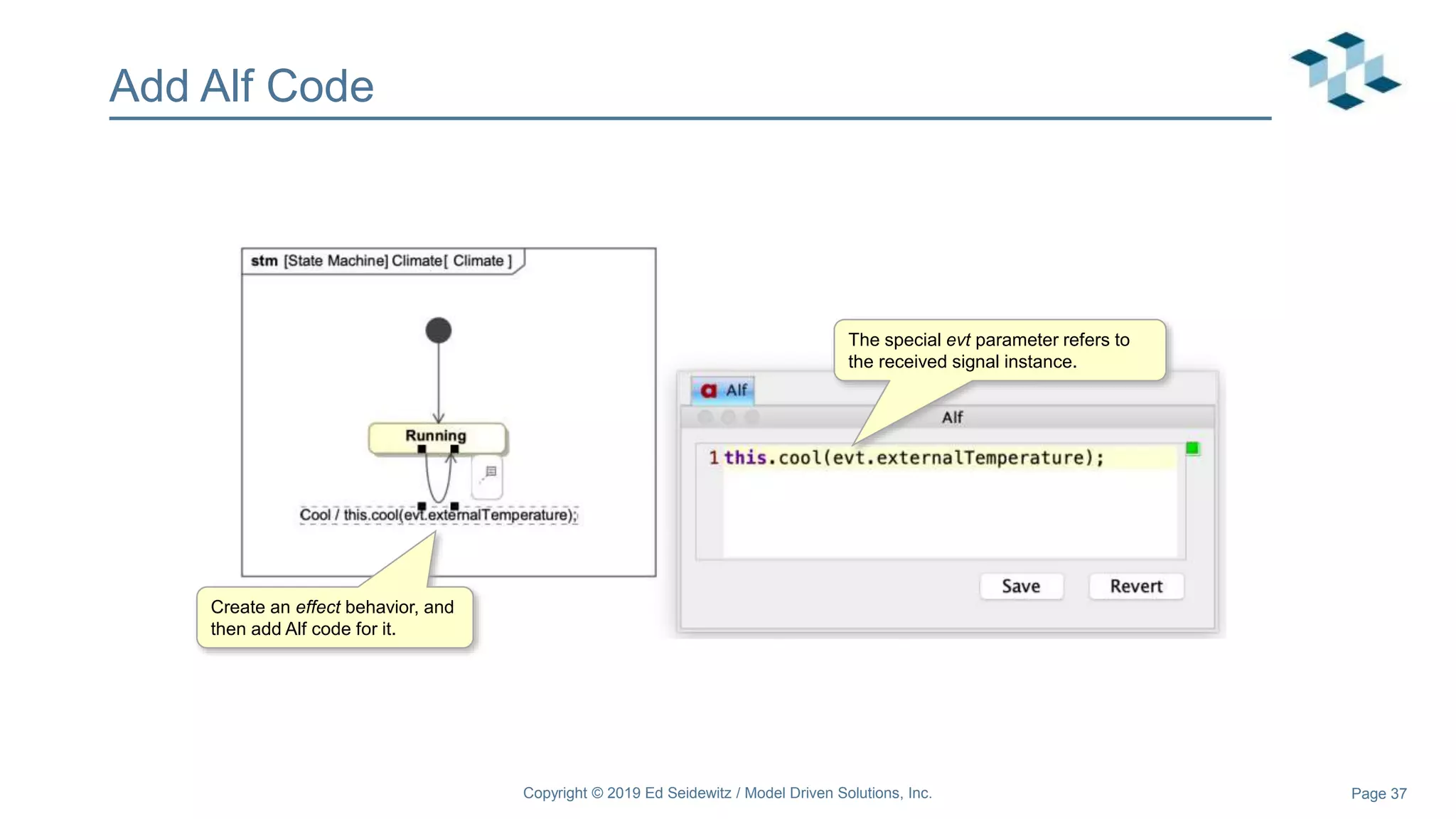
Add Alf Code
Create an effect behavior, and
then add Alf code for it.
The special evt parameter refers to
the received signal instance.
Copyright © 2019 Ed Seidewitz / Model Driven Solutions, Inc.
Page 38
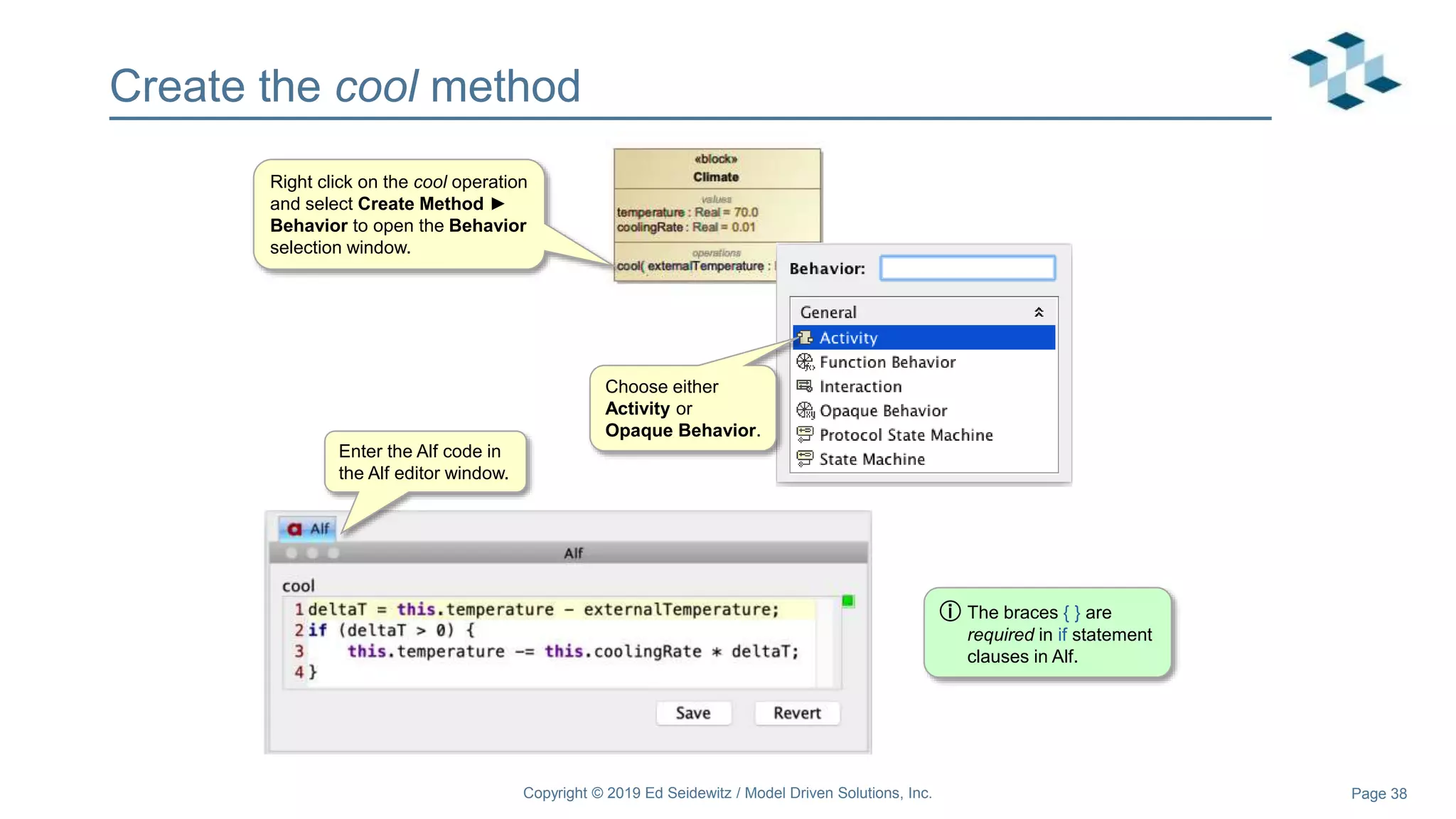
Create the cool method
Right click on the cool operation
and select Create Method ►
Behavior to open the Behavior
selection window.
Enter the Alf code in
the Alf editor window.
Choose either
Activity or
Opaque Behavior.
ⓘ The braces { } are
required in if statement
clauses in Alf.
Copyright © 2019 Ed Seidewitz / Model Driven Solutions, Inc.
Page 39
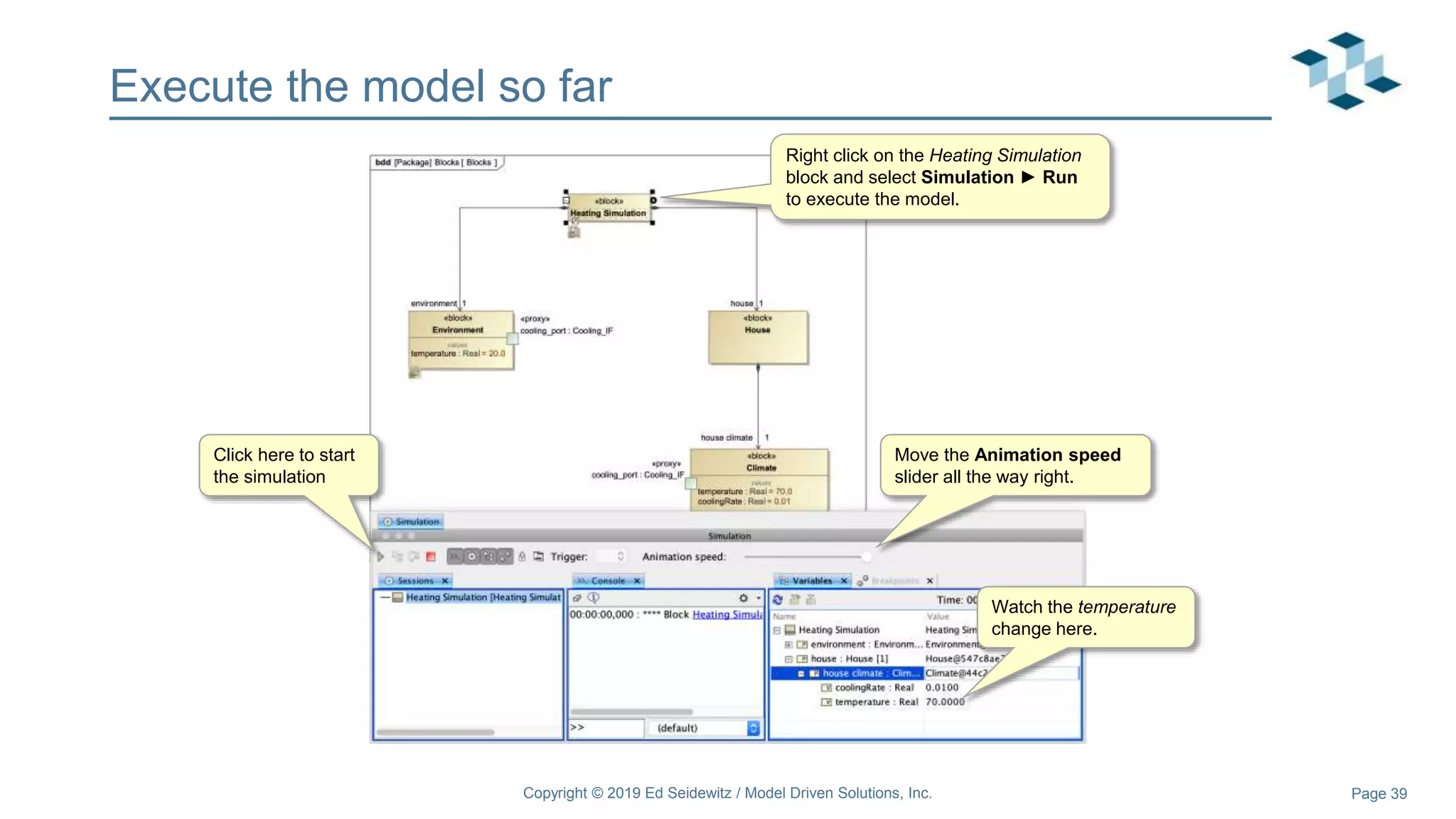
Execute the model so far
Move the Animation speed
slider all the way right.
Right click on the Heating Simulation
block and select Simulation ► Run
to execute the model.
Click here to start
the simulation
Watch the temperature
change here.
Copyright © 2019 Ed Seidewitz / Model Driven Solutions, Inc.
Page 40
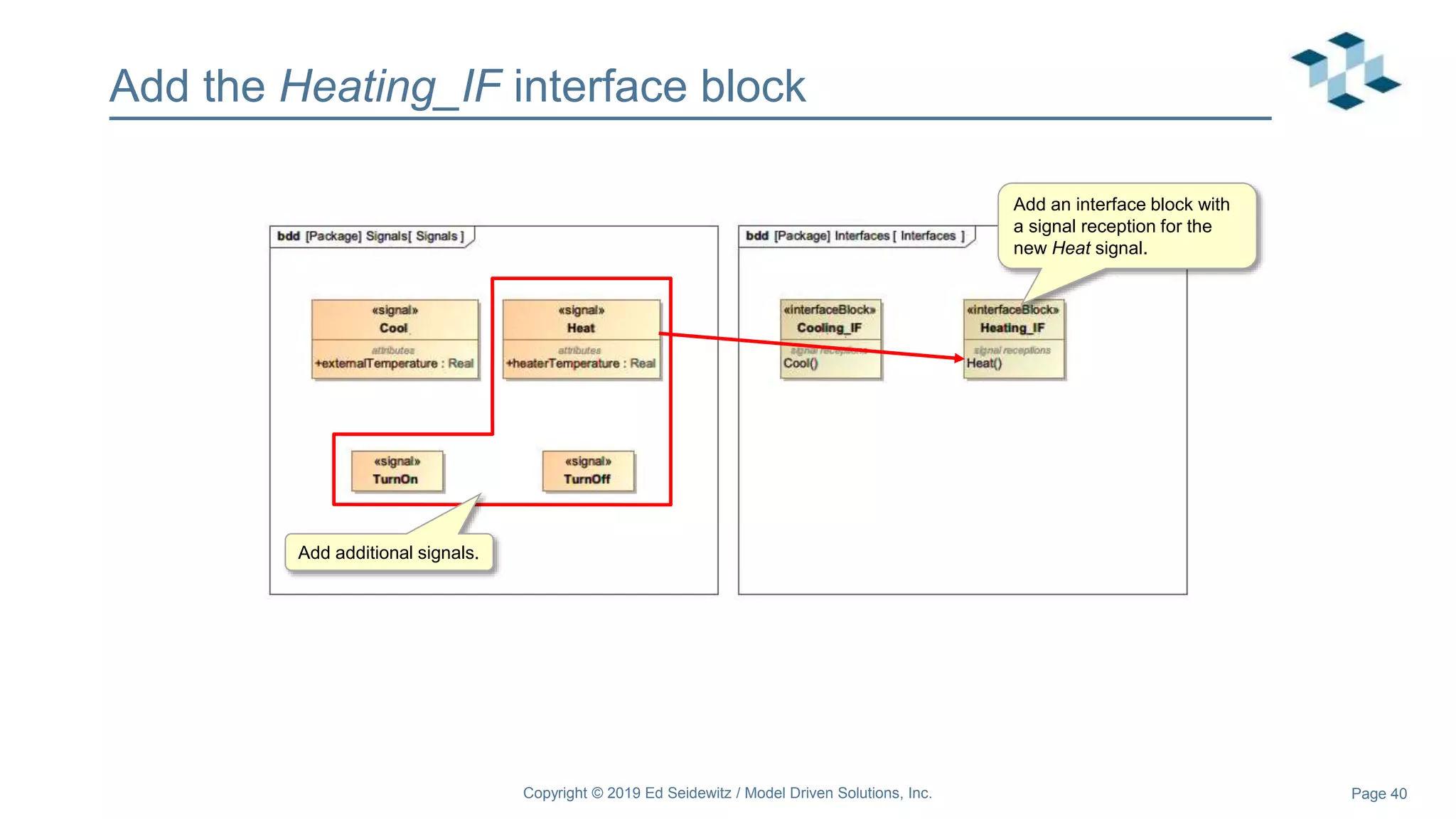
Add an interface block with
a signal reception for the
new Heat signal.
Add the Heating_IF interface block
Add additional signals.
Copyright © 2019 Ed Seidewitz / Model Driven Solutions, Inc.
Page 41
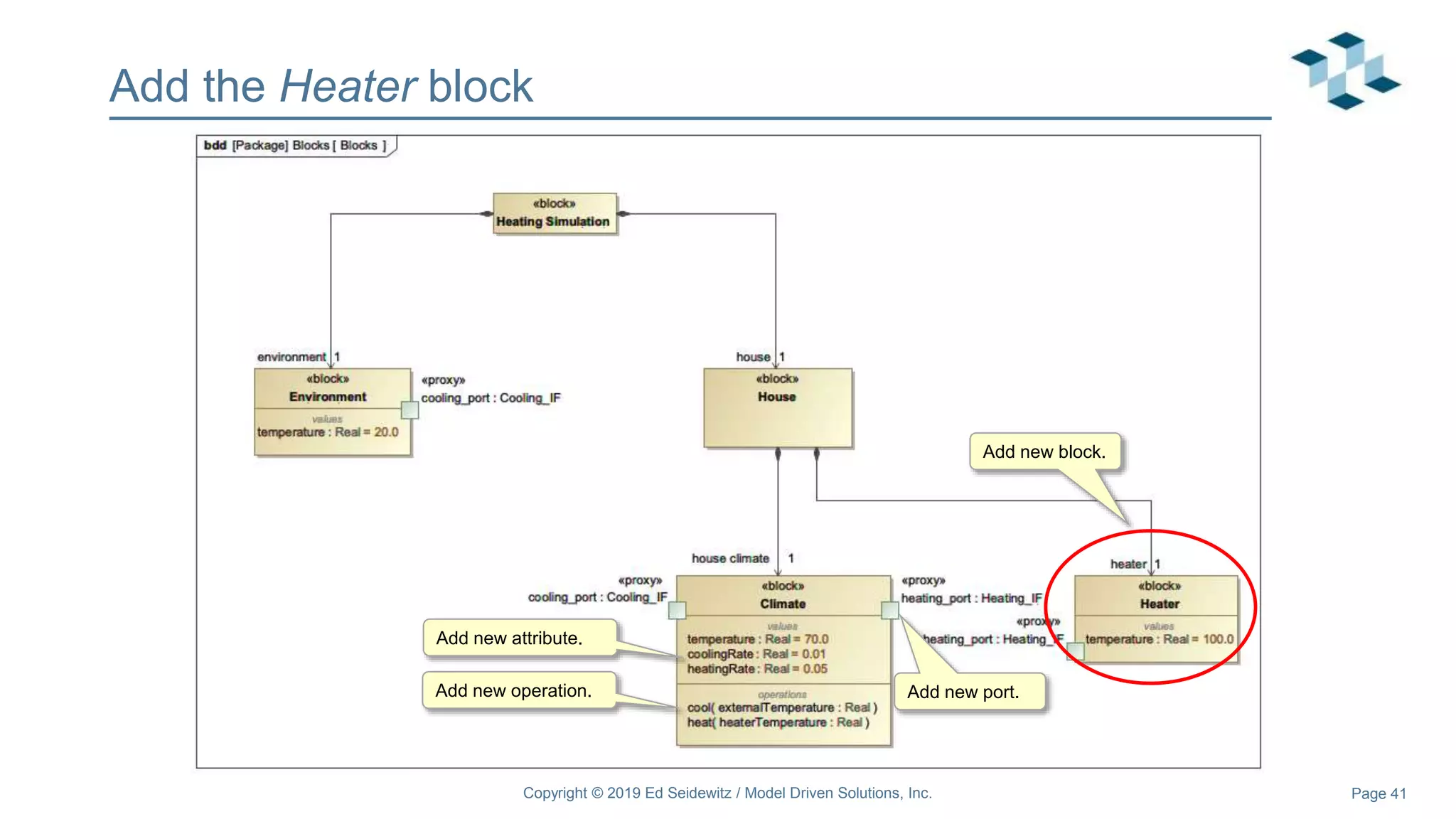
Add the Heater block
Add new operation.
Add new block.
Add new attribute.
Add new port.
Copyright © 2019 Ed Seidewitz / Model Driven Solutions, Inc.
Page 42
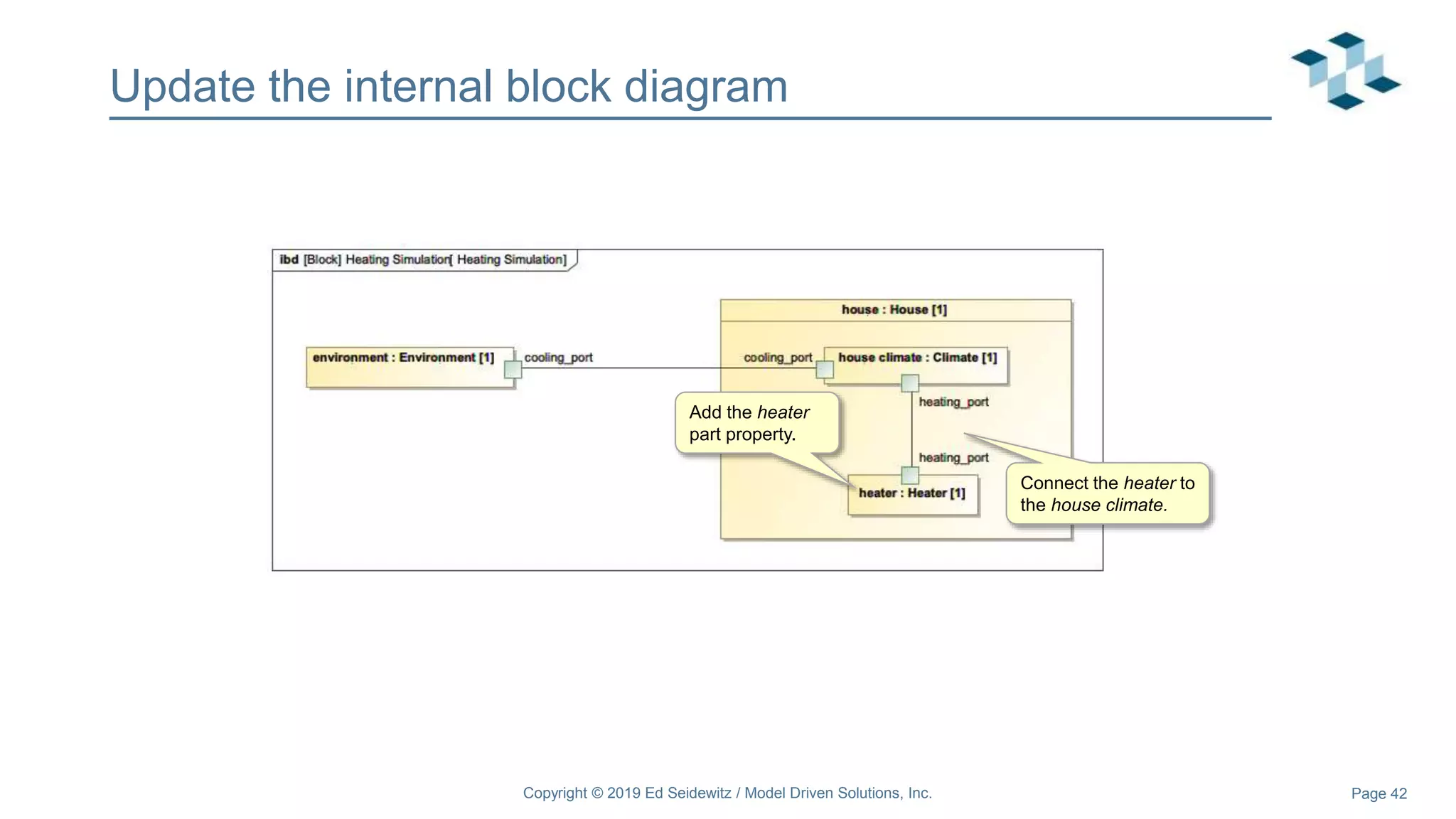
Update the internal block diagram
Connect the heater to
the house climate.
Copyright © 2019 Ed Seidewitz / Model Driven Solutions, Inc.
Add the heater
part property.
Page 43
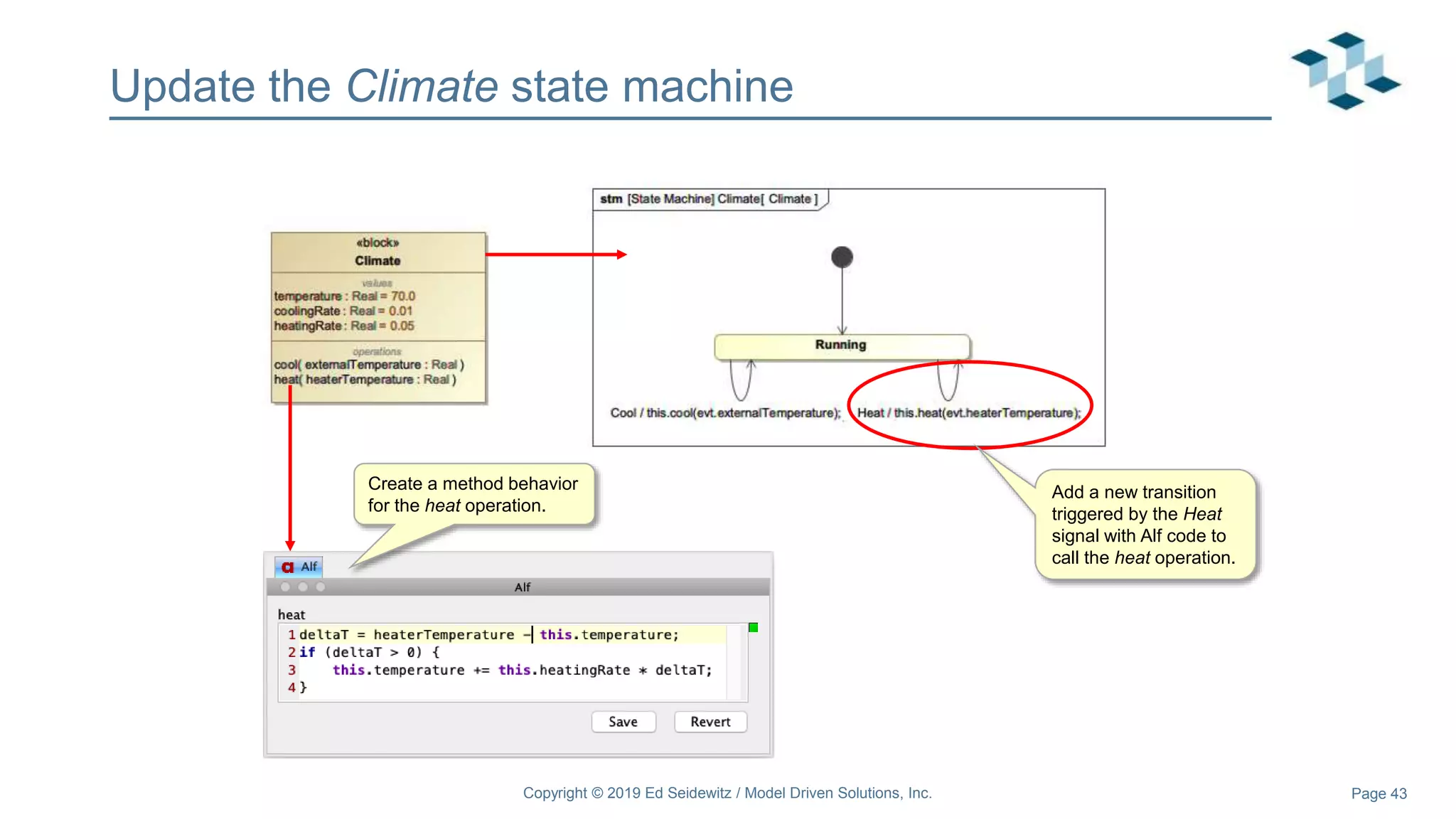
Update the Climate state machine
Add a new transition
triggered by the Heat
signal with Alf code to
call the heat operation.
Create a method behavior
for the heat operation.
Copyright © 2019 Ed Seidewitz / Model Driven Solutions, Inc.
Page 44
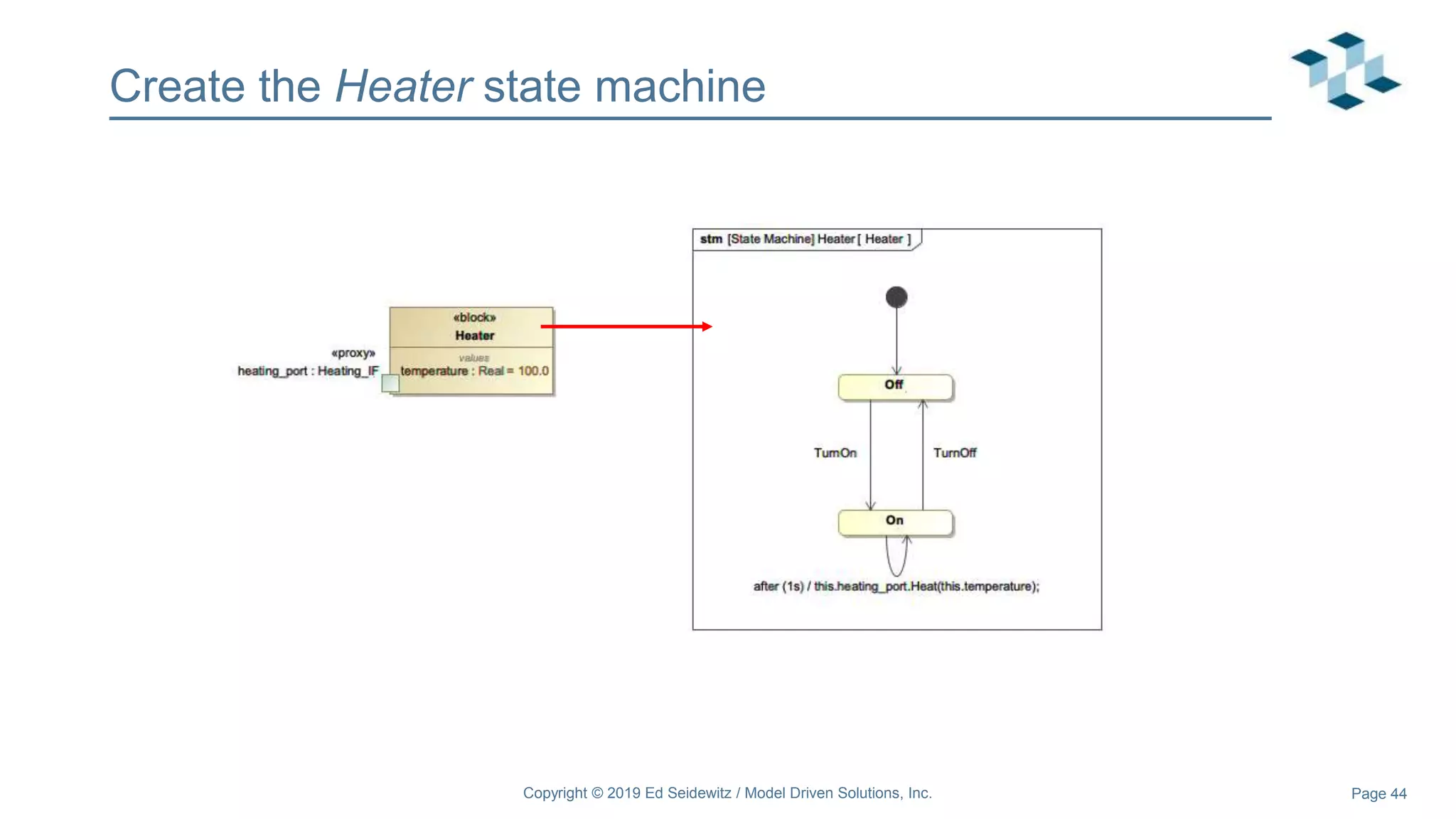
Create the Heater state machine
Copyright © 2019 Ed Seidewitz / Model Driven Solutions, Inc.
Page 45
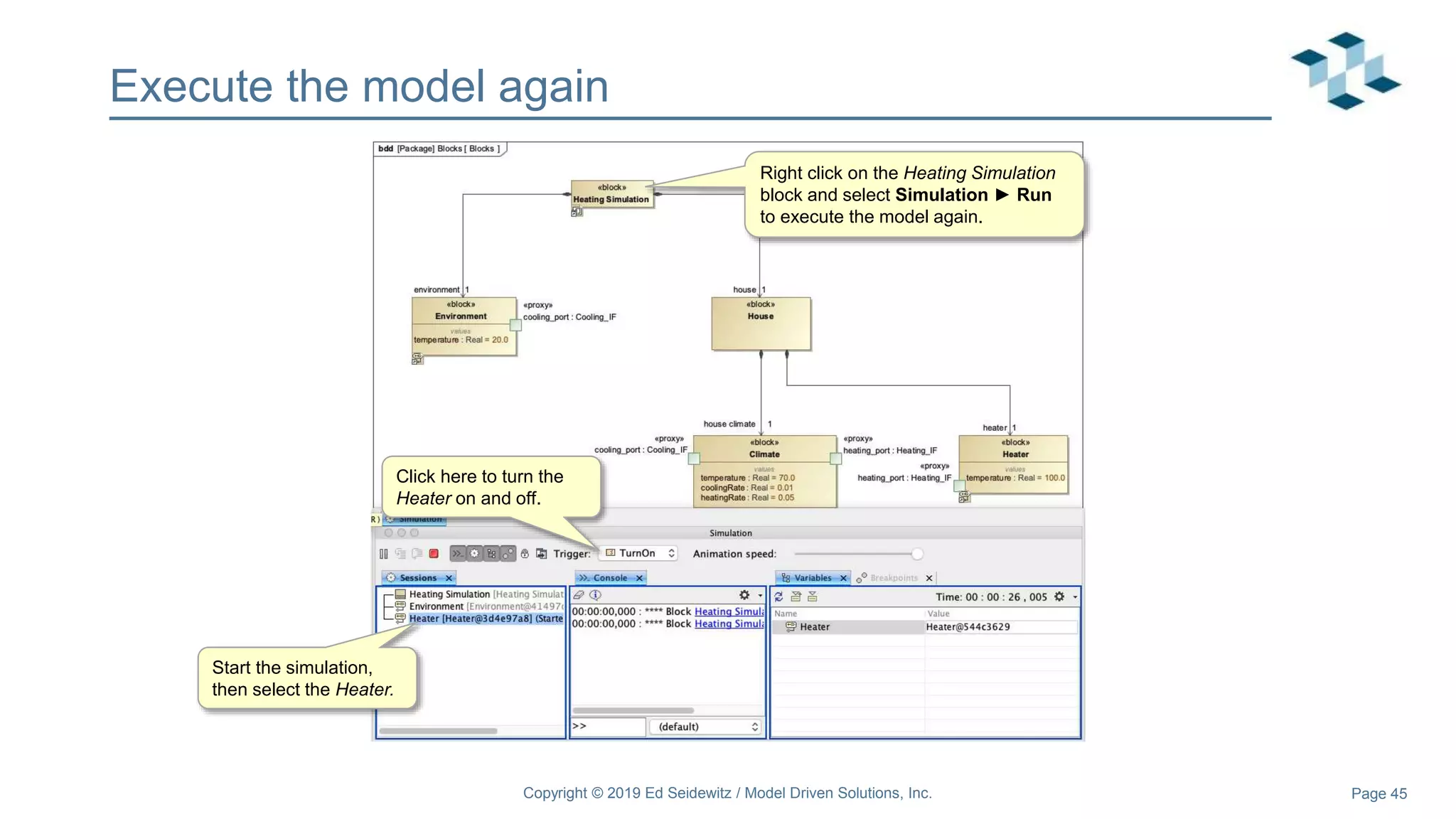
Execute the model again
Start the simulation,
then select the Heater.
Right click on the Heating Simulation
block and select Simulation ► Run
to execute the model again.
Click here to turn the
Heater on and off.
Copyright © 2019 Ed Seidewitz / Model Driven Solutions, Inc.
Page 46
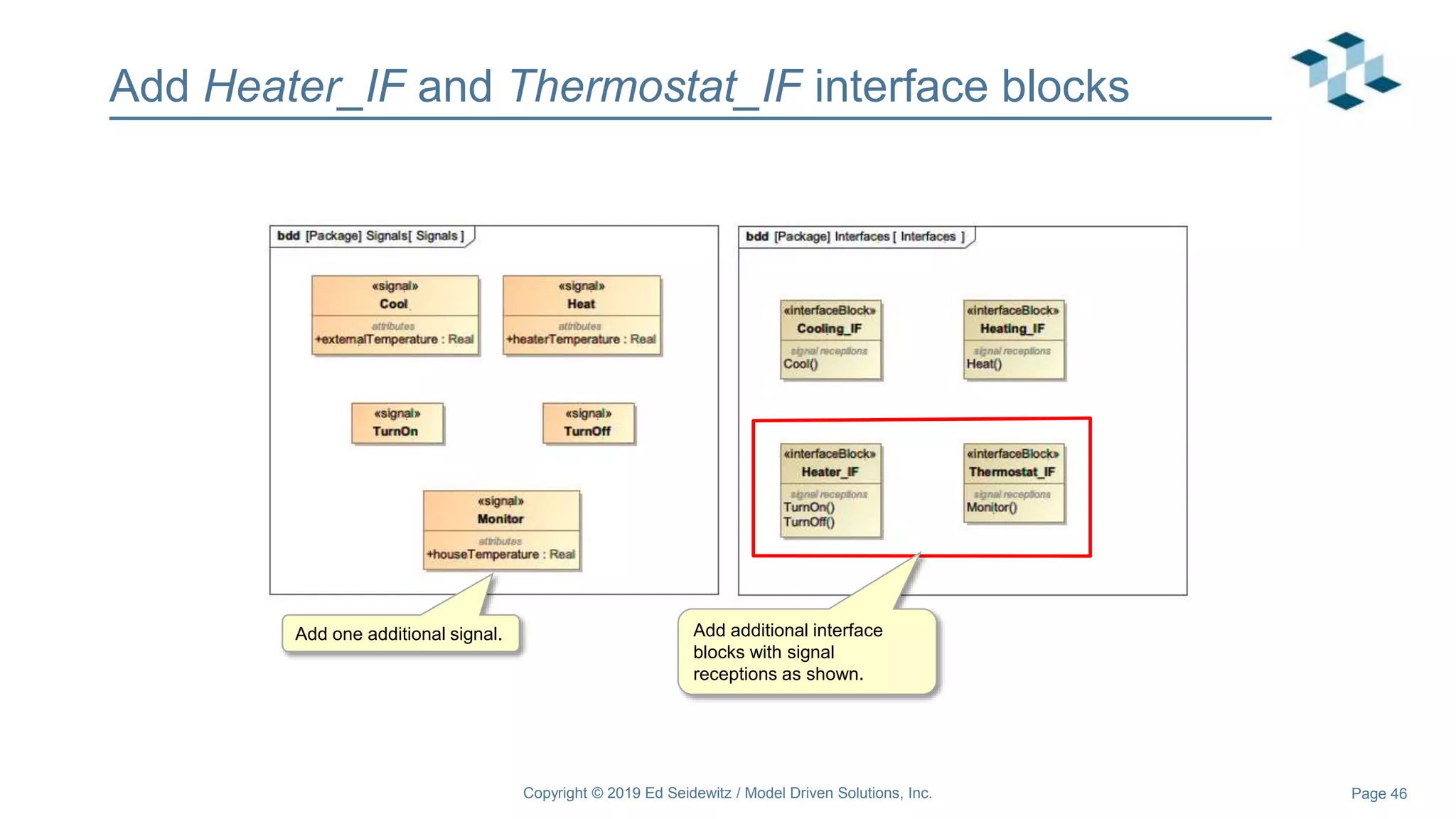
Add Heater_IF and Thermostat_IF interface blocks
Add one additional signal. Add additional interface
blocks with signal
receptions as shown.
Copyright © 2019 Ed Seidewitz / Model Driven Solutions, Inc.
Page 47
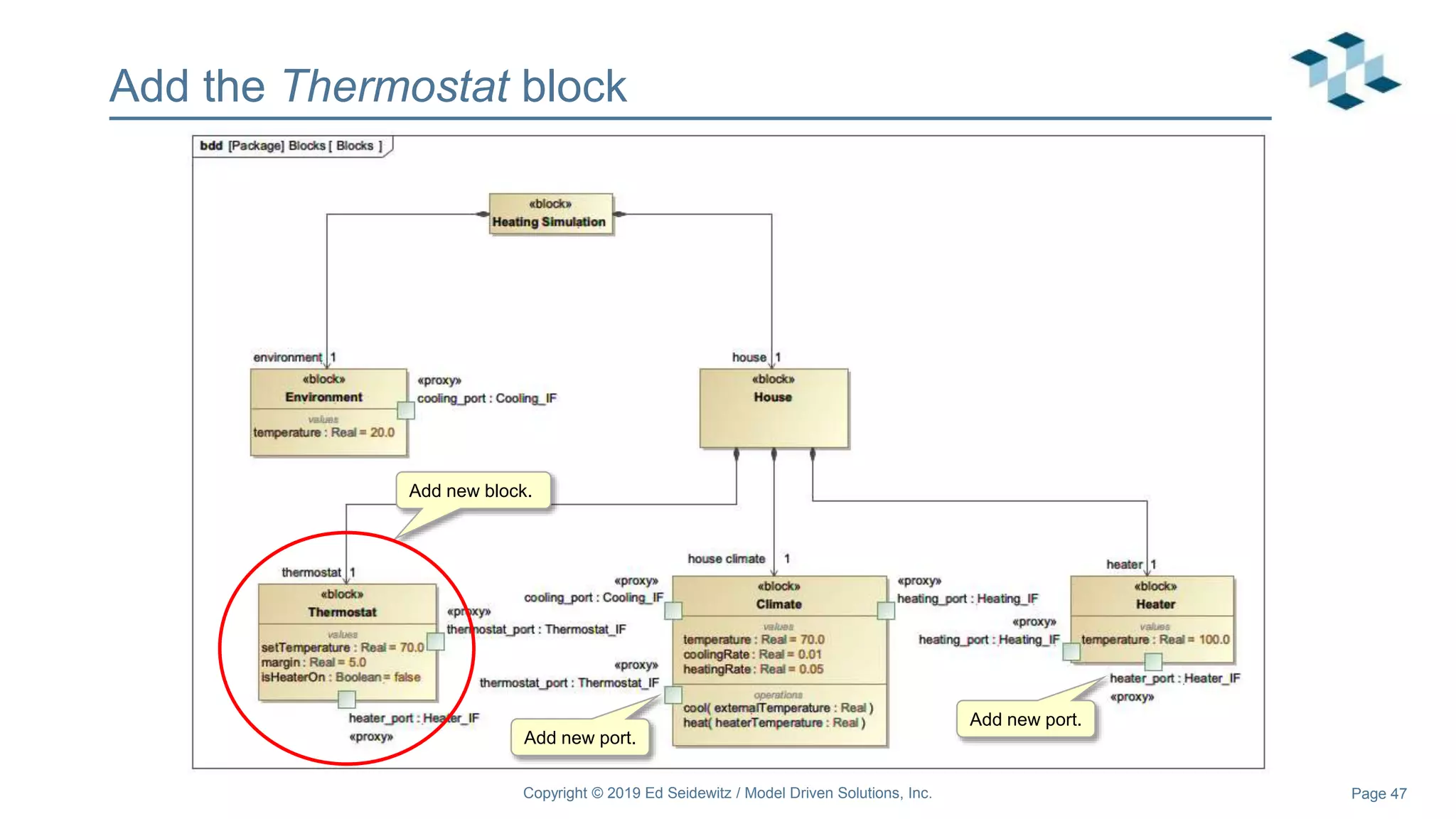
Add the Thermostat block
Add new block.
Add new port.
Copyright © 2019 Ed Seidewitz / Model Driven Solutions, Inc.
Add new port.
Page 48
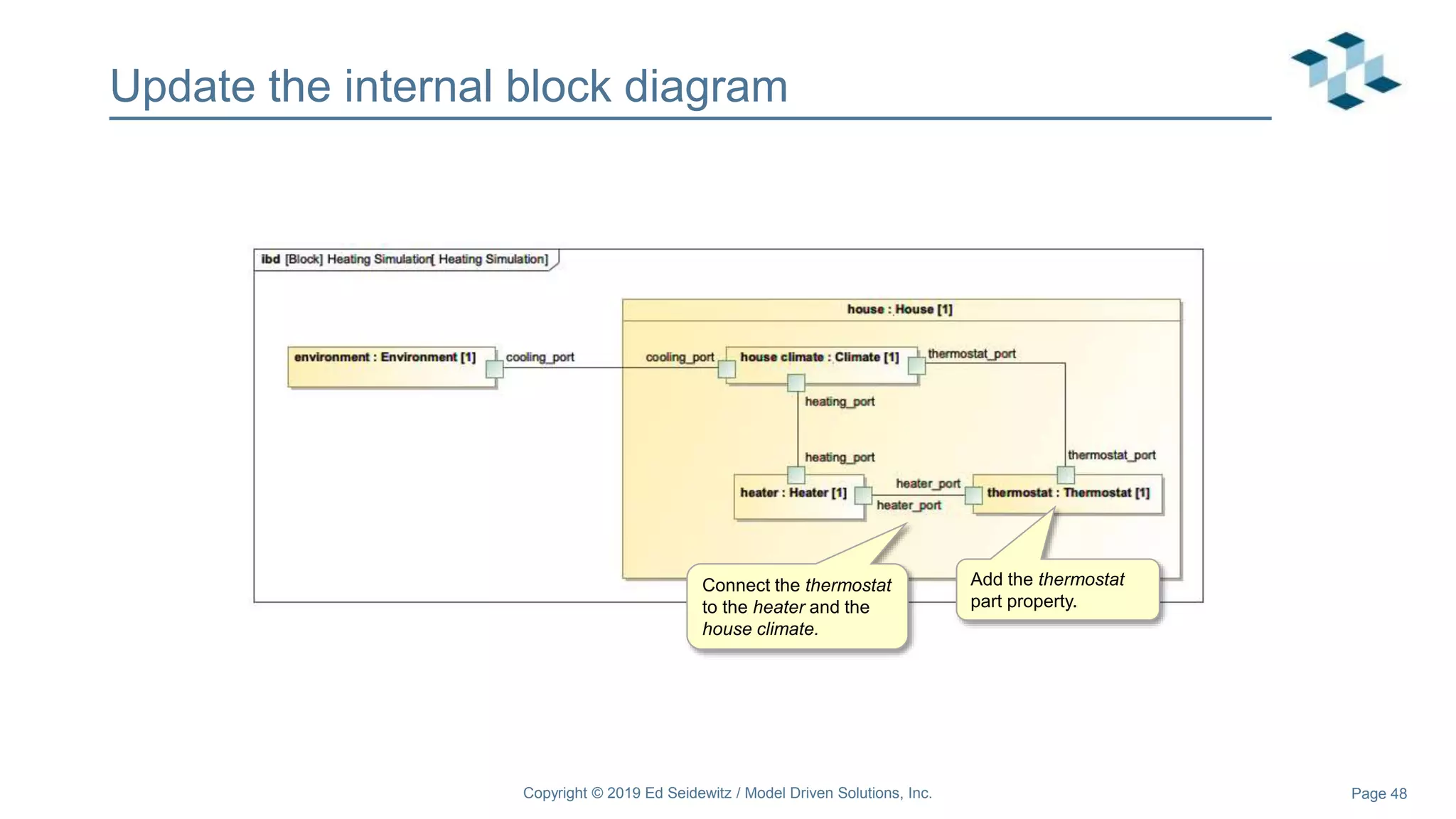
Update the internal block diagram
Copyright © 2019 Ed Seidewitz / Model Driven Solutions, Inc.
Connect the thermostat
to the heater and the
house climate.
Add the thermostat
part property.
Page 49
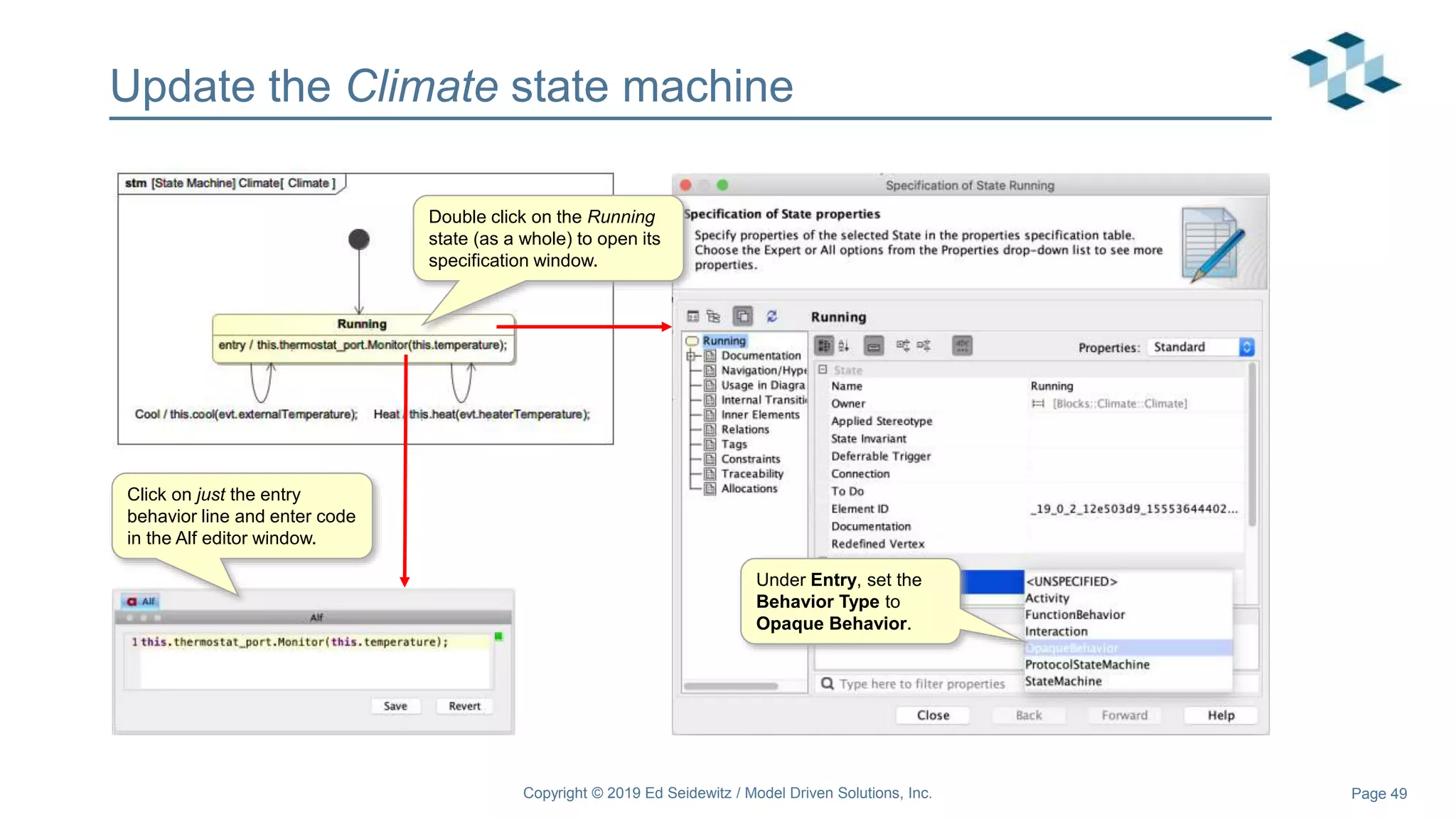
Update the Climate state machine
Double click on the Running
state (as a whole) to open its
specification window.
Under Entry, set the
Behavior Type to
Opaque Behavior.
Click on just the entry
behavior line and enter code
in the Alf editor window.
Copyright © 2019 Ed Seidewitz / Model Driven Solutions, Inc.
Page 50
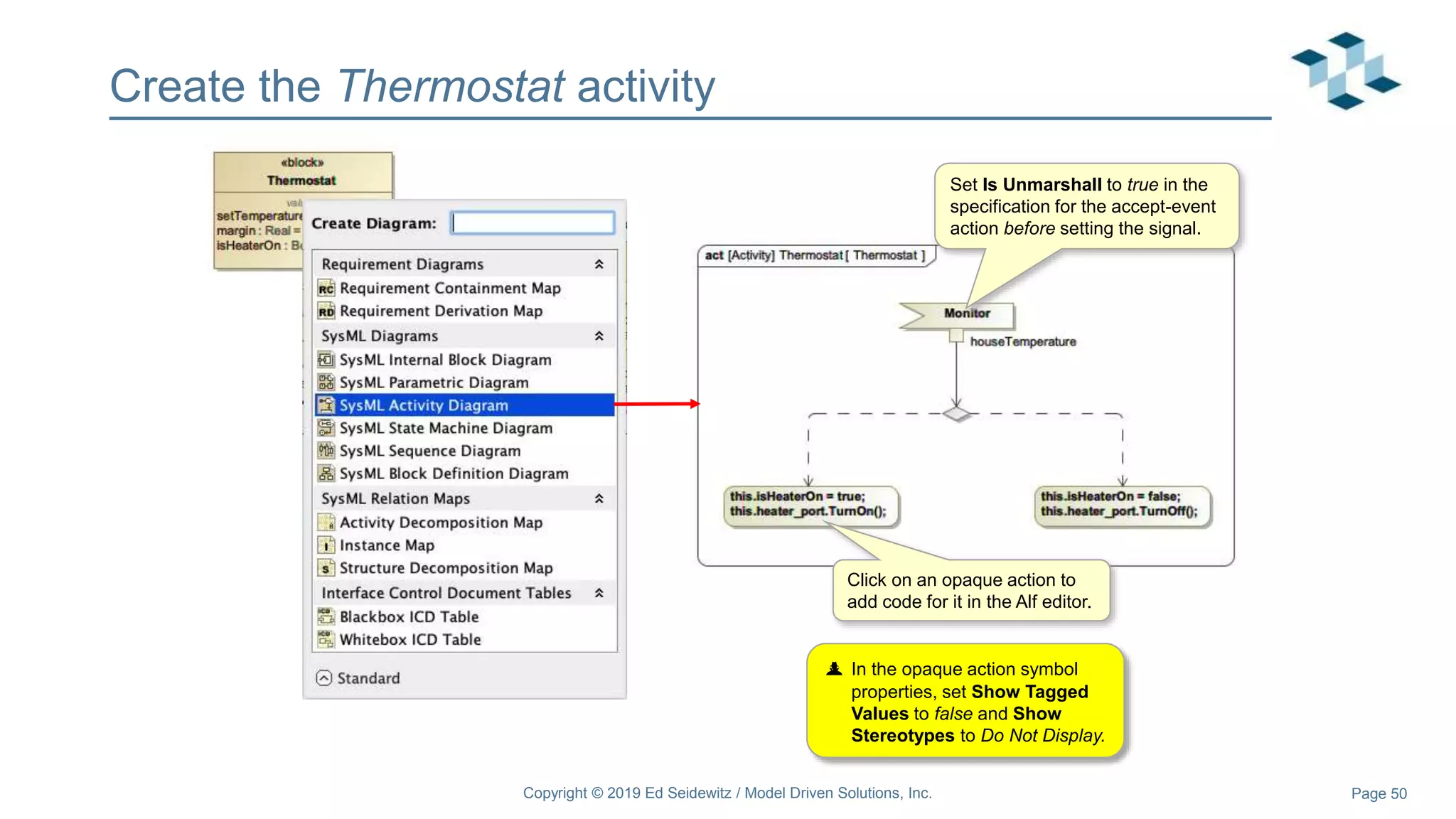
Create the Thermostat activity
Copyright © 2019 Ed Seidewitz / Model Driven Solutions, Inc.
Set Is Unmarshall to true in the
specification for the accept-event
action before setting the signal.
Click on an opaque action to
add code for it in the Alf editor.
 In the opaque action symbol
properties, set Show Tagged
Values to false and Show
Stereotypes to Do Not Display.
Page 51
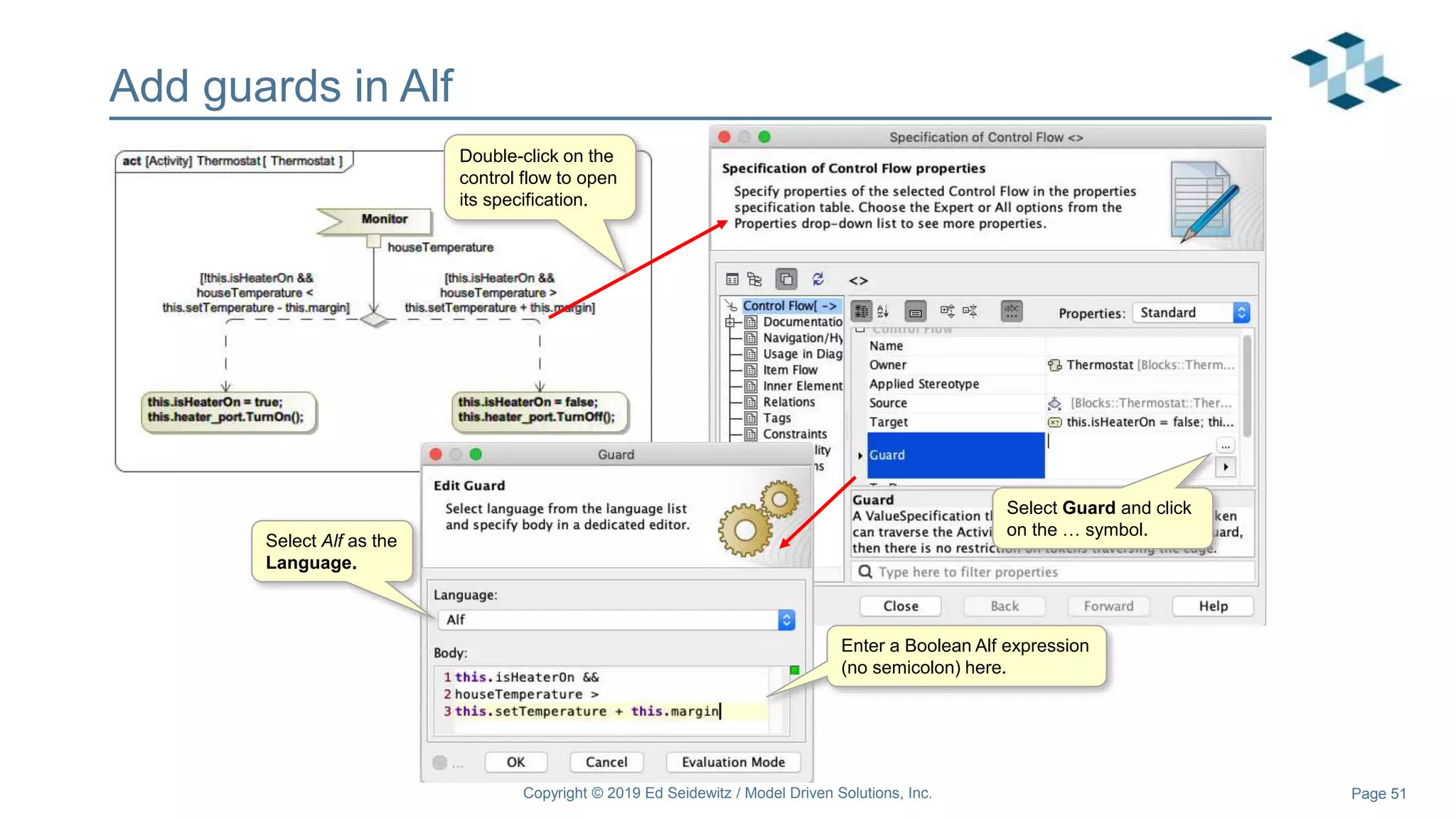
Add guards in Alf
Copyright © 2019 Ed Seidewitz / Model Driven Solutions, Inc.
Double-click on the
control flow to open
its specification.
Select Guard and click
on the … symbol.
Select Alf as the
Language.
Enter a Boolean Alf expression
(no semicolon) here.
Page 52
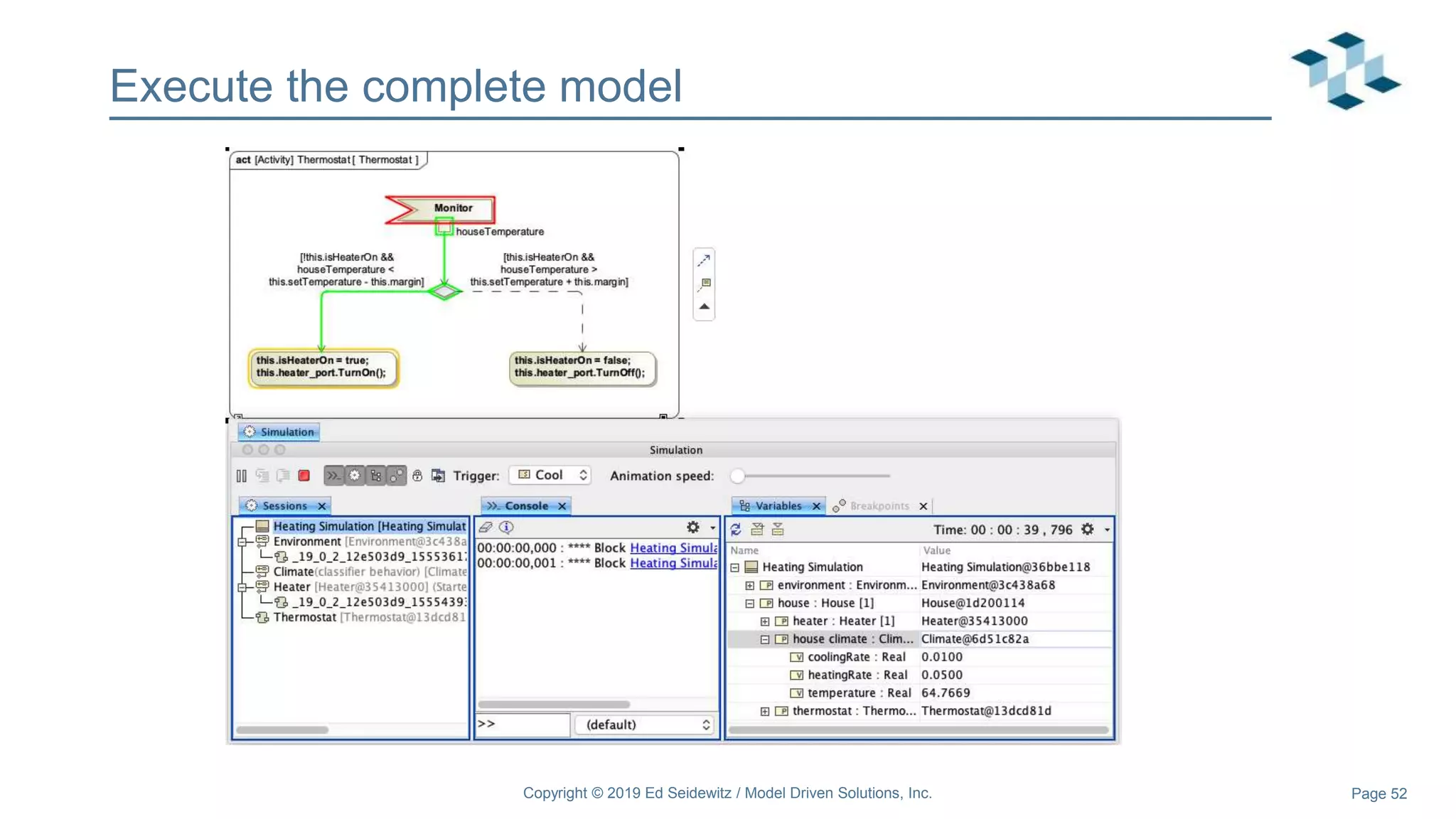
Execute the complete model
Copyright © 2019 Ed Seidewitz / Model Driven Solutions, Inc.
Page 53
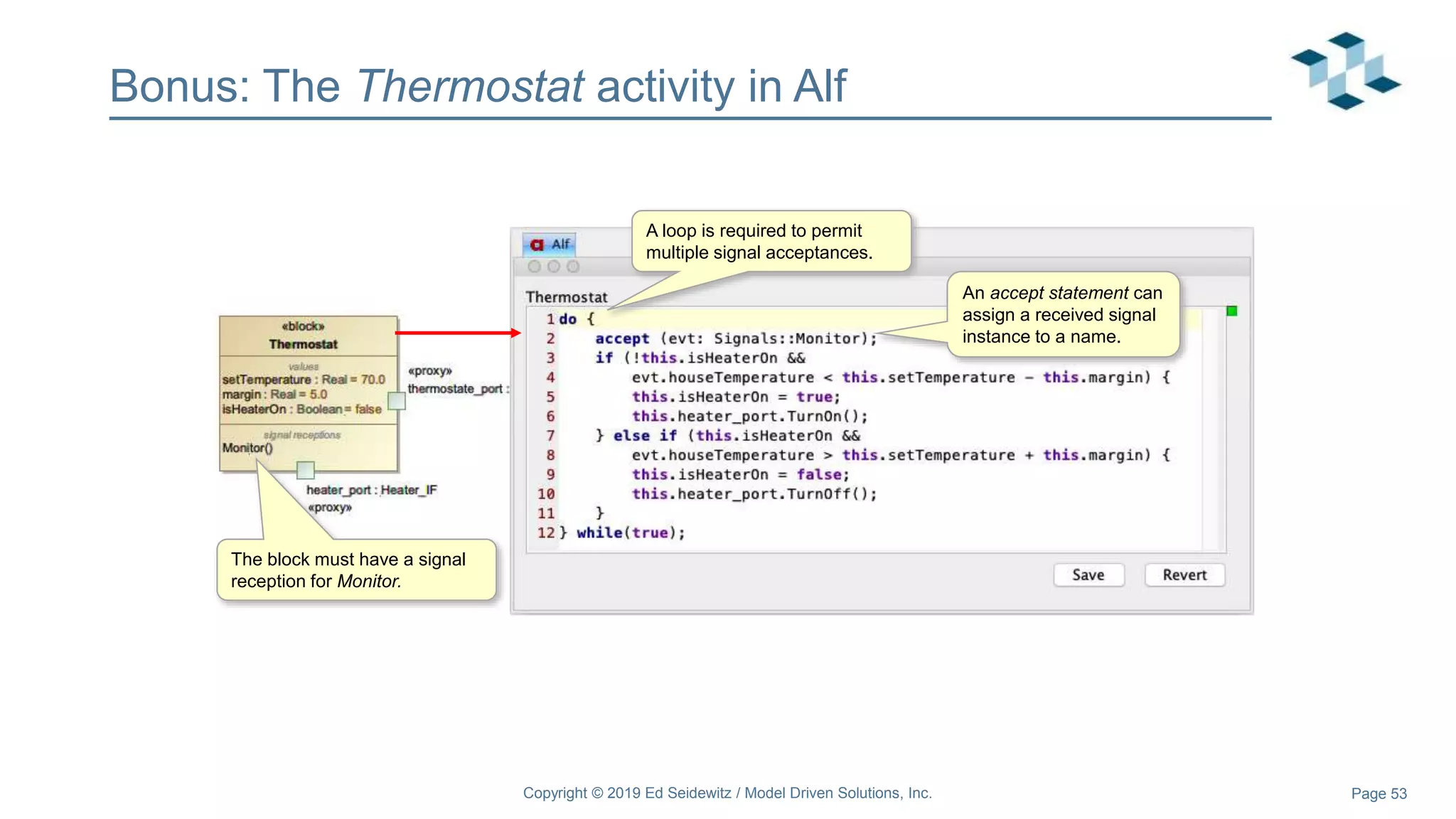
Bonus: The Thermostat activity in Alf
Copyright © 2019 Ed Seidewitz / Model Driven Solutions, Inc.
The block must have a signal
reception for Monitor.
A loop is required to permit
multiple signal acceptances.
An accept statement can
assign a received signal
instance to a name.

Leveraging Alf for SysML, Part 1: Better Simulation Modeling

  • 1.
    Leveraging Alf forSysML Part 1: Better Simulation Modeling Copyright © 2019 Ed Seidewitz / Model Driven Solutions, Inc. Ed Seidewitz Model Driven Solutions, Inc. ● http://www.modeldriven.com ed-s@modeldriven.com ● @Seidewitz http://slideshare.net/seidewitz
  • 2.
    Page 2 Goals Part 1–Simulation Modeling • Learn the basics of the Alf action language for executable modeling. • Learn how to use Alf as an action language in SysML models. • Practice executing simulations of models that use Alf. Part 2 – Trade Study Modeling • Learn how to use the Trade Study Pattern. • Use Alf together with parametric constraints in SysML models. • Use simulation models in trade studies. Copyright © 2019 Ed Seidewitz / Model Driven Solutions, Inc.
  • 3.
    Page 3 Prerequisites • Participant –Knowledge of SysML modeling using MagicDraw or Cameo System Modeler – Some experience with model execution using Cameo Simulation Toolkit – Introductory understanding of using Alf with SysML (e.g., from Part 1 of this tutorial) • System (for hands-on exercises) – Cameo System Modeler 19.0 SP2 (or MagicDraw and SysML) – Cameo Simulation Toolkit 19.0 SP2 (included in CSM Enterprise Edition) – Alf Plugin 19.0 SP2 • Slides: Available at https://www.slideshare.net/seidewitz Copyright © 2019 Ed Seidewitz / Model Driven Solutions, Inc.
  • 4.
    Page 4 4 Installing theAlf Plugin Plugin documentation is available at: https://docs.nomagic.com/display/ALFP190SP2/Alf+plugin Under Plugins (commercial), download / install the Alf plugin v19.0 SP2. Select Help ► Resource/Plugin Manager to open the Resource/ Plugin Manager window. Copyright © 2019 Ed Seidewitz / Model Driven Solutions, Inc.
  • 5.
    Page 5 Background Copyright ©2019 Ed Seidewitz / Model Driven Solutions, Inc.
  • 6.
    Page 6 Executable UML ExecutableUML is a (growing) subset of standard UML that can be used to define, in an executable, operational style, the structural and behavioral semantics of systems. • Foundational UML (structural and activity models) – http://www.omg.org/spec/FUML • Precise Semantics of UML Composite Structure (PSCS) – http://www.omg.org/spec/PSCS • Precise Semantics of UML State Machines (PSSM) – http://www.omg.org/spec/PSSM • Action Language for Foundational UML (Alf) – http://www.omg.org/spec/ALF A textual surface representation for UML modeling elements with the primary purpose of acting as the surface notation for specifying executable (fUML) behaviors within an overall graphical UML model. Alf Plugin Copyright © 2019 Ed Seidewitz / Model Driven Solutions, Inc.
  • 7.
    Page 7 Why anaction language? Graphical notations are good for… Copyright © 2019 Ed Seidewitz / Model Driven Solutions, Inc. Structural models High-level behavioral models
  • 8.
    Page 8 Why anaction language? …but not so good for detailed behavior Full executability requires complete specification of behavior and computation. This is often much more easy to specify using a textual notation. Copyright © 2019 Ed Seidewitz / Model Driven Solutions, Inc.
  • 9.
    Page 9 Why notjust use a scripting language? • Scripting language: No standard syntactic or semantic integration with UML • Alf: Full, standardized syntactic and semantic integration with UML this.lineItems->remove(item) this.totalAmount = Subtract(this.totalAmount, item.amount) ALH.removeValue(self, "lineItems", item); arguments = ALH.createList(); arguments.add(ALH.getValue(self, "totalAmount")); arguments.add(ALH.getValue(item, "amount”)); ALH.setValue(self, "totalAmount", ALH.callBehavior("Subtract", arguments)); Example using the MagicDraw- specific Action Language Helper API for JavaScript. Copyright © 2019 Ed Seidewitz / Model Driven Solutions, Inc.
  • 10.
    Page 10 Hands On SysMLHello Copyright © 2019 Ed Seidewitz / Model Driven Solutions, Inc.
  • 11.
    Page 11 Create theHello project Select Create New Project under Manage Projects or File ► New Project to open the project creation window. Create a Hello project. Copyright © 2019 Ed Seidewitz / Model Driven Solutions, Inc. Under System Engineering, select SysML Project. (This is the default for CSM.)
  • 12.
    Page 12 Load theAlf Library Select Tools ► Alf ► Load Library to load the Alf Library. Copyright © 2019 Ed Seidewitz / Model Driven Solutions, Inc.
  • 13.
    Page 13 Open theAlf Editor window Select Window ► Alf to open the Alf Editor window. You can dock it here, if you wish. Copyright © 2019 Ed Seidewitz / Model Driven Solutions, Inc.
  • 14.
    Page 14 Create aBlock Definition Diagram Copyright © 2019 Ed Seidewitz / Model Driven Solutions, Inc.
  • 15.
    Page 15 Create ablock Copyright © 2019 Ed Seidewitz / Model Driven Solutions, Inc. Add a value property whose value is your name.
  • 16.
    Page 16 Create aclassifier behavior for the block Copyright © 2019 Ed Seidewitz / Model Driven Solutions, Inc. Create a new Activity. Enter Alf code in the Alf editor window. When the code is correct, click Save.
  • 17.
    Page 17 Execute theblock Right click on the Activity and select Simulation ► Run. Set Animation Speed to the highest level… …and click here to run. Output appears in the console pane. Copyright © 2019 Ed Seidewitz / Model Driven Solutions, Inc.
  • 18.
    Page 18 Introduction Copyright ©2019 Ed Seidewitz / Model Driven Solutions, Inc.
  • 19.
    Page 19 The basicidea: Alf maps to fUML activity DoSomething(in input: Integer, out output Integer): Integer { output = A(input); return B(); } Alf behavioral notation maps to fUML activity models. The semantics of the Alf notation is defined by its mapping to fUML Copyright © 2019 Ed Seidewitz / Model Driven Solutions, Inc.
  • 20.
    Page 20 Assignment asdata flow a = +1; b = -a; a = A(a) + B(b); Local names map to forked object flows. Subexpressions are evaluated concurrently. A re-assigned local name actually maps to a new flow.  The literal “1” has type Natural. The expression “+1” has type Integer. The expression “A(a) + B(b)” has type Integer, which is not compatible with Natural. The local name a implicitly gets the type Integer. Statements map to structured activity nodes with control flows to enforce sequential execution. a = 1; a = A(a); ✗ type conformance Copyright © 2019 Ed Seidewitz / Model Driven Solutions, Inc.
  • 21.
    Page 21 Operations andmethods this.powerLevel = powerLevel; this.output = powerLevel * this.maxOutput; return this.output; newPowerLevel = … ; this.fan.setPowerLevel(newPowerLevel); fanOutput = this.fan.getOutput(); Operation calls. The behavior that implements an operation is called its method. Property access. ⓘ Operation calls are synchronous invocations. The caller waits until the operation method execution completes. Copyright © 2019 Ed Seidewitz / Model Driven Solutions, Inc.
  • 22.
    Page 22 Transition andstate behaviors Copyright © 2019 Ed Seidewitz / Model Driven Solutions, Inc. Alf can be used to define transition and state behaviors in state machines.
  • 23.
    Page 23 Signal receptions this.fan.TurnOn(); … this.fan.TurnOff(); Asignal send has a similar syntax to operation calls, but referencing a signal reception, rather than an operation.  A signal can only be sent using Alf to an object whose class has a reception declared for the signal. ⓘ Signal sends are asynchronous invocations. The sender continues immediately after the signal is sent. Copyright © 2019 Ed Seidewitz / Model Driven Solutions, Inc.
  • 24.
    Page 24 Ports andinterfaces this.fan_out.TurnOn(); fanOutput = this.fan_out.getOutput(); A port is referenced like a property.  Signal sends and operation calls through a (proxy) port must be handled by the block classifier behavior or delegated. Signal receptions are necessary only on the interface. Copyright © 2019 Ed Seidewitz / Model Driven Solutions, Inc.
  • 25.
    Page 25 Opaque actionsand guards An Alf expression (no final semicolon) in an opaque action produces its value on a single output pin. The (pin) name of the input to a decision node can be used in guards. An opaque action body may contain one more Alf statements (with final semicolons). ⓘ The Alf code in an opaque action is essentially compiled into a call to a generated activity. Copyright © 2019 Ed Seidewitz / Model Driven Solutions, Inc.
  • 26.
    Page 26 Hands On HeatingSimulation Copyright © 2019 Ed Seidewitz / Model Driven Solutions, Inc.
  • 27.
    Page 27 Create theHeating Simulation project Copyright © 2019 Ed Seidewitz / Model Driven Solutions, Inc.
  • 28.
    Page 28 Load theAlf Library and open the Alf Editor window Copyright © 2019 Ed Seidewitz / Model Driven Solutions, Inc.
  • 29.
    Page 29 Create themodel package structure Copyright © 2019 Ed Seidewitz / Model Driven Solutions, Inc.
  • 30.
    Page 30 Create theCooling_IF interface block Create a signal… …then create an interface block with a signal reception for the signal. Copyright © 2019 Ed Seidewitz / Model Driven Solutions, Inc.
  • 31.
    Page 31 Create aninitial block definition diagram Add value properties, ports and operations as shown. Copyright © 2019 Ed Seidewitz / Model Driven Solutions, Inc.
  • 32.
    Page 32 Create aninitial internal block diagram Connect the environment to the house climate. Copyright © 2019 Ed Seidewitz / Model Driven Solutions, Inc.
  • 33.
    Page 33 Create theEnvironment state machine Add a self-transition with a time-event trigger. Copyright © 2019 Ed Seidewitz / Model Driven Solutions, Inc.
  • 34.
    Page 34 Create anopaque behavior Under Effect, set the Behavior Type to Opaque Behavior. Copyright © 2019 Ed Seidewitz / Model Driven Solutions, Inc.
  • 35.
    Page 35 Add Alfcode Click on the transition to enter code for its effect behavior in the Alf editor window. Arguments give values for signal attributes. Copyright © 2019 Ed Seidewitz / Model Driven Solutions, Inc.
  • 36.
    Page 36 Create theHouse Climate state machine Add a self-transition triggered by the Cool signal. Copyright © 2019 Ed Seidewitz / Model Driven Solutions, Inc.
  • 37.
    Page 37 Add AlfCode Create an effect behavior, and then add Alf code for it. The special evt parameter refers to the received signal instance. Copyright © 2019 Ed Seidewitz / Model Driven Solutions, Inc.
  • 38.
    Page 38 Create thecool method Right click on the cool operation and select Create Method ► Behavior to open the Behavior selection window. Enter the Alf code in the Alf editor window. Choose either Activity or Opaque Behavior. ⓘ The braces { } are required in if statement clauses in Alf. Copyright © 2019 Ed Seidewitz / Model Driven Solutions, Inc.
  • 39.
    Page 39 Execute themodel so far Move the Animation speed slider all the way right. Right click on the Heating Simulation block and select Simulation ► Run to execute the model. Click here to start the simulation Watch the temperature change here. Copyright © 2019 Ed Seidewitz / Model Driven Solutions, Inc.
  • 40.
    Page 40 Add aninterface block with a signal reception for the new Heat signal. Add the Heating_IF interface block Add additional signals. Copyright © 2019 Ed Seidewitz / Model Driven Solutions, Inc.
  • 41.
    Page 41 Add theHeater block Add new operation. Add new block. Add new attribute. Add new port. Copyright © 2019 Ed Seidewitz / Model Driven Solutions, Inc.
  • 42.
    Page 42 Update theinternal block diagram Connect the heater to the house climate. Copyright © 2019 Ed Seidewitz / Model Driven Solutions, Inc. Add the heater part property.
  • 43.
    Page 43 Update theClimate state machine Add a new transition triggered by the Heat signal with Alf code to call the heat operation. Create a method behavior for the heat operation. Copyright © 2019 Ed Seidewitz / Model Driven Solutions, Inc.
  • 44.
    Page 44 Create theHeater state machine Copyright © 2019 Ed Seidewitz / Model Driven Solutions, Inc.
  • 45.
    Page 45 Execute themodel again Start the simulation, then select the Heater. Right click on the Heating Simulation block and select Simulation ► Run to execute the model again. Click here to turn the Heater on and off. Copyright © 2019 Ed Seidewitz / Model Driven Solutions, Inc.
  • 46.
    Page 46 Add Heater_IFand Thermostat_IF interface blocks Add one additional signal. Add additional interface blocks with signal receptions as shown. Copyright © 2019 Ed Seidewitz / Model Driven Solutions, Inc.
  • 47.
    Page 47 Add theThermostat block Add new block. Add new port. Copyright © 2019 Ed Seidewitz / Model Driven Solutions, Inc. Add new port.
  • 48.
    Page 48 Update theinternal block diagram Copyright © 2019 Ed Seidewitz / Model Driven Solutions, Inc. Connect the thermostat to the heater and the house climate. Add the thermostat part property.
  • 49.
    Page 49 Update theClimate state machine Double click on the Running state (as a whole) to open its specification window. Under Entry, set the Behavior Type to Opaque Behavior. Click on just the entry behavior line and enter code in the Alf editor window. Copyright © 2019 Ed Seidewitz / Model Driven Solutions, Inc.
  • 50.
    Page 50 Create theThermostat activity Copyright © 2019 Ed Seidewitz / Model Driven Solutions, Inc. Set Is Unmarshall to true in the specification for the accept-event action before setting the signal. Click on an opaque action to add code for it in the Alf editor.  In the opaque action symbol properties, set Show Tagged Values to false and Show Stereotypes to Do Not Display.
  • 51.
    Page 51 Add guardsin Alf Copyright © 2019 Ed Seidewitz / Model Driven Solutions, Inc. Double-click on the control flow to open its specification. Select Guard and click on the … symbol. Select Alf as the Language. Enter a Boolean Alf expression (no semicolon) here.
  • 52.
    Page 52 Execute thecomplete model Copyright © 2019 Ed Seidewitz / Model Driven Solutions, Inc.
  • 53.
    Page 53 Bonus: TheThermostat activity in Alf Copyright © 2019 Ed Seidewitz / Model Driven Solutions, Inc. The block must have a signal reception for Monitor. A loop is required to permit multiple signal acceptances. An accept statement can assign a received signal instance to a name.

Editor's Notes