Webinar
How to reduce complexity by
segregating your data with Virtual
Workspaces
Felix Hoffmann, Product Management
2019-09-24
2
Felix Hoffmann
Product Manager @ LeanIX GmBH
@Sisp3ks
Felix Hoffmann
felix.hoffmann@leanix.net
Mathematician by trade
Strong interest into Data Science (NLP, ML, …)
Responsible for Core Product at LeanIX
Ask me about: Ballroom Dancing and Table Tennis
3
Agenda
...
• How it works
Virtual Workspaces
• Live Demo
LeanIX Introduction
Q&A
• Overview
LeanIX Introduction
5
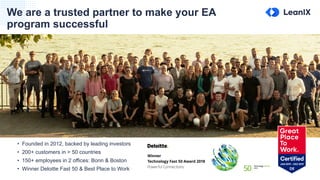
We are a trusted partner to make your EA
program successful
5
• Founded in 2012, backed by leading investors
• 200+ customers in > 50 countries
• 150+ employees in 2 offices: Bonn & Boston
• Winner Deloitte Fast 50 & Best Place to Work
6
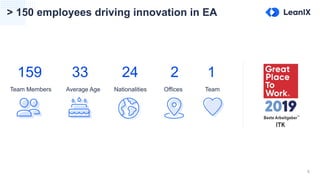
> 150 employees driving innovation in EA
159
Team Members
33
Average Age
24
Nationalities
2
Offices
1
Team
7
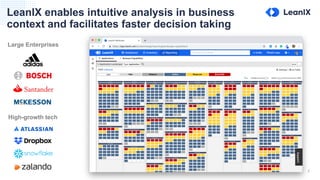
LeanIX enables intuitive analysis in business
context and facilitates faster decision taking
Large Enterprises
High-growth tech
8
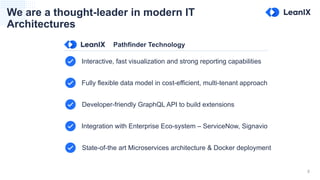
We are a thought-leader in modern IT
Architectures
Interactive, fast visualization and strong reporting capabilities
Fully flexible data model in cost-efficient, multi-tenant approach
Developer-friendly GraphQL API to build extensions
Integration with Enterprise Eco-system – ServiceNow, Signavio
State-of-the art Microservices architecture & Docker deployment
Pathfinder Technology
9
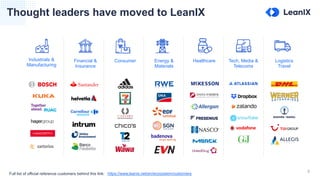
Thought leaders have moved to LeanIX
Industrials &
Manufacturing
Financial &
Insurance
Consumer Energy &
Materials
Healthcare Tech, Media &
Telecoms
Logistics
Travel
Full list of official reference customers behind this link: https://www.leanix.net/en/ecosystem/customers
10
Agenda
...
• How it works
Virtual Workspaces
• Live Demo
LeanIX Introduction
Q&A
• Overview
Virtual Workspaces
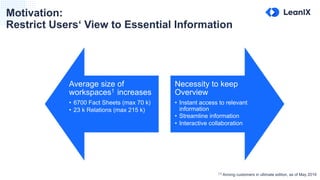
Motivation:
Restrict Users‘ View to Essential Information
Average size of
workspaces1 increases
• 6700 Fact Sheets (max 70 k)
• 23 k Relations (max 215 k)
Necessity to keep
Overview
• Instant access to relevant
information
• Streamline information
• Interactive collaboration
(1)
Among customers in ultimate edition, as of May 2019
13
When you think of Virtual Workspaces ...
"As a user it should feel like there is nothing else in the [EA] world."
- Senior Manager of EAM in Pharmaceuticals
14
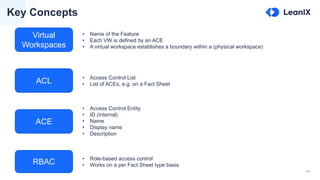
Key Concepts
ACE
Virtual
Workspaces
RBAC
ACL
• Access Control Entity
• ID (internal)
• Name
• Display name
• Description
• Access Control List
• List of ACEs, e.g. on a Fact Sheet
• Name of the Feature
• Each VW is defined by an ACE
• A virtual workspace establishes a boundary within a (physical workspace)
• Role-based access control
• Works on a per Fact Sheet type basis
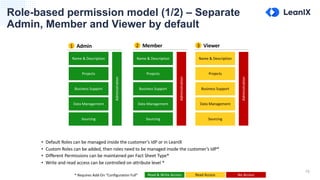
Role-based permission model (1/2) – Separate
Admin, Member and Viewer by default
15
Name & Description
Projects
Business Support
Data Management
Sourcing
Administration
Name & Description
Projects
Business Support
Data Management
Sourcing
Administration
Name & Description
Projects
Business Support
Data Management
Sourcing
Administration
1 Admin 2 Member 3 Viewer
• Default Roles can be managed inside the customer’s IdP or in LeanIX
• Custom Roles can be added, then roles need to be managed inside the customer’s IdP*
• Different Permissions can be maintained per Fact Sheet Type*
• Write and read access can be controlled on attribute level *
* Requires Add-On “Configuration Full” Read & Write Access Read Access No Access
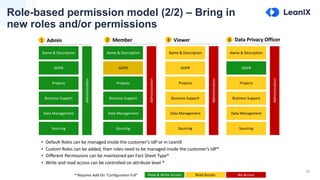
Role-based permission model (2/2) – Bring in
new roles and/or permissions
16
Name & Description
GDPR
Projects
Business Support
Data Management
Administration
Name & Description
GDPR
Projects
Business Support
Data Management
Administration
Name & Description
GDPR
Projects
Business Support
Data Management
Administration
1 Admin 2 Member 3 Viewer
Sourcing Sourcing Sourcing
Name & Description
GDPR
Projects
Business Support
Data Management
Administration
4
Sourcing
• Default Roles can be managed inside the customer’s IdP or in LeanIX
• Custom Roles can be added, then roles need to be managed inside the customer’s IdP*
• Different Permissions can be maintained per Fact Sheet Type*
• Write and read access can be controlled on attribute level *
* Requires Add-On “Configuration Full” Read & Write Access Read Access No Access
Data Privacy Officer
17
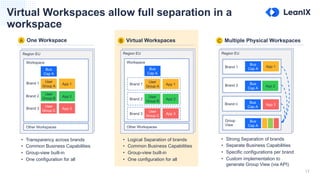
Virtual Workspaces allow full separation in a
workspace
A One Workspace Multiple Physical WorkspacesVirtual WorkspacesB C
Region EU
Workspace
Region EU
Brand 1
Brand 2
Bus
Cap A
Bus
Cap A
Brand n Bus
Cap A
Group
View
Bus
Cap A
App 1
App 2
App 3
Bus
Cap A
App 1
App 2
App 3
User
Group A
User
Group B
User
Group C
Region EU
Other Workspaces
Workspace
Bus
Cap A
App 1
App 2
App 3
User
Group A
User
Group B
User
Group C
Other Workspaces
Brand 1
Brand 2
Brand 3
Brand 1
Brand 2
Brand 3
• Transparency across brands
• Common Business Capabilities
• Group-view built-in
• One configuration for all
• Logical Separation of brands
• Common Business Capabilities
• Group-view built-in
• One configuration for all
• Strong Separation of brands
• Separate Business Capabilities
• Specific configurations per brand
• Custom implementation to
generate Group View (via API)
18
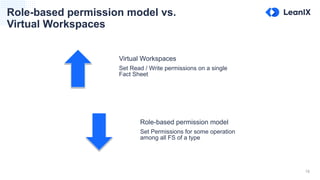
Role-based permission model vs.
Virtual Workspaces
Virtual Workspaces
Set Read / Write permissions on a single
Fact Sheet
Role-based permission model
Set Permissions for some operation
among all FS of a type
Use Cases
20
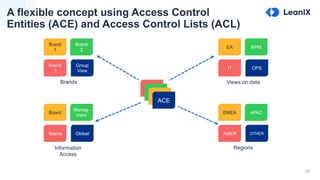
A flexible concept using Access Control
Entities (ACE) and Access Control Lists (ACL)
ACE
ACE
ACE
ACE
Brand
1
Brand
2
Brand
3
Group
View
Board
Manag-
ment
Teams Global
EA BPM
IT OPS
Brands
Information
Access
Views on data
EMEA APAC
AMER OTHER
Regions
21
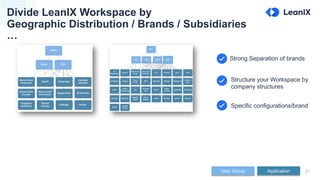
Divide LeanIX Workspace by
Geographic Distribution / Brands / Subsidiaries
…
Structure your Workspace by
company structures
Specific configurations/brand
Strong Separation of brands
User Group Application
22
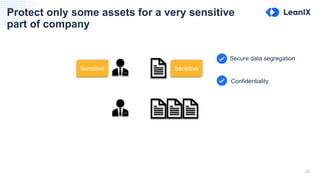
Protect only some assets for a very sensitive
part of company
SensitiveSensitive
Confidentiality
Secure data segregation
23
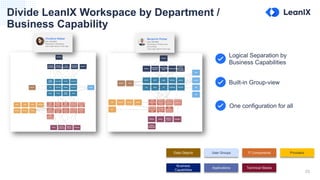
Divide LeanIX Workspace by Department /
Business Capability
Built-in Group-view
One configuration for all
Logical Separation by
Business Capabilities
Data Objects
Business
Capabilities
User Groups
Applications
IT Components
Technical Stacks
Providers
24
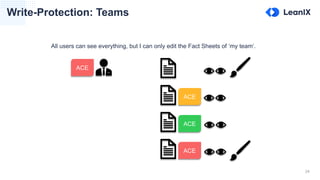
Write-Protection: Teams
All users can see everything, but I can only edit the Fact Sheets of ‘my team‘.
ACE
ACE
ACE
ACE
How it works
26
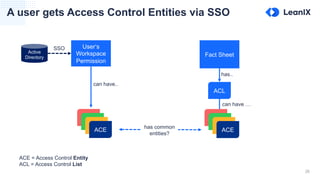
A user gets Access Control Entities via SSO
User‘s
Workspace
Permission
can have..
Fact Sheet
can have …
ACL
has..
has common
entities?
ACE = Access Control Entity
ACL = Access Control List
Active
Directory
SSO
ACE
ACE
ACE
ACE
ACE
ACE
ACE
ACE
27
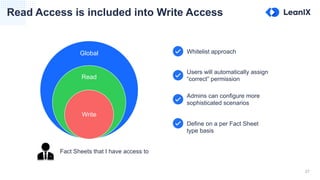
Read Access is included into Write Access
Global
Read
Write
Whitelist approach
Users will automatically assign
“correct” permission
Admins can configure more
sophisticated scenarios
Define on a per Fact Sheet
type basis
Fact Sheets that I have access to
28
Determining Read and Write Access
[ ]
[ ] [ Marketing ]
[ ]
[ Marketing ] [ Marketing ]
Read Access Write Access Result
Everyone can read and write
Everyone can read, only Marketing write
Only Marketing can read or write
[ Marketing, HR ] [ Marketing ] Only Marketing can read and write, HR can only read
Set-up and Demo
30
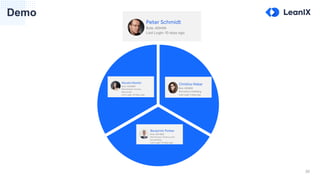
Demo
Marketing
Finance
HR
31
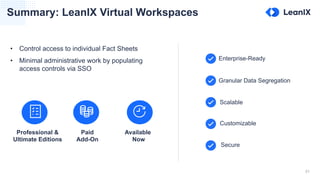
Summary: LeanIX Virtual Workspaces
Granular Data Segregation
Scalable
Customizable
Secure
Enterprise-Ready
Professional &
Ultimate Editions
Paid
Add-On
Available
Now
• Control access to individual Fact Sheets
• Minimal administrative work by populating
access controls via SSO
LeanIX Virtual Workspaces

LeanIX Virtual Workspaces

  • 1.
    Webinar How to reducecomplexity by segregating your data with Virtual Workspaces Felix Hoffmann, Product Management 2019-09-24
  • 2.
    2 Felix Hoffmann Product Manager@ LeanIX GmBH @Sisp3ks Felix Hoffmann felix.hoffmann@leanix.net Mathematician by trade Strong interest into Data Science (NLP, ML, …) Responsible for Core Product at LeanIX Ask me about: Ballroom Dancing and Table Tennis
  • 3.
    3 Agenda ... • How itworks Virtual Workspaces • Live Demo LeanIX Introduction Q&A • Overview
  • 4.
  • 5.
    5 We are atrusted partner to make your EA program successful 5 • Founded in 2012, backed by leading investors • 200+ customers in > 50 countries • 150+ employees in 2 offices: Bonn & Boston • Winner Deloitte Fast 50 & Best Place to Work
  • 6.
    6 > 150 employeesdriving innovation in EA 159 Team Members 33 Average Age 24 Nationalities 2 Offices 1 Team
  • 7.
    7 LeanIX enables intuitiveanalysis in business context and facilitates faster decision taking Large Enterprises High-growth tech
  • 8.
    8 We are athought-leader in modern IT Architectures Interactive, fast visualization and strong reporting capabilities Fully flexible data model in cost-efficient, multi-tenant approach Developer-friendly GraphQL API to build extensions Integration with Enterprise Eco-system – ServiceNow, Signavio State-of-the art Microservices architecture & Docker deployment Pathfinder Technology
  • 9.
    9 Thought leaders havemoved to LeanIX Industrials & Manufacturing Financial & Insurance Consumer Energy & Materials Healthcare Tech, Media & Telecoms Logistics Travel Full list of official reference customers behind this link: https://www.leanix.net/en/ecosystem/customers
  • 10.
    10 Agenda ... • How itworks Virtual Workspaces • Live Demo LeanIX Introduction Q&A • Overview
  • 11.
  • 12.
    Motivation: Restrict Users‘ Viewto Essential Information Average size of workspaces1 increases • 6700 Fact Sheets (max 70 k) • 23 k Relations (max 215 k) Necessity to keep Overview • Instant access to relevant information • Streamline information • Interactive collaboration (1) Among customers in ultimate edition, as of May 2019
  • 13.
    13 When you thinkof Virtual Workspaces ... "As a user it should feel like there is nothing else in the [EA] world." - Senior Manager of EAM in Pharmaceuticals
  • 14.
    14 Key Concepts ACE Virtual Workspaces RBAC ACL • AccessControl Entity • ID (internal) • Name • Display name • Description • Access Control List • List of ACEs, e.g. on a Fact Sheet • Name of the Feature • Each VW is defined by an ACE • A virtual workspace establishes a boundary within a (physical workspace) • Role-based access control • Works on a per Fact Sheet type basis
  • 15.
    Role-based permission model(1/2) – Separate Admin, Member and Viewer by default 15 Name & Description Projects Business Support Data Management Sourcing Administration Name & Description Projects Business Support Data Management Sourcing Administration Name & Description Projects Business Support Data Management Sourcing Administration 1 Admin 2 Member 3 Viewer • Default Roles can be managed inside the customer’s IdP or in LeanIX • Custom Roles can be added, then roles need to be managed inside the customer’s IdP* • Different Permissions can be maintained per Fact Sheet Type* • Write and read access can be controlled on attribute level * * Requires Add-On “Configuration Full” Read & Write Access Read Access No Access
  • 16.
    Role-based permission model(2/2) – Bring in new roles and/or permissions 16 Name & Description GDPR Projects Business Support Data Management Administration Name & Description GDPR Projects Business Support Data Management Administration Name & Description GDPR Projects Business Support Data Management Administration 1 Admin 2 Member 3 Viewer Sourcing Sourcing Sourcing Name & Description GDPR Projects Business Support Data Management Administration 4 Sourcing • Default Roles can be managed inside the customer’s IdP or in LeanIX • Custom Roles can be added, then roles need to be managed inside the customer’s IdP* • Different Permissions can be maintained per Fact Sheet Type* • Write and read access can be controlled on attribute level * * Requires Add-On “Configuration Full” Read & Write Access Read Access No Access Data Privacy Officer
  • 17.
    17 Virtual Workspaces allowfull separation in a workspace A One Workspace Multiple Physical WorkspacesVirtual WorkspacesB C Region EU Workspace Region EU Brand 1 Brand 2 Bus Cap A Bus Cap A Brand n Bus Cap A Group View Bus Cap A App 1 App 2 App 3 Bus Cap A App 1 App 2 App 3 User Group A User Group B User Group C Region EU Other Workspaces Workspace Bus Cap A App 1 App 2 App 3 User Group A User Group B User Group C Other Workspaces Brand 1 Brand 2 Brand 3 Brand 1 Brand 2 Brand 3 • Transparency across brands • Common Business Capabilities • Group-view built-in • One configuration for all • Logical Separation of brands • Common Business Capabilities • Group-view built-in • One configuration for all • Strong Separation of brands • Separate Business Capabilities • Specific configurations per brand • Custom implementation to generate Group View (via API)
  • 18.
    18 Role-based permission modelvs. Virtual Workspaces Virtual Workspaces Set Read / Write permissions on a single Fact Sheet Role-based permission model Set Permissions for some operation among all FS of a type
  • 19.
  • 20.
    20 A flexible conceptusing Access Control Entities (ACE) and Access Control Lists (ACL) ACE ACE ACE ACE Brand 1 Brand 2 Brand 3 Group View Board Manag- ment Teams Global EA BPM IT OPS Brands Information Access Views on data EMEA APAC AMER OTHER Regions
  • 21.
    21 Divide LeanIX Workspaceby Geographic Distribution / Brands / Subsidiaries … Structure your Workspace by company structures Specific configurations/brand Strong Separation of brands User Group Application
  • 22.
    22 Protect only someassets for a very sensitive part of company SensitiveSensitive Confidentiality Secure data segregation
  • 23.
    23 Divide LeanIX Workspaceby Department / Business Capability Built-in Group-view One configuration for all Logical Separation by Business Capabilities Data Objects Business Capabilities User Groups Applications IT Components Technical Stacks Providers
  • 24.
    24 Write-Protection: Teams All userscan see everything, but I can only edit the Fact Sheets of ‘my team‘. ACE ACE ACE ACE
  • 25.
  • 26.
    26 A user getsAccess Control Entities via SSO User‘s Workspace Permission can have.. Fact Sheet can have … ACL has.. has common entities? ACE = Access Control Entity ACL = Access Control List Active Directory SSO ACE ACE ACE ACE ACE ACE ACE ACE
  • 27.
    27 Read Access isincluded into Write Access Global Read Write Whitelist approach Users will automatically assign “correct” permission Admins can configure more sophisticated scenarios Define on a per Fact Sheet type basis Fact Sheets that I have access to
  • 28.
    28 Determining Read andWrite Access [ ] [ ] [ Marketing ] [ ] [ Marketing ] [ Marketing ] Read Access Write Access Result Everyone can read and write Everyone can read, only Marketing write Only Marketing can read or write [ Marketing, HR ] [ Marketing ] Only Marketing can read and write, HR can only read
  • 29.
  • 30.
  • 31.
    31 Summary: LeanIX VirtualWorkspaces Granular Data Segregation Scalable Customizable Secure Enterprise-Ready Professional & Ultimate Editions Paid Add-On Available Now • Control access to individual Fact Sheets • Minimal administrative work by populating access controls via SSO