


Hands On With the Alf Action Language
Making Executable Modeling Even Easier
No Magic World Symposium, Allen TX
Ed Seidewitz
Director of Research and Development
nMeta LLC ● http://www.nmeta.us
ed@nmeta.us ● @seidewitz
Copyright © 2017 Ed Seidewitz
23 May 2017
Page 2
Goals
• To learn the basics of the Alf action language for Executable UML.
• To learn how to use the Alf Plugin for MagicDraw.
• To practice hands-on using Alf with Cameo Simulation Toolkit.
Copyright © 2017 Ed Seidewitz
Page 3
Prerequisites
• Participant
– Basic knowledge of class, activity and state machine modeling
using MagicDraw
– Some experience with model execution using Cameo Simulation
Toolkit
– General familiarity with programming/scripting (particularly in a
language like C++, Java, JavaScript, etc.)
• System (for hands-on exercises)
– MagicDraw 18.4 or 18.5
– Cameo Simulation Toolkit 18.4 or 18.5
– Alf plugin v18.5
Copyright © 2017 Ed Seidewitz
Page 4
4
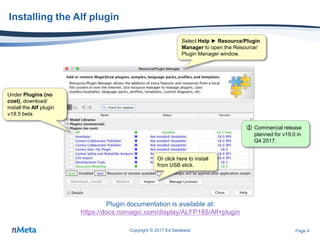
Installing the Alf plugin
Copyright © 2017 Ed Seidewitz
Plugin documentation is available at:
https://docs.nomagic.com/display/ALFP185/Alf+plugin
Under Plugins (no
cost), download/
install the Alf plugin
v18.5 beta.
Select Help ► Resource/Plugin
Manager to open the Resource/
Plugin Manager window.
 Commercial release
planned for v19.0 in
Q4 2017.
Page 5
Background
Copyright © 2017 Ed Seidewitz
Page 6
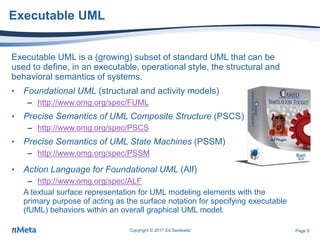
Executable UML
Executable UML is a (growing) subset of standard UML that can be
used to define, in an executable, operational style, the structural and
behavioral semantics of systems.
• Foundational UML (structural and activity models)
– http://www.omg.org/spec/FUML
• Precise Semantics of UML Composite Structure (PSCS)
– http://www.omg.org/spec/PSCS
• Precise Semantics of UML State Machines (PSSM)
– http://www.omg.org/spec/PSSM
Copyright © 2017 Ed Seidewitz
• Action Language for Foundational UML (Alf)
– http://www.omg.org/spec/ALF
A textual surface representation for UML modeling elements with the
primary purpose of acting as the surface notation for specifying executable
(fUML) behaviors within an overall graphical UML model.
Alf Plugin
Page 7
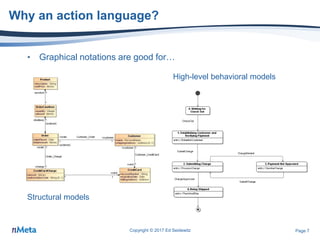
Why an action language?
• Graphical notations are good for…
Copyright © 2017 Ed Seidewitz
Structural models
High-level behavioral models
Page 8
Why an action language?
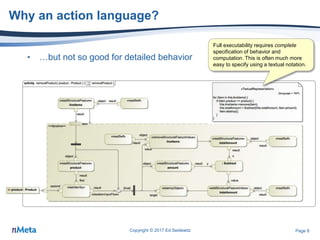
• …but not so good for detailed behavior
Copyright © 2017 Ed Seidewitz
Full executability requires complete
specification of behavior and
computation. This is often much more
easy to specify using a textual notation.
Page 9
Why not just use a scripting language?
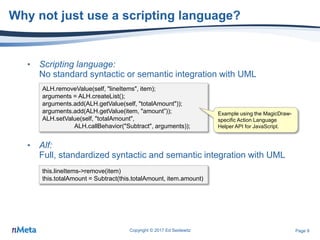
• Scripting language:
No standard syntactic or semantic integration with UML
• Alf:
Full, standardized syntactic and semantic integration with UML
Copyright © 2017 Ed Seidewitz
this.lineItems->remove(item)
this.totalAmount = Subtract(this.totalAmount, item.amount)
ALH.removeValue(self, "lineItems", item);
arguments = ALH.createList();
arguments.add(ALH.getValue(self, "totalAmount"));
arguments.add(ALH.getValue(item, "amount”));
ALH.setValue(self, "totalAmount",
ALH.callBehavior("Subtract", arguments));
Example using the MagicDraw-
specific Action Language
Helper API for JavaScript.
Page 10
The basic idea: Alf maps to fUML
Copyright © 2017 Ed Seidewitz
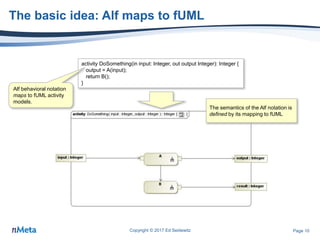
activity DoSomething(in input: Integer, out output Integer): Integer {
output = A(input);
return B();
}
Alf behavioral notation
maps to fUML activity
models.
The semantics of the Alf notation is
defined by its mapping to fUML
Page 11
Hands On
Hello World
Copyright © 2017 Ed Seidewitz
Page 12
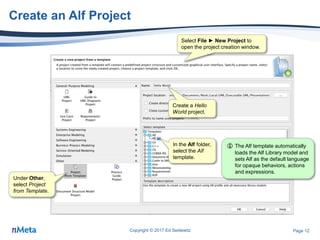
Create an Alf Project
Copyright © 2017 Ed Seidewitz
In the Alf folder,
select the Alf
template.
 The Alf template automatically
loads the Alf Library model and
sets Alf as the default language
for opaque behaviors, actions
and expressions.
Under Other,
select Project
from Template.
Select File ► New Project to
open the project creation window.
Create a Hello
World project.
Page 13
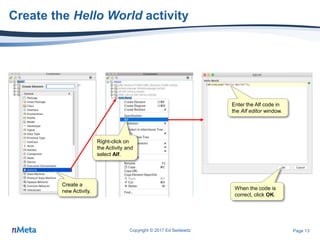
Create the Hello World activity
Copyright © 2017 Ed Seidewitz
Create a
new Activity.
Enter the Alf code in
the Alf editor window.
When the code is
correct, click OK.
Right-click on
the Activity and
select Alf.
Page 14
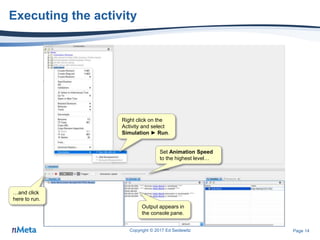
Executing the activity
Copyright © 2017 Ed Seidewitz
Right click on the
Activity and select
Simulation ► Run.
Set Animation Speed
to the highest level…
…and click
here to run.
Output appears in
the console pane.
Page 15
Basic Concepts
Copyright © 2017 Ed Seidewitz
Page 16
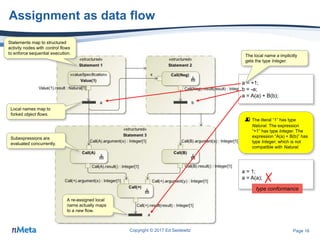
Assignment as data flow
Copyright © 2017 Ed Seidewitz
a = +1;
b = -a;
a = A(a) + B(b);
Local names map to
forked object flows.
Subexpressions are
evaluated concurrently.
A re-assigned local
name actually maps
to a new flow.
 The literal “1” has type
Natural. The expression
“+1” has type Integer. The
expression “A(a) + B(b)” has
type Integer, which is not
compatible with Natural.
The local name a implicitly
gets the type Integer.
Statements map to structured
activity nodes with control flows
to enforce sequential execution.
a = 1;
a = A(a); ✗
type conformance
Page 17
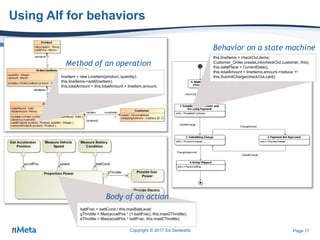
Using Alf for behaviors
Copyright © 2017 Ed Seidewitz
lineItem = new LineItem(product, quantity);
this.lineItems->add(lineItem);
this.totalAmount = this.totalAmount + lineItem.amount;
Method of an operation
this.lineItems = checkOut.items;
Customer_Order.createLink(checkOut.customer, this);
this.datePlace = CurrentDate();
this.totalAmount = lineItems.amount->reduce '+';
this.SubmitCharge(checkOut.card);
Behavior on a state machine
battFrac = battCond / this.maxBattLevel;
gThrottle = Max(accelPos * (1-battFrac), this.maxGThrottle);
eThrottle = Max(accelPos * battFrac, this.maxEThrottle);
Body of an action
Page 18
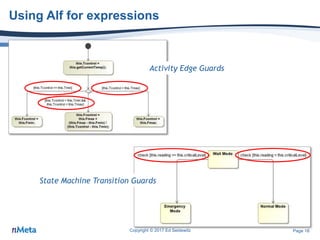
Using Alf for expressions
Copyright © 2017 Ed Seidewitz
Activity Edge Guards
State Machine Transition Guards
Page 19
Hands On
Stopwatch
Copyright © 2017 Ed Seidewitz
Page 20
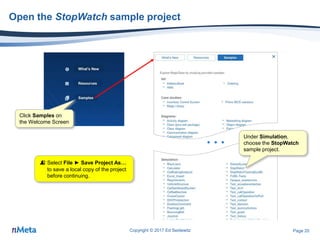
Open the StopWatch sample project
Copyright © 2017 Ed Seidewitz
…
Click Samples on
the Welcome Screen
Under Simulation,
choose the StopWatch
sample project.
 Select File ► Save Project As…
to save a local copy of the project
before continuing.
Page 21
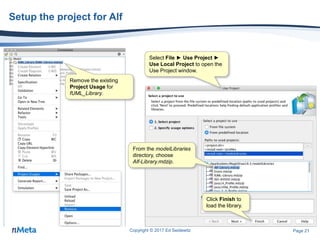
Setup the project for Alf
Copyright © 2017 Ed Seidewitz
Remove the existing
Project Usage for
fUML_Library.
Select File ► Use Project ►
Use Local Project to open the
Use Project window.
From the modelLibraries
directory, choose
Alf-Library.mdzip.
Click Finish to
load the library.
Page 22
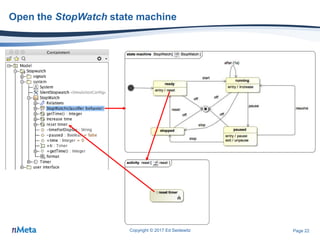
Open the StopWatch state machine
Copyright © 2017 Ed Seidewitz
Page 23
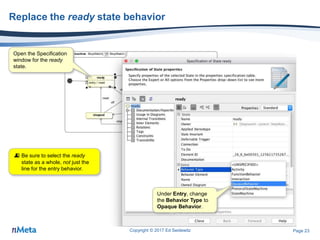
Replace the ready state behavior
Copyright © 2017 Ed Seidewitz
Open the Specification
window for the ready
state.
Under Entry, change
the Behavior Type to
Opaque Behavior.
 Be sure to select the ready
state as a whole, not just the
line for the entry behavior.
Page 24
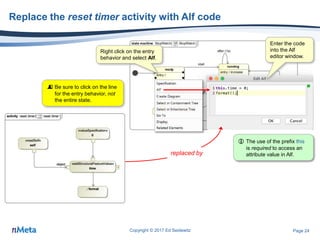
Replace the reset timer activity with Alf code
Copyright © 2017 Ed Seidewitz
 Be sure to click on the line
for the entry behavior, not
the entire state.
Right click on the entry
behavior and select Alf.
Enter the code
into the Alf
editor window.
replaced by
 The use of the prefix this
is required to access an
attribute value in Alf.
Page 25
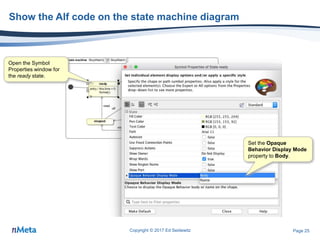
Show the Alf code on the state machine diagram
Copyright © 2017 Ed Seidewitz
Open the Symbol
Properties window for
the ready state.
Set the Opaque
Behavior Display Mode
property to Body.
Page 26
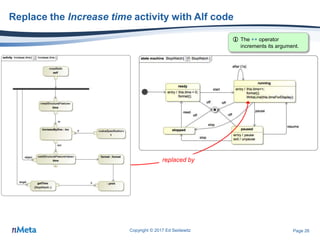
Replace the Increase time activity with Alf code
Copyright © 2017 Ed Seidewitz
replaced by
 The ++ operator
increments its argument.
Page 27
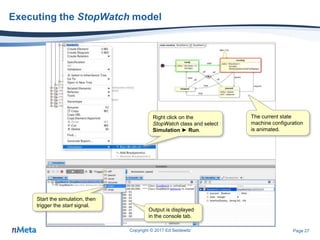
Executing the StopWatch model
Copyright © 2017 Ed Seidewitz
Right click on the
StopWatch class and select
Simulation ► Run.
Start the simulation, then
trigger the start signal.
Output is displayed
in the console tab.
The current state
machine configuration
is animated.
Page 28
Sequences
Copyright © 2017 Ed Seidewitz
Page 29
Sequences
Copyright © 2017 Ed Seidewitz
activity GetReadings(in sensors: Sensor[*]): Integer[*] {
readings = sensors->collect sensor (sensor.reading);
return readings;
}
The input parameter has
an unordered set of
values (by default).
Object flows always carry
ordered sequences of
values.
Values are handled one
by one within the
expansion region.
The read actions
happen concurrently.
The result is a sequence
ordered respective to the
input sequence.
The return parameter
gets an unordered set
of values (by default).
 The Alf on the left could be
written more simply as:
return sensors.reading;
The local name reading
implicitly gets the type Integer
and the multiplicity [0..*].
 Arbitrary sequences cannot
be assigned to local names
with multiplicity [0..1].
reading = -1;
readings = reading;
reading = readings;
Implicitly gets the multiplicity [0..1]
A single value is really just a
sequence of length 1.
✗ multiplicity conformance
Page 30
Null as the empty sequence
Copyright © 2017 Ed Seidewitz
A LiteralNull is intended to be used to explicitly model the lack of a value.
In the context of a MultiplicityElement with a multiplicity lower bound of 0,
this corresponds to the empty set (i.e., a set of no values). It is equivalent
to specifying no values for the Element.
null = any [ ] { }
From the UML 2.5 specification (clause 8.2.3):
The Alf interpretation: null is the (untyped) empty sequence
sensors = null;
sensors.readings;
WriteLine(null);
WriteLine(name ?? "no name");
“null” can be assigned to any target with
a multiplicity lower bound of 0.
This is not an error. It is equivalent to
sensors->collect sensor (sensor.reading);
which evaluates to “null”.
 An argument for
a parameter of
multiplicity 1..1
cannot be null.
✗
multiplicity conformance
A null-coalescing expression can be used
to provide a non-null “default value”.
Page 31
Hands On
Address Book
Copyright © 2017 Ed Seidewitz
Page 32
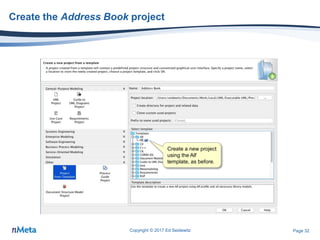
Create the Address Book project
Copyright © 2017 Ed Seidewitz
Create a new project
using the Alf
template, as before.
Page 33
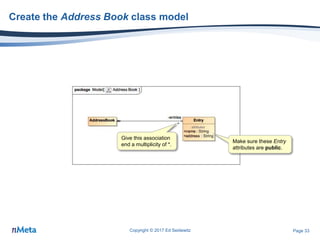
Create the Address Book class model
Copyright © 2017 Ed Seidewitz
Make sure these Entry
attributes are public.
Give this association
end a multiplicity of *.
Page 34
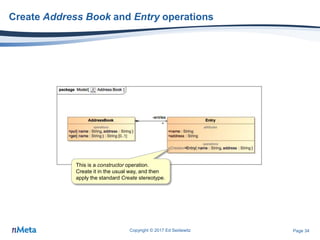
Create Address Book and Entry operations
Copyright © 2017 Ed Seidewitz
This is a constructor operation.
Create it in the usual way, and then
apply the standard Create stereotype.
Page 35
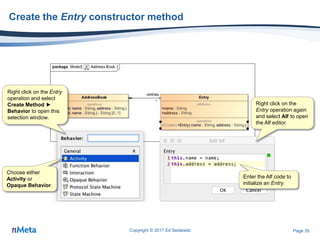
Create the Entry constructor method
Copyright © 2017 Ed Seidewitz
Right click on the Entry
operation and select
Create Method ►
Behavior to open this
selection window.
Choose either
Activity or
Opaque Behavior.
Right click on the
Entry operation again
and select Alf to open
the Alf editor.
Enter the Alf code to
initialize an Entry.
Page 36
Create Address Book operation methods
Copyright © 2017 Ed Seidewitz
Create methods for
the AddressBook
operations, and then
enter the Alf code
shown for them.
 A select expression is used to filter
a sequence based on a condition.
The index [1] ensures that at most
one value is selected.
 This expression will return either a
single value or null, as required by
the return multiplicity of 0..1.
 The constructor
operation is used when
creating an instance of
the Entry class.
 The braces { } are
required in if statement
clauses in Alf.
Page 37
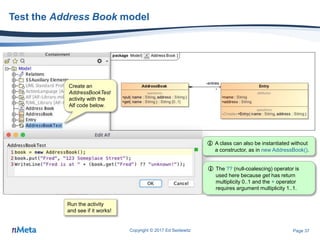
Test the Address Book model
Copyright © 2017 Ed Seidewitz
Create an
AddressBookTest
activity with the
Alf code below.
Run the activity
and see if it works!
 A class can also be instantiated without
a constructor, as in new AddressBook().
 The ?? (null-coalescing) operator is
used here because get has return
multiplicity 0..1 and the + operator
requires argument multiplicity 1..1.

Hands On With the Alf Action Language: Making Executable Modeling Even Easier

  • 1.
    Hands On Withthe Alf Action Language Making Executable Modeling Even Easier No Magic World Symposium, Allen TX Ed Seidewitz Director of Research and Development nMeta LLC ● http://www.nmeta.us ed@nmeta.us ● @seidewitz Copyright © 2017 Ed Seidewitz 23 May 2017
  • 2.
    Page 2 Goals • Tolearn the basics of the Alf action language for Executable UML. • To learn how to use the Alf Plugin for MagicDraw. • To practice hands-on using Alf with Cameo Simulation Toolkit. Copyright © 2017 Ed Seidewitz
  • 3.
    Page 3 Prerequisites • Participant –Basic knowledge of class, activity and state machine modeling using MagicDraw – Some experience with model execution using Cameo Simulation Toolkit – General familiarity with programming/scripting (particularly in a language like C++, Java, JavaScript, etc.) • System (for hands-on exercises) – MagicDraw 18.4 or 18.5 – Cameo Simulation Toolkit 18.4 or 18.5 – Alf plugin v18.5 Copyright © 2017 Ed Seidewitz
  • 4.
    Page 4 4 Installing theAlf plugin Copyright © 2017 Ed Seidewitz Plugin documentation is available at: https://docs.nomagic.com/display/ALFP185/Alf+plugin Under Plugins (no cost), download/ install the Alf plugin v18.5 beta. Select Help ► Resource/Plugin Manager to open the Resource/ Plugin Manager window.  Commercial release planned for v19.0 in Q4 2017.
  • 5.
  • 6.
    Page 6 Executable UML ExecutableUML is a (growing) subset of standard UML that can be used to define, in an executable, operational style, the structural and behavioral semantics of systems. • Foundational UML (structural and activity models) – http://www.omg.org/spec/FUML • Precise Semantics of UML Composite Structure (PSCS) – http://www.omg.org/spec/PSCS • Precise Semantics of UML State Machines (PSSM) – http://www.omg.org/spec/PSSM Copyright © 2017 Ed Seidewitz • Action Language for Foundational UML (Alf) – http://www.omg.org/spec/ALF A textual surface representation for UML modeling elements with the primary purpose of acting as the surface notation for specifying executable (fUML) behaviors within an overall graphical UML model. Alf Plugin
  • 7.
    Page 7 Why anaction language? • Graphical notations are good for… Copyright © 2017 Ed Seidewitz Structural models High-level behavioral models
  • 8.
    Page 8 Why anaction language? • …but not so good for detailed behavior Copyright © 2017 Ed Seidewitz Full executability requires complete specification of behavior and computation. This is often much more easy to specify using a textual notation.
  • 9.
    Page 9 Why notjust use a scripting language? • Scripting language: No standard syntactic or semantic integration with UML • Alf: Full, standardized syntactic and semantic integration with UML Copyright © 2017 Ed Seidewitz this.lineItems->remove(item) this.totalAmount = Subtract(this.totalAmount, item.amount) ALH.removeValue(self, "lineItems", item); arguments = ALH.createList(); arguments.add(ALH.getValue(self, "totalAmount")); arguments.add(ALH.getValue(item, "amount”)); ALH.setValue(self, "totalAmount", ALH.callBehavior("Subtract", arguments)); Example using the MagicDraw- specific Action Language Helper API for JavaScript.
  • 10.
    Page 10 The basicidea: Alf maps to fUML Copyright © 2017 Ed Seidewitz activity DoSomething(in input: Integer, out output Integer): Integer { output = A(input); return B(); } Alf behavioral notation maps to fUML activity models. The semantics of the Alf notation is defined by its mapping to fUML
  • 11.
    Page 11 Hands On HelloWorld Copyright © 2017 Ed Seidewitz
  • 12.
    Page 12 Create anAlf Project Copyright © 2017 Ed Seidewitz In the Alf folder, select the Alf template.  The Alf template automatically loads the Alf Library model and sets Alf as the default language for opaque behaviors, actions and expressions. Under Other, select Project from Template. Select File ► New Project to open the project creation window. Create a Hello World project.
  • 13.
    Page 13 Create theHello World activity Copyright © 2017 Ed Seidewitz Create a new Activity. Enter the Alf code in the Alf editor window. When the code is correct, click OK. Right-click on the Activity and select Alf.
  • 14.
    Page 14 Executing theactivity Copyright © 2017 Ed Seidewitz Right click on the Activity and select Simulation ► Run. Set Animation Speed to the highest level… …and click here to run. Output appears in the console pane.
  • 15.
  • 16.
    Page 16 Assignment asdata flow Copyright © 2017 Ed Seidewitz a = +1; b = -a; a = A(a) + B(b); Local names map to forked object flows. Subexpressions are evaluated concurrently. A re-assigned local name actually maps to a new flow.  The literal “1” has type Natural. The expression “+1” has type Integer. The expression “A(a) + B(b)” has type Integer, which is not compatible with Natural. The local name a implicitly gets the type Integer. Statements map to structured activity nodes with control flows to enforce sequential execution. a = 1; a = A(a); ✗ type conformance
  • 17.
    Page 17 Using Alffor behaviors Copyright © 2017 Ed Seidewitz lineItem = new LineItem(product, quantity); this.lineItems->add(lineItem); this.totalAmount = this.totalAmount + lineItem.amount; Method of an operation this.lineItems = checkOut.items; Customer_Order.createLink(checkOut.customer, this); this.datePlace = CurrentDate(); this.totalAmount = lineItems.amount->reduce '+'; this.SubmitCharge(checkOut.card); Behavior on a state machine battFrac = battCond / this.maxBattLevel; gThrottle = Max(accelPos * (1-battFrac), this.maxGThrottle); eThrottle = Max(accelPos * battFrac, this.maxEThrottle); Body of an action
  • 18.
    Page 18 Using Alffor expressions Copyright © 2017 Ed Seidewitz Activity Edge Guards State Machine Transition Guards
  • 19.
  • 20.
    Page 20 Open theStopWatch sample project Copyright © 2017 Ed Seidewitz … Click Samples on the Welcome Screen Under Simulation, choose the StopWatch sample project.  Select File ► Save Project As… to save a local copy of the project before continuing.
  • 21.
    Page 21 Setup theproject for Alf Copyright © 2017 Ed Seidewitz Remove the existing Project Usage for fUML_Library. Select File ► Use Project ► Use Local Project to open the Use Project window. From the modelLibraries directory, choose Alf-Library.mdzip. Click Finish to load the library.
  • 22.
    Page 22 Open theStopWatch state machine Copyright © 2017 Ed Seidewitz
  • 23.
    Page 23 Replace theready state behavior Copyright © 2017 Ed Seidewitz Open the Specification window for the ready state. Under Entry, change the Behavior Type to Opaque Behavior.  Be sure to select the ready state as a whole, not just the line for the entry behavior.
  • 24.
    Page 24 Replace thereset timer activity with Alf code Copyright © 2017 Ed Seidewitz  Be sure to click on the line for the entry behavior, not the entire state. Right click on the entry behavior and select Alf. Enter the code into the Alf editor window. replaced by  The use of the prefix this is required to access an attribute value in Alf.
  • 25.
    Page 25 Show theAlf code on the state machine diagram Copyright © 2017 Ed Seidewitz Open the Symbol Properties window for the ready state. Set the Opaque Behavior Display Mode property to Body.
  • 26.
    Page 26 Replace theIncrease time activity with Alf code Copyright © 2017 Ed Seidewitz replaced by  The ++ operator increments its argument.
  • 27.
    Page 27 Executing theStopWatch model Copyright © 2017 Ed Seidewitz Right click on the StopWatch class and select Simulation ► Run. Start the simulation, then trigger the start signal. Output is displayed in the console tab. The current state machine configuration is animated.
  • 28.
  • 29.
    Page 29 Sequences Copyright ©2017 Ed Seidewitz activity GetReadings(in sensors: Sensor[*]): Integer[*] { readings = sensors->collect sensor (sensor.reading); return readings; } The input parameter has an unordered set of values (by default). Object flows always carry ordered sequences of values. Values are handled one by one within the expansion region. The read actions happen concurrently. The result is a sequence ordered respective to the input sequence. The return parameter gets an unordered set of values (by default).  The Alf on the left could be written more simply as: return sensors.reading; The local name reading implicitly gets the type Integer and the multiplicity [0..*].  Arbitrary sequences cannot be assigned to local names with multiplicity [0..1]. reading = -1; readings = reading; reading = readings; Implicitly gets the multiplicity [0..1] A single value is really just a sequence of length 1. ✗ multiplicity conformance
  • 30.
    Page 30 Null asthe empty sequence Copyright © 2017 Ed Seidewitz A LiteralNull is intended to be used to explicitly model the lack of a value. In the context of a MultiplicityElement with a multiplicity lower bound of 0, this corresponds to the empty set (i.e., a set of no values). It is equivalent to specifying no values for the Element. null = any [ ] { } From the UML 2.5 specification (clause 8.2.3): The Alf interpretation: null is the (untyped) empty sequence sensors = null; sensors.readings; WriteLine(null); WriteLine(name ?? "no name"); “null” can be assigned to any target with a multiplicity lower bound of 0. This is not an error. It is equivalent to sensors->collect sensor (sensor.reading); which evaluates to “null”.  An argument for a parameter of multiplicity 1..1 cannot be null. ✗ multiplicity conformance A null-coalescing expression can be used to provide a non-null “default value”.
  • 31.
    Page 31 Hands On AddressBook Copyright © 2017 Ed Seidewitz
  • 32.
    Page 32 Create theAddress Book project Copyright © 2017 Ed Seidewitz Create a new project using the Alf template, as before.
  • 33.
    Page 33 Create theAddress Book class model Copyright © 2017 Ed Seidewitz Make sure these Entry attributes are public. Give this association end a multiplicity of *.
  • 34.
    Page 34 Create AddressBook and Entry operations Copyright © 2017 Ed Seidewitz This is a constructor operation. Create it in the usual way, and then apply the standard Create stereotype.
  • 35.
    Page 35 Create theEntry constructor method Copyright © 2017 Ed Seidewitz Right click on the Entry operation and select Create Method ► Behavior to open this selection window. Choose either Activity or Opaque Behavior. Right click on the Entry operation again and select Alf to open the Alf editor. Enter the Alf code to initialize an Entry.
  • 36.
    Page 36 Create AddressBook operation methods Copyright © 2017 Ed Seidewitz Create methods for the AddressBook operations, and then enter the Alf code shown for them.  A select expression is used to filter a sequence based on a condition. The index [1] ensures that at most one value is selected.  This expression will return either a single value or null, as required by the return multiplicity of 0..1.  The constructor operation is used when creating an instance of the Entry class.  The braces { } are required in if statement clauses in Alf.
  • 37.
    Page 37 Test theAddress Book model Copyright © 2017 Ed Seidewitz Create an AddressBookTest activity with the Alf code below. Run the activity and see if it works!  A class can also be instantiated without a constructor, as in new AddressBook().  The ?? (null-coalescing) operator is used here because get has return multiplicity 0..1 and the + operator requires argument multiplicity 1..1.

Editor's Notes