Introduction to
Programming using C++
Lecture One: Getting Started
Carl Gwilliam
gwilliam@hep.ph.liv.ac.uk
http://hep.ph.liv.ac.uk/~gwilliam/cppcourse
Course Prerequisites
• What you should already know about C++
NOTHING!!
• I have assumed:
– You have never encountered C++ before.
– You have limited to no programming experience in any
language.
By the end of the course
• You should:
– Have a working knowledge of all of the common C++ syntax.
– Know how to avoid common coding pitfalls.
– Be able to use and create your own functions and classes.
– Recognise the advantages of using pointers and references.
– Be able to understand the fundamental ideas of object oriented
(OO) design.
• Be aware!
– This is not the comprehensive course for C++!
– Some advanced topics will not be covered in this course.
– Project specific C++ courses are worth attending if you have
time.
• You are learning a sophisticated language! It will take some time
and a fair amount of hands-on experience to become familiar with
C++.
Course format
• Lecture 1: Getting Started
– Statements, variables, types, operators, I/O, conditional
statements
• Lecture 2: Further Syntax
– For and while loops, increment and logical operators, sorting
algorithms
• Lecture 3: Functions
– Library and user functions, declarations, arguments, overloading
• Lecture 4: Pointers and References
– References, pointers, passing by reference, pointers and arrays,
consts
• Lecture 5: Introducing Classes
– Declarations, member variables and functions, accessors,
overloading
Course Format
• Lecture 6: Classes in Practice
– Constructors and destructors, constant functions, memory
management
• Lecture 7: Designing Classes
– Passing by const reference, copy constructors, overloading
operators
• Lecture 8: Towards OO Design
– Inheritance, virtual functions, multiple inheritance, abstract
classes
• Lecture 9: Templates & the STL
– Function & Class Templates, Specialisation, String, Vector, Map
• Lecture 10: File I/O and Streams
– Reading, writing, formatting, strings as streams
Why do you need to learn how to
write code?
"I am not a computer scientist!“
• Software development skills are usually required in every
element of your project - from extracting data to getting
your results published.
• It will be very useful to learn good programming
techniques now so you can save a lot of time later.
Why Learn C++?
"I already know how to program in FORTRAN/C/ASSEMBLER
so why do I have to bother with C++?“
• In recent times there has been a shift from procedural
languages such as FORTRAN to OO-style languages
such as C++ and Java.
• The language of choice, for now, is C++.
• C++ is ideally suited for projects where the active
developers are not located in the same place.
• Our survey says: almost all of the current HEP Ph.D.
students write and execute C++ code on a daily basis.
C++ is not the answer, it is a reasonable solution..
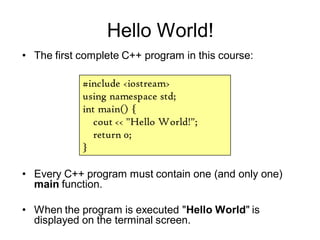
Hello World!
• Every C++ program must contain one (and only one)
main function.
• When the program is executed "Hello World" is
displayed on the terminal screen.
#include <iostream>
using namespace std;
int main() {
cout << "Hello World!";
return 0;
}
• The first complete C++ program in this course:
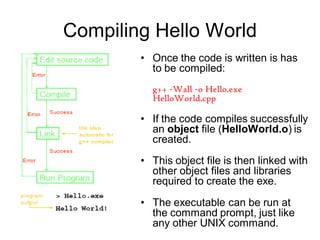
Compiling Hello World
• Once the code is written is has
to be compiled:
g++ -Wall -o Hello.exe
HelloWorld.cpp
• If the code compiles successfully
an object file (HelloWorld.o) is
created.
• This object file is then linked with
other object files and libraries
required to create the exe.
• The executable can be run at
the command prompt, just like
any other UNIX command.
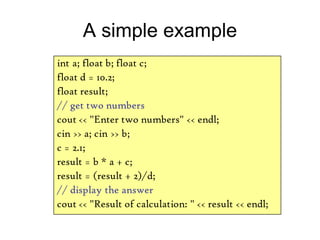
A simple example
int a; float b; float c;
float d = 10.2;
float result;
// get two numbers
cout << "Enter two numbers" << endl;
cin >> a; cin >> b;
c = 2.1;
result = b * a + c;
result = (result + 2)/d;
// display the answer
cout << "Result of calculation: " << result << endl;
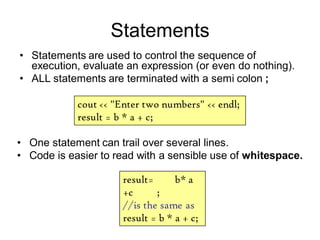
Statements
• Statements are used to control the sequence of
execution, evaluate an expression (or even do nothing).
• ALL statements are terminated with a semi colon ;
cout << "Enter two numbers" << endl;
result = b * a + c;
result= b* a
+c ;
//is the same as
result = b * a + c;
• One statement can trail over several lines.
• Code is easier to read with a sensible use of whitespace.
Comments
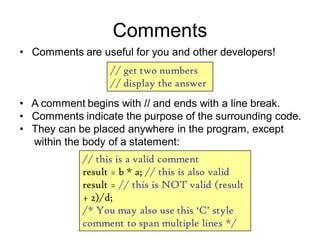
• Comments are useful for you and other developers!
// get two numbers
// display the answer
• A comment begins with // and ends with a line break.
• Comments indicate the purpose of the surrounding code.
• They can be placed anywhere in the program, except
within the body of a statement:
// this is a valid comment
result = b * a; // this is also valid
result = // this is NOT valid (result
+ 2)/d;
/* You may also use this „C‟ style
comment to span multiple lines */
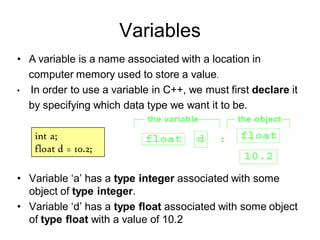
Variables
• Variable ‘a’ has a type integer associated with some
object of type integer.
• Variable ‘d’ has a type float associated with some object
of type float with a value of 10.2
• A variable is a name associated with a location in
computer memory used to store a value.
• In order to use a variable in C++, we must first declare it
by specifying which data type we want it to be.
int a;
float d = 10.2;
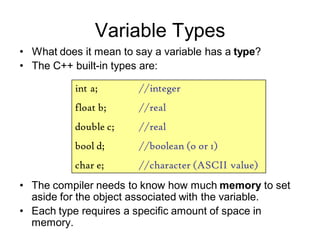
Variable Types
• The compiler needs to know how much memory to set
aside for the object associated with the variable.
• Each type requires a specific amount of space in
memory.
• What does it mean to say a variable has a type?
• The C++ built-in types are:
int a; //integer
float b; //real
double c; //real
bool d; //boolean (o or 1)
char e; //character (ASCII value)
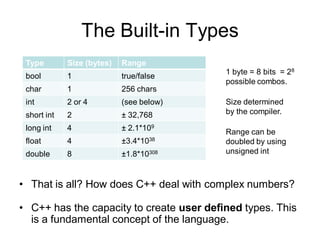
The Built-in Types
• That is all? How does C++ deal with complex numbers?
• C++ has the capacity to create user defined types. This
is a fundamental concept of the language.
Type Size (bytes) Range
bool 1 true/false
char 1 256 chars
int 2 or 4 (see below)
short int 2 Âą 32,768
long int 4 Âą 2.1*109
float 4 Âą3.4*1038
double 8 Âą1.8*10308
1 byte = 8 bits = 28
possible combos.
Size determined
by the compiler.
Range can be
doubled by using
unsigned int
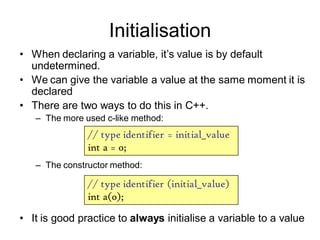
Initialisation
• When declaring a variable, it’s value is by default
undetermined.
• We can give the variable a value at the same moment it is
declared
• There are two ways to do this in C++.
– The more used c-like method:
– The constructor method:
• It is good practice to always initialise a variable to a value
// type identifier = initial_value
int a = 0;
// type identifier (initial_value)
int a(0);
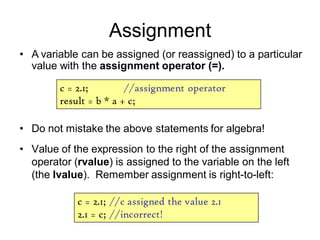
Assignment
• Do not mistake the above statements for algebra!
• Value of the expression to the right of the assignment
operator (rvalue) is assigned to the variable on the left
(the lvalue). Remember assignment is right-to-left:
c = 2.1; //assignment operator
result = b * a + c;
c = 2.1; //c assigned the value 2.1
2.1 = c; //incorrect!
• A variable can be assigned (or reassigned) to a particular
value with the assignment operator (=).
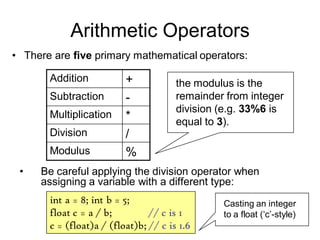
Arithmetic Operators
• Be careful applying the division operator when
assigning a variable with a different type:
• There are five primary mathematical operators:
int a = 8; int b = 5;
float c = a / b; // c is 1
c = (float)a / (float)b; // c is 1.6
Addition +
Subtraction -
Multiplication *
Division /
Modulus %
the modulus is the
remainder from integer
division (e.g. 33%6 is
equal to 3).
Casting an integer
to a float (‘c’-style)
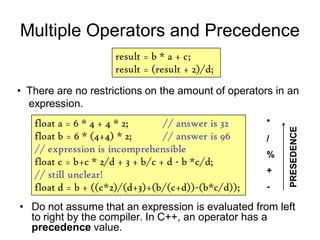
Multiple Operators and Precedence
• Do not assume that an expression is evaluated from left
to right by the compiler. In C++, an operator has a
precedence value.
result = b * a + c;
result = (result + 2)/d;
• There are no restrictions on the amount of operators in an
expression.
float a = 6 * 4 + 4 * 2; // answer is 32
float b = 6 * (4+4) * 2; // answer is 96
// expression is incomprehensible
float c = b+c * 2/d + 3 + b/c + d - b *c/d;
// still unclear!
float d = b + ((c*2)/(d+3)+(b/(c+d))-(b*c/d));
*
/
%
+
-
PRESEDENCE
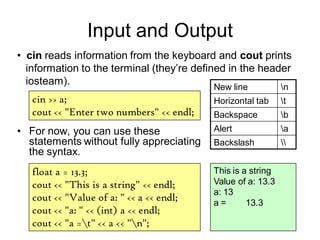
Input and Output
• For now, you can use these
statements without fully appreciating
the syntax.
• cin reads information from the keyboard and cout prints
information to the terminal (they’re defined in the header
iosteam).
cin >> a;
cout << "Enter two numbers" << endl;
float a = 13.3;
cout << "This is a string" << endl;
cout << "Value of a: " << a << endl;
cout << "a: " << (int) a << endl;
cout << "a =t" << a << "n";
This is a string
Value of a: 13.3
a: 13
a = 13.3
New line n
Horizontal tab t
Backspace b
Alert a
Backslash
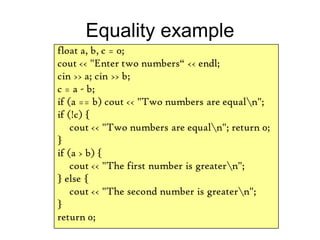
Equality example
float a, b, c = 0;
cout << "Enter two numbers“ << endl;
cin >> a; cin >> b;
c = a - b;
if (a == b) cout << "Two numbers are equaln";
if (!c) {
cout << "Two numbers are equaln"; return 0;
}
if (a > b) {
cout << "The first number is greatern";
} else {
cout << "The second number is greatern";
}
return 0;
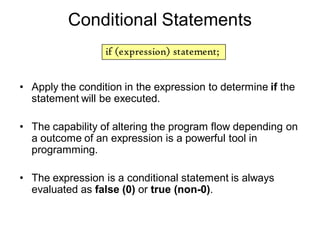
Conditional Statements
• Apply the condition in the expression to determine if the
statement will be executed.
• The capability of altering the program flow depending on
a outcome of an expression is a powerful tool in
programming.
• The expression is a conditional statement is always
evaluated as false (0) or true (non-0).
if (expression) statement;
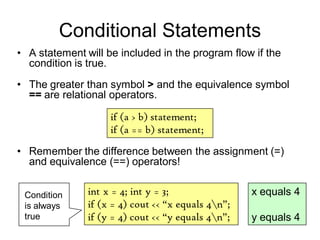
Conditional Statements
• A statement will be included in the program flow if the
condition is true.
• The greater than symbol > and the equivalence symbol
== are relational operators.
if (a > b) statement;
if (a == b) statement;
int x = 4; int y = 3;
if (x = 4) cout << “x equals 4n”;
if (y = 4) cout << “y equals 4n”;
x equals 4
y equals 4
Condition
is always
true
• Remember the difference between the assignment (=)
and equivalence (==) operators!
Relational Operators
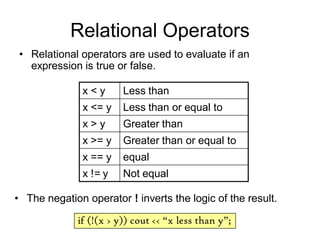
• Relational operators are used to evaluate if an
expression is true or false.
• The negation operator ! inverts the logic of the result.
if (!(x > y)) cout << “x less than y”;
x < y Less than
x <= y Less than or equal to
x > y Greater than
x >= y Greater than or equal to
x == y equal
x != y Not equal
Boolean Logic
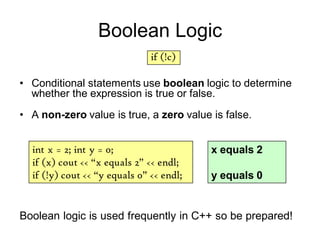
• Conditional statements use boolean logic to determine
whether the expression is true or false.
• A non-zero value is true, a zero value is false.
if (!c)
int x = 2; int y = 0;
if (x) cout << “x equals 2” << endl;
if (!y) cout << “y equals 0” << endl;
x equals 2
y equals 0
Boolean logic is used frequently in C++ so be prepared!
Compound Statements
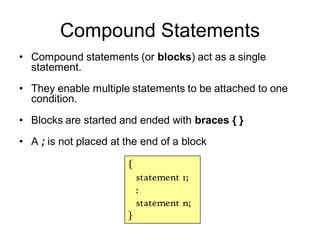
• Compound statements (or blocks) act as a single
statement.
• They enable multiple statements to be attached to one
condition.
• Blocks are started and ended with braces { }
• A ; is not placed at the end of a block
{
statement 1;
:
statement n;
}
If-else Statements
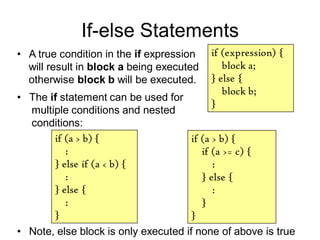
• Note, else block is only executed if none of above is true
if (expression) {
block a;
} else {
block b;
}
if (a > b) {
:
} else if (a < b) {
:
} else {
:
}
if (a > b) {
if (a >= c) {
:
} else {
:
}
}
• A true condition in the if expression
will result in block a being executed
otherwise block b will be executed.
• The if statement can be used for
multiple conditions and nested
conditions:

Lecture1

  • 1.
    Introduction to Programming usingC++ Lecture One: Getting Started Carl Gwilliam gwilliam@hep.ph.liv.ac.uk http://hep.ph.liv.ac.uk/~gwilliam/cppcourse
  • 2.
    Course Prerequisites • Whatyou should already know about C++ NOTHING!! • I have assumed: – You have never encountered C++ before. – You have limited to no programming experience in any language.
  • 3.
    By the endof the course • You should: – Have a working knowledge of all of the common C++ syntax. – Know how to avoid common coding pitfalls. – Be able to use and create your own functions and classes. – Recognise the advantages of using pointers and references. – Be able to understand the fundamental ideas of object oriented (OO) design. • Be aware! – This is not the comprehensive course for C++! – Some advanced topics will not be covered in this course. – Project specific C++ courses are worth attending if you have time. • You are learning a sophisticated language! It will take some time and a fair amount of hands-on experience to become familiar with C++.
  • 4.
    Course format • Lecture1: Getting Started – Statements, variables, types, operators, I/O, conditional statements • Lecture 2: Further Syntax – For and while loops, increment and logical operators, sorting algorithms • Lecture 3: Functions – Library and user functions, declarations, arguments, overloading • Lecture 4: Pointers and References – References, pointers, passing by reference, pointers and arrays, consts • Lecture 5: Introducing Classes – Declarations, member variables and functions, accessors, overloading
  • 5.
    Course Format • Lecture6: Classes in Practice – Constructors and destructors, constant functions, memory management • Lecture 7: Designing Classes – Passing by const reference, copy constructors, overloading operators • Lecture 8: Towards OO Design – Inheritance, virtual functions, multiple inheritance, abstract classes • Lecture 9: Templates & the STL – Function & Class Templates, Specialisation, String, Vector, Map • Lecture 10: File I/O and Streams – Reading, writing, formatting, strings as streams
  • 6.
    Why do youneed to learn how to write code? "I am not a computer scientist!“ • Software development skills are usually required in every element of your project - from extracting data to getting your results published. • It will be very useful to learn good programming techniques now so you can save a lot of time later.
  • 7.
    Why Learn C++? "Ialready know how to program in FORTRAN/C/ASSEMBLER so why do I have to bother with C++?“ • In recent times there has been a shift from procedural languages such as FORTRAN to OO-style languages such as C++ and Java. • The language of choice, for now, is C++. • C++ is ideally suited for projects where the active developers are not located in the same place. • Our survey says: almost all of the current HEP Ph.D. students write and execute C++ code on a daily basis. C++ is not the answer, it is a reasonable solution..
  • 8.
    Hello World! • EveryC++ program must contain one (and only one) main function. • When the program is executed "Hello World" is displayed on the terminal screen. #include <iostream> using namespace std; int main() { cout << "Hello World!"; return 0; } • The first complete C++ program in this course:
  • 9.
    Compiling Hello World •Once the code is written is has to be compiled: g++ -Wall -o Hello.exe HelloWorld.cpp • If the code compiles successfully an object file (HelloWorld.o) is created. • This object file is then linked with other object files and libraries required to create the exe. • The executable can be run at the command prompt, just like any other UNIX command.
  • 10.
    A simple example inta; float b; float c; float d = 10.2; float result; // get two numbers cout << "Enter two numbers" << endl; cin >> a; cin >> b; c = 2.1; result = b * a + c; result = (result + 2)/d; // display the answer cout << "Result of calculation: " << result << endl;
  • 11.
    Statements • Statements areused to control the sequence of execution, evaluate an expression (or even do nothing). • ALL statements are terminated with a semi colon ; cout << "Enter two numbers" << endl; result = b * a + c; result= b* a +c ; //is the same as result = b * a + c; • One statement can trail over several lines. • Code is easier to read with a sensible use of whitespace.
  • 12.
    Comments • Comments areuseful for you and other developers! // get two numbers // display the answer • A comment begins with // and ends with a line break. • Comments indicate the purpose of the surrounding code. • They can be placed anywhere in the program, except within the body of a statement: // this is a valid comment result = b * a; // this is also valid result = // this is NOT valid (result + 2)/d; /* You may also use this „C‟ style comment to span multiple lines */
  • 13.
    Variables • Variable ‘a’has a type integer associated with some object of type integer. • Variable ‘d’ has a type float associated with some object of type float with a value of 10.2 • A variable is a name associated with a location in computer memory used to store a value. • In order to use a variable in C++, we must first declare it by specifying which data type we want it to be. int a; float d = 10.2;
  • 14.
    Variable Types • Thecompiler needs to know how much memory to set aside for the object associated with the variable. • Each type requires a specific amount of space in memory. • What does it mean to say a variable has a type? • The C++ built-in types are: int a; //integer float b; //real double c; //real bool d; //boolean (o or 1) char e; //character (ASCII value)
  • 15.
    The Built-in Types •That is all? How does C++ deal with complex numbers? • C++ has the capacity to create user defined types. This is a fundamental concept of the language. Type Size (bytes) Range bool 1 true/false char 1 256 chars int 2 or 4 (see below) short int 2 ± 32,768 long int 4 ± 2.1*109 float 4 ±3.4*1038 double 8 ±1.8*10308 1 byte = 8 bits = 28 possible combos. Size determined by the compiler. Range can be doubled by using unsigned int
  • 16.
    Initialisation • When declaringa variable, it’s value is by default undetermined. • We can give the variable a value at the same moment it is declared • There are two ways to do this in C++. – The more used c-like method: – The constructor method: • It is good practice to always initialise a variable to a value // type identifier = initial_value int a = 0; // type identifier (initial_value) int a(0);
  • 17.
    Assignment • Do notmistake the above statements for algebra! • Value of the expression to the right of the assignment operator (rvalue) is assigned to the variable on the left (the lvalue). Remember assignment is right-to-left: c = 2.1; //assignment operator result = b * a + c; c = 2.1; //c assigned the value 2.1 2.1 = c; //incorrect! • A variable can be assigned (or reassigned) to a particular value with the assignment operator (=).
  • 18.
    Arithmetic Operators • Becareful applying the division operator when assigning a variable with a different type: • There are five primary mathematical operators: int a = 8; int b = 5; float c = a / b; // c is 1 c = (float)a / (float)b; // c is 1.6 Addition + Subtraction - Multiplication * Division / Modulus % the modulus is the remainder from integer division (e.g. 33%6 is equal to 3). Casting an integer to a float (‘c’-style)
  • 19.
    Multiple Operators andPrecedence • Do not assume that an expression is evaluated from left to right by the compiler. In C++, an operator has a precedence value. result = b * a + c; result = (result + 2)/d; • There are no restrictions on the amount of operators in an expression. float a = 6 * 4 + 4 * 2; // answer is 32 float b = 6 * (4+4) * 2; // answer is 96 // expression is incomprehensible float c = b+c * 2/d + 3 + b/c + d - b *c/d; // still unclear! float d = b + ((c*2)/(d+3)+(b/(c+d))-(b*c/d)); * / % + - PRESEDENCE
  • 20.
    Input and Output •For now, you can use these statements without fully appreciating the syntax. • cin reads information from the keyboard and cout prints information to the terminal (they’re defined in the header iosteam). cin >> a; cout << "Enter two numbers" << endl; float a = 13.3; cout << "This is a string" << endl; cout << "Value of a: " << a << endl; cout << "a: " << (int) a << endl; cout << "a =t" << a << "n"; This is a string Value of a: 13.3 a: 13 a = 13.3 New line n Horizontal tab t Backspace b Alert a Backslash
  • 21.
    Equality example float a,b, c = 0; cout << "Enter two numbers“ << endl; cin >> a; cin >> b; c = a - b; if (a == b) cout << "Two numbers are equaln"; if (!c) { cout << "Two numbers are equaln"; return 0; } if (a > b) { cout << "The first number is greatern"; } else { cout << "The second number is greatern"; } return 0;
  • 22.
    Conditional Statements • Applythe condition in the expression to determine if the statement will be executed. • The capability of altering the program flow depending on a outcome of an expression is a powerful tool in programming. • The expression is a conditional statement is always evaluated as false (0) or true (non-0). if (expression) statement;
  • 23.
    Conditional Statements • Astatement will be included in the program flow if the condition is true. • The greater than symbol > and the equivalence symbol == are relational operators. if (a > b) statement; if (a == b) statement; int x = 4; int y = 3; if (x = 4) cout << “x equals 4n”; if (y = 4) cout << “y equals 4n”; x equals 4 y equals 4 Condition is always true • Remember the difference between the assignment (=) and equivalence (==) operators!
  • 24.
    Relational Operators • Relationaloperators are used to evaluate if an expression is true or false. • The negation operator ! inverts the logic of the result. if (!(x > y)) cout << “x less than y”; x < y Less than x <= y Less than or equal to x > y Greater than x >= y Greater than or equal to x == y equal x != y Not equal
  • 25.
    Boolean Logic • Conditionalstatements use boolean logic to determine whether the expression is true or false. • A non-zero value is true, a zero value is false. if (!c) int x = 2; int y = 0; if (x) cout << “x equals 2” << endl; if (!y) cout << “y equals 0” << endl; x equals 2 y equals 0 Boolean logic is used frequently in C++ so be prepared!
  • 26.
    Compound Statements • Compoundstatements (or blocks) act as a single statement. • They enable multiple statements to be attached to one condition. • Blocks are started and ended with braces { } • A ; is not placed at the end of a block { statement 1; : statement n; }
  • 27.
    If-else Statements • Note,else block is only executed if none of above is true if (expression) { block a; } else { block b; } if (a > b) { : } else if (a < b) { : } else { : } if (a > b) { if (a >= c) { : } else { : } } • A true condition in the if expression will result in block a being executed otherwise block b will be executed. • The if statement can be used for multiple conditions and nested conditions: