LESSON 2
The
Internet,
the
Web,
and
Electronic
Commerce
The
Internet,
the
Web,
and
Electronic
Commerce
Learning Objectives
1. Explain the origins of the Internet and the web.
2. Explain how to access the web using providers and
browsers
3. Compare different web utilities including plug-ins, filters,
file transfer utilities, and Internet security suites
4. Compare different Internet communications, including
email, text messaging, instant messaging, social
networking, blogs, microblogs, Webcasts, podcasts, and
wikis
Learning Objectives continued
5. Describe search tools, including search engines and
specialized search engines
6. Evaluate the accuracy of information presented on
the web
7. Identify electronic commerce, including B2C, C2C,
B2B, and security issues
8. Describe cloud computing, including the three-way
interaction of clients, Internet, and service providers
9. Discuss the Internet of Things (IoT) and the
continuing development of the Internet to allow
everyday objects to send and receive data
⚫The Internet
⚫Interconnected mesh of computers and data lines
⚫Connecting millions of people and organizations
⚫Foundation of the digital revolution.
⚫The web
⚫Provides an easy-to-use interface to Internet resources
⚫To be effective and efficient
⚫End user awareness of the resources available on the
Internet and the web
Introduction
The Internet and the Web
⚫The Internet
⚫ Large global network connecting smaller networks all over the globe
⚫The Internet launched in 1969
⚫ The United States funded a project to develop a national computer
network
⚫ ARPANET (Advanced Research Project Agency Network)
⚫World Wide Web or WWW was introduced in 1991
⚫The Internet and the web are NOT the same
⚫ The Internet is the physical network
⚫ The web is a multimedia interface to the resources available on the
Internet
Web
⚫Web 1.0
⚫1st generation
⚫Linking existing information focus
⚫Search programs were created
⚫Provide links to websites with specific words or phrases
⚫Web 2.0
⚫Dynamic content creation
⚫Facebook is most common in Web 2.0
⚫Web 3.0
⚫Current generation
⚫Personalized content creation for users
Common Internet Uses
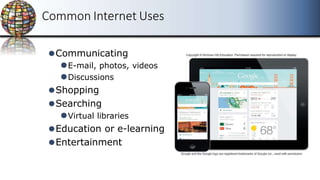
⚫Communicating
⚫E-mail, photos, videos
⚫Discussions
⚫Shopping
⚫Searching
⚫Virtual libraries
⚫Education or e-learning
⚫Entertainment
Making IT Work for You ~ Online Entertainment
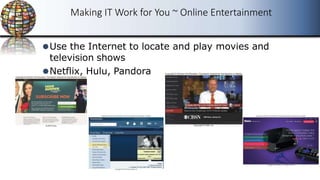
⚫Use the Internet to locate and play movies and
television shows
⚫Netflix, Hulu, Pandora
Internet Access Providers
⚫Internet Service Provider (ISP)
⚫Common way to access the Internet
⚫Provide a path to access the Internet
⚫Use telephone lines, cable, and/or wireless
connections
⚫Most common providers
⚫Verizon, Comcast, Sprint, T-Mobile, AT&T
⚫ISPS connect using connection technologies
⚫DSL, Cable, Wireless
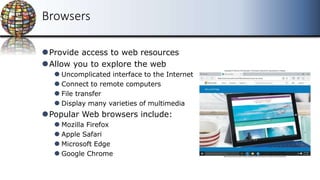
Browsers
⚫Provide access to web resources
⚫Allow you to explore the web
⚫ Uncomplicated interface to the Internet
⚫ Connect to remote computers
⚫ File transfer
⚫ Display many varieties of multimedia
⚫Popular Web browsers include:
⚫ Mozilla Firefox
⚫ Apple Safari
⚫ Microsoft Edge
⚫ Google Chrome
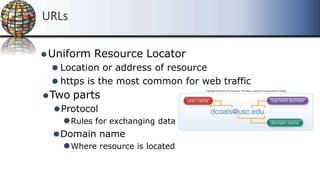
URLs
⚫Uniform Resource Locator
⚫ Location or address of resource
⚫ https is the most common for web traffic
⚫Two parts
⚫Protocol
⚫Rules for exchanging data
⚫Domain name
⚫Where resource is located
Top-Level Doman (TLD)
⚫Top-level domain (TLD) or Web Suffix
⚫Identifies the type of organization
⚫.com
⚫.edu
⚫.gov
⚫.mil
⚫.net
Commercial
Educational
Government
U.S. military
Network
HTML and Hyperlinks
⚫Hypertext Markup Language
⚫Markup language for displaying web pages
⚫Browsers interpret HTML commands
⚫Display document as a web page
⚫Hyperlinks or links
⚫Connect to other web pages
⚫Text files
⚫Graphic images
⚫Audio and Video Clips
Interactive Web Sites
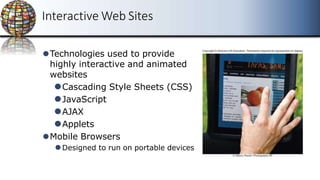
⚫Technologies used to provide
highly interactive and animated
websites
⚫Cascading Style Sheets (CSS)
⚫JavaScript
⚫AJAX
⚫Applets
⚫Mobile Browsers
⚫Designed to run on portable devices
Web Utilities
⚫Specialized utility programs that make using the
Internet and web safer and easier
⚫Plug-Ins
⚫Filters
⚫File Transfer Utilities
⚫Internet Security
Suites
Plug-Ins
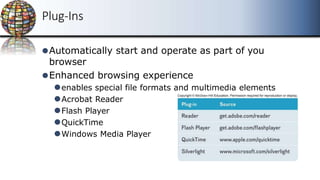
⚫Automatically start and operate as part of you
browser
⚫Enhanced browsing experience
⚫enables special file formats and multimedia elements
⚫Acrobat Reader
⚫Flash Player
⚫QuickTime
⚫Windows Media Player
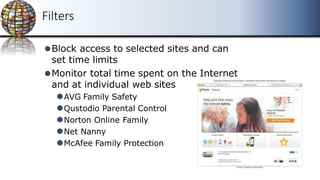
Filters
⚫Block access to selected sites and can
set time limits
⚫Monitor total time spent on the Internet
and at individual web sites
⚫AVG Family Safety
⚫Qustodio Parental Control
⚫Norton Online Family
⚫Net Nanny
⚫McAfee Family Protection
File Transfer Utilities
⚫Upload and download files to and from the Internet
⚫Downloading
⚫Uploading
⚫Three popular types of programs
⚫File transfer protocol (FTP) / Secure file transfer protocol
(SFTP)
⚫Web-based file transfer services
⚫Bit-Torrent
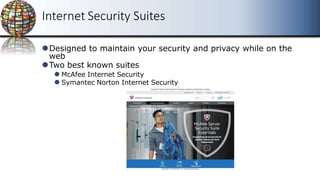
Internet Security Suites
⚫Designed to maintain your security and privacy while on the
web
⚫Two best known suites
⚫ McAfee Internet Security
⚫ Symantec Norton Internet Security
Communication
⚫Communication is the most popular Internet activity
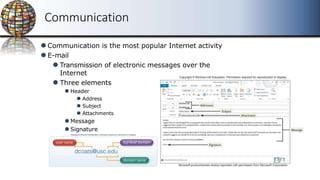
⚫E-mail
⚫ Transmission of electronic messages over the
Internet
⚫ Three elements
⚫ Header
⚫ Address
⚫ Subject
⚫ Attachments
⚫Message
⚫Signature
E-mail Systems
⚫Client-based
⚫E-mail client
⚫Must be installed on computer
⚫Apple Mail
⚫Microsoft Outlook
⚫Web-based
⚫Webmail client
⚫No installation necessary -- free
⚫Google’s Gmail
⚫Microsoft’s Hotmail
⚫Yahoo!’s Yahoo!mail
E-mail
⚫SPAM
⚫Unwelcome-mail
⚫Computer viruses
⚫Destructive programs
⚫Attached to unsolicited email
⚫CAN-SPAM Act
⚫Created antispam laws for control
⚫Every marketing related e-mail must provide an opt-out option
⚫Spam blockers / spam filters
⚫Identify and control spam
⚫Free programs
⚫SPAMfighter
⚫Intego Personal Antispam for Mac
Messaging
⚫Text messaging / texting
⚫SMS (short message service)
⚫Short electronic message
⚫Multimedia Messaging Service (MMS)
⚫Send
⚫Images
⚫Videos
⚫Sounds
Instant Messaging
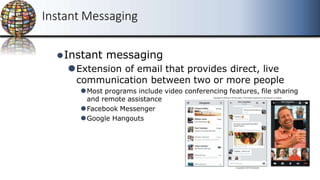
⚫Instant messaging
⚫Extension of email that provides direct, live
communication between two or more people
⚫Most programs include video conferencing features, file sharing
and remote assistance
⚫Facebook Messenger
⚫Google Hangouts
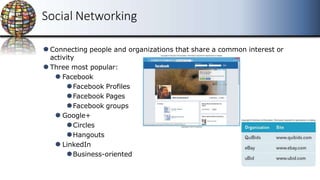
Social Networking
⚫Connecting people and organizations that share a common interest or
activity
⚫Three most popular:
⚫ Facebook
⚫Facebook Profiles
⚫Facebook Pages
⚫Facebook groups
⚫ Google+
⚫Circles
⚫Hangouts
⚫ LinkedIn
⚫Business-oriented
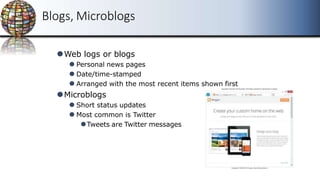
Blogs, Microblogs
⚫Web logs or blogs
⚫ Personal news pages
⚫ Date/time-stamped
⚫ Arranged with the most recent items shown first
⚫Microblogs
⚫ Short status updates
⚫ Most common is Twitter
⚫Tweets are Twitter messages
Webcasts, Podcasts, Wikis
⚫Webcast
⚫Streaming technology for live broadcast of audio and video
⚫No files after streaming ends
⚫Podcast
⚫Must download files to use
⚫Can transfer to media player
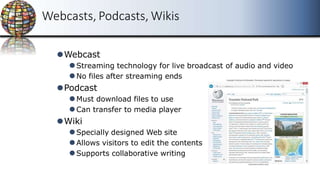
⚫Wiki
⚫Specially designed Web site
⚫Allows visitors to edit the contents
⚫Supports collaborative writing
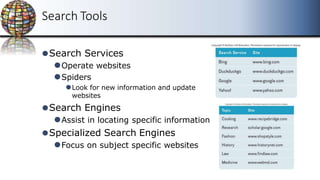
Search Tools
⚫Search Services
⚫Operate websites
⚫Spiders
⚫Look for new information and update
websites
⚫Search Engines
⚫Assist in locating specific information
⚫Specialized Search Engines
⚫Focus on subject specific websites
Content Evaluation
⚫Content Evaluation
⚫Not everything on the Internet is accurate
⚫Authority
⚫Accuracy
⚫Objectivity
⚫Currency
Electronic Commerce
⚫E-commerce
⚫Buying and selling of goods over the
Internet
⚫Three basic types
⚫Business-to-consumer (B2C)
⚫Consumer-to consumer (C2C)
⚫Business-to-business (B2B)
Business to Consumer (B2C)
⚫Sale of product or service to general public
⚫Fastest growing type of e-commerce
⚫Three most widely used B2C applications:
⚫Online banking
⚫Financial trading
⚫Shopping
⚫Amazon.com is one of the most widely use B2C sites
Consumer to Consumer
C2C
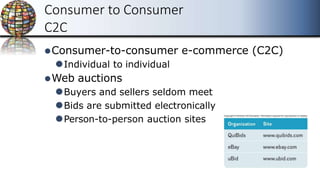
⚫Consumer-to-consumer e-commerce (C2C)
⚫Individual to individual
⚫Web auctions
⚫Buyers and sellers seldom meet
⚫Bids are submitted electronically
⚫Person-to-person auction sites
Business to Business B2B
⚫
Sale of a product or service from one business to
another
⚫Primarily a manufacturer supplier relationship
Security
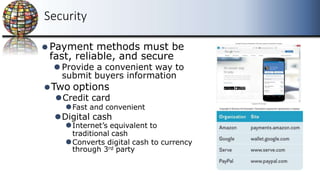
⚫ Payment methods must be
fast, reliable, and secure
⚫Provide a convenient way to
submit buyers information
⚫Two options
⚫Credit card
⚫Fast and convenient
⚫Digital cash
⚫Internet’s equivalent to
traditional cash
⚫Converts digital cash to currency
through 3rd party
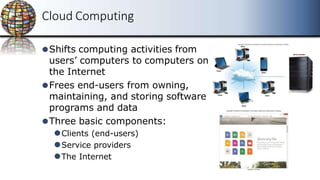
Cloud Computing
⚫Shifts computing activities from
users’ computers to computers on
the Internet
⚫Frees end-users from owning,
maintaining, and storing software
programs and data
⚫Three basic components:
⚫Clients (end-users)
⚫Service providers
⚫The Internet
Internet of Things (IoT)
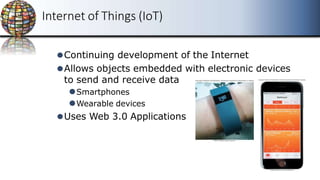
⚫Continuing development of the Internet
⚫Allows objects embedded with electronic devices
to send and receive data
⚫Smartphones
⚫Wearable devices
⚫Uses Web 3.0 Applications
Careers In IT - Webmasters
⚫Develop and maintain websites and resources
⚫Backup of company website
⚫Design and development of websites
⚫Work with the marketing
⚫Increase site traffic
⚫Development of web promotions
A Look to the Future
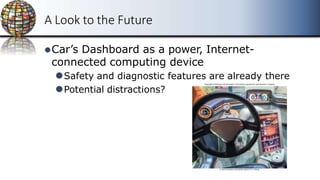
⚫Car’s Dashboard as a power, Internet-
connected computing device
⚫Safety and diagnostic features are already there
⚫Potential distractions?

Lesson 2 - The Internet, the Web, and Electronic Commerce.pptx

  • 1.
  • 2.
    The Internet, the Web, and Electronic Commerce The Internet, the Web, and Electronic Commerce Learning Objectives 1. Explainthe origins of the Internet and the web. 2. Explain how to access the web using providers and browsers 3. Compare different web utilities including plug-ins, filters, file transfer utilities, and Internet security suites 4. Compare different Internet communications, including email, text messaging, instant messaging, social networking, blogs, microblogs, Webcasts, podcasts, and wikis
  • 3.
    Learning Objectives continued 5.Describe search tools, including search engines and specialized search engines 6. Evaluate the accuracy of information presented on the web 7. Identify electronic commerce, including B2C, C2C, B2B, and security issues 8. Describe cloud computing, including the three-way interaction of clients, Internet, and service providers 9. Discuss the Internet of Things (IoT) and the continuing development of the Internet to allow everyday objects to send and receive data
  • 4.
    ⚫The Internet ⚫Interconnected meshof computers and data lines ⚫Connecting millions of people and organizations ⚫Foundation of the digital revolution. ⚫The web ⚫Provides an easy-to-use interface to Internet resources ⚫To be effective and efficient ⚫End user awareness of the resources available on the Internet and the web Introduction
  • 5.
    The Internet andthe Web ⚫The Internet ⚫ Large global network connecting smaller networks all over the globe ⚫The Internet launched in 1969 ⚫ The United States funded a project to develop a national computer network ⚫ ARPANET (Advanced Research Project Agency Network) ⚫World Wide Web or WWW was introduced in 1991 ⚫The Internet and the web are NOT the same ⚫ The Internet is the physical network ⚫ The web is a multimedia interface to the resources available on the Internet
  • 6.
    Web ⚫Web 1.0 ⚫1st generation ⚫Linkingexisting information focus ⚫Search programs were created ⚫Provide links to websites with specific words or phrases ⚫Web 2.0 ⚫Dynamic content creation ⚫Facebook is most common in Web 2.0 ⚫Web 3.0 ⚫Current generation ⚫Personalized content creation for users
  • 7.
    Common Internet Uses ⚫Communicating ⚫E-mail,photos, videos ⚫Discussions ⚫Shopping ⚫Searching ⚫Virtual libraries ⚫Education or e-learning ⚫Entertainment
  • 8.
    Making IT Workfor You ~ Online Entertainment ⚫Use the Internet to locate and play movies and television shows ⚫Netflix, Hulu, Pandora
  • 9.
    Internet Access Providers ⚫InternetService Provider (ISP) ⚫Common way to access the Internet ⚫Provide a path to access the Internet ⚫Use telephone lines, cable, and/or wireless connections ⚫Most common providers ⚫Verizon, Comcast, Sprint, T-Mobile, AT&T ⚫ISPS connect using connection technologies ⚫DSL, Cable, Wireless
  • 10.
    Browsers ⚫Provide access toweb resources ⚫Allow you to explore the web ⚫ Uncomplicated interface to the Internet ⚫ Connect to remote computers ⚫ File transfer ⚫ Display many varieties of multimedia ⚫Popular Web browsers include: ⚫ Mozilla Firefox ⚫ Apple Safari ⚫ Microsoft Edge ⚫ Google Chrome
  • 11.
    URLs ⚫Uniform Resource Locator ⚫Location or address of resource ⚫ https is the most common for web traffic ⚫Two parts ⚫Protocol ⚫Rules for exchanging data ⚫Domain name ⚫Where resource is located
  • 12.
    Top-Level Doman (TLD) ⚫Top-leveldomain (TLD) or Web Suffix ⚫Identifies the type of organization ⚫.com ⚫.edu ⚫.gov ⚫.mil ⚫.net Commercial Educational Government U.S. military Network
  • 13.
    HTML and Hyperlinks ⚫HypertextMarkup Language ⚫Markup language for displaying web pages ⚫Browsers interpret HTML commands ⚫Display document as a web page ⚫Hyperlinks or links ⚫Connect to other web pages ⚫Text files ⚫Graphic images ⚫Audio and Video Clips
  • 14.
    Interactive Web Sites ⚫Technologiesused to provide highly interactive and animated websites ⚫Cascading Style Sheets (CSS) ⚫JavaScript ⚫AJAX ⚫Applets ⚫Mobile Browsers ⚫Designed to run on portable devices
  • 15.
    Web Utilities ⚫Specialized utilityprograms that make using the Internet and web safer and easier ⚫Plug-Ins ⚫Filters ⚫File Transfer Utilities ⚫Internet Security Suites
  • 16.
    Plug-Ins ⚫Automatically start andoperate as part of you browser ⚫Enhanced browsing experience ⚫enables special file formats and multimedia elements ⚫Acrobat Reader ⚫Flash Player ⚫QuickTime ⚫Windows Media Player
  • 17.
    Filters ⚫Block access toselected sites and can set time limits ⚫Monitor total time spent on the Internet and at individual web sites ⚫AVG Family Safety ⚫Qustodio Parental Control ⚫Norton Online Family ⚫Net Nanny ⚫McAfee Family Protection
  • 18.
    File Transfer Utilities ⚫Uploadand download files to and from the Internet ⚫Downloading ⚫Uploading ⚫Three popular types of programs ⚫File transfer protocol (FTP) / Secure file transfer protocol (SFTP) ⚫Web-based file transfer services ⚫Bit-Torrent
  • 19.
    Internet Security Suites ⚫Designedto maintain your security and privacy while on the web ⚫Two best known suites ⚫ McAfee Internet Security ⚫ Symantec Norton Internet Security
  • 20.
    Communication ⚫Communication is themost popular Internet activity ⚫E-mail ⚫ Transmission of electronic messages over the Internet ⚫ Three elements ⚫ Header ⚫ Address ⚫ Subject ⚫ Attachments ⚫Message ⚫Signature
  • 21.
    E-mail Systems ⚫Client-based ⚫E-mail client ⚫Mustbe installed on computer ⚫Apple Mail ⚫Microsoft Outlook ⚫Web-based ⚫Webmail client ⚫No installation necessary -- free ⚫Google’s Gmail ⚫Microsoft’s Hotmail ⚫Yahoo!’s Yahoo!mail
  • 22.
    E-mail ⚫SPAM ⚫Unwelcome-mail ⚫Computer viruses ⚫Destructive programs ⚫Attachedto unsolicited email ⚫CAN-SPAM Act ⚫Created antispam laws for control ⚫Every marketing related e-mail must provide an opt-out option ⚫Spam blockers / spam filters ⚫Identify and control spam ⚫Free programs ⚫SPAMfighter ⚫Intego Personal Antispam for Mac
  • 23.
    Messaging ⚫Text messaging /texting ⚫SMS (short message service) ⚫Short electronic message ⚫Multimedia Messaging Service (MMS) ⚫Send ⚫Images ⚫Videos ⚫Sounds
  • 24.
    Instant Messaging ⚫Instant messaging ⚫Extensionof email that provides direct, live communication between two or more people ⚫Most programs include video conferencing features, file sharing and remote assistance ⚫Facebook Messenger ⚫Google Hangouts
  • 25.
    Social Networking ⚫Connecting peopleand organizations that share a common interest or activity ⚫Three most popular: ⚫ Facebook ⚫Facebook Profiles ⚫Facebook Pages ⚫Facebook groups ⚫ Google+ ⚫Circles ⚫Hangouts ⚫ LinkedIn ⚫Business-oriented
  • 26.
    Blogs, Microblogs ⚫Web logsor blogs ⚫ Personal news pages ⚫ Date/time-stamped ⚫ Arranged with the most recent items shown first ⚫Microblogs ⚫ Short status updates ⚫ Most common is Twitter ⚫Tweets are Twitter messages
  • 27.
    Webcasts, Podcasts, Wikis ⚫Webcast ⚫Streamingtechnology for live broadcast of audio and video ⚫No files after streaming ends ⚫Podcast ⚫Must download files to use ⚫Can transfer to media player ⚫Wiki ⚫Specially designed Web site ⚫Allows visitors to edit the contents ⚫Supports collaborative writing
  • 28.
    Search Tools ⚫Search Services ⚫Operatewebsites ⚫Spiders ⚫Look for new information and update websites ⚫Search Engines ⚫Assist in locating specific information ⚫Specialized Search Engines ⚫Focus on subject specific websites
  • 29.
    Content Evaluation ⚫Content Evaluation ⚫Noteverything on the Internet is accurate ⚫Authority ⚫Accuracy ⚫Objectivity ⚫Currency
  • 30.
    Electronic Commerce ⚫E-commerce ⚫Buying andselling of goods over the Internet ⚫Three basic types ⚫Business-to-consumer (B2C) ⚫Consumer-to consumer (C2C) ⚫Business-to-business (B2B)
  • 31.
    Business to Consumer(B2C) ⚫Sale of product or service to general public ⚫Fastest growing type of e-commerce ⚫Three most widely used B2C applications: ⚫Online banking ⚫Financial trading ⚫Shopping ⚫Amazon.com is one of the most widely use B2C sites
  • 32.
    Consumer to Consumer C2C ⚫Consumer-to-consumere-commerce (C2C) ⚫Individual to individual ⚫Web auctions ⚫Buyers and sellers seldom meet ⚫Bids are submitted electronically ⚫Person-to-person auction sites
  • 33.
    Business to BusinessB2B ⚫ Sale of a product or service from one business to another ⚫Primarily a manufacturer supplier relationship
  • 34.
    Security ⚫ Payment methodsmust be fast, reliable, and secure ⚫Provide a convenient way to submit buyers information ⚫Two options ⚫Credit card ⚫Fast and convenient ⚫Digital cash ⚫Internet’s equivalent to traditional cash ⚫Converts digital cash to currency through 3rd party
  • 35.
    Cloud Computing ⚫Shifts computingactivities from users’ computers to computers on the Internet ⚫Frees end-users from owning, maintaining, and storing software programs and data ⚫Three basic components: ⚫Clients (end-users) ⚫Service providers ⚫The Internet
  • 36.
    Internet of Things(IoT) ⚫Continuing development of the Internet ⚫Allows objects embedded with electronic devices to send and receive data ⚫Smartphones ⚫Wearable devices ⚫Uses Web 3.0 Applications
  • 37.
    Careers In IT- Webmasters ⚫Develop and maintain websites and resources ⚫Backup of company website ⚫Design and development of websites ⚫Work with the marketing ⚫Increase site traffic ⚫Development of web promotions
  • 38.
    A Look tothe Future ⚫Car’s Dashboard as a power, Internet- connected computing device ⚫Safety and diagnostic features are already there ⚫Potential distractions?