Lesson 6
Definition of
Requirements for
each Project Phases
Five stages of project management
Project management process is usually broken down into
separate phases that take the project from the beginning to the
end. These stages include:
• initiation
• planning
• execution
• monitoring and control
• closure
These phases often overlap with the project life cycle. They can
help you determine the right flow and sequence of operations
to bring your project to conclusion. Our project management
checklist can further help you segment the tasks for each of the
project phases.
1. Project initiation
Initiation is the formal start of a project. It usually begins with
the issue of a project mandate which briefly describes the
purpose of the project and authorizes budget spend.
At this stage, you should define the project at a broad level. This
often begins with:
• a business case - justifying the need for the project and
estimating potential benefits
• a feasibility study - evaluating the problem and
determining if the project will solve it
If you decide to undertake the project, you should then create
a project initiation document (PID). This is the foundation of
your project and a critical reference point for the next stages.
Key components of your PID should be:
• your business case
• project goals, scope and size
• project organization (defining the 'who, why, what, when and
how' of the project)
• project constraints
• project risks
• stakeholders
• project controls and reporting framework
• the criteria for closing and assessing the project
Project start-up / project initiation document
Project background / introduction
Give a brief overview of the background to the project and why it is
being carried out. You don’t need to go into detail here.
Business case / Benefits of doing this project
Describe why you are doing the project and list the benefits to the
business.
Objectives and scope [or include / link to the project
scope document]
What are the objectives for this project? This can be a single
statement or may be more detailed, eg listing each specific
objective to be achieved. You should try to keep to no more than
five objectives.
Deliverables / outcomes
What the results or output of the project are, or the end result. Try
to describe a tangible output such as the creation of new marketing
information, product photography completed, new software
uploaded to relevant computers, etc.
Constraints
Constraints are the factors that will affect how and when a project
will be done, such as a delivery date, the budget, etc.
You may not always be able to specify the cost - for example, if you
are refitting premises, you may not have a final cost from all
contractors because a certain amount of uncertainty is inevitable
until work commences - for example, the need to install new lighting
might reveal the need to replace some or all of the existing electrical
cabling to meet current requirements. For situations such as this,
you could indicate a likely cost range or your total maximum budget,
including any contingency sum.
Time: for example does it have to be completed by a certain date,
eg to meet a delivery deadline?
Costs: for example the total maximum budget
Resources: the people required to complete the work on time
Assumptions
List here any assumptions you have made about the project and
which have influenced the approach you're taking, such as:
• "We expect most customers will access the new website
through a broadband connection, so high-resolution graphic
images we'll use in the product catalogue will load/display
quickly"
• "The schedule assumes that the fit-out of the new premises will
have been completed by 15 August 2011 to enable the full move
to take place week commencing 21 August"
• Time and cost estimates
•
• In this section, you should list initial estimates for key tasks or
parts of the project (or known prices, eg from an external
supplier who has already quoted for their part of the project).
•
• Key dates / milestones
•
• Particularly on larger projects, there may be a number of key
dates by which certain tasks or parts of the project must be
completed - either as part of a phased delivery or because
something must be completed in order for something else to
happen.
•
• In the example of a move to new premises, machinery,
equipment or computers must be installed before staff can be
moved. In a project to launch a new retail website, all product
photography, descriptions, price details and other content
creation has to be completed before the upload and test stages
can begin.
• Schedule and project plan
• It is enough here to refer to more detailed documents that are
likely to be held separately and in more detail (see separate
example of a project plan and schedule).
• Key success criteria
• This section should show how you will measure the success of
the project - eg "Launching the new website will result in sales
increase of 15% in the first year".
• Risks - analysis, prevention, management and
monitoring
• In this section, you should show that you have considered what
risks might arise, what you can do to prevent risks or reduce
their effect on the project and how you will monitor them.
• Describe any risks you feel could affect the project, whether
internal or external. There will always be risks but not all risks
will have an impact that would be detrimental. It is important to
consider the risks so that you can also plan how you can reduce
or remove them and help to ensure the project's success.
Describe any plans you have for what you would do if a risk
materialized.
• You can also link to any risk control or monitoring documents,
such as the risk register or risk log (see separate template).
• Reporting
• Describe here any progress reporting that's planned as part of
the project - for example you may ask a supplier to report weekly
or monthly so that you can assess their progress or team
members might be asked to report on individual progress.
• Project manager / project lead
• If there is a project manager - whether someone in this role full
time or someone acting in this position for the purposes of this
project, state who this is and their responsibilities. The project
manager is responsible for the day to day running of the project.
• Project sponsor
• State who this is and their responsibilities.
• Project board / steering group
• On larger projects, there may be a number of people involved
at a higher level who are not directly involved in running the
project but who have an interest or need to authorize some high-
level decisions, such as additional expenditure. Delete this
section if it isn't relevant to your project.
• Project team and roles
• List here all those working on the project, with brief details of
their roles and responsibilities and their contact details.
• For a larger team or project, you could also create a project
organization structure diagram, showing who is doing which
work, who they report to, etc.
2. Project definition and planning
Project planning is key to successful project management. This
stage typically begins with setting goals. The two most
common approaches include:
• the SMART method (specific, measurable, attainable,
realistic and timely)
• the CLEAR method (collaborative, limited, emotional,
appreciable, refinable)
At this stage, you will also define the project scope, and develop
a project plan and work breakdown schedule. This involves
identifying:
• time, cost and resources that are at your disposal
• roles and responsibilities for the project
• quality
• milestones
• baseline performance measures
• progress checkpoints
• risk and resources for resolving unforeseen issues
During this stage, you may also want to develop a
communication plan (especially if you have external
stakeholders), as well as a risk management plan.
Project plan and schedule
A project plan is a detailed schedule or timeline showing:
- all the tasks that need to be completed
- who will be doing those tasks
- key dates or milestones for phased delivery and final
completion of the project
The plan should show not only the full timetable from start to
completion but also the interdependencies between tasks or
resources - what has to happen by when and what must be done
before the next set of tasks can be started, etc.
You can use a computer program to produce a project plan and this
is often particularly useful for complex or multi-strand projects. On
simpler projects you can use whatever suits the way you work and
the type of project you're doing. Often a calendar, spreadsheet or
simple flow diagram will be enough.
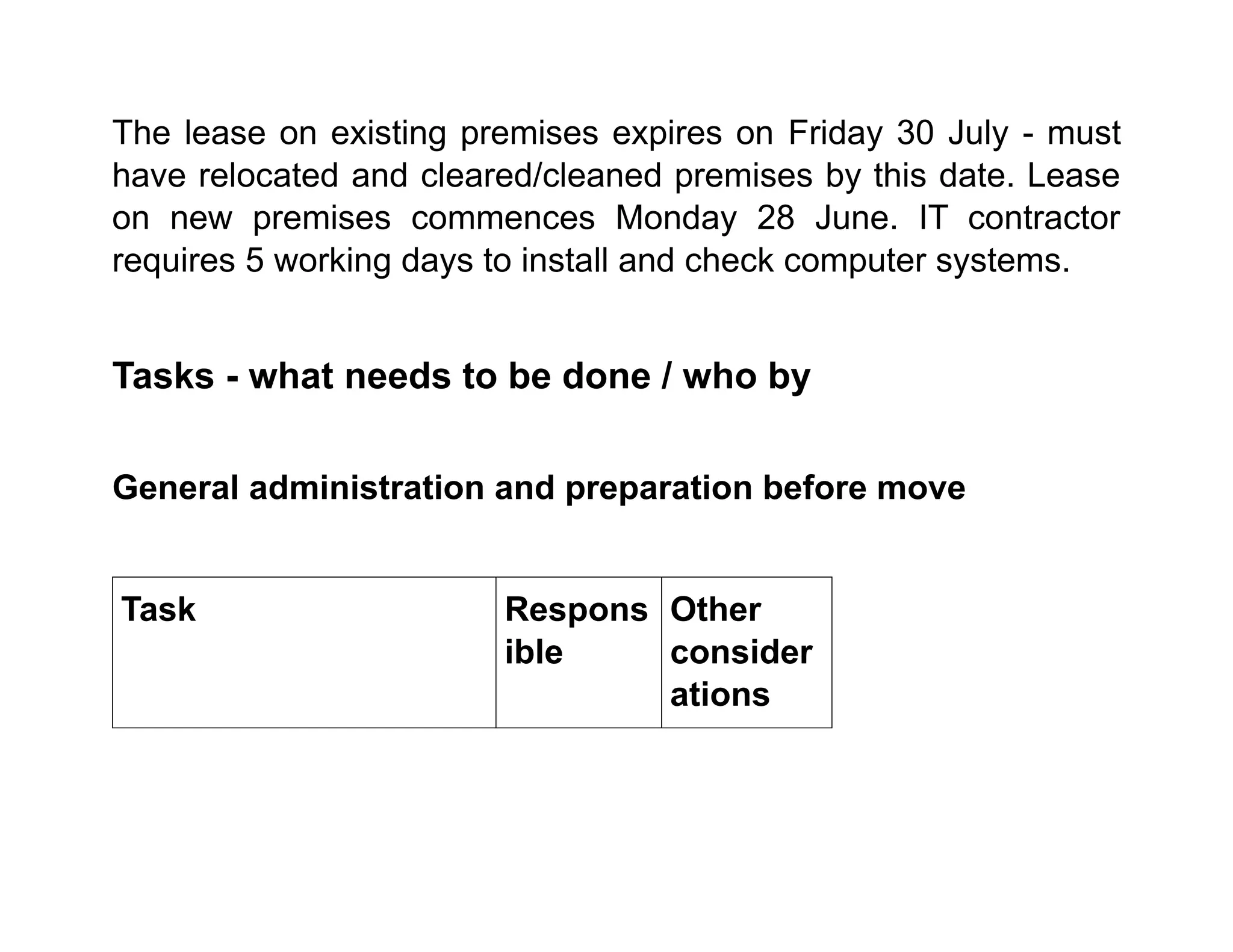
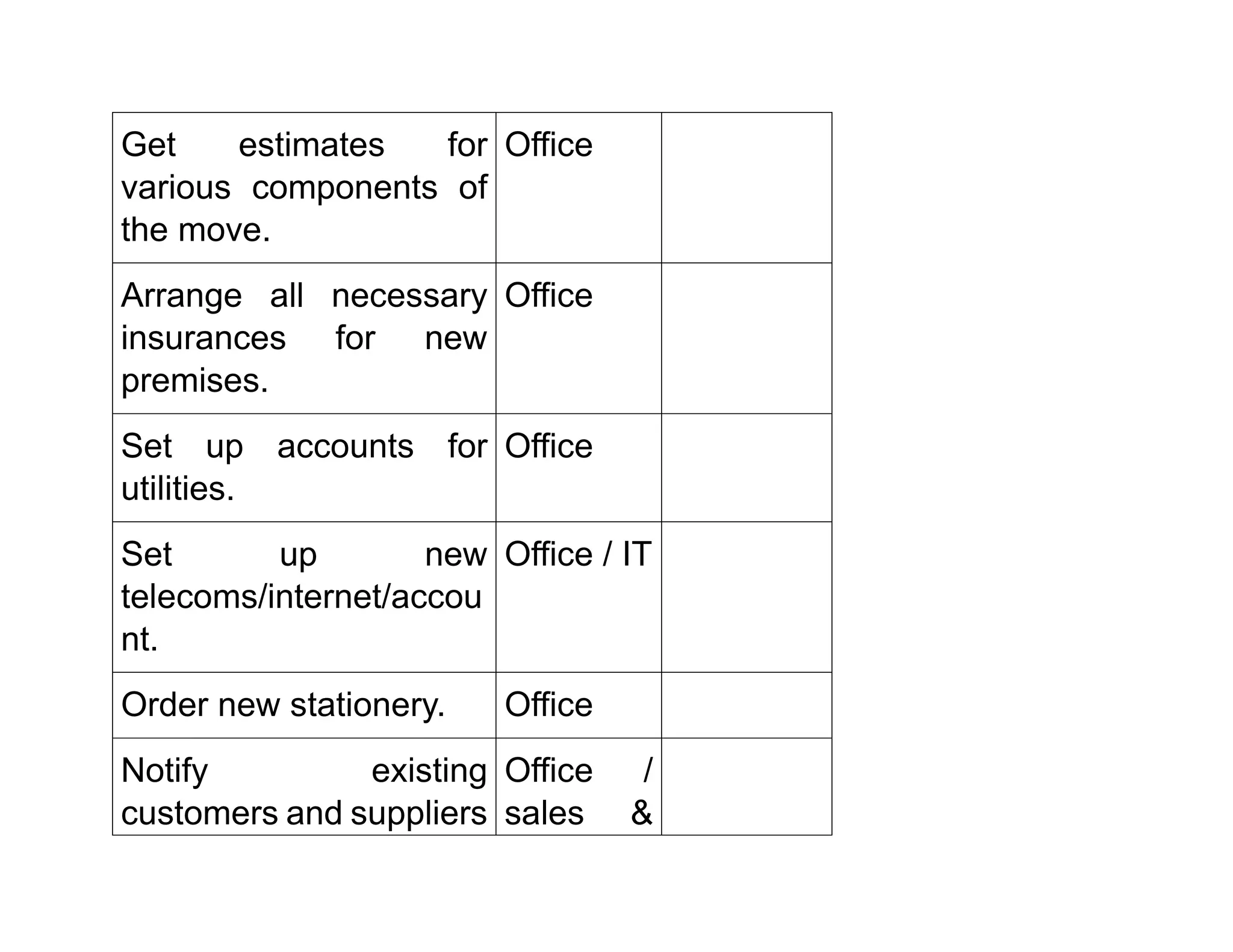
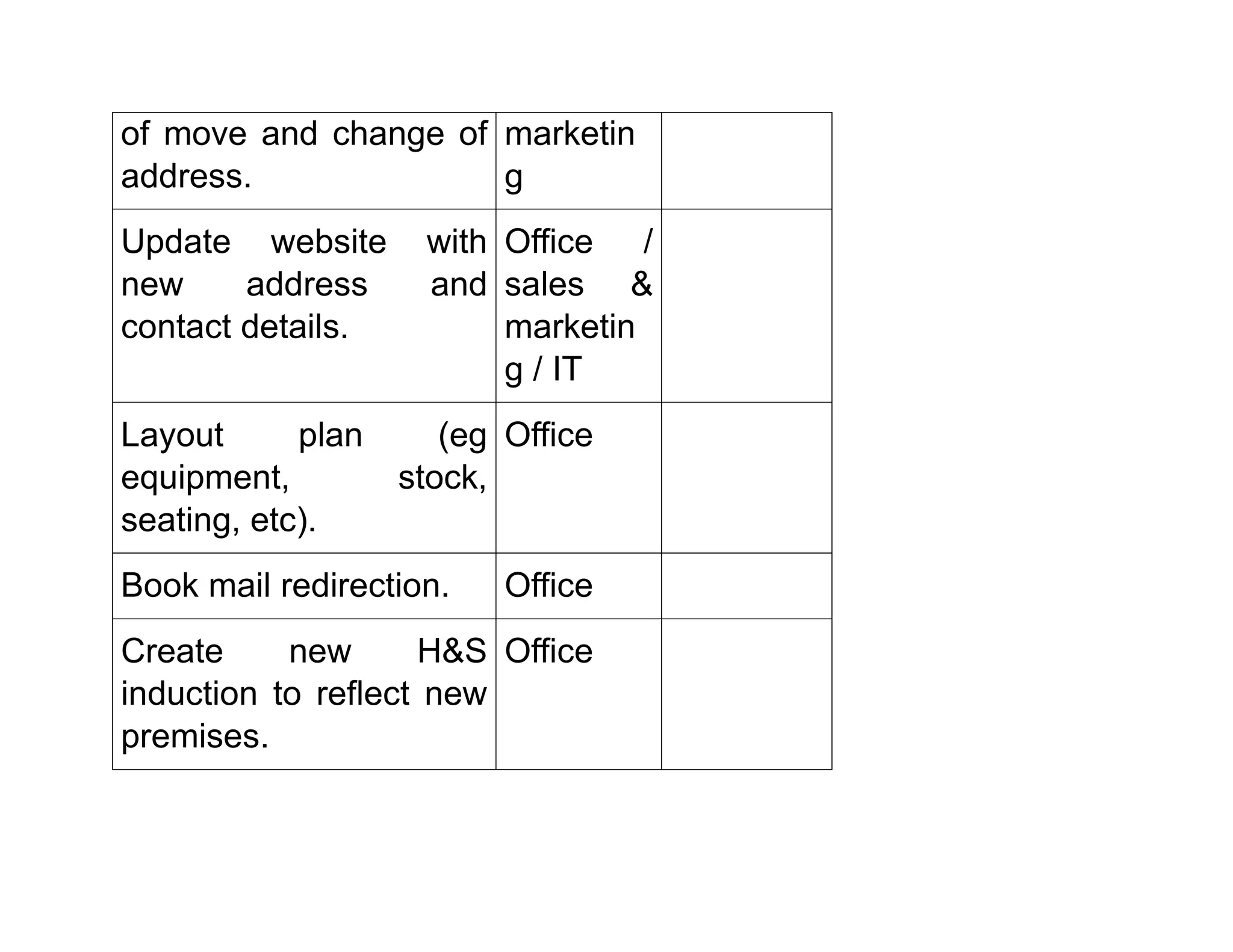
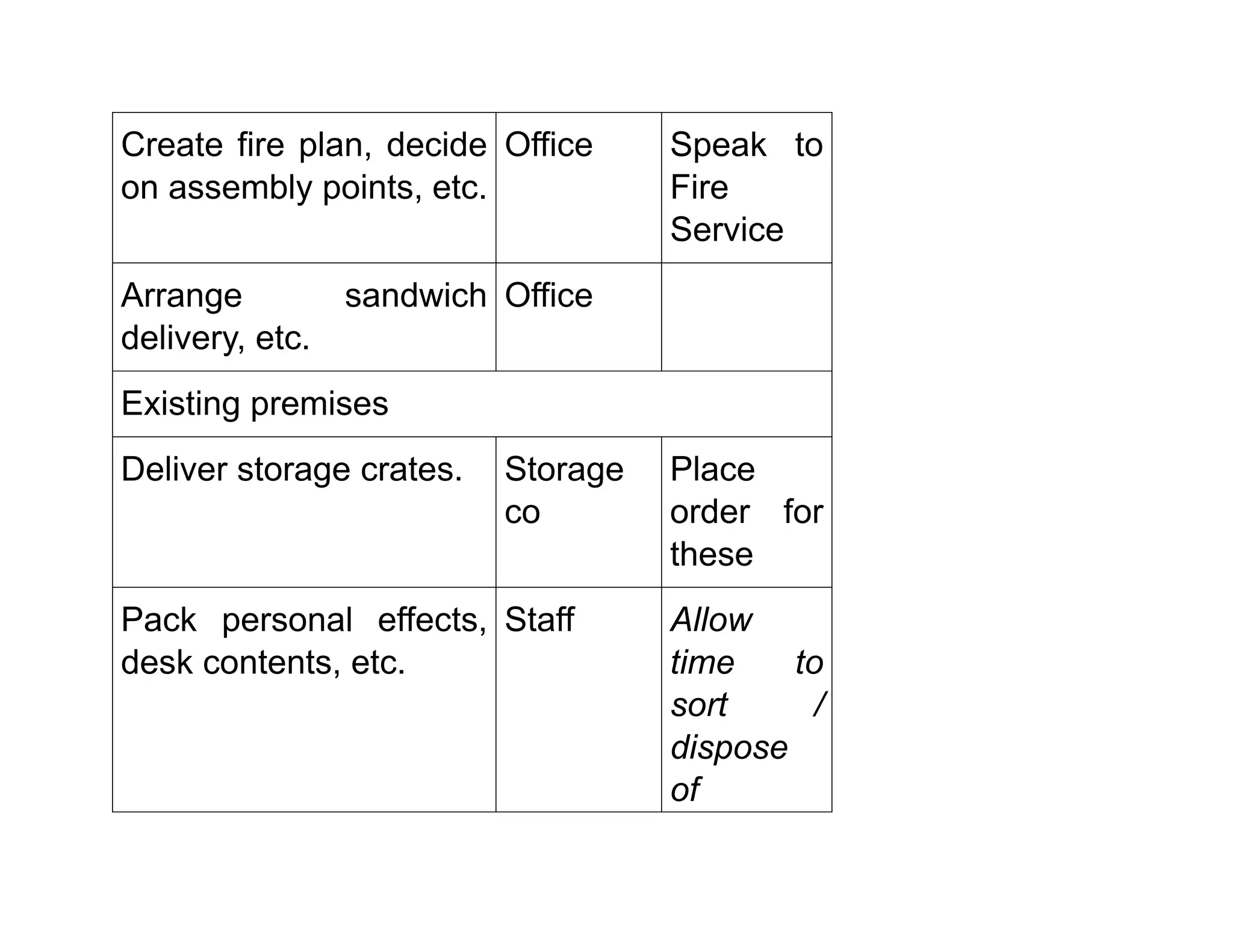
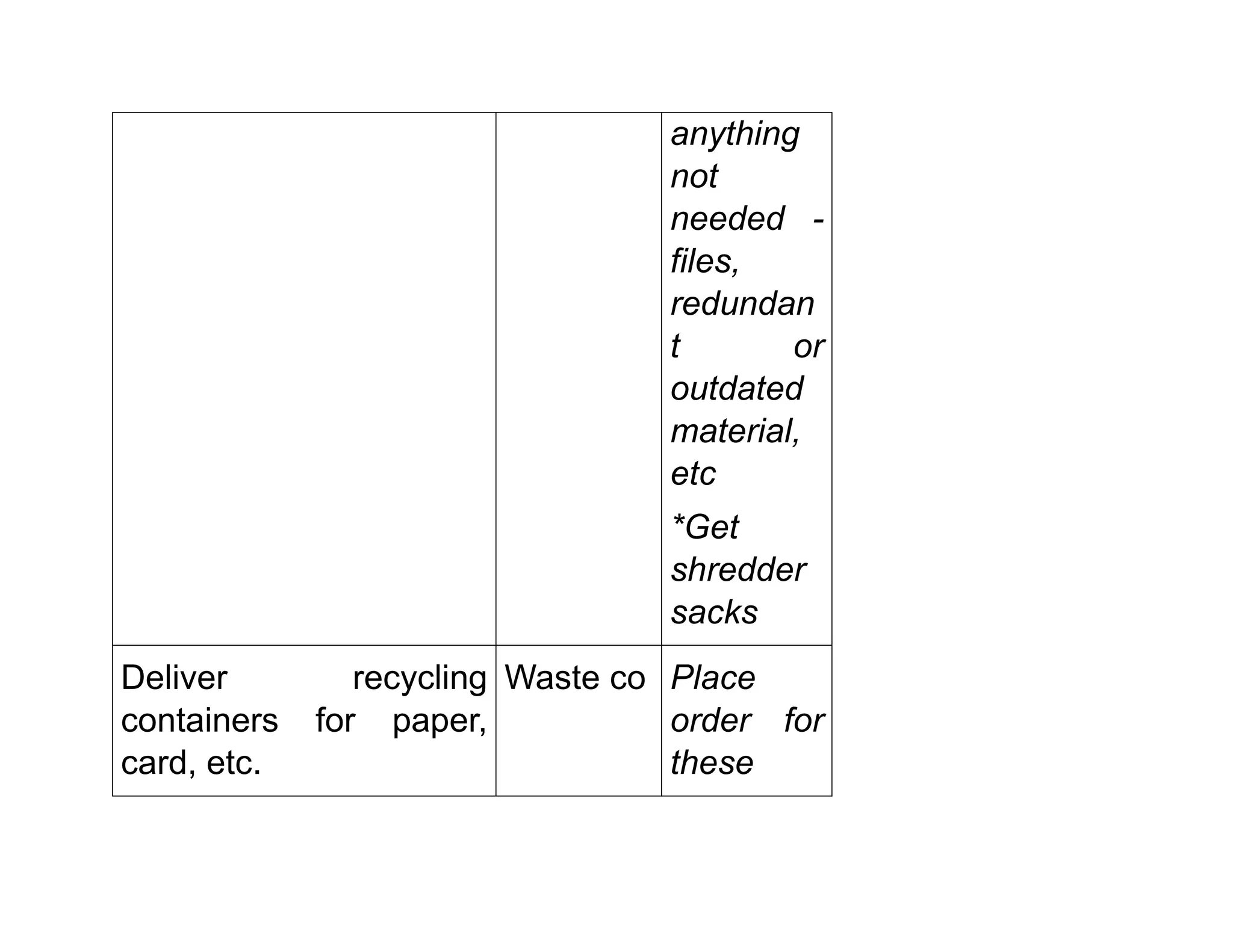
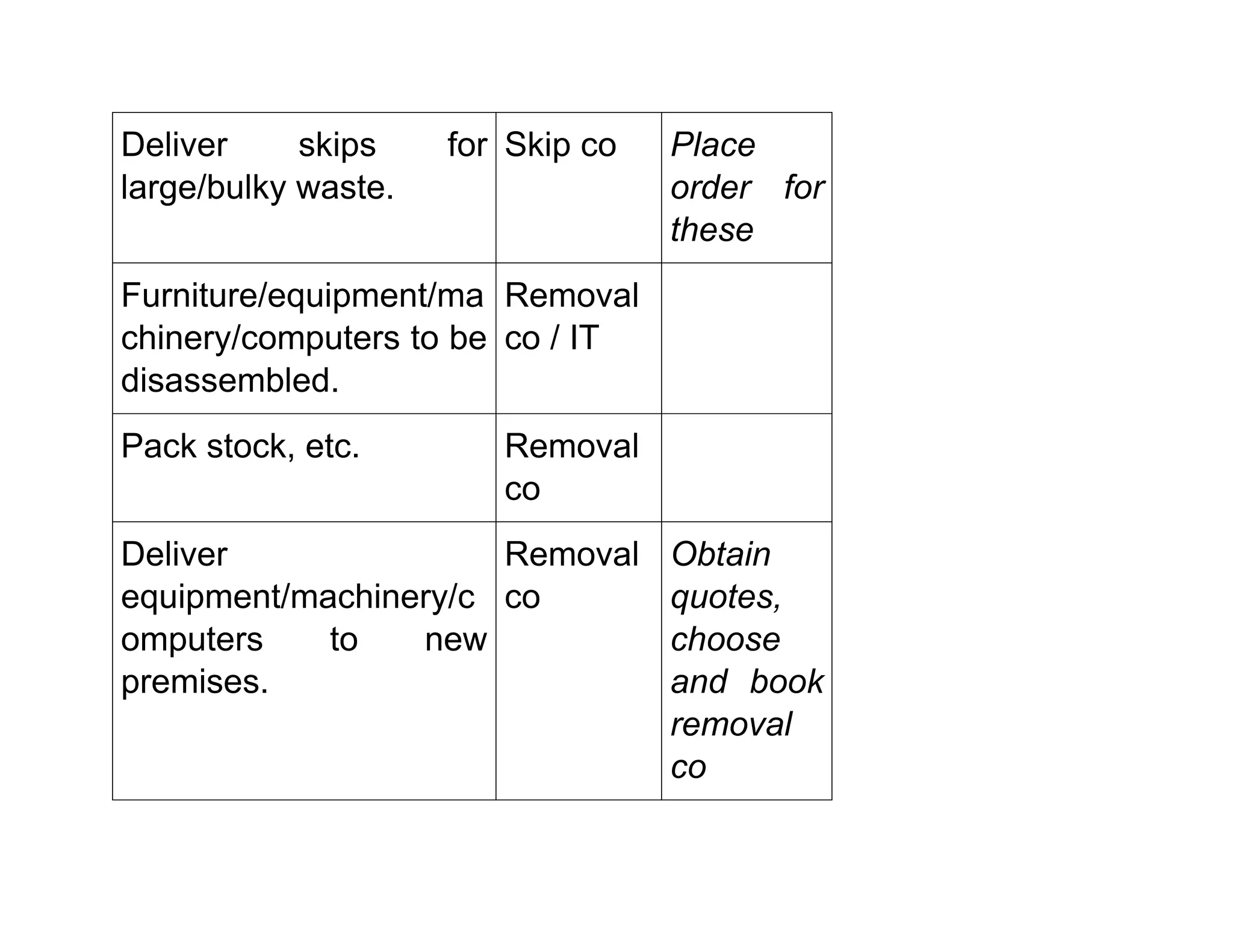
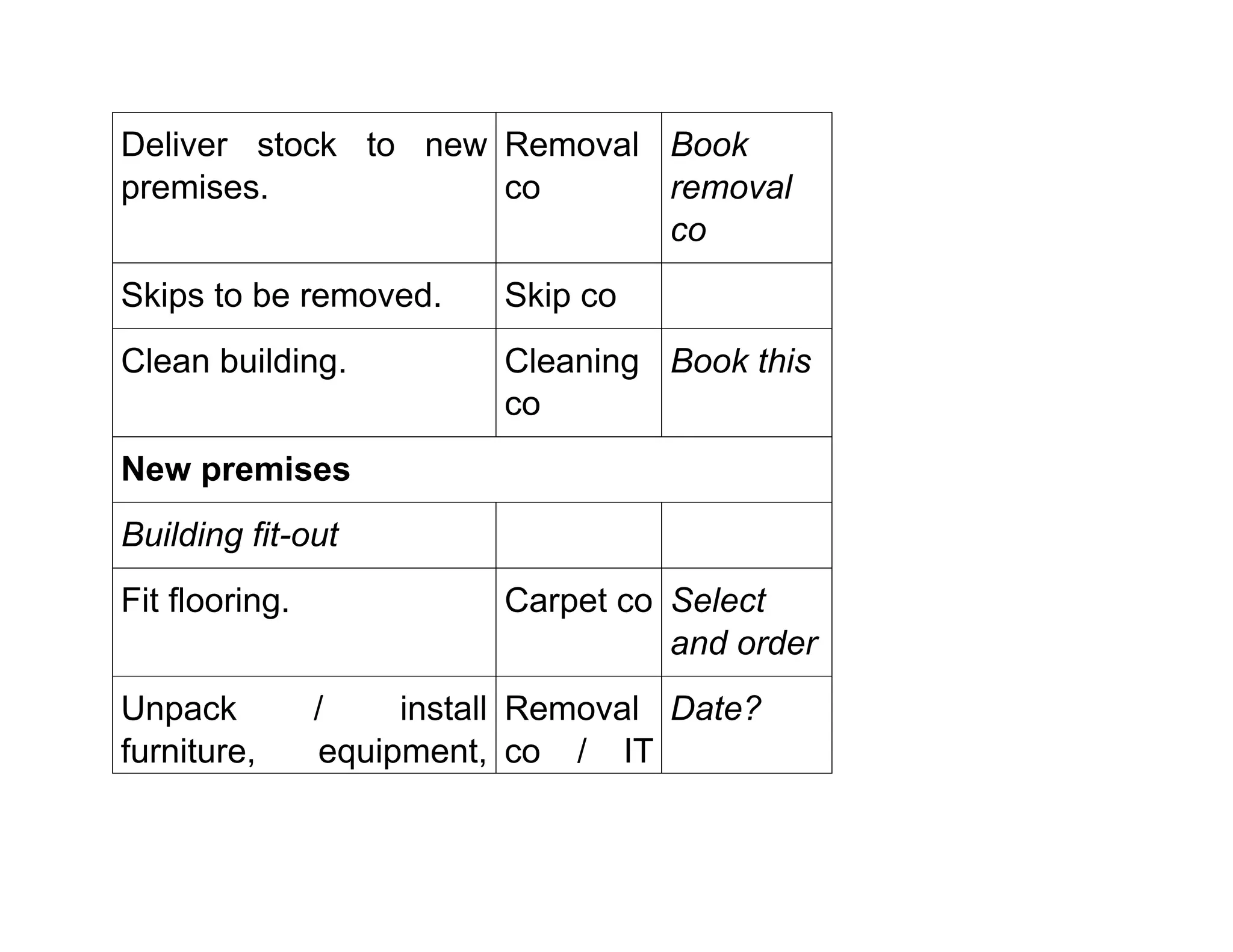
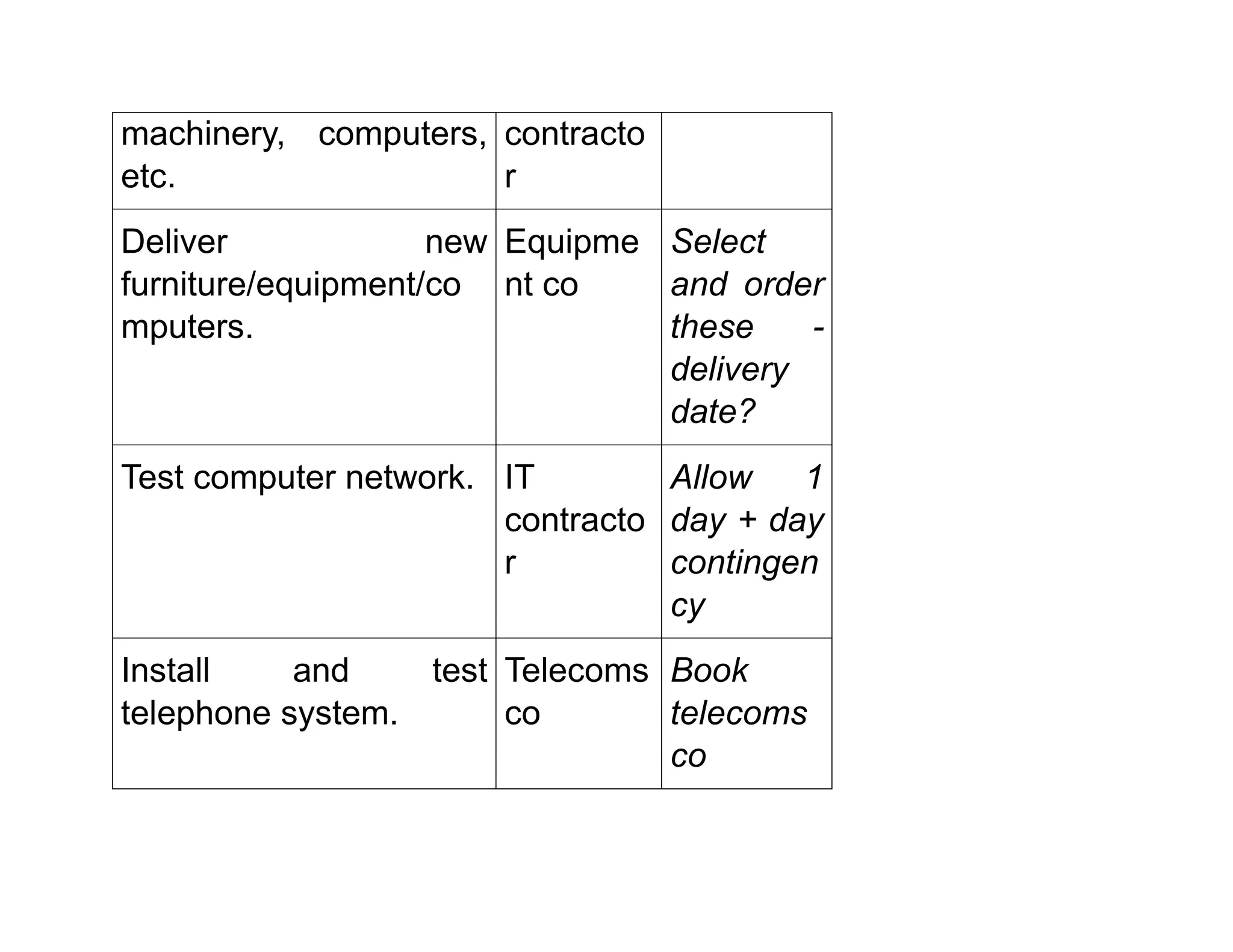
Stage 1 - planning process
This shows an approach to the considerations needed in planning
this relocation. Filling in the task column has also prompted
additional tasks that need to be done first.
Dates - deadlines or milestones and end date
The lease on existing premises expires on Friday 30 July - must
have relocated and cleared/cleaned premises by this date. Lease
on new premises commences Monday 28 June. IT contractor
requires 5 working days to install and check computer systems.
Tasks - what needs to be done / who by
General administration and preparation before move
Task Respons
ible
Other
consider
ations
Get estimates for
various components of
the move.
Office
Arrange all necessary
insurances for new
premises.
Office
Set up accounts for
utilities.
Office
Set up new
telecoms/internet/accou
nt.
Office / IT
Order new stationery. Office
Notify existing
customers and suppliers
Office /
sales &
of move and change of
address.
marketin
g
Update website with
new address and
contact details.
Office /
sales &
marketin
g / IT
Layout plan (eg
equipment, stock,
seating, etc).
Office
Book mail redirection. Office
Create new H&S
induction to reflect new
premises.
Office
Create fire plan, decide
on assembly points, etc.
Office Speak to
Fire
Service
Arrange sandwich
delivery, etc.
Office
Existing premises
Deliver storage crates. Storage
co
Place
order for
these
Pack personal effects,
desk contents, etc.
Staff Allow
time to
sort /
dispose
of
anything
not
needed -
files,
redundan
t or
outdated
material,
etc
*Get
shredder
sacks
Deliver recycling
containers for paper,
card, etc.
Waste co Place
order for
these
Deliver skips for
large/bulky waste.
Skip co Place
order for
these
Furniture/equipment/ma
chinery/computers to be
disassembled.
Removal
co / IT
Pack stock, etc. Removal
co
Deliver
equipment/machinery/c
omputers to new
premises.
Removal
co
Obtain
quotes,
choose
and book
removal
co
Deliver stock to new
premises.
Removal
co
Book
removal
co
Skips to be removed. Skip co
Clean building. Cleaning
co
Book this
New premises
Building fit-out
Fit flooring. Carpet co Select
and order
Unpack / install
furniture, equipment,
Removal
co / IT
Date?
machinery, computers,
etc.
contracto
r
Deliver new
furniture/equipment/co
mputers.
Equipme
nt co
Select
and order
these -
delivery
date?
Test computer network. IT
contracto
r
Allow 1
day + day
contingen
cy
Install and test
telephone system.
Telecoms
co
Book
telecoms
co
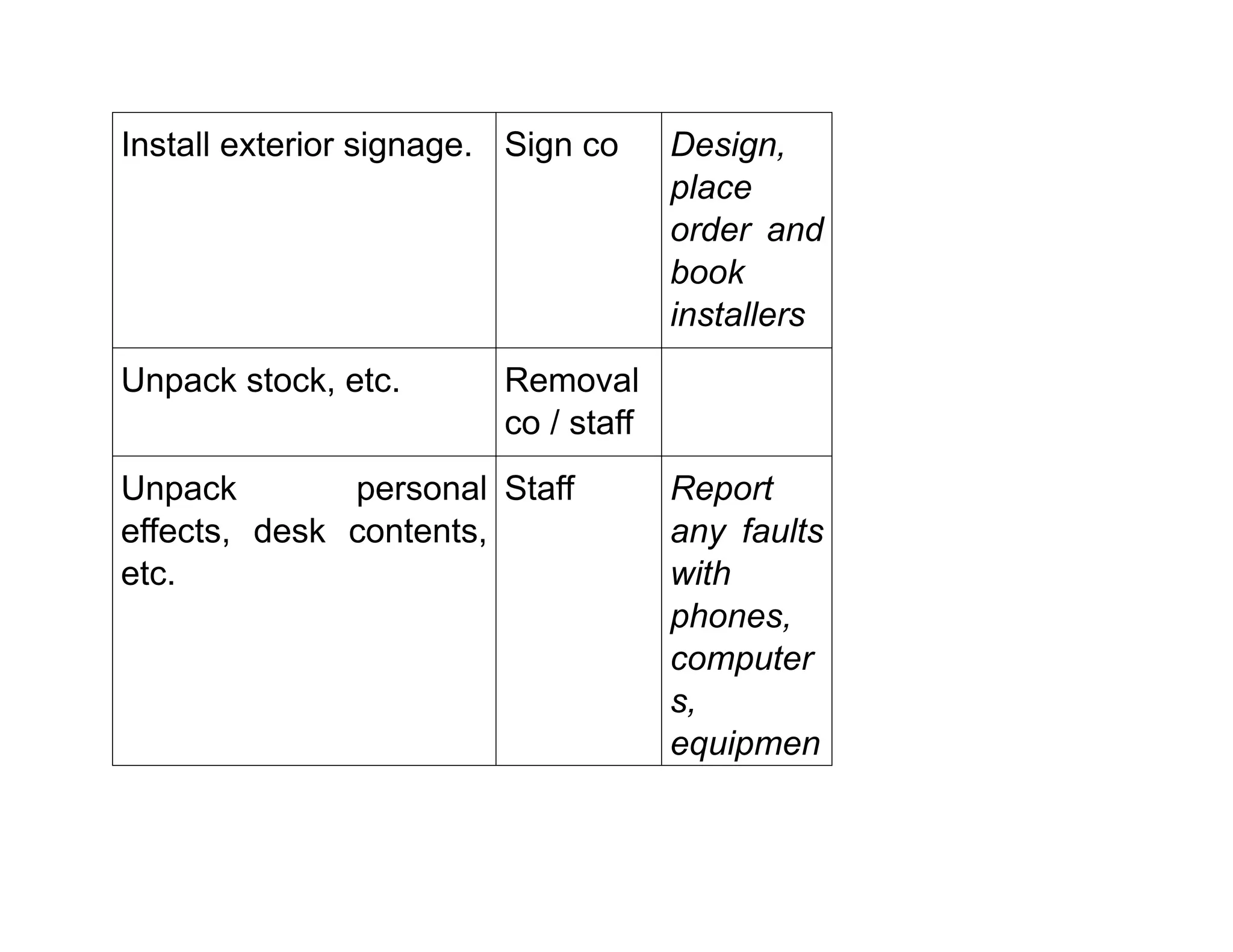
Install exterior signage. Sign co Design,
place
order and
book
installers
Unpack stock, etc. Removal
co / staff
Unpack personal
effects, desk contents,
etc.
Staff Report
any faults
with
phones,
computer
s,
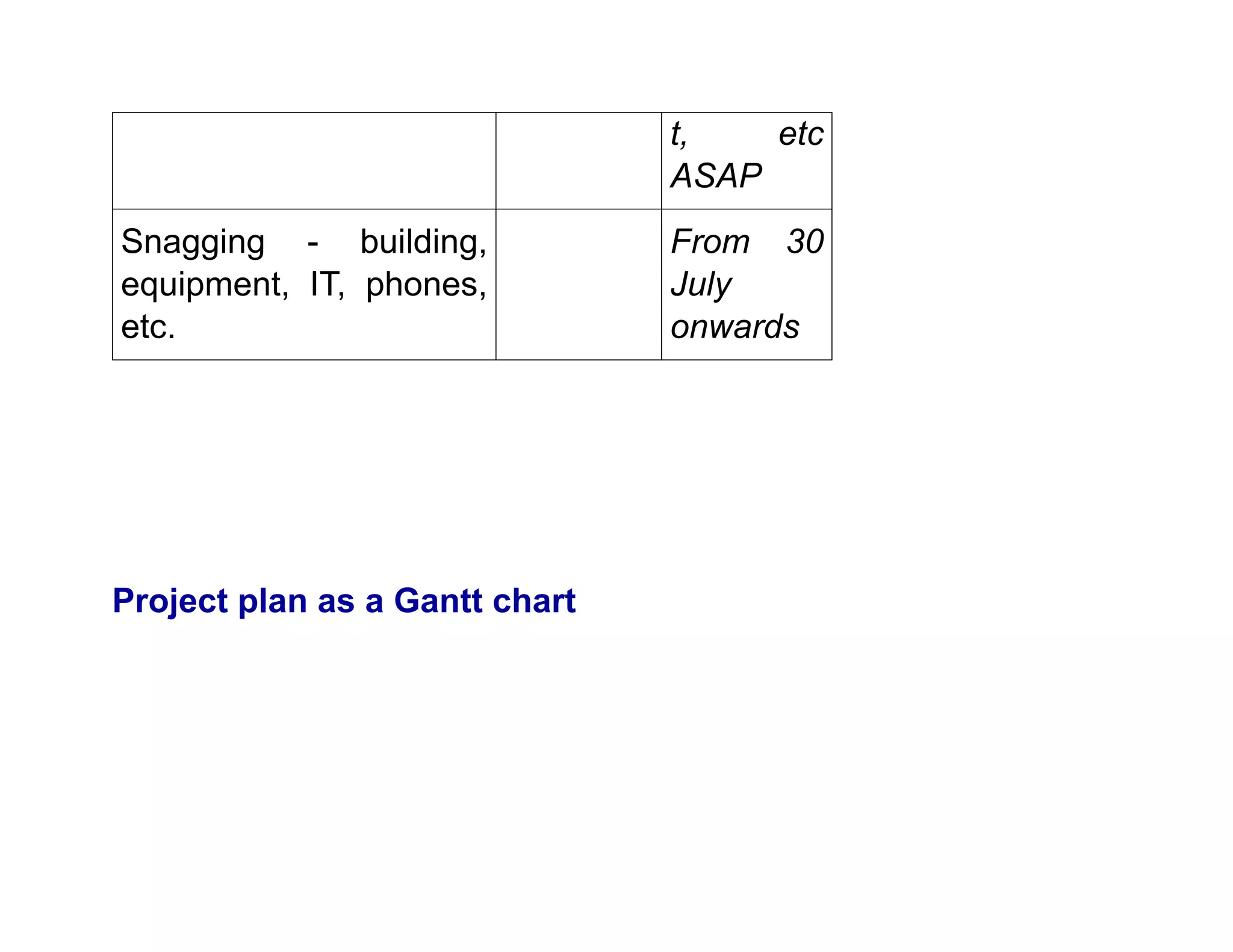
equipmen
t, etc
ASAP
Snagging - building,
equipment, IT, phones,
etc.
From 30
July
onwards
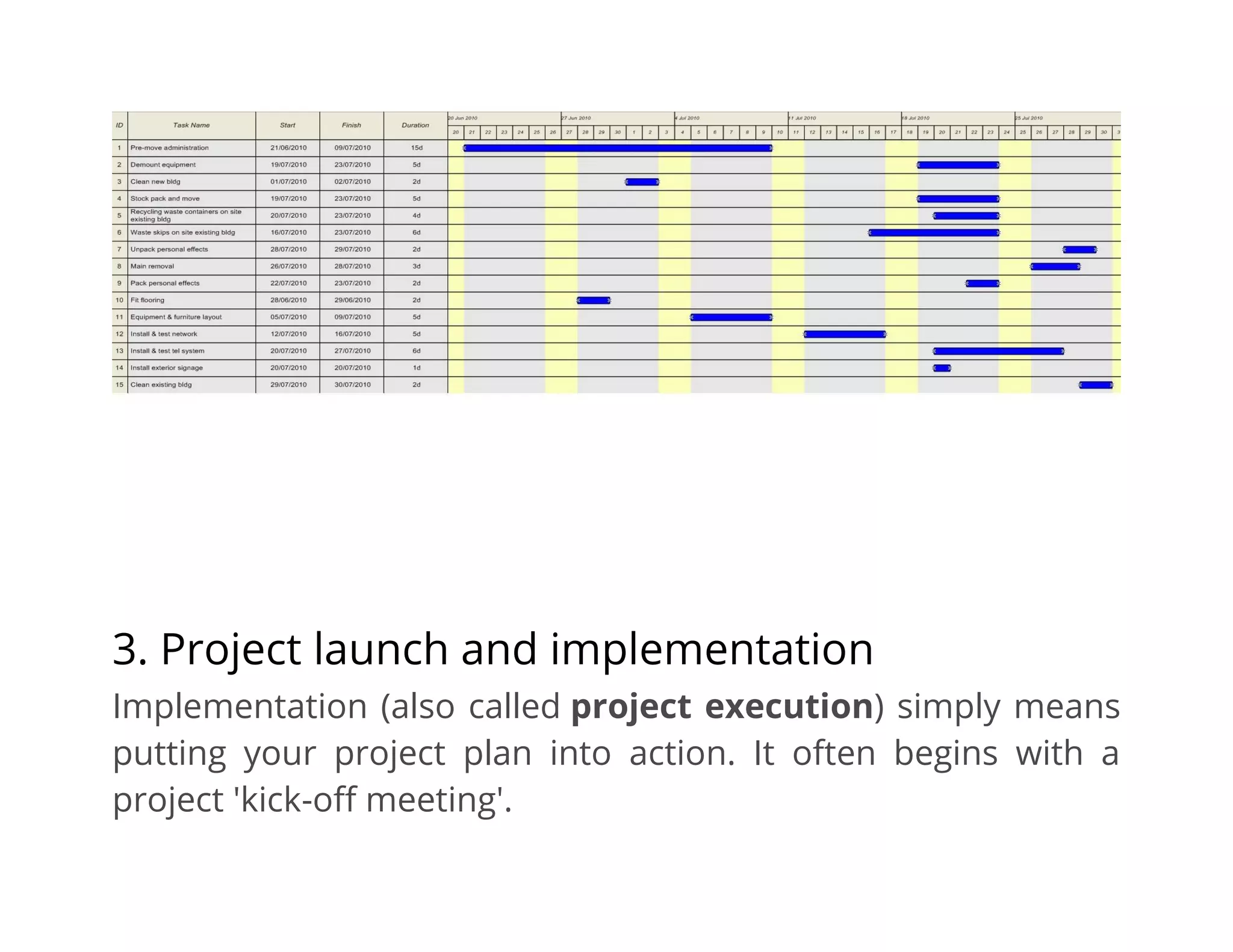
Project plan as a Gantt chart
3. Project launch and implementation
Implementation (also called project execution) simply means
putting your project plan into action. It often begins with a
project 'kick-off meeting'.
During this phase, you will carry out the tasks and activities from
your project plan to produce the project deliverables. For
example, if you are creating a promotional pack for a trade
show, early deliverables might be to gather product information
and prices, and complete all of your product photography and
get it signed off by the customer.
Project managers may direct this work by:
• overseeing a team
• managing budget and resources
• communicating to stakeholders
Careful monitoring and control at this stage can help you keep
the project plan on track. You can use a range of tools and
processes to help you manage things like time, cost, quality and
risks, or to communicate progress and manage customer
acceptance.
4. Project monitoring and control
Monitoring and control often overlap with execution as they
often occur at the same time. They require measuring project
progression and performance, and dealing with any issues
that arise from day-to-day work.
You can use key performance indicators (KPIs) to determine
if your project is on track. Things you could measure include, for
example:
• if your project is on schedule and budget
• if specific tasks are being completed
• if issues are adequately addressed
During this time, you may need to adjust schedules and
resources to ensure that your project remains on track. See how
to measure performance and set targets.
5. Project close
During this last phase, you will complete your work and dissolve
the project. Closure doesn't necessarily mean success, but
simply the final point of the project - eg closure can happen
when you cancel projects that fail.
Project closure often involves things like:
• handing over the deliverables
• releasing staff and resources
• archiving or handing over any relevant project documents
• cancelling supplier contracts
• completion of all activities across the project
• preparing the final project budget and report
• handover into business as usual if this applies
After closure, you can carry out a post-implementation
project review (sometimes referred to as a 'post mortem'
meeting). This is an opportunity to evaluate what went well and
what didn't. Understanding failures, if there were any, can help
you learn lessons and improve the way you carry out future
projects.

Definition of requirements for each project phases.pdf

  • 1.
    Lesson 6 Definition of Requirementsfor each Project Phases
  • 2.
    Five stages ofproject management Project management process is usually broken down into separate phases that take the project from the beginning to the end. These stages include: • initiation • planning • execution • monitoring and control • closure These phases often overlap with the project life cycle. They can help you determine the right flow and sequence of operations to bring your project to conclusion. Our project management
  • 3.
    checklist can furtherhelp you segment the tasks for each of the project phases. 1. Project initiation Initiation is the formal start of a project. It usually begins with the issue of a project mandate which briefly describes the purpose of the project and authorizes budget spend. At this stage, you should define the project at a broad level. This often begins with: • a business case - justifying the need for the project and estimating potential benefits • a feasibility study - evaluating the problem and determining if the project will solve it
  • 4.
    If you decideto undertake the project, you should then create a project initiation document (PID). This is the foundation of your project and a critical reference point for the next stages. Key components of your PID should be: • your business case • project goals, scope and size • project organization (defining the 'who, why, what, when and how' of the project) • project constraints • project risks • stakeholders • project controls and reporting framework • the criteria for closing and assessing the project Project start-up / project initiation document
  • 5.
    Project background /introduction Give a brief overview of the background to the project and why it is being carried out. You don’t need to go into detail here. Business case / Benefits of doing this project Describe why you are doing the project and list the benefits to the business. Objectives and scope [or include / link to the project scope document]
  • 6.
    What are theobjectives for this project? This can be a single statement or may be more detailed, eg listing each specific objective to be achieved. You should try to keep to no more than five objectives. Deliverables / outcomes What the results or output of the project are, or the end result. Try to describe a tangible output such as the creation of new marketing information, product photography completed, new software uploaded to relevant computers, etc. Constraints
  • 7.
    Constraints are thefactors that will affect how and when a project will be done, such as a delivery date, the budget, etc. You may not always be able to specify the cost - for example, if you are refitting premises, you may not have a final cost from all contractors because a certain amount of uncertainty is inevitable until work commences - for example, the need to install new lighting might reveal the need to replace some or all of the existing electrical cabling to meet current requirements. For situations such as this, you could indicate a likely cost range or your total maximum budget, including any contingency sum. Time: for example does it have to be completed by a certain date, eg to meet a delivery deadline?
  • 8.
    Costs: for examplethe total maximum budget Resources: the people required to complete the work on time Assumptions List here any assumptions you have made about the project and which have influenced the approach you're taking, such as: • "We expect most customers will access the new website through a broadband connection, so high-resolution graphic images we'll use in the product catalogue will load/display quickly"
  • 9.
    • "The scheduleassumes that the fit-out of the new premises will have been completed by 15 August 2011 to enable the full move to take place week commencing 21 August" • Time and cost estimates • • In this section, you should list initial estimates for key tasks or parts of the project (or known prices, eg from an external supplier who has already quoted for their part of the project). • • Key dates / milestones • • Particularly on larger projects, there may be a number of key dates by which certain tasks or parts of the project must be completed - either as part of a phased delivery or because something must be completed in order for something else to happen.
  • 10.
    • • In theexample of a move to new premises, machinery, equipment or computers must be installed before staff can be moved. In a project to launch a new retail website, all product photography, descriptions, price details and other content creation has to be completed before the upload and test stages can begin. • Schedule and project plan • It is enough here to refer to more detailed documents that are likely to be held separately and in more detail (see separate example of a project plan and schedule). • Key success criteria
  • 11.
    • This sectionshould show how you will measure the success of the project - eg "Launching the new website will result in sales increase of 15% in the first year". • Risks - analysis, prevention, management and monitoring • In this section, you should show that you have considered what risks might arise, what you can do to prevent risks or reduce their effect on the project and how you will monitor them. • Describe any risks you feel could affect the project, whether internal or external. There will always be risks but not all risks will have an impact that would be detrimental. It is important to consider the risks so that you can also plan how you can reduce or remove them and help to ensure the project's success.
  • 12.
    Describe any plansyou have for what you would do if a risk materialized. • You can also link to any risk control or monitoring documents, such as the risk register or risk log (see separate template). • Reporting • Describe here any progress reporting that's planned as part of the project - for example you may ask a supplier to report weekly or monthly so that you can assess their progress or team members might be asked to report on individual progress. • Project manager / project lead
  • 13.
    • If thereis a project manager - whether someone in this role full time or someone acting in this position for the purposes of this project, state who this is and their responsibilities. The project manager is responsible for the day to day running of the project. • Project sponsor • State who this is and their responsibilities. • Project board / steering group • On larger projects, there may be a number of people involved at a higher level who are not directly involved in running the project but who have an interest or need to authorize some high- level decisions, such as additional expenditure. Delete this section if it isn't relevant to your project.
  • 14.
    • Project teamand roles • List here all those working on the project, with brief details of their roles and responsibilities and their contact details. • For a larger team or project, you could also create a project organization structure diagram, showing who is doing which work, who they report to, etc. 2. Project definition and planning Project planning is key to successful project management. This stage typically begins with setting goals. The two most common approaches include: • the SMART method (specific, measurable, attainable, realistic and timely)
  • 15.
    • the CLEARmethod (collaborative, limited, emotional, appreciable, refinable) At this stage, you will also define the project scope, and develop a project plan and work breakdown schedule. This involves identifying: • time, cost and resources that are at your disposal • roles and responsibilities for the project • quality • milestones • baseline performance measures • progress checkpoints • risk and resources for resolving unforeseen issues
  • 16.
    During this stage,you may also want to develop a communication plan (especially if you have external stakeholders), as well as a risk management plan. Project plan and schedule A project plan is a detailed schedule or timeline showing: - all the tasks that need to be completed - who will be doing those tasks - key dates or milestones for phased delivery and final completion of the project The plan should show not only the full timetable from start to completion but also the interdependencies between tasks or resources - what has to happen by when and what must be done before the next set of tasks can be started, etc.
  • 17.
    You can usea computer program to produce a project plan and this is often particularly useful for complex or multi-strand projects. On simpler projects you can use whatever suits the way you work and the type of project you're doing. Often a calendar, spreadsheet or simple flow diagram will be enough. Stage 1 - planning process This shows an approach to the considerations needed in planning this relocation. Filling in the task column has also prompted additional tasks that need to be done first. Dates - deadlines or milestones and end date
  • 18.
    The lease onexisting premises expires on Friday 30 July - must have relocated and cleared/cleaned premises by this date. Lease on new premises commences Monday 28 June. IT contractor requires 5 working days to install and check computer systems. Tasks - what needs to be done / who by General administration and preparation before move Task Respons ible Other consider ations
  • 19.
    Get estimates for variouscomponents of the move. Office Arrange all necessary insurances for new premises. Office Set up accounts for utilities. Office Set up new telecoms/internet/accou nt. Office / IT Order new stationery. Office Notify existing customers and suppliers Office / sales &
  • 20.
    of move andchange of address. marketin g Update website with new address and contact details. Office / sales & marketin g / IT Layout plan (eg equipment, stock, seating, etc). Office Book mail redirection. Office Create new H&S induction to reflect new premises. Office
  • 21.
    Create fire plan,decide on assembly points, etc. Office Speak to Fire Service Arrange sandwich delivery, etc. Office Existing premises Deliver storage crates. Storage co Place order for these Pack personal effects, desk contents, etc. Staff Allow time to sort / dispose of
  • 22.
    anything not needed - files, redundan t or outdated material, etc *Get shredder sacks Deliverrecycling containers for paper, card, etc. Waste co Place order for these
  • 23.
    Deliver skips for large/bulkywaste. Skip co Place order for these Furniture/equipment/ma chinery/computers to be disassembled. Removal co / IT Pack stock, etc. Removal co Deliver equipment/machinery/c omputers to new premises. Removal co Obtain quotes, choose and book removal co
  • 24.
    Deliver stock tonew premises. Removal co Book removal co Skips to be removed. Skip co Clean building. Cleaning co Book this New premises Building fit-out Fit flooring. Carpet co Select and order Unpack / install furniture, equipment, Removal co / IT Date?
  • 25.
    machinery, computers, etc. contracto r Deliver new furniture/equipment/co mputers. Equipme ntco Select and order these - delivery date? Test computer network. IT contracto r Allow 1 day + day contingen cy Install and test telephone system. Telecoms co Book telecoms co
  • 26.
    Install exterior signage.Sign co Design, place order and book installers Unpack stock, etc. Removal co / staff Unpack personal effects, desk contents, etc. Staff Report any faults with phones, computer s, equipmen
  • 27.
    t, etc ASAP Snagging -building, equipment, IT, phones, etc. From 30 July onwards Project plan as a Gantt chart
  • 28.
    3. Project launchand implementation Implementation (also called project execution) simply means putting your project plan into action. It often begins with a project 'kick-off meeting'.
  • 29.
    During this phase,you will carry out the tasks and activities from your project plan to produce the project deliverables. For example, if you are creating a promotional pack for a trade show, early deliverables might be to gather product information and prices, and complete all of your product photography and get it signed off by the customer. Project managers may direct this work by: • overseeing a team • managing budget and resources • communicating to stakeholders Careful monitoring and control at this stage can help you keep the project plan on track. You can use a range of tools and processes to help you manage things like time, cost, quality and
  • 30.
    risks, or tocommunicate progress and manage customer acceptance. 4. Project monitoring and control Monitoring and control often overlap with execution as they often occur at the same time. They require measuring project progression and performance, and dealing with any issues that arise from day-to-day work. You can use key performance indicators (KPIs) to determine if your project is on track. Things you could measure include, for example: • if your project is on schedule and budget • if specific tasks are being completed • if issues are adequately addressed
  • 31.
    During this time,you may need to adjust schedules and resources to ensure that your project remains on track. See how to measure performance and set targets. 5. Project close During this last phase, you will complete your work and dissolve the project. Closure doesn't necessarily mean success, but simply the final point of the project - eg closure can happen when you cancel projects that fail. Project closure often involves things like: • handing over the deliverables • releasing staff and resources • archiving or handing over any relevant project documents • cancelling supplier contracts
  • 32.
    • completion ofall activities across the project • preparing the final project budget and report • handover into business as usual if this applies After closure, you can carry out a post-implementation project review (sometimes referred to as a 'post mortem' meeting). This is an opportunity to evaluate what went well and what didn't. Understanding failures, if there were any, can help you learn lessons and improve the way you carry out future projects.