1
Introduction: Text files
2
 Text files is a means of making use of external information in
a Delphi project.
 You can use the information and manipulate it into data.
 For example take a look at the following data from a text file:
Mr
De Swart J.P.
Mrs
Malima S.
Dr
Davids W.S.
Mr
Aldridge D.
Text File
3
 The information in the text file makes NO sense.
 With the help of a Delphi program we can luckily
fix this.
 The program will assist us to change the DATA
(from the text file) into usable information.
Text File
4
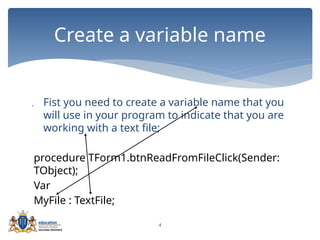
 Fist you need to create a variable name that you
will use in your program to indicate that you are
working with a text file;
procedure TForm1.btnReadFromFileClick(Sender:
TObject);
Var
MyFile : TextFile;
Create a variable name
5
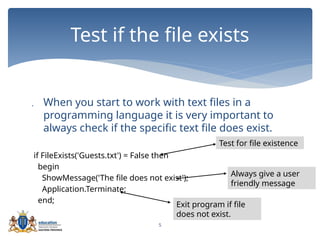
 When you start to work with text files in a
programming language it is very important to
always check if the specific text file does exist.
if FileExists('Guests.txt') = False then
begin
ShowMessage('The file does not exist');
Application.Terminate;
end;
Test if the file exists
Test for file existence
Always give a user
friendly message
Exit program if file
does not exist.
6
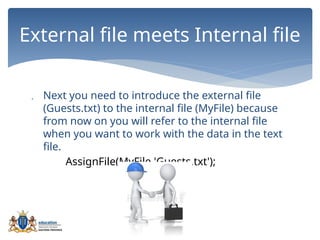
 Next you need to introduce the external file
(Guests.txt) to the internal file (MyFile) because
from now on you will refer to the internal file
when you want to work with the data in the text
file.
AssignFile(MyFile,'Guests.txt');
External file meets Internal file
7
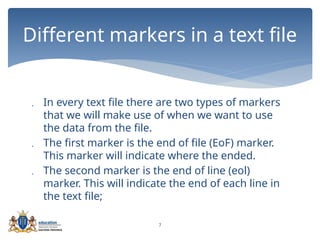
 In every text file there are two types of markers
that we will make use of when we want to use
the data from the file.
 The first marker is the end of file (EoF) marker.
This marker will indicate where the ended.
 The second marker is the end of line (eol)
marker. This will indicate the end of each line in
the text file;
Different markers in a text file
8
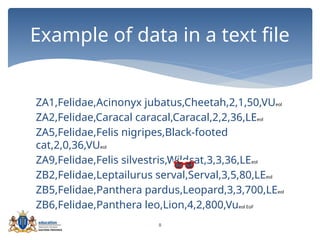
ZA1,Felidae,Acinonyx jubatus,Cheetah,2,1,50,VUeol
ZA2,Felidae,Caracal caracal,Caracal,2,2,36,LEeol
ZA5,Felidae,Felis nigripes,Black-footed
cat,2,0,36,VUeol
ZA9,Felidae,Felis silvestris,Wildcat,3,3,36,LEeol
ZB2,Felidae,Leptailurus serval,Serval,3,5,80,LEeol
ZB5,Felidae,Panthera pardus,Leopard,3,3,700,LEeol
ZB6,Felidae,Panthera leo,Lion,4,2,800,Vueol EoF
Example of data in a text file
9
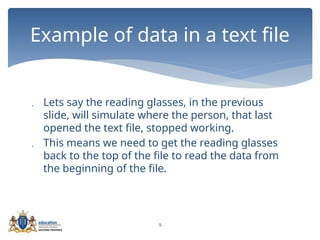
 Lets say the reading glasses, in the previous
slide, will simulate where the person, that last
opened the text file, stopped working.
 This means we need to get the reading glasses
back to the top of the file to read the data from
the beginning of the file.
Example of data in a text file
10
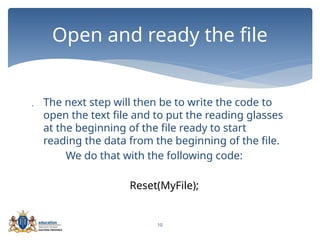
 The next step will then be to write the code to
open the text file and to put the reading glasses
at the beginning of the file ready to start
reading the data from the beginning of the file.
We do that with the following code:
Reset(MyFile);
Open and ready the file
11
 Next to make sure that you read everything
from the text file you will need some kind of a
loop structure.
 We know of two types of loops:
 For loop – number of iterations is known.
 While loop – number of iterations is unknown.
 Which loop structure will we make use of?
Loop structure for reading through
the file
12
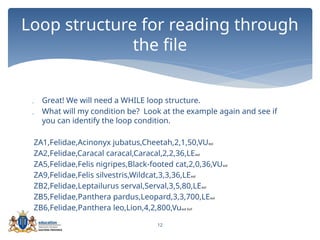
 Great! We will need a WHILE loop structure.
 What will my condition be? Look at the example again and see if
you can identify the loop condition.
ZA1,Felidae,Acinonyx jubatus,Cheetah,2,1,50,VUeol
ZA2,Felidae,Caracal caracal,Caracal,2,2,36,LEeol
ZA5,Felidae,Felis nigripes,Black-footed cat,2,0,36,VUeol
ZA9,Felidae,Felis silvestris,Wildcat,3,3,36,LEeol
ZB2,Felidae,Leptailurus serval,Serval,3,5,80,LEeol
ZB5,Felidae,Panthera pardus,Leopard,3,3,700,LEeol
ZB6,Felidae,Panthera leo,Lion,4,2,800,Vueol EoF
Loop structure for reading through
the file
13
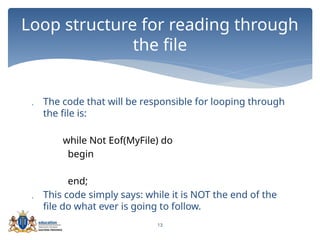
 The code that will be responsible for looping through
the file is:
while Not Eof(MyFile) do
begin
end;
 This code simply says: while it is NOT the end of the
file do what ever is going to follow.
Loop structure for reading through
the file
14
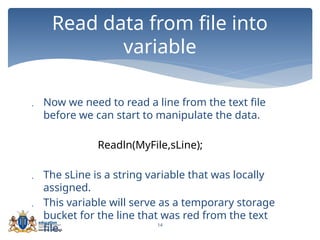
 Now we need to read a line from the text file
before we can start to manipulate the data.
Readln(MyFile,sLine);
 The sLine is a string variable that was locally
assigned.
 This variable will serve as a temporary storage
bucket for the line that was red from the text
file.
Read data from file into
variable
15
 You can take the data from the variable sLine
and manipulate it in any way that will assist you
to solve your problem.
 On the next few slides we will look at possible
scenarios in getting the data from sLine so that
it will serve our purpose.
Read data from file into
variable
16
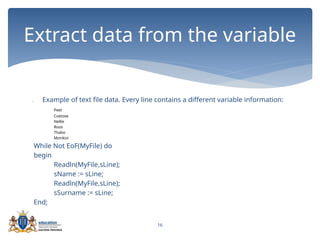
 Example of text file data. Every line contains a different variable information:
Peet
Coetzee
Nellie
Roos
Thabo
Mzinkizi
While Not EoF(MyFile) do
begin
Readln(MyFile,sLine);
sName := sLine;
Readln(MyFile,sLine);
sSurname := sLine;
End;
Extract data from the variable
17
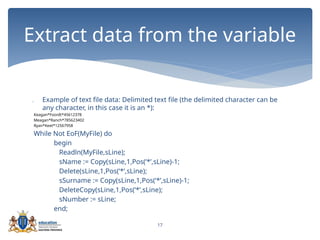
 Example of text file data: Delimited text file (the delimited character can be
any character, in this case it is an *):
Keagan*Foordt*45612378
Meagan*Ranch*785623402
Ryan*Keet*12567958
While Not EoF(MyFile) do
begin
Readln(MyFile,sLine);
sName := Copy(sLine,1,Pos(‘*’,sLine)-1;
Delete(sLine,1,Pos(‘*’,sLine);
sSurname := Copy(sLine,1,Pos(‘*’,sLine)-1;
DeleteCopy(sLine,1,Pos(‘*’,sLine);
sNumber := sLine;
end;
Extract data from the variable
18
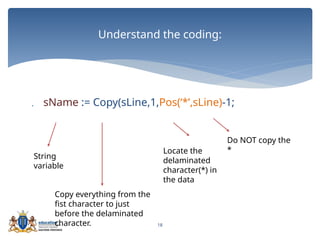
 sName := Copy(sLine,1,Pos(‘*’,sLine)-1;
Understand the coding:
String
variable
Locate the
delaminated
character(*) in
the data
Copy everything from the
fist character to just
before the delaminated
character.
Do NOT copy the
*
19
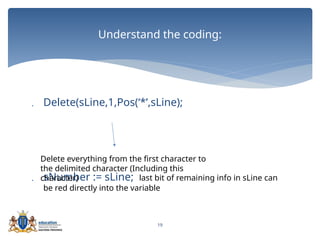
 Delete(sLine,1,Pos(‘*’,sLine);
 sNumber := sLine; last bit of remaining info in sLine can
be red directly into the variable
Understand the coding:
Delete everything from the first character to
the delimited character (Including this
character)
20
 There are many different ways to display the data
from our program, it all depends on the question.
 For example you can use a rich edit:
redOutput.Lines.Add(sTitle +' '+sSurname);
end;
closeFile(MyFile);
 The CloseFile is to make sure that you close your text file
after you are finished working in it.
Output and close file

Lesson 1 Intro Text Files.pptx

  • 1.
  • 2.
    2  Text filesis a means of making use of external information in a Delphi project.  You can use the information and manipulate it into data.  For example take a look at the following data from a text file: Mr De Swart J.P. Mrs Malima S. Dr Davids W.S. Mr Aldridge D. Text File
  • 3.
    3  The informationin the text file makes NO sense.  With the help of a Delphi program we can luckily fix this.  The program will assist us to change the DATA (from the text file) into usable information. Text File
  • 4.
    4  Fist youneed to create a variable name that you will use in your program to indicate that you are working with a text file; procedure TForm1.btnReadFromFileClick(Sender: TObject); Var MyFile : TextFile; Create a variable name
  • 5.
    5  When youstart to work with text files in a programming language it is very important to always check if the specific text file does exist. if FileExists('Guests.txt') = False then begin ShowMessage('The file does not exist'); Application.Terminate; end; Test if the file exists Test for file existence Always give a user friendly message Exit program if file does not exist.
  • 6.
    6  Next youneed to introduce the external file (Guests.txt) to the internal file (MyFile) because from now on you will refer to the internal file when you want to work with the data in the text file. AssignFile(MyFile,'Guests.txt'); External file meets Internal file
  • 7.
    7  In everytext file there are two types of markers that we will make use of when we want to use the data from the file.  The first marker is the end of file (EoF) marker. This marker will indicate where the ended.  The second marker is the end of line (eol) marker. This will indicate the end of each line in the text file; Different markers in a text file
  • 8.
    8 ZA1,Felidae,Acinonyx jubatus,Cheetah,2,1,50,VUeol ZA2,Felidae,Caracal caracal,Caracal,2,2,36,LEeol ZA5,Felidae,Felisnigripes,Black-footed cat,2,0,36,VUeol ZA9,Felidae,Felis silvestris,Wildcat,3,3,36,LEeol ZB2,Felidae,Leptailurus serval,Serval,3,5,80,LEeol ZB5,Felidae,Panthera pardus,Leopard,3,3,700,LEeol ZB6,Felidae,Panthera leo,Lion,4,2,800,Vueol EoF Example of data in a text file
  • 9.
    9  Lets saythe reading glasses, in the previous slide, will simulate where the person, that last opened the text file, stopped working.  This means we need to get the reading glasses back to the top of the file to read the data from the beginning of the file. Example of data in a text file
  • 10.
    10  The nextstep will then be to write the code to open the text file and to put the reading glasses at the beginning of the file ready to start reading the data from the beginning of the file. We do that with the following code: Reset(MyFile); Open and ready the file
  • 11.
    11  Next tomake sure that you read everything from the text file you will need some kind of a loop structure.  We know of two types of loops:  For loop – number of iterations is known.  While loop – number of iterations is unknown.  Which loop structure will we make use of? Loop structure for reading through the file
  • 12.
    12  Great! Wewill need a WHILE loop structure.  What will my condition be? Look at the example again and see if you can identify the loop condition. ZA1,Felidae,Acinonyx jubatus,Cheetah,2,1,50,VUeol ZA2,Felidae,Caracal caracal,Caracal,2,2,36,LEeol ZA5,Felidae,Felis nigripes,Black-footed cat,2,0,36,VUeol ZA9,Felidae,Felis silvestris,Wildcat,3,3,36,LEeol ZB2,Felidae,Leptailurus serval,Serval,3,5,80,LEeol ZB5,Felidae,Panthera pardus,Leopard,3,3,700,LEeol ZB6,Felidae,Panthera leo,Lion,4,2,800,Vueol EoF Loop structure for reading through the file
  • 13.
    13  The codethat will be responsible for looping through the file is: while Not Eof(MyFile) do begin end;  This code simply says: while it is NOT the end of the file do what ever is going to follow. Loop structure for reading through the file
  • 14.
    14  Now weneed to read a line from the text file before we can start to manipulate the data. Readln(MyFile,sLine);  The sLine is a string variable that was locally assigned.  This variable will serve as a temporary storage bucket for the line that was red from the text file. Read data from file into variable
  • 15.
    15  You cantake the data from the variable sLine and manipulate it in any way that will assist you to solve your problem.  On the next few slides we will look at possible scenarios in getting the data from sLine so that it will serve our purpose. Read data from file into variable
  • 16.
    16  Example oftext file data. Every line contains a different variable information: Peet Coetzee Nellie Roos Thabo Mzinkizi While Not EoF(MyFile) do begin Readln(MyFile,sLine); sName := sLine; Readln(MyFile,sLine); sSurname := sLine; End; Extract data from the variable
  • 17.
    17  Example oftext file data: Delimited text file (the delimited character can be any character, in this case it is an *): Keagan*Foordt*45612378 Meagan*Ranch*785623402 Ryan*Keet*12567958 While Not EoF(MyFile) do begin Readln(MyFile,sLine); sName := Copy(sLine,1,Pos(‘*’,sLine)-1; Delete(sLine,1,Pos(‘*’,sLine); sSurname := Copy(sLine,1,Pos(‘*’,sLine)-1; DeleteCopy(sLine,1,Pos(‘*’,sLine); sNumber := sLine; end; Extract data from the variable
  • 18.
    18  sName :=Copy(sLine,1,Pos(‘*’,sLine)-1; Understand the coding: String variable Locate the delaminated character(*) in the data Copy everything from the fist character to just before the delaminated character. Do NOT copy the *
  • 19.
    19  Delete(sLine,1,Pos(‘*’,sLine);  sNumber:= sLine; last bit of remaining info in sLine can be red directly into the variable Understand the coding: Delete everything from the first character to the delimited character (Including this character)
  • 20.
    20  There aremany different ways to display the data from our program, it all depends on the question.  For example you can use a rich edit: redOutput.Lines.Add(sTitle +' '+sSurname); end; closeFile(MyFile);  The CloseFile is to make sure that you close your text file after you are finished working in it. Output and close file

Editor's Notes

  • #2 Bullet 1 :Change is to are. Bullet 2 should read: ..the data and manipulate it into information
  • #3 Bullet 1 : change information to Data . Bullet 2: - remove luckily
  • #4 Bullet 1 correct spelling of first;
  • #7 Bullet 2: insert file ends, delete ended.
  • #10 Changed sentence structure
  • #11 Let the learners tell you they need a while loop structure because the number of iterations for the text file is unknown – changed bullet 2
  • #12 Guide the learners to see the EoF marker and that the loop condition will be the end of file marker.
  • #13 Bullet 2 changed
  • #15 Changed bullet 1
  • #17 Correct spelling of delimited
  • #19 Spelling of delimited
  • #20 Changed bullet 1