Requirements of thesyllabus
DESCRIBE THE FEATURES OF HIGH LEVEL LANGUAGE
LANGUAGE FEATURES OF PROGRAMMING
PROGRAMMING CONSTRUCTS
MANIPULATE AN ARRAY
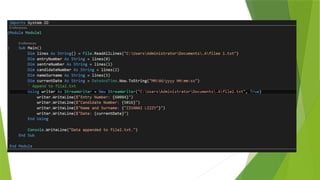
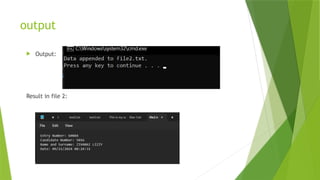
READ/WRITE TO FILE
DESIGN INPUT OR OUTPUT INTERFACE
FEATURES OF OOP (OBJECT ORIENTED PROGRAMMING)
DESIGN GAMES OR MOBILE APPLICATIONS
3.
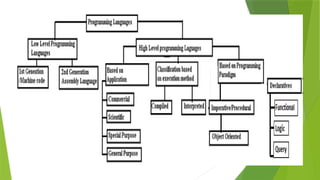
TYPES OF HIGHLEVEL LANGUAGES
GENERAL PURPOSE
SPECIAL PURPOSE
OBJECT ORIENTED PROGRAMMING
DECLARATIVE
IMPERATIVE / PROCEDURAL
5.
OBJECT ORIENTED PROGRAMMING
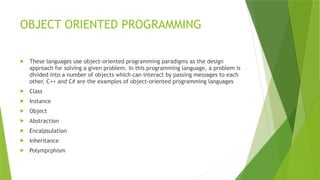
These languages use object-oriented programming paradigms as the design
approach for solving a given problem. In this programming language, a problem is
divided into a number of objects which can interact by passing messages to each
other. C++ and C# are the examples of object-oriented programming languages
Class
Instance
Object
Abstraction
Encalpsulation
Inheritance
Polymprphism
6.
FEATURES
CONSTANTS –RESERVED STORAGE
VARIABLES (LOCAL AND GLOBAL VARIABLES)
EXPRESSIONS
STATEMENTS
CONTROL STRUCTURE
BLOCK STRUCTURE
FUNTIONS
The Functionprocedure performs a task and then returns control to the calling code. When it returns
control, it also returns a value to the calling code.
Each time the procedure is called, its statements run.
[Modifiers] Function FunctionName [(ParameterList)] As ReturnType
[Statements]
End Function
Example:
Public Function FindSqrt(radicand As Single) As Single
End Function
11.
Calling the function
lvalue = functionname [( parameterlist )]
CREATING A FUNCTION HYPOTENUSE
Function Hypotenuse(side1 As Double, side2 As Double) As Double
Return Math.Sqrt((side1 ^ 2) + (side2 ^ 2))
End Function
CALLING THE FUNCTION HYPOTENUSE
Private Sub
Dim testLength, testHypotenuse As Double
testHypotenuse = Hypotenuse(4, 10.7)
QUESTION INVOLVING INPUTBOXAND
FUNCTION
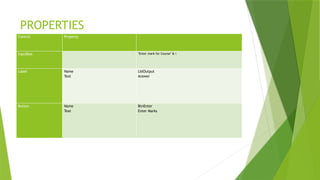
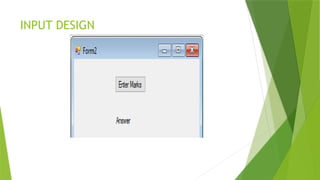
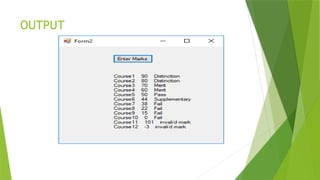
Write a program to grade marks for 12 courses for a college student. Use any
selection statement of your choice. The grades are as follows
>= 75 Distinction
60-74 Merit
50-59 Pass
40-49 Supplementary
<=39 Fail
[12]
CODE
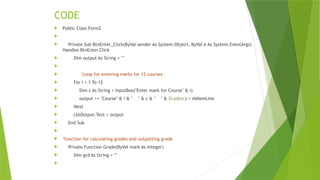
Public ClassForm2
Private Sub BtnEnter_Click(ByVal sender As System.Object, ByVal e As System.EventArgs)
Handles BtnEnter.Click
Dim output As String = ""
‘Loop for entering marks for 12 courses
For i = 1 To 12
Dim c As String = InputBox("Enter mark for Course" & i)
output += "Course" & i & " " & c & " " & Grade(c) + vbNewLine
Next
LblOutput.Text = output
End Sub
‘function for calculating grades and outputting grade
Private Function Grade(ByVal mark As Integer)
Dim grd As String = ""
17.
If mark >100 Then
grd = "invalïd mark"
ElseIf (mark >= 75) Then
grd = "Distinction"
ElseIf mark >= 60 Then
grd = "Merit"
ElseIf mark >= 50 Then
grd = "Pass"
ElseIf mark >= 40 Then
grd = "Supplementary"
ElseIf mark >= 0 Then
grd = "Fail"
Else
grd = "invalïd mark"
End If
Return grd
End Function
End Class
QUESTION involving amessage box
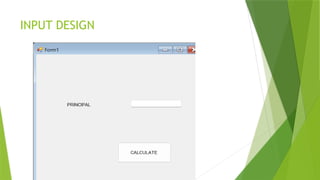
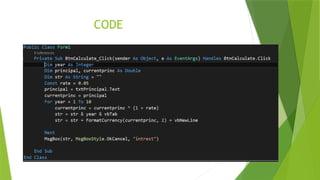
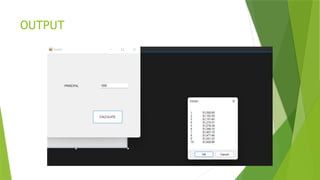
b A person invests $1000.00 in a savings account that yields 5% interest. Assuming that all interest is left on deposit, calculate and print the
amount of money in the account at the end of each year over a period of 10 years. To determine these amounts, use the following formula:
a = p (1 + r) n
where
p is the original amount invested (i.e., the principal)
r is the annual interest rate (e.g., .05 stands for 5%)
n is the number of years
a is the amount on deposit at the end of the nth year.
The interface is as below
[20]
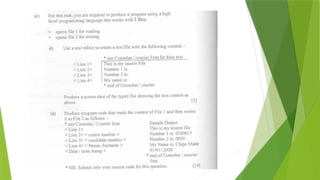
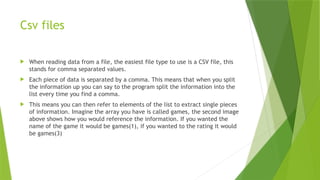
Csv files
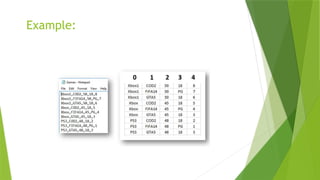
Whenreading data from a file, the easiest file type to use is a CSV file, this
stands for comma separated values.
Each piece of data is separated by a comma. This means that when you split
the information up you can say to the program split the information into the
list every time you find a comma.
This means you can then refer to elements of the list to extract single pieces
of information. Imagine the array you have is called games, the second image
above shows how you would reference the information. If you wanted the
name of the game it would be games(1), if you wanted to the rating it would
be games(3)
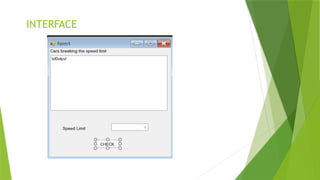
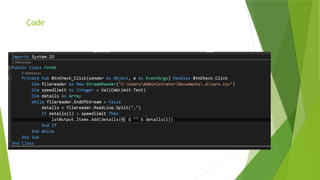
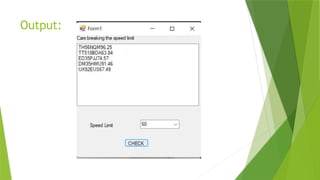
THE QUESTION REQUIRESUS TO CREATE A
CSV FILE WITH CARS AND THEIR SPEEDS AND
WITH A SPEED LIMIT ENTERED THE CARS
OVERSPEEDING WILL BE DETERMINED AND
OUTPUT ON A WINDOWS APPLICATION FORM
MANIPULATING AN ARRAY
•FIRST WE POPULATE THE ARRAY
• THE WE SORT THE ARRAY
BUBBLE SORT
QUICK SORT
• SEARCH FOR AN ITEM
LENEAR SEARCH
BINARY SEARCH
45.
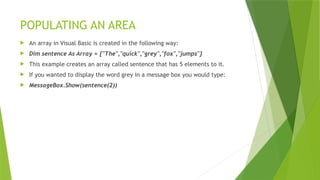
POPULATING AN AREA
An array in Visual Basic is created in the following way:
Dim sentence As Array = {"The","quick","grey","fox","jumps"}
This example creates an array called sentence that has 5 elements to it.
If you wanted to display the word grey in a message box you would type:
MessageBox.Show(sentence(2))
46.
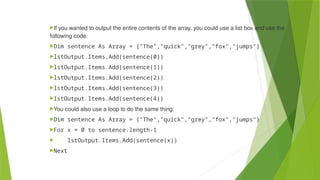
If you wantedto output the entire contents of the array, you could use a list box and use the
following code:
Dim sentence As Array = {"The","quick","grey","fox","jumps"}
lstOutput.Items.Add(sentence(0))
lstOutput.Items.Add(sentence(1))
lstOutput.Items.Add(sentence(2))
lstOutput.Items.Add(sentence(3))
lstOutput.Items.Add(sentence(4))
You could also use a loop to do the same thing:
Dim sentence As Array = {"The","quick","grey","fox","jumps"}
For x = 0 to sentence.length-1
lstOutput.Items.Add(sentence(x))
Next





![FUNTIONS
The Function procedure performs a task and then returns control to the calling code. When it returns
control, it also returns a value to the calling code.
Each time the procedure is called, its statements run.
[Modifiers] Function FunctionName [(ParameterList)] As ReturnType
[Statements]
End Function
Example:
Public Function FindSqrt(radicand As Single) As Single
End Function](https://image.slidesharecdn.com/programmingpart1-250806075051-480226a9/85/Fundamentals-of-Programming-in-Visual-basic-10-320.jpg)
![Calling the function
lvalue = functionname [( parameterlist )]
CREATING A FUNCTION HYPOTENUSE
Function Hypotenuse(side1 As Double, side2 As Double) As Double
Return Math.Sqrt((side1 ^ 2) + (side2 ^ 2))
End Function
CALLING THE FUNCTION HYPOTENUSE
Private Sub
Dim testLength, testHypotenuse As Double
testHypotenuse = Hypotenuse(4, 10.7)](https://image.slidesharecdn.com/programmingpart1-250806075051-480226a9/85/Fundamentals-of-Programming-in-Visual-basic-11-320.jpg)
![inputbox
Syntax::
InputBox(prompt[,title][,default][,xpos][,ypos][,helpfile,context])
InputBox("What is your message?", "Message Entry Form", "Enter your messge here", 500, 700)
Output:](https://image.slidesharecdn.com/programmingpart1-250806075051-480226a9/85/Fundamentals-of-Programming-in-Visual-basic-12-320.jpg)
![QUESTION INVOLVING INPUTBOX AND
FUNCTION
Write a program to grade marks for 12 courses for a college student. Use any
selection statement of your choice. The grades are as follows
>= 75 Distinction
60-74 Merit
50-59 Pass
40-49 Supplementary
<=39 Fail
[12]](https://image.slidesharecdn.com/programmingpart1-250806075051-480226a9/85/Fundamentals-of-Programming-in-Visual-basic-13-320.jpg)

![QUESTION involving a message box
b A person invests $1000.00 in a savings account that yields 5% interest. Assuming that all interest is left on deposit, calculate and print the
amount of money in the account at the end of each year over a period of 10 years. To determine these amounts, use the following formula:
a = p (1 + r) n
where
p is the original amount invested (i.e., the principal)
r is the annual interest rate (e.g., .05 stands for 5%)
n is the number of years
a is the amount on deposit at the end of the nth year.
The interface is as below
[20]](https://image.slidesharecdn.com/programmingpart1-250806075051-480226a9/85/Fundamentals-of-Programming-in-Visual-basic-20-320.jpg)