SPATIAL DOMAIN FILTERING
SHARPENING FILTERS
CS-467 Digital Image Processing
1
Sharpening
• The principal objective of sharpening is to
highlight transitions in intensity
• While image smoothing can be achieved by
averaging (integration) in a local
neighborhood, which leads to suppression of
high frequencies, image sharpening can be
accomplished by differentiation in a local
neighborhood, which leads to the high and
possibly medium frequencies enhancement
2
Sharpening
• There are two types of sharpening :
• Using high-pass filters – these filters suppress or
eliminate low and medium frequencies, passing
and possibly enhancing high frequencies. This is
resulted in edge detection and edge
enhancement
• Using frequency correcting filters – these filters
enhance high and possibly medium frequencies,
which leads to image sharpening and
distinguishing of the details whose area is about a
half by a half of the filtering window size
3
Frequency Correcting Filters
• Frequency correcting filters enhance high and
possibly medium frequencies, which leads to
visual image sharpening and visual distinguishing
of the details whose area is about a half by a half
of the filtering window size
• It is important to understand that these filters
improve visual perception, but they cannot
restore missing frequencies. Thus, they cannot be
used for image deblurring
• These filters are also called image preparation
filters
4
Unsharp Masking
• Unsharp masking is a classical frequency
corrector
• High frequencies enhancement is utilized through
a filter, which adds the “unsharp mask” to an
image
• The unsharp mask corresponding to the filtering
window is a pixel-wise difference between the
original image and its smoothed (averaged)
version
• Depending on the method of averaging this filter
can be linear or nonlinear
5
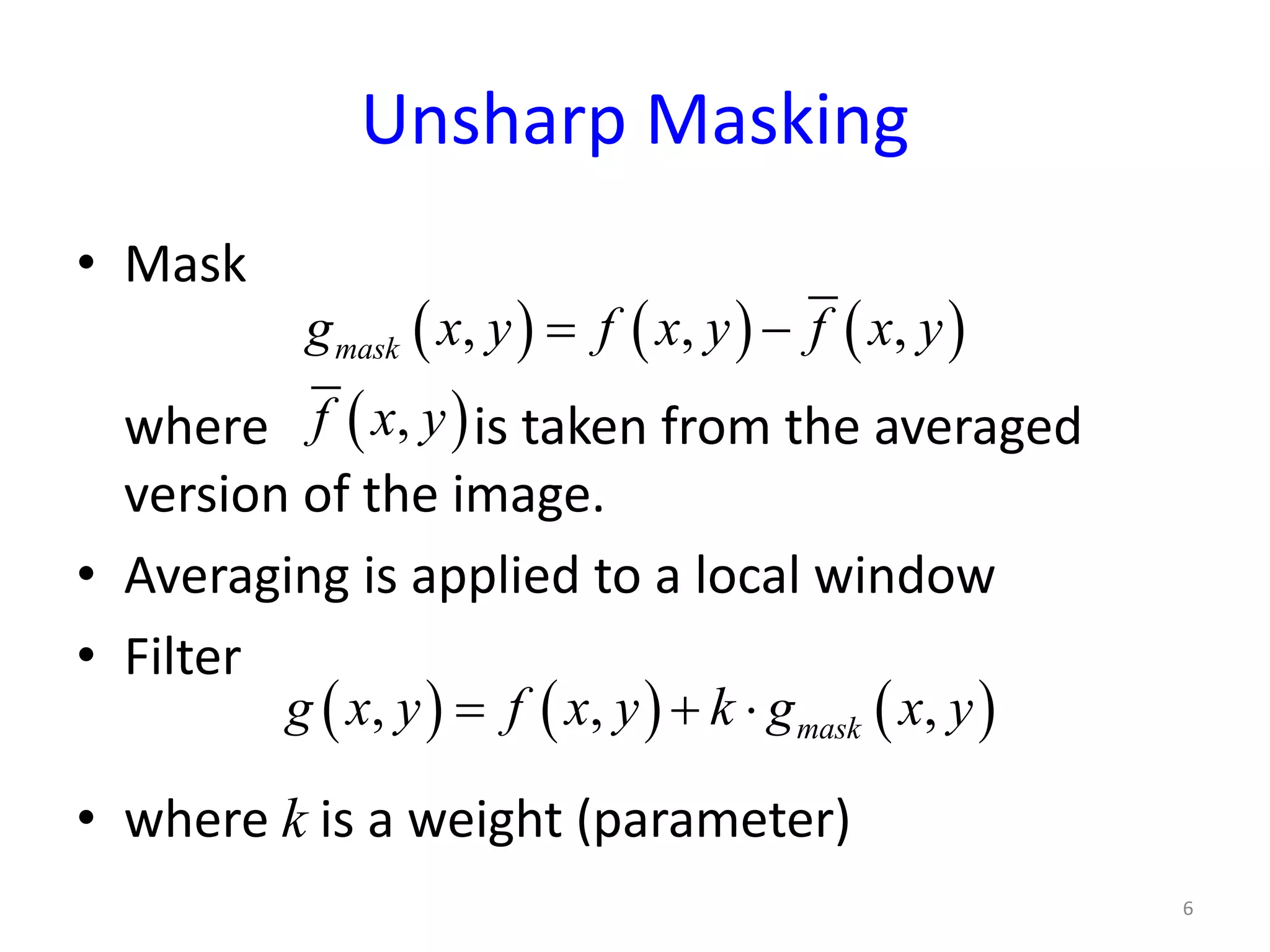
Unsharp Masking
• Mask
where is taken from the averaged
version of the image.
• Averaging is applied to a local window
• Filter
• where k is a weight (parameter)
6
( ) ( ) ( ), , ,maskg x y f x y f x y= −
( ),f x y
( ) ( ) ( ), , ,maskg x y f x y k g x y= + ⋅
Unsharp Masking
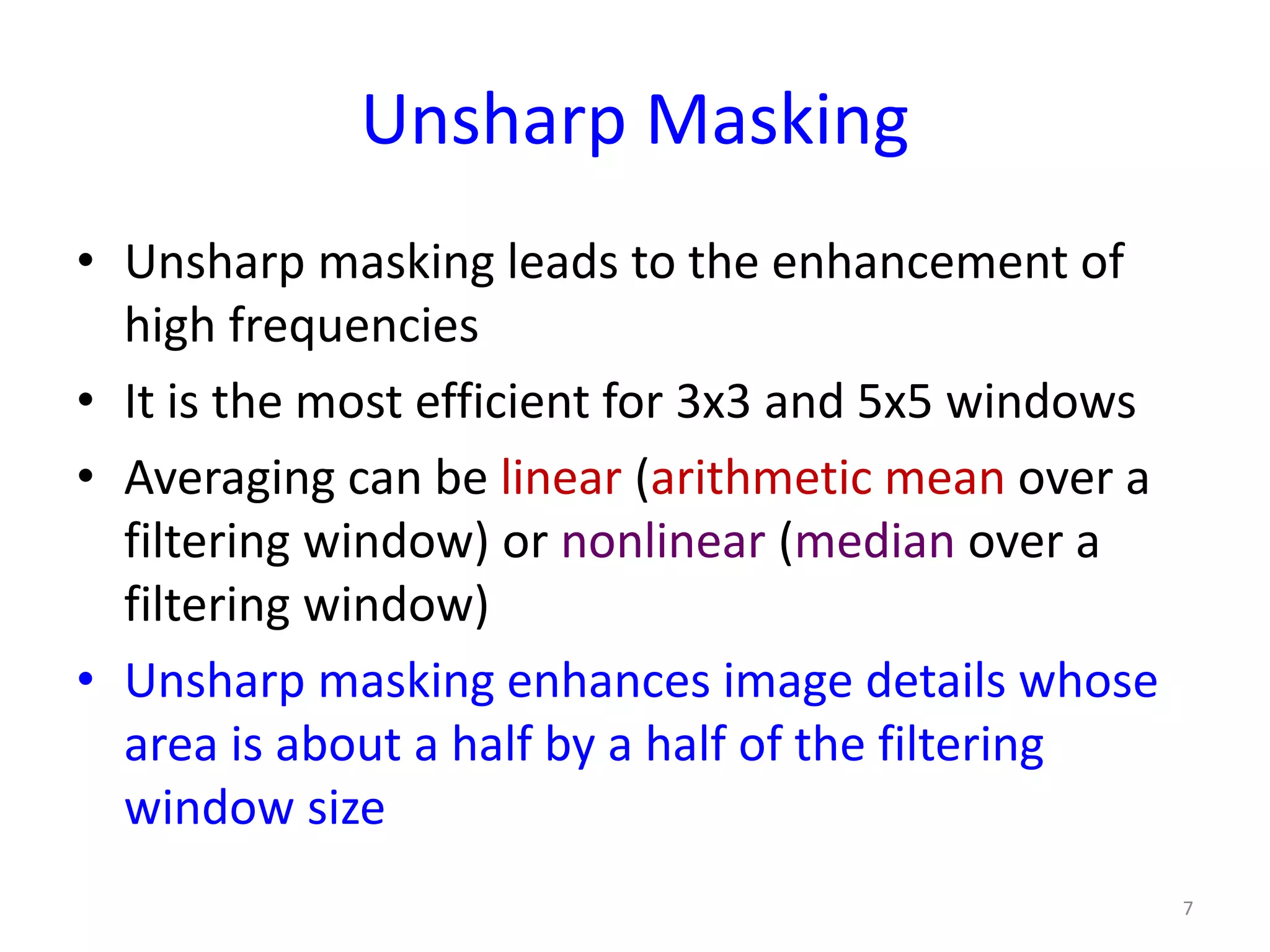
• Unsharp masking leads to the enhancement of
high frequencies
• It is the most efficient for 3x3 and 5x5 windows
• Averaging can be linear (arithmetic mean over a
filtering window) or nonlinear (median over a
filtering window)
• Unsharp masking enhances image details whose
area is about a half by a half of the filtering
window size
7
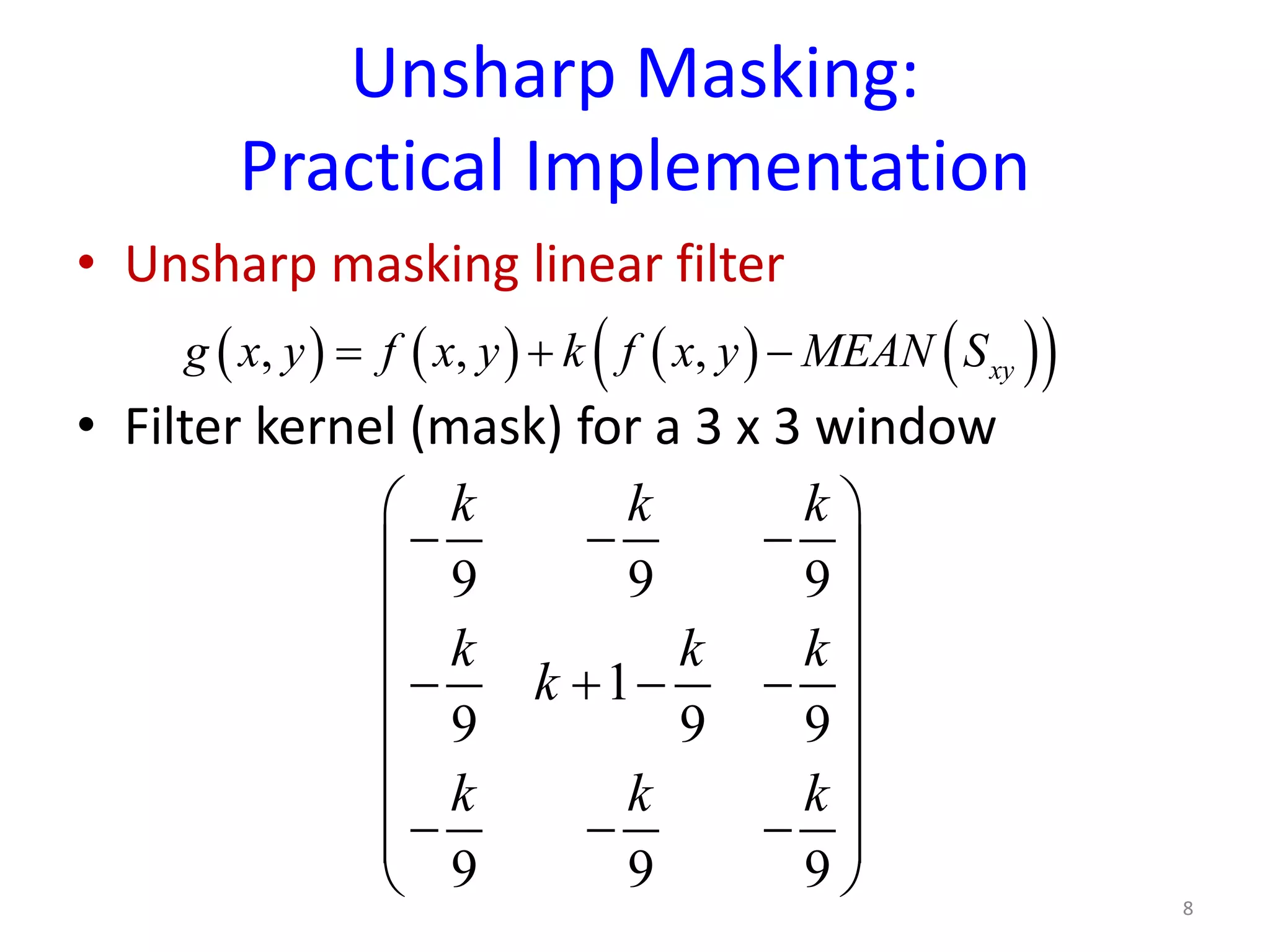
Unsharp Masking:
Practical Implementation
• Unsharp masking linear filter
• Filter kernel (mask) for a 3 x 3 window
8
( ) ( ) ( ) ( )( ), , , xyg x y f x y k f x y MEAN S= + −
9 9 9
1
9 9 9
9 9 9
k k k
k k k
k
k k k
 
− − − 
 
 − + − −
 
 
 − − − 
 
Unsharp Masking:
Practical Implementation
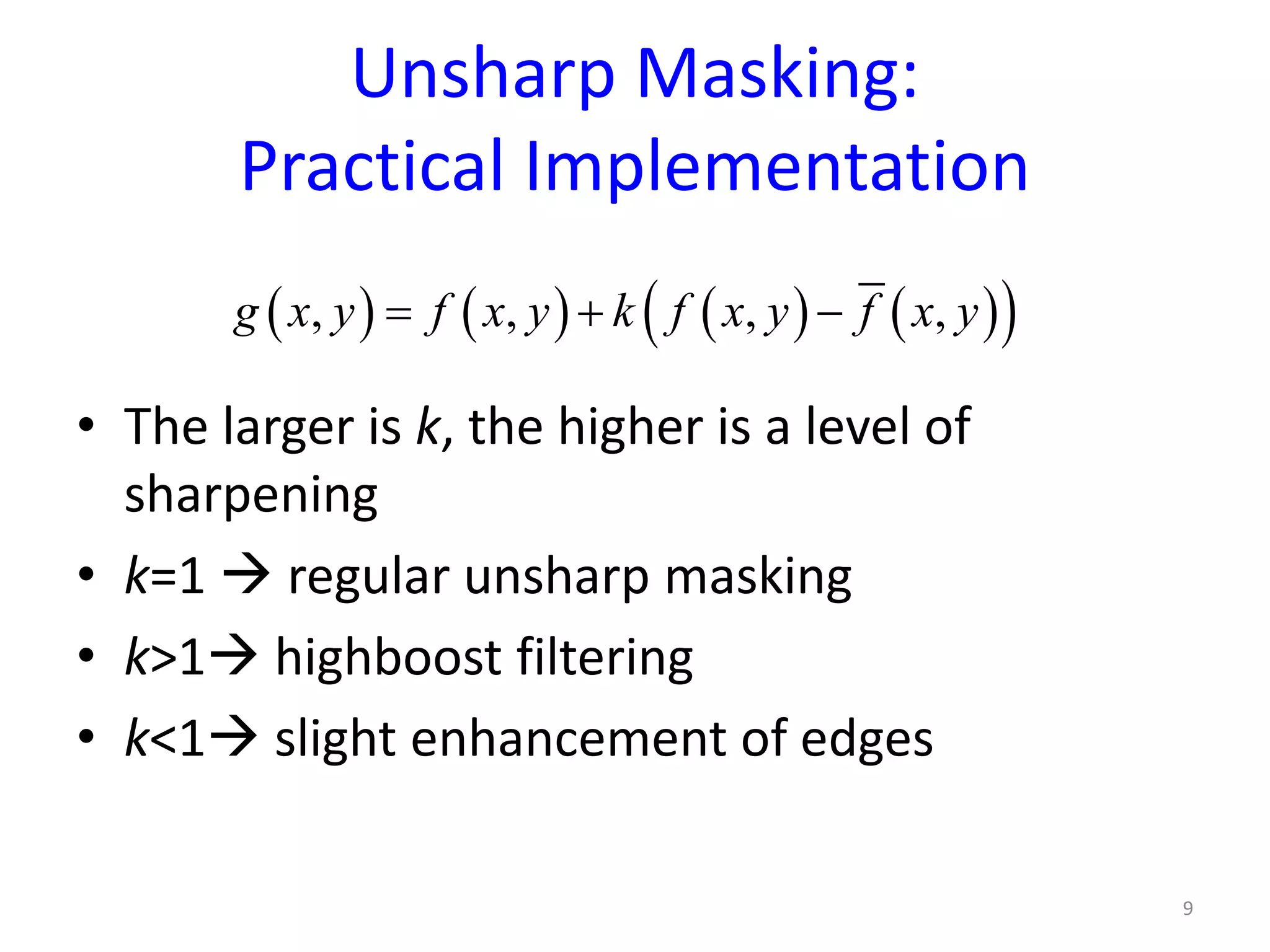
• The larger is k, the higher is a level of
sharpening
• k=1  regular unsharp masking
• k>1 highboost filtering
• k<1 slight enhancement of edges
9
( ) ( ) ( ) ( )( ), , , ,g x y f x y k f x y f x y= + −
Unsharp Masking:
Practical Implementation
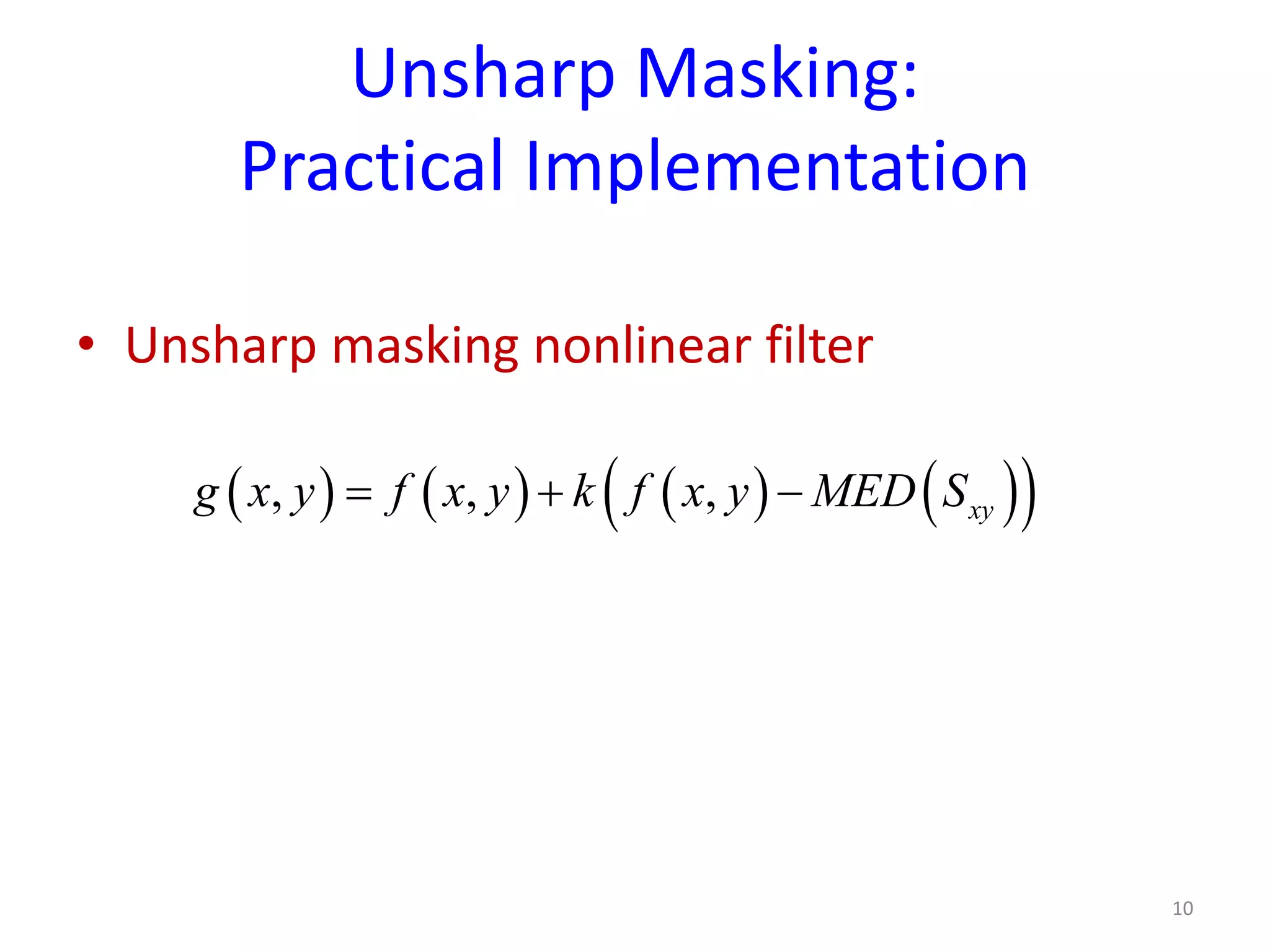
• Unsharp masking nonlinear filter
10
( ) ( ) ( ) ( )( ), , , xyg x y f x y k f x y MED S= + −
Unsharp Masking:
Global Frequency Correction
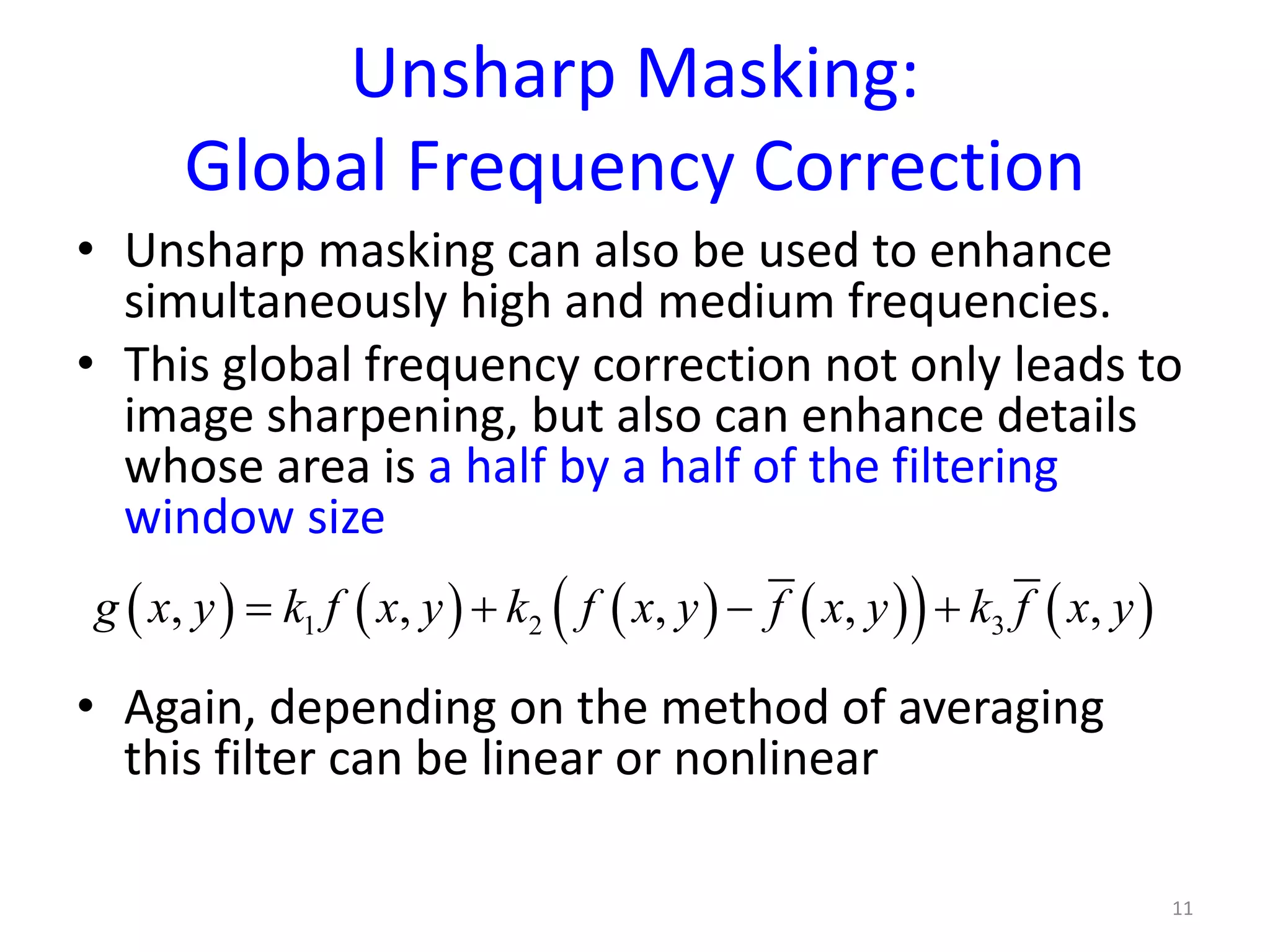
• Unsharp masking can also be used to enhance
simultaneously high and medium frequencies.
• This global frequency correction not only leads to
image sharpening, but also can enhance details
whose area is a half by a half of the filtering
window size
• Again, depending on the method of averaging
this filter can be linear or nonlinear
11
( ) ( ) ( ) ( )( ) ( )1 2 3, , , , ,g x y k f x y k f x y f x y k f x y= + − +
Unsharp Masking:
Global Frequency Correction
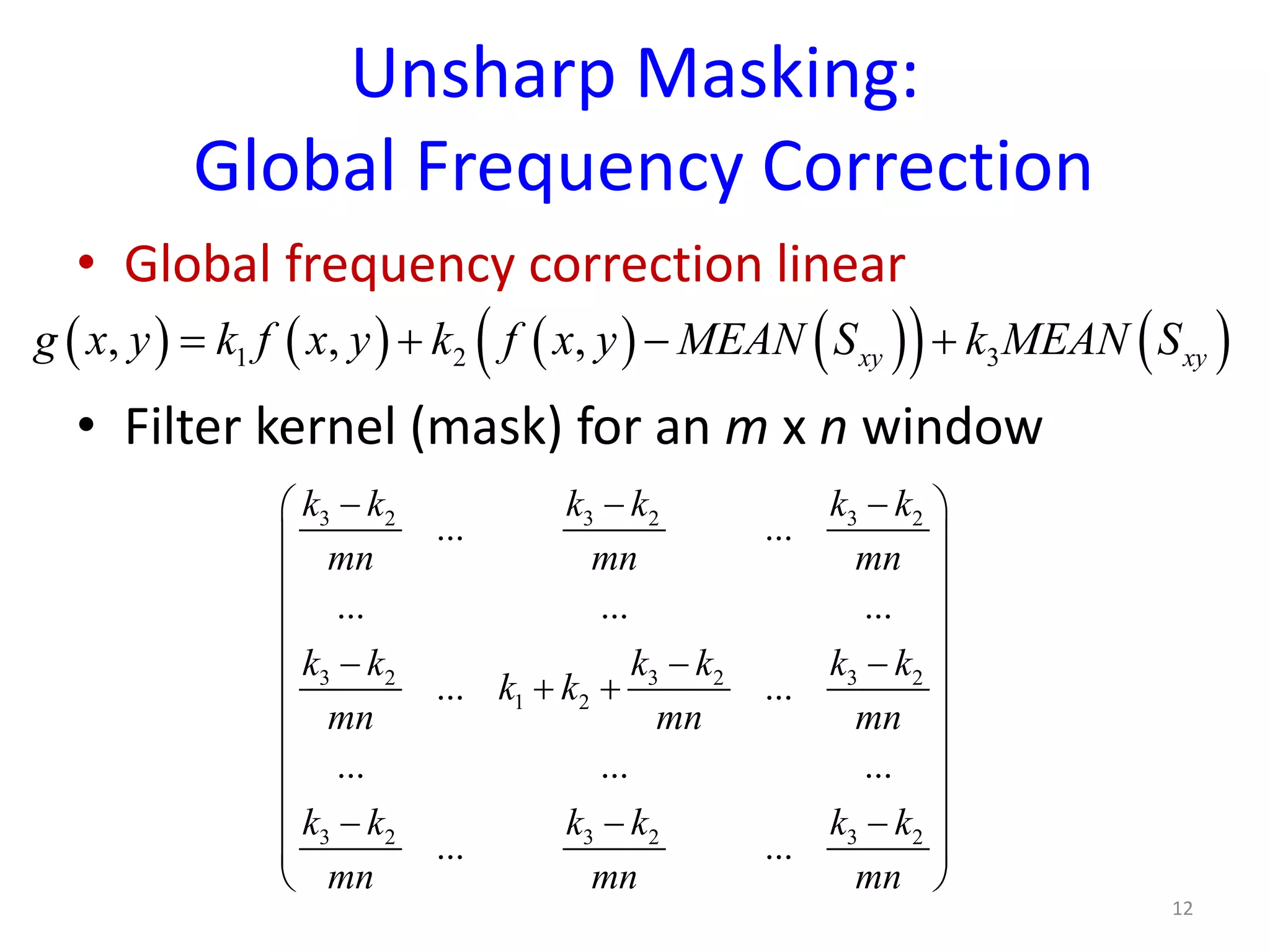
• Global frequency correction linear
• Filter kernel (mask) for an m x n window
12
( ) ( ) ( ) ( )( ) ( )1 2 3, , , xy xyg x y k f x y k f x y MEAN S k MEAN S= + − +
3 2 3 2 3 2
3 2 3 2 3 2
1 2
3 2 3 2 3 2
... ...
... ... ...
... ...
... ... ...
... ...
k k k k k k
mn mn mn
k k k k k k
k k
mn mn mn
k k k k k k
mn mn mn
− − − 
 
 
 
 − − −
 + +
 
 
 
− − − 
 
 
Unsharp Masking:
Global Frequency Correction
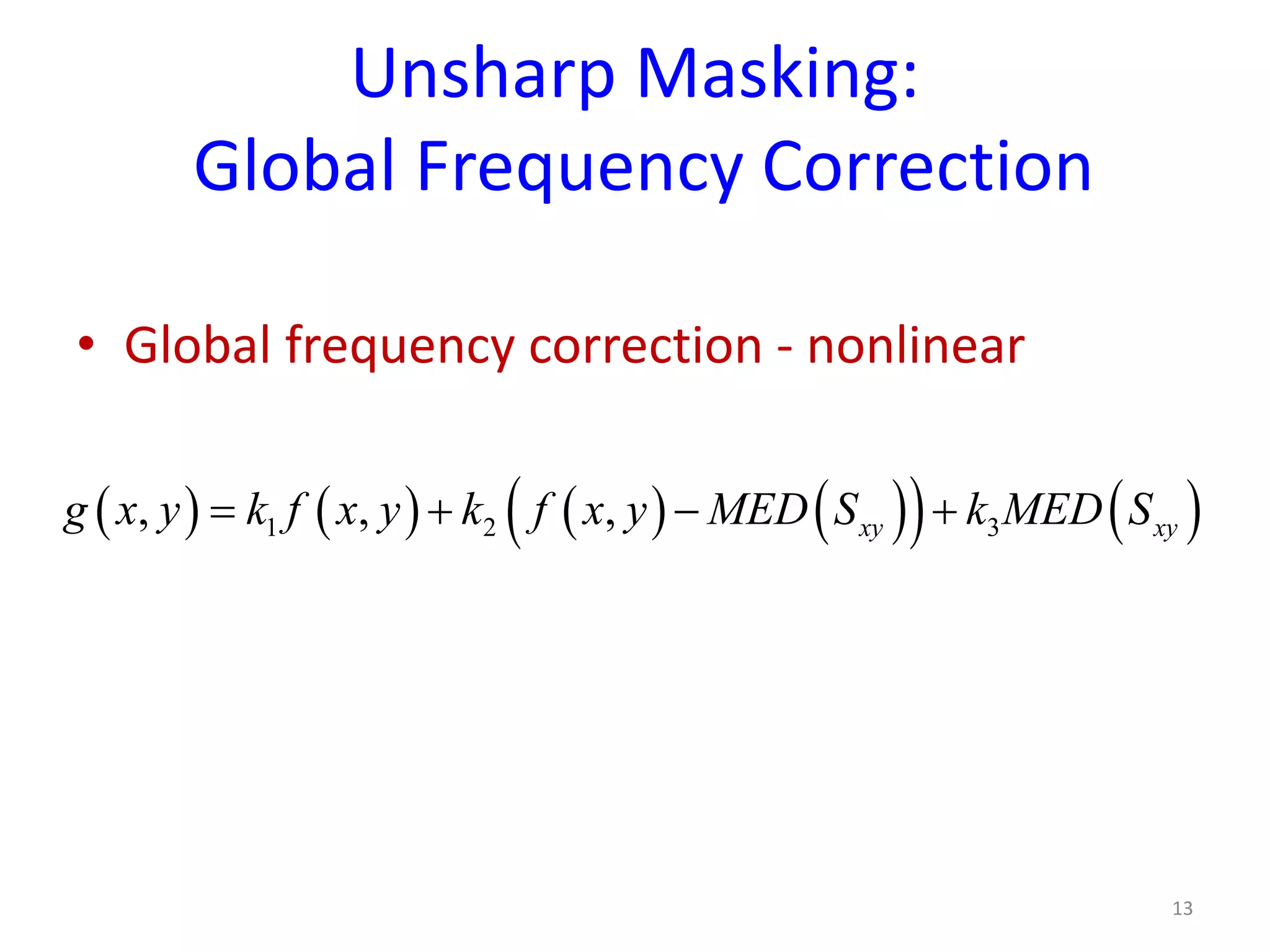
• Global frequency correction - nonlinear
13
( ) ( ) ( ) ( )( ) ( )1 2 3, , , xy xyg x y k f x y k f x y MED S k MED S= + − +
Unsharp Masking:
Global Frequency Correction
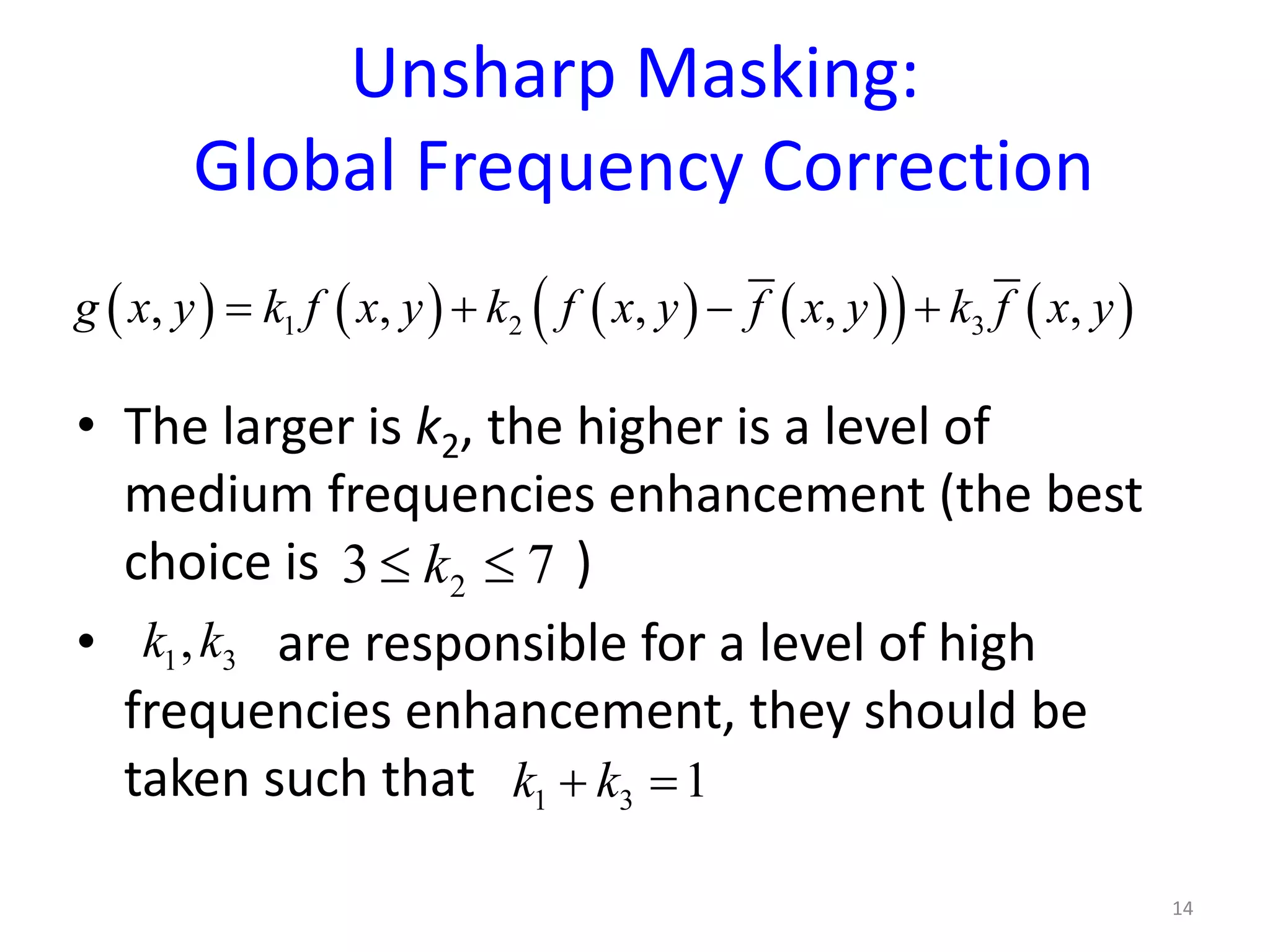
• The larger is k2, the higher is a level of
medium frequencies enhancement (the best
choice is )
• are responsible for a level of high
frequencies enhancement, they should be
taken such that
14
( ) ( ) ( ) ( )( ) ( )1 2 3, , , , ,g x y k f x y k f x y f x y k f x y= + − +
23 7k≤ ≤
1 3,k k
1 3 1k k+ =

Lecture 7

  • 1.
    SPATIAL DOMAIN FILTERING SHARPENINGFILTERS CS-467 Digital Image Processing 1
  • 2.
    Sharpening • The principalobjective of sharpening is to highlight transitions in intensity • While image smoothing can be achieved by averaging (integration) in a local neighborhood, which leads to suppression of high frequencies, image sharpening can be accomplished by differentiation in a local neighborhood, which leads to the high and possibly medium frequencies enhancement 2
  • 3.
    Sharpening • There aretwo types of sharpening : • Using high-pass filters – these filters suppress or eliminate low and medium frequencies, passing and possibly enhancing high frequencies. This is resulted in edge detection and edge enhancement • Using frequency correcting filters – these filters enhance high and possibly medium frequencies, which leads to image sharpening and distinguishing of the details whose area is about a half by a half of the filtering window size 3
  • 4.
    Frequency Correcting Filters •Frequency correcting filters enhance high and possibly medium frequencies, which leads to visual image sharpening and visual distinguishing of the details whose area is about a half by a half of the filtering window size • It is important to understand that these filters improve visual perception, but they cannot restore missing frequencies. Thus, they cannot be used for image deblurring • These filters are also called image preparation filters 4
  • 5.
    Unsharp Masking • Unsharpmasking is a classical frequency corrector • High frequencies enhancement is utilized through a filter, which adds the “unsharp mask” to an image • The unsharp mask corresponding to the filtering window is a pixel-wise difference between the original image and its smoothed (averaged) version • Depending on the method of averaging this filter can be linear or nonlinear 5
  • 6.
    Unsharp Masking • Mask whereis taken from the averaged version of the image. • Averaging is applied to a local window • Filter • where k is a weight (parameter) 6 ( ) ( ) ( ), , ,maskg x y f x y f x y= − ( ),f x y ( ) ( ) ( ), , ,maskg x y f x y k g x y= + ⋅
  • 7.
    Unsharp Masking • Unsharpmasking leads to the enhancement of high frequencies • It is the most efficient for 3x3 and 5x5 windows • Averaging can be linear (arithmetic mean over a filtering window) or nonlinear (median over a filtering window) • Unsharp masking enhances image details whose area is about a half by a half of the filtering window size 7
  • 8.
    Unsharp Masking: Practical Implementation •Unsharp masking linear filter • Filter kernel (mask) for a 3 x 3 window 8 ( ) ( ) ( ) ( )( ), , , xyg x y f x y k f x y MEAN S= + − 9 9 9 1 9 9 9 9 9 9 k k k k k k k k k k   − − −     − + − −      − − −   
  • 9.
    Unsharp Masking: Practical Implementation •The larger is k, the higher is a level of sharpening • k=1  regular unsharp masking • k>1 highboost filtering • k<1 slight enhancement of edges 9 ( ) ( ) ( ) ( )( ), , , ,g x y f x y k f x y f x y= + −
  • 10.
    Unsharp Masking: Practical Implementation •Unsharp masking nonlinear filter 10 ( ) ( ) ( ) ( )( ), , , xyg x y f x y k f x y MED S= + −
  • 11.
    Unsharp Masking: Global FrequencyCorrection • Unsharp masking can also be used to enhance simultaneously high and medium frequencies. • This global frequency correction not only leads to image sharpening, but also can enhance details whose area is a half by a half of the filtering window size • Again, depending on the method of averaging this filter can be linear or nonlinear 11 ( ) ( ) ( ) ( )( ) ( )1 2 3, , , , ,g x y k f x y k f x y f x y k f x y= + − +
  • 12.
    Unsharp Masking: Global FrequencyCorrection • Global frequency correction linear • Filter kernel (mask) for an m x n window 12 ( ) ( ) ( ) ( )( ) ( )1 2 3, , , xy xyg x y k f x y k f x y MEAN S k MEAN S= + − + 3 2 3 2 3 2 3 2 3 2 3 2 1 2 3 2 3 2 3 2 ... ... ... ... ... ... ... ... ... ... ... ... k k k k k k mn mn mn k k k k k k k k mn mn mn k k k k k k mn mn mn − − −         − − −  + +       − − −     
  • 13.
    Unsharp Masking: Global FrequencyCorrection • Global frequency correction - nonlinear 13 ( ) ( ) ( ) ( )( ) ( )1 2 3, , , xy xyg x y k f x y k f x y MED S k MED S= + − +
  • 14.
    Unsharp Masking: Global FrequencyCorrection • The larger is k2, the higher is a level of medium frequencies enhancement (the best choice is ) • are responsible for a level of high frequencies enhancement, they should be taken such that 14 ( ) ( ) ( ) ( )( ) ( )1 2 3, , , , ,g x y k f x y k f x y f x y k f x y= + − + 23 7k≤ ≤ 1 3,k k 1 3 1k k+ =