Dr A Sahu
Dept of Computer Science &
Engineering
IIT Guwahati
• Peripheral communications
• Keyboard
– Simple Switch
– One Dimensional Keyboard (PIANO)
– Two Dimensional (Matrix) Keyboard
• Interfacing 1D Keyboard
• Interfacing Matrix Keyboard
• Modern Keyboard & Scan code
• Timer and Peripheral Controller
• Transmission Controller:
– MPU control, Device Control (DMA)
• Type of IO mapping
– Peripheral (IN/Out), Memory mapped IO (LD/ST,MV)
• Format of communication
– Synchronous (T & R sync with clock), Asynchronous
• Mode of Data Transfer
– Parallel, Serial (UART)
• Condition for data transfer
– Uncond., Polling, Interrupt, Ready signal, Handshake
• Display: Human can’t see the difference after
50Hz
– Displaying speed more then 50Hz is value less
– Human problem, Computer is faster
• Key board
– Computer have to wait for the user Keyboard
response
– Only interrupt or Read form ready buffer
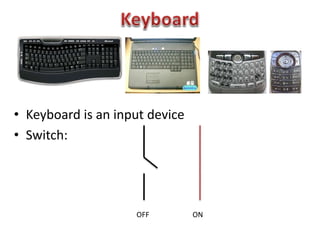
• Keyboard is an input device
• Switch:
OFF ON
0 1 2 3
14 15
+5V
N to Lg(n) decoder
A B C D
. . .
0 1 2 3
14 15
+5V
N to Lg(n) decoder
A B C D
. . .
0 0 1 1
0 1 2 3 1
4
1
5
+5
V
N to Lg(n) decoder
A B C D
. .
.
PIANO
Store
Note
• Problem statement
– A bank of push-button
keys are connected as
inputs to PORTB.
– The pull-up resistors are
internal to PORTB.
– Write a program to
recognize a key pressed,
debounce the key, and
identify its location in the
key bank with numbers
from 0 to 7.
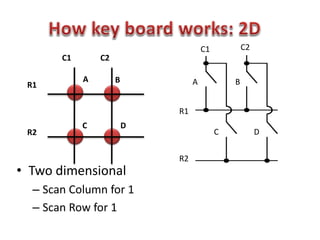
A B
C D
R1
R2
C1 C2
• Two dimensional
– Scan Column for 1
– Scan Row for 1
C1 C2
A B
DC
R2
R1
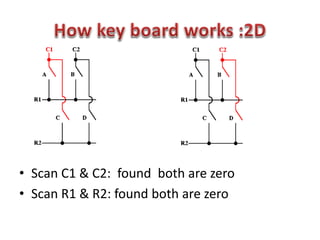
• Scan C1 & C2: found both are zero
• Scan R1 & R2: found both are zero
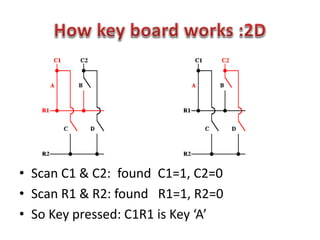
• Scan C1 & C2: found C1=1, C2=0
• Scan R1 & R2: found R1=1, R2=0
• So Key pressed: C1R1 is Key ‘A’
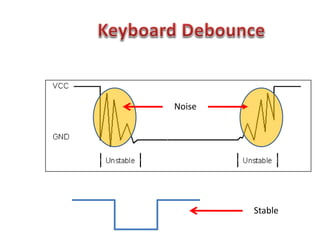
Stable
Noise
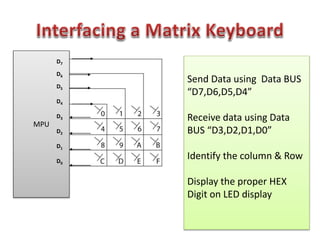
MPU
Send Data using Data BUS
“D7,D6,D5,D4”
Receive data using Data
BUS “D3,D2,D1,D0”
Identify the column & Row
Display the proper HEX
Digit on LED display
D7
D6
D5
D4
D3
D2
D1
D0
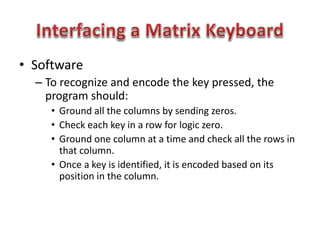
• Software
– To recognize and encode the key pressed, the
program should:
• Ground all the columns by sending zeros.
• Check each key in a row for logic zero.
• Ground one column at a time and check all the rows in
that column.
• Once a key is identified, it is encoded based on its
position in the column.
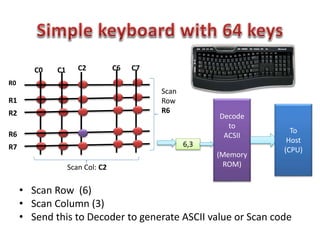
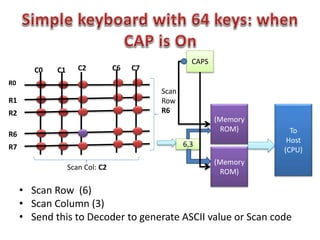
• Scan Row (6)
• Scan Column (3)
• Send this to Decoder to generate ASCII value or Scan code
R0
R1
C0 C1 C6
R2
R6
R7
C7C2
Scan
Row
R6
Scan Col: C2
6,3
Decode
to
ACSII
(Memory
ROM)
To
Host
(CPU)
• Scan Row (6)
• Scan Column (3)
• Send this to Decoder to generate ASCII value or Scan code
R0
R1
C0 C1 C6
R2
R6
R7
C7C2
Scan
Row
R6
Scan Col: C2
6,3
(Memory
ROM) To
Host
(CPU)
(Memory
ROM)
CAPS
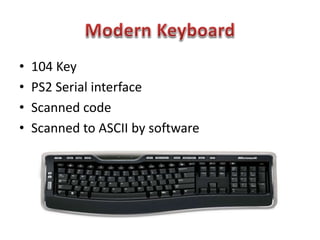
• 104 Key
• PS2 Serial interface
• Scanned code
• Scanned to ASCII by software
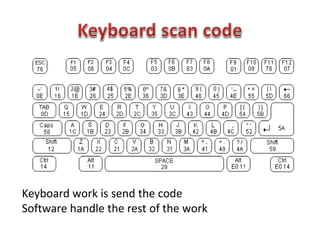
Keyboard work is send the code
Software handle the rest of the work
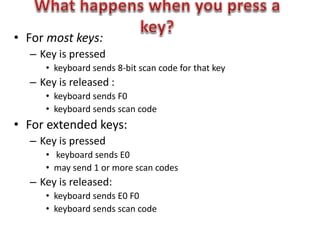
• For most keys:
– Key is pressed
• keyboard sends 8-bit scan code for that key
– Key is released :
• keyboard sends F0
• keyboard sends scan code
• For extended keys:
– Key is pressed
• keyboard sends E0
• may send 1 or more scan codes
– Key is released:
• keyboard sends E0 F0
• keyboard sends scan code
• ASCII is not sent, Scan codes for keys
– Least significant bit first
• Normally translated by software
– You remap your keys, for example
– Software takes care of Shift, caps lock, control
• Scan code generated when you press
• And when you release
– Two bytes: F0 followed by key scan code
– Example:
• Space pressed, 29 sent
• Space released, F0 29 sent
• If you hold key, scan code repeated
23
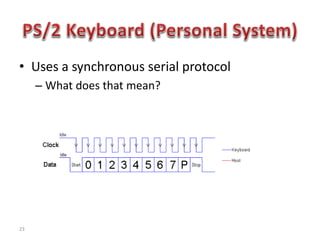
• Uses a synchronous serial protocol
– What does that mean?
• Timer
– Many devices in system
– MPU use many delay routines
• Interrupt controller
• Programmable Interrupt controller
– ADC/DAC controller
– Keyboard controller
– Display controller
Lec10

Lec10

  • 1.
    Dr A Sahu Deptof Computer Science & Engineering IIT Guwahati
  • 2.
    • Peripheral communications •Keyboard – Simple Switch – One Dimensional Keyboard (PIANO) – Two Dimensional (Matrix) Keyboard • Interfacing 1D Keyboard • Interfacing Matrix Keyboard • Modern Keyboard & Scan code • Timer and Peripheral Controller
  • 3.
    • Transmission Controller: –MPU control, Device Control (DMA) • Type of IO mapping – Peripheral (IN/Out), Memory mapped IO (LD/ST,MV) • Format of communication – Synchronous (T & R sync with clock), Asynchronous • Mode of Data Transfer – Parallel, Serial (UART) • Condition for data transfer – Uncond., Polling, Interrupt, Ready signal, Handshake
  • 4.
    • Display: Humancan’t see the difference after 50Hz – Displaying speed more then 50Hz is value less – Human problem, Computer is faster • Key board – Computer have to wait for the user Keyboard response – Only interrupt or Read form ready buffer
  • 5.
    • Keyboard isan input device • Switch: OFF ON
  • 6.
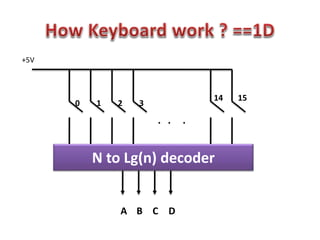
    0 1 23 14 15 +5V N to Lg(n) decoder A B C D . . .
  • 7.
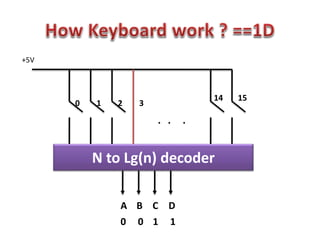
    0 1 23 14 15 +5V N to Lg(n) decoder A B C D . . . 0 0 1 1
  • 8.
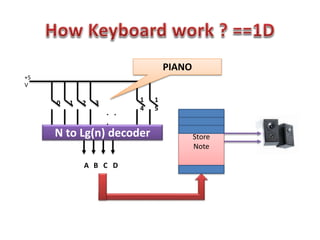
    0 1 23 1 4 1 5 +5 V N to Lg(n) decoder A B C D . . . PIANO Store Note
  • 9.
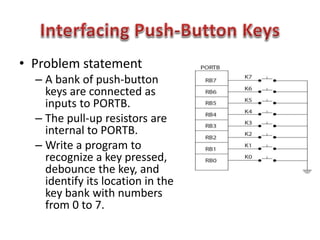
    • Problem statement –A bank of push-button keys are connected as inputs to PORTB. – The pull-up resistors are internal to PORTB. – Write a program to recognize a key pressed, debounce the key, and identify its location in the key bank with numbers from 0 to 7.
  • 11.
    A B C D R1 R2 C1C2 • Two dimensional – Scan Column for 1 – Scan Row for 1 C1 C2 A B DC R2 R1
  • 12.
    • Scan C1& C2: found both are zero • Scan R1 & R2: found both are zero
  • 13.
    • Scan C1& C2: found C1=1, C2=0 • Scan R1 & R2: found R1=1, R2=0 • So Key pressed: C1R1 is Key ‘A’
  • 14.
  • 15.
    MPU Send Data usingData BUS “D7,D6,D5,D4” Receive data using Data BUS “D3,D2,D1,D0” Identify the column & Row Display the proper HEX Digit on LED display D7 D6 D5 D4 D3 D2 D1 D0
  • 16.
    • Software – Torecognize and encode the key pressed, the program should: • Ground all the columns by sending zeros. • Check each key in a row for logic zero. • Ground one column at a time and check all the rows in that column. • Once a key is identified, it is encoded based on its position in the column.
  • 17.
    • Scan Row(6) • Scan Column (3) • Send this to Decoder to generate ASCII value or Scan code R0 R1 C0 C1 C6 R2 R6 R7 C7C2 Scan Row R6 Scan Col: C2 6,3 Decode to ACSII (Memory ROM) To Host (CPU)
  • 18.
    • Scan Row(6) • Scan Column (3) • Send this to Decoder to generate ASCII value or Scan code R0 R1 C0 C1 C6 R2 R6 R7 C7C2 Scan Row R6 Scan Col: C2 6,3 (Memory ROM) To Host (CPU) (Memory ROM) CAPS
  • 19.
    • 104 Key •PS2 Serial interface • Scanned code • Scanned to ASCII by software
  • 20.
    Keyboard work issend the code Software handle the rest of the work
  • 21.
    • For mostkeys: – Key is pressed • keyboard sends 8-bit scan code for that key – Key is released : • keyboard sends F0 • keyboard sends scan code • For extended keys: – Key is pressed • keyboard sends E0 • may send 1 or more scan codes – Key is released: • keyboard sends E0 F0 • keyboard sends scan code
  • 22.
    • ASCII isnot sent, Scan codes for keys – Least significant bit first • Normally translated by software – You remap your keys, for example – Software takes care of Shift, caps lock, control • Scan code generated when you press • And when you release – Two bytes: F0 followed by key scan code – Example: • Space pressed, 29 sent • Space released, F0 29 sent • If you hold key, scan code repeated
  • 23.
    23 • Uses asynchronous serial protocol – What does that mean?
  • 24.
    • Timer – Manydevices in system – MPU use many delay routines • Interrupt controller • Programmable Interrupt controller – ADC/DAC controller – Keyboard controller – Display controller