CHAPTER 3
ALGORITHMS
PROG0101
FUNDAMENTALS OF
PROGRAMMING
C H A P T E R 1
O V E R V I E W O F C O M P U T E R S A N D L O G I C
PROG0101
FUNDAMENTALS OF
PROGRAMMING
PROG0101
FUNDAMENTALS OF PROGRAMMING
CHAPTER 3
ALGORITHM
2
Introduction to Algorithms
 A sequence of instructions.
 A procedure or formula for solving a problem.
 It was created mathematician, Mohammed ibn-Musa
al-Khwarizmi.
 Often used for calculation, data processing and
programming.
 Algorithms can be expressed in any language.
3
Introduction to Algorithms
 Algorithms for making things will often be divided
into sections;
 the parts/components/ingredients (inputs) required to
accomplish the task
 actions/steps/methods (processing) to produce the
required outcome (output).
 For example to build a model car, the parts (inputs)
are needed plus instructions on how to assemble the
car (processing) and the result is the car (output).
4
Types of Algorithms
 Two types of Algorithm:
 Pseudocode
 Flow chart
5
Pseudocode
 Pseudocode (which means fake code, because its not
really programming code) specifies the steps
required to accomplish the task.
 Pseudocode is a type of structured English that is
used to specify an algorithm.
 Pseudocode cannot be compiled nor executed, and
there are no real formatting or syntax rules.
6
Pseudocode
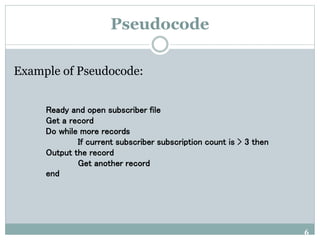
Example of Pseudocode:
Ready and open subscriber file
Get a record
Do while more records
If current subscriber subscription count is > 3 then
Output the record
Get another record
end
7
Pseudocode
Advantages of Pseudocode
 Reduced complexity.
 Increased flexibility.
 Ease of understanding.
8
Pseudocode
Why is Pseudocode Necessary?
 The programming process is a complicated one.
 You must first understand the program specifications.
 Then you need to organize your thoughts and create the
program.
 You must break the main tasks that must be
accomplished into smaller ones in order to be able to
eventually write fully developed code.
 Writing Pseudocode will save you time later during the
construction & testing phase of a program's
development.
9
Pseudocode
How to Write Pseudocode Statements?
1. A computer can receive information
Read (information from a file)
Get (information from the keyboard)
2. A computer can put out information
Write (information to a file)
Display (information to the screen)
10
Pseudocode
How to Write Pseudocode Statements?
3. A computer can perform arithmetic
Use actual mathematical symbols or the words for the symbols
Example:
Add number to total
Total = total + number
+, -, *, /
Calculate, Compute also used
11
Pseudocode
How to Write Pseudocode Statements?
4. A computer can assign a value to a piece of data
i. to give data an initial value
Initialize, Set
ii. to assign a value as a result of some processing
*x=5+y
iii. to keep a piece of information for later use
Save, Store
12
Pseudocode
How to Write Pseudocode Statements?
5. A computer can compare two piece of information
and select one of two alternative actions
IF condition THEN
some action
ELSE
alternative action
ENDIF
13
Pseudocode
How to Write Pseudocode Statements?
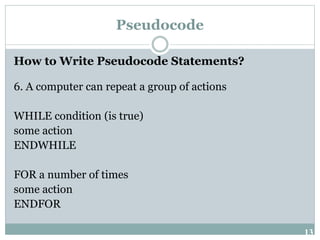
6. A computer can repeat a group of actions
WHILE condition (is true)
some action
ENDWHILE
FOR a number of times
some action
ENDFOR
14
Pseudocode
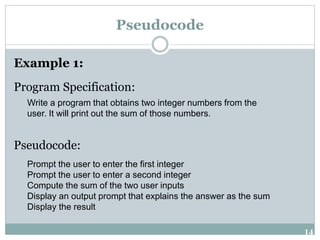
Example 1:
Program Specification:
Pseudocode:
Write a program that obtains two integer numbers from the
user. It will print out the sum of those numbers.
Prompt the user to enter the first integer
Prompt the user to enter a second integer
Compute the sum of the two user inputs
Display an output prompt that explains the answer as the sum
Display the result
15
Pseudocode
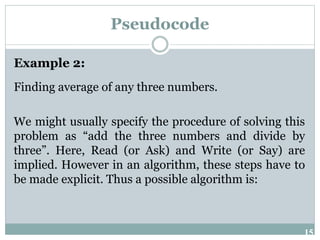
Example 2:
Finding average of any three numbers.
We might usually specify the procedure of solving this
problem as “add the three numbers and divide by
three”. Here, Read (or Ask) and Write (or Say) are
implied. However in an algorithm, these steps have to
be made explicit. Thus a possible algorithm is:
16
Pseudocode
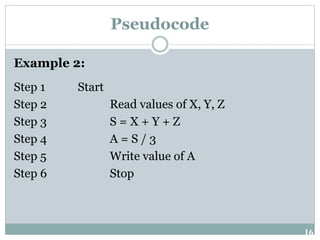
Example 2:
Step 1 Start
Step 2 Read values of X, Y, Z
Step 3 S = X + Y + Z
Step 4 A = S / 3
Step 5 Write value of A
Step 6 Stop
17
Pseudocode
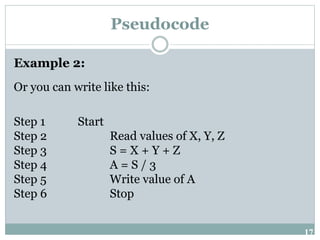
Example 2:
Or you can write like this:
Step 1 Start
Step 2 Read values of X, Y, Z
Step 3 S = X + Y + Z
Step 4 A = S / 3
Step 5 Write value of A
Step 6 Stop
18
Pseudocode
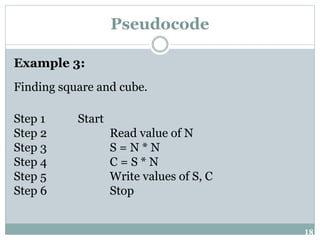
Example 3:
Finding square and cube.
Step 1 Start
Step 2 Read value of N
Step 3 S = N * N
Step 4 C = S * N
Step 5 Write values of S, C
Step 6 Stop
19
Pseudocode
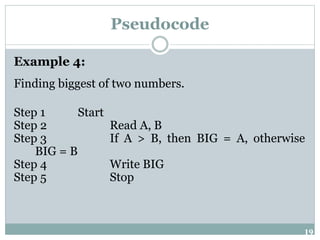
Example 4:
Finding biggest of two numbers.
Step 1 Start
Step 2 Read A, B
Step 3 If A > B, then BIG = A, otherwise
BIG = B
Step 4 Write BIG
Step 5 Stop
20
Pseudocode
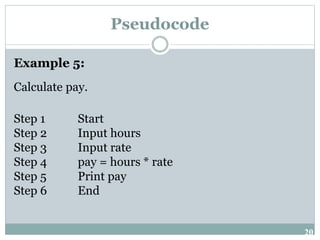
Example 5:
Calculate pay.
Step 1 Start
Step 2 Input hours
Step 3 Input rate
Step 4 pay = hours * rate
Step 5 Print pay
Step 6 End
21
Pseudocode
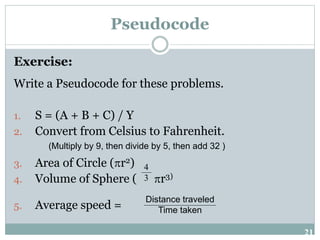
Exercise:
Write a Pseudocode for these problems.
1. S = (A + B + C) / Y
2. Convert from Celsius to Fahrenheit.
3. Area of Circle (r2)
4. Volume of Sphere ( r3)
5. Average speed =
4
3
Distance traveled
Time taken
(Multiply by 9, then divide by 5, then add 32 )
22
Flowchart
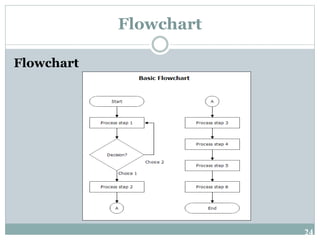
 A flowchart is a graphical representation of an
algorithm.
 These flowcharts play a vital role in the
programming of a problem and are quite helpful in
understanding the logic of complicated and lengthy
problems.
 Once the flowchart is drawn, it becomes easy to
write the program in any high level language.
23
Flowchart
Flowchart
 A flowchart can therefore be used to:
 Define and analyze processes
 Build a step-by-step picture of the process for analysis,
discussion, or communication
 Define, standardize or find areas for improvement in a
process
24
Flowchart
Flowchart
25
Flowchart
Flowchart Symbols
Start and End symbols
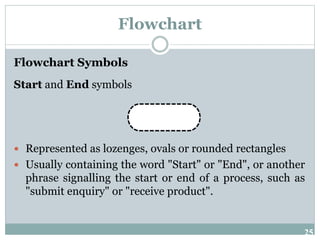
 Represented as lozenges, ovals or rounded rectangles
 Usually containing the word "Start" or "End", or another
phrase signalling the start or end of a process, such as
"submit enquiry" or "receive product".
26
Flowchart
Flowchart Symbols
Arrows
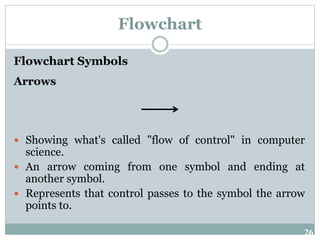
 Showing what's called "flow of control" in computer
science.
 An arrow coming from one symbol and ending at
another symbol.
 Represents that control passes to the symbol the arrow
points to.
27
Flowchart
Flowchart Symbols
Processing steps
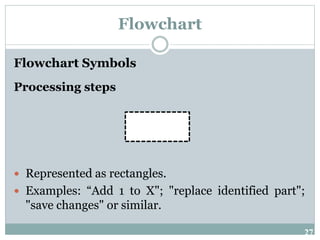
 Represented as rectangles.
 Examples: “Add 1 to X"; "replace identified part";
"save changes" or similar.
28
Flowchart
Flowchart Symbols
Input/Output
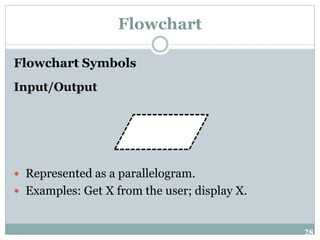
 Represented as a parallelogram.
 Examples: Get X from the user; display X.
29
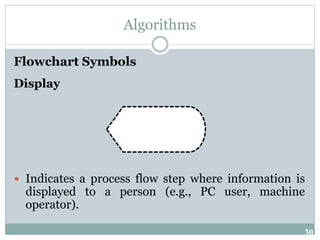
Flowchart
Flowchart Symbols
Conditional or decision
 Represented as a diamond (rhombus).
 These typically contain a Yes/No question or
True/False test.
30
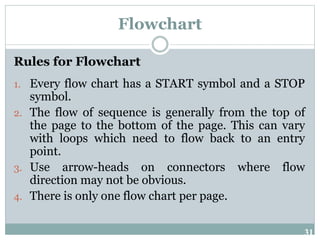
Algorithms
Flowchart Symbols
Display
 Indicates a process flow step where information is
displayed to a person (e.g., PC user, machine
operator).
31
Flowchart
Rules for Flowchart
1. Every flow chart has a START symbol and a STOP
symbol.
2. The flow of sequence is generally from the top of
the page to the bottom of the page. This can vary
with loops which need to flow back to an entry
point.
3. Use arrow-heads on connectors where flow
direction may not be obvious.
4. There is only one flow chart per page.
32
Flowchart
Rules for Flowchart
5. A page should have a page number and a title.
6. A flow chart on one page should not break and
jump to another page
7. A flow chart should have no more than around 15
symbols (not including START and STOP).
33
Flowchart
Advantages of Using Flowcharts
 Communication: Flowcharts are better way of communicating
the logic of a system to all concerned.
 Effective analysis: With the help of flowchart, problem can be
analysed in more effective way.
 Proper documentation: Program flowcharts serve as a good
program documentation, which is needed for various purposes.
 Efficient Coding: The flowcharts act as a guide or blueprint
during the systems analysis and program development phase.
34
Flowchart
Advantages of Using Flowcharts
 Proper Debugging: The flowchart helps in debugging
process.
 Efficient Program Maintenance: The maintenance of
operating program becomes easy with the help of flowchart. It
helps the programmer to put efforts more efficiently on that
part.
35
Flowchart
Basic Control Structures
 Sequence
 Selection
 Loop
36
Flowchart
Basic Control Structures
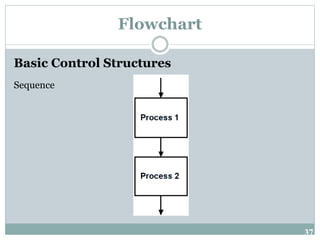
Sequence
 Steps that execute in sequence are represented by symbols that follow
each other top to bottom or left to right.
 Top to bottom is the standard.
37
Flowchart
Basic Control Structures
Sequence
38
Flowchart
Basic Control Structures
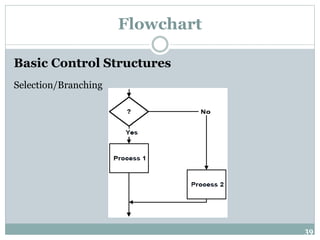
Selection/Branching
 Once the condition is evaluated, the control flows into one of two
paths.
 Once the conditional execution is finished, the flows rejoin before
leaving the structure.
39
Flowchart
Basic Control Structures
Selection/Branching
40
Flowchart
Basic Control Structures
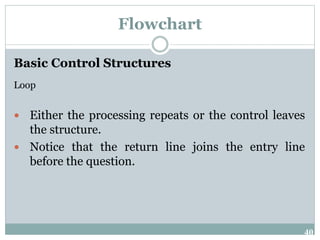
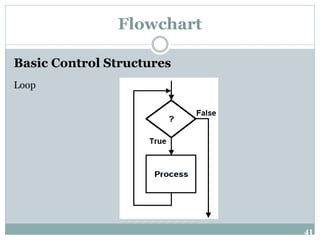
Loop
 Either the processing repeats or the control leaves
the structure.
 Notice that the return line joins the entry line
before the question.
41
Flowchart
Basic Control Structures
Loop
42
Flowchart
Example 1:
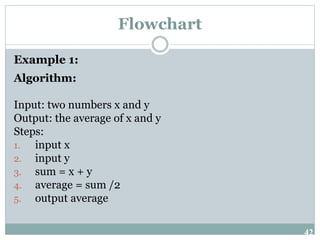
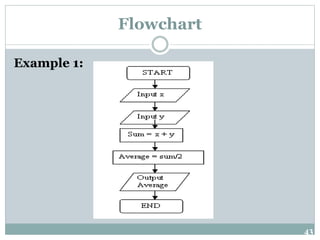
Algorithm:
Input: two numbers x and y
Output: the average of x and y
Steps:
1. input x
2. input y
3. sum = x + y
4. average = sum /2
5. output average
43
Flowchart
Example 1:
44
Flowchart
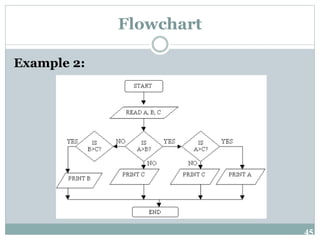
Example 2:
Draw a flowchart to find the largest of three numbers
A, B, and C.
45
Flowchart
Example 2:
46
Flowchart
Exercise:
Draw a flowchart diagram.
1. A program that compare the first number and
second number and display which one is the biggest.
2. Login screen to check the Username and
Password.

Fundamentals of Programming Chapter 3

  • 1.
    CHAPTER 3 ALGORITHMS PROG0101 FUNDAMENTALS OF PROGRAMMING CH A P T E R 1 O V E R V I E W O F C O M P U T E R S A N D L O G I C PROG0101 FUNDAMENTALS OF PROGRAMMING PROG0101 FUNDAMENTALS OF PROGRAMMING CHAPTER 3 ALGORITHM
  • 2.
    2 Introduction to Algorithms A sequence of instructions.  A procedure or formula for solving a problem.  It was created mathematician, Mohammed ibn-Musa al-Khwarizmi.  Often used for calculation, data processing and programming.  Algorithms can be expressed in any language.
  • 3.
    3 Introduction to Algorithms Algorithms for making things will often be divided into sections;  the parts/components/ingredients (inputs) required to accomplish the task  actions/steps/methods (processing) to produce the required outcome (output).  For example to build a model car, the parts (inputs) are needed plus instructions on how to assemble the car (processing) and the result is the car (output).
  • 4.
    4 Types of Algorithms Two types of Algorithm:  Pseudocode  Flow chart
  • 5.
    5 Pseudocode  Pseudocode (whichmeans fake code, because its not really programming code) specifies the steps required to accomplish the task.  Pseudocode is a type of structured English that is used to specify an algorithm.  Pseudocode cannot be compiled nor executed, and there are no real formatting or syntax rules.
  • 6.
    6 Pseudocode Example of Pseudocode: Readyand open subscriber file Get a record Do while more records If current subscriber subscription count is > 3 then Output the record Get another record end
  • 7.
    7 Pseudocode Advantages of Pseudocode Reduced complexity.  Increased flexibility.  Ease of understanding.
  • 8.
    8 Pseudocode Why is PseudocodeNecessary?  The programming process is a complicated one.  You must first understand the program specifications.  Then you need to organize your thoughts and create the program.  You must break the main tasks that must be accomplished into smaller ones in order to be able to eventually write fully developed code.  Writing Pseudocode will save you time later during the construction & testing phase of a program's development.
  • 9.
    9 Pseudocode How to WritePseudocode Statements? 1. A computer can receive information Read (information from a file) Get (information from the keyboard) 2. A computer can put out information Write (information to a file) Display (information to the screen)
  • 10.
    10 Pseudocode How to WritePseudocode Statements? 3. A computer can perform arithmetic Use actual mathematical symbols or the words for the symbols Example: Add number to total Total = total + number +, -, *, / Calculate, Compute also used
  • 11.
    11 Pseudocode How to WritePseudocode Statements? 4. A computer can assign a value to a piece of data i. to give data an initial value Initialize, Set ii. to assign a value as a result of some processing *x=5+y iii. to keep a piece of information for later use Save, Store
  • 12.
    12 Pseudocode How to WritePseudocode Statements? 5. A computer can compare two piece of information and select one of two alternative actions IF condition THEN some action ELSE alternative action ENDIF
  • 13.
    13 Pseudocode How to WritePseudocode Statements? 6. A computer can repeat a group of actions WHILE condition (is true) some action ENDWHILE FOR a number of times some action ENDFOR
  • 14.
    14 Pseudocode Example 1: Program Specification: Pseudocode: Writea program that obtains two integer numbers from the user. It will print out the sum of those numbers. Prompt the user to enter the first integer Prompt the user to enter a second integer Compute the sum of the two user inputs Display an output prompt that explains the answer as the sum Display the result
  • 15.
    15 Pseudocode Example 2: Finding averageof any three numbers. We might usually specify the procedure of solving this problem as “add the three numbers and divide by three”. Here, Read (or Ask) and Write (or Say) are implied. However in an algorithm, these steps have to be made explicit. Thus a possible algorithm is:
  • 16.
    16 Pseudocode Example 2: Step 1Start Step 2 Read values of X, Y, Z Step 3 S = X + Y + Z Step 4 A = S / 3 Step 5 Write value of A Step 6 Stop
  • 17.
    17 Pseudocode Example 2: Or youcan write like this: Step 1 Start Step 2 Read values of X, Y, Z Step 3 S = X + Y + Z Step 4 A = S / 3 Step 5 Write value of A Step 6 Stop
  • 18.
    18 Pseudocode Example 3: Finding squareand cube. Step 1 Start Step 2 Read value of N Step 3 S = N * N Step 4 C = S * N Step 5 Write values of S, C Step 6 Stop
  • 19.
    19 Pseudocode Example 4: Finding biggestof two numbers. Step 1 Start Step 2 Read A, B Step 3 If A > B, then BIG = A, otherwise BIG = B Step 4 Write BIG Step 5 Stop
  • 20.
    20 Pseudocode Example 5: Calculate pay. Step1 Start Step 2 Input hours Step 3 Input rate Step 4 pay = hours * rate Step 5 Print pay Step 6 End
  • 21.
    21 Pseudocode Exercise: Write a Pseudocodefor these problems. 1. S = (A + B + C) / Y 2. Convert from Celsius to Fahrenheit. 3. Area of Circle (r2) 4. Volume of Sphere ( r3) 5. Average speed = 4 3 Distance traveled Time taken (Multiply by 9, then divide by 5, then add 32 )
  • 22.
    22 Flowchart  A flowchartis a graphical representation of an algorithm.  These flowcharts play a vital role in the programming of a problem and are quite helpful in understanding the logic of complicated and lengthy problems.  Once the flowchart is drawn, it becomes easy to write the program in any high level language.
  • 23.
    23 Flowchart Flowchart  A flowchartcan therefore be used to:  Define and analyze processes  Build a step-by-step picture of the process for analysis, discussion, or communication  Define, standardize or find areas for improvement in a process
  • 24.
  • 25.
    25 Flowchart Flowchart Symbols Start andEnd symbols  Represented as lozenges, ovals or rounded rectangles  Usually containing the word "Start" or "End", or another phrase signalling the start or end of a process, such as "submit enquiry" or "receive product".
  • 26.
    26 Flowchart Flowchart Symbols Arrows  Showingwhat's called "flow of control" in computer science.  An arrow coming from one symbol and ending at another symbol.  Represents that control passes to the symbol the arrow points to.
  • 27.
    27 Flowchart Flowchart Symbols Processing steps Represented as rectangles.  Examples: “Add 1 to X"; "replace identified part"; "save changes" or similar.
  • 28.
    28 Flowchart Flowchart Symbols Input/Output  Representedas a parallelogram.  Examples: Get X from the user; display X.
  • 29.
    29 Flowchart Flowchart Symbols Conditional ordecision  Represented as a diamond (rhombus).  These typically contain a Yes/No question or True/False test.
  • 30.
    30 Algorithms Flowchart Symbols Display  Indicatesa process flow step where information is displayed to a person (e.g., PC user, machine operator).
  • 31.
    31 Flowchart Rules for Flowchart 1.Every flow chart has a START symbol and a STOP symbol. 2. The flow of sequence is generally from the top of the page to the bottom of the page. This can vary with loops which need to flow back to an entry point. 3. Use arrow-heads on connectors where flow direction may not be obvious. 4. There is only one flow chart per page.
  • 32.
    32 Flowchart Rules for Flowchart 5.A page should have a page number and a title. 6. A flow chart on one page should not break and jump to another page 7. A flow chart should have no more than around 15 symbols (not including START and STOP).
  • 33.
    33 Flowchart Advantages of UsingFlowcharts  Communication: Flowcharts are better way of communicating the logic of a system to all concerned.  Effective analysis: With the help of flowchart, problem can be analysed in more effective way.  Proper documentation: Program flowcharts serve as a good program documentation, which is needed for various purposes.  Efficient Coding: The flowcharts act as a guide or blueprint during the systems analysis and program development phase.
  • 34.
    34 Flowchart Advantages of UsingFlowcharts  Proper Debugging: The flowchart helps in debugging process.  Efficient Program Maintenance: The maintenance of operating program becomes easy with the help of flowchart. It helps the programmer to put efforts more efficiently on that part.
  • 35.
    35 Flowchart Basic Control Structures Sequence  Selection  Loop
  • 36.
    36 Flowchart Basic Control Structures Sequence Steps that execute in sequence are represented by symbols that follow each other top to bottom or left to right.  Top to bottom is the standard.
  • 37.
  • 38.
    38 Flowchart Basic Control Structures Selection/Branching Once the condition is evaluated, the control flows into one of two paths.  Once the conditional execution is finished, the flows rejoin before leaving the structure.
  • 39.
  • 40.
    40 Flowchart Basic Control Structures Loop Either the processing repeats or the control leaves the structure.  Notice that the return line joins the entry line before the question.
  • 41.
  • 42.
    42 Flowchart Example 1: Algorithm: Input: twonumbers x and y Output: the average of x and y Steps: 1. input x 2. input y 3. sum = x + y 4. average = sum /2 5. output average
  • 43.
  • 44.
    44 Flowchart Example 2: Draw aflowchart to find the largest of three numbers A, B, and C.
  • 45.
  • 46.
    46 Flowchart Exercise: Draw a flowchartdiagram. 1. A program that compare the first number and second number and display which one is the biggest. 2. Login screen to check the Username and Password.