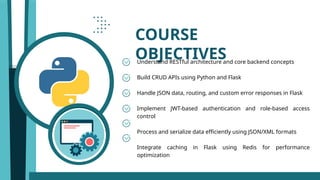
COURSE
OBJECTIVES
Understand RESTful architectureand core backend concepts
Build CRUD APIs using Python and Flask
Handle JSON data, routing, and custom error responses in Flask
Implement JWT-based authentication and role-based access
control
Process and serialize data efficiently using JSON/XML formats
Integrate caching in Flask using Redis for performance
optimization
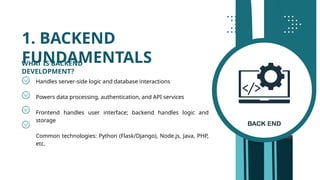
1. BACKEND
FUNDAMENTALS
Handles server-sidelogic and database interactions
Powers data processing, authentication, and API services
Frontend handles user interface; backend handles logic and
storage
Common technologies: Python (Flask/Django), Node.js, Java, PHP,
etc.
WHAT IS BACKEND
DEVELOPMENT?
5.
REST = REpresentationalState Transfer
A standard for web services and APIs
Core REST constraints:
⟶ Stateless: No session info stored on server
⟶ Client-Server separation
⟶ Cacheable responses
⟶ Uniform Interface (standard methods)
Benefits: Scalability, simplicity, reusability
RESTFUL ARCHITECTURE
1. BACKEND
FUNDAMENTALS
6.
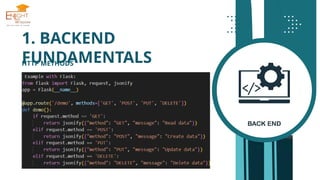
GET – Fetchdata (Read)
POST – Create new data (Insert)
PUT – Update existing data
DELETE – Remove data
Each method maps to a CRUD operation
HTTP METHODS
1. BACKEND
FUNDAMENTALS
RESTful APIs arecentered around resources, not actions.
Resources represent data objects (e.g., users, products).
Good Practices:
• Use nouns:
/users, /products/123, /orders/456/items
• Represent hierarchy using slashes:
/users/123/orders Orders of a specific user
→
• Keep endpoints intuitive, consistent, and predictable
Avoid:
• Using verbs:
/getUser, /createOrder, /updateProduct
• RESTful APIs already use HTTP methods to define actions:
GET /users retrieve users
→
POST /orders create a new order
→
RESOURCE-BASED ENDPOINT DESIGN
1. BACKEND
FUNDAMENTALS
9.
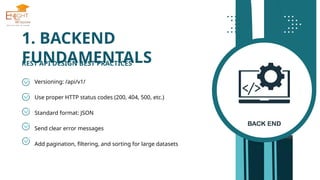
Versioning: /api/v1/
Use properHTTP status codes (200, 404, 500, etc.)
Standard format: JSON
Send clear error messages
Add pagination, filtering, and sorting for large datasets
REST API DESIGN BEST PRACTICES
1. BACKEND
FUNDAMENTALS
10.
2. FLASK ESSENTIALS
INTRODUCTIONTO
FLASK
A lightweight Python web framework
Ideal for REST API development
Simple to use, minimal setup, highly
extensible
2. FLASK ESSENTIALS
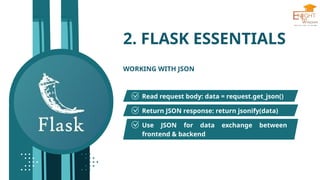
WORKINGWITH JSON
Read request body: data = request.get_json()
Return JSON response: return jsonify(data)
Use JSON for data exchange between
frontend & backend
16.
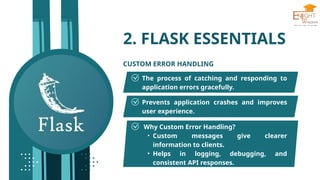
2. FLASK ESSENTIALS
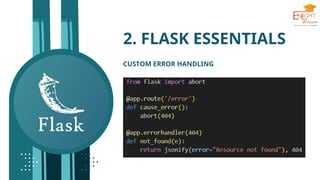
CUSTOMERROR HANDLING
The process of catching and responding to
application errors gracefully.
Prevents application crashes and improves
user experience.
Why Custom Error Handling?
• Custom messages give clearer
information to clients.
• Helps in logging, debugging, and
consistent API responses.
3. BUILDING CRUDAPIS
WITH FLASK
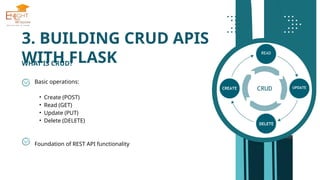
WHAT IS CRUD?
Basic operations:
• Create (POST)
• Read (GET)
• Update (PUT)
• Delete (DELETE)
Foundation of REST API functionality
19.
3. BUILDING CRUDAPIS
WITH FLASK
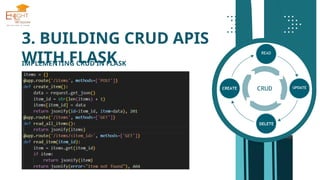
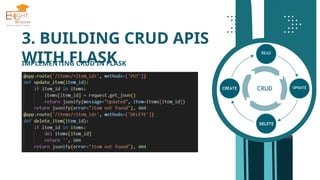
IMPLEMENTING CRUD IN FLASK
Why CRUD in Flask?
• Enables full interaction with application data.
• Essential for building RESTful APIs.
• Flask makes CRUD operations simple with route decorators.
Flask Route Definitions for CRUD:
@app.route("/items", methods=["POST"]) # Create
@app.route("/items", methods=["GET"]) # Read all
@app.route("/items/<int:id>", methods=["GET"]) # Read one
@app.route("/items/<int:id>", methods=["PUT"]) # Update
@app.route("/items/<int:id>", methods=["DELETE"]) # Delete
20.
3. BUILDING CRUDAPIS
WITH FLASK
IMPLEMENTING CRUD IN FLASK
Flask Route Definitions for CRUD:
@app.route("/items", methods=["POST"]) # Create
@app.route("/items", methods=["GET"]) # Read all
@app.route("/items/<int:id>", methods=["GET"]) # Read one
@app.route("/items/<int:id>", methods=["PUT"]) # Update
@app.route("/items/<int:id>", methods=["DELETE"]) # Delete
3. BUILDING CRUDAPIS
WITH FLASK
IN-MEMORY DATA STORAGE
Use Python list/dict for testing:
items = [ ]
items.append({"id": 1, "name": "Book"})
Pros:
• Easy to set up
• No DB dependency
Cons:
• Temporary storage
• Not persistent across server restarts
24.
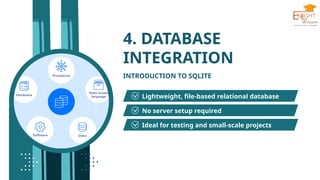
4. DATABASE
INTEGRATION
INTRODUCTION TOSQLITE
Lightweight, file-based relational database
No server setup required
Ideal for testing and small-scale projects
25.
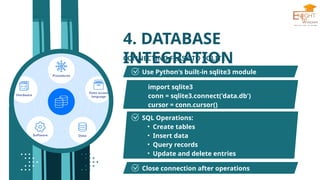
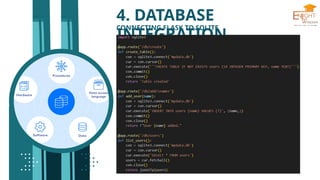
4. DATABASE
INTEGRATION
import sqlite3
conn= sqlite3.connect('data.db')
cursor = conn.cursor()
CONNECTING FLASK TO SQLITE
Use Python's built-in sqlite3 module
SQL Operations:
• Create tables
• Insert data
• Query records
• Update and delete entries
Close connection after operations
![3. BUILDING CRUD APIS
WITH FLASK
IMPLEMENTING CRUD IN FLASK
Why CRUD in Flask?
• Enables full interaction with application data.
• Essential for building RESTful APIs.
• Flask makes CRUD operations simple with route decorators.
Flask Route Definitions for CRUD:
@app.route("/items", methods=["POST"]) # Create
@app.route("/items", methods=["GET"]) # Read all
@app.route("/items/<int:id>", methods=["GET"]) # Read one
@app.route("/items/<int:id>", methods=["PUT"]) # Update
@app.route("/items/<int:id>", methods=["DELETE"]) # Delete](https://image.slidesharecdn.com/unit1-251210165842-0ecb8fd3/85/python-full-stack-development-with-machi-19-320.jpg)
![3. BUILDING CRUD APIS
WITH FLASK
IMPLEMENTING CRUD IN FLASK
Flask Route Definitions for CRUD:
@app.route("/items", methods=["POST"]) # Create
@app.route("/items", methods=["GET"]) # Read all
@app.route("/items/<int:id>", methods=["GET"]) # Read one
@app.route("/items/<int:id>", methods=["PUT"]) # Update
@app.route("/items/<int:id>", methods=["DELETE"]) # Delete](https://image.slidesharecdn.com/unit1-251210165842-0ecb8fd3/85/python-full-stack-development-with-machi-20-320.jpg)
![3. BUILDING CRUD APIS
WITH FLASK
IN-MEMORY DATA STORAGE
Use Python list/dict for testing:
items = [ ]
items.append({"id": 1, "name": "Book"})
Pros:
• Easy to set up
• No DB dependency
Cons:
• Temporary storage
• Not persistent across server restarts](https://image.slidesharecdn.com/unit1-251210165842-0ecb8fd3/85/python-full-stack-development-with-machi-23-320.jpg)



![[drupalday2017] - REST in pieces](https://cdn.slidesharecdn.com/ss_thumbnails/paolo-pustorinorestinpieces-170306112824-170315150716-thumbnail.jpg?width=640&height=640&fit=bounds)


