
www.edureka.co/mastering-node-js
View Mastering Node.js course details at www.edureka.co/mastering-node-js
For Queries during the session and class recording:
Post on Twitter @edurekaIN: #askEdureka
Post on Facebook /edurekaIN
For more details please contact us:
US : 1800 275 9730 (toll free)
INDIA : +91 88808 62004
Email us : sales@edureka.co
Node JS Express - Steps to create Restful Web App
Slide 2 www.edureka.co/mastering-node-jsSlide 2
The Importance or Reason for this Course
Node.js is a platform for building high performance, event-driven, real-time and scalable networking
applications just using javascript.
You will receive hands-on training in Node.js, building networking and web based applications that are far
superior and efficient than your regular languages.
And the best part : It's all in Javascript – on the server or on the client – Javascript Everywhere!
This course is designed to help you learn this amazing platform with great ease, with the help of hands-on
training, code snippets, live sessions and expert support.
Slide 3 www.edureka.co/mastering-node-jsSlide 3
Demand for this Course
Javascript is an ubiquitous language known by millions of developers worldwide. When using Node.js,
Javascript becomes a fully-functional server side programming language that is well suited for making real-time
business apps and APIs
More and more employers & entrepreneurs are switching their technologies to Node.js
Cases in point : Walmart, Paypal/Ebay, Microsoft, LinkedIn, Yahoo, Yammer (Now part of Microsoft) and the list
is never ending.
Slide 4 www.edureka.co/mastering-node-jsSlide 4
Job Trends
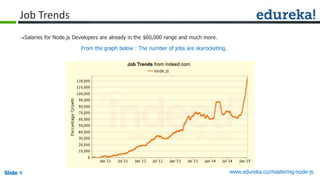
Salaries for Node.js Developers are already in the $60,000 range and much more.
From the graph below : The number of jobs are skyrocketing.
Slide 5 www.edureka.co/mastering-node-js
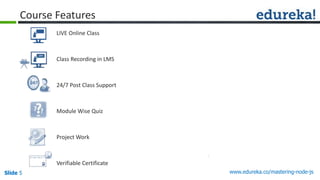
LIVE Online Class
Class Recording in LMS
24/7 Post Class Support
Module Wise Quiz
Project Work
Verifiable Certificate
Course Features
Slide 6 www.edureka.co/mastering-node-js
Objectives
At the end of the session you will be able to learn:
Nodejs express
Creating Restful Web App
NPM
Templates in Express
Slide 7 www.edureka.co/mastering-node-jsSlide 7
What is Node.js ?
It is an Open-Source, Cross-Platform runtime environment for networking applications
It is built on top of Google Chrome’s JavaScript Runtime : V8
This lets us build fast, highly scalable networking applications just using JavaScript
It is an Asynchronous Event driven framework
Guess What ?
» IT’s SINGLE THREADED !!
» No worries about : race conditions, deadlocks and other problems that go with multi-threading.
» “Almost no function in Node directly performs I/O, so the process never blocks. Because nothing blocks,
less-than-expert programmers are able to develop scalable systems.” - (courtesy : nodejs.org)
Slide 8 www.edureka.co/mastering-node-jsSlide 8
What is Node.js ?
Node.js is Event Driven. Uses the Event Emitter model
Just because Node.js is Single Threaded does not mean you can’t have multiple cores in your application. We
can fork or spawn child processes from the main node process any time
» This lets us even fire shell commands or even start up another Application straight from your Node.js
Application
Slide 9 www.edureka.co/mastering-node-jsSlide 9
Your First Node.js Program
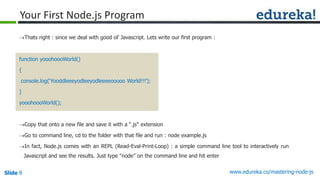
Thats right : since we deal with good ol’ Javascript. Lets write our first program :
function yooohoooWorld()
{
console.log(‘Yooddleeeyodleeyodleeeeooooo World!!!’);
}
yooohoooWorld();
Copy that onto a new file and save it with a “.js” extension
Go to command line, cd to the folder with that file and run : node example.js
In fact, Node.js comes with an REPL (Read-Eval-Print-Loop) : a simple command line tool to interactively run
Javascript and see the results. Just type “node” on the command line and hit enter
Slide 10 www.edureka.co/mastering-node-jsSlide 10
Basics of Node.js : npm
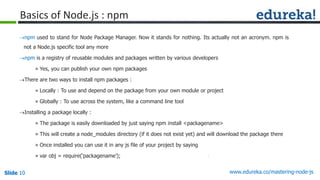
npm used to stand for Node Package Manager. Now it stands for nothing. Its actually not an acronym. npm is
not a Node.js specific tool any more
npm is a registry of reusable modules and packages written by various developers
» Yes, you can publish your own npm packages
There are two ways to install npm packages :
» Locally : To use and depend on the package from your own module or project
» Globally : To use across the system, like a command line tool
Installing a package locally :
» The package is easily downloaded by just saying npm install <packagename>
» This will create a node_modules directory (if it does not exist yet) and will download the package there
» Once installed you can use it in any js file of your project by saying
» var obj = require(‘packagename’);
Slide 11 www.edureka.co/mastering-node-jsSlide 11
Basics of Node.js : npm
Tip: Next time you want to clone or
copy your project to another server,
just copy the code you wrote and
the package.json file. Then run
npm install on that server
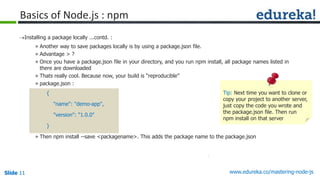
Installing a package locally ...contd. :
» Another way to save packages locally is by using a package.json file.
» Advantage > ?
» Once you have a package.json file in your directory, and you run npm install, all package names listed in
there are downloaded
» Thats really cool. Because now, your build is “reproducible”
» package.json :
{
"name": "demo-app",
"version": "1.0.0"
}
» Then npm install --save <packagename>. This adds the package name to the package.json
Slide 12 www.edureka.co/mastering-node-jsSlide 12
Basics of Node.js : npm
Installing a package locally ...contd. :
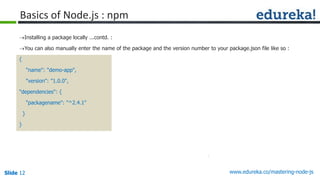
You can also manually enter the name of the package and the version number to your package.json file like so :
{
"name": "demo-app",
"version": "1.0.0",
"dependencies": {
"packagename": "^2.4.1"
}
}
Slide 13 www.edureka.co/mastering-node-jsSlide 13
To install an npm package globally :
just run npm install -g <packagename>
To update or uninstall a globally installed package, just
run npm update or npm uninstall with the -g option
Basics of Node.js : npm
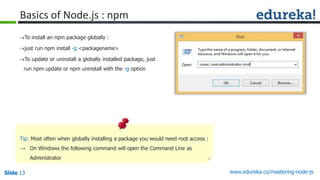
Tip: Most often when globally installing a package you would need root access :
→ On Windows the following command will open the Command Line as
Administrator
Slide 14 www.edureka.co/mastering-node-jsSlide 14
Basics of Node.js : npm
→ Tip: Most often when globally installing a package you would need root
access :
» Another alternative for Windows which will come in handy is
installing some other Command Line alternative like Console2
(http://sourceforge.net/projects/console/) or ConEmu
(http://www.fosshub.com/ConEmu.html) , etc.
» For Linux/Unix/Mac : sudo npm install -g <packagename>
Slide 15 www.edureka.co/mastering-node-jsSlide 15
Express JS
Express JS : Web Framework for Node.js. It is an npm package
To install : npm install express //in the main project folder
Express JS also provides a tool to create a simple folder structure for your app : express-generator :
npm install express-generator -g //To be installed globally
» Now, saying express newapp will create a project called newapp in the current working directory along
with a simple folder structure.
» The dependencies will then be installed by doing a cd newapp and then npm install
» To run the app
» node ./bin/www // This is where the server is run and listening on a port
Slide 16 www.edureka.co/mastering-node-jsSlide 16
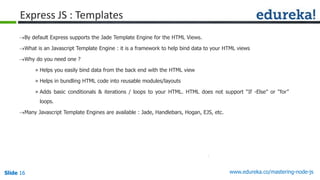
Express JS : Templates
By default Express supports the Jade Template Engine for the HTML Views.
What is an Javascript Template Engine : it is a framework to help bind data to your HTML views
Why do you need one ?
» Helps you easily bind data from the back end with the HTML view
» Helps in bundling HTML code into reusable modules/layouts
» Adds basic conditionals & iterations / loops to your HTML. HTML does not support “If -Else” or “for”
loops.
Many Javascript Template Engines are available : Jade, Handlebars, Hogan, EJS, etc.
Slide 17 www.edureka.co/mastering-node-jsSlide 17
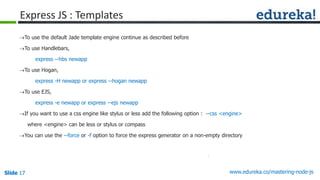
Express JS : Templates
To use the default Jade template engine continue as described before
To use Handlebars,
express --hbs newapp
To use Hogan,
express -H newapp or express --hogan newapp
To use EJS,
express -e newapp or express --ejs newapp
If you want to use a css engine like stylus or less add the following option : --css <engine>
where <engine> can be less or stylus or compass
You can use the --force or -f option to force the express generator on a non-empty directory
Slide 18 www.edureka.co/mastering-node-jsSlide 18
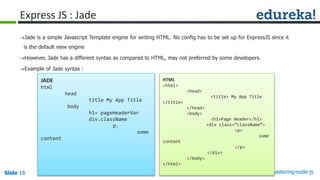
Express JS : Jade
Jade is a simple Javascript Template engine for writing HTML. No config has to be set up for ExpressJS since it
is the default view engine
However, Jade has a different syntax as compared to HTML, may not preferred by some developers.
Example of Jade syntax :
JADE
html
head
title My App Title
body
h1= pageHeaderVar
div.className
p.
some
content
HTML
<html>
<head>
<title> My App Title
</title>
</head>
<body>
<h1>Page Header</h1>
<div class=”className”>
<p>
some
content
</p>
</div>
</body>
</html>
Slide 19 www.edureka.co/mastering-node-jsSlide 19
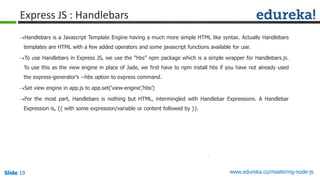
Express JS : Handlebars
Handlebars is a Javascript Template Engine having a much more simple HTML like syntax. Actually Handlebars
templates are HTML with a few added operators and some javascript functions available for use.
To use Handlebars in Express JS, we use the “hbs” npm package which is a simple wrapper for Handlebars.js.
To use this as the view engine in place of Jade, we first have to npm install hbs if you have not already used
the express-generator’s --hbs option to express command.
Set view engine in app.js to app.set(‘view-engine’,’hbs’)
For the most part, Handlebars is nothing but HTML, intermingled with Handlebar Expressions. A Handlebar
Expression is, {{ with some expression/variable or content followed by }}.
Slide 20 www.edureka.co/mastering-node-jsSlide 20
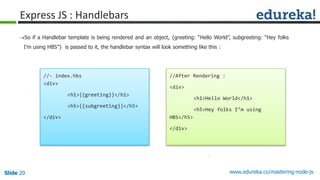
Express JS : Handlebars
So if a Handlebar template is being rendered and an object, {greeting: “Hello World”, subgreeting: “Hey folks
I’m using HBS”} is passed to it, the handlebar syntax will look something like this :
//- index.hbs
<div>
<h1>{{greeting}}</h1>
<h5>{{subgreeting}}</h5>
</div>
//After Rendering :
<div>
<h1>Hello World</h1>
<h5>Hey folks I’m using
HBS</h5>
</div>
Slide 21 www.edureka.co/mastering-node-jsSlide 21
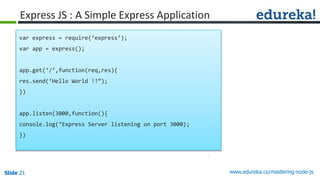
Express JS : A Simple Express Application
var express = require(‘express’);
var app = express();
app.get(‘/’,function(req,res){
res.send(‘Hello World !!”);
})
app.listen(3000,function(){
console.log(‘Express Server listening on port 3000);
})
Slide 22 www.edureka.co/mastering-node-js
DEMO
Slide 23 www.edureka.co/mastering-node-js
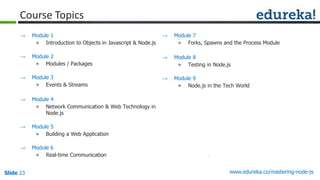
Course Topics
→ Module 7
» Forks, Spawns and the Process Module
→ Module 8
» Testing in Node.js
→ Module 9
» Node.js in the Tech World
→ Module 1
» Introduction to Objects in Javascript & Node.js
→ Module 2
» Modules / Packages
→ Module 3
» Events & Streams
→ Module 4
» Network Communication & Web Technology in
Node.js
→ Module 5
» Building a Web Application
→ Module 6
» Real-time Communication
Slide 24 www.edureka.co/mastering-node-js
Questions
Slide 25 www.edureka.co/mastering-node-js

Node JS Express : Steps to Create Restful Web App

  • 1.
    www.edureka.co/mastering-node-js View Mastering Node.jscourse details at www.edureka.co/mastering-node-js For Queries during the session and class recording: Post on Twitter @edurekaIN: #askEdureka Post on Facebook /edurekaIN For more details please contact us: US : 1800 275 9730 (toll free) INDIA : +91 88808 62004 Email us : sales@edureka.co Node JS Express - Steps to create Restful Web App
  • 2.
    Slide 2 www.edureka.co/mastering-node-jsSlide2 The Importance or Reason for this Course Node.js is a platform for building high performance, event-driven, real-time and scalable networking applications just using javascript. You will receive hands-on training in Node.js, building networking and web based applications that are far superior and efficient than your regular languages. And the best part : It's all in Javascript – on the server or on the client – Javascript Everywhere! This course is designed to help you learn this amazing platform with great ease, with the help of hands-on training, code snippets, live sessions and expert support.
  • 3.
    Slide 3 www.edureka.co/mastering-node-jsSlide3 Demand for this Course Javascript is an ubiquitous language known by millions of developers worldwide. When using Node.js, Javascript becomes a fully-functional server side programming language that is well suited for making real-time business apps and APIs More and more employers & entrepreneurs are switching their technologies to Node.js Cases in point : Walmart, Paypal/Ebay, Microsoft, LinkedIn, Yahoo, Yammer (Now part of Microsoft) and the list is never ending.
  • 4.
    Slide 4 www.edureka.co/mastering-node-jsSlide4 Job Trends Salaries for Node.js Developers are already in the $60,000 range and much more. From the graph below : The number of jobs are skyrocketing.
  • 5.
    Slide 5 www.edureka.co/mastering-node-js LIVEOnline Class Class Recording in LMS 24/7 Post Class Support Module Wise Quiz Project Work Verifiable Certificate Course Features
  • 6.
    Slide 6 www.edureka.co/mastering-node-js Objectives Atthe end of the session you will be able to learn: Nodejs express Creating Restful Web App NPM Templates in Express
  • 7.
    Slide 7 www.edureka.co/mastering-node-jsSlide7 What is Node.js ? It is an Open-Source, Cross-Platform runtime environment for networking applications It is built on top of Google Chrome’s JavaScript Runtime : V8 This lets us build fast, highly scalable networking applications just using JavaScript It is an Asynchronous Event driven framework Guess What ? » IT’s SINGLE THREADED !! » No worries about : race conditions, deadlocks and other problems that go with multi-threading. » “Almost no function in Node directly performs I/O, so the process never blocks. Because nothing blocks, less-than-expert programmers are able to develop scalable systems.” - (courtesy : nodejs.org)
  • 8.
    Slide 8 www.edureka.co/mastering-node-jsSlide8 What is Node.js ? Node.js is Event Driven. Uses the Event Emitter model Just because Node.js is Single Threaded does not mean you can’t have multiple cores in your application. We can fork or spawn child processes from the main node process any time » This lets us even fire shell commands or even start up another Application straight from your Node.js Application
  • 9.
    Slide 9 www.edureka.co/mastering-node-jsSlide9 Your First Node.js Program Thats right : since we deal with good ol’ Javascript. Lets write our first program : function yooohoooWorld() { console.log(‘Yooddleeeyodleeyodleeeeooooo World!!!’); } yooohoooWorld(); Copy that onto a new file and save it with a “.js” extension Go to command line, cd to the folder with that file and run : node example.js In fact, Node.js comes with an REPL (Read-Eval-Print-Loop) : a simple command line tool to interactively run Javascript and see the results. Just type “node” on the command line and hit enter
  • 10.
    Slide 10 www.edureka.co/mastering-node-jsSlide10 Basics of Node.js : npm npm used to stand for Node Package Manager. Now it stands for nothing. Its actually not an acronym. npm is not a Node.js specific tool any more npm is a registry of reusable modules and packages written by various developers » Yes, you can publish your own npm packages There are two ways to install npm packages : » Locally : To use and depend on the package from your own module or project » Globally : To use across the system, like a command line tool Installing a package locally : » The package is easily downloaded by just saying npm install <packagename> » This will create a node_modules directory (if it does not exist yet) and will download the package there » Once installed you can use it in any js file of your project by saying » var obj = require(‘packagename’);
  • 11.
    Slide 11 www.edureka.co/mastering-node-jsSlide11 Basics of Node.js : npm Tip: Next time you want to clone or copy your project to another server, just copy the code you wrote and the package.json file. Then run npm install on that server Installing a package locally ...contd. : » Another way to save packages locally is by using a package.json file. » Advantage > ? » Once you have a package.json file in your directory, and you run npm install, all package names listed in there are downloaded » Thats really cool. Because now, your build is “reproducible” » package.json : { "name": "demo-app", "version": "1.0.0" } » Then npm install --save <packagename>. This adds the package name to the package.json
  • 12.
    Slide 12 www.edureka.co/mastering-node-jsSlide12 Basics of Node.js : npm Installing a package locally ...contd. : You can also manually enter the name of the package and the version number to your package.json file like so : { "name": "demo-app", "version": "1.0.0", "dependencies": { "packagename": "^2.4.1" } }
  • 13.
    Slide 13 www.edureka.co/mastering-node-jsSlide13 To install an npm package globally : just run npm install -g <packagename> To update or uninstall a globally installed package, just run npm update or npm uninstall with the -g option Basics of Node.js : npm Tip: Most often when globally installing a package you would need root access : → On Windows the following command will open the Command Line as Administrator
  • 14.
    Slide 14 www.edureka.co/mastering-node-jsSlide14 Basics of Node.js : npm → Tip: Most often when globally installing a package you would need root access : » Another alternative for Windows which will come in handy is installing some other Command Line alternative like Console2 (http://sourceforge.net/projects/console/) or ConEmu (http://www.fosshub.com/ConEmu.html) , etc. » For Linux/Unix/Mac : sudo npm install -g <packagename>
  • 15.
    Slide 15 www.edureka.co/mastering-node-jsSlide15 Express JS Express JS : Web Framework for Node.js. It is an npm package To install : npm install express //in the main project folder Express JS also provides a tool to create a simple folder structure for your app : express-generator : npm install express-generator -g //To be installed globally » Now, saying express newapp will create a project called newapp in the current working directory along with a simple folder structure. » The dependencies will then be installed by doing a cd newapp and then npm install » To run the app » node ./bin/www // This is where the server is run and listening on a port
  • 16.
    Slide 16 www.edureka.co/mastering-node-jsSlide16 Express JS : Templates By default Express supports the Jade Template Engine for the HTML Views. What is an Javascript Template Engine : it is a framework to help bind data to your HTML views Why do you need one ? » Helps you easily bind data from the back end with the HTML view » Helps in bundling HTML code into reusable modules/layouts » Adds basic conditionals & iterations / loops to your HTML. HTML does not support “If -Else” or “for” loops. Many Javascript Template Engines are available : Jade, Handlebars, Hogan, EJS, etc.
  • 17.
    Slide 17 www.edureka.co/mastering-node-jsSlide17 Express JS : Templates To use the default Jade template engine continue as described before To use Handlebars, express --hbs newapp To use Hogan, express -H newapp or express --hogan newapp To use EJS, express -e newapp or express --ejs newapp If you want to use a css engine like stylus or less add the following option : --css <engine> where <engine> can be less or stylus or compass You can use the --force or -f option to force the express generator on a non-empty directory
  • 18.
    Slide 18 www.edureka.co/mastering-node-jsSlide18 Express JS : Jade Jade is a simple Javascript Template engine for writing HTML. No config has to be set up for ExpressJS since it is the default view engine However, Jade has a different syntax as compared to HTML, may not preferred by some developers. Example of Jade syntax : JADE html head title My App Title body h1= pageHeaderVar div.className p. some content HTML <html> <head> <title> My App Title </title> </head> <body> <h1>Page Header</h1> <div class=”className”> <p> some content </p> </div> </body> </html>
  • 19.
    Slide 19 www.edureka.co/mastering-node-jsSlide19 Express JS : Handlebars Handlebars is a Javascript Template Engine having a much more simple HTML like syntax. Actually Handlebars templates are HTML with a few added operators and some javascript functions available for use. To use Handlebars in Express JS, we use the “hbs” npm package which is a simple wrapper for Handlebars.js. To use this as the view engine in place of Jade, we first have to npm install hbs if you have not already used the express-generator’s --hbs option to express command. Set view engine in app.js to app.set(‘view-engine’,’hbs’) For the most part, Handlebars is nothing but HTML, intermingled with Handlebar Expressions. A Handlebar Expression is, {{ with some expression/variable or content followed by }}.
  • 20.
    Slide 20 www.edureka.co/mastering-node-jsSlide20 Express JS : Handlebars So if a Handlebar template is being rendered and an object, {greeting: “Hello World”, subgreeting: “Hey folks I’m using HBS”} is passed to it, the handlebar syntax will look something like this : //- index.hbs <div> <h1>{{greeting}}</h1> <h5>{{subgreeting}}</h5> </div> //After Rendering : <div> <h1>Hello World</h1> <h5>Hey folks I’m using HBS</h5> </div>
  • 21.
    Slide 21 www.edureka.co/mastering-node-jsSlide21 Express JS : A Simple Express Application var express = require(‘express’); var app = express(); app.get(‘/’,function(req,res){ res.send(‘Hello World !!”); }) app.listen(3000,function(){ console.log(‘Express Server listening on port 3000); })
  • 22.
  • 23.
    Slide 23 www.edureka.co/mastering-node-js CourseTopics → Module 7 » Forks, Spawns and the Process Module → Module 8 » Testing in Node.js → Module 9 » Node.js in the Tech World → Module 1 » Introduction to Objects in Javascript & Node.js → Module 2 » Modules / Packages → Module 3 » Events & Streams → Module 4 » Network Communication & Web Technology in Node.js → Module 5 » Building a Web Application → Module 6 » Real-time Communication
  • 24.
  • 25.