Flask is one of the easiest ways to bring your Python
skills online. It's a great micro framework used by
thousands of people to create prototypes and small
web apps.
Introduction:
 Flask is a micro web application framework written
in Python and based on the Werkzeug toolkit(WSGI is the Web
Server Gateway Interface. It is a specification that describes
how a web server communicates with web applications, and how
web applications can be chained together to process one request.
WSGI is Python standard ) and Jinja2 template
engine[Template engines are tools to separate program-logic
and presentation into two independent parts. This makes the
development of both logic and presentation easier, improves
flexibility and eases modification and maintenance].
 As of 2015, the latest stable version of Flask is 0.10.1.
 Examples of applications that make use of the Flask framework
are Pinterest, LinkedIn, as well as the community web page
for Flask itself.
Flask:
 Flask is called a micro framework because it does not
presume or force a developer to use a particular tool or
library . It has no database abstraction layer, form
validation, or any other components where pre-
existing third-party libraries provide common
functions. However, Flask supports extensions that can
add application features as if they were implemented
in Flask itself. Extensions exist for object-relational
mappers, form validation, upload handling, various
open authentication technologies and several common
framework related tools.
Features:
 Contains development server and debugger
 Integrated support for unit testing
 RESTful request dispatching
 Uses Jinja2 templating
 Support for secure cookies (client side sessions)
 100% WSGI 1.0 compliant
 Unicode-based
 Extensive documentation
 Google App Engine Compatibility
 Extensions available to enhance features desired
Installing Flask:
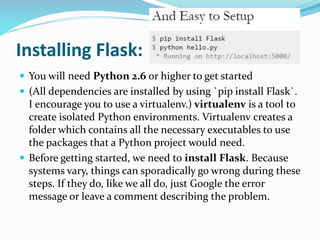
 You will need Python 2.6 or higher to get started
 (All dependencies are installed by using `pip install Flask`.
I encourage you to use a virtualenv.) virtualenv is a tool to
create isolated Python environments. Virtualenv creates a
folder which contains all the necessary executables to use
the packages that a Python project would need.
 Before getting started, we need to install Flask. Because
systems vary, things can sporadically go wrong during these
steps. If they do, like we all do, just Google the error
message or leave a comment describing the problem.
VERTUALENV:
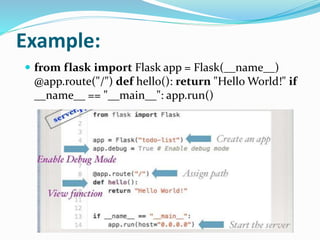
Example:
 from flask import Flask app = Flask(__name__)
@app.route("/") def hello(): return "Hello World!" if
__name__ == "__main__": app.run()
Hello world:
Debug Mode:
app.run(debug=True)
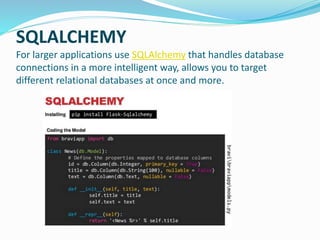
SQLALCHEMY
For larger applications use SQLAlchemy that handles database
connections in a more intelligent way, allows you to target
different relational databases at once and more.
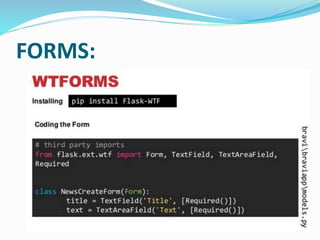
FORMS:
TUTORIAL: blogging application flaskr
1. User sign in and out with credentials specified in the configuration. Only one user is supported.
2. when the user is logged in they can add new entries to the page consisting of a text-only title and
some HTML for the text.
3. The page shows all entries so far in reverse order (newest on top) and the user can add new ones from there if
logged in
Setting up the Project Structure
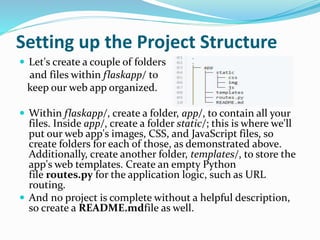
 Let's create a couple of folders
and files within flaskapp/ to
keep our web app organized.
 Within flaskapp/, create a folder, app/, to contain all your
files. Inside app/, create a folder static/; this is where we'll
put our web app's images, CSS, and JavaScript files, so
create folders for each of those, as demonstrated above.
Additionally, create another folder, templates/, to store the
app's web templates. Create an empty Python
file routes.py for the application logic, such as URL
routing.
 And no project is complete without a helpful description,
so create a README.mdfile as well.
Creating a Home page:
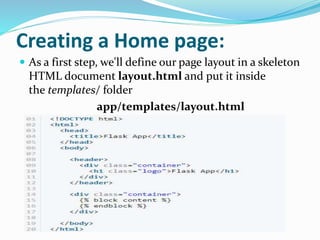
 As a first step, we'll define our page layout in a skeleton
HTML document layout.html and put it inside
the templates/ folder
app/templates/layout.html
 let's create another file home.html:
app/templates/home.html
 layout.html defines all of the common elements of
your site
 home.html is placed in the templates/ folder. Now, we
need to map a URL to it so we can view it in the
browser. Let's open up routes.py and do this:
 app/routes.py
 Return to the command line, and type:
$ python routes.py
 Visit http://localhost:5000/ in your favorite web
browser.
REFRENCE LINKS:
 WIKIPIDIA
 http://flask.pocoo.org/
 Slideshare.com
 www.fullstackpython.com
 www.google.co.in
 http://code.tutsplus.com/tutorials/an-introduction-
to-pythons-flask-framework--net-28822
MADE BY:
MAMTA
RUSTAMJI INSTITUTE OF TECHNOLOGY

Flask

  • 1.
    Flask is oneof the easiest ways to bring your Python skills online. It's a great micro framework used by thousands of people to create prototypes and small web apps.
  • 2.
    Introduction:  Flask isa micro web application framework written in Python and based on the Werkzeug toolkit(WSGI is the Web Server Gateway Interface. It is a specification that describes how a web server communicates with web applications, and how web applications can be chained together to process one request. WSGI is Python standard ) and Jinja2 template engine[Template engines are tools to separate program-logic and presentation into two independent parts. This makes the development of both logic and presentation easier, improves flexibility and eases modification and maintenance].  As of 2015, the latest stable version of Flask is 0.10.1.  Examples of applications that make use of the Flask framework are Pinterest, LinkedIn, as well as the community web page for Flask itself.
  • 3.
    Flask:  Flask iscalled a micro framework because it does not presume or force a developer to use a particular tool or library . It has no database abstraction layer, form validation, or any other components where pre- existing third-party libraries provide common functions. However, Flask supports extensions that can add application features as if they were implemented in Flask itself. Extensions exist for object-relational mappers, form validation, upload handling, various open authentication technologies and several common framework related tools.
  • 4.
    Features:  Contains developmentserver and debugger  Integrated support for unit testing  RESTful request dispatching  Uses Jinja2 templating  Support for secure cookies (client side sessions)  100% WSGI 1.0 compliant  Unicode-based  Extensive documentation  Google App Engine Compatibility  Extensions available to enhance features desired
  • 5.
    Installing Flask:  Youwill need Python 2.6 or higher to get started  (All dependencies are installed by using `pip install Flask`. I encourage you to use a virtualenv.) virtualenv is a tool to create isolated Python environments. Virtualenv creates a folder which contains all the necessary executables to use the packages that a Python project would need.  Before getting started, we need to install Flask. Because systems vary, things can sporadically go wrong during these steps. If they do, like we all do, just Google the error message or leave a comment describing the problem.
  • 6.
  • 7.
    Example:  from flaskimport Flask app = Flask(__name__) @app.route("/") def hello(): return "Hello World!" if __name__ == "__main__": app.run()
  • 8.
  • 9.
  • 10.
    SQLALCHEMY For larger applicationsuse SQLAlchemy that handles database connections in a more intelligent way, allows you to target different relational databases at once and more.
  • 11.
  • 12.
    TUTORIAL: blogging applicationflaskr 1. User sign in and out with credentials specified in the configuration. Only one user is supported. 2. when the user is logged in they can add new entries to the page consisting of a text-only title and some HTML for the text. 3. The page shows all entries so far in reverse order (newest on top) and the user can add new ones from there if logged in
  • 13.
    Setting up theProject Structure  Let's create a couple of folders and files within flaskapp/ to keep our web app organized.  Within flaskapp/, create a folder, app/, to contain all your files. Inside app/, create a folder static/; this is where we'll put our web app's images, CSS, and JavaScript files, so create folders for each of those, as demonstrated above. Additionally, create another folder, templates/, to store the app's web templates. Create an empty Python file routes.py for the application logic, such as URL routing.  And no project is complete without a helpful description, so create a README.mdfile as well.
  • 14.
    Creating a Homepage:  As a first step, we'll define our page layout in a skeleton HTML document layout.html and put it inside the templates/ folder app/templates/layout.html
  • 15.
     let's createanother file home.html: app/templates/home.html  layout.html defines all of the common elements of your site  home.html is placed in the templates/ folder. Now, we need to map a URL to it so we can view it in the browser. Let's open up routes.py and do this:
  • 16.
     app/routes.py  Returnto the command line, and type: $ python routes.py  Visit http://localhost:5000/ in your favorite web browser.
  • 17.
    REFRENCE LINKS:  WIKIPIDIA http://flask.pocoo.org/  Slideshare.com  www.fullstackpython.com  www.google.co.in  http://code.tutsplus.com/tutorials/an-introduction- to-pythons-flask-framework--net-28822
  • 18.