INTEGRATION ARCHITECTURE
WITH
THE DATA FLOW
22nd November 2018
Dominik Rose,
Customer Success Manager @LeanIX
The picture can't be displayed.
WIFI: Leanix Code: EAconnectdays2
Integration Architecture with the Data Flow
3
What you will
learn
How the Visualizer augments LeanIX standard
and custom reports
How to model an Interface in LeanIX
How to foster discussions regarding the
Integration Architecture with the Data Flow
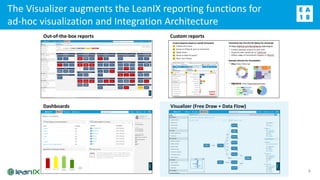
The Visualizer augments the LeanIX reporting functions for
ad-hoc visualization and Integration Architecture
4
Out-of-the-box reports Custom reports
Dashboards Visualizer (Free Draw + Data Flow)
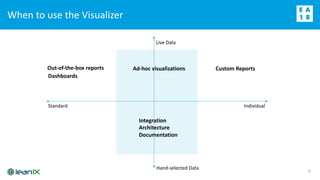
When to use the Visualizer
5
Out-of-the-box reports
Standard Individual
Live Data
Hand-selected Data
Dashboards
Custom ReportsAd-hoc visualizations
Integration
Architecture
Documentation
6
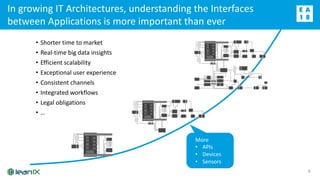
• Shorter time to market
• Real-time big data insights
• Efficient scalability
• Exceptional user experience
• Consistent channels
• Integrated workflows
• Legal obligations
• …
More
• APIs
• Devices
• Sensors
In growing IT Architectures, understanding the Interfaces
between Applications is more important than ever
Gartner‘s view on the API economy
7
APIs are the center of modern application architecture.
APIs enable decomposition of software monoliths.
One of the hallmarks of a successful API program is that you
get things that you don’t plan for and people build things you
don’t expect.
Source: https://www.programmableweb.com/news/gartner-clarifies-where-api-
economy-heading/analysis/2017/03/07
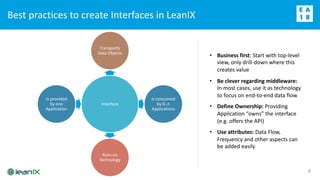
Best practices to create Interfaces in LeanIX
8
Interface
Transports
Data Objects
Is consumed
by 0..n
Applications
Runs on
Technology
Is provided
by one
Application
• Business first: Start with top-level
view, only drill-down where this
creates value
• Be clever regarding middleware:
In most cases, use it as technology
to focus on end-to-end data flow
• Define Ownership: Providing
Application “owns” the interface
(e.g. offers the API)
• Use attributes: Data Flow,
Frequency and other aspects can
be added easily
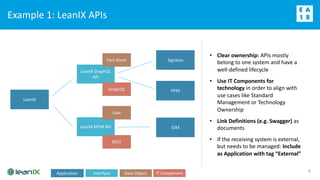
Example 1: LeanIX APIs
9
LeanIX
LeanIX MTM API
User
REST
LeanIX GraphQL
API
Fact Sheet
GraphQL
Signavio
PPM
IDM
• Clear ownership: APIs mostly
belong to one system and have a
well-defined lifecycle
• Use IT Components for
technology in order to align with
use cases like Standard
Management or Technology
Ownership
• Link Definitions (e.g. Swagger) as
documents
• If the receiving system is external,
but needs to be managed: Include
as Application with tag “External”
Application Interface Data Object IT Component
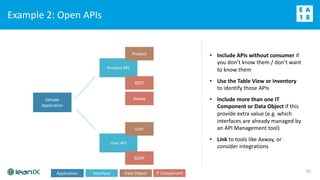
Example 2: Open APIs
10
Sample
Application
User API
User
SOAP
Product API
Product
REST
• Include APIs without consumer if
you don’t know them / don’t want
to know them
• Use the Table View or Inventory
to identify those APIs
• Include more than one IT
Component or Data Object if this
provide extra value (e.g. which
interfaces are already managed by
an API Management tool)
• Link to tools like Axway, or
consider integrations
Axway
Application Interface Data Object IT Component
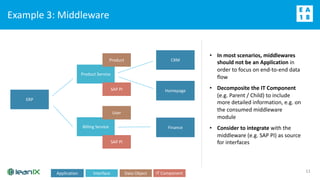
Example 3: Middleware
11
• In most scenarios, middlewares
should not be an Application in
order to focus on end-to-end data
flow
• Decomposite the IT Component
(e.g. Parent / Child) to include
more detailed information, e.g. on
the consumed middleware
module
• Consider to integrate with the
middleware (e.g. SAP PI) as source
for interfaces
ERP
Billing Service
User
SAP PI
Product Service
Product
SAP PI
CRM
Homepage
Finance
Application Interface Data Object IT Component
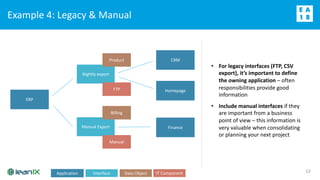
Example 4: Legacy & Manual
12
• For legacy interfaces (FTP, CSV
export), it’s important to define
the owning application – often
responsibilities provide good
information
• Include manual interfaces if they
are important from a business
point of view – this information is
very valuable when consolidating
or planning your next project
ERP
Manual Export
Billing
Manual
Nightly export
Product
FTP
CRM
Homepage
Finance
Application Interface Data Object IT Component
Data Flow - Walkthrough
13
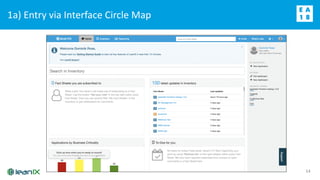
1a) Entry via Interface Circle Map
14
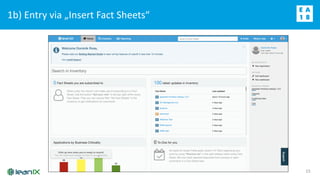
1b) Entry via „Insert Fact Sheets“
15
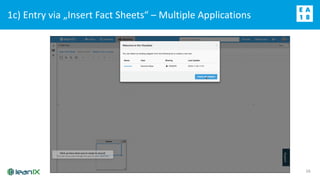
1c) Entry via „Insert Fact Sheets“ – Multiple Applications
16
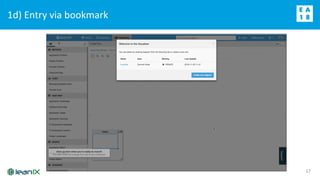
1d) Entry via bookmark
17
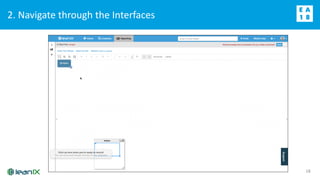
2. Navigate through the Interfaces
18
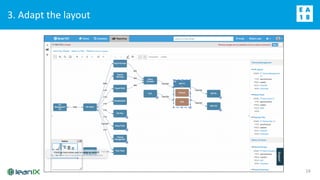
3. Adapt the layout
19
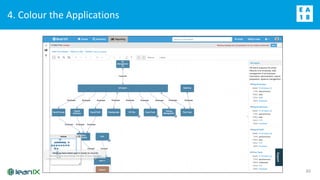
4. Colour the Applications
20
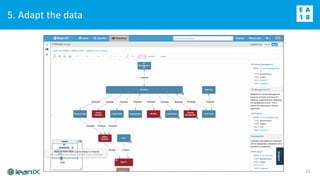
5. Adapt the data
21
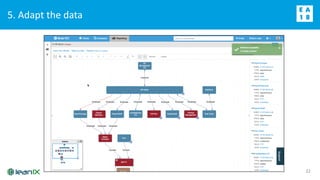
22
5. Adapt the data
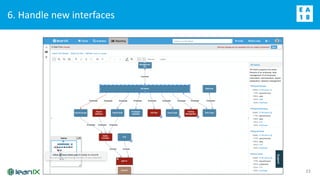
6. Handle new interfaces
23
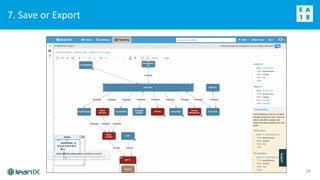
7. Save or Export
24
25
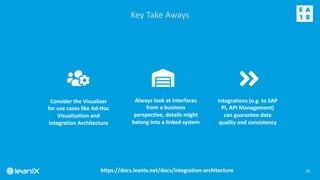
Key Take Aways
Always look at Interfaces
from a business
perspective, details might
belong into a linked system
Consider the Visualizer
for use cases like Ad-Hoc
Visualization and
Integration Architecture
Integrations (e.g. to SAP
PI, API Management)
can guarantee data
quality and consistency
https://docs.leanix.net/docs/integration-architecture
WIFI: Leanix
Code: EAconnectdays
26
Thank you! Any questions?

Integration Architecture with the Data Flow

  • 1.
    INTEGRATION ARCHITECTURE WITH THE DATAFLOW 22nd November 2018 Dominik Rose, Customer Success Manager @LeanIX
  • 2.
    The picture can'tbe displayed. WIFI: Leanix Code: EAconnectdays2
  • 3.
    Integration Architecture withthe Data Flow 3 What you will learn How the Visualizer augments LeanIX standard and custom reports How to model an Interface in LeanIX How to foster discussions regarding the Integration Architecture with the Data Flow
  • 4.
    The Visualizer augmentsthe LeanIX reporting functions for ad-hoc visualization and Integration Architecture 4 Out-of-the-box reports Custom reports Dashboards Visualizer (Free Draw + Data Flow)
  • 5.
    When to usethe Visualizer 5 Out-of-the-box reports Standard Individual Live Data Hand-selected Data Dashboards Custom ReportsAd-hoc visualizations Integration Architecture Documentation
  • 6.
    6 • Shorter timeto market • Real-time big data insights • Efficient scalability • Exceptional user experience • Consistent channels • Integrated workflows • Legal obligations • … More • APIs • Devices • Sensors In growing IT Architectures, understanding the Interfaces between Applications is more important than ever
  • 7.
    Gartner‘s view onthe API economy 7 APIs are the center of modern application architecture. APIs enable decomposition of software monoliths. One of the hallmarks of a successful API program is that you get things that you don’t plan for and people build things you don’t expect. Source: https://www.programmableweb.com/news/gartner-clarifies-where-api- economy-heading/analysis/2017/03/07
  • 8.
    Best practices tocreate Interfaces in LeanIX 8 Interface Transports Data Objects Is consumed by 0..n Applications Runs on Technology Is provided by one Application • Business first: Start with top-level view, only drill-down where this creates value • Be clever regarding middleware: In most cases, use it as technology to focus on end-to-end data flow • Define Ownership: Providing Application “owns” the interface (e.g. offers the API) • Use attributes: Data Flow, Frequency and other aspects can be added easily
  • 9.
    Example 1: LeanIXAPIs 9 LeanIX LeanIX MTM API User REST LeanIX GraphQL API Fact Sheet GraphQL Signavio PPM IDM • Clear ownership: APIs mostly belong to one system and have a well-defined lifecycle • Use IT Components for technology in order to align with use cases like Standard Management or Technology Ownership • Link Definitions (e.g. Swagger) as documents • If the receiving system is external, but needs to be managed: Include as Application with tag “External” Application Interface Data Object IT Component
  • 10.
    Example 2: OpenAPIs 10 Sample Application User API User SOAP Product API Product REST • Include APIs without consumer if you don’t know them / don’t want to know them • Use the Table View or Inventory to identify those APIs • Include more than one IT Component or Data Object if this provide extra value (e.g. which interfaces are already managed by an API Management tool) • Link to tools like Axway, or consider integrations Axway Application Interface Data Object IT Component
  • 11.
    Example 3: Middleware 11 •In most scenarios, middlewares should not be an Application in order to focus on end-to-end data flow • Decomposite the IT Component (e.g. Parent / Child) to include more detailed information, e.g. on the consumed middleware module • Consider to integrate with the middleware (e.g. SAP PI) as source for interfaces ERP Billing Service User SAP PI Product Service Product SAP PI CRM Homepage Finance Application Interface Data Object IT Component
  • 12.
    Example 4: Legacy& Manual 12 • For legacy interfaces (FTP, CSV export), it’s important to define the owning application – often responsibilities provide good information • Include manual interfaces if they are important from a business point of view – this information is very valuable when consolidating or planning your next project ERP Manual Export Billing Manual Nightly export Product FTP CRM Homepage Finance Application Interface Data Object IT Component
  • 13.
    Data Flow -Walkthrough 13
  • 14.
    1a) Entry viaInterface Circle Map 14
  • 15.
    1b) Entry via„Insert Fact Sheets“ 15
  • 16.
    1c) Entry via„Insert Fact Sheets“ – Multiple Applications 16
  • 17.
    1d) Entry viabookmark 17
  • 18.
    2. Navigate throughthe Interfaces 18
  • 19.
    3. Adapt thelayout 19
  • 20.
    4. Colour theApplications 20
  • 21.
    5. Adapt thedata 21
  • 22.
  • 23.
    6. Handle newinterfaces 23
  • 24.
    7. Save orExport 24
  • 25.
    25 Key Take Aways Alwayslook at Interfaces from a business perspective, details might belong into a linked system Consider the Visualizer for use cases like Ad-Hoc Visualization and Integration Architecture Integrations (e.g. to SAP PI, API Management) can guarantee data quality and consistency https://docs.leanix.net/docs/integration-architecture
  • 26.