THE MICROSERVICE INTEGRATION
23rd November 2018
Dominik Rose,
Customer Success Manager @LeanIX
The picture can't be displayed.
WIFI: Leanix Code: EAconnectdays2
The Microservice Integration
3
What you will
learn
What value LeanIX brings to modern Software
development
How to hook into your CI/CD process
How a full toolchain based on Github and
TravisCI could look like
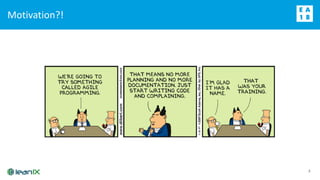
Motivation?!
4
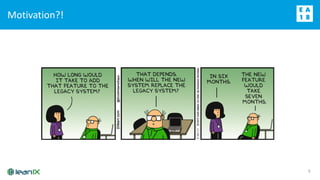
Motivation?!
5
Microservices are no silver bullet, but have certainly proven
helpful when flexibility and scaling are required
6
The Microservice Integration allows to automatically
document Microservices in LeanIX …
7
Source-Code Repository
Source code
Build Info
LeanIX Metadata
LeanIX
Inventory
Continuous
Integration (CI)
Pivio
Client
Fact Sheet
Builds the
Software
automatically
(new releases)
1
1 Dependencies from build system, e.g. uses Hibernate3, Java8, etc.
2 Automatically triggered, when a new release is created
3 Updates Fact Sheets in Inventory
2 3
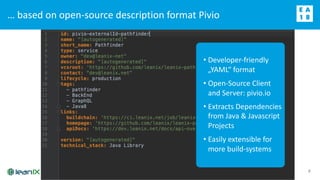
… based on open-source description format Pivio
8
• Developer-friendly
„YAML“ format
• Open-Source Client
and Server: pivio.io
• Extracts Dependencies
from Java & Javascript
Projects
• Easily extensible for
more build-systems
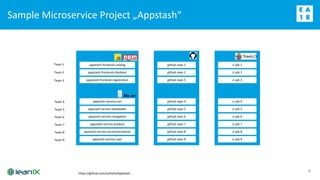
Sample Microservice Project „Appstash“
9
appstash-frontend-catalog
appstash-frontend-checkout
appstash-frontend-registration
appstash-service-cart
appstash-service-dataloader
appstash-service-navigation
appstash-service-product
appstash-service-recommendation
appstash-service-user
Team 1
Team 2
Team 3
Team 4
Team 5
Team 6
Team 7
Team 8
Team 9
github repo 1
github repo 2
github repo 3
github repo 4
github repo 5
github repo 6
github repo 7
github repo 8
github repo 9
ci job 1
ci job 2
ci job 3
ci job 4
ci job 5
ci job 6
ci job 7
ci job 8
ci job 9
https://github.com/zutherb/AppStash
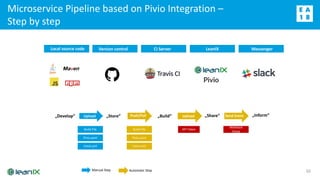
Microservice Pipeline based on Pivio Integration –
Step by step
10
Local source code Version control CI Server LeanIX Messenger
„Develop“ „Store“ „Build“ „Share“ „Inform“Upload Push/Pull Upload Send Event
Automatic StepManual Step
Pivio.yaml
Build-File
travis.yml
API Token
Webhook
Setup
Pivio.yaml
Build-File
travis.yml
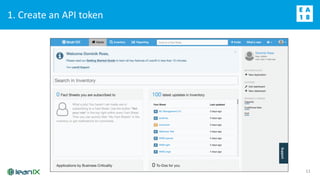
1. Create an API token
11
12
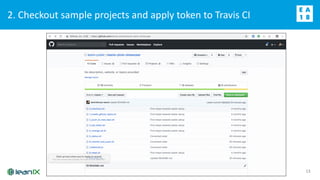
2. Checkout sample projects and apply token to Travis CI
13
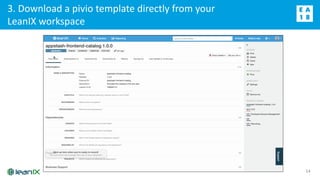
3. Download a pivio template directly from your
LeanIX workspace
14
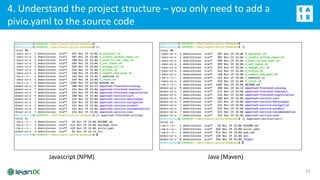
4. Understand the project structure – you only need to add a
pivio.yaml to the source code
15
Javascript (NPM) Java (Maven)
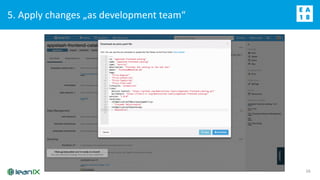
5. Apply changes „as development team“
16
Quick recap: Our Microservice Pipeline
17
Local source code Version control CI Server LeanIX Messenger
„Develop“ „Store“ „Build“ „Share“ „Inform“Upload Push/Pull Upload Send Event
Automatic StepManual Step
Pivio.yaml
Build-File
travis.yml
API Token
Webhook
Setup
Pivio.yaml
Build-File
travis.yml
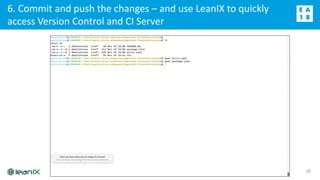
6. Commit and push the changes – and use LeanIX to quickly
access Version Control and CI Server
18
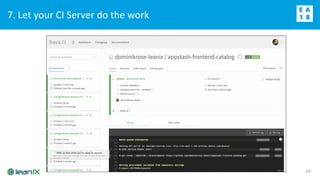
7. Let your CI Server do the work
19
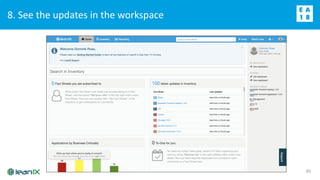
8. See the updates in the workspace
20
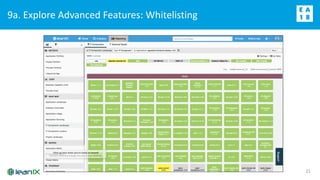
9a. Explore Advanced Features: Whitelisting
21
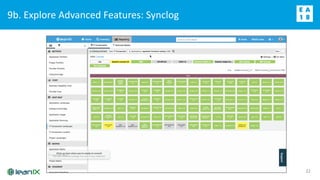
9b. Explore Advanced Features: Synclog
22
Wrap-Up (1/3): Deliberate Choice to put Microservices as
Application – different options to connect to “classical” world
23
Ordering
Inventory
Billing
Accounting
Application
Interface
IT Component
Order Service Billing Service
Inventory Service Accounting Service
SAP FI
Paypal
Billing
API
Order
API
Inventory
API
MySQL
MongoDB
Finance
API
Orders
Data Object
Invoices
Stock Items Balances
Use Cases
User Needs
People involved
• Digital Transformation
• M&A Harmonization
• Tech. Risk Mgmt
• Easy UI / UX
• Visualization
• Collaboration
• Extendable Repository
• + CTO
• + IT Product Mgr
• + IT Project Mgr
• Cloud Transformation
• Microservices Adoption
• IoT Enablement
• Integrations
• Automation
• Machine Learning
• Recommendations
• + SW Developer
• + IT Operations
• Generic Repository
• Meta-Modelling
• Scenario Analysis
• CIOs
• Top Management
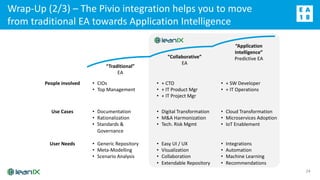
Wrap-Up (2/3) – The Pivio integration helps you to move
from traditional EA towards Application Intelligence
24
“Traditional”
EA
“Collaborative”
EA
“Application
Intelligence”
Predictive EA
• Documentation
• Rationalization
• Standards &
Governance
Wrap-Up (3/3): “Eat your own dogfood“ – Microservices,
Development Teams and Data Objects at LeanIX
25
26
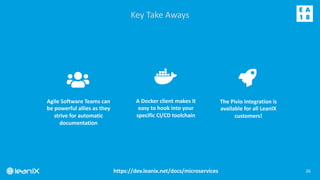
Key Take Aways
A Docker client makes it
easy to hook into your
specific CI/CD toolchain
Agile Software Teams can
be powerful allies as they
strive for automatic
documentation
The Pivio Integration is
available for all LeanIX
customers!
https://dev.leanix.net/docs/microservices
WIFI: Leanix
Code: EAconnectdays
Thank you! Any questions?

The LeanIX Microservices Integration

  • 1.
    THE MICROSERVICE INTEGRATION 23rdNovember 2018 Dominik Rose, Customer Success Manager @LeanIX
  • 2.
    The picture can'tbe displayed. WIFI: Leanix Code: EAconnectdays2
  • 3.
    The Microservice Integration 3 Whatyou will learn What value LeanIX brings to modern Software development How to hook into your CI/CD process How a full toolchain based on Github and TravisCI could look like
  • 4.
  • 5.
  • 6.
    Microservices are nosilver bullet, but have certainly proven helpful when flexibility and scaling are required 6
  • 7.
    The Microservice Integrationallows to automatically document Microservices in LeanIX … 7 Source-Code Repository Source code Build Info LeanIX Metadata LeanIX Inventory Continuous Integration (CI) Pivio Client Fact Sheet Builds the Software automatically (new releases) 1 1 Dependencies from build system, e.g. uses Hibernate3, Java8, etc. 2 Automatically triggered, when a new release is created 3 Updates Fact Sheets in Inventory 2 3
  • 8.
    … based onopen-source description format Pivio 8 • Developer-friendly „YAML“ format • Open-Source Client and Server: pivio.io • Extracts Dependencies from Java & Javascript Projects • Easily extensible for more build-systems
  • 9.
    Sample Microservice Project„Appstash“ 9 appstash-frontend-catalog appstash-frontend-checkout appstash-frontend-registration appstash-service-cart appstash-service-dataloader appstash-service-navigation appstash-service-product appstash-service-recommendation appstash-service-user Team 1 Team 2 Team 3 Team 4 Team 5 Team 6 Team 7 Team 8 Team 9 github repo 1 github repo 2 github repo 3 github repo 4 github repo 5 github repo 6 github repo 7 github repo 8 github repo 9 ci job 1 ci job 2 ci job 3 ci job 4 ci job 5 ci job 6 ci job 7 ci job 8 ci job 9 https://github.com/zutherb/AppStash
  • 10.
    Microservice Pipeline basedon Pivio Integration – Step by step 10 Local source code Version control CI Server LeanIX Messenger „Develop“ „Store“ „Build“ „Share“ „Inform“Upload Push/Pull Upload Send Event Automatic StepManual Step Pivio.yaml Build-File travis.yml API Token Webhook Setup Pivio.yaml Build-File travis.yml
  • 11.
    1. Create anAPI token 11
  • 12.
    12 2. Checkout sampleprojects and apply token to Travis CI
  • 13.
    2. Checkout sampleprojects and apply token to Travis CI 13
  • 14.
    3. Download apivio template directly from your LeanIX workspace 14
  • 15.
    4. Understand theproject structure – you only need to add a pivio.yaml to the source code 15 Javascript (NPM) Java (Maven)
  • 16.
    5. Apply changes„as development team“ 16
  • 17.
    Quick recap: OurMicroservice Pipeline 17 Local source code Version control CI Server LeanIX Messenger „Develop“ „Store“ „Build“ „Share“ „Inform“Upload Push/Pull Upload Send Event Automatic StepManual Step Pivio.yaml Build-File travis.yml API Token Webhook Setup Pivio.yaml Build-File travis.yml
  • 18.
    6. Commit andpush the changes – and use LeanIX to quickly access Version Control and CI Server 18
  • 19.
    7. Let yourCI Server do the work 19
  • 20.
    8. See theupdates in the workspace 20
  • 21.
    9a. Explore AdvancedFeatures: Whitelisting 21
  • 22.
    9b. Explore AdvancedFeatures: Synclog 22
  • 23.
    Wrap-Up (1/3): DeliberateChoice to put Microservices as Application – different options to connect to “classical” world 23 Ordering Inventory Billing Accounting Application Interface IT Component Order Service Billing Service Inventory Service Accounting Service SAP FI Paypal Billing API Order API Inventory API MySQL MongoDB Finance API Orders Data Object Invoices Stock Items Balances
  • 24.
    Use Cases User Needs Peopleinvolved • Digital Transformation • M&A Harmonization • Tech. Risk Mgmt • Easy UI / UX • Visualization • Collaboration • Extendable Repository • + CTO • + IT Product Mgr • + IT Project Mgr • Cloud Transformation • Microservices Adoption • IoT Enablement • Integrations • Automation • Machine Learning • Recommendations • + SW Developer • + IT Operations • Generic Repository • Meta-Modelling • Scenario Analysis • CIOs • Top Management Wrap-Up (2/3) – The Pivio integration helps you to move from traditional EA towards Application Intelligence 24 “Traditional” EA “Collaborative” EA “Application Intelligence” Predictive EA • Documentation • Rationalization • Standards & Governance
  • 25.
    Wrap-Up (3/3): “Eatyour own dogfood“ – Microservices, Development Teams and Data Objects at LeanIX 25
  • 26.
    26 Key Take Aways ADocker client makes it easy to hook into your specific CI/CD toolchain Agile Software Teams can be powerful allies as they strive for automatic documentation The Pivio Integration is available for all LeanIX customers! https://dev.leanix.net/docs/microservices
  • 27.