Early Knowledge Transfer
January 2018
Access Control Management
S/4HANA 1709 FPS01
CUSTOMER
2
CUSTOMER
© 2018 SAP SE or an SAP affiliate company. All rights reserved. ǀ
After completing this learning module, you will be able to:
 Explain the business process behind Access Control Management (ACM)
 List the key features of ACM
 Describe how document info record, recipe, and specification objects are integrated with
ACM
Objectives
3
CUSTOMER
© 2018 SAP SE or an SAP affiliate company. All rights reserved. ǀ
Business Scenario
 Authorization via ACM
 Super and trusted user concept
 Customizing
Owning Context Functionality
 Context maintenance
 Context search
 Transfer List
 Object Navigator
Object Functionality
 Context assignment
 Search and applications
 Object Navigator
Contents
Business Scenario
5
CUSTOMER
© 2018 SAP SE or an SAP affiliate company. All rights reserved. ǀ
You can use ACM to control access to certain business objects on top of using the authorizations granted by
the standard S/4HANA Identity and Access Management.
ACM is useful in the following scenarios:
 Collaboration within the intranet of a company
 Collaboration with business partners accessing data from the extranet
Advantages of ACM:
 Authorization is administered by business users
 Project-based authorization
 Business object instance level access
Use of ACM
6
CUSTOMER
© 2018 SAP SE or an SAP affiliate company. All rights reserved. ǀ
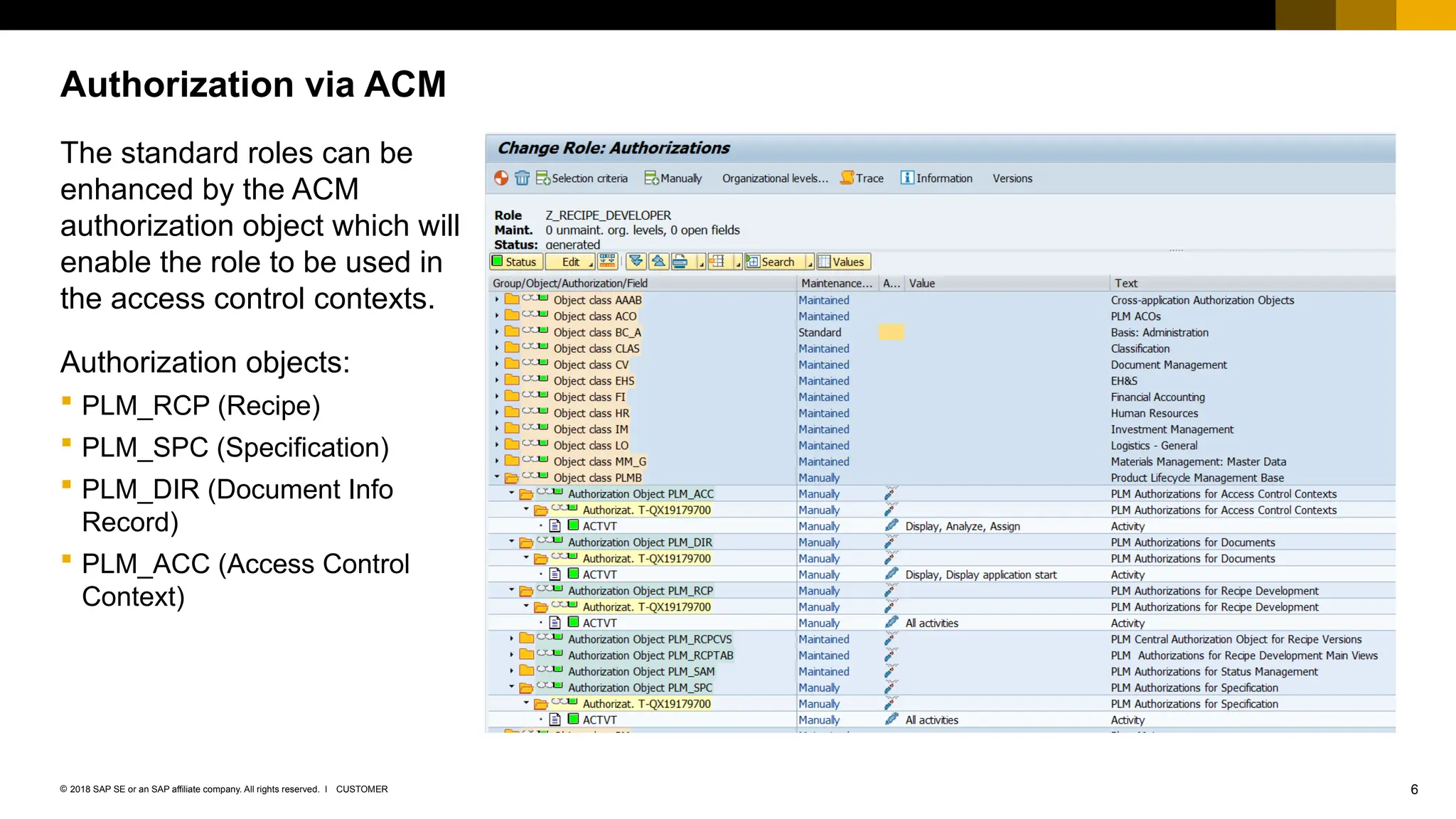
The standard roles can be
enhanced by the ACM
authorization object which will
enable the role to be used in
the access control contexts.
Authorization objects:
 PLM_RCP (Recipe)
 PLM_SPC (Specification)
 PLM_DIR (Document Info
Record)
 PLM_ACC (Access Control
Context)
Authorization via ACM
7
CUSTOMER
© 2018 SAP SE or an SAP affiliate company. All rights reserved. ǀ
The super and trusted user concept can add exception from the ACM authorization to users .
 Assigning the authorization object PLM_SPUSR (super user) to a role enable users to access objects
without considering the access authorization granted by ACM.
 Assigning the authorization object PLM_TRUSR (trusted user) to a role enable users to access objects that
are not controlled by ACM.
Super and Trusted User Concept
8
CUSTOMER
© 2018 SAP SE or an SAP affiliate company. All rights reserved. ǀ
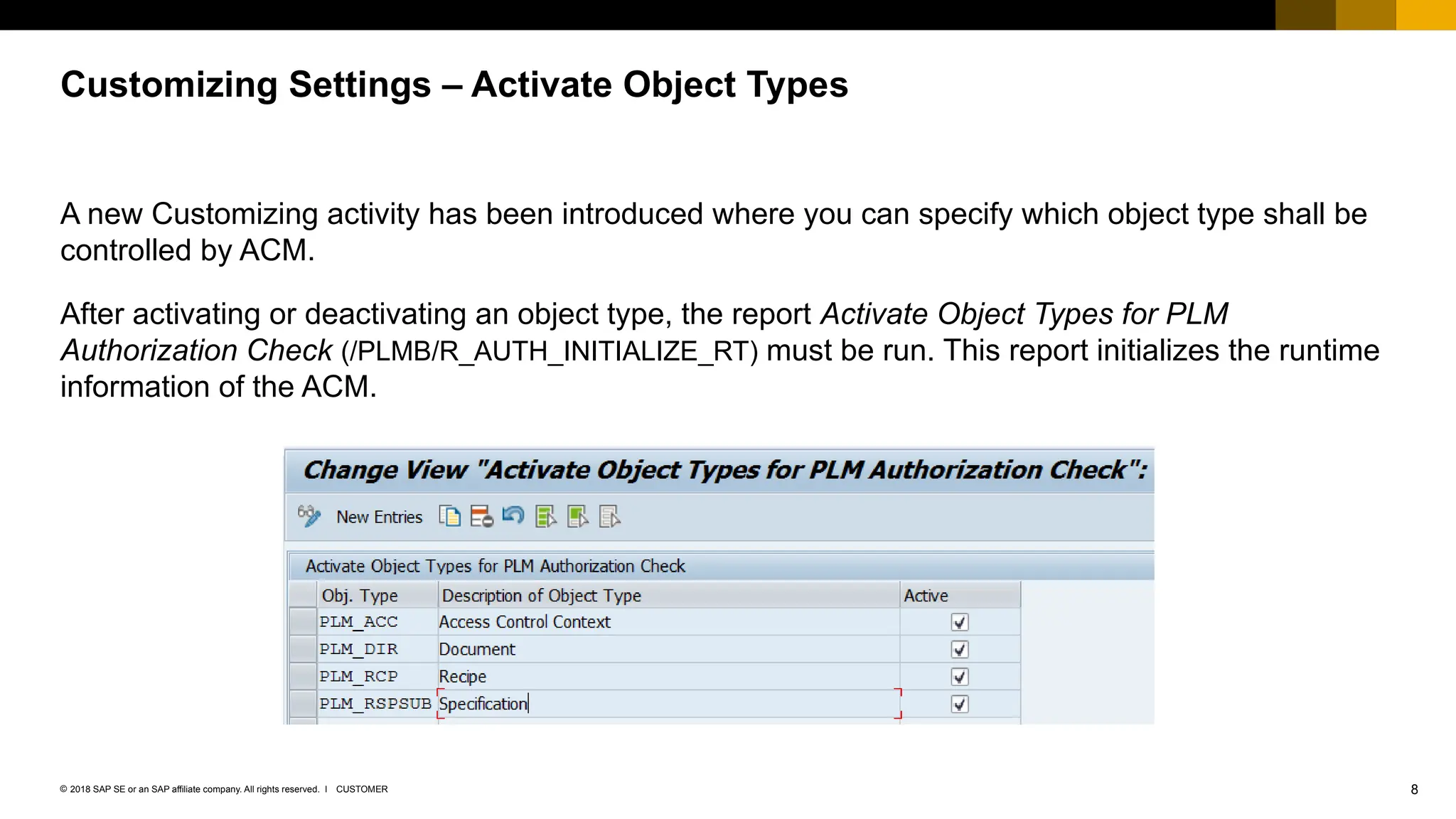
A new Customizing activity has been introduced where you can specify which object type shall be
controlled by ACM.
After activating or deactivating an object type, the report Activate Object Types for PLM
Authorization Check (/PLMB/R_AUTH_INITIALIZE_RT) must be run. This report initializes the runtime
information of the ACM.
Customizing Settings – Activate Object Types
9
CUSTOMER
© 2018 SAP SE or an SAP affiliate company. All rights reserved. ǀ
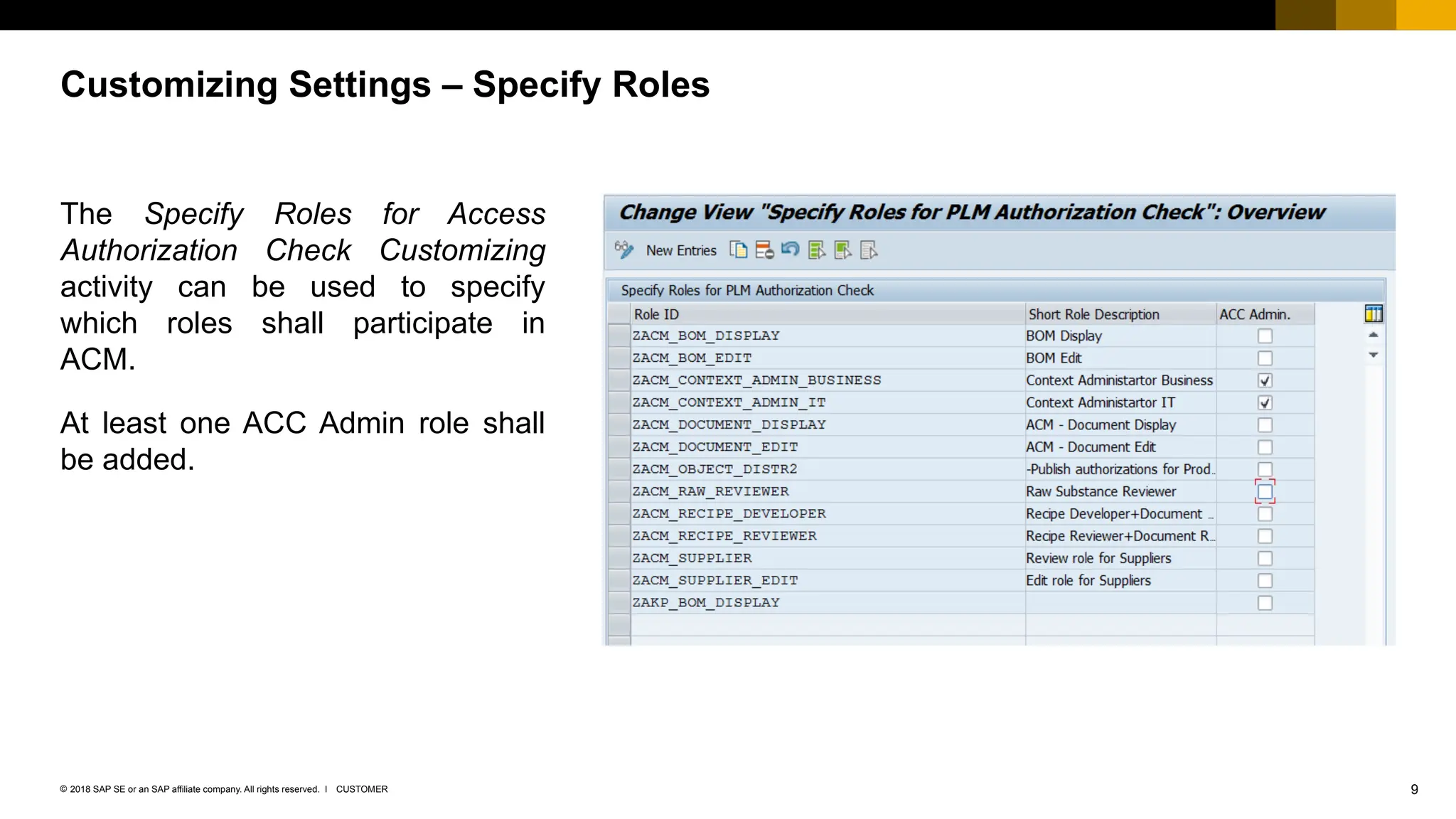
The Specify Roles for Access
Authorization Check Customizing
activity can be used to specify
which roles shall participate in
ACM.
At least one ACC Admin role shall
be added.
Customizing Settings – Specify Roles
10
CUSTOMER
© 2018 SAP SE or an SAP affiliate company. All rights reserved. ǀ
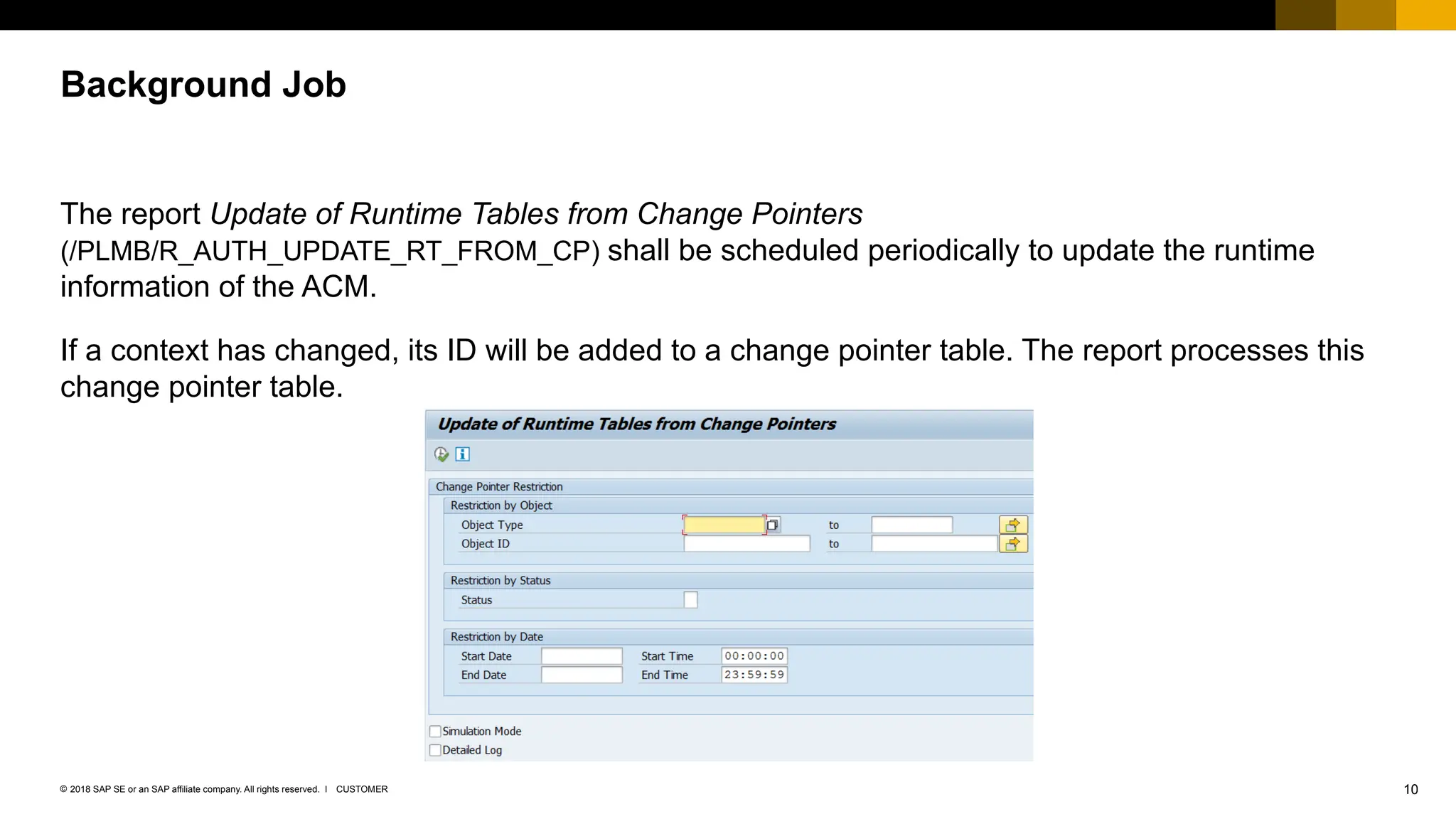
The report Update of Runtime Tables from Change Pointers
(/PLMB/R_AUTH_UPDATE_RT_FROM_CP) shall be scheduled periodically to update the runtime
information of the ACM.
If a context has changed, its ID will be added to a change pointer table. The report processes this
change pointer table.
Background Job
Owning Context Functionality
12
CUSTOMER
© 2018 SAP SE or an SAP affiliate company. All rights reserved. ǀ
The context type determines the purpose and use of a context. There are three context types:
Root context
 The purpose is to inherit authorizations down to the whole context hierarchy. This context is the only context
that does not have a parent context. During system setup, you create a root context by running a program
(see Customizing under Logistics – General Product Lifecycle Management (PLM) – PLM Web User
Interface – PLM Web Applications – PLM Authorizations and Access Control Context – Create a Root Access
Control Context).
Standard context
 A context type that owns all its objects. This context has a parent context.
Compound context
 A special context that does not only own objects but also allows objects to be assigned to it without the
objects actually belonging to it. This context has a parent context.
Context Maintenance – Context Types
13
CUSTOMER
© 2018 SAP SE or an SAP affiliate company. All rights reserved. ǀ
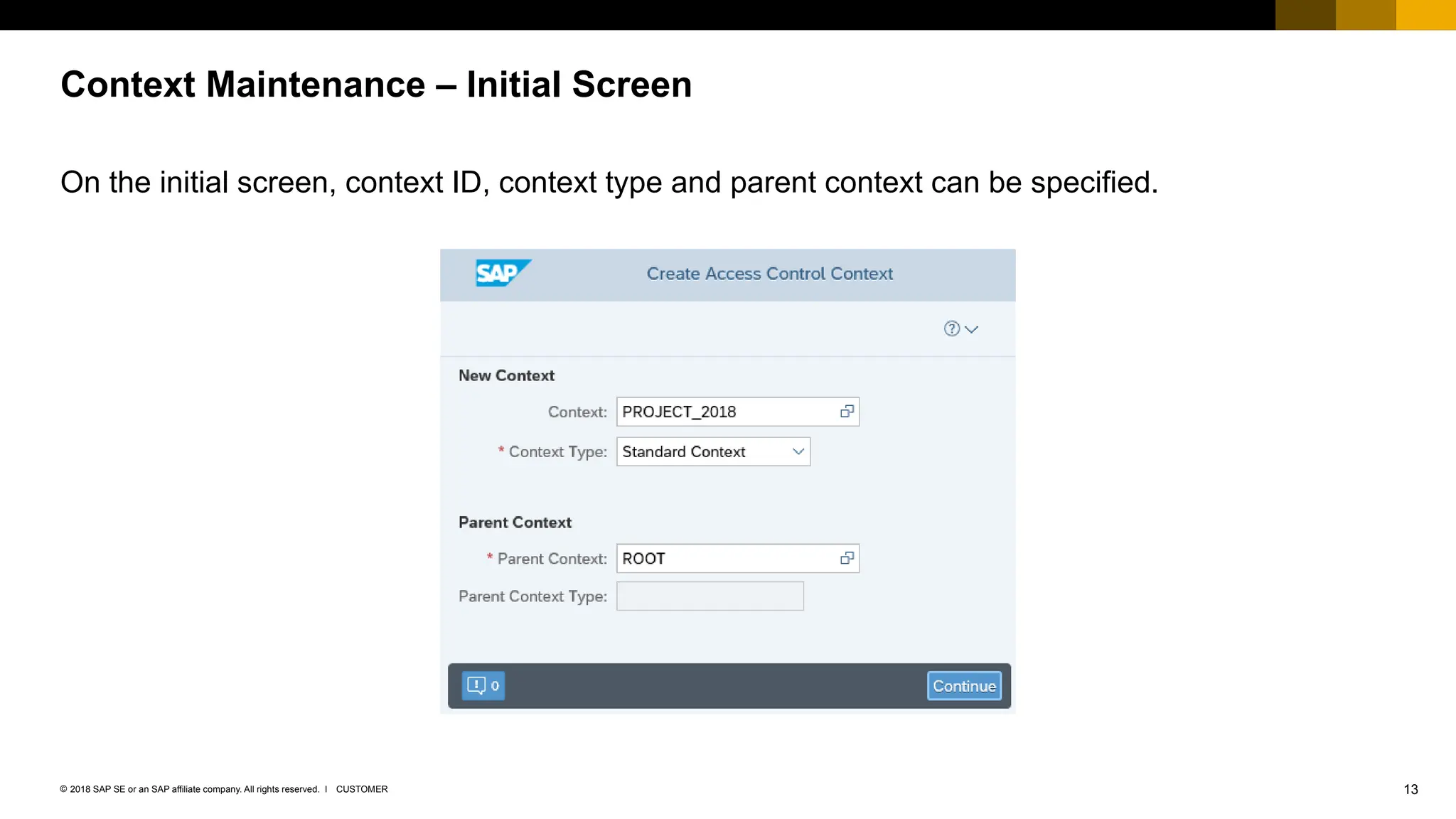
On the initial screen, context ID, context type and parent context can be specified.
Context Maintenance – Initial Screen
14
CUSTOMER
© 2018 SAP SE or an SAP affiliate company. All rights reserved. ǀ
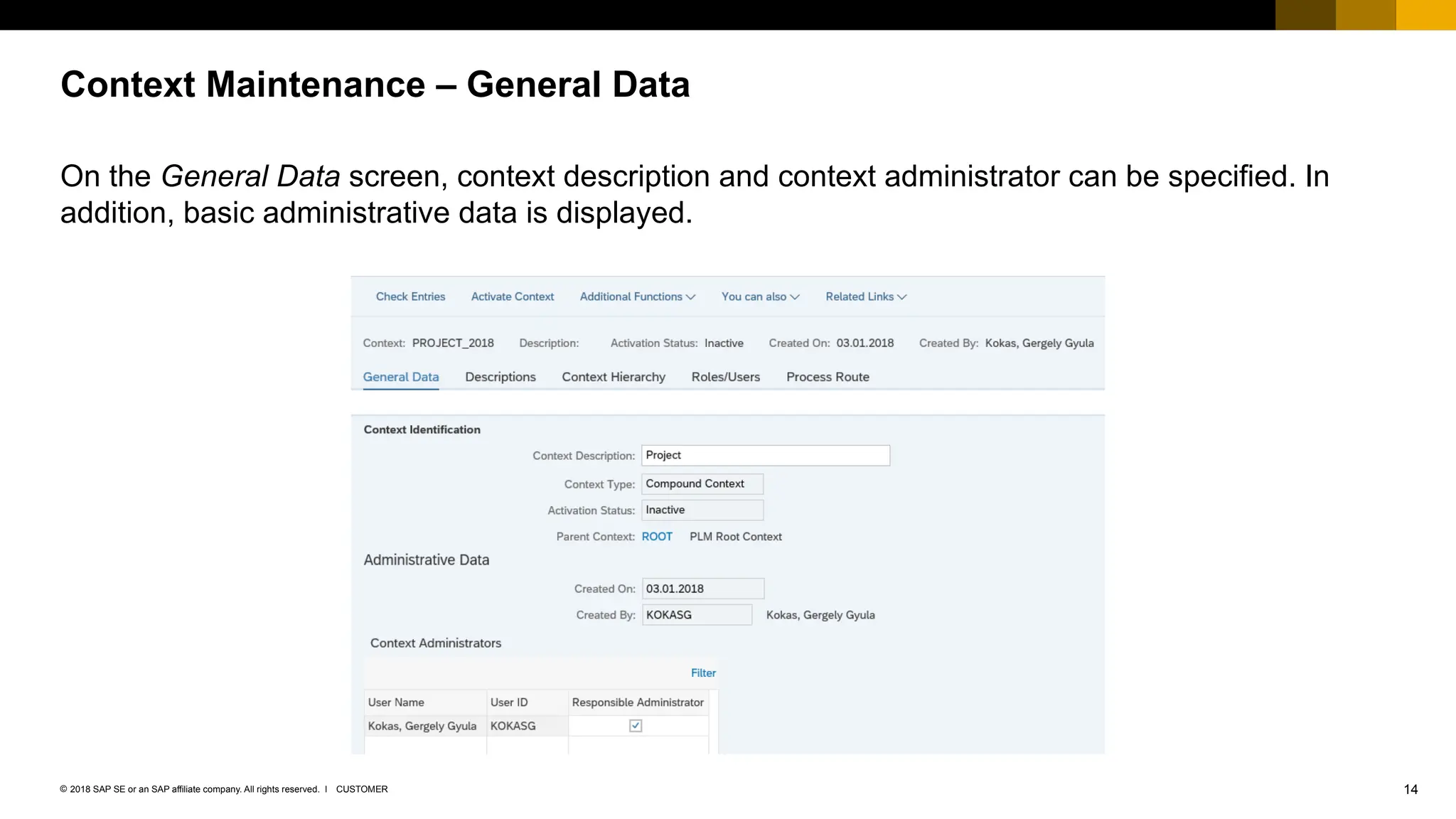
On the General Data screen, context description and context administrator can be specified. In
addition, basic administrative data is displayed.
Context Maintenance – General Data
15
CUSTOMER
© 2018 SAP SE or an SAP affiliate company. All rights reserved. ǀ
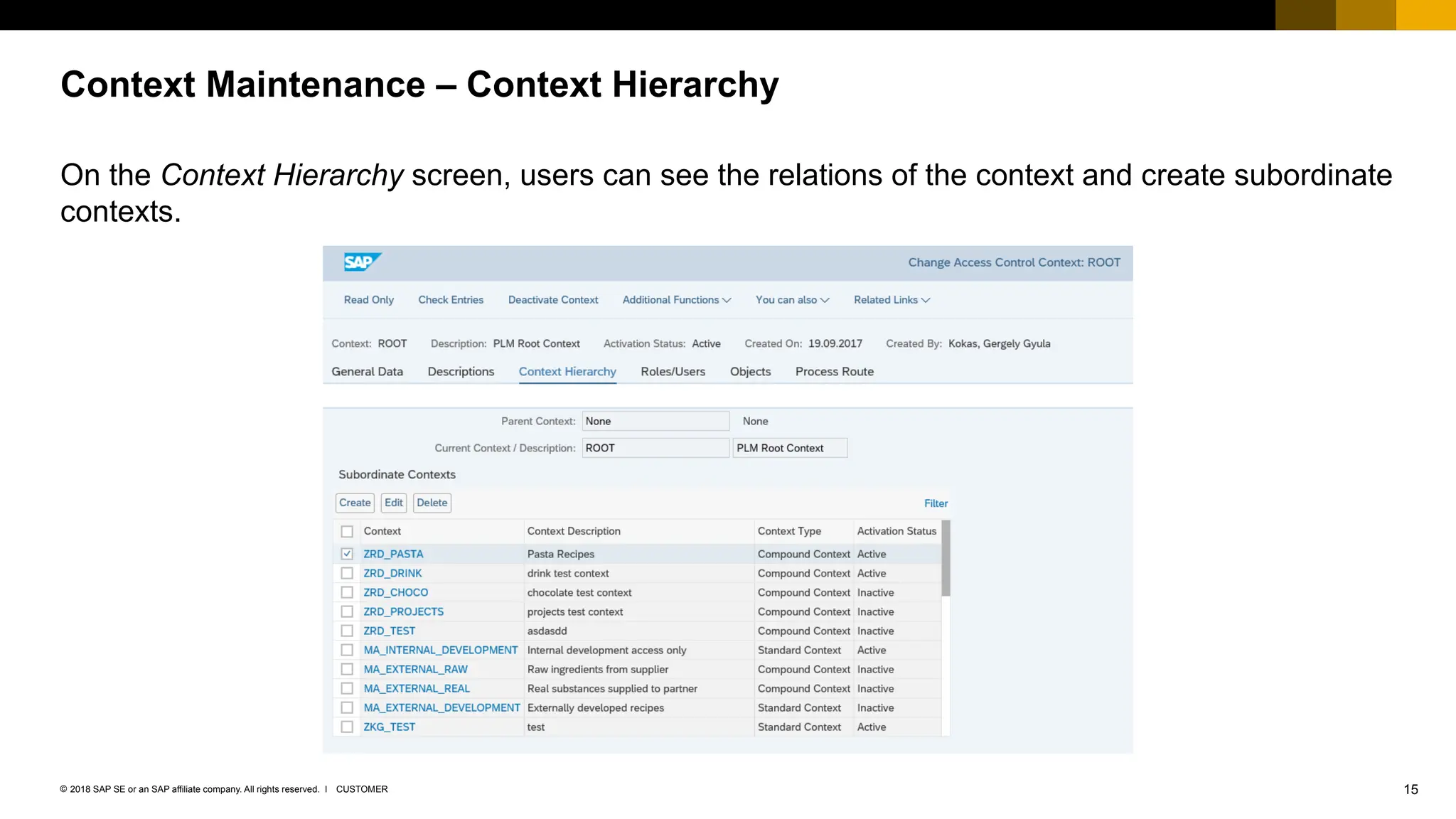
On the Context Hierarchy screen, users can see the relations of the context and create subordinate
contexts.
Context Maintenance – Context Hierarchy
16
CUSTOMER
© 2018 SAP SE or an SAP affiliate company. All rights reserved. ǀ
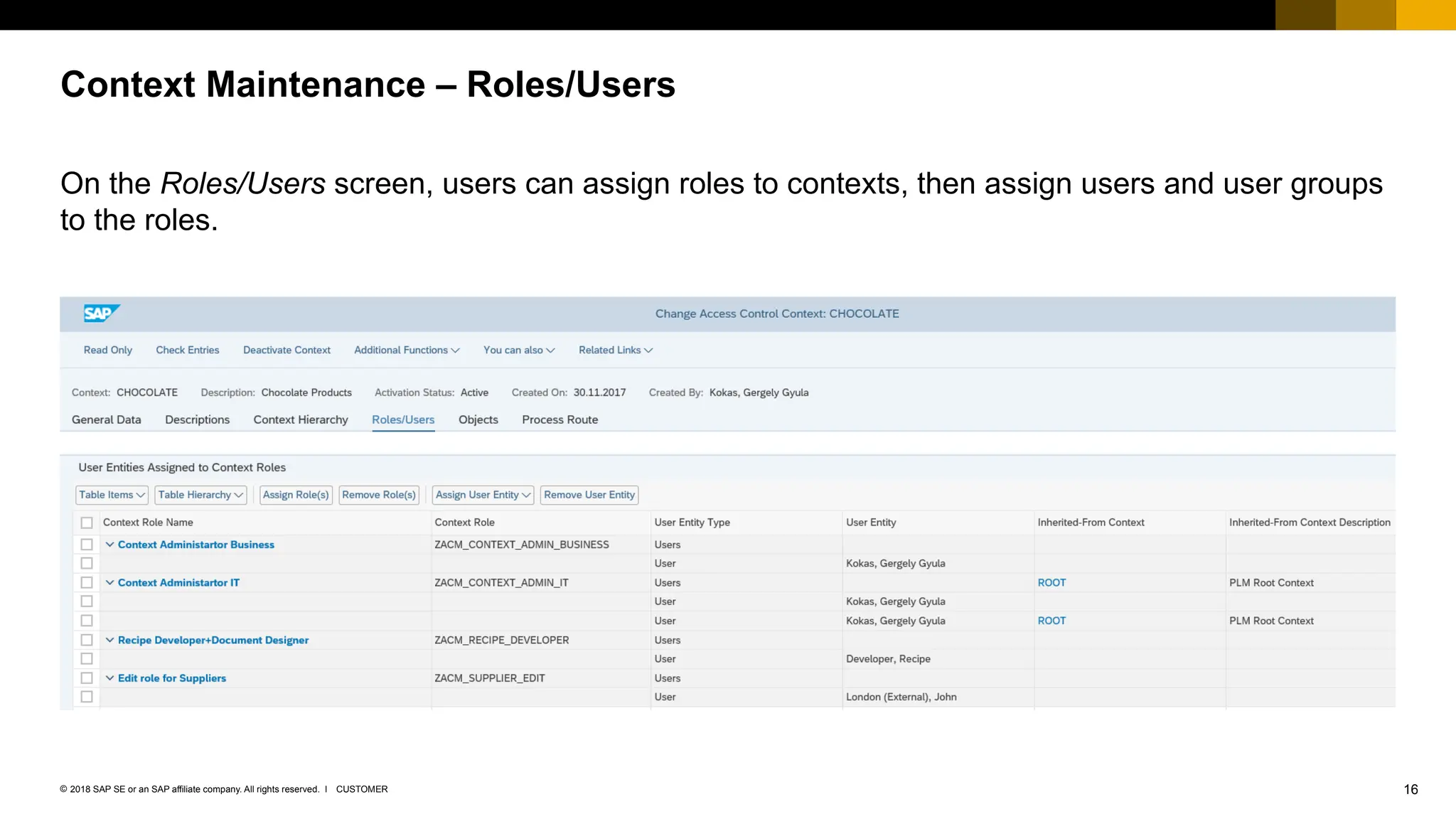
On the Roles/Users screen, users can assign roles to contexts, then assign users and user groups
to the roles.
Context Maintenance – Roles/Users
17
CUSTOMER
© 2018 SAP SE or an SAP affiliate company. All rights reserved. ǀ
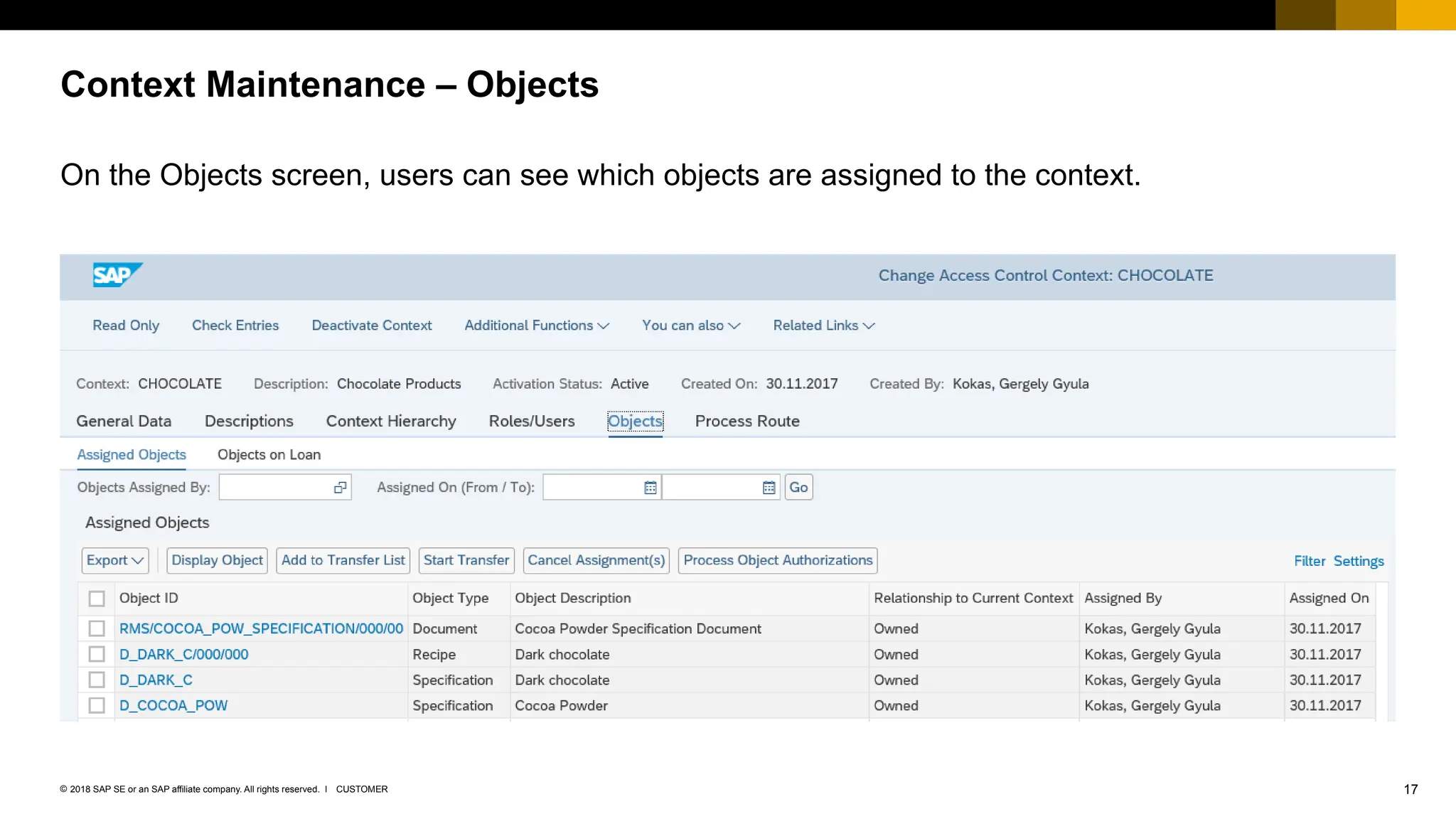
On the Objects screen, users can see which objects are assigned to the context.
Context Maintenance – Objects
18
CUSTOMER
© 2018 SAP SE or an SAP affiliate company. All rights reserved. ǀ
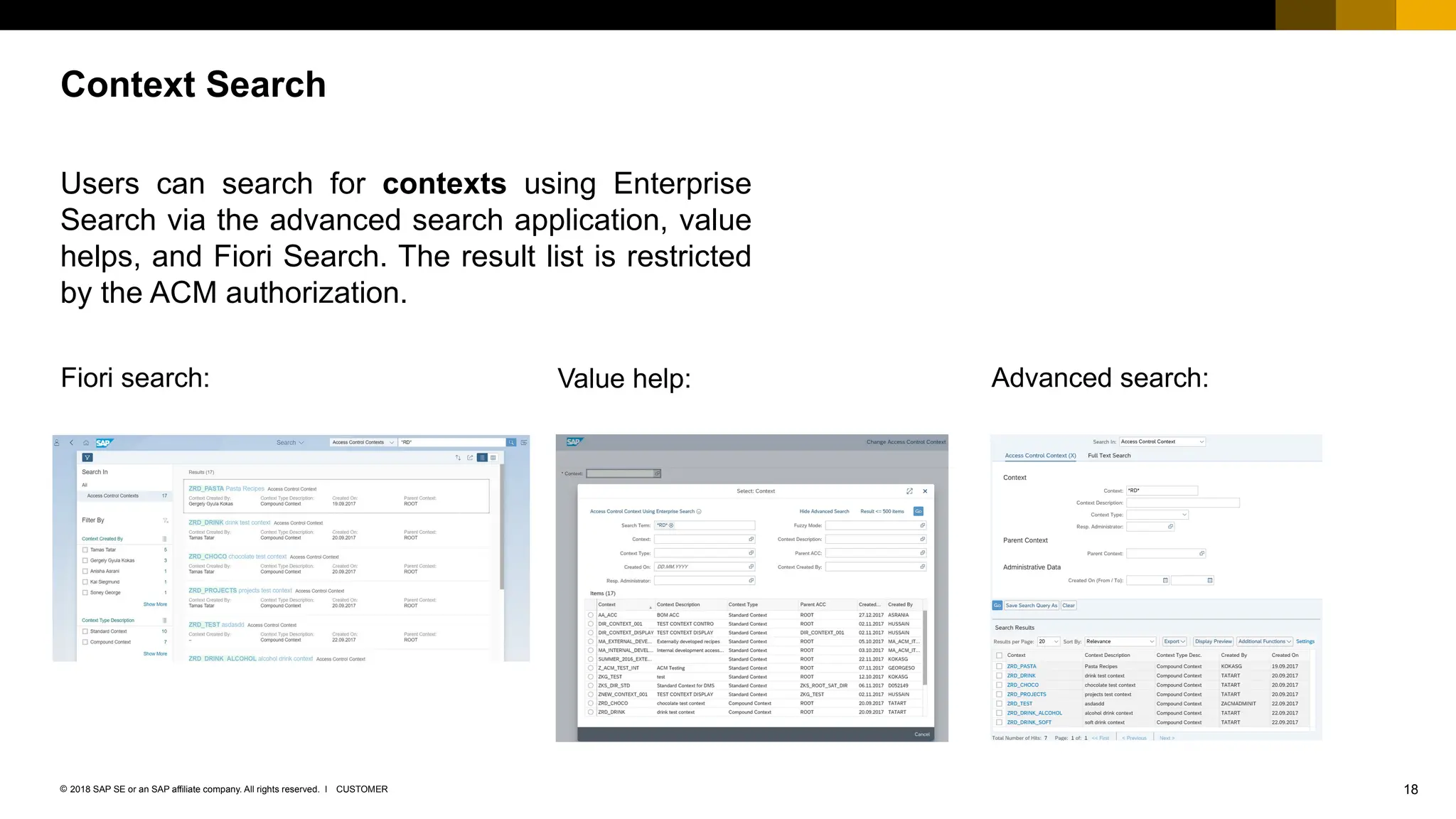
Users can search for contexts using Enterprise
Search via the advanced search application, value
helps, and Fiori Search. The result list is restricted
by the ACM authorization.
Context Search
Fiori search: Value help: Advanced search:
19
CUSTOMER
© 2018 SAP SE or an SAP affiliate company. All rights reserved. ǀ
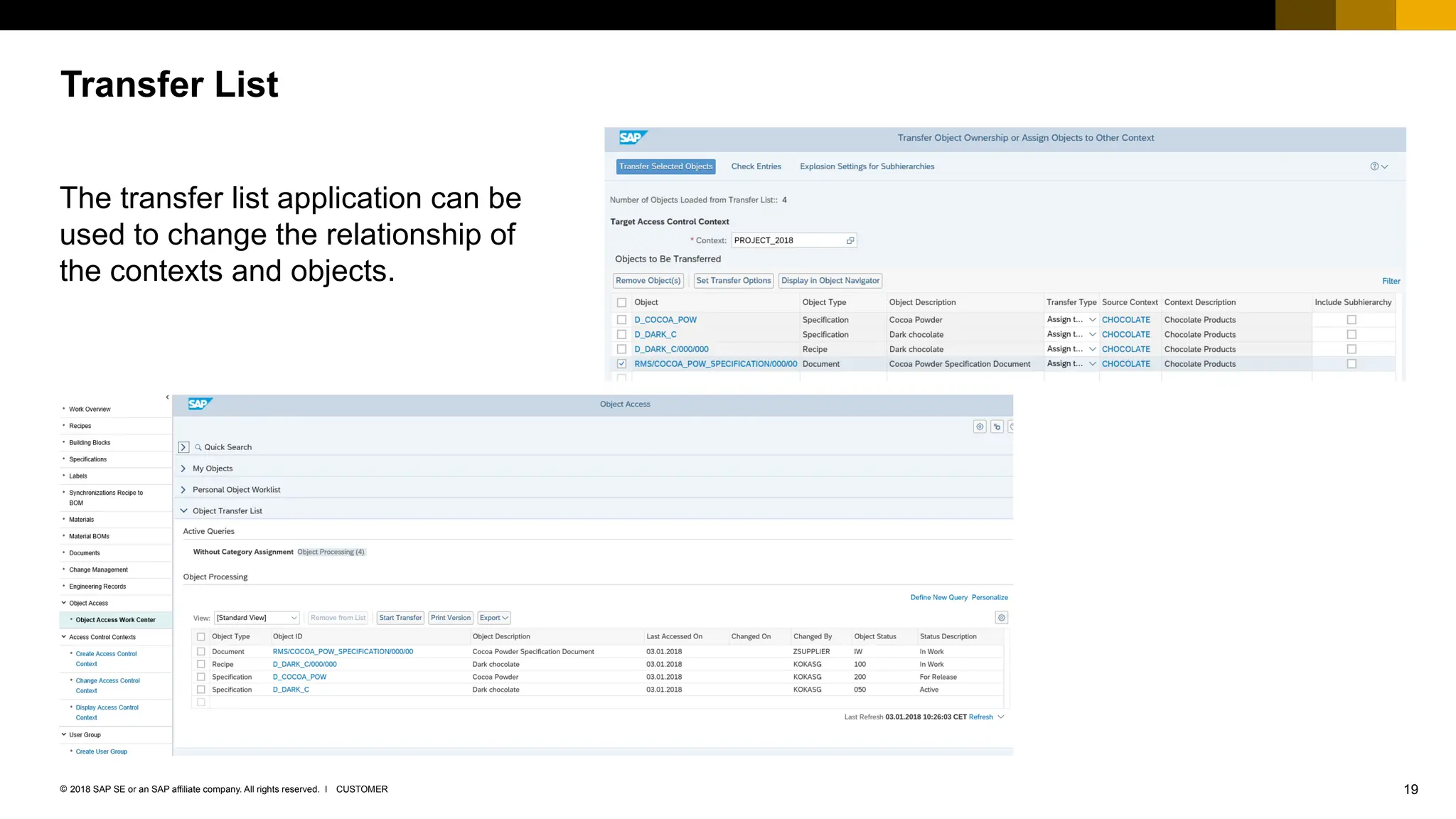
The transfer list application can be
used to change the relationship of
the contexts and objects.
Transfer List
20
CUSTOMER
© 2018 SAP SE or an SAP affiliate company. All rights reserved. ǀ
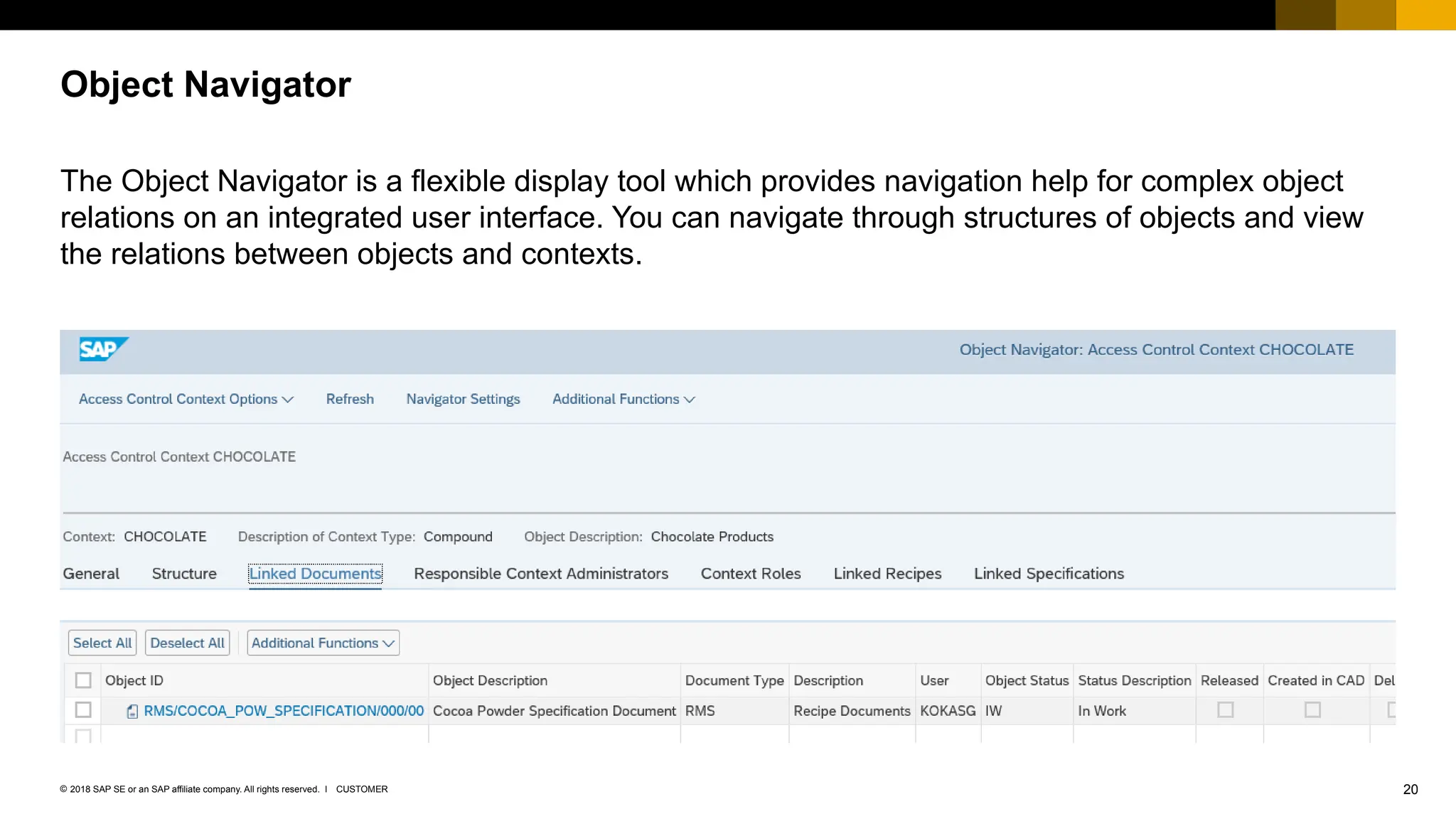
The Object Navigator is a flexible display tool which provides navigation help for complex object
relations on an integrated user interface. You can navigate through structures of objects and view
the relations between objects and contexts.
Object Navigator
Object Functionality
22
CUSTOMER
© 2018 SAP SE or an SAP affiliate company. All rights reserved. ǀ
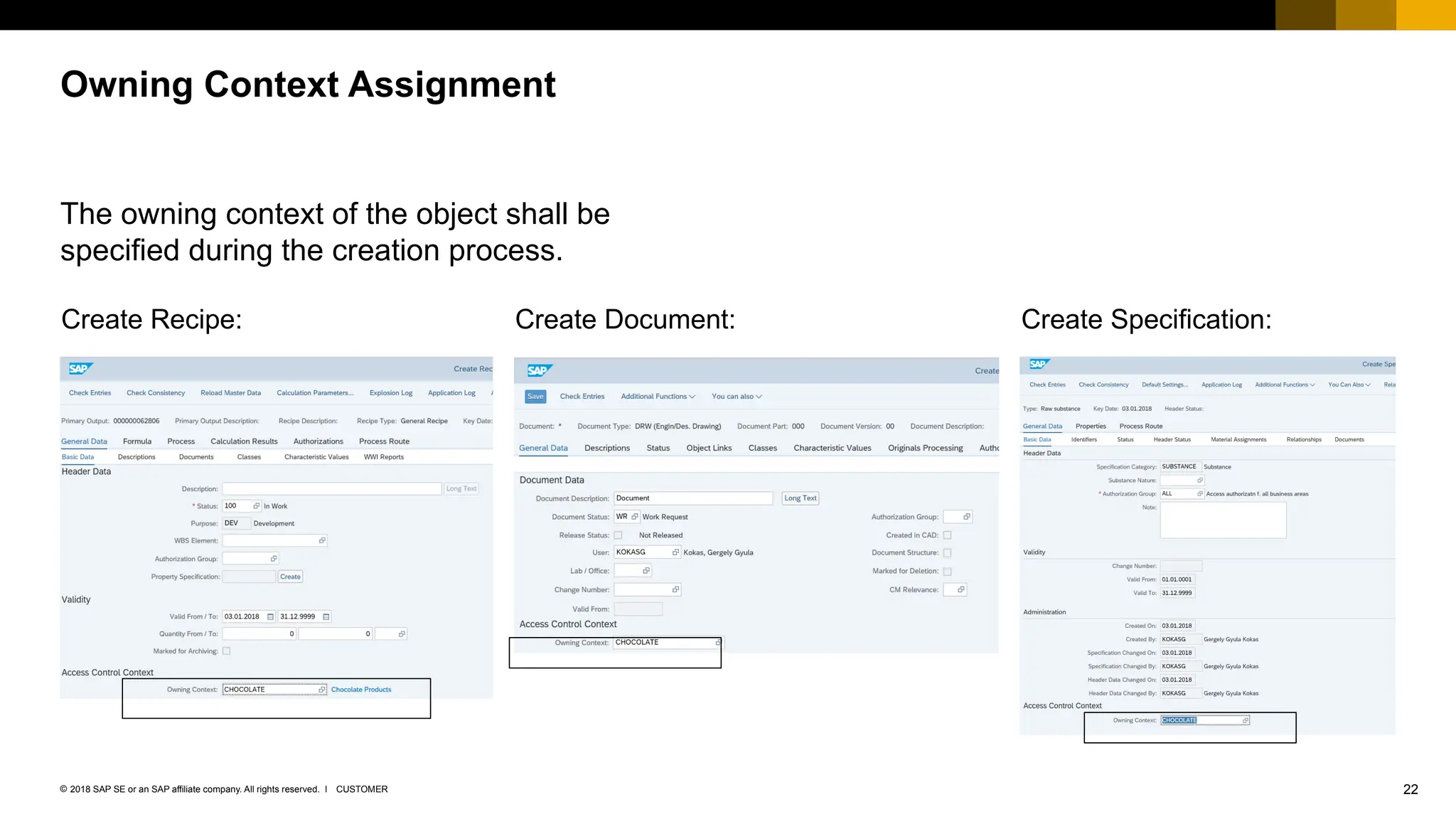
The owning context of the object shall be
specified during the creation process.
Owning Context Assignment
Create Recipe: Create Document: Create Specification:
23
CUSTOMER
© 2018 SAP SE or an SAP affiliate company. All rights reserved. ǀ
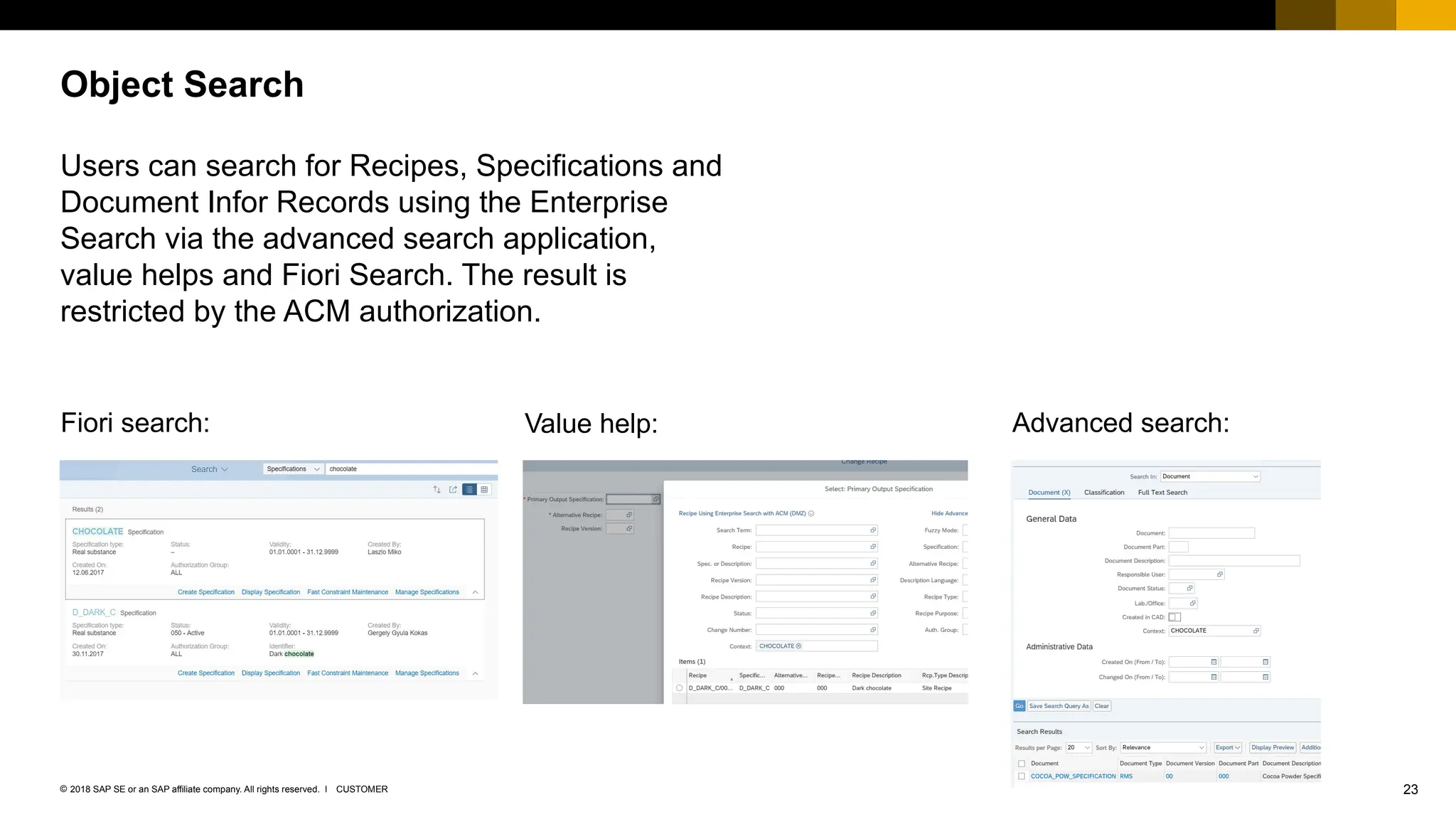
Users can search for Recipes, Specifications and
Document Infor Records using the Enterprise
Search via the advanced search application,
value helps and Fiori Search. The result is
restricted by the ACM authorization.
Object Search
Fiori search: Value help: Advanced search:
24
CUSTOMER
© 2018 SAP SE or an SAP affiliate company. All rights reserved. ǀ
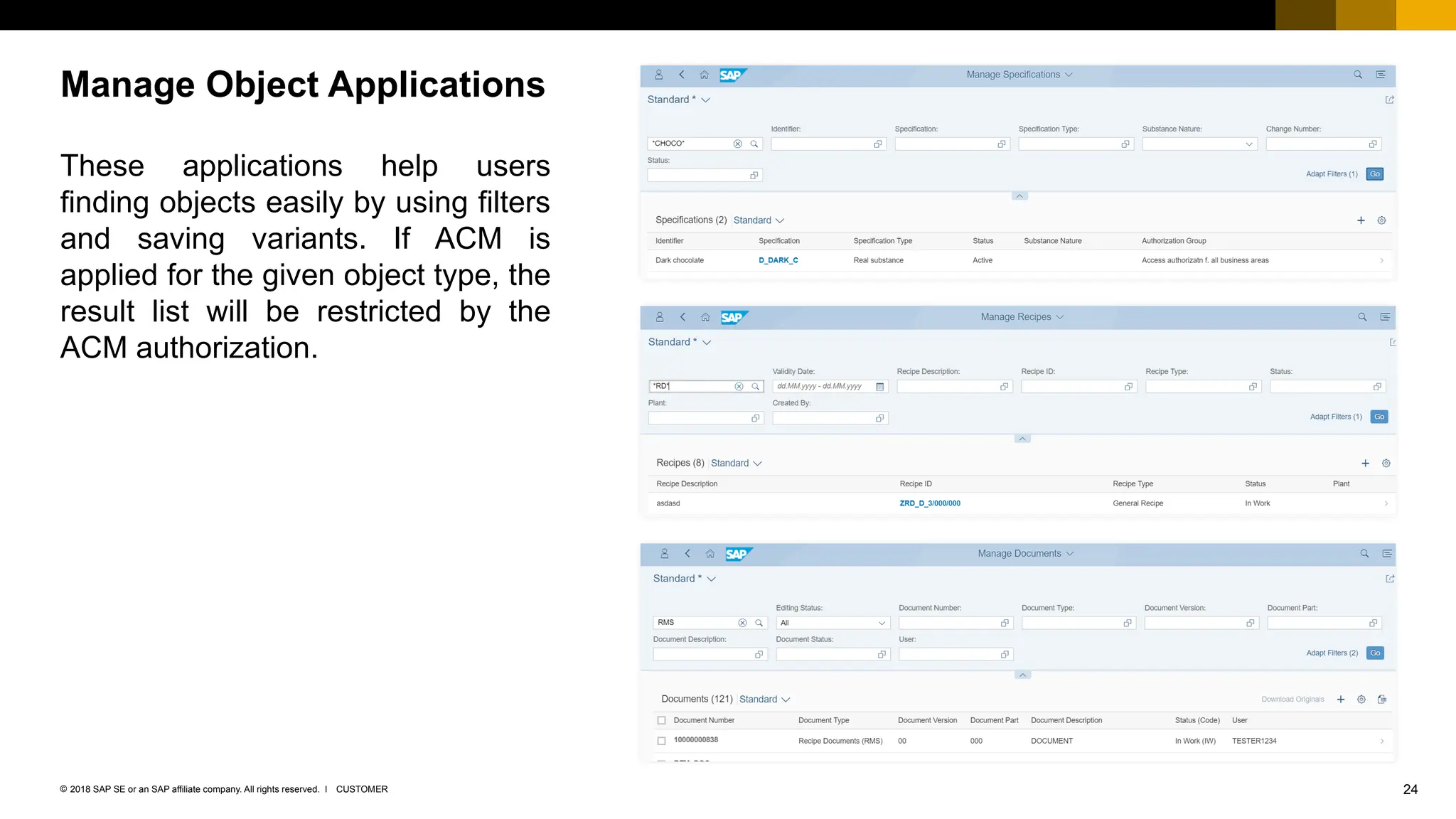
These applications help users
finding objects easily by using filters
and saving variants. If ACM is
applied for the given object type, the
result list will be restricted by the
ACM authorization.
Manage Object Applications
25
CUSTOMER
© 2018 SAP SE or an SAP affiliate company. All rights reserved. ǀ
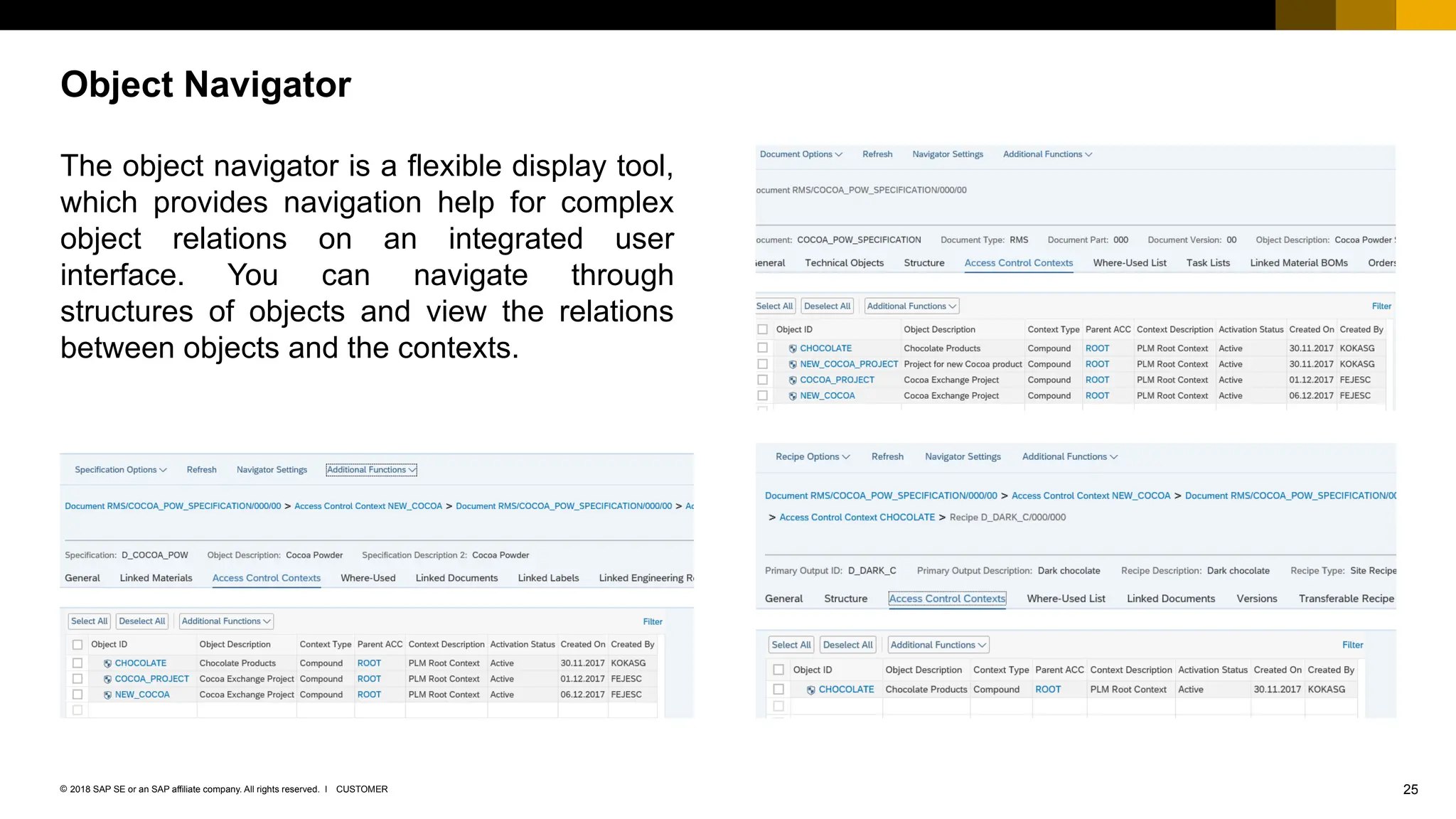
The object navigator is a flexible display tool,
which provides navigation help for complex
object relations on an integrated user
interface. You can navigate through
structures of objects and view the relations
between objects and the contexts.
Object Navigator
26
CUSTOMER
© 2018 SAP SE or an SAP affiliate company. All rights reserved. ǀ
You should now be able to
 Explain the business process behind Access Control Management
 List the features of ACM
 Describe the how the Recipe, Specification and Document Info Record is integrated with
ACM
Summary
No part of this publication may be reproduced or transmitted in any form or for any purpose without the express permission of SAP SE or an SAP affiliate company.
The information contained herein may be changed without prior notice. Some software products marketed by SAP SE and its distributors contain proprietary software components
of other software vendors. National product specifications may vary.
These materials are provided by SAP SE or an SAP affiliate company for informational purposes only, without representation or warranty of any kind, and SAP or its affiliated
companies shall not be liable for errors or omissions with respect to the materials. The only warranties for SAP or SAP affiliate company products and services are those that are
set forth in the express warranty statements accompanying such products and services, if any. Nothing herein should be construed as constituting an additional warranty.
In particular, SAP SE or its affiliated companies have no obligation to pursue any course of business outlined in this document or any related presentation, or to develop or release
any functionality mentioned therein. This document, or any related presentation, and SAP SE’s or its affiliated companies’ strategy and possible future developments, products,
and/or platform directions and functionality are all subject to change and may be changed by SAP SE or its affiliated companies at any time for any reason without notice. The
information in this document is not a commitment, promise, or legal obligation to deliver any material, code, or functionality. All forward-looking statements are subject to various
risks and uncertainties that could cause actual results to differ materially from expectations. Readers are cautioned not to place undue reliance on these forward-looking statements,
and they should not be relied upon in making purchasing decisions.
SAP and other SAP products and services mentioned herein as well as their respective logos are trademarks or registered trademarks of SAP SE (or an SAP affiliate company)
in Germany and other countries. All other product and service names mentioned are the trademarks of their respective companies.
See http://global.sap.com/corporate-en/legal/copyright/index.epx for additional trademark information and notices.
© 2018 SAP SE or an SAP affiliate company. All rights reserved.

AccessControlMgmt_EKT_1709_FPS01_version1pptx

  • 1.
    Early Knowledge Transfer January2018 Access Control Management S/4HANA 1709 FPS01 CUSTOMER
  • 2.
    2 CUSTOMER © 2018 SAPSE or an SAP affiliate company. All rights reserved. ǀ After completing this learning module, you will be able to:  Explain the business process behind Access Control Management (ACM)  List the key features of ACM  Describe how document info record, recipe, and specification objects are integrated with ACM Objectives
  • 3.
    3 CUSTOMER © 2018 SAPSE or an SAP affiliate company. All rights reserved. ǀ Business Scenario  Authorization via ACM  Super and trusted user concept  Customizing Owning Context Functionality  Context maintenance  Context search  Transfer List  Object Navigator Object Functionality  Context assignment  Search and applications  Object Navigator Contents
  • 4.
  • 5.
    5 CUSTOMER © 2018 SAPSE or an SAP affiliate company. All rights reserved. ǀ You can use ACM to control access to certain business objects on top of using the authorizations granted by the standard S/4HANA Identity and Access Management. ACM is useful in the following scenarios:  Collaboration within the intranet of a company  Collaboration with business partners accessing data from the extranet Advantages of ACM:  Authorization is administered by business users  Project-based authorization  Business object instance level access Use of ACM
  • 6.
    6 CUSTOMER © 2018 SAPSE or an SAP affiliate company. All rights reserved. ǀ The standard roles can be enhanced by the ACM authorization object which will enable the role to be used in the access control contexts. Authorization objects:  PLM_RCP (Recipe)  PLM_SPC (Specification)  PLM_DIR (Document Info Record)  PLM_ACC (Access Control Context) Authorization via ACM
  • 7.
    7 CUSTOMER © 2018 SAPSE or an SAP affiliate company. All rights reserved. ǀ The super and trusted user concept can add exception from the ACM authorization to users .  Assigning the authorization object PLM_SPUSR (super user) to a role enable users to access objects without considering the access authorization granted by ACM.  Assigning the authorization object PLM_TRUSR (trusted user) to a role enable users to access objects that are not controlled by ACM. Super and Trusted User Concept
  • 8.
    8 CUSTOMER © 2018 SAPSE or an SAP affiliate company. All rights reserved. ǀ A new Customizing activity has been introduced where you can specify which object type shall be controlled by ACM. After activating or deactivating an object type, the report Activate Object Types for PLM Authorization Check (/PLMB/R_AUTH_INITIALIZE_RT) must be run. This report initializes the runtime information of the ACM. Customizing Settings – Activate Object Types
  • 9.
    9 CUSTOMER © 2018 SAPSE or an SAP affiliate company. All rights reserved. ǀ The Specify Roles for Access Authorization Check Customizing activity can be used to specify which roles shall participate in ACM. At least one ACC Admin role shall be added. Customizing Settings – Specify Roles
  • 10.
    10 CUSTOMER © 2018 SAPSE or an SAP affiliate company. All rights reserved. ǀ The report Update of Runtime Tables from Change Pointers (/PLMB/R_AUTH_UPDATE_RT_FROM_CP) shall be scheduled periodically to update the runtime information of the ACM. If a context has changed, its ID will be added to a change pointer table. The report processes this change pointer table. Background Job
  • 11.
  • 12.
    12 CUSTOMER © 2018 SAPSE or an SAP affiliate company. All rights reserved. ǀ The context type determines the purpose and use of a context. There are three context types: Root context  The purpose is to inherit authorizations down to the whole context hierarchy. This context is the only context that does not have a parent context. During system setup, you create a root context by running a program (see Customizing under Logistics – General Product Lifecycle Management (PLM) – PLM Web User Interface – PLM Web Applications – PLM Authorizations and Access Control Context – Create a Root Access Control Context). Standard context  A context type that owns all its objects. This context has a parent context. Compound context  A special context that does not only own objects but also allows objects to be assigned to it without the objects actually belonging to it. This context has a parent context. Context Maintenance – Context Types
  • 13.
    13 CUSTOMER © 2018 SAPSE or an SAP affiliate company. All rights reserved. ǀ On the initial screen, context ID, context type and parent context can be specified. Context Maintenance – Initial Screen
  • 14.
    14 CUSTOMER © 2018 SAPSE or an SAP affiliate company. All rights reserved. ǀ On the General Data screen, context description and context administrator can be specified. In addition, basic administrative data is displayed. Context Maintenance – General Data
  • 15.
    15 CUSTOMER © 2018 SAPSE or an SAP affiliate company. All rights reserved. ǀ On the Context Hierarchy screen, users can see the relations of the context and create subordinate contexts. Context Maintenance – Context Hierarchy
  • 16.
    16 CUSTOMER © 2018 SAPSE or an SAP affiliate company. All rights reserved. ǀ On the Roles/Users screen, users can assign roles to contexts, then assign users and user groups to the roles. Context Maintenance – Roles/Users
  • 17.
    17 CUSTOMER © 2018 SAPSE or an SAP affiliate company. All rights reserved. ǀ On the Objects screen, users can see which objects are assigned to the context. Context Maintenance – Objects
  • 18.
    18 CUSTOMER © 2018 SAPSE or an SAP affiliate company. All rights reserved. ǀ Users can search for contexts using Enterprise Search via the advanced search application, value helps, and Fiori Search. The result list is restricted by the ACM authorization. Context Search Fiori search: Value help: Advanced search:
  • 19.
    19 CUSTOMER © 2018 SAPSE or an SAP affiliate company. All rights reserved. ǀ The transfer list application can be used to change the relationship of the contexts and objects. Transfer List
  • 20.
    20 CUSTOMER © 2018 SAPSE or an SAP affiliate company. All rights reserved. ǀ The Object Navigator is a flexible display tool which provides navigation help for complex object relations on an integrated user interface. You can navigate through structures of objects and view the relations between objects and contexts. Object Navigator
  • 21.
  • 22.
    22 CUSTOMER © 2018 SAPSE or an SAP affiliate company. All rights reserved. ǀ The owning context of the object shall be specified during the creation process. Owning Context Assignment Create Recipe: Create Document: Create Specification:
  • 23.
    23 CUSTOMER © 2018 SAPSE or an SAP affiliate company. All rights reserved. ǀ Users can search for Recipes, Specifications and Document Infor Records using the Enterprise Search via the advanced search application, value helps and Fiori Search. The result is restricted by the ACM authorization. Object Search Fiori search: Value help: Advanced search:
  • 24.
    24 CUSTOMER © 2018 SAPSE or an SAP affiliate company. All rights reserved. ǀ These applications help users finding objects easily by using filters and saving variants. If ACM is applied for the given object type, the result list will be restricted by the ACM authorization. Manage Object Applications
  • 25.
    25 CUSTOMER © 2018 SAPSE or an SAP affiliate company. All rights reserved. ǀ The object navigator is a flexible display tool, which provides navigation help for complex object relations on an integrated user interface. You can navigate through structures of objects and view the relations between objects and the contexts. Object Navigator
  • 26.
    26 CUSTOMER © 2018 SAPSE or an SAP affiliate company. All rights reserved. ǀ You should now be able to  Explain the business process behind Access Control Management  List the features of ACM  Describe the how the Recipe, Specification and Document Info Record is integrated with ACM Summary
  • 27.
    No part ofthis publication may be reproduced or transmitted in any form or for any purpose without the express permission of SAP SE or an SAP affiliate company. The information contained herein may be changed without prior notice. Some software products marketed by SAP SE and its distributors contain proprietary software components of other software vendors. National product specifications may vary. These materials are provided by SAP SE or an SAP affiliate company for informational purposes only, without representation or warranty of any kind, and SAP or its affiliated companies shall not be liable for errors or omissions with respect to the materials. The only warranties for SAP or SAP affiliate company products and services are those that are set forth in the express warranty statements accompanying such products and services, if any. Nothing herein should be construed as constituting an additional warranty. In particular, SAP SE or its affiliated companies have no obligation to pursue any course of business outlined in this document or any related presentation, or to develop or release any functionality mentioned therein. This document, or any related presentation, and SAP SE’s or its affiliated companies’ strategy and possible future developments, products, and/or platform directions and functionality are all subject to change and may be changed by SAP SE or its affiliated companies at any time for any reason without notice. The information in this document is not a commitment, promise, or legal obligation to deliver any material, code, or functionality. All forward-looking statements are subject to various risks and uncertainties that could cause actual results to differ materially from expectations. Readers are cautioned not to place undue reliance on these forward-looking statements, and they should not be relied upon in making purchasing decisions. SAP and other SAP products and services mentioned herein as well as their respective logos are trademarks or registered trademarks of SAP SE (or an SAP affiliate company) in Germany and other countries. All other product and service names mentioned are the trademarks of their respective companies. See http://global.sap.com/corporate-en/legal/copyright/index.epx for additional trademark information and notices. © 2018 SAP SE or an SAP affiliate company. All rights reserved.