LEANIX 3.4
RELEASE NOTES
Contents
2
1 - Overview: Features & fixed Bugs
2 - Screenshots for all new features
Overview 1/3: Key Features
3
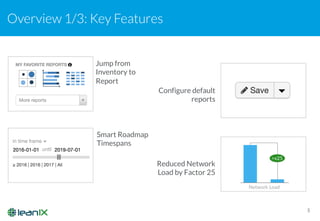
Jump from
Inventory to
Report
Smart Roadmap
Timespans
Configure default
reports
Reduced Network
Load by Factor 25
Overview 2/3: New Features
4
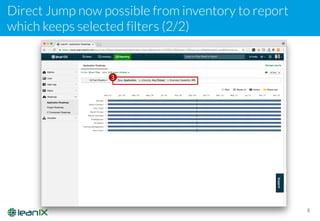
• Inventory: Direct Jump now possible from inventory to report which keeps selected filters
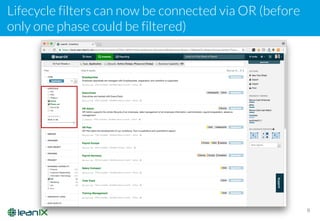
• Inventory: Lifecycle filters can now be connected via OR
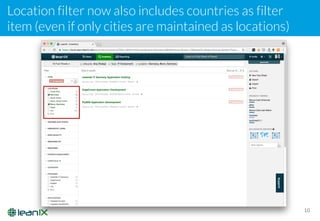
• Inventory: Location filter now also includes countries as filter item
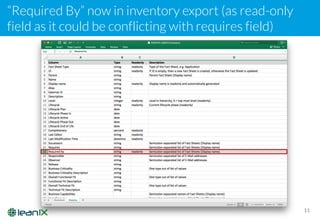
• Inventory: Required By in Excel Export (as read-only field)
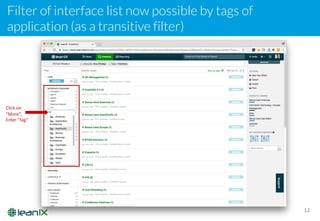
• Inventory: Filter of interface list by tags of application
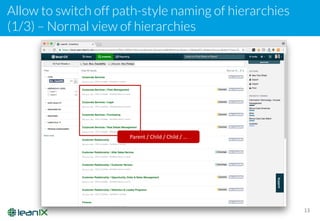
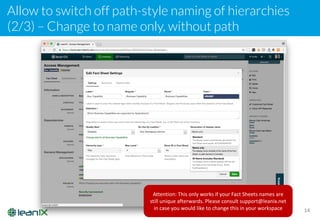
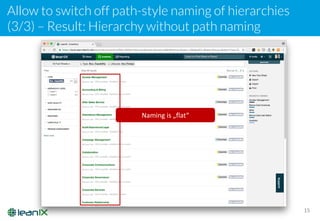
• Inventory: Allow to switch off path-style naming of hierarchies
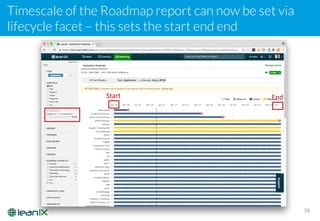
• Reporting: Allow to change the time scale of the Roadmap report
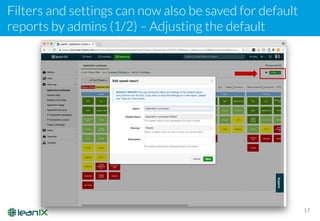
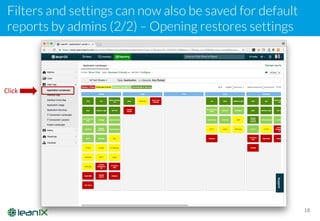
• Reporting: Filters and settings can now also be saved for default reports by admins
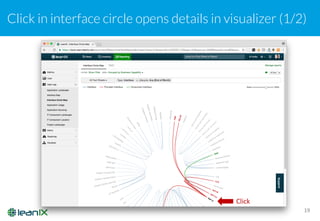
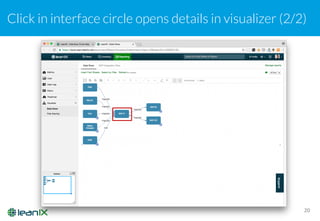
• Reporting: Click in interface circle map opens details in visualizer
• API: New compression algorithm in API reduces network load up to factor 25
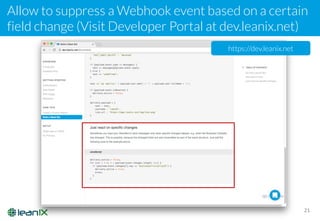
• API: Allow to suppress a Webhook event based on a certain field change
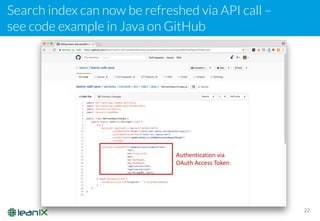
• API: Search index can now be refreshed via API call
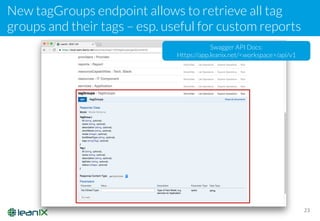
• API: New tagGroups endpoint allows to retrieve all tag groups and their tags
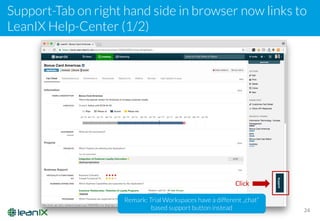
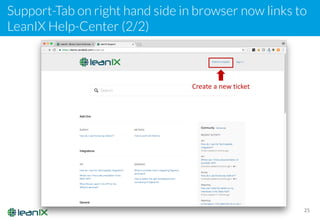
• Other: Support-Tab on right hand side in browser now links to LeanIX Help-Center
Overview 3/3: Bug Fixes
5
• Fact Sheet: Cloning a Fact Sheet now also properly clones the linked document (esp. relevant for
Technopedia, otherwise two Fact Sheets link to the same Technopedia entry)
• Fact Sheet: Extend length of externalID (can now be longer than 255 chars)
• Fact Sheet: Fixed unable to add interface provider in case an existing provider has been deleted
• Inventory: Full text search where exact match is required
• Inventory: Tag Groups should always be sorted properly
• Inventory: Enable upload of large Excel files
• Reporting: Visualizer not working with some IE11 configurations
• Reporting: Fixes exporting or printing of reports with IE11
• Reporting: Images not shown in roadmap export png/pdf (drilldown, stop)
• Reporting: EOL icon not shown in Roadmap export
• Reporting: Fixes empty data flow if one app has been deleted
• Signavio: Integration now properly syncs links to Applications when sync Processes
• Authentication: Confirmation invitation if external IDP with LeanIX managed roles is used
Contents
6
1 - Overview: Features & fixed Bugs
2 - Screenshots for all new features
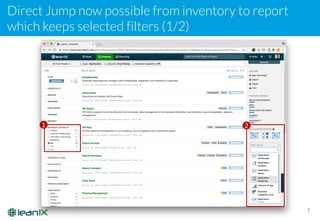
Direct Jump now possible from inventory to report
which keeps selected filters (1/2)
7
1 2
Direct Jump now possible from inventory to report
which keeps selected filters (2/2)
8
3
Lifecycle filters can now be connected via OR (before
only one phase could be filtered)
9
Location filter now also includes countries as filter
item (even if only cities are maintained as locations)
10
“Required By” now in inventory export (as read-only
field as it could be conflicting with requires field)
11
Filter of interface list now possible by tags of
application (as a transitive filter)
12
Click	on
“More”,
Enter	”tag”
Allow to switch off path-style naming of hierarchies
(1/3) – Normal view of hierarchies
13
Parent	/	Child	/	Child	/	…
Allow to switch off path-style naming of hierarchies
(2/3) – Change to name only, without path
14
Attention:	This	only	works	if	your	Fact	Sheets	names	are	
still	unique	afterwards.	Please	consult	support@leanix.net
in	case	you	would	like	to	change	this	in	your	workspace
Allow to switch off path-style naming of hierarchies
(3/3) – Result: Hierarchy without path naming
15
Naming is „flat“
Timescale of the Roadmap report can now be set via
lifecycle facet – this sets the start end end
16
Start End
Filters and settings can now also be saved for default
reports by admins (1/2) – Adjusting the default
17
Filters and settings can now also be saved for default
reports by admins (2/2) – Opening restores settings
18
Click
Click in interface circle opens details in visualizer (1/2)
19
Click
Click in interface circle opens details in visualizer (2/2)
20
Allow to suppress a Webhook event based on a certain
field change (Visit Developer Portal at dev.leanix.net)
21
https://dev.leanix.net
Search index can now be refreshed via API call –
see code example in Java on GitHub
22
Authentication	via	
OAuth	Access	Token
New tagGroups endpoint allows to retrieve all tag
groups and their tags – esp. useful for custom reports
23
Swagger API Docs:
Https://app.leanix.net/<workspace>/api/v1
Support-Tab on right hand side in browser now links to
LeanIX Help-Center (1/2)
24
Click
Remark: Trial Workspaces have a different „chat“
based support button instead
Support-Tab on right hand side in browser now links to
LeanIX Help-Center (2/2)
25
Create	a	new	ticket
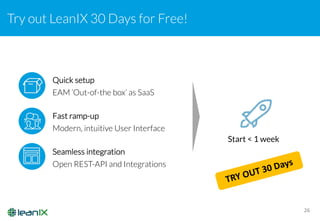
Try out LeanIX 30 Days for Free!
26
Quick setup
EAM ‘Out-of-the box’ as SaaS
Seamless integration
Open REST-API and Integrations
Start < 1 week
Fast ramp-up
Modern, intuitive User Interface

LeanIX Enterprise Architecture Management - Release Notes 3.4

  • 1.
  • 2.
    Contents 2 1 - Overview:Features & fixed Bugs 2 - Screenshots for all new features
  • 3.
    Overview 1/3: KeyFeatures 3 Jump from Inventory to Report Smart Roadmap Timespans Configure default reports Reduced Network Load by Factor 25
  • 4.
    Overview 2/3: NewFeatures 4 • Inventory: Direct Jump now possible from inventory to report which keeps selected filters • Inventory: Lifecycle filters can now be connected via OR • Inventory: Location filter now also includes countries as filter item • Inventory: Required By in Excel Export (as read-only field) • Inventory: Filter of interface list by tags of application • Inventory: Allow to switch off path-style naming of hierarchies • Reporting: Allow to change the time scale of the Roadmap report • Reporting: Filters and settings can now also be saved for default reports by admins • Reporting: Click in interface circle map opens details in visualizer • API: New compression algorithm in API reduces network load up to factor 25 • API: Allow to suppress a Webhook event based on a certain field change • API: Search index can now be refreshed via API call • API: New tagGroups endpoint allows to retrieve all tag groups and their tags • Other: Support-Tab on right hand side in browser now links to LeanIX Help-Center
  • 5.
    Overview 3/3: BugFixes 5 • Fact Sheet: Cloning a Fact Sheet now also properly clones the linked document (esp. relevant for Technopedia, otherwise two Fact Sheets link to the same Technopedia entry) • Fact Sheet: Extend length of externalID (can now be longer than 255 chars) • Fact Sheet: Fixed unable to add interface provider in case an existing provider has been deleted • Inventory: Full text search where exact match is required • Inventory: Tag Groups should always be sorted properly • Inventory: Enable upload of large Excel files • Reporting: Visualizer not working with some IE11 configurations • Reporting: Fixes exporting or printing of reports with IE11 • Reporting: Images not shown in roadmap export png/pdf (drilldown, stop) • Reporting: EOL icon not shown in Roadmap export • Reporting: Fixes empty data flow if one app has been deleted • Signavio: Integration now properly syncs links to Applications when sync Processes • Authentication: Confirmation invitation if external IDP with LeanIX managed roles is used
  • 6.
    Contents 6 1 - Overview:Features & fixed Bugs 2 - Screenshots for all new features
  • 7.
    Direct Jump nowpossible from inventory to report which keeps selected filters (1/2) 7 1 2
  • 8.
    Direct Jump nowpossible from inventory to report which keeps selected filters (2/2) 8 3
  • 9.
    Lifecycle filters cannow be connected via OR (before only one phase could be filtered) 9
  • 10.
    Location filter nowalso includes countries as filter item (even if only cities are maintained as locations) 10
  • 11.
    “Required By” nowin inventory export (as read-only field as it could be conflicting with requires field) 11
  • 12.
    Filter of interfacelist now possible by tags of application (as a transitive filter) 12 Click on “More”, Enter ”tag”
  • 13.
    Allow to switchoff path-style naming of hierarchies (1/3) – Normal view of hierarchies 13 Parent / Child / Child / …
  • 14.
    Allow to switchoff path-style naming of hierarchies (2/3) – Change to name only, without path 14 Attention: This only works if your Fact Sheets names are still unique afterwards. Please consult support@leanix.net in case you would like to change this in your workspace
  • 15.
    Allow to switchoff path-style naming of hierarchies (3/3) – Result: Hierarchy without path naming 15 Naming is „flat“
  • 16.
    Timescale of theRoadmap report can now be set via lifecycle facet – this sets the start end end 16 Start End
  • 17.
    Filters and settingscan now also be saved for default reports by admins (1/2) – Adjusting the default 17
  • 18.
    Filters and settingscan now also be saved for default reports by admins (2/2) – Opening restores settings 18 Click
  • 19.
    Click in interfacecircle opens details in visualizer (1/2) 19 Click
  • 20.
    Click in interfacecircle opens details in visualizer (2/2) 20
  • 21.
    Allow to suppressa Webhook event based on a certain field change (Visit Developer Portal at dev.leanix.net) 21 https://dev.leanix.net
  • 22.
    Search index cannow be refreshed via API call – see code example in Java on GitHub 22 Authentication via OAuth Access Token
  • 23.
    New tagGroups endpointallows to retrieve all tag groups and their tags – esp. useful for custom reports 23 Swagger API Docs: Https://app.leanix.net/<workspace>/api/v1
  • 24.
    Support-Tab on righthand side in browser now links to LeanIX Help-Center (1/2) 24 Click Remark: Trial Workspaces have a different „chat“ based support button instead
  • 25.
    Support-Tab on righthand side in browser now links to LeanIX Help-Center (2/2) 25 Create a new ticket
  • 26.
    Try out LeanIX30 Days for Free! 26 Quick setup EAM ‘Out-of-the box’ as SaaS Seamless integration Open REST-API and Integrations Start < 1 week Fast ramp-up Modern, intuitive User Interface