GRAPHQL BASICS
LeanIX,	
  2017
What	
  you	
  will	
  learn
2
• What	
  is	
  GraphQL,	
  and	
  why	
  do	
  we	
  trust	
  in	
  it
• How	
  to	
  use	
  it	
  directly	
  from	
  your	
  workspace
• How	
  to	
  execute	
  the	
  most	
  popular	
  queries	
  and	
  mutations
• Where	
  to	
  learn	
  more
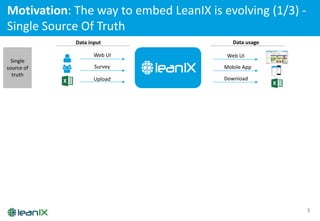
Motivation:	
  The	
  way	
  to	
  embed	
  LeanIX	
  is	
  evolving	
  (1/3)	
  -­‐
Single	
  Source	
  Of	
  Truth
3
Data	
  input
!
"
Upload
Web	
  UI
Survey
Data	
  usage
Download
Web	
  UI
Mobile	
  App
Single	
  
source	
  of	
  
truth
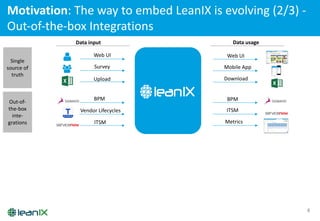
Motivation:	
  The	
  way	
  to	
  embed	
  LeanIX	
  is	
  evolving	
  (2/3)	
  -­‐
Out-­‐of-­‐the-­‐box	
  Integrations
4
Data	
  input
!
"
Upload
Web	
  UI
Survey
Data	
  usage
Download
Web	
  UI
Mobile	
  App
ITSM
BPM
Vendor	
  Lifecycles
Metrics
BPM
ITSM
Single	
  
source	
  of	
  
truth
Out-­‐of-­‐
the-­‐box	
  
inte-­‐
grations
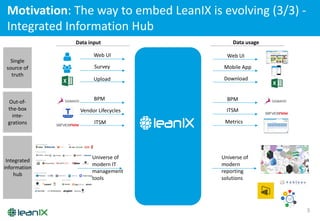
Motivation:	
  The	
  way	
  to	
  embed	
  LeanIX	
  is	
  evolving	
  (3/3)	
  -­‐
Integrated	
  Information	
  Hub
5
Data	
  input
"
Upload
Web	
  UI
Survey
Data	
  usage
Download
Web	
  UI
Mobile	
  App
ITSM
BPM
Vendor	
  Lifecycles
Metrics
BPM
ITSM
Universe	
  of	
  	
  
modern	
  IT	
  
management	
  
tools
Universe	
  of	
  
modern	
  
reporting	
  
solutions
Single	
  
source	
  of	
  
truth
Out-­‐of-­‐
the-­‐box	
  
inte-­‐
grations
Integrated	
  
information	
  
hub
!
Three	
  reasons	
  to	
  learn	
  more	
  about	
  GraphQL
6
Create	
  custom	
  
integrations
Create	
  custom	
  reports
Conduct	
  ad-­‐hoc	
  
analyses
• For	
  Data	
  Input,	
  e.g.	
  to	
  your	
  BPM,	
  ITSM	
  or	
  monitoring	
  tool
• For	
  Data	
  Usage,	
  e.g.	
  to	
  your	
  Self-­‐Service	
  BI	
  tool
A
B
C
• Enhance	
  the	
  out-­‐of-­‐the-­‐box	
  LeanIX	
  reports	
  by	
  powerful,	
  
individual	
  visualizations	
  based	
  on	
  libraries	
  like	
  d3.js
• Get	
  data	
  out	
  of	
  LeanIX	
  in	
  a	
  few	
  seconds
• Leverage	
  the	
  underlying	
  Graph	
  structure	
  to	
  conduct	
  complex	
  
analyses	
  
Six	
  selected	
  Case	
  Studies
7
Data	
  input Data	
  usage
# Pharma:	
  Upload	
  
project	
  data	
  from	
  
HP	
  PPM to	
  LeanIX	
  to	
  
relate	
  architecture	
  
planning	
  to	
  execution
$ Energy:	
  Integrate	
  
ARIS	
  BPM	
  with	
  LeanIX	
  to	
  
relate	
  application	
  to	
  
business	
  processes
% Retail:	
  Upload	
  
microservice	
  details	
  to	
  
deploy	
  time	
  from	
  AWS
framework	
  into	
  LeanIX
# Pharma:	
  Make	
  
LeanIX	
  data	
  available	
  to	
  
everyone	
  with	
  Microsoft	
  
Power	
  BI
& Telco:	
  Visualize	
  and	
  
measure	
  the	
  effects	
  of	
  
Application	
  
Rationalization	
  via	
  
custom	
  reports
' Banking:	
  Quantify	
  
the	
  reduction	
  of	
  IT	
  
complexity	
  via	
  ad-­‐hoc	
  
GraphQL	
  analyses
What’s	
  wrong	
  with	
  REST	
  (1/2)	
  –
Performance	
  and	
  Usability	
  Limits
8
/applications /capabilities
GET GET
Display interactive reports very fast Many requests & unnecessary network load
9
Interface
Application
Provider
IT	
  
Component
Project
User
Group
Data	
  
Object
Tech.
Stack
Business
Capability
Process
Allow full customization of data model Uncomfortable generic access to data
/factSheets
/factSheets/<ID>/attributes
GET
GET
/factSheets/<ID>/relationsGET
What’s	
  wrong	
  with	
  REST	
  (2/2)	
  –
Missing	
  Support	
  of	
  customizable	
  Data	
  Model	
  
Solution:	
  Facebook’s	
  GraphQL – “SQL”	
  for	
  APIs
10
query
{
allBusinessCapabilities {
factSheets {
id
displayName
relToChild {factSheet{id}}
}
}
allApplications {
factSheets {
id
displayName
relToChild {factSheet{id}}
relApplToBusCapability {factSheet{id}}
}
}
}
• JSON-based query language to
request required data
• Graph-based access to EA data
• Strongly typed API for each
LeanIX workspace (full multi-
tenancy)
Example: One request to build report
Data-­‐driven:	
  Let	
  the	
  client	
  define	
  what	
  he	
  needs
11
LeanIX	
  Server
Client
/businessCapability/ID/services/ID
Application:
ID
Name
DisplayName
Lifecycle
Tags
Subscriptions
relApplicationToUserGroup
relApplicationToBusinessCapability
relApplicationToProcess
…
BusinessCapability:
ID
Name
DisplayName
Lifecycle
Tags
Subscriptions
relBusinessCapabilityToApplication
relBusinessCapabilityToProcess
…
LeanIX	
  Server
Client
/graphQL
Application:
Name
Lifecycle
relApplicationToBusinessCapability
BusinessCapability:
Name
REST
1 Reduced	
  Network	
  load
2 Increased	
  efficiency	
  
for	
  Client	
  Developer
3 Increased	
  flexibility	
  
on	
  Server-­‐side
Network
Key	
  benefits	
  of	
  GraphQL
Two	
  Basic	
  Concepts:	
  Query	
  and	
  Mutation
12
query
Retrieve	
  Fact	
  Sheet	
  data,	
  
Subscriptions,	
  Tags,	
  ….
mutation
Create,	
  Update	
  or	
  Delete	
  Fact	
  
Sheets,	
  Subscriptions,	
  Tags,	
  …
Live	
  Demo	
  –
Start	
  with	
  GraphQL directly	
  from	
  your	
  workspace
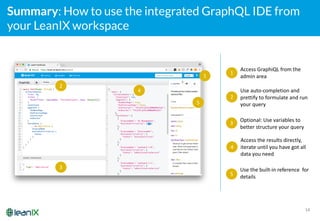
Summary: How to use the integrated GraphQL IDE from
your LeanIX workspace
14
1
2
3
5
4
1
Access	
  GraphiQL from	
  the	
  
admin	
  area
2
Use	
  auto-­‐completion	
  and	
  
prettify	
  to	
  formulate	
  and	
  run	
  
your	
  query
3
Optional:	
  Use	
  variables	
  to	
  
better	
  structure	
  your	
  query
4
Access	
  the	
  results	
  directly,	
  
iterate	
  until	
  you	
  have	
  got	
  all	
  
data	
  you	
  need
5
Use	
  the	
  built-­‐in	
  reference	
  	
  for	
  
details
Now:	
  Compiling	
  a	
  query	
  step-­‐by-­‐step	
  
(don’t	
  be	
  afraid	
  of	
  brackets!)
15
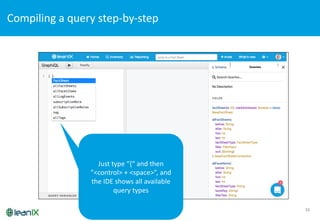
Compiling	
  a	
  query	
  step-­‐by-­‐step	
  
16
Just	
  type	
  “{“	
  and	
  then	
  
”<control>	
  +	
  <space>”,	
  and	
  
the	
  IDE	
  shows	
  all	
  available	
  
query	
  types
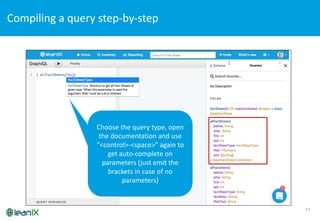
Compiling	
  a	
  query	
  step-­‐by-­‐step	
  
17
Choose	
  the	
  query	
  type,	
  open	
  
the	
  documentation	
  and	
  use	
  
“<control>-­‐<space>”	
  again	
  to	
  
get	
  auto-­‐complete	
  on	
  
parameters	
  (just	
  emit	
  the	
  
brackets	
  in	
  case	
  of	
  no	
  
parameters)	
  
Compiling	
  a	
  query	
  step-­‐by-­‐step	
  
18
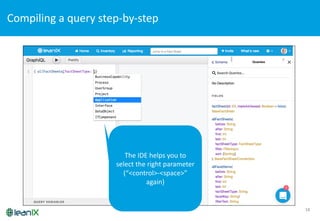
The	
  IDE	
  helps	
  you	
  to	
  
select	
  the	
  right	
  parameter	
  
(“<control>-­‐<space>”	
  
again)	
  
Compiling	
  a	
  query	
  step-­‐by-­‐step	
  
19
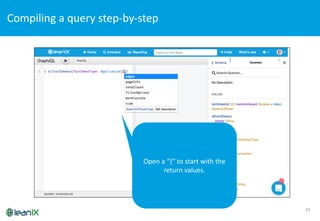
Open	
  a	
  “{“	
  to	
  start	
  with	
  the	
  
return	
  values.
Compiling	
  a	
  query	
  step-­‐by-­‐step	
  
20
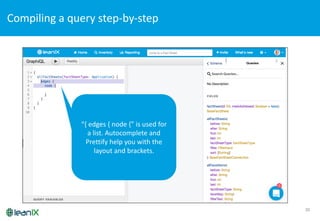
“{	
  edges	
  {	
  node	
  {”	
  is	
  used	
  for	
  
a	
  list.	
  Autocomplete	
  and	
  
Prettify	
  help	
  you	
  with	
  the	
  
layout	
  and	
  brackets.
Compiling	
  a	
  query	
  step-­‐by-­‐step	
  
21
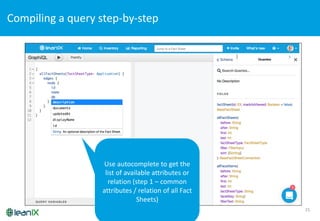
Use	
  autocomplete	
  to	
  get	
  the	
  
list	
  of	
  available	
  attributes	
  or	
  
relation	
  (step	
  1	
  – common	
  
attributes	
  /	
  relation	
  of	
  all	
  Fact	
  
Sheets)
Compiling	
  a	
  query	
  step-­‐by-­‐step	
  
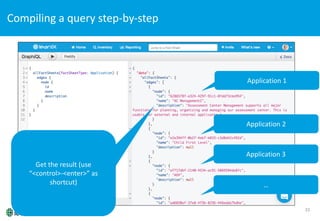
22
Get	
  the	
  result	
  (use	
  
“<control>-­‐<enter>”	
  as	
  
shortcut)
Application	
  1
Application	
  2
Application	
  3
…
Compiling	
  a	
  query	
  step-­‐by-­‐step	
  
23
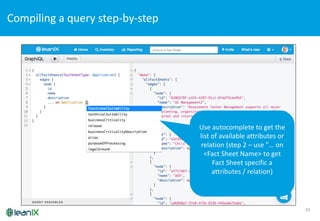
Use	
  autocomplete	
  to	
  get	
  the	
  
list	
  of	
  available	
  attributes	
  or	
  
relation	
  (step	
  2	
  – use	
  ”…	
  on	
  
<Fact	
  Sheet	
  Name>	
  to	
  get	
  
Fact	
  Sheet	
  specific	
  a
attributes	
  /	
  relation)
Compiling	
  a	
  query	
  step-­‐by-­‐step	
  
24
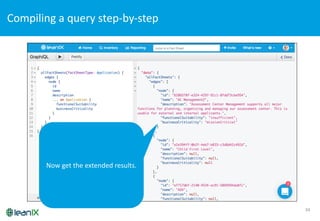
Now get the extended results.
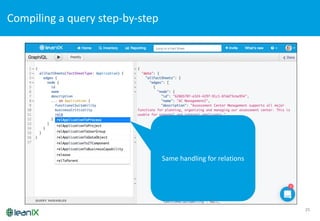
25
Same	
  handling for relations
Compiling	
  a	
  query	
  step-­‐by-­‐step	
  
26
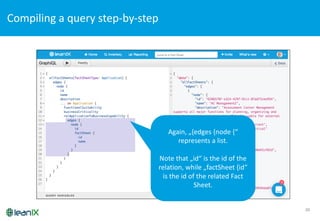
Again,	
  „{edges {node {“	
  
represents a	
  list.	
  
Note	
  that „id“	
  is the id of the
relation,	
  while „factSheet {id“	
  
is the id of the related Fact	
  
Sheet.
Compiling	
  a	
  query	
  step-­‐by-­‐step	
  
27
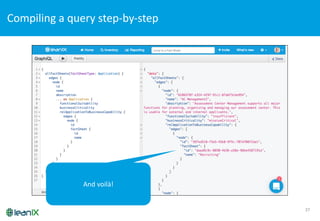
And voilà!
Compiling	
  a	
  query	
  step-­‐by-­‐step	
  
28
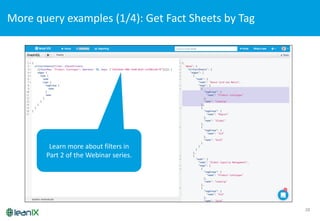
More	
  query	
  examples	
  (1/4):	
  Get	
  Fact	
  Sheets	
  by	
  Tag
Learn more about filters in	
  
Part	
  2	
  of the Webinar	
  series.
29
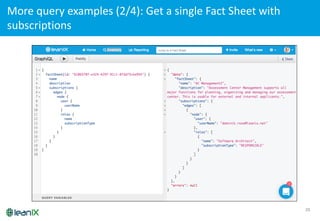
More	
  query	
  examples	
  (2/4):	
  Get	
  a	
  single	
  Fact	
  Sheet	
  with	
  
subscriptions
30
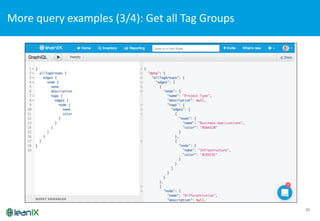
More	
  query	
  examples	
  (3/4):	
  Get	
  all	
  Tag	
  Groups
31
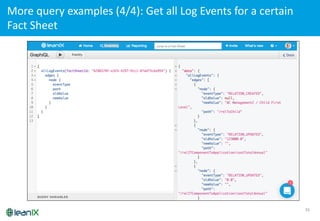
More	
  query	
  examples	
  (4/4):	
  Get	
  all	
  Log	
  Events	
  for	
  a	
  certain	
  
Fact	
  Sheet
32
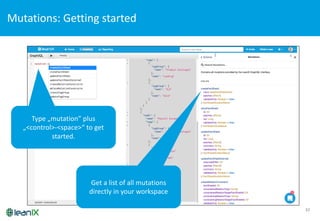
Mutations:	
  Getting	
  started
Type	
  „mutation”	
  plus	
  
„<control>-­‐<space>“	
  to get
started.
Get a	
  list of all	
  mutations
directly in	
  your workspace
33
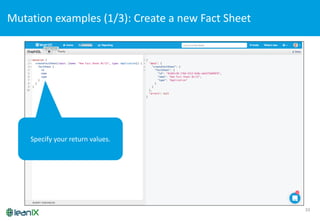
Mutation	
  examples	
  (1/3):	
  Create	
  a	
  new	
  Fact	
  Sheet
Specify your return values.
34
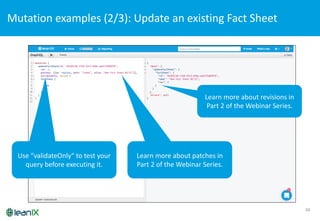
Mutation	
  examples	
  (2/3):	
  Update	
  an	
  existing	
  Fact	
  Sheet
Learn more about patches in	
  
Part	
  2	
  of the Webinar	
  Series.
Learn more about revisions in	
  
Part	
  2	
  of the Webinar	
  Series.
Use “validateOnly“	
  to test your
query before executing it.
35
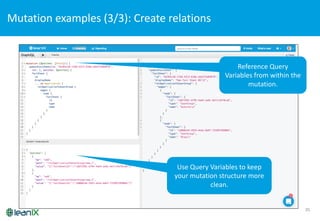
Mutation	
  examples	
  (3/3):	
  Create	
  relations
Learn more about patches in	
  
Part	
  2	
  of the Webinar	
  Series.Use Query	
  Variables	
  to keep
your mutation structure more
clean.	
  
Reference	
  Query	
  
Variables	
  from within the
mutation.
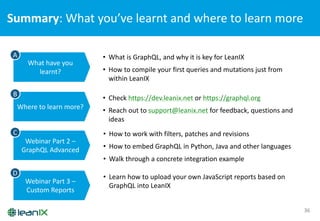
Summary:	
  What	
  you’ve	
  learnt	
  and	
  where	
  to	
  learn	
  more	
  
36
What	
  have	
  you	
  
learnt?
Where	
  to	
  learn	
  more?
Webinar	
  Part	
  2	
  –
GraphQL Advanced
Webinar	
  Part	
  3	
  –
Custom	
  Reports
• What	
  is	
  GraphQL,	
  and	
  why	
  it	
  is	
  key	
  for	
  LeanIX
• How	
  to	
  compile	
  your	
  first	
  queries	
  and	
  mutations	
  just	
  from	
  
within	
  LeanIX
A
B
C
D
• Check	
  https://dev.leanix.net or	
  https://graphql.org
• Reach	
  out	
  to	
  support@leanix.net for	
  feedback,	
  questions	
  and	
  
ideas
• How	
  to	
  work	
  with	
  filters,	
  patches	
  and	
  revisions
• How	
  to	
  embed	
  GraphQL in	
  Python,	
  Java	
  and	
  other	
  languages
• Walk	
  through	
  a	
  concrete	
  integration	
  example
• Learn	
  how	
  to	
  upload	
  your	
  own	
  JavaScript	
  reports	
  based	
  on	
  
GraphQL into	
  LeanIX
37
“You	
  can’t	
  build	
  your	
  IT	
  architecture	
  today	
  with	
  
yesterday’s	
  tools	
  and	
  stay	
  in	
  business	
  tomorrow”

GraphQL Basics

  • 1.
  • 2.
    What  you  will  learn 2 • What  is  GraphQL,  and  why  do  we  trust  in  it • How  to  use  it  directly  from  your  workspace • How  to  execute  the  most  popular  queries  and  mutations • Where  to  learn  more
  • 3.
    Motivation:  The  way  to  embed  LeanIX  is  evolving  (1/3)  -­‐ Single  Source  Of  Truth 3 Data  input ! " Upload Web  UI Survey Data  usage Download Web  UI Mobile  App Single   source  of   truth
  • 4.
    Motivation:  The  way  to  embed  LeanIX  is  evolving  (2/3)  -­‐ Out-­‐of-­‐the-­‐box  Integrations 4 Data  input ! " Upload Web  UI Survey Data  usage Download Web  UI Mobile  App ITSM BPM Vendor  Lifecycles Metrics BPM ITSM Single   source  of   truth Out-­‐of-­‐ the-­‐box   inte-­‐ grations
  • 5.
    Motivation:  The  way  to  embed  LeanIX  is  evolving  (3/3)  -­‐ Integrated  Information  Hub 5 Data  input " Upload Web  UI Survey Data  usage Download Web  UI Mobile  App ITSM BPM Vendor  Lifecycles Metrics BPM ITSM Universe  of     modern  IT   management   tools Universe  of   modern   reporting   solutions Single   source  of   truth Out-­‐of-­‐ the-­‐box   inte-­‐ grations Integrated   information   hub !
  • 6.
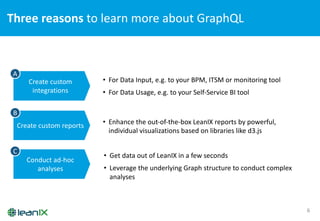
    Three  reasons  to  learn  more  about  GraphQL 6 Create  custom   integrations Create  custom  reports Conduct  ad-­‐hoc   analyses • For  Data  Input,  e.g.  to  your  BPM,  ITSM  or  monitoring  tool • For  Data  Usage,  e.g.  to  your  Self-­‐Service  BI  tool A B C • Enhance  the  out-­‐of-­‐the-­‐box  LeanIX  reports  by  powerful,   individual  visualizations  based  on  libraries  like  d3.js • Get  data  out  of  LeanIX  in  a  few  seconds • Leverage  the  underlying  Graph  structure  to  conduct  complex   analyses  
  • 7.
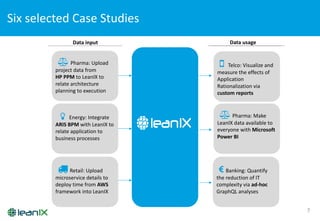
    Six  selected  Case  Studies 7 Data  input Data  usage # Pharma:  Upload   project  data  from   HP  PPM to  LeanIX  to   relate  architecture   planning  to  execution $ Energy:  Integrate   ARIS  BPM  with  LeanIX  to   relate  application  to   business  processes % Retail:  Upload   microservice  details  to   deploy  time  from  AWS framework  into  LeanIX # Pharma:  Make   LeanIX  data  available  to   everyone  with  Microsoft   Power  BI & Telco:  Visualize  and   measure  the  effects  of   Application   Rationalization  via   custom  reports ' Banking:  Quantify   the  reduction  of  IT   complexity  via  ad-­‐hoc   GraphQL  analyses
  • 8.
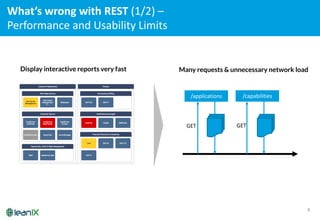
    What’s  wrong  with  REST  (1/2)  – Performance  and  Usability  Limits 8 /applications /capabilities GET GET Display interactive reports very fast Many requests & unnecessary network load
  • 9.
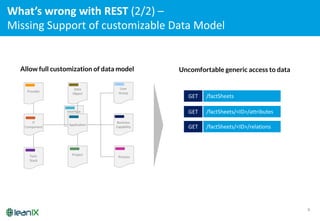
    9 Interface Application Provider IT   Component Project User Group Data   Object Tech. Stack Business Capability Process Allowfull customization of data model Uncomfortable generic access to data /factSheets /factSheets/<ID>/attributes GET GET /factSheets/<ID>/relationsGET What’s  wrong  with  REST  (2/2)  – Missing  Support  of  customizable  Data  Model  
  • 10.
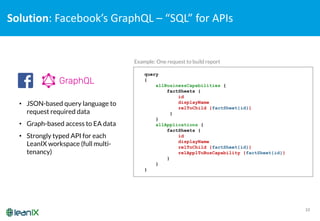
    Solution:  Facebook’s  GraphQL– “SQL”  for  APIs 10 query { allBusinessCapabilities { factSheets { id displayName relToChild {factSheet{id}} } } allApplications { factSheets { id displayName relToChild {factSheet{id}} relApplToBusCapability {factSheet{id}} } } } • JSON-based query language to request required data • Graph-based access to EA data • Strongly typed API for each LeanIX workspace (full multi- tenancy) Example: One request to build report
  • 11.
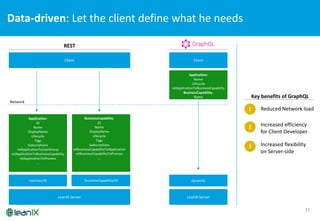
    Data-­‐driven:  Let  the  client  define  what  he  needs 11 LeanIX  Server Client /businessCapability/ID/services/ID Application: ID Name DisplayName Lifecycle Tags Subscriptions relApplicationToUserGroup relApplicationToBusinessCapability relApplicationToProcess … BusinessCapability: ID Name DisplayName Lifecycle Tags Subscriptions relBusinessCapabilityToApplication relBusinessCapabilityToProcess … LeanIX  Server Client /graphQL Application: Name Lifecycle relApplicationToBusinessCapability BusinessCapability: Name REST 1 Reduced  Network  load 2 Increased  efficiency   for  Client  Developer 3 Increased  flexibility   on  Server-­‐side Network Key  benefits  of  GraphQL
  • 12.
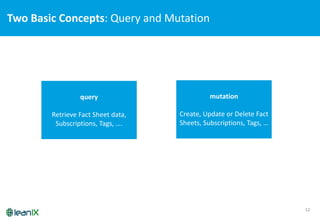
    Two  Basic  Concepts:  Query  and  Mutation 12 query Retrieve  Fact  Sheet  data,   Subscriptions,  Tags,  …. mutation Create,  Update  or  Delete  Fact   Sheets,  Subscriptions,  Tags,  …
  • 13.
    Live  Demo  – Start  with  GraphQL directly  from  your  workspace
  • 14.
    Summary: How touse the integrated GraphQL IDE from your LeanIX workspace 14 1 2 3 5 4 1 Access  GraphiQL from  the   admin  area 2 Use  auto-­‐completion  and   prettify  to  formulate  and  run   your  query 3 Optional:  Use  variables  to   better  structure  your  query 4 Access  the  results  directly,   iterate  until  you  have  got  all   data  you  need 5 Use  the  built-­‐in  reference    for   details
  • 15.
    Now:  Compiling  a  query  step-­‐by-­‐step   (don’t  be  afraid  of  brackets!) 15
  • 16.
    Compiling  a  query  step-­‐by-­‐step   16 Just  type  “{“  and  then   ”<control>  +  <space>”,  and   the  IDE  shows  all  available   query  types
  • 17.
    Compiling  a  query  step-­‐by-­‐step   17 Choose  the  query  type,  open   the  documentation  and  use   “<control>-­‐<space>”  again  to   get  auto-­‐complete  on   parameters  (just  emit  the   brackets  in  case  of  no   parameters)  
  • 18.
    Compiling  a  query  step-­‐by-­‐step   18 The  IDE  helps  you  to   select  the  right  parameter   (“<control>-­‐<space>”   again)  
  • 19.
    Compiling  a  query  step-­‐by-­‐step   19 Open  a  “{“  to  start  with  the   return  values.
  • 20.
    Compiling  a  query  step-­‐by-­‐step   20 “{  edges  {  node  {”  is  used  for   a  list.  Autocomplete  and   Prettify  help  you  with  the   layout  and  brackets.
  • 21.
    Compiling  a  query  step-­‐by-­‐step   21 Use  autocomplete  to  get  the   list  of  available  attributes  or   relation  (step  1  – common   attributes  /  relation  of  all  Fact   Sheets)
  • 22.
    Compiling  a  query  step-­‐by-­‐step   22 Get  the  result  (use   “<control>-­‐<enter>”  as   shortcut) Application  1 Application  2 Application  3 …
  • 23.
    Compiling  a  query  step-­‐by-­‐step   23 Use  autocomplete  to  get  the   list  of  available  attributes  or   relation  (step  2  – use  ”…  on   <Fact  Sheet  Name>  to  get   Fact  Sheet  specific  a attributes  /  relation)
  • 24.
    Compiling  a  query  step-­‐by-­‐step   24 Now get the extended results.
  • 25.
    25 Same  handling forrelations Compiling  a  query  step-­‐by-­‐step  
  • 26.
    26 Again,  „{edges {node{“   represents a  list.   Note  that „id“  is the id of the relation,  while „factSheet {id“   is the id of the related Fact   Sheet. Compiling  a  query  step-­‐by-­‐step  
  • 27.
    27 And voilà! Compiling  a  query  step-­‐by-­‐step  
  • 28.
    28 More  query  examples  (1/4):  Get  Fact  Sheets  by  Tag Learn more about filters in   Part  2  of the Webinar  series.
  • 29.
    29 More  query  examples  (2/4):  Get  a  single  Fact  Sheet  with   subscriptions
  • 30.
    30 More  query  examples  (3/4):  Get  all  Tag  Groups
  • 31.
    31 More  query  examples  (4/4):  Get  all  Log  Events  for  a  certain   Fact  Sheet
  • 32.
    32 Mutations:  Getting  started Type  „mutation”  plus   „<control>-­‐<space>“  to get started. Get a  list of all  mutations directly in  your workspace
  • 33.
    33 Mutation  examples  (1/3):  Create  a  new  Fact  Sheet Specify your return values.
  • 34.
    34 Mutation  examples  (2/3):  Update  an  existing  Fact  Sheet Learn more about patches in   Part  2  of the Webinar  Series. Learn more about revisions in   Part  2  of the Webinar  Series. Use “validateOnly“  to test your query before executing it.
  • 35.
    35 Mutation  examples  (3/3):  Create  relations Learn more about patches in   Part  2  of the Webinar  Series.Use Query  Variables  to keep your mutation structure more clean.   Reference  Query   Variables  from within the mutation.
  • 36.
    Summary:  What  you’ve  learnt  and  where  to  learn  more   36 What  have  you   learnt? Where  to  learn  more? Webinar  Part  2  – GraphQL Advanced Webinar  Part  3  – Custom  Reports • What  is  GraphQL,  and  why  it  is  key  for  LeanIX • How  to  compile  your  first  queries  and  mutations  just  from   within  LeanIX A B C D • Check  https://dev.leanix.net or  https://graphql.org • Reach  out  to  support@leanix.net for  feedback,  questions  and   ideas • How  to  work  with  filters,  patches  and  revisions • How  to  embed  GraphQL in  Python,  Java  and  other  languages • Walk  through  a  concrete  integration  example • Learn  how  to  upload  your  own  JavaScript  reports  based  on   GraphQL into  LeanIX
  • 37.
    37 “You  can’t  build  your  IT  architecture  today  with   yesterday’s  tools  and  stay  in  business  tomorrow”