Chapter 13
        Wired LANs: Ethernet


13.1   Copyright © The McGraw-Hill Companies, Inc. Permission required for reproduction or display.
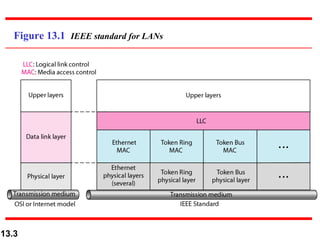
13-1 IEEE STANDARDS

   In 1985, the Computer Society of the IEEE started a
   project, called Project 802, to set standards to enable
   intercommunication among equipment from a variety
   of manufacturers. Project 802 is a way of specifying
   functions of the physical layer and the data link layer
   of major LAN protocols.

 Topics discussed in this section:
 Data Link Layer
 Physical Layer


13.2
Figure 13.1 IEEE standard for LANs


13.3
13-2 STANDARD ETHERNET

 The original Ethernet was created in 1976 at Xerox’s
 Palo Alto Research Center (PARC). Since then, it has
 gone through four generations. We briefly discuss the
 Standard (or traditional) Ethernet in this section.


 Topics discussed in this section:
 MAC Sublayer
 Physical Layer


13.4
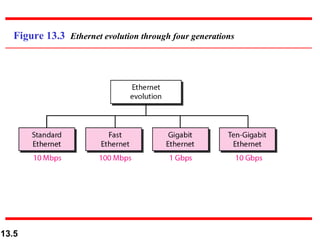
Figure 13.3 Ethernet evolution through four generations


13.5
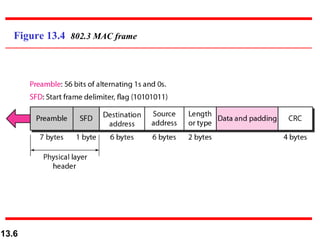
Figure 13.4 802.3 MAC frame


13.6
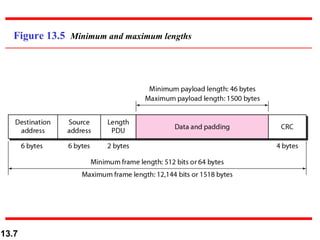
Figure 13.5 Minimum and maximum lengths


13.7
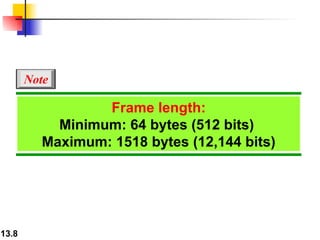
Note

                 Frame length:
           Minimum: 64 bytes (512 bits)
         Maximum: 1518 bytes (12,144 bits)


13.8
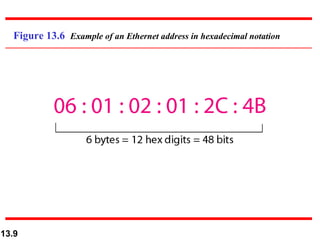
Figure 13.6 Example of an Ethernet address in hexadecimal notation


13.9
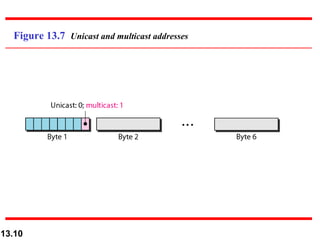
Figure 13.7 Unicast and multicast addresses


13.10
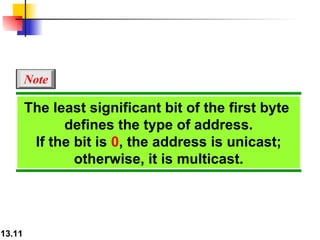
Note

        The least significant bit of the first byte
              defines the type of address.
         If the bit is 0, the address is unicast;
                otherwise, it is multicast.


13.11
Note

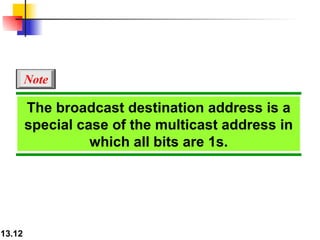
        The broadcast destination address is a
        special case of the multicast address in
                  which all bits are 1s.


13.12
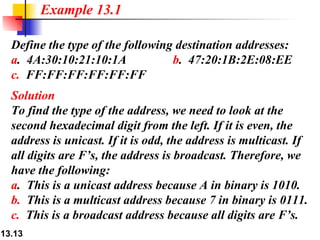
Example 13.1

  Define the type of the following destination addresses:
  a. 4A:30:10:21:10:1A            b. 47:20:1B:2E:08:EE
  c. FF:FF:FF:FF:FF:FF
  Solution
  To find the type of the address, we need to look at the
  second hexadecimal digit from the left. If it is even, the
  address is unicast. If it is odd, the address is multicast. If
  all digits are F’s, the address is broadcast. Therefore, we
  have the following:
  a. This is a unicast address because A in binary is 1010.
  b. This is a multicast address because 7 in binary is 0111.
  c. This is a broadcast address because all digits are F’s.
13.13
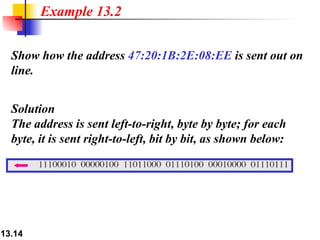
Example 13.2


  Show how the address 47:20:1B:2E:08:EE is sent out on
  line.


  Solution
  The address is sent left-to-right, byte by byte; for each
  byte, it is sent right-to-left, bit by bit, as shown below:


13.14
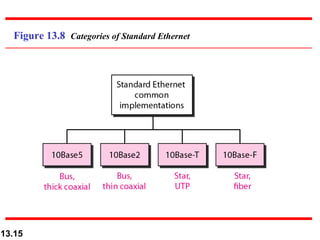
Figure 13.8 Categories of Standard Ethernet


13.15
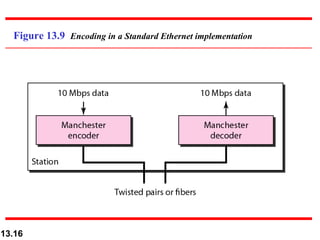
Figure 13.9 Encoding in a Standard Ethernet implementation


13.16
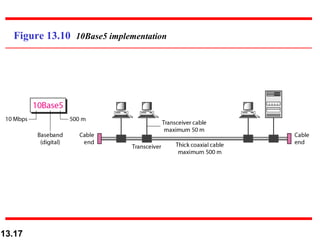
Figure 13.10 10Base5 implementation


13.17
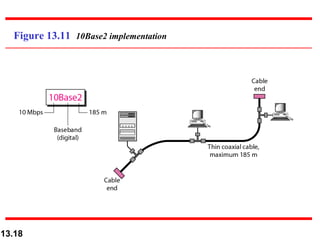
Figure 13.11 10Base2 implementation


13.18
13-4 FAST ETHERNET

  Fast Ethernet was designed to compete with LAN
  protocols such as FDDI or Fiber Channel. IEEE
  created Fast Ethernet under the name 802.3u. Fast
  Ethernet is backward-compatible with Standard
  Ethernet, but it can transmit data 10 times faster at a
  rate of 100 Mbps.

 Topics discussed in this section:
 MAC Sublayer
 Physical Layer


13.19
13-5 GIGABIT ETHERNET

 The need for an even higher data rate resulted in the
 design of the Gigabit Ethernet protocol (1000 Mbps).
 The IEEE committee calls the standard 802.3z.


 Topics discussed in this section:
 MAC Sublayer
 Physical Layer
 Ten-Gigabit Ethernet


13.20

Lans ethernet

  • 1.
    Chapter 13 Wired LANs: Ethernet 13.1 Copyright © The McGraw-Hill Companies, Inc. Permission required for reproduction or display.
  • 2.
    13-1 IEEE STANDARDS In 1985, the Computer Society of the IEEE started a project, called Project 802, to set standards to enable intercommunication among equipment from a variety of manufacturers. Project 802 is a way of specifying functions of the physical layer and the data link layer of major LAN protocols. Topics discussed in this section: Data Link Layer Physical Layer 13.2
  • 3.
    Figure 13.1 IEEEstandard for LANs 13.3
  • 4.
    13-2 STANDARD ETHERNET The original Ethernet was created in 1976 at Xerox’s Palo Alto Research Center (PARC). Since then, it has gone through four generations. We briefly discuss the Standard (or traditional) Ethernet in this section. Topics discussed in this section: MAC Sublayer Physical Layer 13.4
  • 5.
    Figure 13.3 Ethernetevolution through four generations 13.5
  • 6.
    Figure 13.4 802.3MAC frame 13.6
  • 7.
    Figure 13.5 Minimumand maximum lengths 13.7
  • 8.
    Note Frame length: Minimum: 64 bytes (512 bits) Maximum: 1518 bytes (12,144 bits) 13.8
  • 9.
    Figure 13.6 Exampleof an Ethernet address in hexadecimal notation 13.9
  • 10.
    Figure 13.7 Unicastand multicast addresses 13.10
  • 11.
    Note The least significant bit of the first byte defines the type of address. If the bit is 0, the address is unicast; otherwise, it is multicast. 13.11
  • 12.
    Note The broadcast destination address is a special case of the multicast address in which all bits are 1s. 13.12
  • 13.
    Example 13.1 Define the type of the following destination addresses: a. 4A:30:10:21:10:1A b. 47:20:1B:2E:08:EE c. FF:FF:FF:FF:FF:FF Solution To find the type of the address, we need to look at the second hexadecimal digit from the left. If it is even, the address is unicast. If it is odd, the address is multicast. If all digits are F’s, the address is broadcast. Therefore, we have the following: a. This is a unicast address because A in binary is 1010. b. This is a multicast address because 7 in binary is 0111. c. This is a broadcast address because all digits are F’s. 13.13
  • 14.
    Example 13.2 Show how the address 47:20:1B:2E:08:EE is sent out on line. Solution The address is sent left-to-right, byte by byte; for each byte, it is sent right-to-left, bit by bit, as shown below: 13.14
  • 15.
    Figure 13.8 Categoriesof Standard Ethernet 13.15
  • 16.
    Figure 13.9 Encodingin a Standard Ethernet implementation 13.16
  • 17.
    Figure 13.10 10Base5implementation 13.17
  • 18.
    Figure 13.11 10Base2implementation 13.18
  • 19.
    13-4 FAST ETHERNET Fast Ethernet was designed to compete with LAN protocols such as FDDI or Fiber Channel. IEEE created Fast Ethernet under the name 802.3u. Fast Ethernet is backward-compatible with Standard Ethernet, but it can transmit data 10 times faster at a rate of 100 Mbps. Topics discussed in this section: MAC Sublayer Physical Layer 13.19
  • 20.
    13-5 GIGABIT ETHERNET The need for an even higher data rate resulted in the design of the Gigabit Ethernet protocol (1000 Mbps). The IEEE committee calls the standard 802.3z. Topics discussed in this section: MAC Sublayer Physical Layer Ten-Gigabit Ethernet 13.20