Empowerment Technologies
Senior High School Applied - Academic
Unit 3: Word Processing Skills
Lesson 2
Character and Paragraph
Formatting
ENGAGE
EXPLOR
EXPLAIN EXTEND
EVALUAT
“The appearance of your
message is a reflection of
yourself and your
relation with the reader.”
2
ENGAGE
EXPLOR
EXPLAIN EXTEND
EVALUAT
What captures
your attention
in a piece to
read? What
makes you
believe in it?
3
Learning
Objectives
ENGAGE
EXPLOR
EXPLAIN EXTEND
EVALUAT
At the end of the
lesson, you should
be able to do the
following:
4
● Understand the basics of
formatting.
● Identify each feature of
character and paragraph
formatting.
● Apply the basics of formatting.
4
ENGAGE
EXPLOR
EXPLAIN EXTEND
EVALUAT
Take a look
at the
image.
5
ENGAGE
EXPLOR
EXPLAIN EXTEND
EVALUAT
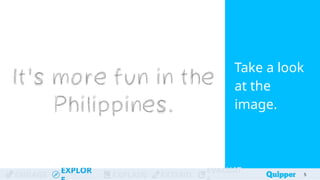
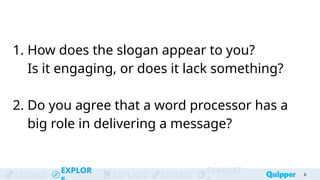
1. How does the slogan appear to you?
Is it engaging, or does it lack something?
2. Do you agree that a word processor has a
big role in delivering a message?
6
ENGAGE
EXPLOR
EXPLAIN EXTEND
EVALUAT 7
7
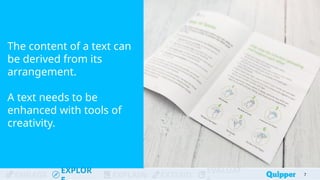
The content of a text can
be derived from its
arrangement.
A text needs to be
enhanced with tools of
creativity.
ENGAGE
EXPLOR
EXPLAIN EXTEND
EVALUAT 8
8
The difference between a word processor
from a text editor is a word processor’s
customization features that allow manipulation
of your work.
Remember
9
Formatting capability varies
depending on the software or its
versions available.
Microsoft Word is the most
commonly used word processor
software.
ENGAGE
EXPLOR
EXPLAIN EXTEND
EVALUAT
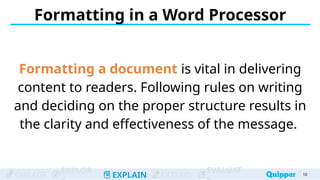
Formatting in a Word Processor
Formatting a document is vital in delivering
content to readers. Following rules on writing
and deciding on the proper structure results in
the clarity and effectiveness of the message.
10
ENGAGE
EXPLOR
EXPLAIN EXTEND
EVALUAT
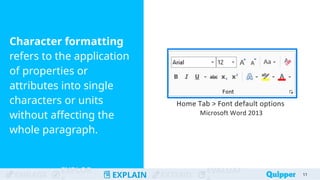
Character formatting
refers to the application
of properties or
attributes into single
characters or units
without affecting the
whole paragraph.
11
ENGAGE
EXPLOR
EXPLAIN EXTEND
EVALUAT
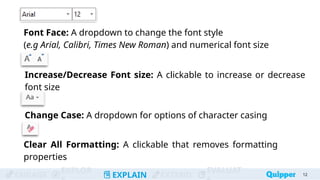
Font Face: A dropdown to change the font style
(e.g Arial, Calibri, Times New Roman) and numerical font size
12
Increase/Decrease Font size: A clickable to increase or decrease
font size
Change Case: A dropdown for options of character casing
Clear All Formatting: A clickable that removes formatting
properties
ENGAGE
EXPLOR
EXPLAIN EXTEND
EVALUAT 13
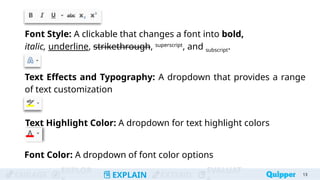
Font Style: A clickable that changes a font into bold,
italic, underline, strikethrough, superscript
, and subscript.
Text Effects and Typography: A dropdown that provides a range
of text customization
Text Highlight Color: A dropdown for text highlight colors
Font Color: A dropdown of font color options
ENGAGE
EXPLOR
EXPLAIN EXTEND
EVALUAT
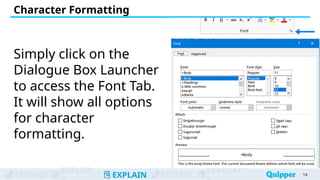
Simply click on the
Dialogue Box Launcher
to access the Font Tab.
It will show all options
for character
formatting.
14
14
Character Formatting
ENGAGE
EXPLOR
EXPLAIN EXTEND
EVALUAT
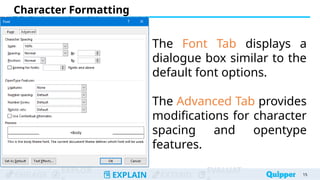
The Font Tab displays a
dialogue box similar to the
default font options.
The Advanced Tab provides
modifications for character
spacing and opentype
features.
Character Formatting
15
15
ENGAGE
EXPLOR
EXPLAIN EXTEND
EVALUAT
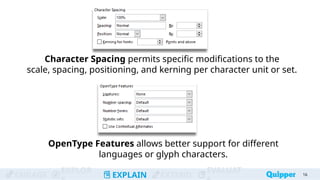
Character Spacing permits specific modifications to the
scale, spacing, positioning, and kerning per character unit or set.
16
16
OpenType Features allows better support for different
languages or glyph characters.
ENGAGE
EXPLOR
EXPLAIN EXTEND
EVALUAT
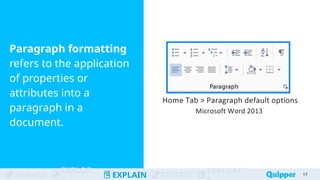
Paragraph formatting
refers to the application
of properties or
attributes into a
paragraph in a
document.
17
ENGAGE
EXPLOR
EXPLAIN EXTEND
EVALUAT
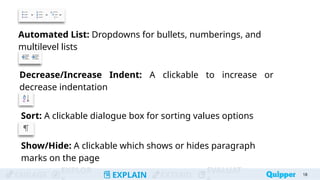
Automated List: Dropdowns for bullets, numberings, and
multilevel lists
18
Decrease/Increase Indent: A clickable to increase or
decrease indentation
Sort: A clickable dialogue box for sorting values options
Show/Hide: A clickable which shows or hides paragraph
marks on the page
ENGAGE
EXPLOR
EXPLAIN EXTEND
EVALUAT
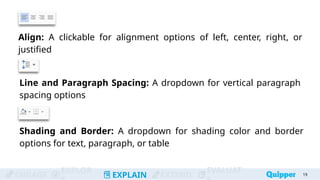
Align: A clickable for alignment options of left, center, right, or
justified
19
Line and Paragraph Spacing: A dropdown for vertical paragraph
spacing options
Shading and Border: A dropdown for shading color and border
options for text, paragraph, or table
ENGAGE
EXPLOR
EXPLAIN EXTEND
EVALUAT
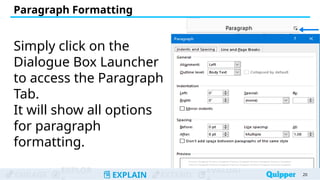
Simply click on the
Dialogue Box Launcher
to access the Paragraph
Tab.
It will show all options
for paragraph
formatting.
20
20
Paragraph Formatting
ENGAGE
EXPLOR
EXPLAIN EXTEND
EVALUAT
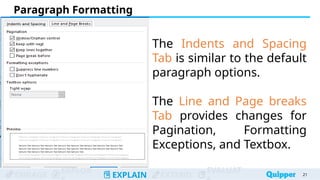
The Indents and Spacing
Tab is similar to the default
paragraph options.
The Line and Page breaks
Tab provides changes for
Pagination, Formatting
Exceptions, and Textbox.
Paragraph Formatting
21
21
ENGAGE
EXPLOR
EXPLAIN EXTEND
EVALUAT
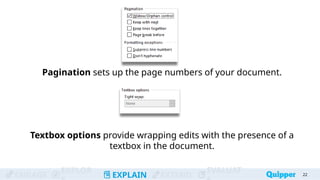
Pagination sets up the page numbers of your document.
22
22
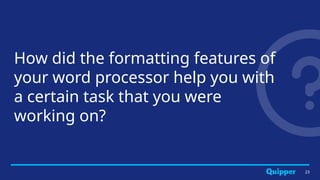
Textbox options provide wrapping edits with the presence of a
textbox in the document.
23
How did the formatting features of
your word processor help you with
a certain task that you were
working on?
ENGAGE
EXPLOR
EXPLAIN EXTEND
EVALUAT
Practice 1
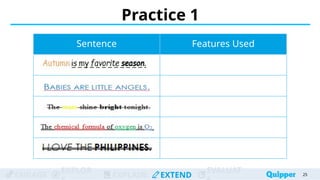
Identify 3 to 5 formatting features used
in each of the sentences.
Disregard any differences in the font
type and font size.
24
ENGAGE
EXPLOR
EXPLAIN EXTEND
EVALUAT
Practice 1
25
Sentence Features Used
ENGAGE
EXPLOR
EXPLAIN EXTEND
EVALUAT
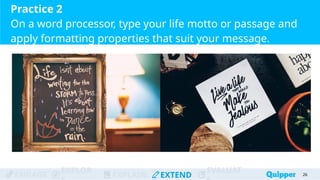
Practice 2
On a word processor, type your life motto or passage and
apply formatting properties that suit your message.
26
ENGAGE
EXPLOR
EXPLAIN EXTEND
EVALUAT
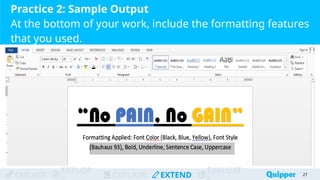
Practice 2: Sample Output
At the bottom of your work, include the formatting features
that you used.
27
ENGAGE
EXPLOR
EXPLAIN EXTEND
EVALUAT
ENGAGE
EXPLOR
EXPLAIN EXTEND
EVALUAT
Character
Formatting
Practice 3: Word Bank
28
28
28
28
28
Paragraph Formatting Font Style
Text Effects and
Typography
Automated List Change Casing
Align
Line and Paragraph
Spacing
Show/Hide
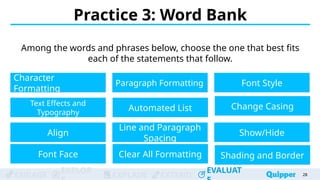
Among the words and phrases below, choose the one that best fits
each of the statements that follow.
Font Face Clear All Formatting Shading and Border
ENGAGE
EXPLOR
EXPLAIN EXTEND
EVALUAT
ENGAGE
EXPLOR
EXPLAIN EXTEND
EVALUAT
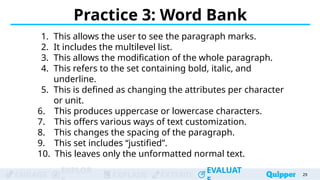
1. This allows the user to see the paragraph marks.
2. It includes the multilevel list.
3. This allows the modification of the whole paragraph.
4. This refers to the set containing bold, italic, and
underline.
5. This is defined as changing the attributes per character
or unit.
6. This produces uppercase or lowercase characters.
7. This offers various ways of text customization.
8. This changes the spacing of the paragraph.
9. This set includes “justified”.
10. This leaves only the unformatted normal text.
Practice 3: Word Bank
29
29
29
29
29
ENGAGE
EXPLOR
EXPLAIN EXTEND
EVALUAT
ENGAGE
EXPLOR
EXPLAIN EXTEND
EVALUAT
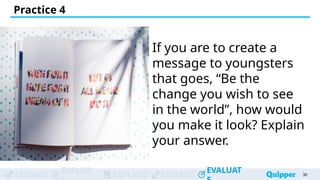
If you are to create a
message to youngsters
that goes, “Be the
change you wish to see
in the world”, how would
you make it look? Explain
your answer.
Practice 4
30
30
30
30
30
Wrap Up
Word Formatting
refers to modifications in character
and paragraph properties.
Character Formatting focuses on the
design of each character on a document,
while Paragraph Formatting pertains to
changes in the whole paragraph layout.
31
Bibliography
32
Brown, Jonathan. “The Enduring Popularity of Microsoft Word.” tmcnet.com.
November 26 2018. Accessed May 23 2020.
https://www.tmcnet.com/topics/articles/2018/11/26/440392-enduring-popularit
y-microsoft-word.htm
.
Strizver, Ilene. “Think You Know What Opentype Is? Think Again!”
creativepro.com. October 19 2016. Accessed May 23 2020.
https://creativepro.com/typetalk-what-is-opentype/.

L2 Character and Paragraph Formatting.pptx

Editor's Notes

  • #6 sample answer: The slogan lacks creativity and aliveness. It does not justify its message. Yes. With a word processor, we can manipulate our text and make it more effective.
  • #24 Complete instruction: Identify the features applied in formatting the given sentences. There are 3 to 5 features used in each. To avoid confusion, consider Times New Roman as the default font family and disregard any differences with the font size.
  • #25 answers: font color (orange), italics, dashed underline, sentence case. font color (blue), underline, uppercase strikethrough, font color (yellow, black), bold, sentence case. font color (black, red, green, blue), double underline, subscript, sentence case. strikethrough, italic, bold, uppercase
  • #26 Below the created “motto” text, kindly ask the students to indicate what formatting properties are present on their work.
  • #27 Below the created “motto” text, kindly ask the students to indicate what formatting properties are present on their work.
  • #29 Answer key: Show/Hide Automated List Paragraph Formatting Font Style Character Formatting Change Case Text effects and typography Line or Paragraph Spacing Align Clear All Formatting