Lecture 08
Data Source Layer
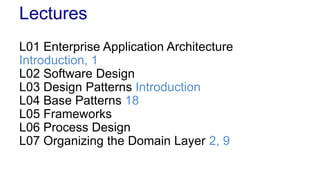
Lectures
L01 Enterprise Application Architecture
Introduction, 1
L02 Software Design
L03 Design Patterns Introduction
L04 Base Patterns 18
L05 Frameworks
L06 Process Design
L07 Organizing the Domain Layer 2, 9
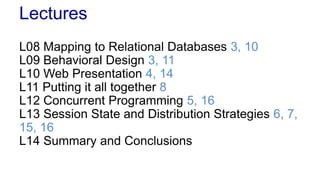
Lectures
L08 Mapping to Relational Databases 3, 10
L09 Behavioral Design 3, 11
L10 Web Presentation 4, 14
L11 Putting it all together 8
L12 Concurrent Programming 5, 16
L13 Session State and Distribution Strategies 6, 7,
15, 16
L14 Summary and Conclusions
Lecture 08
Data Source Layer
Reading
 Fowler 3 Mapping to Relational Database
 Fowler 10 Data Source Architectural Patterns
– Table Data Gateway (144)
– Row Data Gateway (152)
– Active Record (160)
– Data Mapper (165)
 Fowler 15 Distribution Patterns
– Data Transfer Object (401)
 Fowler 18 Base Pattern
– Record set (508)
Agenda
 Design Objectives
 Data Source Patterns
– Data Transfer Object (401)
– Row Data Gateway (152)
– Table Data Gateway (144)
– Active Record (160)
– Data Mapper (165)
– Record set (508)
Design Objectives
Relational Databases
 We are dealing with relational databases
– Wide-spread and well understood
– SQL based
– These are important in enterprise software
 Alternatives
– NoSQL databases
– O/R Mappers
Connecting to Data Sources
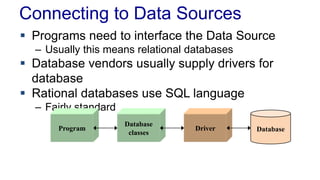
 Programs need to interface the Data Source
– Usually this means relational databases
 Database vendors usually supply drivers for
database
 Rational databases use SQL language
– Fairly standard
Program
Database
classes
Driver Database
Objectives
 Hide SQL from the Domain Layer
 Access to database needs to ensure
– Speed and data integrity
– Concurrent access of many clients
 Database independence
– It can be an objective to keep the system independent
of particular database technology
 Data Source Layer needs to be maintainable
– Database will change
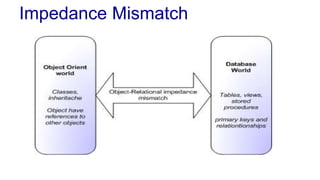
Impedance Mismatch
The Legacy Problem
 In most cases the data model exists
– The schema already exists
– We cannot assume that we create the schema
 Data tends to stick where it lends
– Cannot assume that our application controls the
schema
– The schema will likely outlive the application
The Usability Problem
 The Database API determines the usability of
the data access
– Should be easy to use
 The programming model is important
– Does matter how efficient and good a persistence
framework is, if it is complex and cumbersome to use
 Tools may help, but should not be used to
conceal excessive complexity
– If tools are required to generate data access the
programming model is likely to be complex
Using Databases
 Programmers tend to want to solve all problems
in their domain
– Should we solve all problems in our object domain?
– Should we write everything in Java or C#?
 Databases are good at what they do
– But it’s necessary to let them do it in a natural way
Database Code
 Database programming can be very repetitive
– Opportunities for reusability
– JDBC is too low-level
 Code is Bad!
– Don’t write code unless you have to
– Try to write code for the business layer
 Persistence Frameworks are difficult to build
– Use the frameworks that exist
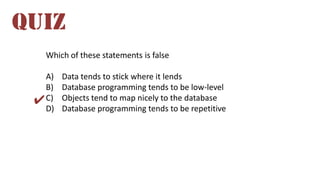
Which of these statements is false
A) Data tends to stick where it lends
B) Database programming tends to be low-level
C) Objects tend to map nicely to the database
D) Database programming tends to be repetitive
QUIZ
✔
Data Source Patterns
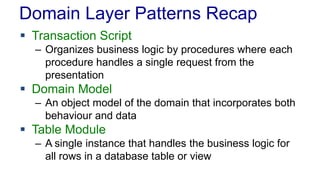
Domain Layer Patterns Recap
 Transaction Script
– Organizes business logic by procedures where each
procedure handles a single request from the
presentation
 Domain Model
– An object model of the domain that incorporates both
behaviour and data
 Table Module
– A single instance that handles the business logic for
all rows in a database table or view
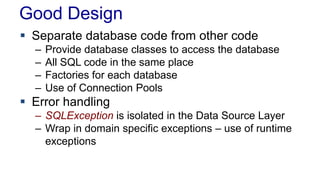
Good Design
 Separate database code from other code
– Provide database classes to access the database
– All SQL code in the same place
– Factories for each database
– Use of Connection Pools
 Error handling
– SQLException is isolated in the Data Source Layer
– Wrap in domain specific exceptions – use of runtime
exceptions
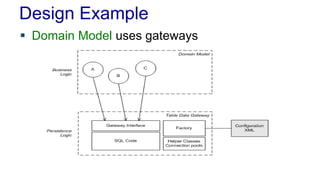
Design Example
 Domain Model uses gateways
Useful Patterns
 Data Transfer Object (401)
– An object that carries data between processes in
order to deduce the number of method calls
 Record Set (508)
– An in-memory representation of tabular data
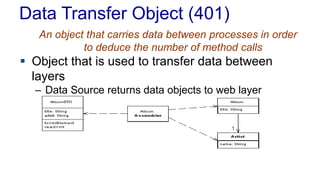
Data Transfer Object (401)
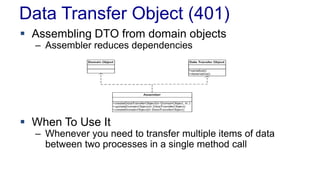
An object that carries data between processes in order
to deduce the number of method calls
 Object that is used to transfer data between
layers
– Data Source returns data objects to web layer
Data Transfer Object (401)
 How it Works
– Similar to Value Object but is constructed to carry
data between layers
– Data source layer creates DTO for transfer
– DTOs holds data – get/set method
– Can be mutable or immutable
– Could have methods to transform data – for example
serialize the data or convert to XML
– Simple Domain Objects can be used as DTO
• Creates dependencies
Data Transfer Object (401)
 Assembling DTO from domain objects
– Assembler reduces dependencies
 When To Use It
– Whenever you need to transfer multiple items of data
between two processes in a single method call
Record Set (508)
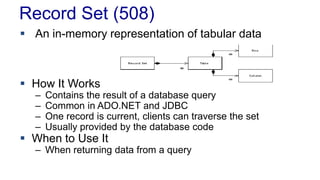
 An in-memory representation of tabular data
 How It Works
– Contains the result of a database query
– Common in ADO.NET and JDBC
– One record is current, clients can traverse the set
– Usually provided by the database code
 When to Use It
– When returning data from a query
Data Source Patterns
 Table Data Gateway (144)
– Acts as a Gateway to a database table
 Row Data Gateway (152)
– Acts as a Gateway to a single record in a data source
 Active Record (160)
– Wraps a row in a database table or
view, encapsulates the database access, and adds
domain logic on that data
 Data Mapper (165)
– A layer of Mappers that moves data between objects
and database while keeping them independent
Pattern Overview
Data Source Layer
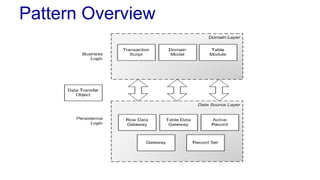
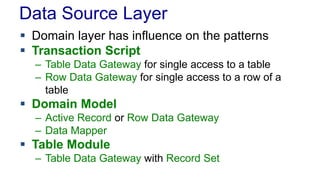
 Domain layer has influence on the patterns
 Transaction Script
– Table Data Gateway for single access to a table
– Row Data Gateway for single access to a row of a
table
 Domain Model
– Active Record or Row Data Gateway
– Data Mapper
 Table Module
– Table Data Gateway with Record Set
Data Source Patterns
 Table Data Gateway (144)
– Acts as a Gateway to a database table
 Row Data Gateway (152)
– Acts as a Gateway to a single record in a data source
 Active Record (160)
– Wraps a row in a database table or
view, encapsulates the database access, and adds
domain logic on that data
 Data Mapper (165)
– A layer of Mappers that moves data between objects
and database while keeping them independent
Table Data Gateway (114)
An object that acts as a Gateway (446) to a
database table. One instance handles all the
rows in the table.
 Also called Data Access Objects – DAO
 How It Works
– Simple interface to a table with several find methods
and methods for maintaining data
– CRUD methods (Create, Read, Update, Delete)
– Acts as a gateway to a table
– One gateway for each table
– Finders return Collection of DTOs or Record Set
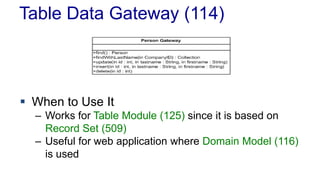
Table Data Gateway (114)
 When to Use It
– Works for Table Module (125) since it is based on
Record Set (509)
– Useful for web application where Domain Model (116)
is used
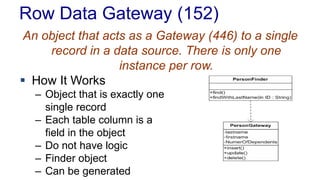
Row Data Gateway (152)
An object that acts as a Gateway (446) to a single
record in a data source. There is only one
instance per row.
 How It Works
– Object that is exactly one
single record
– Each table column is a
field in the object
– Do not have logic
– Finder object
– Can be generated
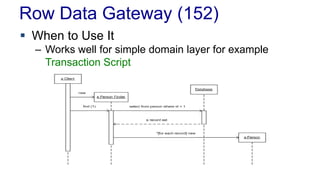
Row Data Gateway (152)
 When to Use It
– Works well for simple domain layer for example
Transaction Script
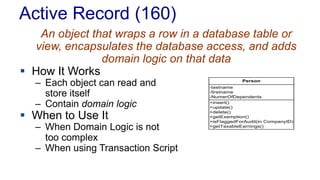
Active Record (160)
An object that wraps a row in a database table or
view, encapsulates the database access, and adds
domain logic on that data
 How It Works
– Each object can read and
store itself
– Contain domain logic
 When to Use It
– When Domain Logic is not
too complex
– When using Transaction Script
+insert()
+update()
+delete()
+getExemption()
+isFlaggedForAudit(in CompanyID)
+getTaxableEarnings()
-lastname
-firstname
-NumerOfDependents
Person
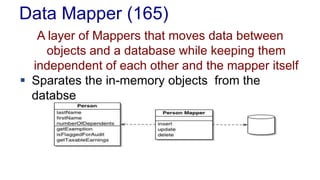
Data Mapper (165)
A layer of Mappers that moves data between
objects and a database while keeping them
independent of each other and the mapper itself
 Sparates the in-memory objects from the
databse
Data Mapper
 How It works
– Simple Data Mappers map in-memory object to table on a
field-to-field basis
– Others need to map more complicated object hierarchies
to multiple tables
– Mapper uses Identity Map to see if object is already
loaded
 For insert and updates
– The mapper must know what objects have changed, which
are new, and which must be destroyed
– Unit of Work pattern
Data Mapper
 When to Use It
– Database and object model must be independent
– Data Mappers are useful with Domain Model
– For simple Domain Model an Active Record could
be used, but as it becomes more complicated some
mapping is needed
 O/R mapping solutions can provide the mappers
– For example Hibernate
Data Mapper
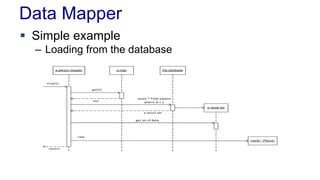
 Simple example
– Loading from the database
Data Mapper
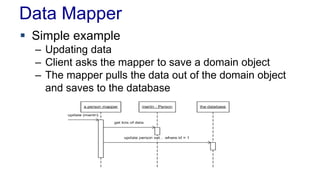
 Simple example
– Updating data
– Client asks the mapper to save a domain object
– The mapper pulls the data out of the domain object
and saves to the database
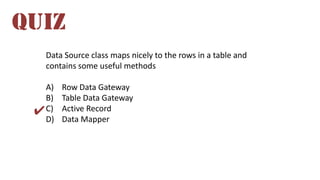
Data Source class maps nicely to the rows in a table and
contains some useful methods
A) Row Data Gateway
B) Table Data Gateway
C) Active Record
D) Data Mapper
QUIZ
✔
Spring JDBC
Spring JDBC
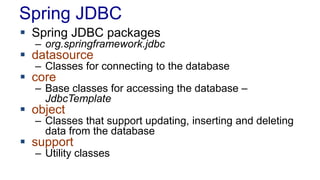
 Spring JDBC packages
– org.springframework.jdbc
 datasource
– Classes for connecting to the database
 core
– Base classes for accessing the database –
JdbcTemplate
 object
– Classes that support updating, inserting and deleting
data from the database
 support
– Utility classes
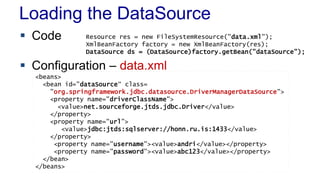
Loading the DataSource
 Code
 Configuration – data.xml
Resource res = new FileSystemResource("data.xml");
XmlBeanFactory factory = new XmlBeanFactory(res);
DataSource ds = (DataSource)factory.getBean("dataSource");
<beans>
<bean id="dataSource“ class=
"org.springframework.jdbc.datasource.DriverManagerDataSource">
<property name="driverClassName">
<value>net.sourceforge.jtds.jdbc.Driver</value>
</property>
<property name="url”>
<value>jdbc:jtds:sqlserver://honn.ru.is:1433</value>
</property>
<property name="username"><value>andri</value></property>
<property name="password"><value>abc123</value></property>
</bean>
</beans>
JdbcTemplate
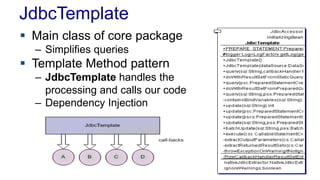
 Main class of core package
– Simplifies queries
 Template Method pattern
– JdbcTemplate handles the
processing and calls our code
– Dependency Injection
JdbcTemplate Example
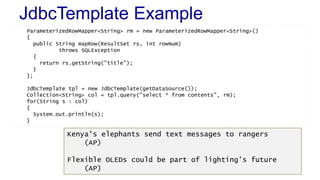
ParameterizedRowMapper<String> rm = new ParameterizedRowMapper<String>()
{
public String mapRow(ResultSet rs, int rowNum)
throws SQLException
{
return rs.getString("title");
}
};
JdbcTemplate tpl = new JdbcTemplate(getDataSource());
Collection<String> col = tpl.query("select * from contents", rm);
for(String s : col)
{
System.out.println(s);
}
Kenya's elephants send text messages to rangers
(AP)
Flexible OLEDs could be part of lighting's future
(AP)
Collecting Data
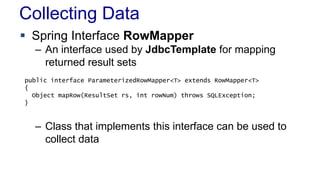
 Spring Interface RowMapper
– An interface used by JdbcTemplate for mapping
returned result sets
– Class that implements this interface can be used to
collect data
public interface ParameterizedRowMapper<T> extends RowMapper<T>
{
Object mapRow(ResultSet rs, int rowNum) throws SQLException;
}
ContentRowMapper
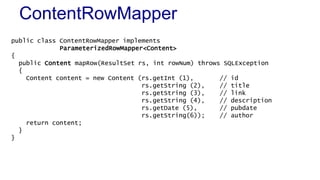
public class ContentRowMapper implements
ParameterizedRowMapper<Content>
{
public Content mapRow(ResultSet rs, int rowNum) throws SQLException
{
Content content = new Content (rs.getInt (1), // id
rs.getString (2), // title
rs.getString (3), // link
rs.getString (4), // description
rs.getDate (5), // pubdate
rs.getString(6)); // author
return content;
}
}
Using ContentRowMapper
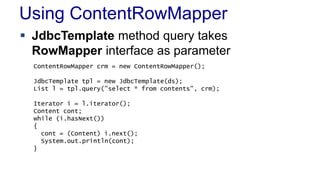
 JdbcTemplate method query takes
RowMapper interface as parameter
ContentRowMapper crm = new ContentRowMapper();
JdbcTemplate tpl = new JdbcTemplate(ds);
List l = tpl.query("select * from contents", crm);
Iterator i = l.iterator();
Content cont;
while (i.hasNext())
{
cont = (Content) i.next();
System.out.println(cont);
}
Insert
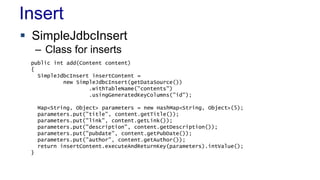
 SimpleJdbcInsert
– Class for inserts
public int add(Content content)
{
SimpleJdbcInsert insertContent =
new SimpleJdbcInsert(getDataSource())
.withTableName("contents")
.usingGeneratedKeyColumns("id");
Map<String, Object> parameters = new HashMap<String, Object>(5);
parameters.put("title", content.getTitle());
parameters.put("link", content.getLink());
parameters.put("description", content.getDescription());
parameters.put("pubdate", content.getPubDate());
parameters.put("author", content.getAuthor());
return insertContent.executeAndReturnKey(parameters).intValue();
}
RU Data Framework
Content Example
Content Example
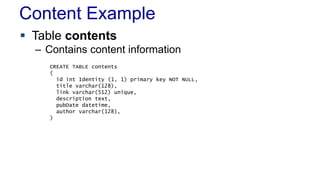
 Table contents
– Contains content information
CREATE TABLE contents
(
id int Identity (1, 1) primary key NOT NULL,
title varchar(128),
link varchar(512) unique,
description text,
pubDate datetime,
author varchar(128),
)
Content Example
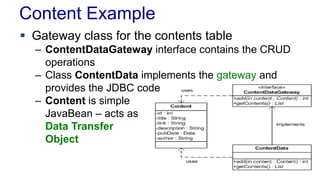
 Gateway class for the contents table
– ContentDataGateway interface contains the CRUD
operations
– Class ContentData implements the gateway and
provides the JDBC code
– Content is simple
JavaBean – acts as
Data Transfer
Object
RU Data Framework
 Classes and interfaces for accessing the
database
– Implementation of the Data Gateway
 For Table Data Gateway
– Each table has an Gateway interface
– Implementation in Data classes
– Factory pattern returns the implementation for each
Date Gateway
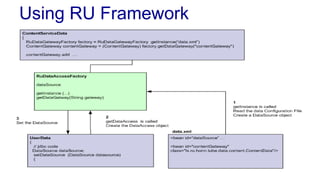
RuDataAccessFactory
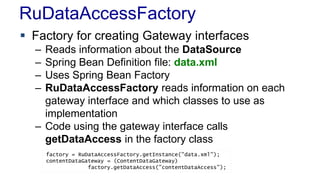
 Factory for creating Gateway interfaces
– Reads information about the DataSource
– Spring Bean Definition file: data.xml
– Uses Spring Bean Factory
– RuDataAccessFactory reads information on each
gateway interface and which classes to use as
implementation
– Code using the gateway interface calls
getDataAccess in the factory class
factory = RuDataAccessFactory.getInstance("data.xml");
contentDataGateway = (ContentDataGateway)
factory.getDataAccess("contentDataAccess");
Data Definition
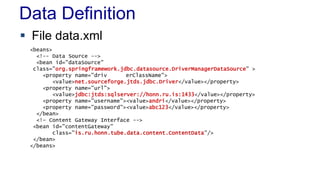
 File data.xml
<beans>
<!-- Data Source -->
<bean id="dataSource"
class="org.springframework.jdbc.datasource.DriverManagerDataSource" >
<property name="driv erClassName">
<value>net.sourceforge.jtds.jdbc.Driver</value></property>
<property name="url">
<value>jdbc:jtds:sqlserver://honn.ru.is:1433</value></property>
<property name="username"><value>andri</value></property>
<property name="password"><value>abc123</value></property>
</bean>
<!– Content Gateway Interface -->
<bean id="contentGateway"
class="is.ru.honn.tube.data.content.ContentData"/>
</bean>
</beans>
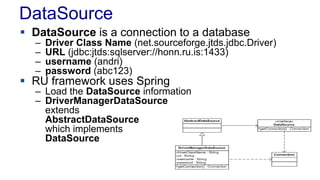
DataSource
 DataSource is a connection to a database
– Driver Class Name (net.sourceforge.jtds.jdbc.Driver)
– URL (jdbc:jtds:sqlserver://honn.ru.is:1433)
– username (andri)
– password (abc123)
 RU framework uses Spring
– Load the DataSource information
– DriverManagerDataSource
extends
AbstractDataSource
which implements
DataSource
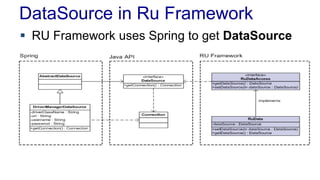
DataSource in Ru Framework
 RU Framework uses Spring to get DataSource
Using RU Framework
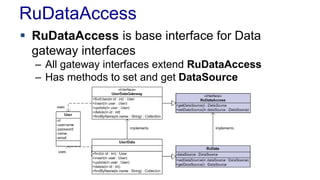
RuDataAccess
 RuDataAccess is base interface for Data
gateway interfaces
– All gateway interfaces extend RuDataAccess
– Has methods to set and get DataSource
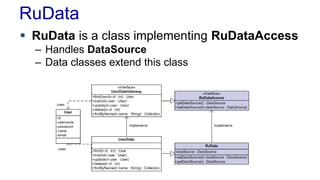
RuData
 RuData is a class implementing RuDataAccess
– Handles DataSource
– Data classes extend this class
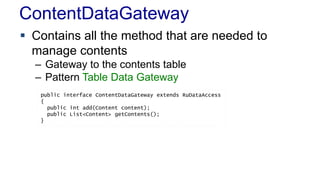
ContentDataGateway
 Contains all the method that are needed to
manage contents
– Gateway to the contents table
– Pattern Table Data Gateway
public interface ContentDataGateway extends RuDataAccess
{
public int add(Content content);
public List<Content> getContents();
}
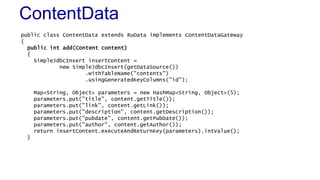
ContentData
public class ContentData extends RuData implements ContentDataGateway
{
public int add(Content content)
{
SimpleJdbcInsert insertContent =
new SimpleJdbcInsert(getDataSource())
.withTableName("contents")
.usingGeneratedKeyColumns("id");
Map<String, Object> parameters = new HashMap<String, Object>(5);
parameters.put("title", content.getTitle());
parameters.put("link", content.getLink());
parameters.put("description", content.getDescription());
parameters.put("pubdate", content.getPubDate());
parameters.put("author", content.getAuthor());
return insertContent.executeAndReturnKey(parameters).intValue();
}
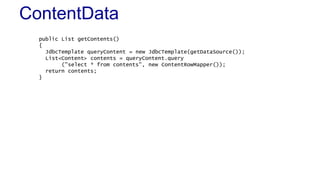
ContentData
public List getContents()
{
JdbcTemplate queryContent = new JdbcTemplate(getDataSource());
List<Content> contents = queryContent.query
("select * from contents", new ContentRowMapper());
return contents;
}
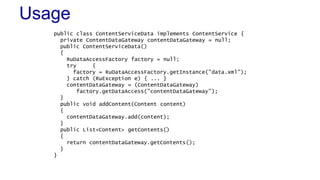
Usage
public class ContentServiceData implements ContentService {
private ContentDataGateway contentDataGateway = null;
public ContentServiceData()
{
RuDataAccessFactory factory = null;
try {
factory = RuDataAccessFactory.getInstance("data.xml");
} catch (RuException e) { ... }
contentDataGateway = (ContentDataGateway)
factory.getDataAccess("contentDataGateway");
}
public void addContent(Content content)
{
contentDataGateway.add(content);
}
public List<Content> getContents()
{
return contentDataGateway.getContents();
}
}
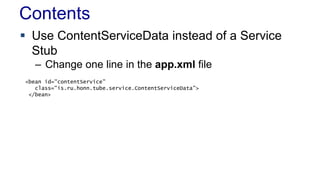
Contents
 Use ContentServiceData instead of a Service
Stub
– Change one line in the app.xml file
<bean id="contentService"
class="is.ru.honn.tube.service.ContentServiceData">
</bean>
Contents
 Use ContentServiceData instead of a Service
Stub
– Change one line in the app.xml file
Summary
 Design Objectives
– Object-relational impedance mismatch
– The Usability Problem
– The Legacy Problem
 Patterns
– Table Data Gateway (144)
– Row Data Gateway (152)
– Active Record (160)
– Data Mapper (165)
– Data Transfer Object (401) and Record set (508)

L08 Data Source Layer

  • 1.
  • 2.
    Lectures L01 Enterprise ApplicationArchitecture Introduction, 1 L02 Software Design L03 Design Patterns Introduction L04 Base Patterns 18 L05 Frameworks L06 Process Design L07 Organizing the Domain Layer 2, 9
  • 3.
    Lectures L08 Mapping toRelational Databases 3, 10 L09 Behavioral Design 3, 11 L10 Web Presentation 4, 14 L11 Putting it all together 8 L12 Concurrent Programming 5, 16 L13 Session State and Distribution Strategies 6, 7, 15, 16 L14 Summary and Conclusions
  • 4.
  • 5.
    Reading  Fowler 3Mapping to Relational Database  Fowler 10 Data Source Architectural Patterns – Table Data Gateway (144) – Row Data Gateway (152) – Active Record (160) – Data Mapper (165)  Fowler 15 Distribution Patterns – Data Transfer Object (401)  Fowler 18 Base Pattern – Record set (508)
  • 6.
    Agenda  Design Objectives Data Source Patterns – Data Transfer Object (401) – Row Data Gateway (152) – Table Data Gateway (144) – Active Record (160) – Data Mapper (165) – Record set (508)
  • 7.
  • 8.
    Relational Databases  Weare dealing with relational databases – Wide-spread and well understood – SQL based – These are important in enterprise software  Alternatives – NoSQL databases – O/R Mappers
  • 9.
    Connecting to DataSources  Programs need to interface the Data Source – Usually this means relational databases  Database vendors usually supply drivers for database  Rational databases use SQL language – Fairly standard Program Database classes Driver Database
  • 10.
    Objectives  Hide SQLfrom the Domain Layer  Access to database needs to ensure – Speed and data integrity – Concurrent access of many clients  Database independence – It can be an objective to keep the system independent of particular database technology  Data Source Layer needs to be maintainable – Database will change
  • 11.
  • 12.
    The Legacy Problem In most cases the data model exists – The schema already exists – We cannot assume that we create the schema  Data tends to stick where it lends – Cannot assume that our application controls the schema – The schema will likely outlive the application
  • 13.
    The Usability Problem The Database API determines the usability of the data access – Should be easy to use  The programming model is important – Does matter how efficient and good a persistence framework is, if it is complex and cumbersome to use  Tools may help, but should not be used to conceal excessive complexity – If tools are required to generate data access the programming model is likely to be complex
  • 14.
    Using Databases  Programmerstend to want to solve all problems in their domain – Should we solve all problems in our object domain? – Should we write everything in Java or C#?  Databases are good at what they do – But it’s necessary to let them do it in a natural way
  • 15.
    Database Code  Databaseprogramming can be very repetitive – Opportunities for reusability – JDBC is too low-level  Code is Bad! – Don’t write code unless you have to – Try to write code for the business layer  Persistence Frameworks are difficult to build – Use the frameworks that exist
  • 16.
    Which of thesestatements is false A) Data tends to stick where it lends B) Database programming tends to be low-level C) Objects tend to map nicely to the database D) Database programming tends to be repetitive QUIZ ✔
  • 17.
  • 18.
    Domain Layer PatternsRecap  Transaction Script – Organizes business logic by procedures where each procedure handles a single request from the presentation  Domain Model – An object model of the domain that incorporates both behaviour and data  Table Module – A single instance that handles the business logic for all rows in a database table or view
  • 19.
    Good Design  Separatedatabase code from other code – Provide database classes to access the database – All SQL code in the same place – Factories for each database – Use of Connection Pools  Error handling – SQLException is isolated in the Data Source Layer – Wrap in domain specific exceptions – use of runtime exceptions
  • 20.
    Design Example  DomainModel uses gateways
  • 21.
    Useful Patterns  DataTransfer Object (401) – An object that carries data between processes in order to deduce the number of method calls  Record Set (508) – An in-memory representation of tabular data
  • 22.
    Data Transfer Object(401) An object that carries data between processes in order to deduce the number of method calls  Object that is used to transfer data between layers – Data Source returns data objects to web layer
  • 23.
    Data Transfer Object(401)  How it Works – Similar to Value Object but is constructed to carry data between layers – Data source layer creates DTO for transfer – DTOs holds data – get/set method – Can be mutable or immutable – Could have methods to transform data – for example serialize the data or convert to XML – Simple Domain Objects can be used as DTO • Creates dependencies
  • 24.
    Data Transfer Object(401)  Assembling DTO from domain objects – Assembler reduces dependencies  When To Use It – Whenever you need to transfer multiple items of data between two processes in a single method call
  • 25.
    Record Set (508) An in-memory representation of tabular data  How It Works – Contains the result of a database query – Common in ADO.NET and JDBC – One record is current, clients can traverse the set – Usually provided by the database code  When to Use It – When returning data from a query
  • 26.
    Data Source Patterns Table Data Gateway (144) – Acts as a Gateway to a database table  Row Data Gateway (152) – Acts as a Gateway to a single record in a data source  Active Record (160) – Wraps a row in a database table or view, encapsulates the database access, and adds domain logic on that data  Data Mapper (165) – A layer of Mappers that moves data between objects and database while keeping them independent
  • 27.
  • 28.
    Data Source Layer Domain layer has influence on the patterns  Transaction Script – Table Data Gateway for single access to a table – Row Data Gateway for single access to a row of a table  Domain Model – Active Record or Row Data Gateway – Data Mapper  Table Module – Table Data Gateway with Record Set
  • 29.
    Data Source Patterns Table Data Gateway (144) – Acts as a Gateway to a database table  Row Data Gateway (152) – Acts as a Gateway to a single record in a data source  Active Record (160) – Wraps a row in a database table or view, encapsulates the database access, and adds domain logic on that data  Data Mapper (165) – A layer of Mappers that moves data between objects and database while keeping them independent
  • 30.
    Table Data Gateway(114) An object that acts as a Gateway (446) to a database table. One instance handles all the rows in the table.  Also called Data Access Objects – DAO  How It Works – Simple interface to a table with several find methods and methods for maintaining data – CRUD methods (Create, Read, Update, Delete) – Acts as a gateway to a table – One gateway for each table – Finders return Collection of DTOs or Record Set
  • 31.
    Table Data Gateway(114)  When to Use It – Works for Table Module (125) since it is based on Record Set (509) – Useful for web application where Domain Model (116) is used
  • 32.
    Row Data Gateway(152) An object that acts as a Gateway (446) to a single record in a data source. There is only one instance per row.  How It Works – Object that is exactly one single record – Each table column is a field in the object – Do not have logic – Finder object – Can be generated
  • 33.
    Row Data Gateway(152)  When to Use It – Works well for simple domain layer for example Transaction Script
  • 34.
    Active Record (160) Anobject that wraps a row in a database table or view, encapsulates the database access, and adds domain logic on that data  How It Works – Each object can read and store itself – Contain domain logic  When to Use It – When Domain Logic is not too complex – When using Transaction Script +insert() +update() +delete() +getExemption() +isFlaggedForAudit(in CompanyID) +getTaxableEarnings() -lastname -firstname -NumerOfDependents Person
  • 35.
    Data Mapper (165) Alayer of Mappers that moves data between objects and a database while keeping them independent of each other and the mapper itself  Sparates the in-memory objects from the databse
  • 36.
    Data Mapper  HowIt works – Simple Data Mappers map in-memory object to table on a field-to-field basis – Others need to map more complicated object hierarchies to multiple tables – Mapper uses Identity Map to see if object is already loaded  For insert and updates – The mapper must know what objects have changed, which are new, and which must be destroyed – Unit of Work pattern
  • 37.
    Data Mapper  Whento Use It – Database and object model must be independent – Data Mappers are useful with Domain Model – For simple Domain Model an Active Record could be used, but as it becomes more complicated some mapping is needed  O/R mapping solutions can provide the mappers – For example Hibernate
  • 38.
    Data Mapper  Simpleexample – Loading from the database
  • 39.
    Data Mapper  Simpleexample – Updating data – Client asks the mapper to save a domain object – The mapper pulls the data out of the domain object and saves to the database
  • 40.
    Data Source classmaps nicely to the rows in a table and contains some useful methods A) Row Data Gateway B) Table Data Gateway C) Active Record D) Data Mapper QUIZ ✔
  • 41.
  • 42.
    Spring JDBC  SpringJDBC packages – org.springframework.jdbc  datasource – Classes for connecting to the database  core – Base classes for accessing the database – JdbcTemplate  object – Classes that support updating, inserting and deleting data from the database  support – Utility classes
  • 43.
    Loading the DataSource Code  Configuration – data.xml Resource res = new FileSystemResource("data.xml"); XmlBeanFactory factory = new XmlBeanFactory(res); DataSource ds = (DataSource)factory.getBean("dataSource"); <beans> <bean id="dataSource“ class= "org.springframework.jdbc.datasource.DriverManagerDataSource"> <property name="driverClassName"> <value>net.sourceforge.jtds.jdbc.Driver</value> </property> <property name="url”> <value>jdbc:jtds:sqlserver://honn.ru.is:1433</value> </property> <property name="username"><value>andri</value></property> <property name="password"><value>abc123</value></property> </bean> </beans>
  • 44.
    JdbcTemplate  Main classof core package – Simplifies queries  Template Method pattern – JdbcTemplate handles the processing and calls our code – Dependency Injection
  • 45.
    JdbcTemplate Example ParameterizedRowMapper<String> rm= new ParameterizedRowMapper<String>() { public String mapRow(ResultSet rs, int rowNum) throws SQLException { return rs.getString("title"); } }; JdbcTemplate tpl = new JdbcTemplate(getDataSource()); Collection<String> col = tpl.query("select * from contents", rm); for(String s : col) { System.out.println(s); } Kenya's elephants send text messages to rangers (AP) Flexible OLEDs could be part of lighting's future (AP)
  • 46.
    Collecting Data  SpringInterface RowMapper – An interface used by JdbcTemplate for mapping returned result sets – Class that implements this interface can be used to collect data public interface ParameterizedRowMapper<T> extends RowMapper<T> { Object mapRow(ResultSet rs, int rowNum) throws SQLException; }
  • 47.
    ContentRowMapper public class ContentRowMapperimplements ParameterizedRowMapper<Content> { public Content mapRow(ResultSet rs, int rowNum) throws SQLException { Content content = new Content (rs.getInt (1), // id rs.getString (2), // title rs.getString (3), // link rs.getString (4), // description rs.getDate (5), // pubdate rs.getString(6)); // author return content; } }
  • 48.
    Using ContentRowMapper  JdbcTemplatemethod query takes RowMapper interface as parameter ContentRowMapper crm = new ContentRowMapper(); JdbcTemplate tpl = new JdbcTemplate(ds); List l = tpl.query("select * from contents", crm); Iterator i = l.iterator(); Content cont; while (i.hasNext()) { cont = (Content) i.next(); System.out.println(cont); }
  • 49.
    Insert  SimpleJdbcInsert – Classfor inserts public int add(Content content) { SimpleJdbcInsert insertContent = new SimpleJdbcInsert(getDataSource()) .withTableName("contents") .usingGeneratedKeyColumns("id"); Map<String, Object> parameters = new HashMap<String, Object>(5); parameters.put("title", content.getTitle()); parameters.put("link", content.getLink()); parameters.put("description", content.getDescription()); parameters.put("pubdate", content.getPubDate()); parameters.put("author", content.getAuthor()); return insertContent.executeAndReturnKey(parameters).intValue(); }
  • 50.
  • 51.
    Content Example  Tablecontents – Contains content information CREATE TABLE contents ( id int Identity (1, 1) primary key NOT NULL, title varchar(128), link varchar(512) unique, description text, pubDate datetime, author varchar(128), )
  • 52.
    Content Example  Gatewayclass for the contents table – ContentDataGateway interface contains the CRUD operations – Class ContentData implements the gateway and provides the JDBC code – Content is simple JavaBean – acts as Data Transfer Object
  • 53.
    RU Data Framework Classes and interfaces for accessing the database – Implementation of the Data Gateway  For Table Data Gateway – Each table has an Gateway interface – Implementation in Data classes – Factory pattern returns the implementation for each Date Gateway
  • 54.
    RuDataAccessFactory  Factory forcreating Gateway interfaces – Reads information about the DataSource – Spring Bean Definition file: data.xml – Uses Spring Bean Factory – RuDataAccessFactory reads information on each gateway interface and which classes to use as implementation – Code using the gateway interface calls getDataAccess in the factory class factory = RuDataAccessFactory.getInstance("data.xml"); contentDataGateway = (ContentDataGateway) factory.getDataAccess("contentDataAccess");
  • 55.
    Data Definition  Filedata.xml <beans> <!-- Data Source --> <bean id="dataSource" class="org.springframework.jdbc.datasource.DriverManagerDataSource" > <property name="driv erClassName"> <value>net.sourceforge.jtds.jdbc.Driver</value></property> <property name="url"> <value>jdbc:jtds:sqlserver://honn.ru.is:1433</value></property> <property name="username"><value>andri</value></property> <property name="password"><value>abc123</value></property> </bean> <!– Content Gateway Interface --> <bean id="contentGateway" class="is.ru.honn.tube.data.content.ContentData"/> </bean> </beans>
  • 56.
    DataSource  DataSource isa connection to a database – Driver Class Name (net.sourceforge.jtds.jdbc.Driver) – URL (jdbc:jtds:sqlserver://honn.ru.is:1433) – username (andri) – password (abc123)  RU framework uses Spring – Load the DataSource information – DriverManagerDataSource extends AbstractDataSource which implements DataSource
  • 57.
    DataSource in RuFramework  RU Framework uses Spring to get DataSource
  • 58.
  • 59.
    RuDataAccess  RuDataAccess isbase interface for Data gateway interfaces – All gateway interfaces extend RuDataAccess – Has methods to set and get DataSource
  • 60.
    RuData  RuData isa class implementing RuDataAccess – Handles DataSource – Data classes extend this class
  • 61.
    ContentDataGateway  Contains allthe method that are needed to manage contents – Gateway to the contents table – Pattern Table Data Gateway public interface ContentDataGateway extends RuDataAccess { public int add(Content content); public List<Content> getContents(); }
  • 62.
    ContentData public class ContentDataextends RuData implements ContentDataGateway { public int add(Content content) { SimpleJdbcInsert insertContent = new SimpleJdbcInsert(getDataSource()) .withTableName("contents") .usingGeneratedKeyColumns("id"); Map<String, Object> parameters = new HashMap<String, Object>(5); parameters.put("title", content.getTitle()); parameters.put("link", content.getLink()); parameters.put("description", content.getDescription()); parameters.put("pubdate", content.getPubDate()); parameters.put("author", content.getAuthor()); return insertContent.executeAndReturnKey(parameters).intValue(); }
  • 63.
    ContentData public List getContents() { JdbcTemplatequeryContent = new JdbcTemplate(getDataSource()); List<Content> contents = queryContent.query ("select * from contents", new ContentRowMapper()); return contents; }
  • 64.
    Usage public class ContentServiceDataimplements ContentService { private ContentDataGateway contentDataGateway = null; public ContentServiceData() { RuDataAccessFactory factory = null; try { factory = RuDataAccessFactory.getInstance("data.xml"); } catch (RuException e) { ... } contentDataGateway = (ContentDataGateway) factory.getDataAccess("contentDataGateway"); } public void addContent(Content content) { contentDataGateway.add(content); } public List<Content> getContents() { return contentDataGateway.getContents(); } }
  • 65.
    Contents  Use ContentServiceDatainstead of a Service Stub – Change one line in the app.xml file <bean id="contentService" class="is.ru.honn.tube.service.ContentServiceData"> </bean>
  • 66.
    Contents  Use ContentServiceDatainstead of a Service Stub – Change one line in the app.xml file
  • 67.
    Summary  Design Objectives –Object-relational impedance mismatch – The Usability Problem – The Legacy Problem  Patterns – Table Data Gateway (144) – Row Data Gateway (152) – Active Record (160) – Data Mapper (165) – Data Transfer Object (401) and Record set (508)