Sandeep Dinesh
Developer Advocate
@sandeepdinesh
github.com/thesandlord
Kubernetes Best Practices
Google Cloud Platform 2
Kubernetes is really flexible
Google Cloud Platform 3
But you might yourself in the
Building Containers
Google Cloud Platform 5
Don’t trust arbitrary base images!
6Google Cloud Platform
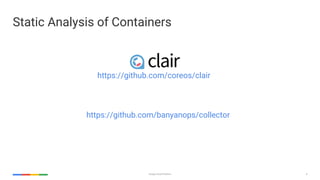
Static Analysis of Containers
https://github.com/banyanops/collector
https://github.com/coreos/clair
Google Cloud Platform 7
Use small base images
8Google Cloud Platform
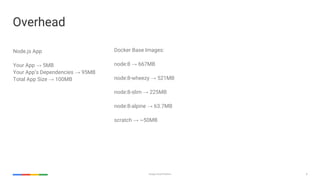
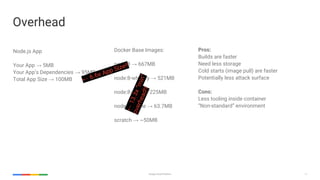
Overhead
Node.js App
Your App → 5MB
Your App’s Dependencies → 95MB
Total App Size → 100MB
Docker Base Images:
node:8 → 667MB
node:8-wheezy → 521MB
node:8-slim → 225MB
node:8-alpine → 63.7MB
scratch → ~50MB
9Google Cloud Platform
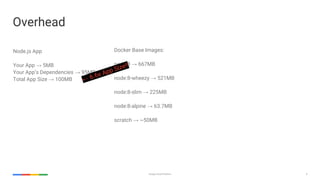
Overhead
Node.js App
Your App → 5MB
Your App’s Dependencies → 95MB
Total App Size → 100MB
Docker Base Images:
node:8 → 667MB
node:8-wheezy → 521MB
node:8-slim → 225MB
node:8-alpine → 63.7MB
scratch → ~50MB
← 6.6x App Size!!
10Google Cloud Platform
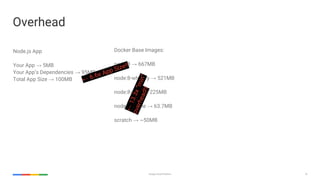
Overhead
Node.js App
Your App → 5MB
Your App’s Dependencies → 95MB
Total App Size → 100MB
Docker Base Images:
node:8 → 667MB
node:8-wheezy → 521MB
node:8-slim → 225MB
node:8-alpine → 63.7MB
scratch → ~50MB
← 6.6x App Size!!
←
13.3x“min”
overhead!!
11Google Cloud Platform
Overhead
Node.js App
Your App → 5MB
Your App’s Dependencies → 95MB
Total App Size → 100MB
Docker Base Images:
node:8 → 667MB
node:8-wheezy → 521MB
node:8-slim → 225MB
node:8-alpine → 63.7MB
scratch → ~50MB
← 6.6x App Size!!
←
13.3x“min”
overhead!!
Pros:
Builds are faster
Need less storage
Cold starts (image pull) are faster
Potentially less attack surface
Cons:
Less tooling inside container
“Non-standard” environment
Google Cloud Platform 12
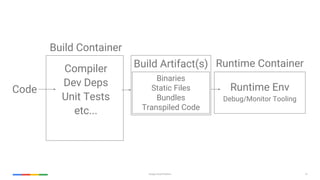
Use the “builder pattern”
13Google Cloud Platform
Code
Build Container
Compiler
Dev Deps
Unit Tests
etc...
Build Artifact(s) Runtime Container
Runtime Env
Debug/Monitor Tooling
Binaries
Static Files
Bundles
Transpiled Code
Google Cloud Platform 14
Docker bringing native support for multi-stage
builds in Docker CE 17.05
Container Internals
Google Cloud Platform 16
Use a non-root user inside the container
17Google Cloud Platform
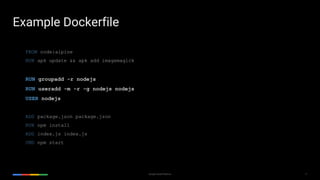
FROM node:alpine
RUN apk update && apk add imagemagick
RUN groupadd -r nodejs
RUN useradd -m -r -g nodejs nodejs
USER nodejs
ADD package.json package.json
RUN npm install
ADD index.js index.js
CMD npm start
Example Dockerfile
18Google Cloud Platform
Enforce it!
apiVersion: v1
kind: Pod
metadata:
name: hello-world
spec:
containers:
# specification of the pod’s containers
# ...
securityContext:
runAsNonRoot: true
Google Cloud Platform 19
Make the filesystem read-only
20Google Cloud Platform
apiVersion: v1
kind: Pod
metadata:
name: hello-world
spec:
containers:
# specification of the pod’s containers
# ...
securityContext:
runAsNonRoot: true
readOnlyRootFilesystem: true
Enforce it!
Google Cloud Platform 21
One process per container
Google Cloud Platform 22
Don’t restart on failure. Crash cleanly instead.
Google Cloud Platform 23
Log to stdout and stderr
Google Cloud Platform 24
Add “dumb-init” to prevent zombie processes
25Google Cloud Platform
FROM node:alpine
RUN apk update && apk add imagemagick
RUN groupadd -r nodejs
RUN useradd -m -r -g nodejs nodejs
USER nodejs
ADD https://github.com/Yelp/dumb-init/releases/download/v1.2.0/dumb-init_1.2.0_amd64 
/usr/local/bin/dumb-init
RUN chmod +x /usr/local/bin/dumb-init
ENTRYPOINT ["/usr/bin/dumb-init", "--"]
ADD package.json package.json
RUN npm install
ADD index.js index.js
CMD npm start
Example Dockerfile
Google Cloud Platform 26
Good News: No need to do this in K8s 1.7
Deployments
Google Cloud Platform 28
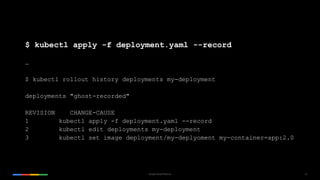
Use the “record” option for easier rollbacks
29Google Cloud Platform
$ kubectl apply -f deployment.yaml --record
…
$ kubectl rollout history deployments my-deployment
deployments "ghost-recorded"
REVISION CHANGE-CAUSE
1 kubectl apply -f deployment.yaml --record
2 kubectl edit deployments my-deployment
3 kubectl set image deployment/my-deplyoment my-container=app:2.0
Google Cloud Platform 30
Use plenty of descriptive labels
31Google Cloud Platform
apiVersion: extensions/v1beta1
kind: Deployment
metadata:
name: web
spec:
replicas: 12
template:
metadata:
labels:
name: web
color: blue
experimental: 'true'
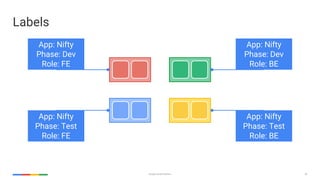
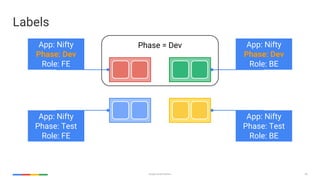
Labels
32Google Cloud Platform
App: Nifty
Phase: Dev
Role: FE
App: Nifty
Phase: Test
Role: FE
App: Nifty
Phase: Dev
Role: BE
App: Nifty
Phase: Test
Role: BE
Labels
33Google Cloud Platform
App: Nifty
Phase: Dev
Role: FE
App: Nifty
Phase: Test
Role: FE
App: Nifty
Phase: Dev
Role: BE
App: Nifty
Phase: Test
Role: BE
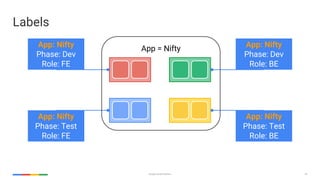
Labels
App = Nifty
34Google Cloud Platform
App: Nifty
Phase: Dev
Role: FE
App: Nifty
Phase: Test
Role: FE
App: Nifty
Phase: Dev
Role: BE
App: Nifty
Phase: Test
Role: BE
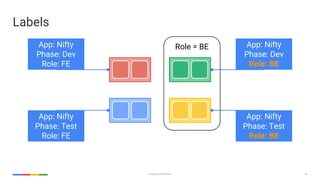
Labels
Role = BE
35Google Cloud Platform
App: Nifty
Phase: Dev
Role: FE
App: Nifty
Phase: Test
Role: FE
App: Nifty
Phase: Dev
Role: BE
App: Nifty
Phase: Test
Role: BE
Labels
Phase = Dev
36Google Cloud Platform
App: Nifty
Phase: Dev
Role: FE
App: Nifty
Phase: Test
Role: FE
App: Nifty
Phase: Dev
Role: BE
App: Nifty
Phase: Test
Role: BE
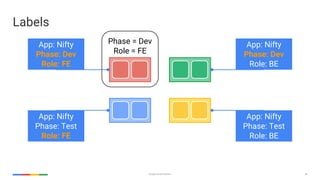
Labels
Phase = Dev
Role = FE
Google Cloud Platform 37
Use sidecar containers for proxies, watchers, etc
38Google Cloud Platform
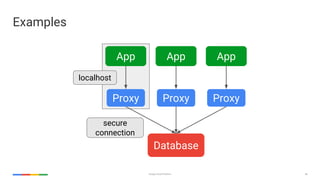
Examples
App
Database
localhost
App App
Proxy Proxy Proxy
secure
connection
39Google Cloud Platform
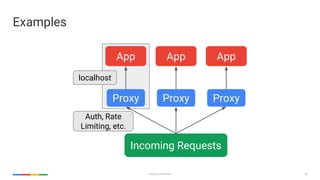
Auth, Rate
Limiting, etc.
Examples
App
Incoming Requests
localhost
App App
Proxy Proxy Proxy
Google Cloud Platform 40
Don’t use sidecars for bootstrapping!
Google Cloud Platform 41
Use init containers instead!
42Google Cloud Platform
apiVersion: v1
kind: Pod
metadata:
name: awesomeapp-pod
labels:
app: awesomeapp
annotations:
pod.beta.kubernetes.io/init-containers: '[
{
"name": "init-myapp",
"image": "busybox",
"command": ["sh", "-c", "until nslookup myapp; do echo waiting for myapp; sleep 2; done;"]
},
{
"name": "init-mydb",
"image": "busybox",
"command": ["sh", "-c", "until nslookup mydb; do echo waiting for mydb; sleep 2; done;"]
}
]'
spec:
containers:
- name: awesomeapp-container
image: busybox
command: ['sh', '-c', 'echo The app is running! && sleep 3600']
Google Cloud Platform 43
Don’t use :latest or no tag
Google Cloud Platform 44
Readiness and Liveness probes are your friend
45Google Cloud Platform
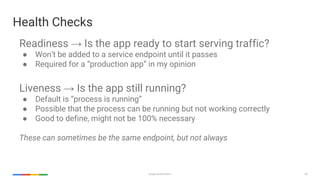
Readiness → Is the app ready to start serving traffic?
● Won’t be added to a service endpoint until it passes
● Required for a “production app” in my opinion
Liveness → Is the app still running?
● Default is “process is running”
● Possible that the process can be running but not working correctly
● Good to define, might not be 100% necessary
These can sometimes be the same endpoint, but not always
Health Checks
Services
Google Cloud Platform 47
Don’t always use type: LoadBalancer
Google Cloud Platform 48
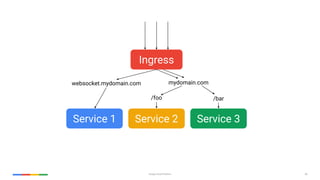
Ingress is great
49Google Cloud Platform
Ingress
Service 1 Service 2 Service 3
websocket.mydomain.com mydomain.com
/foo /bar
Google Cloud Platform 50
type: NodePort can be “good enough”
Google Cloud Platform 51
Use Static IPs. They are free*
!
52Google Cloud Platform
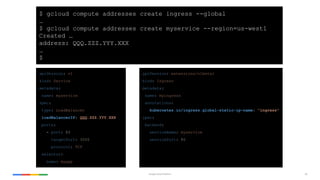
apiVersion: v1
kind: Service
metadata:
name: myservice
spec:
type: LoadBalancer
loadBalancerIP: QQQ.ZZZ.YYY.XXX
ports:
- port: 80
targetPort: 3000
protocol: TCP
selector:
name: myapp
$ gcloud compute addresses create ingress --global
…
$ gcloud compute addresses create myservice --region=us-west1
Created …
address: QQQ.ZZZ.YYY.XXX
…
$
apiVersion: extensions/v1beta1
kind: Ingress
metadata:
name: myingress
annotations:
kubernetes.io/ingress.global-static-ip-name: "ingress"
spec:
backend:
serviceName: myservice
servicePort: 80
Google Cloud Platform 53
Map external services to internal ones
54Google Cloud Platform
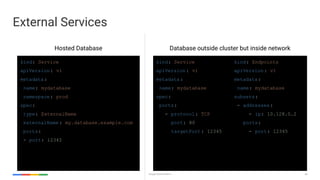
External Services
kind: Service
apiVersion: v1
metadata:
name: mydatabase
namespace: prod
spec:
type: ExternalName
externalName : my.database.example.com
ports:
- port: 12345
kind: Service
apiVersion: v1
metadata:
name: mydatabase
spec:
ports:
- protocol: TCP
port: 80
targetPort: 12345
kind: Endpoints
apiVersion: v1
metadata:
name: mydatabase
subsets:
- addresses:
- ip: 10.128.0.2
ports:
- port: 12345
Hosted Database Database outside cluster but inside network
Application Architecture
Google Cloud Platform 56
Use Helm Charts
Google Cloud Platform 57
ALL downstream dependencies are unreliable
Google Cloud Platform 58
Make sure your microservices aren’t too micro
Google Cloud Platform 59
Use a “Service Mesh”
60Google Cloud Platform
https://github.com/istio/istio
https://github.com/linkerd/linkerd
Google Cloud Platform 61
Use a PaaS?
62Google Cloud Platform
Cluster Management
Google Cloud Platform 64
Use Google Container Engine
Google Cloud Platform 65
Resources, Anti-Affinity, and Scheduling
66Google Cloud Platform
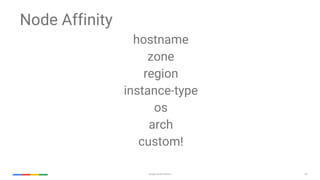
Node Affinity
hostname
zone
region
instance-type
os
arch
custom!
67Google Cloud Platform
Node Taints / Tolerations
special hardware
dedicated hosts
etc
68Google Cloud Platform
Pod Affinity / Anti-Affinity
hostname
zone
region
Google Cloud Platform 69
Use Namespaces to split up your cluster
Google Cloud Platform 70
Role Based Access Control
Google Cloud Platform 71
Unleash the Chaos Monkey
72Google Cloud Platform
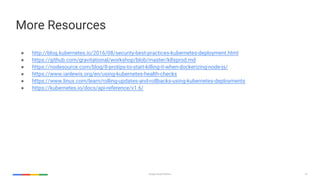
More Resources
● http://blog.kubernetes.io/2016/08/security-best-practices-kubernetes-deployment.html
● https://github.com/gravitational/workshop/blob/master/k8sprod.md
● https://nodesource.com/blog/8-protips-to-start-killing-it-when-dockerizing-node-js/
● https://www.ianlewis.org/en/using-kubernetes-health-checks
● https://www.linux.com/learn/rolling-updates-and-rollbacks-using-kubernetes-deployments
● https://kubernetes.io/docs/api-reference/v1.6/
Questions?
What best practices do you have?

Kubernetes best practices