Dasun Hegoda
Software Engineer
About Me
Dasun Hegoda
Joomla Experience : 3 Years
I'm Gonna Talk About
Few Interesting Facts About Joomla
CMS, Examples, Comparison
Introduction To Joomla
Joomla Features
Latest & Greatest Joomla 3.2 & It's New Features
Joomla Versions
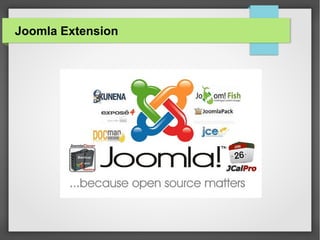
Joomla Extensions
I'm Gonna Talk About
Joomla Architecture & Execution Flow
Joomla Performance
Joomla Myths
Joomla Pros & Cons
Joomla Vulnerabilities & How To Fix
Where To Start
Why Study Joomla
● Governments are using Joomla – joomlagov.info/
● Nearly 7400 extensions for Joomla! - extensions.joomla.org/
● Joomla.org exceeds 2 TB of traffic per month
● Over 210k active registered users on the Official Joomla
community forum
Why Study Joomla
● Google and Yahoo have estimated the number of websites
using Joomla to be around 30 million.
● Over 35 million downloads of Joomla
● In the last six months(September 2012 – February 2013)
● Joomla 3.0: 796,340 (about 133k per month)
● Joomla 2.5: 1,725,268 (about 288k per month)
Let's Start!!!
What's a CMS
● A content management system (CMS) is a computer
program that allows publishing, editing and modifying
content.
● CMSs are often used to run websites containing blogs,
news, and shopping.
● CMSs typically aim to avoid the need for hand coding.
CMS Examples
Let's see which one is the most popular
Let Me Explain
● Drupal is a full-fledged, enterprise grade CMS. It’s
recommended for large projects where stability,
scalability and power are prioritized over ease of use
and aesthetics.
● Joomla is a good option for small to enterprise grade
CMS.
● WordPress is often called a ‘mini CMS’. It isn’t nearly
as powerful or capable as Drupal or Joomla, easy to
use blogging solution that looks good and can
accommodate multiple authors easily.
Stop! Think-A-Min
● Drupal - Steep Learning Curve, Lack of Free Plugins,
Very Heavy, Big Cost
● WordPress – Security, Limited Design Option, Limited
Content Management Capabilities, Less Flexible
● Joomla is perfect in every angle.
Introduction To Joomla
● Joomla is a free and open-source content
management framework for publishing web content. It
is built on a model–view–controller web application
framework.
● Joomla is written in PHP, uses object-oriented
programming (OOP) techniques and software design
patterns, stores data in a MySQL, MS SQL or
PostgreSQL database.
Introduction To Joomla Cont
● Mambo and Joomla are similar because they
originated together, and then split into two communities
and code bases in late 2005 when Joomla forked off
from Mambo and they seperated. Because of the fact
that Mambo is older, it's code base is clunkier and
more cluttered.
● www.mamboserver.com
If A Picture Is Worth A Thousand Words,
How Many Words Is A Movie Worth?
So Who's Using Joomla?
● Harvard University – Gsas.hardvard.edu
● Crime Agency(U.K. Gov) - nationalcrimeagency.gov.uk
● Linux – Linux.com
● Epson – erd.erdvdc.com
● MTV Greece – Mtvgreece.gr
● Yahama – mx.yamaha.com
● ICTA – icta.lk
● and Many More
Why Joomla?
Features
● Content Management
● Template Management
● User Management
● Media Manager
● Language Manager
● Banner Management
● Contact Management
● Menu Manager
Features Cont
● Integrated Help System
● System Features
● Web Services
● Syndication and Newsfeed Management
● Web Link Management
● Search
● Polls
● Powerful Extensibility
Secret Features
● Joomla Debugging
● Offline Mode – Maintenance
● Multi Database Support
● WYSIWYG Editor Customization
Why Joomla 3 Is Sooooo Special ?
What I Think About Joomla 3
● New Libraries
● Improved UI – Responsive, Simple Admin
● Extra Functions
● Security - Two Factor Authentication, Bcrypt
● Debug- SQL Explain, Profile & Call Stack
● RAD – Minimal Code
● Content Version Control
● UX Improvement
Two Factor Authentication
Content Version Control
SQL Explain
Profile
See it yourself
http://community.joomla.org/blogs/community/1777-
joomla-32-video-tutorials.html
If A Picture Is Worth A Thousand Words,
How Many Words Is A Movie Worth?
Let's See What Officials Say
Joomla Versions
● LTS(2 Years) VS STS
● 1.0 in 2005-September
● 1.5(LTS), 1.6, 1.7, 2.5(LTS), 3.0, 3.1
● 3.2 Now
● 3.5 (LTS) 2014-March
● docs.joomla.org/Joomla_3.0_FAQ#I.27m_building_a_b
rand_new_site._Should_I_launch_a_Joomla.21_2.5_sit
e_or_a_3.0_site.3F
Past Releases
Future Releases
If A Picture Is Worth A Thousand Words,
How Many Words Is A Movie Worth?
Joomla Extension
Basic Parts(Extension types)
● Components
● Modules
● Plugins
● Templates
Components
● Components are the largest and most complex
extensions of them all, They can be seen as mini-
applications. Most components have two parts: a site
part and an administrator part. Every time a Joomla
page loads, one component is called to render the main
page body.
● Content (com_content), Banners (com_banners),
Contact (com_contact), News Feeds (com_newsfeeds)
and Web Links (com_weblinks)
Modules
● Modules are more lightweight and flexible extensions
used for page rendering. These modules are mostly
known as the “boxes” that are arranged around a
component.
● Banners (mod_banners), Menus (mod_menu), Who's
Online (mod_whosonline)
Plugins
● Plugins are more advanced extensions and are in
essence event handlers. In the execution of any part of
Joomla, be it the core, a module or a component, an
event can be triggered. When an event is triggered,
plugins that are registered with the application to handle
that event execute.
● Content - Load Modules, Editor - TinyMCE
Template
● A template is basically the design of your Joomla!
powered website. With a template you can change the
look and feel of your website. Templates have certain
fields in which the component (just one) and modules (as
many as you like) will be shown. Templates are easy to
build or customize and they provide maximum flexibility
in how you style your site.
Template Examples
CMS Architecture
CMS Architecture
● Extensions layer, consists of
Extensions(Components, Templates, Modules)
● Application layer, consists of applications that
extend the Framework JApplication class.
Jinstallation, Jadministrator, Jsite, XML-RPC.
● Framework layer, consists of the Joomla!
Framework, Libraries that are required by the
Framework or are installed for use by third-party
developers. Plugins extend the functionality available
in the Framework.
Joomla Folder Structure
● root: Once installed Joomla, this index.php page will
detect your settings in the configuration.php file and
execute your main Joomla engine.
● administrator: In this directory you find all files for
your Joomla administrator web interface (components,
templates, modules, plugins, etc).
● cache: This folder holds Joomla cache files. To
accelerate performance
● components: This directory holds all Joomla
components
● images: This folder by default holds images used for
your extensions
Joomla Folder Structure Cont
● language: This folder holds all language files. Joomla
stores translations in a simple INI-based file format.
● libraries: this directory holds your entire Joomla system
and third-party libraries used in your website. A Joomla
website uses the core libraries contained inside the
libraries folder.
● logs: Where Joomla stores its log files.
● media: Default folder to store media files. It may contains
files related with user interfaces, such as: JavaScript
libraries, flash files, etc.
● modules: This folder contains all installed front-end
modules. It holds the modules available for display by a
template.
Joomla Folder Structure Cont
● includes: In this directory you find core files of Joomla
● installation: This folder contains needed files for Joomla
installation. It should be deleted after installed Joomla.
● plugins: It contains all your plugins files. As well as components
and modules, plugins are a type of add-on extension.
● templates: This directory has all your frontend template files.
● tmp: This folder stores temporary files and cookies that are used
by the administrator and user interface of Joomla. Most of time,
extensions’ files are copied to this folder during Joomla
installation process.
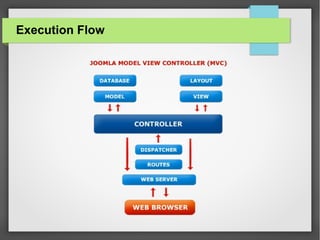
Execution Flow
Execution Flow Cont
● Load once: defines.php
● Load once: framework.php
● Profile mark: afterLoad
● Call to Jfactory::getApplication('site')
● Call to Jsite::initialise
● JpluginHelper::importPlugin('system')
● Profile mark: afterInitialise
● Trigger events: onAfterInitialise
Execution Flow Cont
● Route the URI: Call to JSite::route
● Profile mark: afterRoute
● Trigger events: onAfterRoute
● Dispatch the component: Call to JSite::dispatch
● Profile mark: afterDispatch
● Trigger events: onAfterDispatch
Execution Flow Cont
● Render the page: Call to JSite::render
● Profile mark: afterRender
● Trigger events: onAfterRender
● Echo output: Call to Jresponse::toString
● Render the page: Call to JSite::render
● Profile mark: afterRender
● Trigger events: onAfterRender
● Echo output: Call to JResponse::toString
Joomla Performance
● Template Optimization
● All Components Are Not Good Components
● Enable Caching
● Find The Bad Queries
● Optimize Your Database(Schema, Indexing)
● Follow Best Practices(OOP, Design Patterns)
● Use Joomla Debugging
Joomla Myths
Joomla Myths
● Joomla is only for small sites
● Legacy mode is bad for your site
● Joomla has insufficient SEO
● Joomla is for end users, not developers
● Template will be mobile ready
● A Silver bullet - will make my life easier
● Joomla can’t compete with commercial tools.
Joomla Pros
Joomla Pros
● Free & Open Source
● Full Fledged CMS
● Power, Robust & Well Tested
● Extensions – Components, Modules, Plugins, Themes
● Small Learning Curve
● Future Proof Content – Responsive Design, jQuery
Joomla Pros Cont
● Scheduled Content
● Social Media Integration
● Multiple User Collaboration
● Easy To Manage
● Community Support
● Security
● Multi-Lingual Support
Joomla Cons
Joomla Cons
● Limited Flexibility
● Migration – Joomla 1.5 → Joomla 3.2
● Security – Open Code
● Extension Compatibility
● Limited ACL Support – is being fixed
● Unnecessary Extensions
● Joomla(CMS) Need To Be Upgraded
Vulnerabilities
● A weakness which allows an attacker to reduce a
system's information assurance
● Different versions have different issues & most of them
are solved.
● Vulnerability could exist due to an extension.
● docs.joomla.org/Vulnerable_Extensions_List
● Report : vel.joomla.org
How To Fix
How To Fix
● Use The Latest Joomla Security Update
● Keep Extensions Updated
● Applied Server Level Security
● Follow Best Practices In Coding
● Delete The Joomla Templates That You Do Not Use
● Write-Protected Your Joomla Configuration File
Where To Start???
Where To Start
● docs.joomla.org
● developer.joomla.org
● hiddenjoomlasecrets.com
● Youtube
● Google

Joomla - CMS

  • 1.
  • 2.
    About Me Dasun Hegoda JoomlaExperience : 3 Years
  • 3.
    I'm Gonna TalkAbout Few Interesting Facts About Joomla CMS, Examples, Comparison Introduction To Joomla Joomla Features Latest & Greatest Joomla 3.2 & It's New Features Joomla Versions Joomla Extensions
  • 4.
    I'm Gonna TalkAbout Joomla Architecture & Execution Flow Joomla Performance Joomla Myths Joomla Pros & Cons Joomla Vulnerabilities & How To Fix Where To Start
  • 6.
    Why Study Joomla ●Governments are using Joomla – joomlagov.info/ ● Nearly 7400 extensions for Joomla! - extensions.joomla.org/ ● Joomla.org exceeds 2 TB of traffic per month ● Over 210k active registered users on the Official Joomla community forum
  • 7.
    Why Study Joomla ●Google and Yahoo have estimated the number of websites using Joomla to be around 30 million. ● Over 35 million downloads of Joomla ● In the last six months(September 2012 – February 2013) ● Joomla 3.0: 796,340 (about 133k per month) ● Joomla 2.5: 1,725,268 (about 288k per month)
  • 8.
  • 9.
    What's a CMS ●A content management system (CMS) is a computer program that allows publishing, editing and modifying content. ● CMSs are often used to run websites containing blogs, news, and shopping. ● CMSs typically aim to avoid the need for hand coding.
  • 10.
  • 11.
    Let's see whichone is the most popular
  • 12.
    Let Me Explain ●Drupal is a full-fledged, enterprise grade CMS. It’s recommended for large projects where stability, scalability and power are prioritized over ease of use and aesthetics. ● Joomla is a good option for small to enterprise grade CMS. ● WordPress is often called a ‘mini CMS’. It isn’t nearly as powerful or capable as Drupal or Joomla, easy to use blogging solution that looks good and can accommodate multiple authors easily.
  • 13.
    Stop! Think-A-Min ● Drupal- Steep Learning Curve, Lack of Free Plugins, Very Heavy, Big Cost ● WordPress – Security, Limited Design Option, Limited Content Management Capabilities, Less Flexible ● Joomla is perfect in every angle.
  • 15.
    Introduction To Joomla ●Joomla is a free and open-source content management framework for publishing web content. It is built on a model–view–controller web application framework. ● Joomla is written in PHP, uses object-oriented programming (OOP) techniques and software design patterns, stores data in a MySQL, MS SQL or PostgreSQL database.
  • 16.
    Introduction To JoomlaCont ● Mambo and Joomla are similar because they originated together, and then split into two communities and code bases in late 2005 when Joomla forked off from Mambo and they seperated. Because of the fact that Mambo is older, it's code base is clunkier and more cluttered. ● www.mamboserver.com
  • 17.
    If A PictureIs Worth A Thousand Words, How Many Words Is A Movie Worth?
  • 18.
    So Who's UsingJoomla? ● Harvard University – Gsas.hardvard.edu ● Crime Agency(U.K. Gov) - nationalcrimeagency.gov.uk ● Linux – Linux.com ● Epson – erd.erdvdc.com ● MTV Greece – Mtvgreece.gr ● Yahama – mx.yamaha.com ● ICTA – icta.lk ● and Many More
  • 19.
  • 20.
    Features ● Content Management ●Template Management ● User Management ● Media Manager ● Language Manager ● Banner Management ● Contact Management ● Menu Manager
  • 21.
    Features Cont ● IntegratedHelp System ● System Features ● Web Services ● Syndication and Newsfeed Management ● Web Link Management ● Search ● Polls ● Powerful Extensibility
  • 22.
    Secret Features ● JoomlaDebugging ● Offline Mode – Maintenance ● Multi Database Support ● WYSIWYG Editor Customization
  • 23.
    Why Joomla 3Is Sooooo Special ?
  • 24.
    What I ThinkAbout Joomla 3 ● New Libraries ● Improved UI – Responsive, Simple Admin ● Extra Functions ● Security - Two Factor Authentication, Bcrypt ● Debug- SQL Explain, Profile & Call Stack ● RAD – Minimal Code ● Content Version Control ● UX Improvement
  • 25.
  • 26.
  • 27.
  • 28.
  • 29.
  • 30.
    If A PictureIs Worth A Thousand Words, How Many Words Is A Movie Worth? Let's See What Officials Say
  • 32.
    Joomla Versions ● LTS(2Years) VS STS ● 1.0 in 2005-September ● 1.5(LTS), 1.6, 1.7, 2.5(LTS), 3.0, 3.1 ● 3.2 Now ● 3.5 (LTS) 2014-March ● docs.joomla.org/Joomla_3.0_FAQ#I.27m_building_a_b rand_new_site._Should_I_launch_a_Joomla.21_2.5_sit e_or_a_3.0_site.3F
  • 33.
  • 34.
  • 35.
    If A PictureIs Worth A Thousand Words, How Many Words Is A Movie Worth?
  • 36.
  • 37.
    Basic Parts(Extension types) ●Components ● Modules ● Plugins ● Templates
  • 38.
    Components ● Components arethe largest and most complex extensions of them all, They can be seen as mini- applications. Most components have two parts: a site part and an administrator part. Every time a Joomla page loads, one component is called to render the main page body. ● Content (com_content), Banners (com_banners), Contact (com_contact), News Feeds (com_newsfeeds) and Web Links (com_weblinks)
  • 39.
    Modules ● Modules aremore lightweight and flexible extensions used for page rendering. These modules are mostly known as the “boxes” that are arranged around a component. ● Banners (mod_banners), Menus (mod_menu), Who's Online (mod_whosonline)
  • 40.
    Plugins ● Plugins aremore advanced extensions and are in essence event handlers. In the execution of any part of Joomla, be it the core, a module or a component, an event can be triggered. When an event is triggered, plugins that are registered with the application to handle that event execute. ● Content - Load Modules, Editor - TinyMCE
  • 41.
    Template ● A templateis basically the design of your Joomla! powered website. With a template you can change the look and feel of your website. Templates have certain fields in which the component (just one) and modules (as many as you like) will be shown. Templates are easy to build or customize and they provide maximum flexibility in how you style your site.
  • 42.
  • 43.
  • 44.
    CMS Architecture ● Extensionslayer, consists of Extensions(Components, Templates, Modules) ● Application layer, consists of applications that extend the Framework JApplication class. Jinstallation, Jadministrator, Jsite, XML-RPC. ● Framework layer, consists of the Joomla! Framework, Libraries that are required by the Framework or are installed for use by third-party developers. Plugins extend the functionality available in the Framework.
  • 45.
  • 46.
    Joomla Folder Structure ●root: Once installed Joomla, this index.php page will detect your settings in the configuration.php file and execute your main Joomla engine. ● administrator: In this directory you find all files for your Joomla administrator web interface (components, templates, modules, plugins, etc). ● cache: This folder holds Joomla cache files. To accelerate performance ● components: This directory holds all Joomla components ● images: This folder by default holds images used for your extensions
  • 47.
    Joomla Folder StructureCont ● language: This folder holds all language files. Joomla stores translations in a simple INI-based file format. ● libraries: this directory holds your entire Joomla system and third-party libraries used in your website. A Joomla website uses the core libraries contained inside the libraries folder. ● logs: Where Joomla stores its log files. ● media: Default folder to store media files. It may contains files related with user interfaces, such as: JavaScript libraries, flash files, etc. ● modules: This folder contains all installed front-end modules. It holds the modules available for display by a template.
  • 48.
    Joomla Folder StructureCont ● includes: In this directory you find core files of Joomla ● installation: This folder contains needed files for Joomla installation. It should be deleted after installed Joomla. ● plugins: It contains all your plugins files. As well as components and modules, plugins are a type of add-on extension. ● templates: This directory has all your frontend template files. ● tmp: This folder stores temporary files and cookies that are used by the administrator and user interface of Joomla. Most of time, extensions’ files are copied to this folder during Joomla installation process.
  • 49.
  • 50.
    Execution Flow Cont ●Load once: defines.php ● Load once: framework.php ● Profile mark: afterLoad ● Call to Jfactory::getApplication('site') ● Call to Jsite::initialise ● JpluginHelper::importPlugin('system') ● Profile mark: afterInitialise ● Trigger events: onAfterInitialise
  • 51.
    Execution Flow Cont ●Route the URI: Call to JSite::route ● Profile mark: afterRoute ● Trigger events: onAfterRoute ● Dispatch the component: Call to JSite::dispatch ● Profile mark: afterDispatch ● Trigger events: onAfterDispatch
  • 52.
    Execution Flow Cont ●Render the page: Call to JSite::render ● Profile mark: afterRender ● Trigger events: onAfterRender ● Echo output: Call to Jresponse::toString ● Render the page: Call to JSite::render ● Profile mark: afterRender ● Trigger events: onAfterRender ● Echo output: Call to JResponse::toString
  • 54.
    Joomla Performance ● TemplateOptimization ● All Components Are Not Good Components ● Enable Caching ● Find The Bad Queries ● Optimize Your Database(Schema, Indexing) ● Follow Best Practices(OOP, Design Patterns) ● Use Joomla Debugging
  • 55.
  • 56.
    Joomla Myths ● Joomlais only for small sites ● Legacy mode is bad for your site ● Joomla has insufficient SEO ● Joomla is for end users, not developers ● Template will be mobile ready ● A Silver bullet - will make my life easier ● Joomla can’t compete with commercial tools.
  • 57.
  • 58.
    Joomla Pros ● Free& Open Source ● Full Fledged CMS ● Power, Robust & Well Tested ● Extensions – Components, Modules, Plugins, Themes ● Small Learning Curve ● Future Proof Content – Responsive Design, jQuery
  • 59.
    Joomla Pros Cont ●Scheduled Content ● Social Media Integration ● Multiple User Collaboration ● Easy To Manage ● Community Support ● Security ● Multi-Lingual Support
  • 60.
  • 61.
    Joomla Cons ● LimitedFlexibility ● Migration – Joomla 1.5 → Joomla 3.2 ● Security – Open Code ● Extension Compatibility ● Limited ACL Support – is being fixed ● Unnecessary Extensions ● Joomla(CMS) Need To Be Upgraded
  • 63.
    Vulnerabilities ● A weaknesswhich allows an attacker to reduce a system's information assurance ● Different versions have different issues & most of them are solved. ● Vulnerability could exist due to an extension. ● docs.joomla.org/Vulnerable_Extensions_List ● Report : vel.joomla.org
  • 64.
  • 65.
    How To Fix ●Use The Latest Joomla Security Update ● Keep Extensions Updated ● Applied Server Level Security ● Follow Best Practices In Coding ● Delete The Joomla Templates That You Do Not Use ● Write-Protected Your Joomla Configuration File
  • 66.
  • 67.
    Where To Start ●docs.joomla.org ● developer.joomla.org ● hiddenjoomlasecrets.com ● Youtube ● Google