Oracle Fleet Patching and Provisioning
Provision, Patch and Upgrade Oracle Grid and Oracle RAC Databases with Ease
Ludovico Caldara
Principal Product Manager
Oracle Database High Availability (HA),
Scalability and Maximum Availability Architecture (MAA)
Oracle Maximum Availability Architecture (MAA)
Reference
architectures
Deployment choices
HA features,
configurations
and operational
practices
Customer insights and expert recommendations
Production site Replicated site
Replication
Generic Systems Engineered Systems DBCS ExaCS/ExaCC Autonomous DB
24/7
Bronze
Silver
Gold
Platinum
Copyright © 2021, Oracle and/or its affiliates
2
Scale out
Data protection
Flashback RMAN + ZDLRA
Continuous availability
Application Continuity Global Data Services
Active replication
Active Data Guard
RAC Sharding
ASM
GoldenGate
Availability service levels
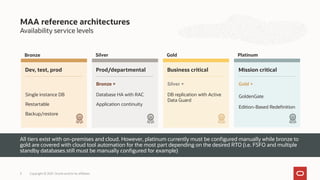
MAA reference architectures
Dev, test, prod
Single instance DB
Restartable
Backup/restore
Prod/departmental
Bronze +
Database HA with RAC
Application continuity
Business critical
Silver +
DB replication with Active
Data Guard
Mission critical
Gold +
GoldenGate
Edition-Based Redefinition
All tiers exist with on-premises and cloud. However, platinum currently must be configured manually while bronze to
gold are covered with cloud tool automation for the most part depending on the desired RTO (i.e. FSFO and multiple
standby databases still must be manually configured for example)
Bronze Silver Gold Platinum
Copyright © 2021, Oracle and/or its affiliates
3
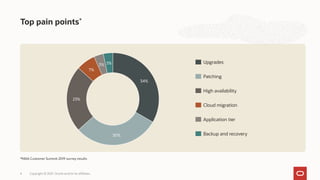
Top pain points*
Copyright © 2021, Oracle and/or its affiliates.
4
34%
30%
23%
7%
3% 3%
*MAA Customer Summit 2019 survey results
Upgrades
Patching
High availability
Cloud migration
Application tier
Backup and recovery
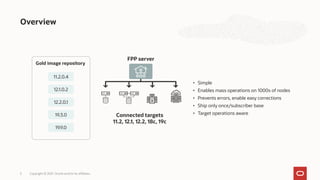
Overview
Copyright © 2021, Oracle and/or its affiliates.
5
• Simple
• Enables mass operations on 1000s of nodes
• Prevents errors, enable easy corrections
• Ship only once/subscriber base
• Target operations aware
Gold image repository
11.2.0.4
12.1.0.2
12.2.0.1
19.3.0
19.9.0
Connected targets
11.2, 12.1, 12.2, 18c, 19c
FPP server
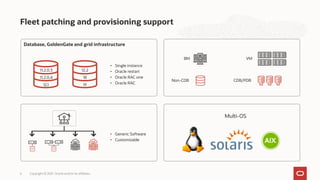
Database, GoldenGate and grid infrastructure
Fleet patching and provisioning support
Copyright © 2021, Oracle and/or its affiliates.
6
• Single instance
• Oracle restart
• Oracle RAC one
• Oracle RAC
BM
Non-CDB CDB/PDB
VM
• Generic Software
• Customizable
Multi-OS
11.2.0.3
11.2.0.4
12.1
12.2
18
19
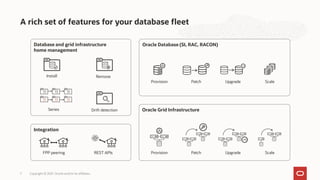
A rich set of features for your database fleet
Copyright © 2021, Oracle and/or its affiliates.
7
Database and grid infrastructure
home management
Oracle Database (SI, RAC, RACON)
Install Remove
Series Drift detection Oracle Grid Infrastructure
Provision
Provision
Patch
Patch
Scale
Scale
Upgrade
Upgrade
+1
+1
Integration
FPP peering REST APIs
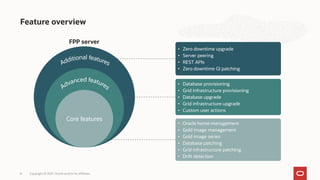
Feature overview
Copyright © 2021, Oracle and/or its affiliates.
8
Core features
• Oracle home management
• Gold image management
• Gold image series
• Database patching
• Grid infrastructure patching
• Drift detection
• Database provisioning
• Grid infrastructure provisioning
• Database upgrade
• Grid infrastructure upgrade
• Custom user actions
• Zero downtime upgrade
• Server peering
• REST APIs
• Zero downtime GI patching
FPP server
Grid Infrastructure
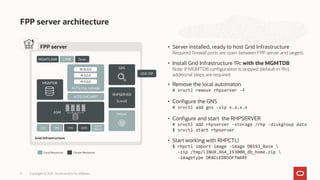
FPP server architecture
Copyright © 2021, Oracle and/or its affiliates.
9
• Server installed, ready to host Grid Infrastructure
Required firewall ports are open between FPP server and targets
• Install Grid Infrastructure 19c with the MGMTDB
Note: If MGMTDB configuration is skipped (default in 19c),
additional steps are required
• Configure the GNS
# srvctl add gns -vip x.x.x.x
• Configure and start the RHPSERVER
# srvctl add rhpserver -storage /rhp -diskgroup data
$ srvctl start rhpserver
• Remove the local automaton
# srvctl remove rhpserver -f
• Start working with RHPCTL!
$ rhpctl import image -image DB193_Base 
-zip /tmp/LINUX.X64_193000_db_home.zip 
-imagetype ORACLEDBSOFTWARE
Local Resources Cluster Resources
FPP server
CHA QOS
CVU
ONS
ADVM
PROXY
ACFS/rhp_storage
18.10.0.0
19.3.0.0
19.9.0.0
ACFS GHCHKPT
MGMTLSNR LSNR Scan
Helper
ASM
MGMTDB
RHPSERVER
GNS
RHPSERVER
(Local)
GNS VIP
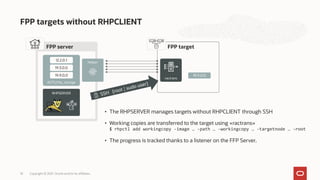
FPP targets without RHPCLIENT
Copyright © 2021, Oracle and/or its affiliates.
10
FPP target
• The RHPSERVER manages targets without RHPCLIENT through SSH
• Working copies are transferred to the target using «ractrans»
$ rhpctl add workingcopy -image … -path … -workingcopy … -targetnode … -root
• The progress is tracked thanks to a listener on the FFP Server.
FPP server
ACFS/rhp_storage
12.2.0.1
19.3.0.0
19.9.0.0 19.9.0.0
RHPSERVER
Helper
ractrans
Grid infrastructure
RHPCLIENT
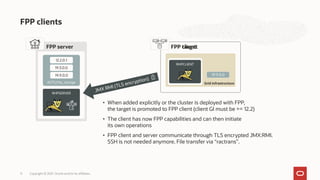
FPP clients
Copyright © 2021, Oracle and/or its affiliates.
11
FPP target
• When added explicitly or the cluster is deployed with FPP,
the target is promoted to FPP client (client GI must be >= 12.2)
• The client has now FPP capabilities and can then initiate
its own operations
• FPP client and server communicate through TLS encrypted JMX:RMI.
SSH is not needed anymore. File transfer via “ractrans”.
FPP server
ACFS/rhp_storage
12.2.0.1
19.3.0.0
19.9.0.0 19.9.0.0
RHPSERVER
FPP client
Adding FPP clients
Copyright © 2021, Oracle and/or its affiliates.
12
• The server produces a manifest file for the client
$ rhpctl add client -client dbrac-cluster -toclientdata /tmp
• It must be copied on the client, which uses it to connect to the server
$ srvctl add rhpclient -clientdata /tmp/dbrac-cluster-cluster.xml
[ -diskgroup … -storage … ]
FPP server
ACFS/rhp_storage
12.2.0.1
19.3.0.0
19.9.0.0
RHPSERVER
FPP client
Grid infrastructure
RHPCLIENT
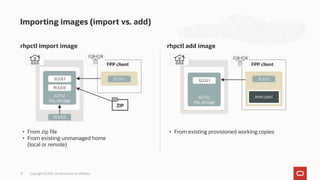
Importing images (import vs. add)
Copyright © 2021, Oracle and/or its affiliates.
13
rhpctl add image
rhpctl import image
• From zip file
• From existing unmanaged home
(local or remote)
• From existing provisioned working copies
ACFS/
rhp_storage
12.2.0.1
19.3.0.0
19.3.0.0
FPP client
12.2.0.1
ZIP
RHPCLIENT
ACFS/
rhp_storage
12.2.0.1
FPP client
12.2.0.1
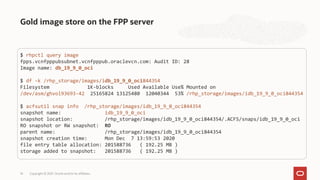
Gold image store on the FPP server
Copyright © 2021, Oracle and/or its affiliates.
14
$ rhpctl query image
fpps.vcnfpppubsubnet.vcnfpppub.oraclevcn.com: Audit ID: 28
Image name: db_19_9_0_oci
$ df -k /rhp_storage/images/idb_19_9_0_oci844354
Filesystem 1K-blocks Used Available Use% Mounted on
/dev/asm/ghvol93693-42 25165824 13125480 12040344 53% /rhp_storage/images/idb_19_9_0_oci844354
$ acfsutil snap info /rhp_storage/images/idb_19_9_0_oci844354
snapshot name: idb_19_9_0_oci
snapshot location: /rhp_storage/images/idb_19_9_0_oci844354/.ACFS/snaps/idb_19_9_0_oci
RO snapshot or RW snapshot: RO
parent name: /rhp_storage/images/idb_19_9_0_oci844354
snapshot creation time: Mon Dec 7 13:59:53 2020
file entry table allocation: 201588736 ( 192.25 MB )
storage added to snapshot: 201588736 ( 192.25 MB )
Helper
FPP target
ractrans
RHPCLIENT
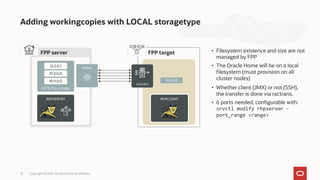
Adding workingcopies with LOCAL storagetype
Copyright © 2021, Oracle and/or its affiliates.
15
• Whether client (JMX) or not (SSH),
the transfer is done via ractrans.
• 6 ports needed, configurable with:
srvctl modify rhpserver -
port_range <range>
• Filesystem existence and size are not
managed by FPP
• The Oracle Home will be on a local
filesystem (must provision on all
cluster nodes)
FPP server
ACFS/rhp_storage
12.2.0.1
19.3.0.0
19.9.0.0
RHPSERVER
19.9.0.0
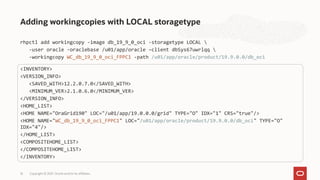
Adding workingcopies with LOCAL storagetype
Copyright © 2021, Oracle and/or its affiliates.
16
<INVENTORY>
<VERSION_INFO>
<SAVED_WITH>12.2.0.7.0</SAVED_WITH>
<MINIMUM_VER>2.1.0.6.0</MINIMUM_VER>
</VERSION_INFO>
<HOME_LIST>
<HOME NAME="OraGrid190" LOC="/u01/app/19.0.0.0/grid" TYPE="O" IDX="1" CRS="true"/>
<HOME NAME="WC_db_19_9_0_oci_FPPC1" LOC="/u01/app/oracle/product/19.9.0.0/db_oci" TYPE="O"
IDX="4"/>
</HOME_LIST>
<COMPOSITEHOME_LIST>
</COMPOSITEHOME_LIST>
</INVENTORY>
rhpctl add workingcopy -image db_19_9_0_oci -storagetype LOCAL 
-user oracle -oraclebase /u01/app/oracle –client dbSys67uwrlqq 
-workingcopy WC_db_19_9_0_oci_FPPC1 -path /u01/app/oracle/product/19.9.0.0/db_oci
FPP client
ractrans
RHPCLIENT
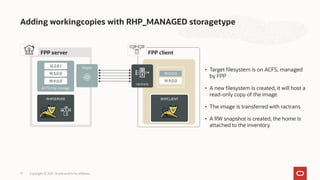
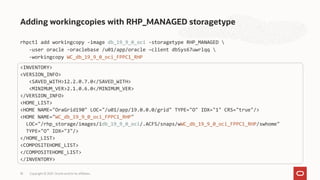
Adding workingcopies with RHP_MANAGED storagetype
Copyright © 2021, Oracle and/or its affiliates.
17
• A new filesystem is created, it will host a
read-only copy of the image
• Target filesystem is on ACFS, managed
by FPP
• The image is transferred with ractrans
• A RW snapshot is created, the home is
attached to the inventory
FPP server
ACFS/rhp_storage
12.2.0.1
19.3.0.0
19.9.0.0 19.9.0.0
RHPSERVER
Helper
19.9.0.0
Adding workingcopies with RHP_MANAGED storagetype
Copyright © 2021, Oracle and/or its affiliates.
18
<INVENTORY>
<VERSION_INFO>
<SAVED_WITH>12.2.0.7.0</SAVED_WITH>
<MINIMUM_VER>2.1.0.6.0</MINIMUM_VER>
</VERSION_INFO>
<HOME_LIST>
<HOME NAME="OraGrid190" LOC="/u01/app/19.0.0.0/grid" TYPE="O" IDX="1" CRS="true"/>
<HOME NAME="WC_db_19_9_0_oci_FPPC1_RHP"
LOC="/rhp_storage/images/idb_19_9_0_oci/.ACFS/snaps/wWC_db_19_9_0_oci_FPPC1_RHP/swhome"
TYPE="O" IDX="3"/>
</HOME_LIST>
<COMPOSITEHOME_LIST>
</COMPOSITEHOME_LIST>
</INVENTORY>
rhpctl add workingcopy -image db_19_9_0_oci -storagetype RHP_MANAGED 
-user oracle -oraclebase /u01/app/oracle –client dbSys67uwrlqq 
-workingcopy WC_db_19_9_0_oci_FPPC1_RHP
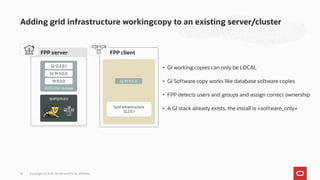
Adding grid infrastructure workingcopy to an existing server/cluster
Copyright © 2021, Oracle and/or its affiliates.
19
• GI working copies can only be LOCAL
• FPP detects users and groups and assign correct ownership
• GI Software copy works like database software copies
• A GI stack already exists, the install is «software_only»
Grid Infrastructure
12.2.0.1
FPP client
FPP server
ACFS/rhp_storage
GI 12.2.0.1
GI 19.3.0.0
19.9.0.0 GI 19.9.0.0
RHPSERVER
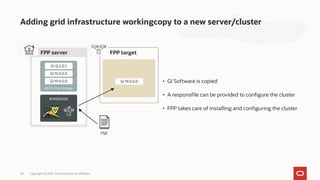
Adding grid infrastructure workingcopy to a new server/cluster
Copyright © 2021, Oracle and/or its affiliates.
20
• A responsfile can be provided to configure the cluster
• GI Software is copied
• FPP takes care of installing and configuring the cluster
FPP target
FPP server
ACFS/rhp_storage
GI 12.2.0.1
GI 19.3.0.0
GI 19.9.0.0 GI 19.9.0.0
RHPSERVER
rsp
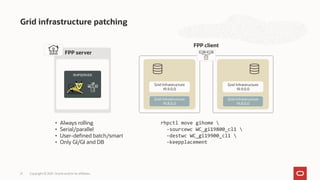
Grid infrastructure patching
Copyright © 2021, Oracle and/or its affiliates.
21
rhpctl move gihome 
-sourcewc WC_gi19800_cl1 
-destwc WC_gi19900_cl1 
-keepplacement
• Always rolling
• Serial/parallel
• User-defined batch/smart
• Only GI/GI and DB
FPP server
RHPSERVER
FPP client
Grid Infrastructure
19.8.0.0
Grid Infrastructure
19.8.0.0
Grid Infrastructure
19.9.0.0
Grid Infrastructure
19.9.0.0
Grid Infrastructure
19.8.0.0
Grid Infrastructure
19.9.0.0
Grid Infrastructure
19.8.0.0
Grid Infrastructure
19.9.0.0
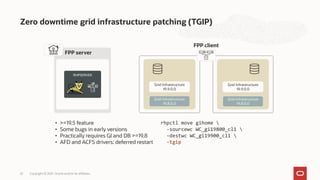
Zero downtime grid infrastructure patching (TGIP)
Copyright © 2021, Oracle and/or its affiliates.
22
rhpctl move gihome 
-sourcewc WC_gi19800_cl1 
-destwc WC_gi19900_cl1 
-tgip
• >=19.5 feature
• Some bugs in early versions
• Practically requires GI and DB >=19.8
• AFD and ACFS drivers: deferred restart
FPP server
RHPSERVER
FPP client
Grid Infrastructure
19.8.0.0
Grid Infrastructure
19.8.0.0
Grid Infrastructure
19.9.0.0
Grid Infrastructure
19.9.0.0
Grid Infrastructure
19.8.0.0
Grid Infrastructure
19.9.0.0
Grid Infrastructure
19.8.0.0
Grid Infrastructure
19.9.0.0
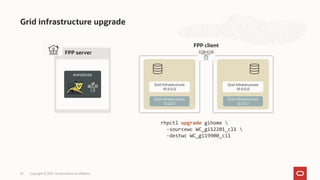
Grid infrastructure upgrade
Copyright © 2021, Oracle and/or its affiliates.
23
FPP server
RHPSERVER
FPP client
Grid Infrastructure
12.2.0.1
Grid Infrastructure
12.2.0.1
Grid Infrastructure
19.9.0.0
Grid Infrastructure
19.9.0.0
Grid Infrastructure
12.2.0.1
Grid Infrastructure
19.9.0.0
Grid Infrastructure
12.2.0.1
Grid Infrastructure
19.9.0.0
rhpctl upgrade gihome 
-sourcewc WC_gi12201_cl1 
-destwc WC_gi19900_cl1
FPP server
RHPSERVER
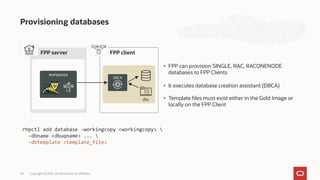
Provisioning databases
Copyright © 2021, Oracle and/or its affiliates.
24
• It executes database creation assistant (DBCA)
• FPP can provision SINGLE, RAC, RACONENODE
databases to FPP Clients
• Template files must exist either in the Gold Image or
locally on the FPP Client
rhpctl add database -workingcopy <workingcopy> 
-dbname <dbuqname> ... 
–dbtemplate <template_file>
FPP client
DBCA
dbc
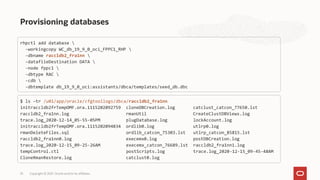
Provisioning databases
Copyright © 2021, Oracle and/or its affiliates.
25
rhpctl add database 
-workingcopy WC_db_19_9_0_oci_FPPC1_RHP 
-dbname raccldb2_fra1nn 
-datafileDestination DATA 
-node fppc1 
-dbtype RAC 
-cdb 
-dbtemplate db_19_9_0_oci:assistants/dbca/templates/seed_db.dbc
$ ls –tr /u01/app/oracle/cfgtoollogs/dbca/raccldb2_fra1nn
initraccldb2frTempOMF.ora.1115202092759 cloneDBCreation.log catclust_catcon_77650.lst
raccldb2_fra1nn.log rmanUtil CreateClustDBViews.log
trace.log_2020-12-14_05-55-05PM plugDatabase.log lockAccount.log
initraccldb2frTempOMF.ora.1115202094834 ordlib0.log utlrp0.log
rmanDeleteFiles.sql ordlib_catcon_75303.lst utlrp_catcon_85815.lst
raccldb2_fra1nn0.log execemx0.log postDBCreation.log
trace.log_2020-12-15_09-25-26AM execemx_catcon_76689.lst raccldb2_fra1nn1.log
tempControl.ctl postScripts.log trace.log_2020-12-15_09-45-48AM
CloneRmanRestore.log catclust0.log
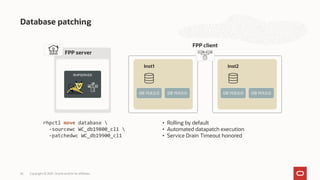
Database patching
Copyright © 2021, Oracle and/or its affiliates.
26
rhpctl move database 
-sourcewc WC_db19800_cl1 
-patchedwc WC_db19900_cl1
• Rolling by default
• Automated datapatch execution
• Service Drain Timeout honored
FPP server
RHPSERVER
FPP client
DB 19.8.0.0 DB 19.9.0.0 DB 19.8.0.0 DB 19.9.0.0
Inst1 Inst2
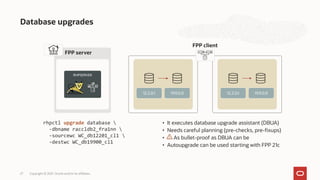
Database upgrades
Copyright © 2021, Oracle and/or its affiliates.
27
rhpctl upgrade database 
-dbname raccldb2_fra1nn 
-sourcewc WC_db12201_cl1 
-destwc WC_db19900_cl1
• It executes database upgrade assistant (DBUA)
• Needs careful planning (pre-checks, pre-fixups)
• As bullet-proof as DBUA can be
• Autoupgrade can be used starting with FPP 21c
FPP server
RHPSERVER
FPP client
12.2.0.1 19.9.0.0 12.2.0.1 19.9.0.0
FPP server
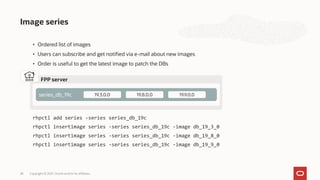
Image series
Copyright © 2021, Oracle and/or its affiliates.
28
rhpctl add series -series series_db_19c
rhpctl insertimage series -series series_db_19c -image db_19_3_0
rhpctl insertimage series -series series_db_19c -image db_19_8_0
rhpctl insertimage series -series series_db_19c -image db_19_9_0
series_db_19c 19.3.0.0 19.8.0.0 19.9.0.0
• Ordered list of images
• Users can subscribe and get notified via e-mail about new images
• Order is useful to get the latest image to patch the DBs
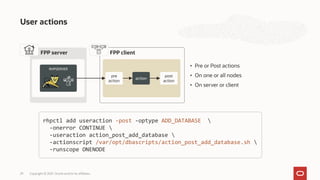
User actions
Copyright © 2021, Oracle and/or its affiliates.
29
rhpctl add useraction -post -optype ADD_DATABASE 
-onerror CONTINUE 
-useraction action_post_add_database 
-actionscript /var/opt/dbascripts/action_post_add_database.sh 
-runscope ONENODE
• Pre or Post actions
• On one or all nodes
• On server or client
FPP server
RHPSERVER
FPP client
pre
action
action
post
action
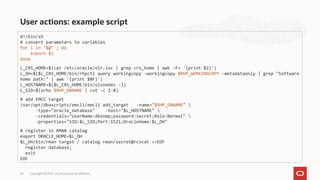
User actions: example script
Copyright © 2021, Oracle and/or its affiliates.
30
#!/bin/sh
# convert parameters to variables
for i in "$@" ; do
export $i
done
L_CRS_HOME=$(cat /etc/oracle/olr.loc | grep crs_home | awk -F= '{print $2}')
L_OH=$($L_CRS_HOME/bin/rhpctl query workingcopy -workingcopy $RHP_WORKINGCOPY -metadataonly | grep "Software
home path:" | awk '{print $NF}')
L_HOSTNAME=$($L_CRS_HOME/bin/olsnodes -l)
L_SID=$(echo $RHP_DBNAME | cut -c 1-8)
# add EMCC target
/var/opt/dbascripts/emcli/emcli add_target -name="$RHP_DBNAME" 
-type="oracle_database" -host="$L_HOSTNAME" 
-credentials="UserName:dbsnmp;password:secret;Role:Normal" 
-properties="SID:$L_SID;Port:1521;OracleHome:$L_OH"
# register in RMAN catalog
export ORACLE_HOME=$L_OH
$L_OH/bin/rman target / catalog rman/secret@rcvcat <<EOF
register database;
exit
EOF
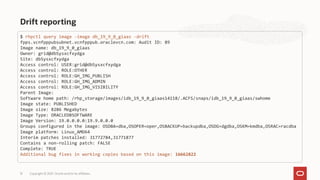
Drift reporting
Copyright © 2021, Oracle and/or its affiliates.
31
$ rhpctl query image -image db_19_9_0_giaas -drift
fpps.vcnfpppubsubnet.vcnfpppub.oraclevcn.com: Audit ID: 89
Image name: db_19_9_0_giaas
Owner: grid@dbSysxcfxydga
Site: dbSysxcfxydga
Access control: USER:grid@dbSysxcfxydga
Access control: ROLE:OTHER
Access control: ROLE:GH_IMG_PUBLISH
Access control: ROLE:GH_IMG_ADMIN
Access control: ROLE:GH_IMG_VISIBILITY
Parent Image:
Software home path: /rhp_storage/images/idb_19_9_0_giaas14118/.ACFS/snaps/idb_19_9_0_giaas/swhome
Image state: PUBLISHED
Image size: 8286 Megabytes
Image Type: ORACLEDBSOFTWARE
Image Version: 19.0.0.0.0:19.9.0.0.0
Groups configured in the image: OSDBA=dba,OSOPER=oper,OSBACKUP=backupdba,OSDG=dgdba,OSKM=kmdba,OSRAC=racdba
Image platform: Linux_AMD64
Interim patches installed: 31772784,31771877
Contains a non-rolling patch: FALSE
Complete: TRUE
Additional bug fixes in working copies based on this image: 16662822
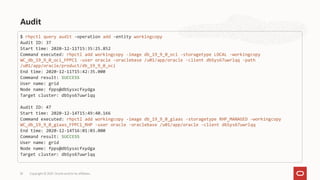
Audit
Copyright © 2021, Oracle and/or its affiliates.
32
$ rhpctl query audit -operation add -entity workingcopy
Audit ID: 37
Start time: 2020-12-11T15:35:25.852
Command executed: rhpctl add workingcopy -image db_19_9_0_oci -storagetype LOCAL -workingcopy
WC_db_19_9_0_oci_FPPC1 -user oracle -oraclebase /u01/app/oracle -client dbSys67uwrlqq -path
/u01/app/oracle/product/db_19_9_0_oci
End time: 2020-12-11T15:42:35.000
Command result: SUCCESS
User name: grid
Node name: fpps@dbSysxcfxydga
Target cluster: dbSys67uwrlqq
Audit ID: 47
Start time: 2020-12-14T15:49:40.166
Command executed: rhpctl add workingcopy -image db_19_9_0_giaas -storagetype RHP_MANAGED -workingcopy
WC_db_19_9_0_giaas_FPPC1_RHP -user oracle -oraclebase /u01/app/oracle -client dbSys67uwrlqq
End time: 2020-12-14T16:01:03.000
Command result: SUCCESS
User name: grid
Node name: fpps@dbSysxcfxydga
Target cluster: dbSys67uwrlqq
FPP server
RHPSERVER
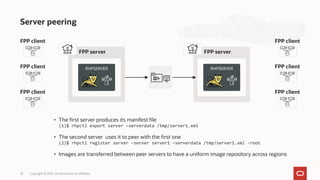
Server peering
Copyright © 2021, Oracle and/or its affiliates.
33
• The first server produces its manifest file
(1)$ rhpctl export server –serverdata /tmp/server1.xml
• The second server uses it to peer with the first one
(2)$ rhpctl register server –server server1 –serverdata /tmp/server1.xml -root
• Images are transferred between peer servers to have a uniform image repository across regions
FPP server
RHPSERVER
FPP client
FPP client
FPP client
FPP client
FPP client
FPP client
FPP server
RHPSERVER
FPP client
FPP client
FPP client
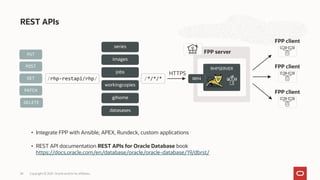
REST APIs
Copyright © 2021, Oracle and/or its affiliates.
34
• Integrate FPP with Ansible, APEX, Rundeck, custom applications
HTTPS
8894
/rhp-restapi/rhp/
series
images
jobs
workingcopies
gihome
datasases
PUT
POST
GET
PATCH
DELETE
/*/*/*
• REST API documentation REST APIs for Oracle Database book
https://docs.oracle.com/en/database/oracle/oracle-database/19/dbrst/
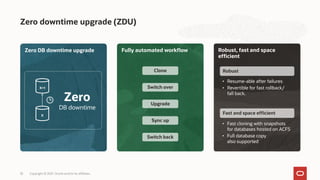
Zero downtime upgrade (ZDU)
Copyright © 2021, Oracle and/or its affiliates.
35
Zero DB downtime upgrade Fully automated workflow
Zero
DB downtime
Clone
Switch over
Upgrade
Switch back
Sync up
Robust, fast and space
efficient
• Fast cloning with snapshots
for databases hosted on ACFS
• Full database copy
also supported
Robust
• Resume-able after failures
• Revertible for fast rollback/
fall back.
Fast and space efficient
X
X+1
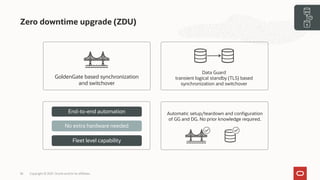
Zero downtime upgrade (ZDU)
Copyright © 2021, Oracle and/or its affiliates.
36
Data Guard
transient logical standby (TLS) based
synchronization and switchover
Automatic setup/teardown and configuration
of GG and DG. No prior knowledge required.
End-to-end automation
Fleet level capability
No extra hardware needed
GoldenGate based synchronization
and switchover
X
X+1
Additional information
Copyright © 2021, Oracle and/or its affiliates.
37
Oracle fleet patching and provisioning landing page
https://www.oracle.com/goto/fpp
Fleet patching and provisioning and maintenance 19c documentation
https://docs.oracle.com/en/database/oracle/oracle-database/19/cwadd/rapid-home-provisioning.html
Technical brief: Oracle fleet patching and provisioning (FPP) introduction and technical overview
https://www.oracle.com/a/tech/docs/fpp-technical-brief-19c.pdf
Fleet patching and provisioning and maintenance 18c cookbook
https://www.oracle.com/technetwork/database/database-cloud/private/rapid-home-provisioning-2405191.pdf
FPP vagrant provisioning for VirtualBox and KVM
https://blogs.oracle.com/db_maintenance/oracle-fleet-patching-and-provisioning-meets-vagrantvirtualbox
Thank you
Copyright © 2021, Oracle and/or its affiliates.
38
Our mission is to help people see
data in new ways, discover insights,
unlock endless possibilities.

Oracle Fleet Patching and Provisioning Deep Dive Webcast Slides

  • 1.
    Oracle Fleet Patchingand Provisioning Provision, Patch and Upgrade Oracle Grid and Oracle RAC Databases with Ease Ludovico Caldara Principal Product Manager Oracle Database High Availability (HA), Scalability and Maximum Availability Architecture (MAA)
  • 2.
    Oracle Maximum AvailabilityArchitecture (MAA) Reference architectures Deployment choices HA features, configurations and operational practices Customer insights and expert recommendations Production site Replicated site Replication Generic Systems Engineered Systems DBCS ExaCS/ExaCC Autonomous DB 24/7 Bronze Silver Gold Platinum Copyright © 2021, Oracle and/or its affiliates 2 Scale out Data protection Flashback RMAN + ZDLRA Continuous availability Application Continuity Global Data Services Active replication Active Data Guard RAC Sharding ASM GoldenGate
  • 3.
    Availability service levels MAAreference architectures Dev, test, prod Single instance DB Restartable Backup/restore Prod/departmental Bronze + Database HA with RAC Application continuity Business critical Silver + DB replication with Active Data Guard Mission critical Gold + GoldenGate Edition-Based Redefinition All tiers exist with on-premises and cloud. However, platinum currently must be configured manually while bronze to gold are covered with cloud tool automation for the most part depending on the desired RTO (i.e. FSFO and multiple standby databases still must be manually configured for example) Bronze Silver Gold Platinum Copyright © 2021, Oracle and/or its affiliates 3
  • 4.
    Top pain points* Copyright© 2021, Oracle and/or its affiliates. 4 34% 30% 23% 7% 3% 3% *MAA Customer Summit 2019 survey results Upgrades Patching High availability Cloud migration Application tier Backup and recovery
  • 5.
    Overview Copyright © 2021,Oracle and/or its affiliates. 5 • Simple • Enables mass operations on 1000s of nodes • Prevents errors, enable easy corrections • Ship only once/subscriber base • Target operations aware Gold image repository 11.2.0.4 12.1.0.2 12.2.0.1 19.3.0 19.9.0 Connected targets 11.2, 12.1, 12.2, 18c, 19c FPP server
  • 6.
    Database, GoldenGate andgrid infrastructure Fleet patching and provisioning support Copyright © 2021, Oracle and/or its affiliates. 6 • Single instance • Oracle restart • Oracle RAC one • Oracle RAC BM Non-CDB CDB/PDB VM • Generic Software • Customizable Multi-OS 11.2.0.3 11.2.0.4 12.1 12.2 18 19
  • 7.
    A rich setof features for your database fleet Copyright © 2021, Oracle and/or its affiliates. 7 Database and grid infrastructure home management Oracle Database (SI, RAC, RACON) Install Remove Series Drift detection Oracle Grid Infrastructure Provision Provision Patch Patch Scale Scale Upgrade Upgrade +1 +1 Integration FPP peering REST APIs
  • 8.
    Feature overview Copyright ©2021, Oracle and/or its affiliates. 8 Core features • Oracle home management • Gold image management • Gold image series • Database patching • Grid infrastructure patching • Drift detection • Database provisioning • Grid infrastructure provisioning • Database upgrade • Grid infrastructure upgrade • Custom user actions • Zero downtime upgrade • Server peering • REST APIs • Zero downtime GI patching FPP server
  • 9.
    Grid Infrastructure FPP serverarchitecture Copyright © 2021, Oracle and/or its affiliates. 9 • Server installed, ready to host Grid Infrastructure Required firewall ports are open between FPP server and targets • Install Grid Infrastructure 19c with the MGMTDB Note: If MGMTDB configuration is skipped (default in 19c), additional steps are required • Configure the GNS # srvctl add gns -vip x.x.x.x • Configure and start the RHPSERVER # srvctl add rhpserver -storage /rhp -diskgroup data $ srvctl start rhpserver • Remove the local automaton # srvctl remove rhpserver -f • Start working with RHPCTL! $ rhpctl import image -image DB193_Base -zip /tmp/LINUX.X64_193000_db_home.zip -imagetype ORACLEDBSOFTWARE Local Resources Cluster Resources FPP server CHA QOS CVU ONS ADVM PROXY ACFS/rhp_storage 18.10.0.0 19.3.0.0 19.9.0.0 ACFS GHCHKPT MGMTLSNR LSNR Scan Helper ASM MGMTDB RHPSERVER GNS RHPSERVER (Local) GNS VIP
  • 10.
    FPP targets withoutRHPCLIENT Copyright © 2021, Oracle and/or its affiliates. 10 FPP target • The RHPSERVER manages targets without RHPCLIENT through SSH • Working copies are transferred to the target using «ractrans» $ rhpctl add workingcopy -image … -path … -workingcopy … -targetnode … -root • The progress is tracked thanks to a listener on the FFP Server. FPP server ACFS/rhp_storage 12.2.0.1 19.3.0.0 19.9.0.0 19.9.0.0 RHPSERVER Helper ractrans
  • 11.
    Grid infrastructure RHPCLIENT FPP clients Copyright© 2021, Oracle and/or its affiliates. 11 FPP target • When added explicitly or the cluster is deployed with FPP, the target is promoted to FPP client (client GI must be >= 12.2) • The client has now FPP capabilities and can then initiate its own operations • FPP client and server communicate through TLS encrypted JMX:RMI. SSH is not needed anymore. File transfer via “ractrans”. FPP server ACFS/rhp_storage 12.2.0.1 19.3.0.0 19.9.0.0 19.9.0.0 RHPSERVER FPP client
  • 12.
    Adding FPP clients Copyright© 2021, Oracle and/or its affiliates. 12 • The server produces a manifest file for the client $ rhpctl add client -client dbrac-cluster -toclientdata /tmp • It must be copied on the client, which uses it to connect to the server $ srvctl add rhpclient -clientdata /tmp/dbrac-cluster-cluster.xml [ -diskgroup … -storage … ] FPP server ACFS/rhp_storage 12.2.0.1 19.3.0.0 19.9.0.0 RHPSERVER FPP client Grid infrastructure RHPCLIENT
  • 13.
    Importing images (importvs. add) Copyright © 2021, Oracle and/or its affiliates. 13 rhpctl add image rhpctl import image • From zip file • From existing unmanaged home (local or remote) • From existing provisioned working copies ACFS/ rhp_storage 12.2.0.1 19.3.0.0 19.3.0.0 FPP client 12.2.0.1 ZIP RHPCLIENT ACFS/ rhp_storage 12.2.0.1 FPP client 12.2.0.1
  • 14.
    Gold image storeon the FPP server Copyright © 2021, Oracle and/or its affiliates. 14 $ rhpctl query image fpps.vcnfpppubsubnet.vcnfpppub.oraclevcn.com: Audit ID: 28 Image name: db_19_9_0_oci $ df -k /rhp_storage/images/idb_19_9_0_oci844354 Filesystem 1K-blocks Used Available Use% Mounted on /dev/asm/ghvol93693-42 25165824 13125480 12040344 53% /rhp_storage/images/idb_19_9_0_oci844354 $ acfsutil snap info /rhp_storage/images/idb_19_9_0_oci844354 snapshot name: idb_19_9_0_oci snapshot location: /rhp_storage/images/idb_19_9_0_oci844354/.ACFS/snaps/idb_19_9_0_oci RO snapshot or RW snapshot: RO parent name: /rhp_storage/images/idb_19_9_0_oci844354 snapshot creation time: Mon Dec 7 13:59:53 2020 file entry table allocation: 201588736 ( 192.25 MB ) storage added to snapshot: 201588736 ( 192.25 MB )
  • 15.
    Helper FPP target ractrans RHPCLIENT Adding workingcopieswith LOCAL storagetype Copyright © 2021, Oracle and/or its affiliates. 15 • Whether client (JMX) or not (SSH), the transfer is done via ractrans. • 6 ports needed, configurable with: srvctl modify rhpserver - port_range <range> • Filesystem existence and size are not managed by FPP • The Oracle Home will be on a local filesystem (must provision on all cluster nodes) FPP server ACFS/rhp_storage 12.2.0.1 19.3.0.0 19.9.0.0 RHPSERVER 19.9.0.0
  • 16.
    Adding workingcopies withLOCAL storagetype Copyright © 2021, Oracle and/or its affiliates. 16 <INVENTORY> <VERSION_INFO> <SAVED_WITH>12.2.0.7.0</SAVED_WITH> <MINIMUM_VER>2.1.0.6.0</MINIMUM_VER> </VERSION_INFO> <HOME_LIST> <HOME NAME="OraGrid190" LOC="/u01/app/19.0.0.0/grid" TYPE="O" IDX="1" CRS="true"/> <HOME NAME="WC_db_19_9_0_oci_FPPC1" LOC="/u01/app/oracle/product/19.9.0.0/db_oci" TYPE="O" IDX="4"/> </HOME_LIST> <COMPOSITEHOME_LIST> </COMPOSITEHOME_LIST> </INVENTORY> rhpctl add workingcopy -image db_19_9_0_oci -storagetype LOCAL -user oracle -oraclebase /u01/app/oracle –client dbSys67uwrlqq -workingcopy WC_db_19_9_0_oci_FPPC1 -path /u01/app/oracle/product/19.9.0.0/db_oci
  • 17.
    FPP client ractrans RHPCLIENT Adding workingcopieswith RHP_MANAGED storagetype Copyright © 2021, Oracle and/or its affiliates. 17 • A new filesystem is created, it will host a read-only copy of the image • Target filesystem is on ACFS, managed by FPP • The image is transferred with ractrans • A RW snapshot is created, the home is attached to the inventory FPP server ACFS/rhp_storage 12.2.0.1 19.3.0.0 19.9.0.0 19.9.0.0 RHPSERVER Helper 19.9.0.0
  • 18.
    Adding workingcopies withRHP_MANAGED storagetype Copyright © 2021, Oracle and/or its affiliates. 18 <INVENTORY> <VERSION_INFO> <SAVED_WITH>12.2.0.7.0</SAVED_WITH> <MINIMUM_VER>2.1.0.6.0</MINIMUM_VER> </VERSION_INFO> <HOME_LIST> <HOME NAME="OraGrid190" LOC="/u01/app/19.0.0.0/grid" TYPE="O" IDX="1" CRS="true"/> <HOME NAME="WC_db_19_9_0_oci_FPPC1_RHP" LOC="/rhp_storage/images/idb_19_9_0_oci/.ACFS/snaps/wWC_db_19_9_0_oci_FPPC1_RHP/swhome" TYPE="O" IDX="3"/> </HOME_LIST> <COMPOSITEHOME_LIST> </COMPOSITEHOME_LIST> </INVENTORY> rhpctl add workingcopy -image db_19_9_0_oci -storagetype RHP_MANAGED -user oracle -oraclebase /u01/app/oracle –client dbSys67uwrlqq -workingcopy WC_db_19_9_0_oci_FPPC1_RHP
  • 19.
    Adding grid infrastructureworkingcopy to an existing server/cluster Copyright © 2021, Oracle and/or its affiliates. 19 • GI working copies can only be LOCAL • FPP detects users and groups and assign correct ownership • GI Software copy works like database software copies • A GI stack already exists, the install is «software_only» Grid Infrastructure 12.2.0.1 FPP client FPP server ACFS/rhp_storage GI 12.2.0.1 GI 19.3.0.0 19.9.0.0 GI 19.9.0.0 RHPSERVER
  • 20.
    Adding grid infrastructureworkingcopy to a new server/cluster Copyright © 2021, Oracle and/or its affiliates. 20 • A responsfile can be provided to configure the cluster • GI Software is copied • FPP takes care of installing and configuring the cluster FPP target FPP server ACFS/rhp_storage GI 12.2.0.1 GI 19.3.0.0 GI 19.9.0.0 GI 19.9.0.0 RHPSERVER rsp
  • 21.
    Grid infrastructure patching Copyright© 2021, Oracle and/or its affiliates. 21 rhpctl move gihome -sourcewc WC_gi19800_cl1 -destwc WC_gi19900_cl1 -keepplacement • Always rolling • Serial/parallel • User-defined batch/smart • Only GI/GI and DB FPP server RHPSERVER FPP client Grid Infrastructure 19.8.0.0 Grid Infrastructure 19.8.0.0 Grid Infrastructure 19.9.0.0 Grid Infrastructure 19.9.0.0 Grid Infrastructure 19.8.0.0 Grid Infrastructure 19.9.0.0 Grid Infrastructure 19.8.0.0 Grid Infrastructure 19.9.0.0
  • 22.
    Zero downtime gridinfrastructure patching (TGIP) Copyright © 2021, Oracle and/or its affiliates. 22 rhpctl move gihome -sourcewc WC_gi19800_cl1 -destwc WC_gi19900_cl1 -tgip • >=19.5 feature • Some bugs in early versions • Practically requires GI and DB >=19.8 • AFD and ACFS drivers: deferred restart FPP server RHPSERVER FPP client Grid Infrastructure 19.8.0.0 Grid Infrastructure 19.8.0.0 Grid Infrastructure 19.9.0.0 Grid Infrastructure 19.9.0.0 Grid Infrastructure 19.8.0.0 Grid Infrastructure 19.9.0.0 Grid Infrastructure 19.8.0.0 Grid Infrastructure 19.9.0.0
  • 23.
    Grid infrastructure upgrade Copyright© 2021, Oracle and/or its affiliates. 23 FPP server RHPSERVER FPP client Grid Infrastructure 12.2.0.1 Grid Infrastructure 12.2.0.1 Grid Infrastructure 19.9.0.0 Grid Infrastructure 19.9.0.0 Grid Infrastructure 12.2.0.1 Grid Infrastructure 19.9.0.0 Grid Infrastructure 12.2.0.1 Grid Infrastructure 19.9.0.0 rhpctl upgrade gihome -sourcewc WC_gi12201_cl1 -destwc WC_gi19900_cl1
  • 24.
    FPP server RHPSERVER Provisioning databases Copyright© 2021, Oracle and/or its affiliates. 24 • It executes database creation assistant (DBCA) • FPP can provision SINGLE, RAC, RACONENODE databases to FPP Clients • Template files must exist either in the Gold Image or locally on the FPP Client rhpctl add database -workingcopy <workingcopy> -dbname <dbuqname> ... –dbtemplate <template_file> FPP client DBCA dbc
  • 25.
    Provisioning databases Copyright ©2021, Oracle and/or its affiliates. 25 rhpctl add database -workingcopy WC_db_19_9_0_oci_FPPC1_RHP -dbname raccldb2_fra1nn -datafileDestination DATA -node fppc1 -dbtype RAC -cdb -dbtemplate db_19_9_0_oci:assistants/dbca/templates/seed_db.dbc $ ls –tr /u01/app/oracle/cfgtoollogs/dbca/raccldb2_fra1nn initraccldb2frTempOMF.ora.1115202092759 cloneDBCreation.log catclust_catcon_77650.lst raccldb2_fra1nn.log rmanUtil CreateClustDBViews.log trace.log_2020-12-14_05-55-05PM plugDatabase.log lockAccount.log initraccldb2frTempOMF.ora.1115202094834 ordlib0.log utlrp0.log rmanDeleteFiles.sql ordlib_catcon_75303.lst utlrp_catcon_85815.lst raccldb2_fra1nn0.log execemx0.log postDBCreation.log trace.log_2020-12-15_09-25-26AM execemx_catcon_76689.lst raccldb2_fra1nn1.log tempControl.ctl postScripts.log trace.log_2020-12-15_09-45-48AM CloneRmanRestore.log catclust0.log
  • 26.
    Database patching Copyright ©2021, Oracle and/or its affiliates. 26 rhpctl move database -sourcewc WC_db19800_cl1 -patchedwc WC_db19900_cl1 • Rolling by default • Automated datapatch execution • Service Drain Timeout honored FPP server RHPSERVER FPP client DB 19.8.0.0 DB 19.9.0.0 DB 19.8.0.0 DB 19.9.0.0 Inst1 Inst2
  • 27.
    Database upgrades Copyright ©2021, Oracle and/or its affiliates. 27 rhpctl upgrade database -dbname raccldb2_fra1nn -sourcewc WC_db12201_cl1 -destwc WC_db19900_cl1 • It executes database upgrade assistant (DBUA) • Needs careful planning (pre-checks, pre-fixups) • As bullet-proof as DBUA can be • Autoupgrade can be used starting with FPP 21c FPP server RHPSERVER FPP client 12.2.0.1 19.9.0.0 12.2.0.1 19.9.0.0
  • 28.
    FPP server Image series Copyright© 2021, Oracle and/or its affiliates. 28 rhpctl add series -series series_db_19c rhpctl insertimage series -series series_db_19c -image db_19_3_0 rhpctl insertimage series -series series_db_19c -image db_19_8_0 rhpctl insertimage series -series series_db_19c -image db_19_9_0 series_db_19c 19.3.0.0 19.8.0.0 19.9.0.0 • Ordered list of images • Users can subscribe and get notified via e-mail about new images • Order is useful to get the latest image to patch the DBs
  • 29.
    User actions Copyright ©2021, Oracle and/or its affiliates. 29 rhpctl add useraction -post -optype ADD_DATABASE -onerror CONTINUE -useraction action_post_add_database -actionscript /var/opt/dbascripts/action_post_add_database.sh -runscope ONENODE • Pre or Post actions • On one or all nodes • On server or client FPP server RHPSERVER FPP client pre action action post action
  • 30.
    User actions: examplescript Copyright © 2021, Oracle and/or its affiliates. 30 #!/bin/sh # convert parameters to variables for i in "$@" ; do export $i done L_CRS_HOME=$(cat /etc/oracle/olr.loc | grep crs_home | awk -F= '{print $2}') L_OH=$($L_CRS_HOME/bin/rhpctl query workingcopy -workingcopy $RHP_WORKINGCOPY -metadataonly | grep "Software home path:" | awk '{print $NF}') L_HOSTNAME=$($L_CRS_HOME/bin/olsnodes -l) L_SID=$(echo $RHP_DBNAME | cut -c 1-8) # add EMCC target /var/opt/dbascripts/emcli/emcli add_target -name="$RHP_DBNAME" -type="oracle_database" -host="$L_HOSTNAME" -credentials="UserName:dbsnmp;password:secret;Role:Normal" -properties="SID:$L_SID;Port:1521;OracleHome:$L_OH" # register in RMAN catalog export ORACLE_HOME=$L_OH $L_OH/bin/rman target / catalog rman/secret@rcvcat <<EOF register database; exit EOF
  • 31.
    Drift reporting Copyright ©2021, Oracle and/or its affiliates. 31 $ rhpctl query image -image db_19_9_0_giaas -drift fpps.vcnfpppubsubnet.vcnfpppub.oraclevcn.com: Audit ID: 89 Image name: db_19_9_0_giaas Owner: grid@dbSysxcfxydga Site: dbSysxcfxydga Access control: USER:grid@dbSysxcfxydga Access control: ROLE:OTHER Access control: ROLE:GH_IMG_PUBLISH Access control: ROLE:GH_IMG_ADMIN Access control: ROLE:GH_IMG_VISIBILITY Parent Image: Software home path: /rhp_storage/images/idb_19_9_0_giaas14118/.ACFS/snaps/idb_19_9_0_giaas/swhome Image state: PUBLISHED Image size: 8286 Megabytes Image Type: ORACLEDBSOFTWARE Image Version: 19.0.0.0.0:19.9.0.0.0 Groups configured in the image: OSDBA=dba,OSOPER=oper,OSBACKUP=backupdba,OSDG=dgdba,OSKM=kmdba,OSRAC=racdba Image platform: Linux_AMD64 Interim patches installed: 31772784,31771877 Contains a non-rolling patch: FALSE Complete: TRUE Additional bug fixes in working copies based on this image: 16662822
  • 32.
    Audit Copyright © 2021,Oracle and/or its affiliates. 32 $ rhpctl query audit -operation add -entity workingcopy Audit ID: 37 Start time: 2020-12-11T15:35:25.852 Command executed: rhpctl add workingcopy -image db_19_9_0_oci -storagetype LOCAL -workingcopy WC_db_19_9_0_oci_FPPC1 -user oracle -oraclebase /u01/app/oracle -client dbSys67uwrlqq -path /u01/app/oracle/product/db_19_9_0_oci End time: 2020-12-11T15:42:35.000 Command result: SUCCESS User name: grid Node name: fpps@dbSysxcfxydga Target cluster: dbSys67uwrlqq Audit ID: 47 Start time: 2020-12-14T15:49:40.166 Command executed: rhpctl add workingcopy -image db_19_9_0_giaas -storagetype RHP_MANAGED -workingcopy WC_db_19_9_0_giaas_FPPC1_RHP -user oracle -oraclebase /u01/app/oracle -client dbSys67uwrlqq End time: 2020-12-14T16:01:03.000 Command result: SUCCESS User name: grid Node name: fpps@dbSysxcfxydga Target cluster: dbSys67uwrlqq
  • 33.
    FPP server RHPSERVER Server peering Copyright© 2021, Oracle and/or its affiliates. 33 • The first server produces its manifest file (1)$ rhpctl export server –serverdata /tmp/server1.xml • The second server uses it to peer with the first one (2)$ rhpctl register server –server server1 –serverdata /tmp/server1.xml -root • Images are transferred between peer servers to have a uniform image repository across regions FPP server RHPSERVER FPP client FPP client FPP client FPP client FPP client FPP client
  • 34.
    FPP server RHPSERVER FPP client FPPclient FPP client REST APIs Copyright © 2021, Oracle and/or its affiliates. 34 • Integrate FPP with Ansible, APEX, Rundeck, custom applications HTTPS 8894 /rhp-restapi/rhp/ series images jobs workingcopies gihome datasases PUT POST GET PATCH DELETE /*/*/* • REST API documentation REST APIs for Oracle Database book https://docs.oracle.com/en/database/oracle/oracle-database/19/dbrst/
  • 35.
    Zero downtime upgrade(ZDU) Copyright © 2021, Oracle and/or its affiliates. 35 Zero DB downtime upgrade Fully automated workflow Zero DB downtime Clone Switch over Upgrade Switch back Sync up Robust, fast and space efficient • Fast cloning with snapshots for databases hosted on ACFS • Full database copy also supported Robust • Resume-able after failures • Revertible for fast rollback/ fall back. Fast and space efficient X X+1
  • 36.
    Zero downtime upgrade(ZDU) Copyright © 2021, Oracle and/or its affiliates. 36 Data Guard transient logical standby (TLS) based synchronization and switchover Automatic setup/teardown and configuration of GG and DG. No prior knowledge required. End-to-end automation Fleet level capability No extra hardware needed GoldenGate based synchronization and switchover X X+1
  • 37.
    Additional information Copyright ©2021, Oracle and/or its affiliates. 37 Oracle fleet patching and provisioning landing page https://www.oracle.com/goto/fpp Fleet patching and provisioning and maintenance 19c documentation https://docs.oracle.com/en/database/oracle/oracle-database/19/cwadd/rapid-home-provisioning.html Technical brief: Oracle fleet patching and provisioning (FPP) introduction and technical overview https://www.oracle.com/a/tech/docs/fpp-technical-brief-19c.pdf Fleet patching and provisioning and maintenance 18c cookbook https://www.oracle.com/technetwork/database/database-cloud/private/rapid-home-provisioning-2405191.pdf FPP vagrant provisioning for VirtualBox and KVM https://blogs.oracle.com/db_maintenance/oracle-fleet-patching-and-provisioning-meets-vagrantvirtualbox
  • 38.
    Thank you Copyright ©2021, Oracle and/or its affiliates. 38
  • 40.
    Our mission isto help people see data in new ways, discover insights, unlock endless possibilities.