

Custom Template for
Joomla! 3
Carly Willats
Web Designer at All Things Web
Get started
Let’s get started.
● We’re building a basic front-end template for Joomla! 3.
● Fixed module positions.
● Not responsive.
● No template overrides, language files, error page, favicon, template
thumbnail preview, print-friendly, fancy jQuery or JavaScript.
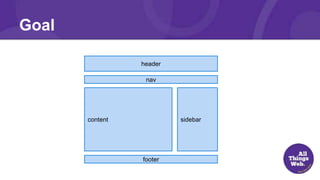
Goal
header
nav
content sidebar
footer
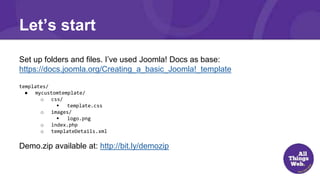
Let’s start
Set up folders and files. I’ve used Joomla! Docs as base:
https://docs.joomla.org/Creating_a_basic_Joomla!_template
templates/
● mycustomtemplate/
o css/
 template.css
o images/
 logo.png
o index.php
o templateDetails.xml
Demo.zip available at: http://bit.ly/demozip
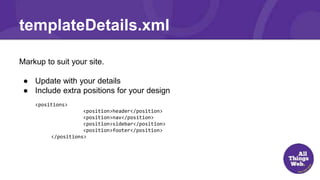
templateDetails.xml
Markup to suit your site.
● Update with your details
● Include extra positions for your design
<positions>
<position>header</position>
<position>nav</position>
<position>sidebar</position>
<position>footer</position>
</positions>
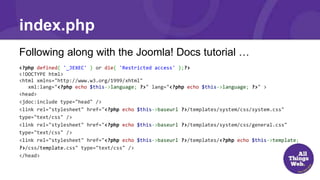
index.php
Following along with the Joomla! Docs tutorial …
<?php defined( '_JEXEC' ) or die( 'Restricted access' );?>
<!DOCTYPE html>
<html xmlns="http://www.w3.org/1999/xhtml"
xml:lang="<?php echo $this->language; ?>" lang="<?php echo $this->language; ?>" >
<head>
<jdoc:include type="head" />
<link rel="stylesheet" href="<?php echo $this->baseurl ?>/templates/system/css/system.css"
type="text/css" />
<link rel="stylesheet" href="<?php echo $this->baseurl ?>/templates/system/css/general.css"
type="text/css" />
<link rel="stylesheet" href="<?php echo $this->baseurl ?>/templates/<?php echo $this->template;
?>/css/template.css" type="text/css" />
</head>
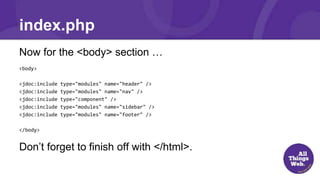
index.php
Now for the <body> section …
<body>
<jdoc:include type="modules" name="header" />
<jdoc:include type="modules" name="nav" />
<jdoc:include type="component" />
<jdoc:include type="modules" name="sidebar" />
<jdoc:include type="modules" name="footer" />
</body>
Don’t forget to finish off with </html>.
index.php
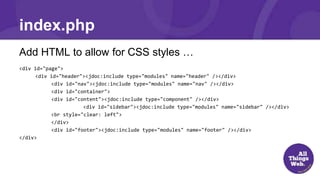
Add HTML to allow for CSS styles …
<div id="page">
<div id="header"><jdoc:include type="modules" name="header" /></div>
<div id="nav"><jdoc:include type="modules" name="nav" /></div>
<div id="container">
<div id="content"><jdoc:include type="component" /></div>
<div id="sidebar"><jdoc:include type="modules" name="sidebar" /></div>
<br style="clear: left">
</div>
<div id="footer"><jdoc:include type="modules" name="footer" /></div>
</div>
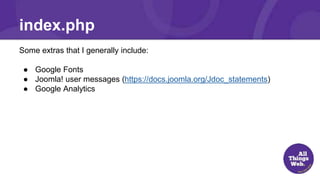
Some extras that I generally include:
● Google Fonts
● Joomla! user messages (https://docs.joomla.org/Jdoc_statements)
● Google Analytics
index.php
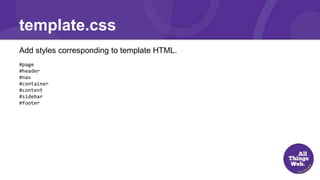
Add styles corresponding to template HTML.
#page
#header
#nav
#container
#content
#sidebar
#footer
template.css
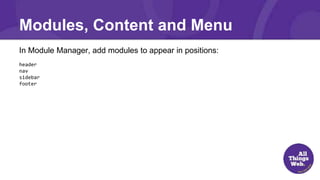
In Module Manager, add modules to appear in positions:
header
nav
sidebar
footer
Modules, Content and Menu
Resources
Joomla! Docs “Creating a basic Joomla! template”
http://docs.joomla.org/Creating_a_basic_Joomla!_template
Questions
www.allthingsweb.com.au
Tweet about tonight using #BJUG
Tweet me @carlyweb
Stay in touch

Custom Template for Joomla! 3

  • 1.
    Custom Template for Joomla!3 Carly Willats Web Designer at All Things Web
  • 2.
    Get started Let’s getstarted. ● We’re building a basic front-end template for Joomla! 3. ● Fixed module positions. ● Not responsive. ● No template overrides, language files, error page, favicon, template thumbnail preview, print-friendly, fancy jQuery or JavaScript.
  • 3.
  • 4.
    Let’s start Set upfolders and files. I’ve used Joomla! Docs as base: https://docs.joomla.org/Creating_a_basic_Joomla!_template templates/ ● mycustomtemplate/ o css/  template.css o images/  logo.png o index.php o templateDetails.xml Demo.zip available at: http://bit.ly/demozip
  • 5.
    templateDetails.xml Markup to suityour site. ● Update with your details ● Include extra positions for your design <positions> <position>header</position> <position>nav</position> <position>sidebar</position> <position>footer</position> </positions>
  • 6.
    index.php Following along withthe Joomla! Docs tutorial … <?php defined( '_JEXEC' ) or die( 'Restricted access' );?> <!DOCTYPE html> <html xmlns="http://www.w3.org/1999/xhtml" xml:lang="<?php echo $this->language; ?>" lang="<?php echo $this->language; ?>" > <head> <jdoc:include type="head" /> <link rel="stylesheet" href="<?php echo $this->baseurl ?>/templates/system/css/system.css" type="text/css" /> <link rel="stylesheet" href="<?php echo $this->baseurl ?>/templates/system/css/general.css" type="text/css" /> <link rel="stylesheet" href="<?php echo $this->baseurl ?>/templates/<?php echo $this->template; ?>/css/template.css" type="text/css" /> </head>
  • 7.
    index.php Now for the<body> section … <body> <jdoc:include type="modules" name="header" /> <jdoc:include type="modules" name="nav" /> <jdoc:include type="component" /> <jdoc:include type="modules" name="sidebar" /> <jdoc:include type="modules" name="footer" /> </body> Don’t forget to finish off with </html>.
  • 8.
    index.php Add HTML toallow for CSS styles … <div id="page"> <div id="header"><jdoc:include type="modules" name="header" /></div> <div id="nav"><jdoc:include type="modules" name="nav" /></div> <div id="container"> <div id="content"><jdoc:include type="component" /></div> <div id="sidebar"><jdoc:include type="modules" name="sidebar" /></div> <br style="clear: left"> </div> <div id="footer"><jdoc:include type="modules" name="footer" /></div> </div>
  • 9.
    Some extras thatI generally include: ● Google Fonts ● Joomla! user messages (https://docs.joomla.org/Jdoc_statements) ● Google Analytics index.php
  • 10.
    Add styles correspondingto template HTML. #page #header #nav #container #content #sidebar #footer template.css
  • 11.
    In Module Manager,add modules to appear in positions: header nav sidebar footer Modules, Content and Menu
  • 12.
    Resources Joomla! Docs “Creatinga basic Joomla! template” http://docs.joomla.org/Creating_a_basic_Joomla!_template
  • 13.
  • 14.
    www.allthingsweb.com.au Tweet about tonightusing #BJUG Tweet me @carlyweb Stay in touch