Java™Platform, Micro EditionPart 6 – Record Stores, Distribution andLocalizationv3.0a – 14 April 20091Andreas Jakl, 2009
DisclaimerThese slides are provided free of charge at http://www.symbianresources.com and are used during Java ME courses at the University of Applied Sciences in Hagenberg, Austria at the Mobile Computing department ( http://www.fh-ooe.at/mc )Respecting the copyright laws, you are allowed to use them:for your own, personal, non-commercial usein the academic environmentIn all other cases (e.g. for commercial training), please contact andreas.jakl@fh-hagenberg.atThe correctness of the contents of these materials cannot be guaranteed. Andreas Jakl is not liable for incorrect information or damage that may arise from using the materials.This document contains copyright materials which are proprietary to Sun or various mobile device manufacturers, including Nokia, SonyEricsson and Motorola. Sun, Sun Microsystems, the Sun Logo and the Java™ Platform, Micro Edition are trademarks or registered trademarks of Sun Microsystems, Inc. in the United States and other countries. Andreas Jakl, 20092
ContentsRecord StoresInput/OutputStreamsDistributionDeploymentPre-ProcessingObfuscationOTA-DeploymentLocalizationAndreas Jakl, 20093
Record StoresSave your dataAndreas Jakl, 20094
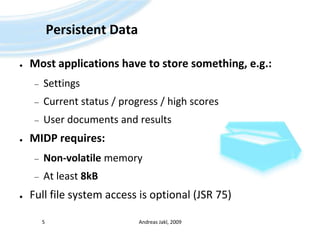
Persistent DataMost applications have to store something, e.g.:SettingsCurrent status / progress / high scoresUser documents and resultsMIDP requires:Non-volatile memoryAt least 8kBFull file system access is optional (JSR 75)Andreas Jakl, 20095
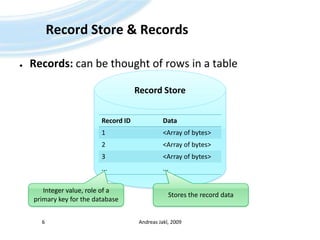
Records: can be thought of rows in a tableRecord Store & RecordsAndreas Jakl, 20096Record StoreInteger value, role of a primary key for the databaseStores the record data
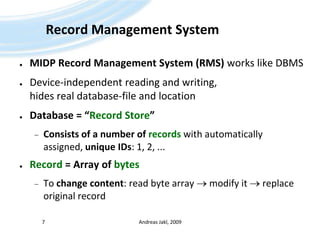
Record Management SystemMIDP Record Management System (RMS) works like DBMSDevice-independent reading and writing, hides real database-file and locationDatabase = “Record Store”Consists of a number of recordswith automatically assigned, unique IDs: 1, 2, ...Record = Array of bytesTo change content: read byte array  modify it  replace original recordAndreas Jakl, 20097
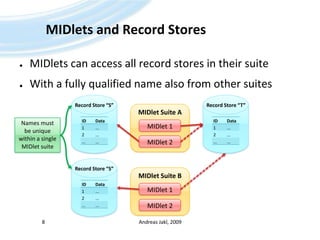
MIDlets and Record StoresMIDlets can access all record stores in their suiteWith a fully qualified name also from other suitesAndreas Jakl, 20098Record Store “S”Record Store “T”MIDlet Suite AMIDlet 1MIDlet 1Names must be unique within a single MIDlet suiteMIDlet 2MIDlet 2Record Store “S”MIDlet Suite B
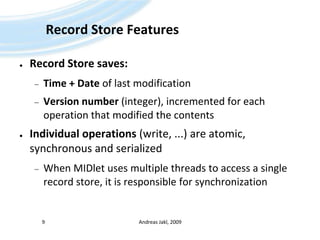
Record Store FeaturesRecord Store saves:Time + Date of last modificationVersion number (integer), incremented for each operation that modified the contentsIndividual operations (write, ...) are atomic, synchronous and serializedWhen MIDlet uses multiple threads to access a single record store, it is responsible for synchronizationAndreas Jakl, 20099
RecordStore APIOpening / Creating a Record StoreRecordStorers = RecordStore.openRecordStore(        String recordStoreName, booleancreateIfNecessary);recordStoreName: MIDlet suite-unique name, up to 32 (Unicode) charscreateIfNecessary: if it does not exist, create it or throw an exceptionAdd RecordsintnewId = rs.addRecord(byte[] data, intoffset, intnumBytes);newId: ID of the record that was created (1, 2, ...)data: byte-array to add as a new recordoffset: index into data buffer (first byte to write), usually 0numBytes: number of bytes to use (length of data to write)Andreas Jakl, 200910
RecordStore APIReading a recordbyte[] record = rs.getRecord(intrecordId);record: copy of the data stored in the recordrecordId: ID of the record to retrieveClose the record storers.closeRecordStore();Delete a record storeRecordStore.deleteRecordStore(String recordStoreName);Andreas Jakl, 200911
Byte-ArraysWorking withAndreas Jakl, 200912
StreamsJava offers comfortable streams to:Create byte arrays on the fly (ByteArrayOutputStream)Write standard data types to the stream (DataOutputStream)Andreas Jakl, 200913String objectString objectDataOutputStream.writeUTF();DataInputStream.readUTF();DataOutputStreamDataInputStreamByteArrayOutputStreamByteArrayInputStreambyte[]byte[]
Output Stream ExampleAndreas Jakl, 200914// Open (+ create) the record store with the name "MyData"RecordStorers = RecordStore.openRecordStore("MyData", true);// First create the byte array output stream which can generate the arrayByteArrayOutputStreambos = new ByteArrayOutputStream();// On top of that, create the data output stream, // which can serialize several standard Java data typesDataOutputStream dos = new DataOutputStream(bos);// Write data to the streamdos.writeInt(667487);dos.writeBoolean(true);dos.writeUTF("Test");// Flush data to make sure everything is commited down streamsdos.flush();// Grab byte array from the streambyte[] recordOut = bos.toByteArray();// Add a new record to the record store, write the whole array from 0 to its lengthintnewRecordId = rs.addRecord(recordOut, 0, recordOut.length);// Finished working on the record store – close itdos.close();			// Closes underlying output stream as wellrs.closeRecordStore();(example omits catching Exceptions for clarity)
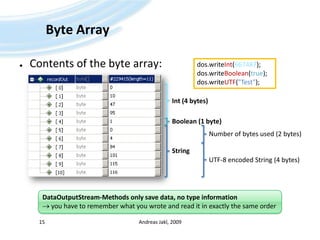
Byte ArrayContents of the byte array:Andreas Jakl, 200915dos.writeInt(667487);dos.writeBoolean(true);dos.writeUTF("Test");Int (4 bytes)Boolean (1 byte)Number of bytes used (2 bytes)StringUTF-8 encoded String (4 bytes)DataOutputStream-Methods only save data, no type information you have to remember what you wrote and read it in exactly the same order
ReadingRather similar to writing:Andreas Jakl, 200916// Open the record store with the name "MyData"RecordStorers = RecordStore.openRecordStore("MyData", false);// Get record contentsbyte[] record = rs.getRecord(newRecordId);// First create the byte array input stream which accesses the byte arrayByteArrayInputStreambis = new ByteArrayInputStream(record);// On top of that, create the data input stream, // which can interpret the contents byte array as Java data typesDataInputStreamdis = new DataInputStream(bis);// Read data from the streamint version = dis.readInt();booleanfirstStart = dis.readBoolean();String userName = dis.readUTF();// Finished working on the record store – close itdis.close(); 			// Closes underlying input stream as wellrs.closeRecordStore();(example omits catching Exceptions for clarity)
... back to the RecordStoreEnough reading and writing ... Andreas Jakl, 200917
RecordStore APIModify (= overwrite, replace) existing recordrs.setRecord(intrecordId, byte[] newData, intoffset, intnumBytes);recordId: ID of the record to replacedata: byte-array to add as a the new recordoffset: index into data buffer (first byte to write), usually 0numBytes: number of bytes to use (length of data to write)Andreas Jakl, 200918
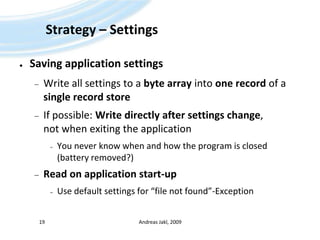
Strategy – SettingsSaving application settingsWrite all settings to a byte array into one record of a single record storeIf possible: Write directly after settings change, not when exiting the applicationYou never know when and how the program is closed(battery removed?)Read on application start-upUse default settings for “file not found”-ExceptionAndreas Jakl, 200919
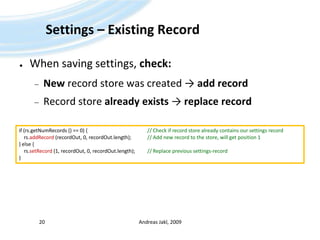
Settings – Existing RecordWhen saving settings, check:New record store was created ->add recordRecord store already exists -> replace recordAndreas Jakl, 200920if (rs.getNumRecords () == 0) {					// Check if record store already contains our settings recordrs.addRecord(recordOut, 0, recordOut.length);		// Add new record to the store, will get position 1} else {rs.setRecord (1, recordOut, 0, recordOut.length);	// Replace previous settings-record}
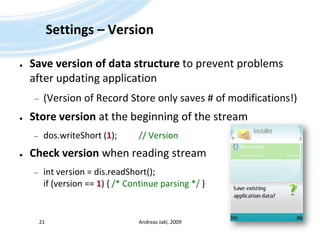
Settings – VersionSave version of data structure to prevent problems after updating application(Version of Record Store only saves # of modifications!)Store version at the beginning of the streamdos.writeShort (1);	    // VersionCheck version when reading streamint version = dis.readShort();if (version == 1) { /* Continue parsing */ }Andreas Jakl, 200921
Strategy – DatabaseApplication with database (e.g. time management)Multiple records per record store.Each record = one entry, which consists of the data, written as a byte array as usualSerializing ObjectsUsed to save object’s state to a sequence of bytesAllows rebuilding an identical object later onNot supported in current CLDCWrite it yourself: Use a stream to put all relevant data into a stream; read and create obj. in a static methodAndreas Jakl, 200922
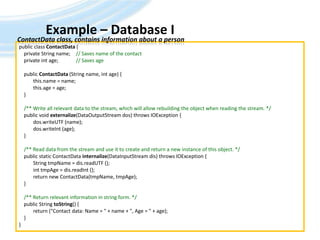
Example – Database IAndreas Jakl, 200923ContactData class, contains information about a personpublic class ContactData {    private String name;	// Saves name of the contact    private int age;		// Saves age    public ContactData (String name, int age) {	this.name = name;this.age = age;    }/** Write all relevant data to the stream, which will allow rebuilding the object when reading the stream. */    public void externalize(DataOutputStream dos) throws IOException {dos.writeUTF (name);dos.writeInt (age);    }/** Read data from the stream and use it to create and return a new instance of this object. */    public static ContactDatainternalize(DataInputStreamdis) throws IOException {	String tmpName = dis.readUTF ();inttmpAge = dis.readInt ();	return new ContactData(tmpName, tmpAge);    }    /** Return relevant information in string form. */    public String toString() {	return ("Contact data: Name = " + name + ", Age = " + age);    }}
Example – Database IIAndreas Jakl, 200924Main application – save contacts to the database// Create new vector that will contain all contact dataVector names = new Vector();names.addElement (new ContactData("Valerie Dimeling", 20));names.addElement (new ContactData("Ginger Hay", 54));try{RecordStore.deleteRecordStore ("myRs");				// Make sure no record store already existsRecordStorers = RecordStore.openRecordStore("myRs", true);	// Create a new record storeByteArrayOutputStreambos = new ByteArrayOutputStream();	// Create streams for writing dataDataOutputStream dos = new DataOutputStream(bos);// Go through the vector and create a record for each element    for (Enumeration e = names.elements (); e.hasMoreElements (); )    {ContactDatacd = (ContactData) e.nextElement ();    // Get next element of the vectorcd.externalize (dos);					// Let the instance externalize itself into our streamdos.flush();							// Make sure everything is written	byte[] record = bos.toByteArray ();			// Get byte array from the recordrs.addRecord (record, 0, record.length);    		// Add the record to the storebos.reset ();							// Clear the output stream so that we can start from scratch    }dos.close ();[…]
Example – Database IIIAndreas Jakl, 200925Main application – restore database from the record store// Read back data using a record enumerator to go through all elements    // Record enumerator would be more powerful, we do not use the advanced features hereRecordEnumerationrenum = rs.enumerateRecords (null, null, false);    while (renum.hasNextElement ())    {	byte[] record = renum.nextRecord ();						// Get data of the next recordByteArrayInputStreambis = new ByteArrayInputStream(record);	// Input streams for parsing dataDataInputStreamdis = new DataInputStream(bis);ContactDatacd = ContactData.internalize (dis);	// Internalize and create new instance (static method)System.out.println(cd);	    				// Print information to consoledis.close();    }rs.closeRecordStore ();			// Close the record store} catch (RecordStoreException ex) {ex.printStackTrace();} catch (IOException ex) {ex.printStackTrace();}
Advanced AccessSortingRecordComparatorSearchingRecordFilterNotification of changesRecordListenerAndreas Jakl, 200926
Distributing MIDletsLet others experience your fabulous applications!Andreas Jakl, 200927
Device FragmentationMobile devices vary in:Screen sizeColour depthSpeedOptional API support (Bluetooth, ...)Bugs (+ their workarounds)Solution (in NetBeans):Project configurations + pre-processing (like in C++)Andreas Jakl, 200928
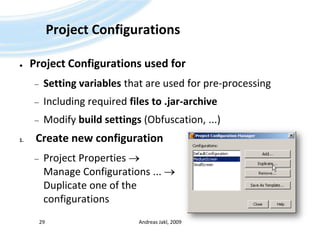
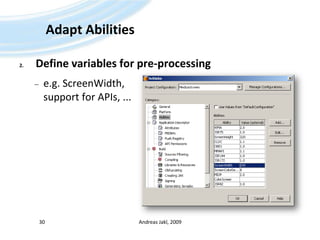
Project ConfigurationsProject Configurations used forSetting variables that are used for pre-processingIncluding required files to .jar-archiveModify build settings (Obfuscation, ...)Create new configurationProject Properties  Manage Configurations ...  Duplicate one of the configurationsAndreas Jakl, 200929
Adapt AbilitiesDefine variables for pre-processinge.g. ScreenWidth, support for APIs, ...Andreas Jakl, 200930
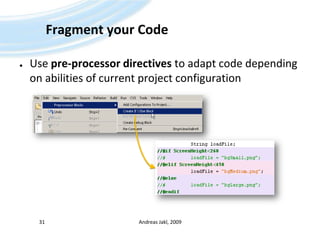
Fragment your CodeUse pre-processor directives to adapt code depending on abilities of current project configurationAndreas Jakl, 200931
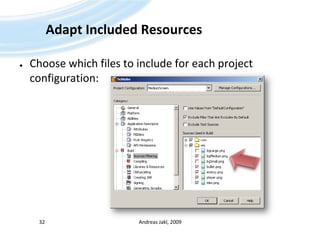
Adapt Included ResourcesChoose which files to include for each project configuration:Andreas Jakl, 200932
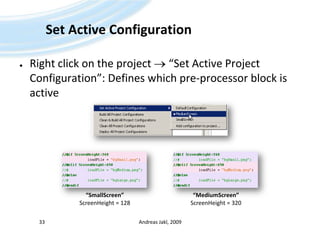
Set Active ConfigurationRight click on the project  “Set Active Project Configuration”: Defines which pre-processor block is activeAndreas Jakl, 200933“SmallScreen”ScreenHeight = 128“MediumScreen”ScreenHeight = 320
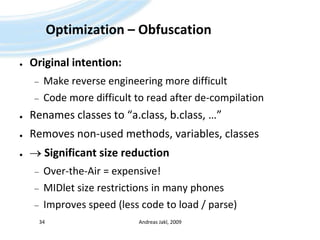
Optimization – ObfuscationOriginal intention:Make reverse engineering more difficultCode more difficult to read after de-compilationRenames classes to “a.class, b.class, …”Removes non-used methods, variables, classes Significant size reductionOver-the-Air = expensive!MIDlet size restrictions in many phonesImproves speed (less code to load / parse)Andreas Jakl, 200934
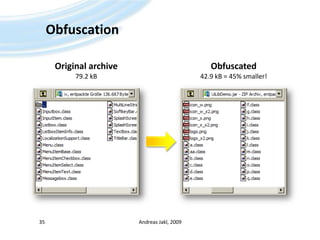
ObfuscationAndreas Jakl, 200935Original archive79.2 kBObfuscated42.9 kB = 45% smaller!
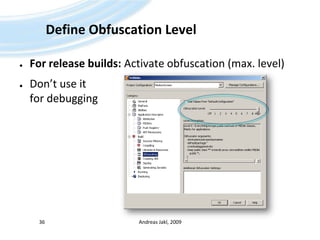
Define Obfuscation LevelFor release builds: Activate obfuscation (max. level)Don’t use it for debuggingAndreas Jakl, 200936
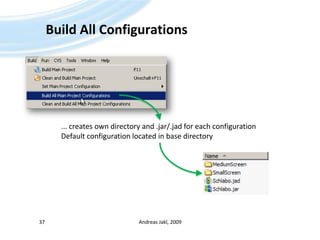
Build All ConfigurationsAndreas Jakl, 200937... creates own directory and .jar/.jad for each configurationDefault configuration located in base directory
Over-The-Air DeploymentTransmitting MIDlets to phonesAndreas Jakl, 200938
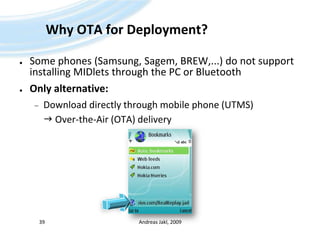
Why OTA for Deployment?Some phones (Samsung, Sagem, BREW,...) do not support installing MIDlets through the PC or BluetoothOnly alternative:Download directly through mobile phone (UTMS) Over-the-Air (OTA) deliveryAndreas Jakl, 200939
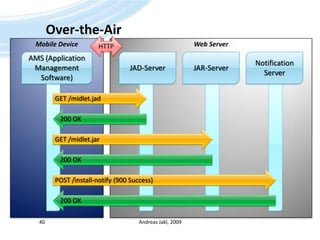
Over-the-AirAndreas Jakl, 200940HTTPWeb ServerMobile DeviceAMS (Application Management Software)JAD-ServerJAR-ServerNotification ServerGET /midlet.jadGET /midlet.jarPOST /install-notify (900 Success)200 OK200 OK200 OK
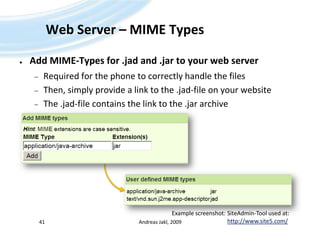
Web Server – MIME TypesAdd MIME-Types for .jad and .jar to your web serverRequired for the phone to correctly handle the filesThen, simply provide a link to the .jad-file on your websiteThe .jad-file contains the link to the .jar archiveAndreas Jakl, 200941Example screenshot: SiteAdmin-Tool used at:http://www.site5.com/
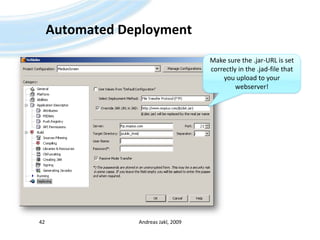
Automated DeploymentAndreas Jakl, 200942Make sure the .jar-URL is set correctly in the .jad-file that you upload to your webserver!
LocalizationPrepare for the international marketAndreas Jakl, 200943
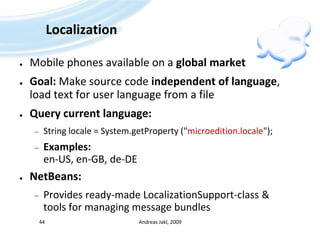
LocalizationMobile phones available on a global marketGoal: Make source code independent of language, load text for user language from a fileQuery current language:String locale = System.getProperty ("microedition.locale");Examples:en-US, en-GB, de-DENetBeans:Provides ready-made LocalizationSupport-class & tools for managing message bundlesAndreas Jakl, 200944
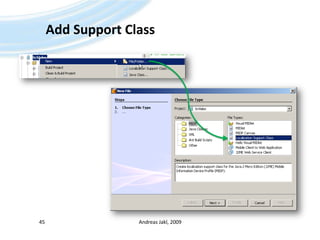
Add Support ClassAndreas Jakl, 200945
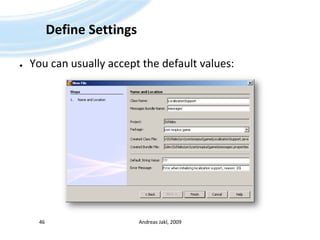
Define SettingsYou can usually accept the default values:Andreas Jakl, 200946
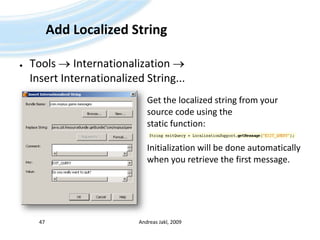
Add Localized StringTools  Internationalization  Insert Internationalized String...Andreas Jakl, 200947Get the localized string from your source code using the static function:Initialization will be done automaticallywhen you retrieve the first message.
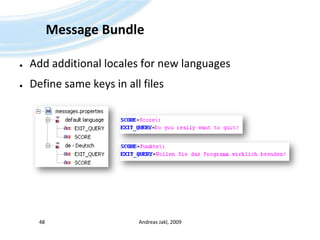
Message BundleAdd additional locales for new languagesDefine same keys in all filesAndreas Jakl, 200948
Thanks for your attentionThat’s it!Andreas Jakl, 200949

Java ME - 06 - Record Stores, Distribution and Localization

  • 1.
    Java™Platform, Micro EditionPart6 – Record Stores, Distribution andLocalizationv3.0a – 14 April 20091Andreas Jakl, 2009
  • 2.
    DisclaimerThese slides areprovided free of charge at http://www.symbianresources.com and are used during Java ME courses at the University of Applied Sciences in Hagenberg, Austria at the Mobile Computing department ( http://www.fh-ooe.at/mc )Respecting the copyright laws, you are allowed to use them:for your own, personal, non-commercial usein the academic environmentIn all other cases (e.g. for commercial training), please contact andreas.jakl@fh-hagenberg.atThe correctness of the contents of these materials cannot be guaranteed. Andreas Jakl is not liable for incorrect information or damage that may arise from using the materials.This document contains copyright materials which are proprietary to Sun or various mobile device manufacturers, including Nokia, SonyEricsson and Motorola. Sun, Sun Microsystems, the Sun Logo and the Java™ Platform, Micro Edition are trademarks or registered trademarks of Sun Microsystems, Inc. in the United States and other countries. Andreas Jakl, 20092
  • 3.
  • 4.
    Record StoresSave yourdataAndreas Jakl, 20094
  • 5.
    Persistent DataMost applicationshave to store something, e.g.:SettingsCurrent status / progress / high scoresUser documents and resultsMIDP requires:Non-volatile memoryAt least 8kBFull file system access is optional (JSR 75)Andreas Jakl, 20095
  • 6.
    Records: can bethought of rows in a tableRecord Store & RecordsAndreas Jakl, 20096Record StoreInteger value, role of a primary key for the databaseStores the record data
  • 7.
    Record Management SystemMIDPRecord Management System (RMS) works like DBMSDevice-independent reading and writing, hides real database-file and locationDatabase = “Record Store”Consists of a number of recordswith automatically assigned, unique IDs: 1, 2, ...Record = Array of bytesTo change content: read byte array  modify it  replace original recordAndreas Jakl, 20097
  • 8.
    MIDlets and RecordStoresMIDlets can access all record stores in their suiteWith a fully qualified name also from other suitesAndreas Jakl, 20098Record Store “S”Record Store “T”MIDlet Suite AMIDlet 1MIDlet 1Names must be unique within a single MIDlet suiteMIDlet 2MIDlet 2Record Store “S”MIDlet Suite B
  • 9.
    Record Store FeaturesRecordStore saves:Time + Date of last modificationVersion number (integer), incremented for each operation that modified the contentsIndividual operations (write, ...) are atomic, synchronous and serializedWhen MIDlet uses multiple threads to access a single record store, it is responsible for synchronizationAndreas Jakl, 20099
  • 10.
    RecordStore APIOpening /Creating a Record StoreRecordStorers = RecordStore.openRecordStore( String recordStoreName, booleancreateIfNecessary);recordStoreName: MIDlet suite-unique name, up to 32 (Unicode) charscreateIfNecessary: if it does not exist, create it or throw an exceptionAdd RecordsintnewId = rs.addRecord(byte[] data, intoffset, intnumBytes);newId: ID of the record that was created (1, 2, ...)data: byte-array to add as a new recordoffset: index into data buffer (first byte to write), usually 0numBytes: number of bytes to use (length of data to write)Andreas Jakl, 200910
  • 11.
    RecordStore APIReading arecordbyte[] record = rs.getRecord(intrecordId);record: copy of the data stored in the recordrecordId: ID of the record to retrieveClose the record storers.closeRecordStore();Delete a record storeRecordStore.deleteRecordStore(String recordStoreName);Andreas Jakl, 200911
  • 12.
  • 13.
    StreamsJava offers comfortablestreams to:Create byte arrays on the fly (ByteArrayOutputStream)Write standard data types to the stream (DataOutputStream)Andreas Jakl, 200913String objectString objectDataOutputStream.writeUTF();DataInputStream.readUTF();DataOutputStreamDataInputStreamByteArrayOutputStreamByteArrayInputStreambyte[]byte[]
  • 14.
    Output Stream ExampleAndreasJakl, 200914// Open (+ create) the record store with the name "MyData"RecordStorers = RecordStore.openRecordStore("MyData", true);// First create the byte array output stream which can generate the arrayByteArrayOutputStreambos = new ByteArrayOutputStream();// On top of that, create the data output stream, // which can serialize several standard Java data typesDataOutputStream dos = new DataOutputStream(bos);// Write data to the streamdos.writeInt(667487);dos.writeBoolean(true);dos.writeUTF("Test");// Flush data to make sure everything is commited down streamsdos.flush();// Grab byte array from the streambyte[] recordOut = bos.toByteArray();// Add a new record to the record store, write the whole array from 0 to its lengthintnewRecordId = rs.addRecord(recordOut, 0, recordOut.length);// Finished working on the record store – close itdos.close(); // Closes underlying output stream as wellrs.closeRecordStore();(example omits catching Exceptions for clarity)
  • 15.
    Byte ArrayContents ofthe byte array:Andreas Jakl, 200915dos.writeInt(667487);dos.writeBoolean(true);dos.writeUTF("Test");Int (4 bytes)Boolean (1 byte)Number of bytes used (2 bytes)StringUTF-8 encoded String (4 bytes)DataOutputStream-Methods only save data, no type information you have to remember what you wrote and read it in exactly the same order
  • 16.
    ReadingRather similar towriting:Andreas Jakl, 200916// Open the record store with the name "MyData"RecordStorers = RecordStore.openRecordStore("MyData", false);// Get record contentsbyte[] record = rs.getRecord(newRecordId);// First create the byte array input stream which accesses the byte arrayByteArrayInputStreambis = new ByteArrayInputStream(record);// On top of that, create the data input stream, // which can interpret the contents byte array as Java data typesDataInputStreamdis = new DataInputStream(bis);// Read data from the streamint version = dis.readInt();booleanfirstStart = dis.readBoolean();String userName = dis.readUTF();// Finished working on the record store – close itdis.close(); // Closes underlying input stream as wellrs.closeRecordStore();(example omits catching Exceptions for clarity)
  • 17.
    ... back tothe RecordStoreEnough reading and writing ... Andreas Jakl, 200917
  • 18.
    RecordStore APIModify (=overwrite, replace) existing recordrs.setRecord(intrecordId, byte[] newData, intoffset, intnumBytes);recordId: ID of the record to replacedata: byte-array to add as a the new recordoffset: index into data buffer (first byte to write), usually 0numBytes: number of bytes to use (length of data to write)Andreas Jakl, 200918
  • 19.
    Strategy – SettingsSavingapplication settingsWrite all settings to a byte array into one record of a single record storeIf possible: Write directly after settings change, not when exiting the applicationYou never know when and how the program is closed(battery removed?)Read on application start-upUse default settings for “file not found”-ExceptionAndreas Jakl, 200919
  • 20.
    Settings – ExistingRecordWhen saving settings, check:New record store was created ->add recordRecord store already exists -> replace recordAndreas Jakl, 200920if (rs.getNumRecords () == 0) { // Check if record store already contains our settings recordrs.addRecord(recordOut, 0, recordOut.length); // Add new record to the store, will get position 1} else {rs.setRecord (1, recordOut, 0, recordOut.length); // Replace previous settings-record}
  • 21.
    Settings – VersionSaveversion of data structure to prevent problems after updating application(Version of Record Store only saves # of modifications!)Store version at the beginning of the streamdos.writeShort (1); // VersionCheck version when reading streamint version = dis.readShort();if (version == 1) { /* Continue parsing */ }Andreas Jakl, 200921
  • 22.
    Strategy – DatabaseApplicationwith database (e.g. time management)Multiple records per record store.Each record = one entry, which consists of the data, written as a byte array as usualSerializing ObjectsUsed to save object’s state to a sequence of bytesAllows rebuilding an identical object later onNot supported in current CLDCWrite it yourself: Use a stream to put all relevant data into a stream; read and create obj. in a static methodAndreas Jakl, 200922
  • 23.
    Example – DatabaseIAndreas Jakl, 200923ContactData class, contains information about a personpublic class ContactData { private String name; // Saves name of the contact private int age; // Saves age public ContactData (String name, int age) { this.name = name;this.age = age; }/** Write all relevant data to the stream, which will allow rebuilding the object when reading the stream. */ public void externalize(DataOutputStream dos) throws IOException {dos.writeUTF (name);dos.writeInt (age); }/** Read data from the stream and use it to create and return a new instance of this object. */ public static ContactDatainternalize(DataInputStreamdis) throws IOException { String tmpName = dis.readUTF ();inttmpAge = dis.readInt (); return new ContactData(tmpName, tmpAge); } /** Return relevant information in string form. */ public String toString() { return ("Contact data: Name = " + name + ", Age = " + age); }}
  • 24.
    Example – DatabaseIIAndreas Jakl, 200924Main application – save contacts to the database// Create new vector that will contain all contact dataVector names = new Vector();names.addElement (new ContactData("Valerie Dimeling", 20));names.addElement (new ContactData("Ginger Hay", 54));try{RecordStore.deleteRecordStore ("myRs"); // Make sure no record store already existsRecordStorers = RecordStore.openRecordStore("myRs", true); // Create a new record storeByteArrayOutputStreambos = new ByteArrayOutputStream(); // Create streams for writing dataDataOutputStream dos = new DataOutputStream(bos);// Go through the vector and create a record for each element for (Enumeration e = names.elements (); e.hasMoreElements (); ) {ContactDatacd = (ContactData) e.nextElement (); // Get next element of the vectorcd.externalize (dos); // Let the instance externalize itself into our streamdos.flush(); // Make sure everything is written byte[] record = bos.toByteArray (); // Get byte array from the recordrs.addRecord (record, 0, record.length); // Add the record to the storebos.reset (); // Clear the output stream so that we can start from scratch }dos.close ();[…]
  • 25.
    Example – DatabaseIIIAndreas Jakl, 200925Main application – restore database from the record store// Read back data using a record enumerator to go through all elements // Record enumerator would be more powerful, we do not use the advanced features hereRecordEnumerationrenum = rs.enumerateRecords (null, null, false); while (renum.hasNextElement ()) { byte[] record = renum.nextRecord (); // Get data of the next recordByteArrayInputStreambis = new ByteArrayInputStream(record); // Input streams for parsing dataDataInputStreamdis = new DataInputStream(bis);ContactDatacd = ContactData.internalize (dis); // Internalize and create new instance (static method)System.out.println(cd); // Print information to consoledis.close(); }rs.closeRecordStore (); // Close the record store} catch (RecordStoreException ex) {ex.printStackTrace();} catch (IOException ex) {ex.printStackTrace();}
  • 26.
  • 27.
    Distributing MIDletsLet othersexperience your fabulous applications!Andreas Jakl, 200927
  • 28.
    Device FragmentationMobile devicesvary in:Screen sizeColour depthSpeedOptional API support (Bluetooth, ...)Bugs (+ their workarounds)Solution (in NetBeans):Project configurations + pre-processing (like in C++)Andreas Jakl, 200928
  • 29.
    Project ConfigurationsProject Configurationsused forSetting variables that are used for pre-processingIncluding required files to .jar-archiveModify build settings (Obfuscation, ...)Create new configurationProject Properties  Manage Configurations ...  Duplicate one of the configurationsAndreas Jakl, 200929
  • 30.
    Adapt AbilitiesDefine variablesfor pre-processinge.g. ScreenWidth, support for APIs, ...Andreas Jakl, 200930
  • 31.
    Fragment your CodeUsepre-processor directives to adapt code depending on abilities of current project configurationAndreas Jakl, 200931
  • 32.
    Adapt Included ResourcesChoosewhich files to include for each project configuration:Andreas Jakl, 200932
  • 33.
    Set Active ConfigurationRightclick on the project  “Set Active Project Configuration”: Defines which pre-processor block is activeAndreas Jakl, 200933“SmallScreen”ScreenHeight = 128“MediumScreen”ScreenHeight = 320
  • 34.
    Optimization – ObfuscationOriginalintention:Make reverse engineering more difficultCode more difficult to read after de-compilationRenames classes to “a.class, b.class, …”Removes non-used methods, variables, classes Significant size reductionOver-the-Air = expensive!MIDlet size restrictions in many phonesImproves speed (less code to load / parse)Andreas Jakl, 200934
  • 35.
    ObfuscationAndreas Jakl, 200935Originalarchive79.2 kBObfuscated42.9 kB = 45% smaller!
  • 36.
    Define Obfuscation LevelForrelease builds: Activate obfuscation (max. level)Don’t use it for debuggingAndreas Jakl, 200936
  • 37.
    Build All ConfigurationsAndreasJakl, 200937... creates own directory and .jar/.jad for each configurationDefault configuration located in base directory
  • 38.
    Over-The-Air DeploymentTransmitting MIDletsto phonesAndreas Jakl, 200938
  • 39.
    Why OTA forDeployment?Some phones (Samsung, Sagem, BREW,...) do not support installing MIDlets through the PC or BluetoothOnly alternative:Download directly through mobile phone (UTMS) Over-the-Air (OTA) deliveryAndreas Jakl, 200939
  • 40.
    Over-the-AirAndreas Jakl, 200940HTTPWebServerMobile DeviceAMS (Application Management Software)JAD-ServerJAR-ServerNotification ServerGET /midlet.jadGET /midlet.jarPOST /install-notify (900 Success)200 OK200 OK200 OK
  • 41.
    Web Server –MIME TypesAdd MIME-Types for .jad and .jar to your web serverRequired for the phone to correctly handle the filesThen, simply provide a link to the .jad-file on your websiteThe .jad-file contains the link to the .jar archiveAndreas Jakl, 200941Example screenshot: SiteAdmin-Tool used at:http://www.site5.com/
  • 42.
    Automated DeploymentAndreas Jakl,200942Make sure the .jar-URL is set correctly in the .jad-file that you upload to your webserver!
  • 43.
    LocalizationPrepare for theinternational marketAndreas Jakl, 200943
  • 44.
    LocalizationMobile phones availableon a global marketGoal: Make source code independent of language, load text for user language from a fileQuery current language:String locale = System.getProperty ("microedition.locale");Examples:en-US, en-GB, de-DENetBeans:Provides ready-made LocalizationSupport-class & tools for managing message bundlesAndreas Jakl, 200944
  • 45.
  • 46.
    Define SettingsYou canusually accept the default values:Andreas Jakl, 200946
  • 47.
    Add Localized StringTools Internationalization  Insert Internationalized String...Andreas Jakl, 200947Get the localized string from your source code using the static function:Initialization will be done automaticallywhen you retrieve the first message.
  • 48.
    Message BundleAdd additionallocales for new languagesDefine same keys in all filesAndreas Jakl, 200948
  • 49.
    Thanks for yourattentionThat’s it!Andreas Jakl, 200949