JAVA NIO ( New IO )
Import java.nio.*
Old IO Example
import java.io.*;
public class CopyFile {
public static void main(String args[]) throws
IOException {
FileInputStream in = null;
FileOutputStream out = null;
try {
in = new FileInputStream("input.txt");
out = new FileOutputStream("output.txt");
int c;
while ((c = in.read()) != -1) {
out.write(c);
}
}finally {
if (in != null) {
in.close();
}
if (out != null) {
out.close();
}
}
}
}
JAVA NIO Overview
Java NIO consist of the following core components:
Channels
Buffers
Selectors
Channels and Buffers
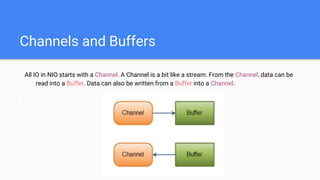
All IO in NIO starts with a Channel. A Channel is a bit like a stream. From the Channel, data can be
read into a Buffer. Data can also be written from a Buffer into a Channel.
Channel Types
Here is a list of the primary Channel implementations in Java NIO:
FileChannel
DatagramChannel
SocketChannel
ServerSocketChannel
As you can see, these channels cover UDP + TCP network IO, and file IO.
Buffers Types
Here is a list of the core Buffer implementations in Java NIO:
ByteBuffer
CharBuffer
DoubleBuffer
FloatBuffer
IntBuffer
LongBuffer
ShortBuffer
Buffer Layout
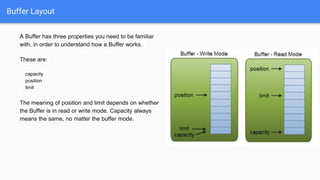
A Buffer has three properties you need to be familiar
with, in order to understand how a Buffer works.
These are:
capacity
position
limit
The meaning of position and limit depends on whether
the Buffer is in read or write mode. Capacity always
means the same, no matter the buffer mode.
Buffer Methods
● rewind()
● clear() and compact()
● mark() and reset()
Channel - Buffer Example
Using a Buffer to read and write data
typically follows this little 4-step process:
1. Write data into the Buffer
2. Call buffer.flip()
3. Read data out of the Buffer
4. Call buffer.clear() or buffer.compact()
RandomAccessFile aFile = new RandomAccessFile("data/nio-data.txt", "rw");
FileChannel inChannel = aFile.getChannel();
//create buffer with capacity of 48 bytes
ByteBuffer buf = ByteBuffer.allocate(48);
int bytesRead = inChannel.read(buf); //read into buffer.
while (bytesRead != -1) {
buf.flip(); //make buffer ready for read
while(buf.hasRemaining()){
System.out.print((char) buf.get()); // read 1 byte at a time
}
buf.clear(); //make buffer ready for writing
bytesRead = inChannel.read(buf);
}
aFile.close();
Selectors
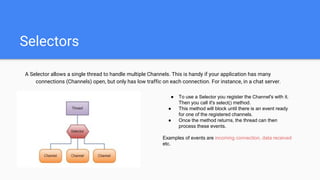
A Selector allows a single thread to handle multiple Channels. This is handy if your application has many
connections (Channels) open, but only has low traffic on each connection. For instance, in a chat server.
● To use a Selector you register the Channel's with it.
Then you call it's select() method.
● This method will block until there is an event ready
for one of the registered channels.
● Once the method returns, the thread can then
process these events.
Examples of events are incoming connection, data received
etc.
Selectors
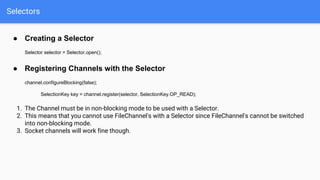
● Creating a Selector
Selector selector = Selector.open();
● Registering Channels with the Selector
channel.configureBlocking(false);
SelectionKey key = channel.register(selector, SelectionKey.OP_READ);
1. The Channel must be in non-blocking mode to be used with a Selector.
2. This means that you cannot use FileChannel's with a Selector since FileChannel's cannot be switched
into non-blocking mode.
3. Socket channels will work fine though.
Selectors
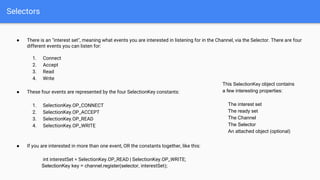
● There is an "interest set", meaning what events you are interested in listening for in the Channel, via the Selector. There are four
different events you can listen for:
1. Connect
2. Accept
3. Read
4. Write
● These four events are represented by the four SelectionKey constants:
1. SelectionKey.OP_CONNECT
2. SelectionKey.OP_ACCEPT
3. SelectionKey.OP_READ
4. SelectionKey.OP_WRITE
● If you are interested in more than one event, OR the constants together, like this:
int interestSet = SelectionKey.OP_READ | SelectionKey.OP_WRITE;
SelectionKey key = channel.register(selector, interestSet);
This SelectionKey object contains
a few interesting properties:
The interest set
The ready set
The Channel
The Selector
An attached object (optional)
Select Methods
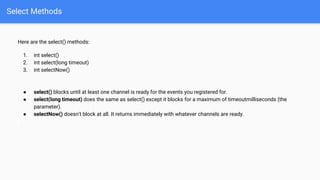
Here are the select() methods:
1. int select()
2. int select(long timeout)
3. int selectNow()
● select() blocks until at least one channel is ready for the events you registered for.
● select(long timeout) does the same as select() except it blocks for a maximum of timeoutmilliseconds (the
parameter).
● selectNow() doesn't block at all. It returns immediately with whatever channels are ready.
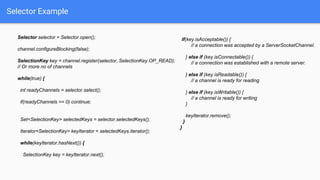
Selector Example
Selector selector = Selector.open();
channel.configureBlocking(false);
SelectionKey key = channel.register(selector, SelectionKey.OP_READ);
// Or more no of channels
while(true) {
int readyChannels = selector.select();
if(readyChannels == 0) continue;
Set<SelectionKey> selectedKeys = selector.selectedKeys();
Iterator<SelectionKey> keyIterator = selectedKeys.iterator();
while(keyIterator.hasNext()) {
SelectionKey key = keyIterator.next();
if(key.isAcceptable()) {
// a connection was accepted by a ServerSocketChannel.
} else if (key.isConnectable()) {
// a connection was established with a remote server.
} else if (key.isReadable()) {
// a channel is ready for reading
} else if (key.isWritable()) {
// a channel is ready for writing
}
keyIterator.remove();
}
}
JAVA NIO Pipe
A Java NIO Pipe is a one-way data connection between two threads. A Pipe has a source channel and a sink channel.
You write data to the sink channel. This data can then be read from the source channel.
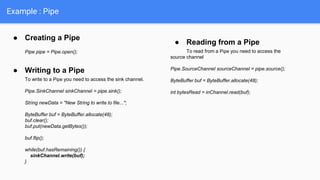
● Creating a Pipe
Pipe pipe = Pipe.open();
● Writing to a Pipe
To write to a Pipe you need to access the sink channel.
Pipe.SinkChannel sinkChannel = pipe.sink();
String newData = "New String to write to file...";
ByteBuffer buf = ByteBuffer.allocate(48);
buf.clear();
buf.put(newData.getBytes());
buf.flip();
while(buf.hasRemaining()) {
sinkChannel.write(buf);
}
● Reading from a Pipe
To read from a Pipe you need to access the
source channel
Pipe.SourceChannel sourceChannel = pipe.source();
ByteBuffer buf = ByteBuffer.allocate(48);
int bytesRead = inChannel.read(buf);
Example : Pipe
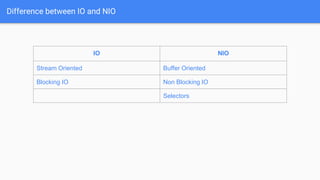
Difference between IO and NIO
IO NIO
Stream Oriented Buffer Oriented
Blocking IO Non Blocking IO
Selectors
Summary
NIO allows you to manage multiple channels using only a single (or fewer) threads.
To manage thousands of open connections simultaneously, which each only send a little data, Ex. chat server,
implementing the server in NIO is probably an advantage.
Similarly, if we need to keep a lot of open connections to other computers, e.g. in a P2P network, using a single
thread to manage all of your outbound connections might be an advantage.
When we have fewer connections with very high bandwidth, sending a lot of data at a time, standard IO server
implementation is better.
References
http://tutorials.jenkov.com/java-nio
http://howtodoinjava.com/java-nio-tutorials/
Thank you :)

Java nio ( new io )

  • 1.
    JAVA NIO (New IO ) Import java.nio.*
  • 2.
    Old IO Example importjava.io.*; public class CopyFile { public static void main(String args[]) throws IOException { FileInputStream in = null; FileOutputStream out = null; try { in = new FileInputStream("input.txt"); out = new FileOutputStream("output.txt"); int c; while ((c = in.read()) != -1) { out.write(c); } }finally { if (in != null) { in.close(); } if (out != null) { out.close(); } } } }
  • 3.
    JAVA NIO Overview JavaNIO consist of the following core components: Channels Buffers Selectors
  • 4.
    Channels and Buffers AllIO in NIO starts with a Channel. A Channel is a bit like a stream. From the Channel, data can be read into a Buffer. Data can also be written from a Buffer into a Channel.
  • 5.
    Channel Types Here isa list of the primary Channel implementations in Java NIO: FileChannel DatagramChannel SocketChannel ServerSocketChannel As you can see, these channels cover UDP + TCP network IO, and file IO.
  • 6.
    Buffers Types Here isa list of the core Buffer implementations in Java NIO: ByteBuffer CharBuffer DoubleBuffer FloatBuffer IntBuffer LongBuffer ShortBuffer
  • 7.
    Buffer Layout A Bufferhas three properties you need to be familiar with, in order to understand how a Buffer works. These are: capacity position limit The meaning of position and limit depends on whether the Buffer is in read or write mode. Capacity always means the same, no matter the buffer mode.
  • 8.
    Buffer Methods ● rewind() ●clear() and compact() ● mark() and reset()
  • 9.
    Channel - BufferExample Using a Buffer to read and write data typically follows this little 4-step process: 1. Write data into the Buffer 2. Call buffer.flip() 3. Read data out of the Buffer 4. Call buffer.clear() or buffer.compact() RandomAccessFile aFile = new RandomAccessFile("data/nio-data.txt", "rw"); FileChannel inChannel = aFile.getChannel(); //create buffer with capacity of 48 bytes ByteBuffer buf = ByteBuffer.allocate(48); int bytesRead = inChannel.read(buf); //read into buffer. while (bytesRead != -1) { buf.flip(); //make buffer ready for read while(buf.hasRemaining()){ System.out.print((char) buf.get()); // read 1 byte at a time } buf.clear(); //make buffer ready for writing bytesRead = inChannel.read(buf); } aFile.close();
  • 10.
    Selectors A Selector allowsa single thread to handle multiple Channels. This is handy if your application has many connections (Channels) open, but only has low traffic on each connection. For instance, in a chat server. ● To use a Selector you register the Channel's with it. Then you call it's select() method. ● This method will block until there is an event ready for one of the registered channels. ● Once the method returns, the thread can then process these events. Examples of events are incoming connection, data received etc.
  • 11.
    Selectors ● Creating aSelector Selector selector = Selector.open(); ● Registering Channels with the Selector channel.configureBlocking(false); SelectionKey key = channel.register(selector, SelectionKey.OP_READ); 1. The Channel must be in non-blocking mode to be used with a Selector. 2. This means that you cannot use FileChannel's with a Selector since FileChannel's cannot be switched into non-blocking mode. 3. Socket channels will work fine though.
  • 12.
    Selectors ● There isan "interest set", meaning what events you are interested in listening for in the Channel, via the Selector. There are four different events you can listen for: 1. Connect 2. Accept 3. Read 4. Write ● These four events are represented by the four SelectionKey constants: 1. SelectionKey.OP_CONNECT 2. SelectionKey.OP_ACCEPT 3. SelectionKey.OP_READ 4. SelectionKey.OP_WRITE ● If you are interested in more than one event, OR the constants together, like this: int interestSet = SelectionKey.OP_READ | SelectionKey.OP_WRITE; SelectionKey key = channel.register(selector, interestSet); This SelectionKey object contains a few interesting properties: The interest set The ready set The Channel The Selector An attached object (optional)
  • 13.
    Select Methods Here arethe select() methods: 1. int select() 2. int select(long timeout) 3. int selectNow() ● select() blocks until at least one channel is ready for the events you registered for. ● select(long timeout) does the same as select() except it blocks for a maximum of timeoutmilliseconds (the parameter). ● selectNow() doesn't block at all. It returns immediately with whatever channels are ready.
  • 14.
    Selector Example Selector selector= Selector.open(); channel.configureBlocking(false); SelectionKey key = channel.register(selector, SelectionKey.OP_READ); // Or more no of channels while(true) { int readyChannels = selector.select(); if(readyChannels == 0) continue; Set<SelectionKey> selectedKeys = selector.selectedKeys(); Iterator<SelectionKey> keyIterator = selectedKeys.iterator(); while(keyIterator.hasNext()) { SelectionKey key = keyIterator.next(); if(key.isAcceptable()) { // a connection was accepted by a ServerSocketChannel. } else if (key.isConnectable()) { // a connection was established with a remote server. } else if (key.isReadable()) { // a channel is ready for reading } else if (key.isWritable()) { // a channel is ready for writing } keyIterator.remove(); } }
  • 15.
    JAVA NIO Pipe AJava NIO Pipe is a one-way data connection between two threads. A Pipe has a source channel and a sink channel. You write data to the sink channel. This data can then be read from the source channel.
  • 16.
    ● Creating aPipe Pipe pipe = Pipe.open(); ● Writing to a Pipe To write to a Pipe you need to access the sink channel. Pipe.SinkChannel sinkChannel = pipe.sink(); String newData = "New String to write to file..."; ByteBuffer buf = ByteBuffer.allocate(48); buf.clear(); buf.put(newData.getBytes()); buf.flip(); while(buf.hasRemaining()) { sinkChannel.write(buf); } ● Reading from a Pipe To read from a Pipe you need to access the source channel Pipe.SourceChannel sourceChannel = pipe.source(); ByteBuffer buf = ByteBuffer.allocate(48); int bytesRead = inChannel.read(buf); Example : Pipe
  • 17.
    Difference between IOand NIO IO NIO Stream Oriented Buffer Oriented Blocking IO Non Blocking IO Selectors
  • 18.
    Summary NIO allows youto manage multiple channels using only a single (or fewer) threads. To manage thousands of open connections simultaneously, which each only send a little data, Ex. chat server, implementing the server in NIO is probably an advantage. Similarly, if we need to keep a lot of open connections to other computers, e.g. in a P2P network, using a single thread to manage all of your outbound connections might be an advantage. When we have fewer connections with very high bandwidth, sending a lot of data at a time, standard IO server implementation is better.
  • 19.
  • 20.