Outline-session 9 (09-April-2009) >> J2ME Record Management System -Introduction -RMS -Record Store -Record Store-MIDlet -Record Store –Scope -Record Store –Two attribute -Record Store –API -Record Enumeration
Introduction Just like ordinary desktop-based programs, MIDlets need a facility to store data permanently.  C ell phones and other mobile devices are quite limited when compared to desktop systems.  NO  file system  nor relational database  in a MIDP-based environment.  MIDP provides  the persistence storage package  javax.microedition.rms  for storing data .  The package is called  Record Management System  ( RMS )  provides a simple record-oriented database.
RMS(Record Management System) RMS is a system for managing records.  A record is an individual data item. No data type. A record is represented by  an array of bytes . A  record can contain a number, a string, an array, an image -- anything that a sequence of bytes can represent.  Manipulating byte array is difficult.  A simple way is to use String as it has a rich API to manipulate and convert it to and from byte array is simple.
Where are the fields? Don't be  confused by the term record. The answer is simple:  In RMS a record doesn't have any fields. A  record consists of a n array of  single binary field of variable size  identified by a record Id .  This  keeps RMS  small  and  flexible  -- important attributes for a MIDP subsystem.  The programmer has to handle type conversion, comparison, etc.
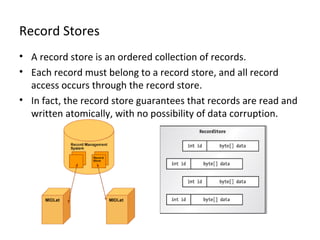
Record Stores A record store is an ordered collection of records.  E ach  record  must belong to a record store, and all record access occurs through the record store.  In fact, the record store guarantees that records are read and written atomically, with no possibility of data corruption.
Record Stores When a record is created, the record store assigns it a unique identifier, an integer called the record ID.  The first record added to a record store has a record ID of 1, the second a record ID of 2, and so on.
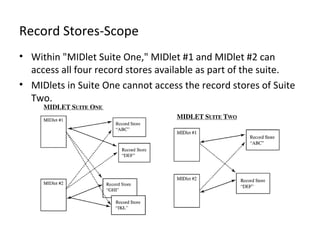
Record Stores-MIDlet A MIDlet can have any number of record stores (including none) Each record store is uniquely identified by its name MIDlet is part of MIDlet suite, record store names must also be unique within the suite MIDlets that are packaged within a suite can access not only the record stores they create, but also those of other MIDlets in the suite
Record Stores-Scope Within "MIDlet Suite One," MIDlet #1 and MIDlet #2 can access all four record stores available as part of the suite. MIDlets in Suite One cannot access the record stores of Suite Two.
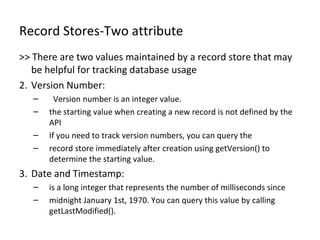
Record Stores-Two attribute >> There are two values maintained by a record store that may be helpful for tracking database usage Version Number:   Version number is an integer value. the starting value when creating a new record is not defined by the API If you need to track version numbers, you can query the record store immediately after creation using getVersion() to determine the starting value. Date and Timestamp: is a long integer that represents the number of milliseconds since midnight January 1st, 1970. You can query this value by calling getLastModified().
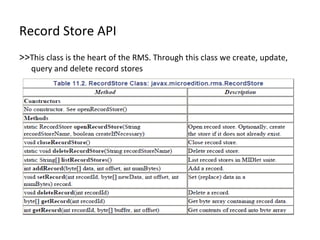
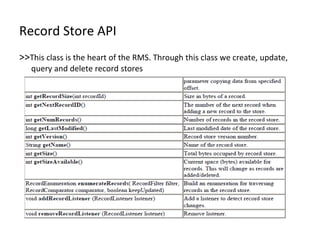
Record Store API >> This class is the heart of the RMS. Through this class we create, update, query and delete record stores
Manage Record Store To open a record store, you simply need to  call the  openRecordStore  method.   public  static  RecordStore openRecordStore( String recordStoreName,   boolean createIfNecessary)  throws RecordStoreException,   RecordStoreFullException, RecordStoreNotFoundException createIfNecessary  determines whether  the  record store , if not existed,  will be created or a RecordStoreNotFoundException  will be thrown . The following opens a record store named "Address." RecordStore rs = RecordStore.openRecordStore("Address",  true); The record store will be created if it does not exist.
Manage Record Store closeRecordStore () method  closes a n open record.  rs. closeRecordStore() ; Remember  to clean up after yourself as much as possible.  T o  delete  a record store and its contained records, call the static  deleteRecordStore () method.  RecordStore.deleteRecordStore("Address"); To find out all the record stores available  to a  particular MIDlet suite, call the  listRecordStores () method: public static String[] listRecordStores()
Adding records The MIDlet invokes the  addRecord () method of RecordStore class to insert a new record into the record store.  public int addRecord(byte[] data, int offset, int numBytes)  inserts a record represented by an array of bytes data with offset as its starting index and numBytes as its length. String brand = "Honda"; byte bytes[] = brand .getBytes(); int recID =  rs .addRecord (bytes,0,bytes.length);
Manage Record Store closeRecordStore () method  closes a n open record.  rs. closeRecordStore() ; Remember  to clean up after yourself as much as possible.  T o  delete  a record store and its contained records, call the static  deleteRecordStore () method.  RecordStore.deleteRecordStore("Address"); To find out all the record stores available  to a  particular MIDlet suite, call the  listRecordStores () method: public static String[] listRecordStores()
Retrieving Record There are two versions to retrieve a record: public int getRecord(int recordId, byte[] buffer, int offset)  copies  the data stored in the given record  to  the byte array represented by buffer.   public byte[] getRecord(int record I d)  returns a  new  copy of the data represented by recordId.  byte[] retrieved = new byte[rs.getRecordSize( recID )]; rs.getRecord(id, retrieved, 0); String retrievedString = new String(retrieved); byte[] retrieved = rs.getRecord( recID ); String retrievedString = new String(retrieved);
Update Record To update  a record  use the method  setRecord : public void setRecord(int recordId,    byte[] newData, int offset, int numBytes)  sets new information, a stream of bytes (newData) with offset as its starting index and numBytes as its length, at the record location represented by recordId. String  brand  = "Toyota"; byte data[] = newappt.getBytes(); r s.setRecord( recID , data, 0, data.length());
Deleting Record The MIDlet invokes the deleteRecord() method to delete a record from the record store. public void deleteRecord(int recordId)  deletes the record represented by recordId. The recordId is not reused. rs .deleteRecord(1);
Record Enumeration The RecordEnumeration (A.K.A enumerator) class provides methods for moving forward and back through a record store.  you might prefer to enumerate through the records, sorting alphabetically Enumeration Implementation RecordEnumeration re = rs.enumerateRecords(null,null,false); while (re.hasNextElement()) { // Get the next record into a String String str = new String(re.nextRecord()); ... do something ... }
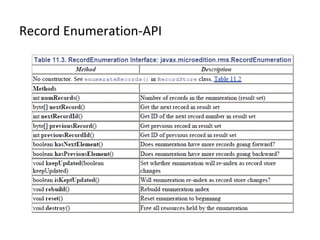
Record Enumeration Key Methods in enumeration >> nextRecord() to move forward >>previousRecord() to move back >>previousRecord(), whichh will return the last record An enumerator maintains in internal index of the record store You can make calls to reindex() whenever you update, delete or add a record. A record listener can be established to notify you of changes to the record store Whenever a change occurs, the listener will call one of three methods, depending on whether the change was an add, delete or update
Record Enumeration-API

Session9 J2ME Record Management System

  • 1.
    Outline-session 9 (09-April-2009)>> J2ME Record Management System -Introduction -RMS -Record Store -Record Store-MIDlet -Record Store –Scope -Record Store –Two attribute -Record Store –API -Record Enumeration
  • 2.
    Introduction Just likeordinary desktop-based programs, MIDlets need a facility to store data permanently. C ell phones and other mobile devices are quite limited when compared to desktop systems. NO file system nor relational database in a MIDP-based environment. MIDP provides the persistence storage package javax.microedition.rms for storing data . The package is called Record Management System ( RMS ) provides a simple record-oriented database.
  • 3.
    RMS(Record Management System)RMS is a system for managing records. A record is an individual data item. No data type. A record is represented by an array of bytes . A record can contain a number, a string, an array, an image -- anything that a sequence of bytes can represent. Manipulating byte array is difficult. A simple way is to use String as it has a rich API to manipulate and convert it to and from byte array is simple.
  • 4.
    Where are thefields? Don't be confused by the term record. The answer is simple: In RMS a record doesn't have any fields. A record consists of a n array of single binary field of variable size identified by a record Id . This keeps RMS small and flexible -- important attributes for a MIDP subsystem. The programmer has to handle type conversion, comparison, etc.
  • 5.
    Record Stores Arecord store is an ordered collection of records. E ach record must belong to a record store, and all record access occurs through the record store. In fact, the record store guarantees that records are read and written atomically, with no possibility of data corruption.
  • 6.
    Record Stores Whena record is created, the record store assigns it a unique identifier, an integer called the record ID. The first record added to a record store has a record ID of 1, the second a record ID of 2, and so on.
  • 7.
    Record Stores-MIDlet AMIDlet can have any number of record stores (including none) Each record store is uniquely identified by its name MIDlet is part of MIDlet suite, record store names must also be unique within the suite MIDlets that are packaged within a suite can access not only the record stores they create, but also those of other MIDlets in the suite
  • 8.
    Record Stores-Scope Within"MIDlet Suite One," MIDlet #1 and MIDlet #2 can access all four record stores available as part of the suite. MIDlets in Suite One cannot access the record stores of Suite Two.
  • 9.
    Record Stores-Two attribute>> There are two values maintained by a record store that may be helpful for tracking database usage Version Number: Version number is an integer value. the starting value when creating a new record is not defined by the API If you need to track version numbers, you can query the record store immediately after creation using getVersion() to determine the starting value. Date and Timestamp: is a long integer that represents the number of milliseconds since midnight January 1st, 1970. You can query this value by calling getLastModified().
  • 10.
    Record Store API>> This class is the heart of the RMS. Through this class we create, update, query and delete record stores
  • 11.
    Record Store API>> This class is the heart of the RMS. Through this class we create, update, query and delete record stores
  • 12.
    Manage Record StoreTo open a record store, you simply need to call the openRecordStore method. public static RecordStore openRecordStore( String recordStoreName, boolean createIfNecessary) throws RecordStoreException, RecordStoreFullException, RecordStoreNotFoundException createIfNecessary determines whether the record store , if not existed, will be created or a RecordStoreNotFoundException will be thrown . The following opens a record store named "Address." RecordStore rs = RecordStore.openRecordStore("Address", true); The record store will be created if it does not exist.
  • 13.
    Manage Record StorecloseRecordStore () method closes a n open record. rs. closeRecordStore() ; Remember to clean up after yourself as much as possible. T o delete a record store and its contained records, call the static deleteRecordStore () method. RecordStore.deleteRecordStore("Address"); To find out all the record stores available to a particular MIDlet suite, call the listRecordStores () method: public static String[] listRecordStores()
  • 14.
    Adding records TheMIDlet invokes the addRecord () method of RecordStore class to insert a new record into the record store. public int addRecord(byte[] data, int offset, int numBytes) inserts a record represented by an array of bytes data with offset as its starting index and numBytes as its length. String brand = "Honda"; byte bytes[] = brand .getBytes(); int recID = rs .addRecord (bytes,0,bytes.length);
  • 15.
    Manage Record StorecloseRecordStore () method closes a n open record. rs. closeRecordStore() ; Remember to clean up after yourself as much as possible. T o delete a record store and its contained records, call the static deleteRecordStore () method. RecordStore.deleteRecordStore("Address"); To find out all the record stores available to a particular MIDlet suite, call the listRecordStores () method: public static String[] listRecordStores()
  • 16.
    Retrieving Record Thereare two versions to retrieve a record: public int getRecord(int recordId, byte[] buffer, int offset) copies the data stored in the given record to the byte array represented by buffer. public byte[] getRecord(int record I d) returns a new copy of the data represented by recordId. byte[] retrieved = new byte[rs.getRecordSize( recID )]; rs.getRecord(id, retrieved, 0); String retrievedString = new String(retrieved); byte[] retrieved = rs.getRecord( recID ); String retrievedString = new String(retrieved);
  • 17.
    Update Record Toupdate a record use the method setRecord : public void setRecord(int recordId, byte[] newData, int offset, int numBytes) sets new information, a stream of bytes (newData) with offset as its starting index and numBytes as its length, at the record location represented by recordId. String brand = "Toyota"; byte data[] = newappt.getBytes(); r s.setRecord( recID , data, 0, data.length());
  • 18.
    Deleting Record TheMIDlet invokes the deleteRecord() method to delete a record from the record store. public void deleteRecord(int recordId) deletes the record represented by recordId. The recordId is not reused. rs .deleteRecord(1);
  • 19.
    Record Enumeration TheRecordEnumeration (A.K.A enumerator) class provides methods for moving forward and back through a record store. you might prefer to enumerate through the records, sorting alphabetically Enumeration Implementation RecordEnumeration re = rs.enumerateRecords(null,null,false); while (re.hasNextElement()) { // Get the next record into a String String str = new String(re.nextRecord()); ... do something ... }
  • 20.
    Record Enumeration KeyMethods in enumeration >> nextRecord() to move forward >>previousRecord() to move back >>previousRecord(), whichh will return the last record An enumerator maintains in internal index of the record store You can make calls to reindex() whenever you update, delete or add a record. A record listener can be established to notify you of changes to the record store Whenever a change occurs, the listener will call one of three methods, depending on whether the change was an add, delete or update
  • 21.