Copyright © 2017, Oracle and/or its affiliates. All rights reserved. |
Java for the containers
Vaibhav Choudhary (@vaibhav_c)
Java Platforms Team
https://blogs.oracle.com/vaibhav
Copyright © 2017, Oracle and/or its affiliates. All rights reserved. |
Safe Harbor Statement
The following is intended to outline our general product direction. It is intended
for information purposes only, and may not be incorporated into any contract. It
is not a commitment to deliver any material, code, or functionality, and should
not be relied upon in making purchasing decisions. The development, release,
and timing of any features or functionality described for Oracle’s products
remains at the sole discretion of Oracle.
3
Copyright © 2017, Oracle and/or its affiliates. All rights reserved. |
Agenda of the day …
A brief on Container
Java - as first class citizen in Container
Respect Container Boundary
Leverage features inside container
Final thoughts
1
2
3
4
4
5
Copyright © 2017, Oracle and/or its affiliates. All rights reserved. |
Respective the container Boundary
Copyright © 2017, Oracle and/or its affiliates. All rights reserved. |
Processor Boundary (--cpu-shares)
6
public class CoreCheck {
public static void main(String[] args) {
  System.out.println(Runtime.getRuntime().availableProcessors());
 }}
JDK8 :
docker run --rm --cpu-shares 2048 -v /root/:/mnt/mydata -it ubuntu bash
root@7599aae2613d:/mnt/mydata/jdk-8/bin# ./java CoreCheck
8
FROM openjdk:10
ADD CoreCheck.java .
WORKDIR .
RUN javac CoreCheck.java
CMD ["java", "CoreCheck" ]
docker build -t hello-world .
docker run --cpu-shares 2048 java-helloworld
2
Copyright © 2017, Oracle and/or its affiliates. All rights reserved. |
Processor Boundary (--cpuset-cpus)
7
public class CoreCheck {
public static void main(String[] args) {
  System.out.println(Runtime.getRuntime().availableProcessors());
 }}
JDK8 :
docker run --rm --cpuset-cpus 3,4,6 -v /root/:/mnt/mydata -it ubuntu bash
root@7599aae2613d:/mnt/mydata/jdk-8/bin# ./java CoreCheck
8 (ideally it should say 3)
FROM openjdk:10
ADD CoreCheck.java .
WORKDIR .
RUN javac CoreCheck.java
CMD ["java", "CoreCheck" ]
docker build -t hello-world .
docker run --cpuset-cpus 3,4,6 java-
helloworld
3 (Processor 3rd, 4th and 6th)
Copyright © 2017, Oracle and/or its affiliates. All rights reserved. |
Here are the results (Respecting Logs)
8
public class HelloWorld {
public static void main(String[] args) {
  System.out.println(Runtime.getRuntime().availableProcessors());
 }}
JDK10 :
root@4795a54e037e:/mnt/mydata/jdk-10b38/bin# ./java -Xlog:os+container=trace HelloWorld
[0.001s][trace][os,container] OSContainer::init: Initializing Container Support
[0.001s][trace][os,container] Path to /memory.limit_in_bytes is /sys/fs/cgroup/memory/
memory.limit_in_bytes
JDK9 :
root@4795a54e037e:/mnt/mydata/jdk-9/bin# ./java -Xlog:os+container=trace HelloWorld
[0.001s][error][logging] Invalid tag 'container' in what-expression.
Invalid -Xlog option '-Xlog:os+container=trace'
Copyright © 2017, Oracle and/or its affiliates. All rights reserved. |
Here are the results (ActiveProcessorCount)
9
public class HelloWorld {
public static void main(String[] args) {
  System.out.println(Runtime.getRuntime().availableProcessors());
 }}
JDK10 :
root@4795a54e037e:/mnt/mydata/jdk-10b38/bin# ./java -
XX:ActiveProcessorCount=4 HelloWorld
4
JDK8 :
root@4795a54e037e:/mnt/mydata/jdk1.8.0_152/bin# ./java -
XX:ActiveProcessorCount=4 HelloWorld
Unrecognized VM option 'ActiveProcessorCount=4'
Error: Could not create the Java Virtual Machine.
Error: A fatal exception has occurred. Program will exit.
Copyright © 2017, Oracle and/or its affiliates. All rights reserved. |
Cont.. (Respecting Memory Boundaries)
10
public class MemoryCheck {
public static void main(String[] args) {
  System.out.println(Runtime.getRuntime().maxMemory());
 }}
JDK8 :
docker run --rm --memory 100m -v /root/:/mnt/mydata -it ubuntu bash
root@7599aae2613d:/mnt/mydata/jdk-8/bin# ./java CoreCheck
It will print 1/4 of the Physical Memory (It should understand docker memory limit)
FROM openjdk:10
ADD MemoryCheck.java .
WORKDIR .
RUN javac MemoryCheck.java
CMD ["java", "MemoryCheck" ]
docker build -t hello-world .
docker run --memory 100m java-helloworld
Half of the docker limit (50m)
Copyright © 2017, Oracle and/or its affiliates. All rights reserved. |
Solution 1 : Application Class Data Sharing (AppCDS)
Copyright © 2016, Oracle and/or its affiliates. All rights reserved. | Confidential – Oracle Internal/Restricted/Highly Restricted
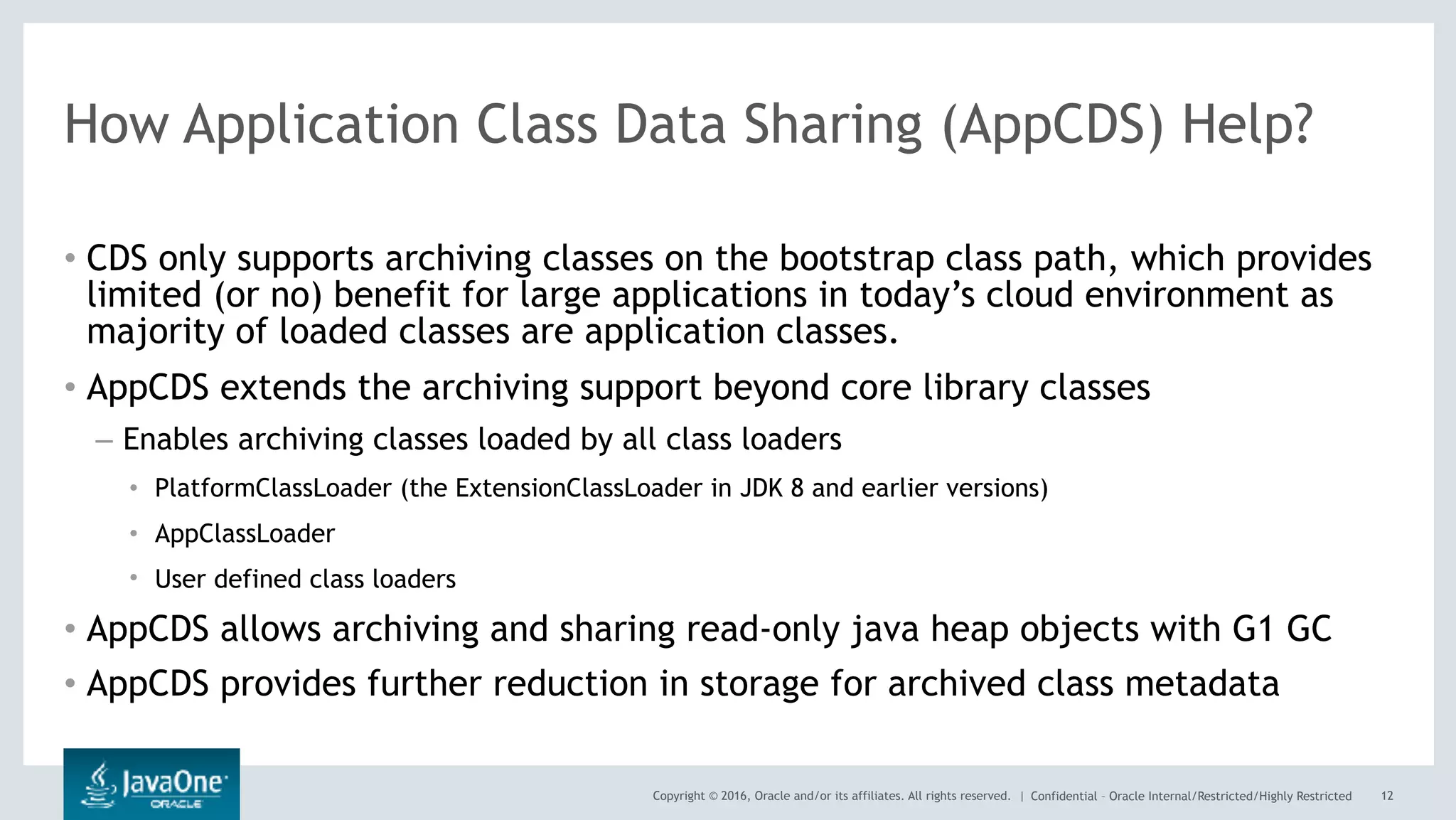
How Application Class Data Sharing (AppCDS) Help?
• CDS only supports archiving classes on the bootstrap class path, which provides
limited (or no) benefit for large applications in today’s cloud environment as
majority of loaded classes are application classes.
• AppCDS extends the archiving support beyond core library classes
– Enables archiving classes loaded by all class loaders
• PlatformClassLoader (the ExtensionClassLoader in JDK 8 and earlier versions)
• AppClassLoader
• User defined class loaders
• AppCDS allows archiving and sharing read-only java heap objects with G1 GC
• AppCDS provides further reduction in storage for archived class metadata
12
Copyright © 2016, Oracle and/or its affiliates. All rights reserved. | Confidential – Oracle Internal/Restricted/Highly Restricted
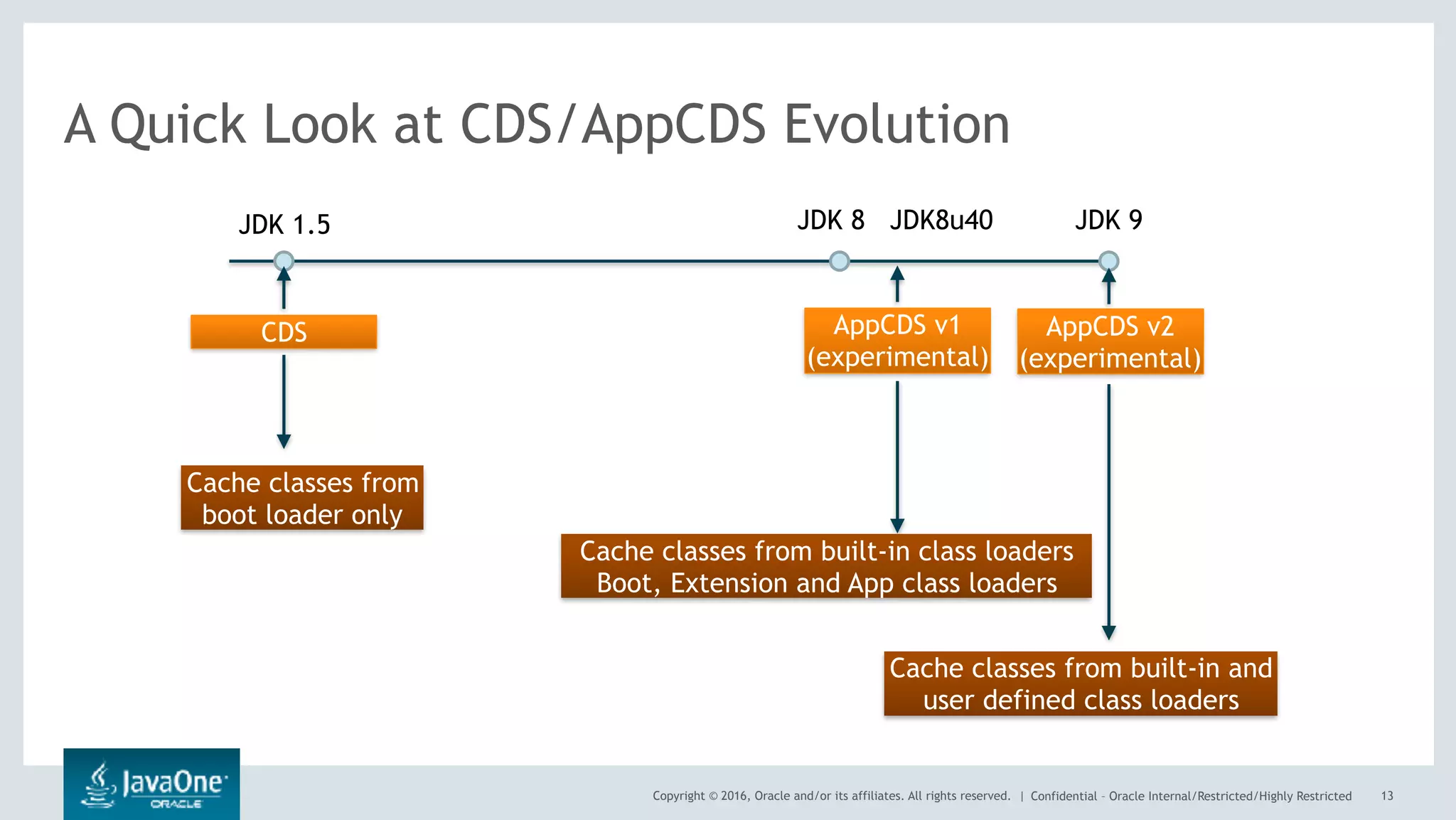
A Quick Look at CDS/AppCDS Evolution
13
JDK 1.5 JDK 8 JDK 9JDK8u40
CDS AppCDS v1
(experimental)
AppCDS v2
(experimental)
Cache classes from
boot loader only
Cache classes from built-in class loaders
Boot, Extension and App class loaders
Cache classes from built-in and
user defined class loaders
Copyright © 2016, Oracle and/or its affiliates. All rights reserved. | Confidential – Oracle Internal/Restricted/Highly Restricted
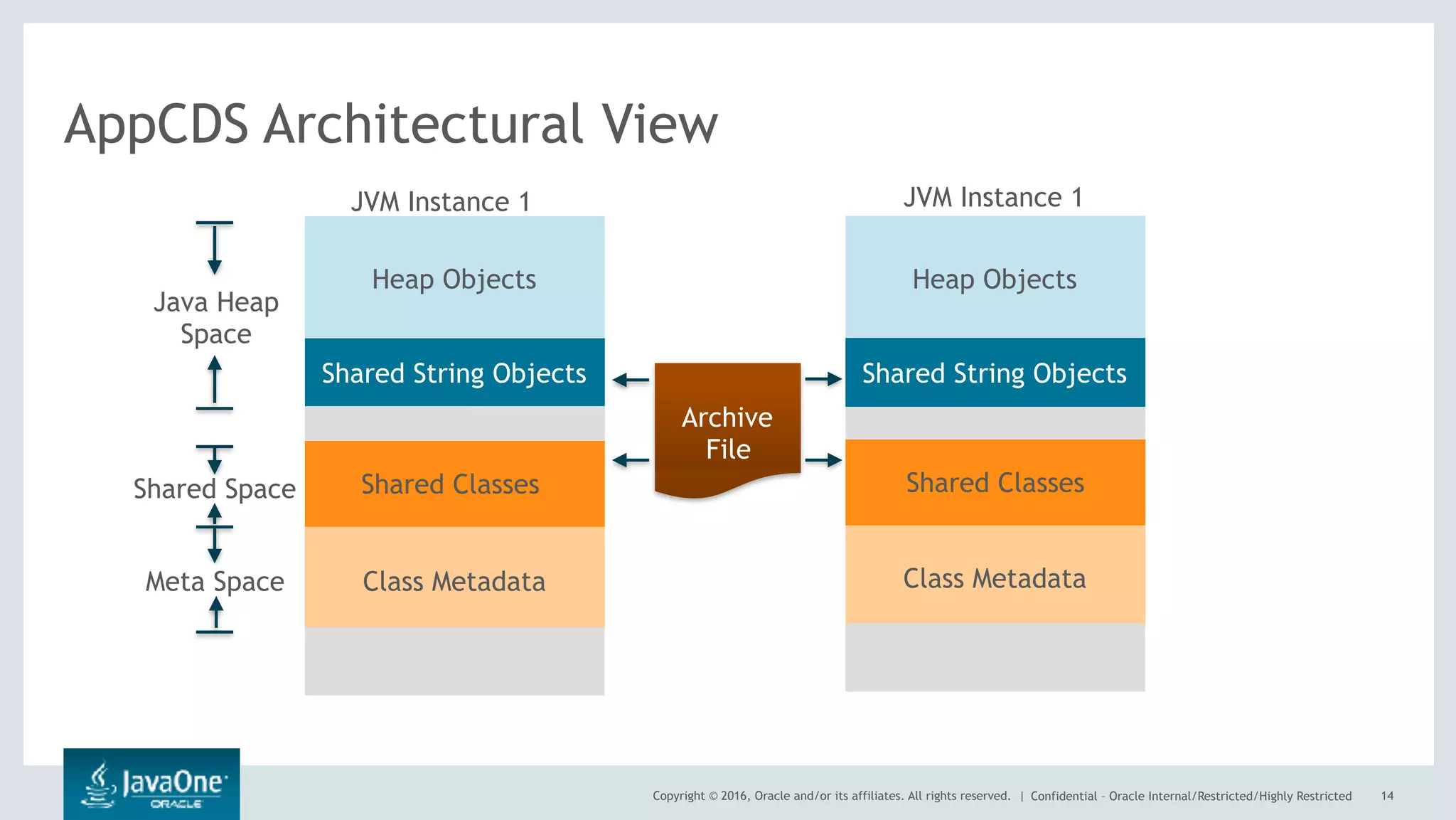
AppCDS Architectural View
14
JVM Instance 1 JVM Instance 1
Java Heap
Space
Shared Space
Meta Space
Heap Objects
Class Metadata
Shared String Objects
Class Metadata
Archive
File
Shared Classes
Heap Objects
Shared String Objects
Shared Classes
Copyright © 2016, Oracle and/or its affiliates. All rights reserved. | Confidential – Oracle Internal/Restricted/Highly Restricted
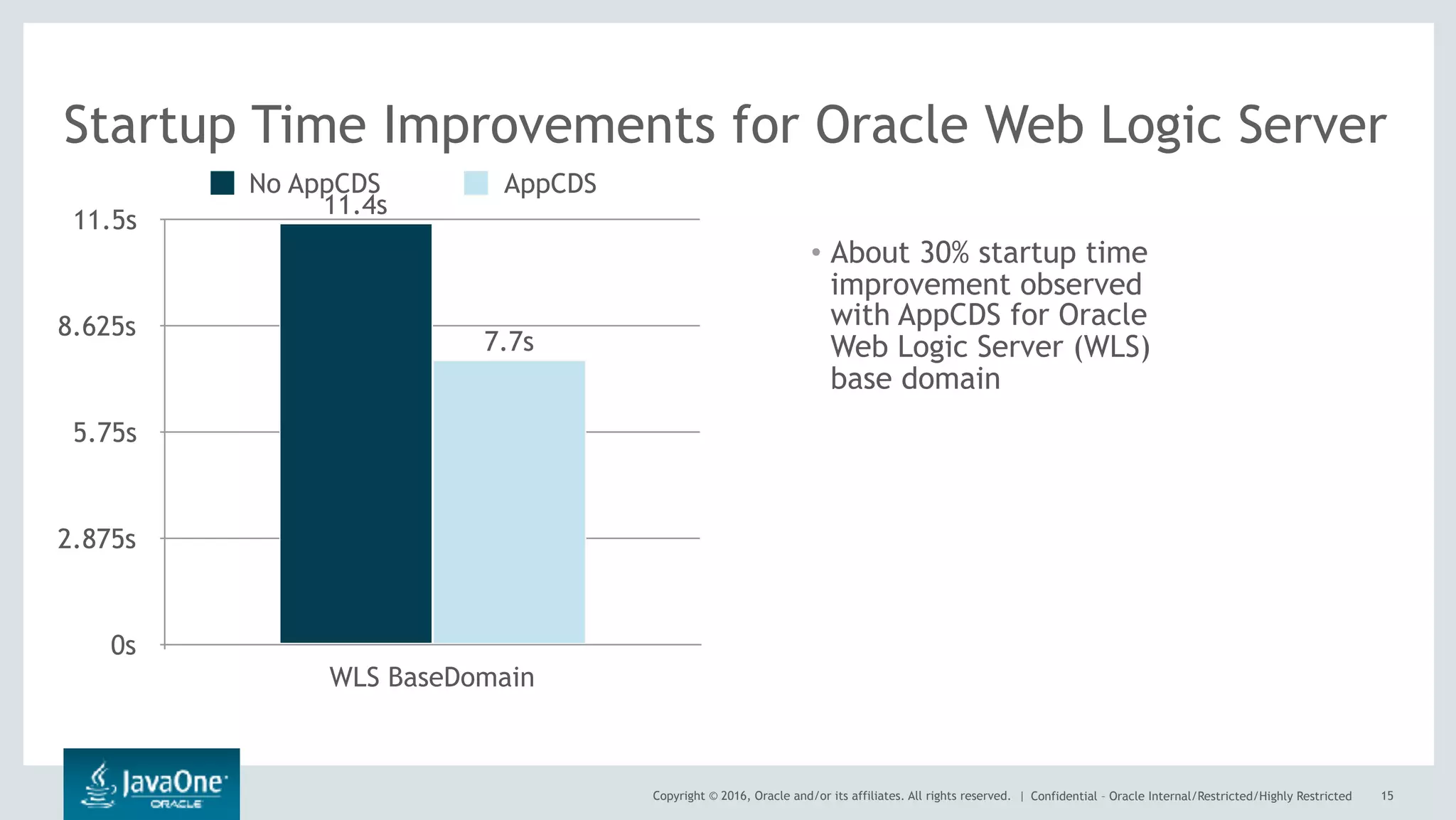
• About 30% startup time
improvement observed
with AppCDS for Oracle
Web Logic Server (WLS)
base domain
15
Startup Time Improvements for Oracle Web Logic Server
0s
2.875s
5.75s
8.625s
11.5s
WLS BaseDomain
7.7s
11.4s
No AppCDS AppCDS
Copyright © 2017, Oracle and/or its affiliates. All rights reserved. |
AppCDS inside Container - How to use
• Simple CDS use in Docker
DockerFile

FROM openjdk:10
ADD HelloWorld.java .
WORKDIR .
RUN javac HelloWorld.java
RUN ["java", "-Xshare:dump" ]
CMD ["java", "-showversion" , "-Xshare:on", "HelloWorld" ]
Copyright © 2017, Oracle and/or its affiliates. All rights reserved. |
Cont…
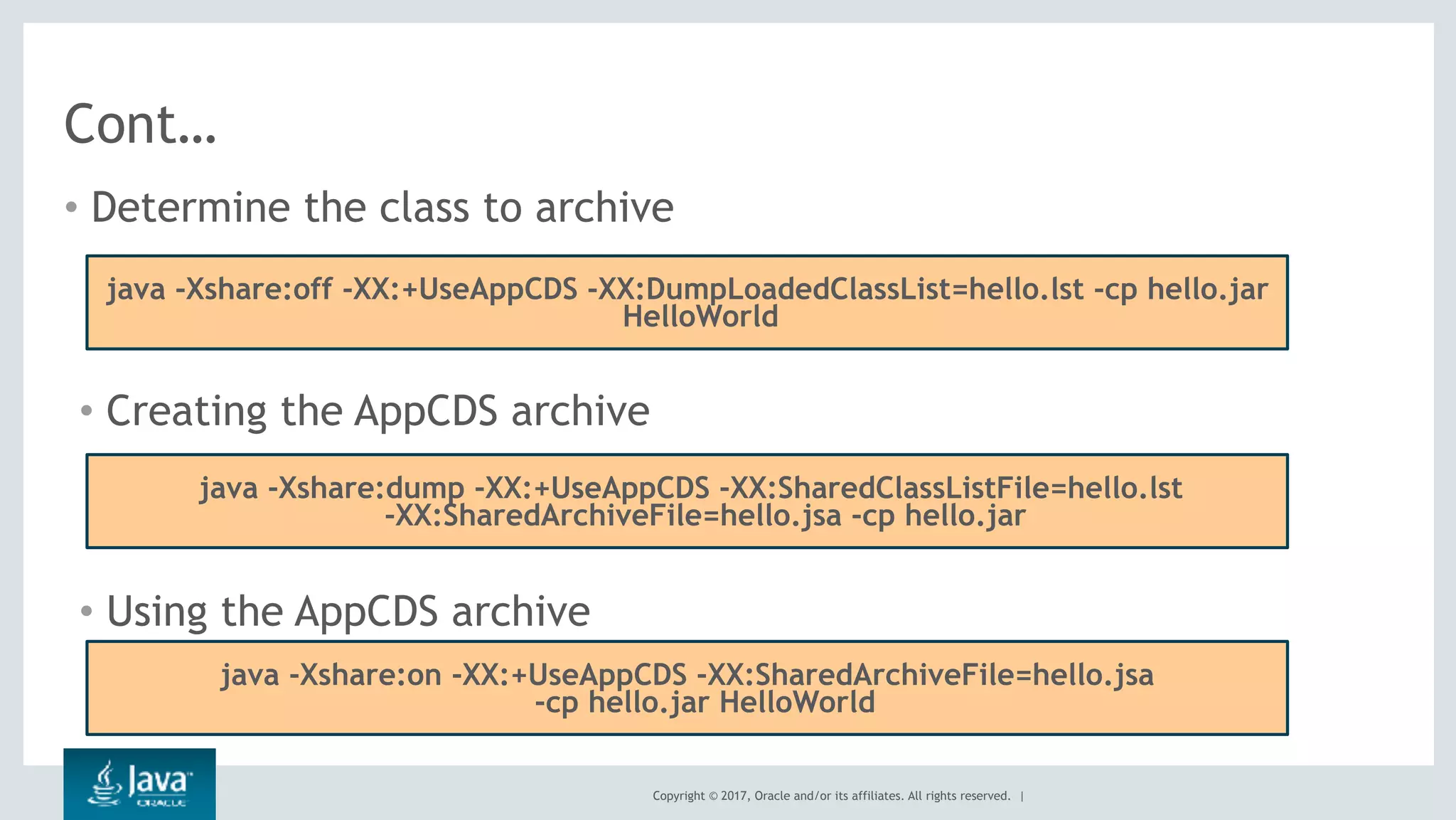
• Determine the class to archive
java -Xshare:off -XX:+UseAppCDS -XX:DumpLoadedClassList=hello.lst -cp hello.jar
HelloWorld
• Creating the AppCDS archive
java -Xshare:dump -XX:+UseAppCDS -XX:SharedClassListFile=hello.lst
-XX:SharedArchiveFile=hello.jsa -cp hello.jar
• Using the AppCDS archive
java -Xshare:on -XX:+UseAppCDS -XX:SharedArchiveFile=hello.jsa
-cp hello.jar HelloWorld
Copyright © 2017, Oracle and/or its affiliates. All rights reserved. |
Solution 2: Ahead of Time Compilation (AOT)
Copyright © 2018, Oracle and/or its affiliates. All rights reserved. | 19
At Compile Time At Runtime Time
Java Source [*.java]
Java Bytecode [*.class]
javac
Classloader
Verifier
Java
Interpreter
JIT
Compiler
(C1, C2)
Native Level (OS,
Hardware)
Most of the
code get
optimized
here
Shared Object [*.so]
jaotc
Copyright © 2018, Oracle and/or its affiliates. All rights reserved. |
• jaotc --output HelloWorld.so HelloWorld.class
• java -XX:AOTLibrary=./HelloWorld.so HelloWorld
20
-bash-4.1$ ./java -XX:+PrintAOT -XX:AOTLibrary=./HelloWorld.so
HelloWorld
15 1 loaded ./HelloWorld.so aot library
153 1 aot[ 1] HelloWorld.<init>()V
153 2 aot[ 1] HelloWorld.main([Ljava/lang/String;)V
Hello AOT
• jaotc --output base.so --module java.base
Copyright © 2018, Oracle and/or its affiliates. All rights reserved. |
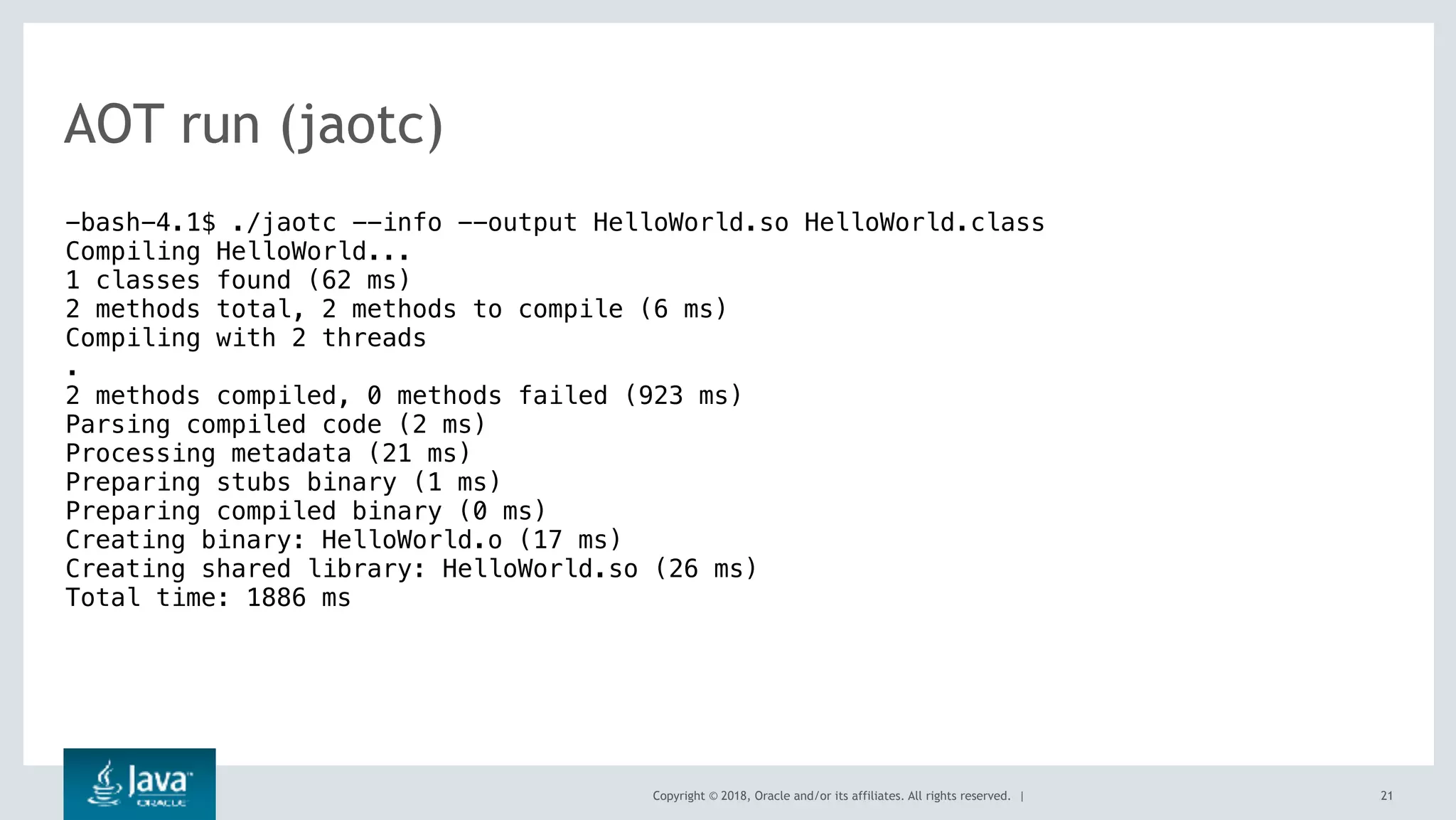
AOT run (jaotc)
21
-bash-4.1$ ./jaotc --info --output HelloWorld.so HelloWorld.class
Compiling HelloWorld...
1 classes found (62 ms)
2 methods total, 2 methods to compile (6 ms)
Compiling with 2 threads
.
2 methods compiled, 0 methods failed (923 ms)
Parsing compiled code (2 ms)
Processing metadata (21 ms)
Preparing stubs binary (1 ms)
Preparing compiled binary (0 ms)
Creating binary: HelloWorld.o (17 ms)
Creating shared library: HelloWorld.so (26 ms)
Total time: 1886 ms
Copyright © 2018, Oracle and/or its affiliates. All rights reserved. | 22
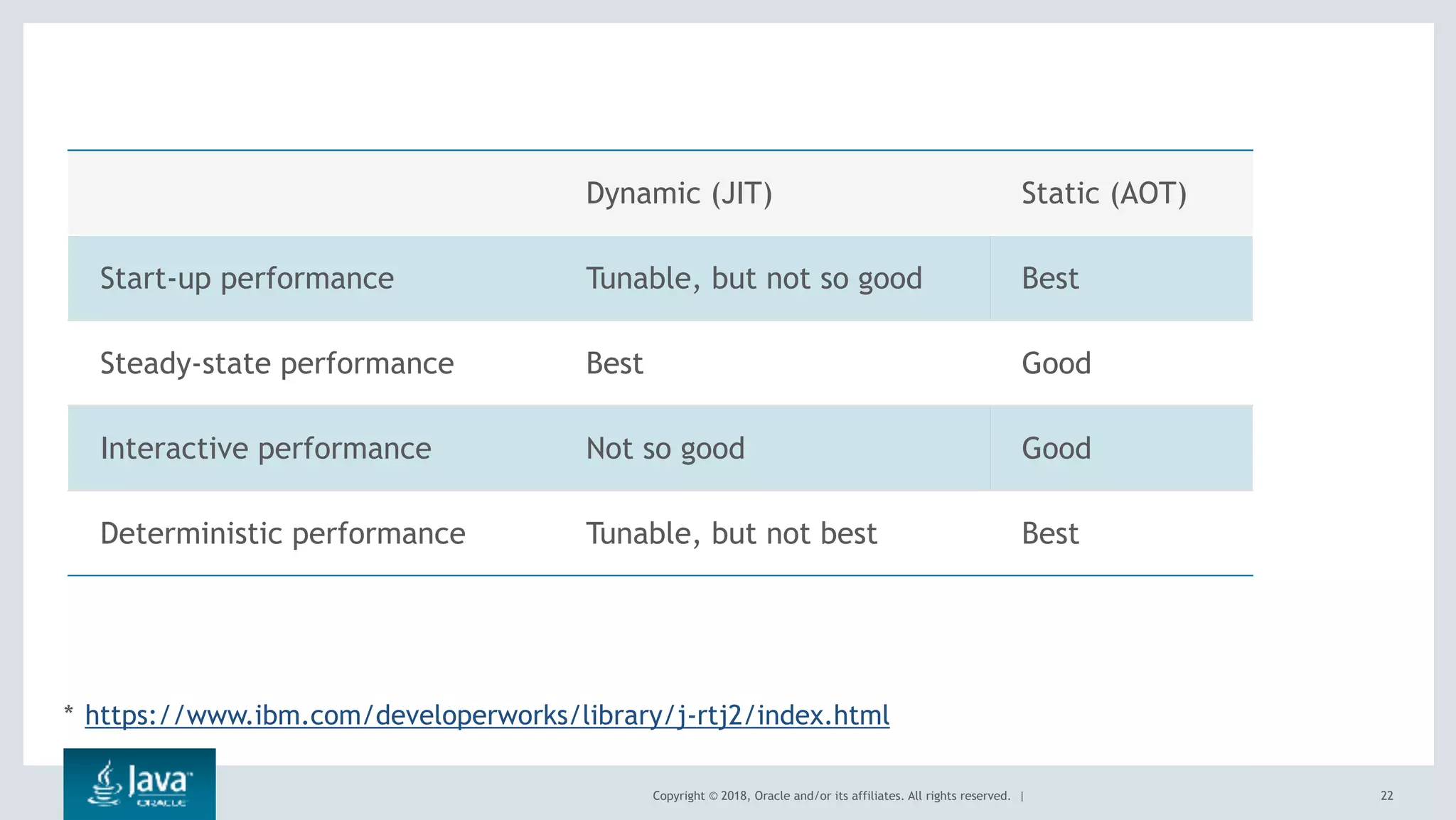
Dynamic (JIT) Static (AOT)
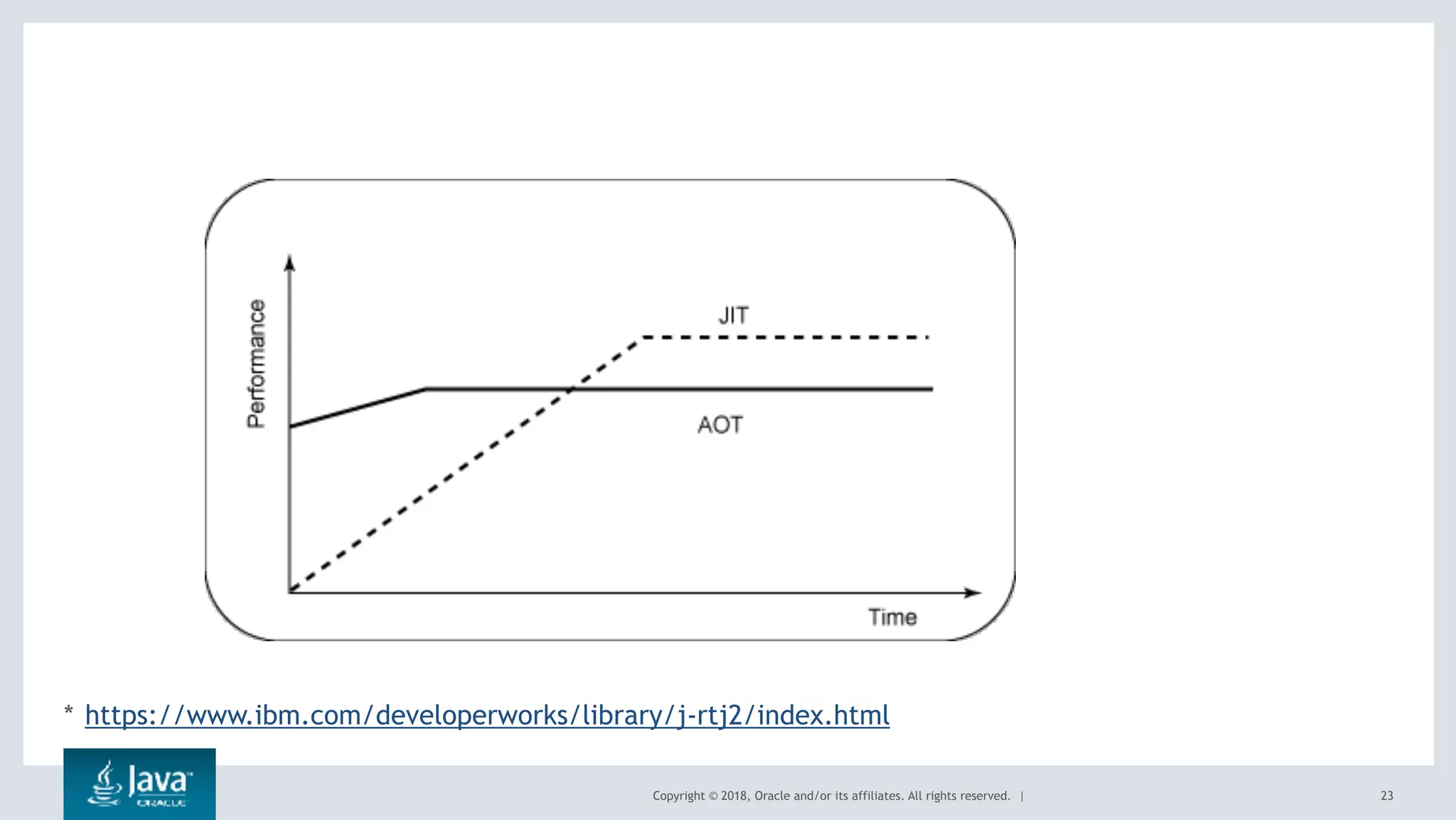
Start-up performance Tunable, but not so good Best
Steady-state performance Best Good
Interactive performance Not so good Good
Deterministic performance Tunable, but not best Best
* https://www.ibm.com/developerworks/library/j-rtj2/index.html
Copyright © 2018, Oracle and/or its affiliates. All rights reserved. | 23
* https://www.ibm.com/developerworks/library/j-rtj2/index.html
Copyright © 2017, Oracle and/or its affiliates. All rights reserved. |
Solution 3: Modularity
Copyright © 2017, Oracle and/or its affiliates. All rights reserved. |
DockerFile should look like
FROM openjdk:10 as small
ADD jdk-10.tar.gz /jdk
ENV PATH=$PATH:/jdk/jdk-10/bin
RUN [“jlink”, “—compress=2”, “—module-path”, “/jdk/jdk-10/jmods”,
“—add-modules”, “java.base”, “—output”, “/linked” ]
FROM openjdk:10
COPY —from=small /linked /jdk
ADD HelloWorld.class
CMD [“java”, “-showversion”, “HelloWorld”]
Copyright © 2017, Oracle and/or its affiliates. All rights reserved. |
Links
• For any query, you can drop me mail at vaibhav.x.choudhary@oracle.com
• Good links :-
• Bangalore JUG resource - http://bangalorejug.org/downloads/
• Container Aware Java - http://openjdk.java.net/jeps/8182070
• JDK-8146115 - https://bugs.openjdk.java.net/browse/JDK-8146115
• Better containerization by JDK10 : https://mjg123.github.io/
2018/01/10/Java-in-containers-jdk10.html
• VJUG Talk :- Java in Container world

Java is Container Ready - Vaibhav - Container Conference 2018

  • 2.
    Copyright © 2017,Oracle and/or its affiliates. All rights reserved. | Java for the containers Vaibhav Choudhary (@vaibhav_c) Java Platforms Team https://blogs.oracle.com/vaibhav
  • 3.
    Copyright © 2017,Oracle and/or its affiliates. All rights reserved. | Safe Harbor Statement The following is intended to outline our general product direction. It is intended for information purposes only, and may not be incorporated into any contract. It is not a commitment to deliver any material, code, or functionality, and should not be relied upon in making purchasing decisions. The development, release, and timing of any features or functionality described for Oracle’s products remains at the sole discretion of Oracle. 3
  • 4.
    Copyright © 2017,Oracle and/or its affiliates. All rights reserved. | Agenda of the day … A brief on Container Java - as first class citizen in Container Respect Container Boundary Leverage features inside container Final thoughts 1 2 3 4 4 5
  • 5.
    Copyright © 2017,Oracle and/or its affiliates. All rights reserved. | Respective the container Boundary
  • 6.
    Copyright © 2017,Oracle and/or its affiliates. All rights reserved. | Processor Boundary (--cpu-shares) 6 public class CoreCheck { public static void main(String[] args) {   System.out.println(Runtime.getRuntime().availableProcessors());  }} JDK8 : docker run --rm --cpu-shares 2048 -v /root/:/mnt/mydata -it ubuntu bash root@7599aae2613d:/mnt/mydata/jdk-8/bin# ./java CoreCheck 8 FROM openjdk:10 ADD CoreCheck.java . WORKDIR . RUN javac CoreCheck.java CMD ["java", "CoreCheck" ] docker build -t hello-world . docker run --cpu-shares 2048 java-helloworld 2
  • 7.
    Copyright © 2017,Oracle and/or its affiliates. All rights reserved. | Processor Boundary (--cpuset-cpus) 7 public class CoreCheck { public static void main(String[] args) {   System.out.println(Runtime.getRuntime().availableProcessors());  }} JDK8 : docker run --rm --cpuset-cpus 3,4,6 -v /root/:/mnt/mydata -it ubuntu bash root@7599aae2613d:/mnt/mydata/jdk-8/bin# ./java CoreCheck 8 (ideally it should say 3) FROM openjdk:10 ADD CoreCheck.java . WORKDIR . RUN javac CoreCheck.java CMD ["java", "CoreCheck" ] docker build -t hello-world . docker run --cpuset-cpus 3,4,6 java- helloworld 3 (Processor 3rd, 4th and 6th)
  • 8.
    Copyright © 2017,Oracle and/or its affiliates. All rights reserved. | Here are the results (Respecting Logs) 8 public class HelloWorld { public static void main(String[] args) {   System.out.println(Runtime.getRuntime().availableProcessors());  }} JDK10 : root@4795a54e037e:/mnt/mydata/jdk-10b38/bin# ./java -Xlog:os+container=trace HelloWorld [0.001s][trace][os,container] OSContainer::init: Initializing Container Support [0.001s][trace][os,container] Path to /memory.limit_in_bytes is /sys/fs/cgroup/memory/ memory.limit_in_bytes JDK9 : root@4795a54e037e:/mnt/mydata/jdk-9/bin# ./java -Xlog:os+container=trace HelloWorld [0.001s][error][logging] Invalid tag 'container' in what-expression. Invalid -Xlog option '-Xlog:os+container=trace'
  • 9.
    Copyright © 2017,Oracle and/or its affiliates. All rights reserved. | Here are the results (ActiveProcessorCount) 9 public class HelloWorld { public static void main(String[] args) {   System.out.println(Runtime.getRuntime().availableProcessors());  }} JDK10 : root@4795a54e037e:/mnt/mydata/jdk-10b38/bin# ./java - XX:ActiveProcessorCount=4 HelloWorld 4 JDK8 : root@4795a54e037e:/mnt/mydata/jdk1.8.0_152/bin# ./java - XX:ActiveProcessorCount=4 HelloWorld Unrecognized VM option 'ActiveProcessorCount=4' Error: Could not create the Java Virtual Machine. Error: A fatal exception has occurred. Program will exit.
  • 10.
    Copyright © 2017,Oracle and/or its affiliates. All rights reserved. | Cont.. (Respecting Memory Boundaries) 10 public class MemoryCheck { public static void main(String[] args) {   System.out.println(Runtime.getRuntime().maxMemory());  }} JDK8 : docker run --rm --memory 100m -v /root/:/mnt/mydata -it ubuntu bash root@7599aae2613d:/mnt/mydata/jdk-8/bin# ./java CoreCheck It will print 1/4 of the Physical Memory (It should understand docker memory limit) FROM openjdk:10 ADD MemoryCheck.java . WORKDIR . RUN javac MemoryCheck.java CMD ["java", "MemoryCheck" ] docker build -t hello-world . docker run --memory 100m java-helloworld Half of the docker limit (50m)
  • 11.
    Copyright © 2017,Oracle and/or its affiliates. All rights reserved. | Solution 1 : Application Class Data Sharing (AppCDS)
  • 12.
    Copyright © 2016,Oracle and/or its affiliates. All rights reserved. | Confidential – Oracle Internal/Restricted/Highly Restricted How Application Class Data Sharing (AppCDS) Help? • CDS only supports archiving classes on the bootstrap class path, which provides limited (or no) benefit for large applications in today’s cloud environment as majority of loaded classes are application classes. • AppCDS extends the archiving support beyond core library classes – Enables archiving classes loaded by all class loaders • PlatformClassLoader (the ExtensionClassLoader in JDK 8 and earlier versions) • AppClassLoader • User defined class loaders • AppCDS allows archiving and sharing read-only java heap objects with G1 GC • AppCDS provides further reduction in storage for archived class metadata 12
  • 13.
    Copyright © 2016,Oracle and/or its affiliates. All rights reserved. | Confidential – Oracle Internal/Restricted/Highly Restricted A Quick Look at CDS/AppCDS Evolution 13 JDK 1.5 JDK 8 JDK 9JDK8u40 CDS AppCDS v1 (experimental) AppCDS v2 (experimental) Cache classes from boot loader only Cache classes from built-in class loaders Boot, Extension and App class loaders Cache classes from built-in and user defined class loaders
  • 14.
    Copyright © 2016,Oracle and/or its affiliates. All rights reserved. | Confidential – Oracle Internal/Restricted/Highly Restricted AppCDS Architectural View 14 JVM Instance 1 JVM Instance 1 Java Heap Space Shared Space Meta Space Heap Objects Class Metadata Shared String Objects Class Metadata Archive File Shared Classes Heap Objects Shared String Objects Shared Classes
  • 15.
    Copyright © 2016,Oracle and/or its affiliates. All rights reserved. | Confidential – Oracle Internal/Restricted/Highly Restricted • About 30% startup time improvement observed with AppCDS for Oracle Web Logic Server (WLS) base domain 15 Startup Time Improvements for Oracle Web Logic Server 0s 2.875s 5.75s 8.625s 11.5s WLS BaseDomain 7.7s 11.4s No AppCDS AppCDS
  • 16.
    Copyright © 2017,Oracle and/or its affiliates. All rights reserved. | AppCDS inside Container - How to use • Simple CDS use in Docker DockerFile FROM openjdk:10 ADD HelloWorld.java . WORKDIR . RUN javac HelloWorld.java RUN ["java", "-Xshare:dump" ] CMD ["java", "-showversion" , "-Xshare:on", "HelloWorld" ]
  • 17.
    Copyright © 2017,Oracle and/or its affiliates. All rights reserved. | Cont… • Determine the class to archive java -Xshare:off -XX:+UseAppCDS -XX:DumpLoadedClassList=hello.lst -cp hello.jar HelloWorld • Creating the AppCDS archive java -Xshare:dump -XX:+UseAppCDS -XX:SharedClassListFile=hello.lst -XX:SharedArchiveFile=hello.jsa -cp hello.jar • Using the AppCDS archive java -Xshare:on -XX:+UseAppCDS -XX:SharedArchiveFile=hello.jsa -cp hello.jar HelloWorld
  • 18.
    Copyright © 2017,Oracle and/or its affiliates. All rights reserved. | Solution 2: Ahead of Time Compilation (AOT)
  • 19.
    Copyright © 2018,Oracle and/or its affiliates. All rights reserved. | 19 At Compile Time At Runtime Time Java Source [*.java] Java Bytecode [*.class] javac Classloader Verifier Java Interpreter JIT Compiler (C1, C2) Native Level (OS, Hardware) Most of the code get optimized here Shared Object [*.so] jaotc
  • 20.
    Copyright © 2018,Oracle and/or its affiliates. All rights reserved. | • jaotc --output HelloWorld.so HelloWorld.class • java -XX:AOTLibrary=./HelloWorld.so HelloWorld 20 -bash-4.1$ ./java -XX:+PrintAOT -XX:AOTLibrary=./HelloWorld.so HelloWorld 15 1 loaded ./HelloWorld.so aot library 153 1 aot[ 1] HelloWorld.<init>()V 153 2 aot[ 1] HelloWorld.main([Ljava/lang/String;)V Hello AOT • jaotc --output base.so --module java.base
  • 21.
    Copyright © 2018,Oracle and/or its affiliates. All rights reserved. | AOT run (jaotc) 21 -bash-4.1$ ./jaotc --info --output HelloWorld.so HelloWorld.class Compiling HelloWorld... 1 classes found (62 ms) 2 methods total, 2 methods to compile (6 ms) Compiling with 2 threads . 2 methods compiled, 0 methods failed (923 ms) Parsing compiled code (2 ms) Processing metadata (21 ms) Preparing stubs binary (1 ms) Preparing compiled binary (0 ms) Creating binary: HelloWorld.o (17 ms) Creating shared library: HelloWorld.so (26 ms) Total time: 1886 ms
  • 22.
    Copyright © 2018,Oracle and/or its affiliates. All rights reserved. | 22 Dynamic (JIT) Static (AOT) Start-up performance Tunable, but not so good Best Steady-state performance Best Good Interactive performance Not so good Good Deterministic performance Tunable, but not best Best * https://www.ibm.com/developerworks/library/j-rtj2/index.html
  • 23.
    Copyright © 2018,Oracle and/or its affiliates. All rights reserved. | 23 * https://www.ibm.com/developerworks/library/j-rtj2/index.html
  • 24.
    Copyright © 2017,Oracle and/or its affiliates. All rights reserved. | Solution 3: Modularity
  • 25.
    Copyright © 2017,Oracle and/or its affiliates. All rights reserved. | DockerFile should look like FROM openjdk:10 as small ADD jdk-10.tar.gz /jdk ENV PATH=$PATH:/jdk/jdk-10/bin RUN [“jlink”, “—compress=2”, “—module-path”, “/jdk/jdk-10/jmods”, “—add-modules”, “java.base”, “—output”, “/linked” ] FROM openjdk:10 COPY —from=small /linked /jdk ADD HelloWorld.class CMD [“java”, “-showversion”, “HelloWorld”]
  • 26.
    Copyright © 2017,Oracle and/or its affiliates. All rights reserved. | Links • For any query, you can drop me mail at vaibhav.x.choudhary@oracle.com • Good links :- • Bangalore JUG resource - http://bangalorejug.org/downloads/ • Container Aware Java - http://openjdk.java.net/jeps/8182070 • JDK-8146115 - https://bugs.openjdk.java.net/browse/JDK-8146115 • Better containerization by JDK10 : https://mjg123.github.io/ 2018/01/10/Java-in-containers-jdk10.html • VJUG Talk :- Java in Container world