v
Java in a World of Containers
Arun Gupta, Principal Technologist, AWS, @arungupta
Bob Vandette, Consulting Engineer, Oracle, @BobVandette
Safe Harbor Statement
The following is intended to outline our general product direction. It
is intended for information purposes only, and may not be
incorporated into any contract. It is not a commitment to deliver any
material, code, or functionality, and should not be relied upon in
making purchasing decisions. The development, release, and timing
of any features or functionality described for Oracle’s products
remains at the sole discretion of Oracle.
• Java in a World of Containers
• Creating Docker images
• Creating Custom JREs
• Java + Docker features
Agenda
3
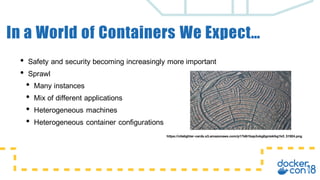
In a World of Containers We Expect…
• Safety and security becoming increasingly more important
• Sprawl
• Many instances
• Mix of different applications
• Heterogeneous machines
• Heterogeneous container configurations
https://citelighter-cards.s3.amazonaws.com/p17k6i1bqs3okg8gnisklkg1k0_51924.png
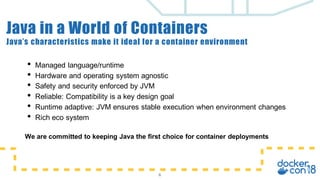
Java’s characteristics make it ideal for a container environment
5
Java in a World of Containers
• Managed language/runtime
• Hardware and operating system agnostic
• Safety and security enforced by JVM
• Reliable: Compatibility is a key design goal
• Runtime adaptive: JVM ensures stable execution when environment changes
• Rich eco system
Java’s characteristics make it ideal for a container environment
6
Java in a World of Containers
• Managed language/runtime
• Hardware and operating system agnostic
• Safety and security enforced by JVM
• Reliable: Compatibility is a key design goal
• Runtime adaptive: JVM ensures stable execution when environment changes
• Rich eco system
We are committed to keeping Java the first choice for container deployments
How Docker Works for Me
“During Java Platform
development, Docker
helps to increase our
teams productivity by
allowing quick access
to pre-canned images
that we can use to
quickly test new
features on a variety of
configurations.”
Bob Vandette
Oracle Java Products Group
“Help developers learn
good practices for
building containerized
applications. Authoring
books and online
courses. Bragging
rights for being a
#DockerCaptain. ”
Arun Gupta
AWS
v
Creating Docker Images
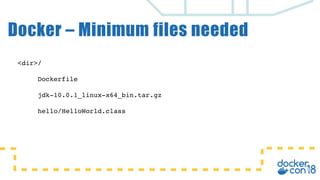
Docker – Minimum files needed
<dir>/
Dockerfile
jdk-10.0.1_linux-x64_bin.tar.gz
hello/HelloWorld.class
FROM oraclelinux:7-slim
ADD jdk-10.0.1_linux-x64_bin.tar.gz /opt/jdk
ENV PATH=$PATH:/opt/jdk/jdk-10.0.1/bin
COPY hello /hello
CMD [ "java", "-cp", ". ", "-showversion", "HelloWorld" ]
10
Dockerfile contents
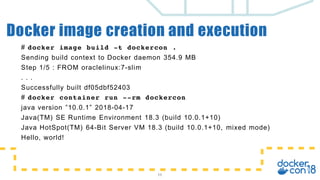
# docker image build -t dockercon .
Sending build context to Docker daemon 354.9 MB
Step 1/5 : FROM oraclelinux:7-slim
. . .
Successfully built df05dbf52403
# docker container run --rm dockercon
java version ”10.0.1” 2018-04-17
Java(TM) SE Runtime Environment 18.3 (build 10.0.1+10)
Java HotSpot(TM) 64-Bit Server VM 18.3 (build 10.0.1+10, mixed mode)
Hello, world!
11
Docker image creation and execution
v
Creating Custom Java Runtimes
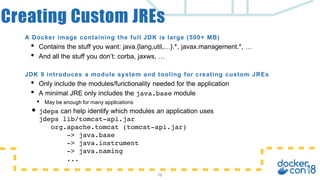
A Docker image containing the full JDK is large (500+ MB)
• Contains the stuff you want: java.{lang,util,…}.*, javax.management.*, …
• And all the stuff you don’t: corba, jaxws, …
JDK 9 introduces a module system and tooling for creating custom JREs
• Only include the modules/functionality needed for the application
• A minimal JRE only includes the java.base module
• May be enough for many applications
• jdeps can help identify which modules an application uses
jdeps lib/tomcat-api.jar
org.apache.tomcat (tomcat-api.jar)
-> java.base
-> java.instrument
-> java.naming
...
13
Creating Custom JREs
Creating a custom JRE is straightforward
jlink <options>
--module-path <modulepath>
--add-modules <module>[,<module>...]
Example: Creating a java.base (only) JRE
$JAVA_HOME/bin/jlink
--output hello-jre
--module-path $JAVA_HOME/jmods
–-add-modules java.base
hello-jre/bin/java –m helloworld HelloWorld
Note: The application does not have to be module aware!
14
Creating a Custom JRE
Custom JRE
my.module
java.management
java.base
Creation of custom JRE Docker image can be automated using Multi-Stage
Dockerfiles
# Multi-Stage example using jlink to produce small Java runtime
FROM openjdk:10-jdk AS java-build
WORKDIR /jlink/outputdir
RUN jlink --module-path /docker-java-home/jmods --strip-debug --
compress=2 --output java --add-modules java.base
FROM oraclelinux:latest
WORKDIR /root/
COPY --from=java-build /jlink/outputdir .
ENV PATH /root/java/bin:$PATH
CMD ["bash”]
15
Multi-Stage Dockerfile
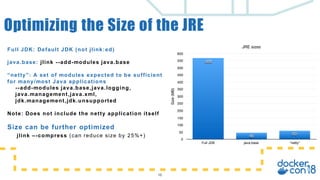
Full JDK: Default JDK (not jlink:ed)
java.base: jlink --add-modules java.base
“netty”: A set of modules expected to be sufficient
for many/most Java applications
--add-modules java.base,java.logging,
java.management,java.xml,
jdk.management,jdk.unsupported
Note: Does not include the netty application itself
Size can be further optimized
jlink –-compress (can reduce size by 25%+)
16
Optimizing the Size of the JRE
JRE sizes
Size(MB)
0
50
100
150
200
250
300
350
400
450
500
550
600
Full JDK java.base “netty”
60
46
568
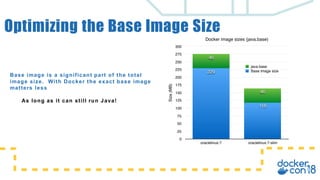
Base image is a significant part of the total
image size. With Docker the exact base image
matters less
As long as it can still run Java!
Optimizing the Base Image Size
Docker image sizes (java.base)
Size(MB)
0
25
50
75
100
125
150
175
200
225
250
275
300
oraclelinux:7 oraclelinux:7-slim
46
46
118
229 Base image size
java.base
Small. Simple. Secure.
Alpine Linux is a security-
oriented, lightweight Linux
distribution based on musl
libc and busybox.
-
https://www.alpinelinux.org
musl is lightweight, fast, simple, free, and
strives to be correct in the sense of
standards-conformance and safety.
- https://www.musl-libc.org
Alpine Linux & musl libc
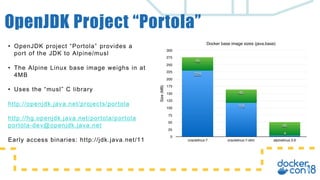
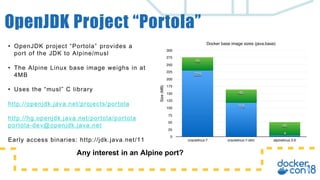
• OpenJDK project “Portola” provides a
port of the JDK to Alpine/musl
• The Alpine Linux base image weighs in at
4MB
• Uses the “musl” C library
http://openjdk.java.net/projects/portola
http://hg.openjdk.java.net/portola/portola
portola-dev@openjdk.java.net
Early access binaries: http://jdk.java.net/11
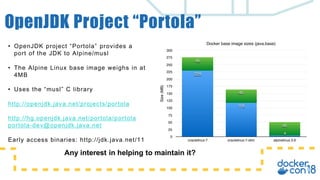
OpenJDK Project “Portola”
Docker base image sizes (java.base)
Size(MB)
0
25
50
75
100
125
150
175
200
225
250
275
300
oraclelinux:7 oraclelinux:7-slim alpinelinux:3.6
46
46
46
4
118
229
• OpenJDK project “Portola” provides a
port of the JDK to Alpine/musl
• The Alpine Linux base image weighs in at
4MB
• Uses the “musl” C library
http://openjdk.java.net/projects/portola
http://hg.openjdk.java.net/portola/portola
portola-dev@openjdk.java.net
Early access binaries: http://jdk.java.net/11
OpenJDK Project “Portola”
Docker base image sizes (java.base)
Size(MB)
0
25
50
75
100
125
150
175
200
225
250
275
300
oraclelinux:7 oraclelinux:7-slim alpinelinux:3.6
46
46
46
4
118
229
Any interest in an Alpine port?
• OpenJDK project “Portola” provides a
port of the JDK to Alpine/musl
• The Alpine Linux base image weighs in at
4MB
• Uses the “musl” C library
http://openjdk.java.net/projects/portola
http://hg.openjdk.java.net/portola/portola
portola-dev@openjdk.java.net
Early access binaries: http://jdk.java.net/11
OpenJDK Project “Portola”
Docker base image sizes (java.base)
Size(MB)
0
25
50
75
100
125
150
175
200
225
250
275
300
oraclelinux:7 oraclelinux:7-slim alpinelinux:3.6
46
46
46
4
118
229
Any interest in helping to maintain it?
v
Java and Docker Features
• Micro-services and Docker encourages running many
processes on the same machine
• Chances are many instances will be running the
exact same application
• OS shared libraries allows for sharing native data
• libc, libjvm.so all get shared automatically by the OS
& Docker (Assuming same layer/file/inode)
• What about Java class data?
23
Sharing Across Container Instances
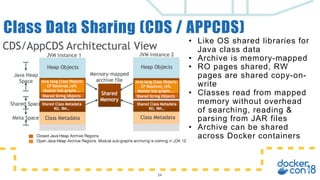
• Like OS shared libraries for
Java class data
• Archive is memory-mapped
• RO pages shared, RW
pages are shared copy-on-
write
• Classes read from mapped
memory without overhead
of searching, reading &
parsing from JAR files
• Archive can be shared
across Docker containers
24
Class Data Sharing (CDS / APPCDS)
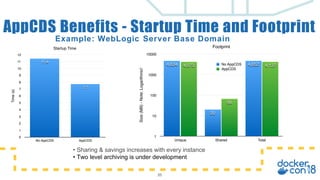
Example: WebLogic Server Base Domain
25
AppCDS Benefits - Startup Time and Footprint
• Sharing & savings increases with every instance
• Two level archiving is under development
Footprint
Size(MB)-Note:Logarithmic!
1
10
100
1000
10000
Unique Shared Total
4,137
66
4,073 4,652
20
4,634 No AppCDS
AppCDS
Startup Time
Time(s)
0
1
2
3
4
5
6
7
8
9
10
11
12
No AppCDS AppCDS
7.7
11.4
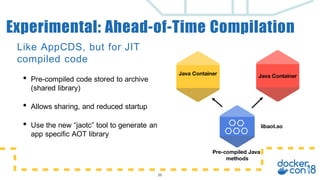
Like AppCDS, but for JIT
compiled code
• Pre-compiled code stored to archive
(shared library)
• Allows sharing, and reduced startup
• Use the new “jaotc” tool to generate an
app specific AOT library
26
Experimental: Ahead-of-Time Compilation
libaot.so
Java ContainerJava Container
Pre-compiled Java
methods
The JVM has plenty of ergonomics which are based on the underlying system
• Memory, #cpus, exact CPU model, etc.
• For example, heap size is based on available memory
Docker allows for specifying resource limits
• Implemented through cgroups
• Not transparent - requires cooperative application support
• Explicit support needed for JVM
27
Honoring Docker/cgroups Resource Limits
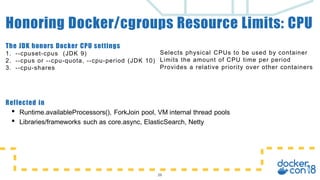
Reflected in
• Runtime.availableProcessors(), ForkJoin pool, VM internal thread pools
• Libraries/frameworks such as core.async, ElasticSearch, Netty
28
Honoring Docker/cgroups Resource Limits: CPU
The JDK honors Docker CPU settings
1. --cpuset-cpus (JDK 9)
2. --cpus or --cpu-quota, --cpu-period (JDK 10)
3. --cpu-shares
Selects physical CPUs to be used by container
Limits the amount of CPU time per period
Provides a relative priority over other containers
29
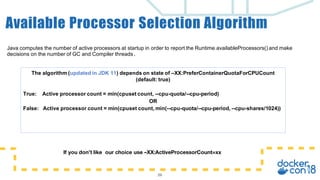
Available Processor Selection Algorithm
Java computes the number of active processors at startup in order to report the Runtime.availableProcessors() and make
decisions on the number of GC and Compiler threads.
If you don’t like our choice use –XX:ActiveProcessorCount=xx
The algorithm (updated in JDK 11) depends on state of –XX:PreferContainerQuotaForCPUCount
(default: true)
True: Active processor count = min(cpuset count, --cpu-quota/--cpu-period)
OR
False: Active processor count = min(cpuset count, min(--cpu-quota/--cpu-period, --cpu-shares/1024))
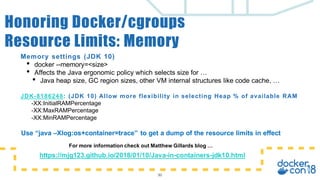
Memory settings (JDK 10)
• docker --memory=<size>
• Affects the Java ergonomic policy which selects size for …
• Java heap size, GC region sizes, other VM internal structures like code cache, …
JDK-8186248: (JDK 10) Allow more flexibility in selecting Heap % of available RAM
-XX:InitialRAMPercentage
-XX:MaxRAMPercentage
-XX:MinRAMPercentage
30
Honoring Docker/cgroups
Resource Limits: Memory
https://mjg123.github.io/2018/01/10/Java-in-containers-jdk10.html
For more information check out Matthew Gillards blog …
Use “java –Xlog:os+container=trace” to get a dump of the resource limits in effect
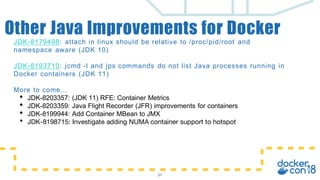
JDK-8179498: attach in linux should be relative to /proc/pid/root and
namespace aware (JDK 10)
JDK-8193710: jcmd -l and jps commands do not list Java processes running in
Docker containers (JDK 11)
More to come…
• JDK-8203357: (JDK 11) RFE: Container Metrics
• JDK-8203359: Java Flight Recorder (JFR) improvements for containers
• JDK-8199944: Add Container MBean to JMX
• JDK-8198715: Investigate adding NUMA container support to hotspot
31
Other Java Improvements for Docker
v
QUESTIONS?

Java in a world of containers

  • 1.
    v Java in aWorld of Containers Arun Gupta, Principal Technologist, AWS, @arungupta Bob Vandette, Consulting Engineer, Oracle, @BobVandette
  • 2.
    Safe Harbor Statement Thefollowing is intended to outline our general product direction. It is intended for information purposes only, and may not be incorporated into any contract. It is not a commitment to deliver any material, code, or functionality, and should not be relied upon in making purchasing decisions. The development, release, and timing of any features or functionality described for Oracle’s products remains at the sole discretion of Oracle.
  • 3.
    • Java ina World of Containers • Creating Docker images • Creating Custom JREs • Java + Docker features Agenda 3
  • 4.
    In a Worldof Containers We Expect… • Safety and security becoming increasingly more important • Sprawl • Many instances • Mix of different applications • Heterogeneous machines • Heterogeneous container configurations https://citelighter-cards.s3.amazonaws.com/p17k6i1bqs3okg8gnisklkg1k0_51924.png
  • 5.
    Java’s characteristics makeit ideal for a container environment 5 Java in a World of Containers • Managed language/runtime • Hardware and operating system agnostic • Safety and security enforced by JVM • Reliable: Compatibility is a key design goal • Runtime adaptive: JVM ensures stable execution when environment changes • Rich eco system
  • 6.
    Java’s characteristics makeit ideal for a container environment 6 Java in a World of Containers • Managed language/runtime • Hardware and operating system agnostic • Safety and security enforced by JVM • Reliable: Compatibility is a key design goal • Runtime adaptive: JVM ensures stable execution when environment changes • Rich eco system We are committed to keeping Java the first choice for container deployments
  • 7.
    How Docker Worksfor Me “During Java Platform development, Docker helps to increase our teams productivity by allowing quick access to pre-canned images that we can use to quickly test new features on a variety of configurations.” Bob Vandette Oracle Java Products Group “Help developers learn good practices for building containerized applications. Authoring books and online courses. Bragging rights for being a #DockerCaptain. ” Arun Gupta AWS
  • 8.
  • 9.
    Docker – Minimumfiles needed <dir>/ Dockerfile jdk-10.0.1_linux-x64_bin.tar.gz hello/HelloWorld.class
  • 10.
    FROM oraclelinux:7-slim ADD jdk-10.0.1_linux-x64_bin.tar.gz/opt/jdk ENV PATH=$PATH:/opt/jdk/jdk-10.0.1/bin COPY hello /hello CMD [ "java", "-cp", ". ", "-showversion", "HelloWorld" ] 10 Dockerfile contents
  • 11.
    # docker imagebuild -t dockercon . Sending build context to Docker daemon 354.9 MB Step 1/5 : FROM oraclelinux:7-slim . . . Successfully built df05dbf52403 # docker container run --rm dockercon java version ”10.0.1” 2018-04-17 Java(TM) SE Runtime Environment 18.3 (build 10.0.1+10) Java HotSpot(TM) 64-Bit Server VM 18.3 (build 10.0.1+10, mixed mode) Hello, world! 11 Docker image creation and execution
  • 12.
  • 13.
    A Docker imagecontaining the full JDK is large (500+ MB) • Contains the stuff you want: java.{lang,util,…}.*, javax.management.*, … • And all the stuff you don’t: corba, jaxws, … JDK 9 introduces a module system and tooling for creating custom JREs • Only include the modules/functionality needed for the application • A minimal JRE only includes the java.base module • May be enough for many applications • jdeps can help identify which modules an application uses jdeps lib/tomcat-api.jar org.apache.tomcat (tomcat-api.jar) -> java.base -> java.instrument -> java.naming ... 13 Creating Custom JREs
  • 14.
    Creating a customJRE is straightforward jlink <options> --module-path <modulepath> --add-modules <module>[,<module>...] Example: Creating a java.base (only) JRE $JAVA_HOME/bin/jlink --output hello-jre --module-path $JAVA_HOME/jmods –-add-modules java.base hello-jre/bin/java –m helloworld HelloWorld Note: The application does not have to be module aware! 14 Creating a Custom JRE Custom JRE my.module java.management java.base
  • 15.
    Creation of customJRE Docker image can be automated using Multi-Stage Dockerfiles # Multi-Stage example using jlink to produce small Java runtime FROM openjdk:10-jdk AS java-build WORKDIR /jlink/outputdir RUN jlink --module-path /docker-java-home/jmods --strip-debug -- compress=2 --output java --add-modules java.base FROM oraclelinux:latest WORKDIR /root/ COPY --from=java-build /jlink/outputdir . ENV PATH /root/java/bin:$PATH CMD ["bash”] 15 Multi-Stage Dockerfile
  • 16.
    Full JDK: DefaultJDK (not jlink:ed) java.base: jlink --add-modules java.base “netty”: A set of modules expected to be sufficient for many/most Java applications --add-modules java.base,java.logging, java.management,java.xml, jdk.management,jdk.unsupported Note: Does not include the netty application itself Size can be further optimized jlink –-compress (can reduce size by 25%+) 16 Optimizing the Size of the JRE JRE sizes Size(MB) 0 50 100 150 200 250 300 350 400 450 500 550 600 Full JDK java.base “netty” 60 46 568
  • 17.
    Base image isa significant part of the total image size. With Docker the exact base image matters less As long as it can still run Java! Optimizing the Base Image Size Docker image sizes (java.base) Size(MB) 0 25 50 75 100 125 150 175 200 225 250 275 300 oraclelinux:7 oraclelinux:7-slim 46 46 118 229 Base image size java.base
  • 18.
    Small. Simple. Secure. AlpineLinux is a security- oriented, lightweight Linux distribution based on musl libc and busybox. - https://www.alpinelinux.org musl is lightweight, fast, simple, free, and strives to be correct in the sense of standards-conformance and safety. - https://www.musl-libc.org Alpine Linux & musl libc
  • 19.
    • OpenJDK project“Portola” provides a port of the JDK to Alpine/musl • The Alpine Linux base image weighs in at 4MB • Uses the “musl” C library http://openjdk.java.net/projects/portola http://hg.openjdk.java.net/portola/portola portola-dev@openjdk.java.net Early access binaries: http://jdk.java.net/11 OpenJDK Project “Portola” Docker base image sizes (java.base) Size(MB) 0 25 50 75 100 125 150 175 200 225 250 275 300 oraclelinux:7 oraclelinux:7-slim alpinelinux:3.6 46 46 46 4 118 229
  • 20.
    • OpenJDK project“Portola” provides a port of the JDK to Alpine/musl • The Alpine Linux base image weighs in at 4MB • Uses the “musl” C library http://openjdk.java.net/projects/portola http://hg.openjdk.java.net/portola/portola portola-dev@openjdk.java.net Early access binaries: http://jdk.java.net/11 OpenJDK Project “Portola” Docker base image sizes (java.base) Size(MB) 0 25 50 75 100 125 150 175 200 225 250 275 300 oraclelinux:7 oraclelinux:7-slim alpinelinux:3.6 46 46 46 4 118 229 Any interest in an Alpine port?
  • 21.
    • OpenJDK project“Portola” provides a port of the JDK to Alpine/musl • The Alpine Linux base image weighs in at 4MB • Uses the “musl” C library http://openjdk.java.net/projects/portola http://hg.openjdk.java.net/portola/portola portola-dev@openjdk.java.net Early access binaries: http://jdk.java.net/11 OpenJDK Project “Portola” Docker base image sizes (java.base) Size(MB) 0 25 50 75 100 125 150 175 200 225 250 275 300 oraclelinux:7 oraclelinux:7-slim alpinelinux:3.6 46 46 46 4 118 229 Any interest in helping to maintain it?
  • 22.
  • 23.
    • Micro-services andDocker encourages running many processes on the same machine • Chances are many instances will be running the exact same application • OS shared libraries allows for sharing native data • libc, libjvm.so all get shared automatically by the OS & Docker (Assuming same layer/file/inode) • What about Java class data? 23 Sharing Across Container Instances
  • 24.
    • Like OSshared libraries for Java class data • Archive is memory-mapped • RO pages shared, RW pages are shared copy-on- write • Classes read from mapped memory without overhead of searching, reading & parsing from JAR files • Archive can be shared across Docker containers 24 Class Data Sharing (CDS / APPCDS)
  • 25.
    Example: WebLogic ServerBase Domain 25 AppCDS Benefits - Startup Time and Footprint • Sharing & savings increases with every instance • Two level archiving is under development Footprint Size(MB)-Note:Logarithmic! 1 10 100 1000 10000 Unique Shared Total 4,137 66 4,073 4,652 20 4,634 No AppCDS AppCDS Startup Time Time(s) 0 1 2 3 4 5 6 7 8 9 10 11 12 No AppCDS AppCDS 7.7 11.4
  • 26.
    Like AppCDS, butfor JIT compiled code • Pre-compiled code stored to archive (shared library) • Allows sharing, and reduced startup • Use the new “jaotc” tool to generate an app specific AOT library 26 Experimental: Ahead-of-Time Compilation libaot.so Java ContainerJava Container Pre-compiled Java methods
  • 27.
    The JVM hasplenty of ergonomics which are based on the underlying system • Memory, #cpus, exact CPU model, etc. • For example, heap size is based on available memory Docker allows for specifying resource limits • Implemented through cgroups • Not transparent - requires cooperative application support • Explicit support needed for JVM 27 Honoring Docker/cgroups Resource Limits
  • 28.
    Reflected in • Runtime.availableProcessors(),ForkJoin pool, VM internal thread pools • Libraries/frameworks such as core.async, ElasticSearch, Netty 28 Honoring Docker/cgroups Resource Limits: CPU The JDK honors Docker CPU settings 1. --cpuset-cpus (JDK 9) 2. --cpus or --cpu-quota, --cpu-period (JDK 10) 3. --cpu-shares Selects physical CPUs to be used by container Limits the amount of CPU time per period Provides a relative priority over other containers
  • 29.
    29 Available Processor SelectionAlgorithm Java computes the number of active processors at startup in order to report the Runtime.availableProcessors() and make decisions on the number of GC and Compiler threads. If you don’t like our choice use –XX:ActiveProcessorCount=xx The algorithm (updated in JDK 11) depends on state of –XX:PreferContainerQuotaForCPUCount (default: true) True: Active processor count = min(cpuset count, --cpu-quota/--cpu-period) OR False: Active processor count = min(cpuset count, min(--cpu-quota/--cpu-period, --cpu-shares/1024))
  • 30.
    Memory settings (JDK10) • docker --memory=<size> • Affects the Java ergonomic policy which selects size for … • Java heap size, GC region sizes, other VM internal structures like code cache, … JDK-8186248: (JDK 10) Allow more flexibility in selecting Heap % of available RAM -XX:InitialRAMPercentage -XX:MaxRAMPercentage -XX:MinRAMPercentage 30 Honoring Docker/cgroups Resource Limits: Memory https://mjg123.github.io/2018/01/10/Java-in-containers-jdk10.html For more information check out Matthew Gillards blog … Use “java –Xlog:os+container=trace” to get a dump of the resource limits in effect
  • 31.
    JDK-8179498: attach inlinux should be relative to /proc/pid/root and namespace aware (JDK 10) JDK-8193710: jcmd -l and jps commands do not list Java processes running in Docker containers (JDK 11) More to come… • JDK-8203357: (JDK 11) RFE: Container Metrics • JDK-8203359: Java Flight Recorder (JFR) improvements for containers • JDK-8199944: Add Container MBean to JMX • JDK-8198715: Investigate adding NUMA container support to hotspot 31 Other Java Improvements for Docker
  • 32.