YAML Tips & Tricks for K8s
Neependra Khare, CloudYuga
@neependra
About Me - Neependra Khare
●
●
●
●
●
●
Agenda
● YAML Basics
● K8s & YAML
● K8s API Reference
● YAML Tips for K8s
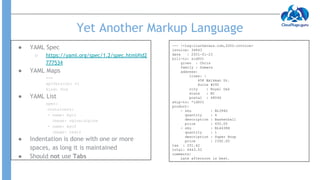
Yet Another Markup Language
● YAML Spec
○ https://yaml.org/spec/1.2/spec.html#id2
777534
● YAML Maps
---
apiVersion: v1
kind: Pod
● YAML List
spec:
containers:
- name: myc1
image: nginx:alpine
- name: myc2
image: redis
● Indentation is done with one or more
spaces, as long it is maintained
● Should not use Tabs
--- !<tag:clarkevans.com,2002:invoice>
invoice: 34843
date : 2001-01-23
bill-to: &id001
given : Chris
family : Dumars
address:
lines: |
458 Walkman Dr.
Suite #292
city : Royal Oak
state : MI
postal : 48046
ship-to: *id001
product:
- sku : BL394D
quantity : 4
description : Basketball
price : 450.00
- sku : BL4438H
quantity : 1
description : Super Hoop
price : 2392.00
tax : 251.42
total: 4443.52
comments:
Late afternoon is best.
Some Issues With YAML
● Define the YAML
country_codes:
united_states: us
ireland: ie
norway: no
● Load the YAML in Ruby
require 'yaml'
doc = <<-ENDYAML
country_codes:
united_states: us
ireland: ie
norway: no
ENDYAML
puts YAML.load(doc)
● Output
{"country_codes"=>{"united_states"=>"us",
"ireland"=>"ie", "norway"=>false}}
YAML Reference
● Define
name: &speaker Neependra
presentation:
name: AKD
speaker: *speaker
● Reference Later
name: "Neependra"
presentation:
name: "AKD"
speaker: "Neependra"
● What would happen with this?
a: &a ["a", "a", "a"]
b: &b [*a,*a,*a]
c: &c [*b, *b, *b]
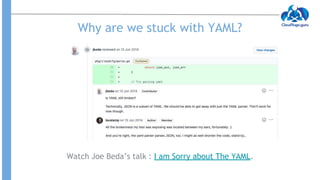
Why are we stuck with YAML?
Watch Joe Beda’s talk : I am Sorry about The YAML.
Why YAML over JSON ?
● YAML is superset of JSON
● More readable
● Takes less space
● Allows comments
apiVersion: v1
kind: Pod
metadata:
name: mypod #name of the Pod
labels:
app: nginx
spec:
containers:
- name: nginx-demo
image: nginx:alpine
ports:
- containerPort: 80
{
"apiVersion": "v1",
"kind": "Pod",
"metadata": {
"name": "mypod",
"labels": {
"app": "nginx"
}
},
"spec": {
"containers": [
{
"name": "nginx-demo",
"image": "nginx:alpine",
"ports": [
{
"containerPort": 80
}
]
}
]
}
}
Configuration in YAML Configuration in JSON
K8s API Reference
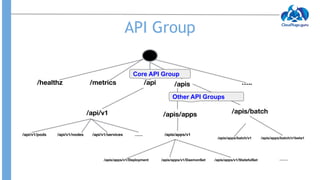
API Group
Core API Group
Other API Groups
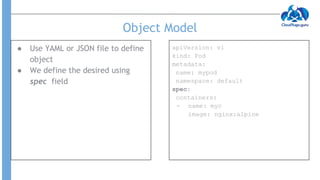
Object Model
● Use YAML or JSON file to define
object
● We define the desired using
spec field
apiVersion: v1
kind: Pod
metadata:
name: mypod
namespace: default
spec:
containers:
- name: myc
image: nginx:alpine
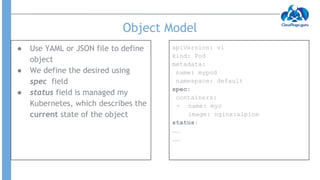
Object Model
● Use YAML or JSON file to define
object
● We define the desired using
spec field
● status field is managed my
Kubernetes, which describes the
current state of the object
apiVersion: v1
kind: Pod
metadata:
name: mypod
namespace: default
spec:
containers:
- name: myc
image: nginx:alpine
status:
……
……
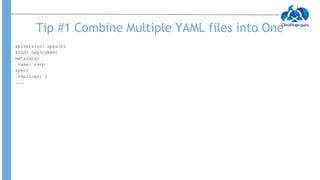
Tip #1 Combine Multiple YAML files into One
apiVersion: apps/v1
kind: Deployment
metadata:
name: rsvp
spec:
replicas: 1
...
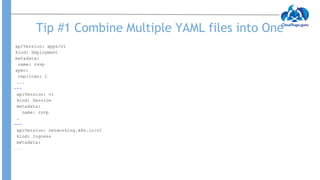
Tip #1 Combine Multiple YAML files into One
apiVersion: apps/v1
kind: Deployment
metadata:
name: rsvp
spec:
replicas: 1
...
---
apiVersion: v1
kind: Service
metadata:
name: rsvp
…
---
apiVersion: networking.k8s.io/v1
kind: Ingress
metadata:
…..
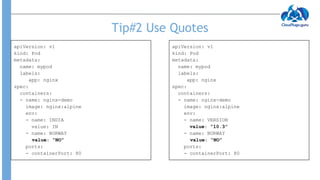
Tip#2 Use Quotes
apiVersion: v1
kind: Pod
metadata:
name: mypod
labels:
app: nginx
spec:
containers:
- name: nginx-demo
image: nginx:alpine
env:
- name: INDIA
value: IN
- name: NORWAY
value: NO
ports:
- containerPort: 80
root@master:~# k apply -f pod.yaml
Error from server (BadRequest): error when creating
"pod.yaml": Pod in version "v1" cannot be handled as
a Pod: v1.Pod.Spec: v1.PodSpec.Containers:
[]v1.Container: v1.Container.Env: []v1.EnvVar:
v1.EnvVar.Value: ReadString: expects " or n, but found
f, error found in #10 byte of
...|,"value":false}],"im|..., bigger context
...|":"INDIA","value":"IN"},{"name":"NORWAY","value":fa
lse}],"image":"nginx:alpine","name":
"nginx-demo",|...
Tip#2 Use Quotes
apiVersion: v1
kind: Pod
metadata:
name: mypod
labels:
app: nginx
spec:
containers:
- name: nginx-demo
image: nginx:alpine
env:
- name: INDIA
value: IN
- name: NORWAY
value: “NO”
ports:
- containerPort: 80
apiVersion: v1
kind: Pod
metadata:
name: mypod
labels:
app: nginx
spec:
containers:
- name: nginx-demo
image: nginx:alpine
env:
- name: VERSION
value: “10.3”
- name: NORWAY
value: “NO”
ports:
- containerPort: 80
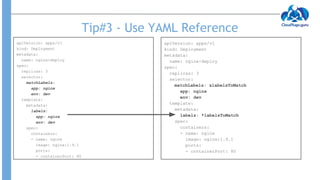
Tip#3 - Use YAML Reference
apiVersion: apps/v1
kind: Deployment
metadata:
name: nginx-deploy
spec:
replicas: 3
selector:
matchLabels: &labelsToMatch
app: nginx
env: dev
template:
metadata:
labels: *labelsToMatch
spec:
containers:
- name: nginx
image: nginx:1.9.1
ports:
- containerPort: 80
apiVersion: apps/v1
kind: Deployment
metadata:
name: nginx-deploy
spec:
replicas: 3
selector:
matchLabels:
app: nginx
env: dev
template:
metadata:
labels:
app: nginx
env: dev
spec:
containers:
- name: nginx
image: nginx:1.9.1
ports:
- containerPort: 80
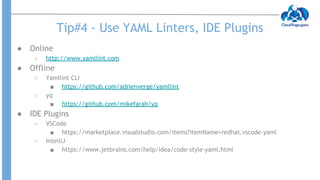
Tip#4 - Use YAML Linters, IDE Plugins
● Online
○ http://www.yamllint.com
● Offline
○ Yamllint CLI
■ https://github.com/adrienverge/yamllint
○ yq
■ https://github.com/mikefarah/yq
● IDE Plugins
○ VSCode
■ https://marketplace.visualstudio.com/items?itemName=redhat.vscode-yaml
○ IntelliJ
■ https://www.jetbrains.com/help/idea/code-style-yaml.html
Thanks
@neependra
References
● https://tanzu.vmware.com/developer/blog/the-hate-for-yaml-the-hammer
-or-the-nail/
● https://www.mirantis.com/blog/introduction-to-yaml-creating-a-kubernete
s-deployment/

YAML Tips For Kubernetes by Neependra Khare

  • 1.
    YAML Tips &Tricks for K8s Neependra Khare, CloudYuga @neependra
  • 2.
    About Me -Neependra Khare ● ● ● ● ● ●
  • 3.
    Agenda ● YAML Basics ●K8s & YAML ● K8s API Reference ● YAML Tips for K8s
  • 4.
    Yet Another MarkupLanguage ● YAML Spec ○ https://yaml.org/spec/1.2/spec.html#id2 777534 ● YAML Maps --- apiVersion: v1 kind: Pod ● YAML List spec: containers: - name: myc1 image: nginx:alpine - name: myc2 image: redis ● Indentation is done with one or more spaces, as long it is maintained ● Should not use Tabs --- !<tag:clarkevans.com,2002:invoice> invoice: 34843 date : 2001-01-23 bill-to: &id001 given : Chris family : Dumars address: lines: | 458 Walkman Dr. Suite #292 city : Royal Oak state : MI postal : 48046 ship-to: *id001 product: - sku : BL394D quantity : 4 description : Basketball price : 450.00 - sku : BL4438H quantity : 1 description : Super Hoop price : 2392.00 tax : 251.42 total: 4443.52 comments: Late afternoon is best.
  • 5.
    Some Issues WithYAML ● Define the YAML country_codes: united_states: us ireland: ie norway: no ● Load the YAML in Ruby require 'yaml' doc = <<-ENDYAML country_codes: united_states: us ireland: ie norway: no ENDYAML puts YAML.load(doc) ● Output {"country_codes"=>{"united_states"=>"us", "ireland"=>"ie", "norway"=>false}} YAML Reference ● Define name: &speaker Neependra presentation: name: AKD speaker: *speaker ● Reference Later name: "Neependra" presentation: name: "AKD" speaker: "Neependra" ● What would happen with this? a: &a ["a", "a", "a"] b: &b [*a,*a,*a] c: &c [*b, *b, *b]
  • 6.
    Why are westuck with YAML? Watch Joe Beda’s talk : I am Sorry about The YAML.
  • 7.
    Why YAML overJSON ? ● YAML is superset of JSON ● More readable ● Takes less space ● Allows comments apiVersion: v1 kind: Pod metadata: name: mypod #name of the Pod labels: app: nginx spec: containers: - name: nginx-demo image: nginx:alpine ports: - containerPort: 80 { "apiVersion": "v1", "kind": "Pod", "metadata": { "name": "mypod", "labels": { "app": "nginx" } }, "spec": { "containers": [ { "name": "nginx-demo", "image": "nginx:alpine", "ports": [ { "containerPort": 80 } ] } ] } } Configuration in YAML Configuration in JSON
  • 8.
  • 9.
    API Group Core APIGroup Other API Groups
  • 10.
    Object Model ● UseYAML or JSON file to define object ● We define the desired using spec field apiVersion: v1 kind: Pod metadata: name: mypod namespace: default spec: containers: - name: myc image: nginx:alpine
  • 11.
    Object Model ● UseYAML or JSON file to define object ● We define the desired using spec field ● status field is managed my Kubernetes, which describes the current state of the object apiVersion: v1 kind: Pod metadata: name: mypod namespace: default spec: containers: - name: myc image: nginx:alpine status: …… ……
  • 12.
    Tip #1 CombineMultiple YAML files into One apiVersion: apps/v1 kind: Deployment metadata: name: rsvp spec: replicas: 1 ...
  • 13.
    Tip #1 CombineMultiple YAML files into One apiVersion: apps/v1 kind: Deployment metadata: name: rsvp spec: replicas: 1 ... --- apiVersion: v1 kind: Service metadata: name: rsvp … --- apiVersion: networking.k8s.io/v1 kind: Ingress metadata: …..
  • 14.
    Tip#2 Use Quotes apiVersion:v1 kind: Pod metadata: name: mypod labels: app: nginx spec: containers: - name: nginx-demo image: nginx:alpine env: - name: INDIA value: IN - name: NORWAY value: NO ports: - containerPort: 80 root@master:~# k apply -f pod.yaml Error from server (BadRequest): error when creating "pod.yaml": Pod in version "v1" cannot be handled as a Pod: v1.Pod.Spec: v1.PodSpec.Containers: []v1.Container: v1.Container.Env: []v1.EnvVar: v1.EnvVar.Value: ReadString: expects " or n, but found f, error found in #10 byte of ...|,"value":false}],"im|..., bigger context ...|":"INDIA","value":"IN"},{"name":"NORWAY","value":fa lse}],"image":"nginx:alpine","name": "nginx-demo",|...
  • 15.
    Tip#2 Use Quotes apiVersion:v1 kind: Pod metadata: name: mypod labels: app: nginx spec: containers: - name: nginx-demo image: nginx:alpine env: - name: INDIA value: IN - name: NORWAY value: “NO” ports: - containerPort: 80 apiVersion: v1 kind: Pod metadata: name: mypod labels: app: nginx spec: containers: - name: nginx-demo image: nginx:alpine env: - name: VERSION value: “10.3” - name: NORWAY value: “NO” ports: - containerPort: 80
  • 16.
    Tip#3 - UseYAML Reference apiVersion: apps/v1 kind: Deployment metadata: name: nginx-deploy spec: replicas: 3 selector: matchLabels: &labelsToMatch app: nginx env: dev template: metadata: labels: *labelsToMatch spec: containers: - name: nginx image: nginx:1.9.1 ports: - containerPort: 80 apiVersion: apps/v1 kind: Deployment metadata: name: nginx-deploy spec: replicas: 3 selector: matchLabels: app: nginx env: dev template: metadata: labels: app: nginx env: dev spec: containers: - name: nginx image: nginx:1.9.1 ports: - containerPort: 80
  • 17.
    Tip#4 - UseYAML Linters, IDE Plugins ● Online ○ http://www.yamllint.com ● Offline ○ Yamllint CLI ■ https://github.com/adrienverge/yamllint ○ yq ■ https://github.com/mikefarah/yq ● IDE Plugins ○ VSCode ■ https://marketplace.visualstudio.com/items?itemName=redhat.vscode-yaml ○ IntelliJ ■ https://www.jetbrains.com/help/idea/code-style-yaml.html
  • 18.
  • 19.