Topic 11: Applets
Chapter 10
Advanced Programming Techniques
Introduction
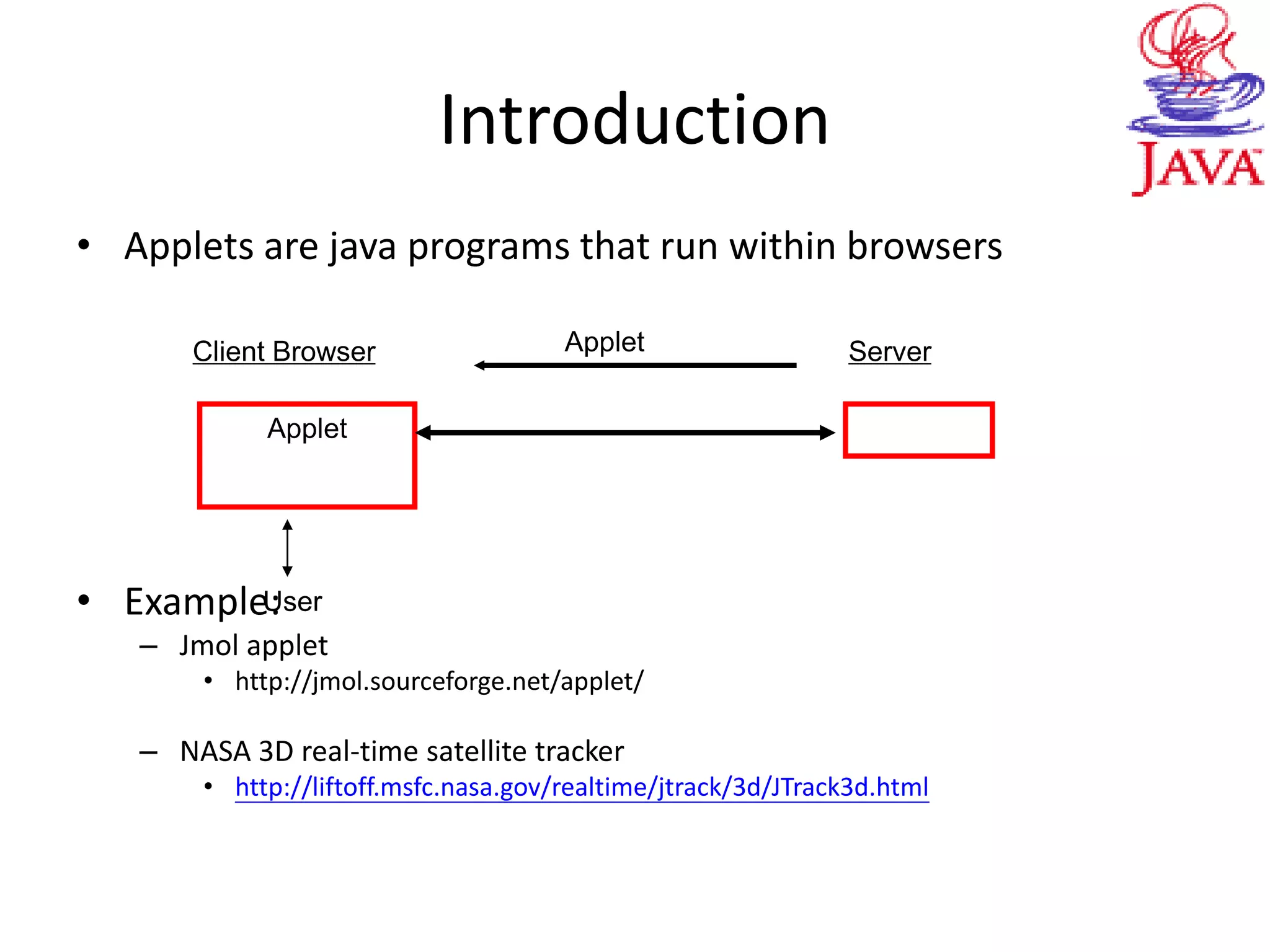
• Applets are java programs that run within browsers
• Example:
– Jmol applet
• http://jmol.sourceforge.net/applet/
– NASA 3D real-time satellite tracker
• http://liftoff.msfc.nasa.gov/realtime/jtrack/3d/JTrack3d.html
Applet
Client Browser ServerApplet
User
Outline
• An example
• Creation
– Converting applications to applets
• Transportation
– Jar files: Move applets from servers to browsers quickly
• Operation
– Applet life cycle
– Security restrictions
– Getting resources from home
– Communicating with browser
Applet
Client Browser ServerApplet
User
An Example
 An applet is a Java class which extends java.applet.Applet
 If Swing components are used, the applet must extend from
javax.swing.JApplet
public class NotHelloWorldApplet extends JApplet
{ public void init()
{
Container contentPane = getContentPane();
JLabel label = new JLabel("Not a Hello,
World applet", SwingConstants.CENTER);
contentPane.add(label);
}
} //NotHelloWorldApplet.java
• Compile and run
– Compile: javac NotHelloWorldApplet.java
– Run:
• Create a HTML file that tells the browser which file to load and how to size the applet
<html><body> This is an example.
<applet code=“NotHelloWorldApplet.class” width=300
height=300>
This text shown if browser doesn’t do Java.</applet>
</body></html>
• View the HTML file with a browser or the command appletviewer
– Note:
• Textpad: Cntrl+3 – creates a simple html file and show it with appletviewer
An Example
An Example
• More notes
– To view applet, one needs Java 2 enabled browser (recent version of IE
and Netscape, e.g. IE 6, Netscape 6, Netscape 7. Netscape 4 is not Java
2 enabled)
– Class files are cached by browser.
• Restart browser after each modification
• Alternatively, one can clear the cache from Java console, which can be
accessed from Netscape or control panel on Windows
An Example
• Compare with application: NotHelloWorld.java
class NotHelloWorldFrame extends JFrame
{
public NotHelloWorldFrame()
{
setTitle("NotHelloWorld");
setSize(300, 200);
Container contentPane = getContentPane();
JLabel label = new JLabel("Not a Hello,
World application", SwingConstants.CENTER);
contentPane.add(label);
}
}
public class NotHelloWorldApplication
{ public static void main(String[] args)
{ NotHelloWorldFrame frame =
new NotHelloWorldFrame();
frame.setDefaultCloseOperation(JFrame.EXIT_ON_CLOSE);
frame.show();
}}
An Example
• Applets are created, run, and destroyed by web browser
– Don’t set size for an applet: determined by HTML file.
– Don’t set title for an applet: applets cannot have title bars.
• Can have menus.
– No need to explicitly construct an applet. Construction code placed inside the
init method.
– There is no main method.
– An applet cannot be closed. It terminates automatically when the browser exit.
– No need to call method show. An applet is displayed automatically.
An Example
Outline
• An example
• Creation
– Converting applications to applets
• Transportation
– Jar files: Move applets from servers to browsers quickly
• Operation
– Applet life cycle
– Security restrictions
– Getting resources from home
– Communicating with browser
Creating Applets from Applications
• Non-IO applications for now
– Pop up window for application
– Embed top-level frame of application inside
browser
Creating Applets from Applications
• Popping up a window for application.
– Assume: Separate class for creating and showing a top-level frame. (If this
class also does some other things, move the other things to other classes.)
class NotHelloWorldFrame extends JFrame {…}
public class NotHelloWorldApplication
{ public static void main(String[] args)
{ JFrame frame = new NotHelloWorldFrame();
frame.setDefaultCloseOperation(JFrame.EXIT_ON_CLOSE);
frame.show();
}
}
Creating Applets from Applications
• Steps of conversion:
– Delete the class for creating and showing the top-level frame
– Add an applet class whose init method contains the same instructions as
main method of deleted class.
– Remove code for closing window
public class NHWApplet extends JApplet
{ public void init()
{ JFrame frame = new NotHelloWorldFrame();
frame.show();
}
} //NHWApplet.java
– The popup window coming with a warning message for security reasons,
(which can be avoided for signed applets).
Creating Applets from Applications
• Placing top-level frame of application inside browser.
– Separate class for creating and showing a top-level frame. (If this class also
does some other things, move the other things to other classes.)
class NotHelloWorldFrame extends JFrame
{
public NotHelloWorldFrame()
{
setTitle("NotHelloWorld");
setSize(300, 200);
Container contentPane = getContentPane();
JLabel label = new JLabel("Not a Hello, World applet", SwingConstants.CENTER);
contentPane.add(label);
}}
public class NotHelloWorld
{ public static void main(String[ ] args)
{ NotHelloWorldFrame frame = new NotHelloWorldFrame();
frame.setDefaultCloseOperation(JFrame.EXIT_ON_CLOSE);
frame.show();
}}
Creating Applets from Applications
• Steps of conversion
– Delete the class for creating and showing the top-level frame
– Convert the top-level frame class into an applet
• JFrame class => JApplet class; must be public
• Remove setSize: set in HTML file
• Remove setTitle: Applet cannot have title bar
• Replace constructor with init.
Creating Applets from Applications
• Let’s do it now
class NotHelloWorldFrame extends JFrame
{
public NotHelloWorldFrame()
{
setTitle("NotHelloWorld");
setSize(300, 200);
Container contentPane = getContentPane();
JLabel label = new JLabel("Not a Hello, World applet", SwingConstants.CENTER);
contentPane.add(label);
}}
public class NotHelloWorld
{ public static void main(String[ ] args)
{ NotHelloWorldFrame frame = new NotHelloWorldFrame();
frame.setDefaultCloseOperation(JFrame.EXIT_ON_CLOSE);
frame.show();
}}
Outline
• An example
• Creation
– Converting applications to applets
• Transportation
– Jar files: Move applets from servers to browsers quickly
• Operation
– Applet life cycle
– Security restrictions
– Getting resources from home
– Communicating with browser
Transportation of Applets via Jar Files
• PopupCalculatorApplet involve three classes
– CalculatorFrame.class, CalculatorPanel.class
PopupCalculatorApplet.class
• HTML file contains name of the applet class
– <APPLET CODE=" PopupCalculatorApplet.class " WIDTH = 60
HEIGHT = 20 > </APPLET>
• Class loader
– First fetches PopupCalculatorApplet.class
– In the process, it notices that some other classes are also needed. It then makes net
connections to get them.
– Many connections might be needed in general, especially when there are associated
resources such as images and sounds.
Jar Files
• Jar files
– A jar file is simply a zip file that contains a manifest file, which
describes features of the archive
– Java Archive (JAR) files allow one to bundle a set of classes and resources into
one file that can be downloaded via one net connection.
Jar Files
• Creating jar files
– jar cf PopupCalculatorAppletClasses.jar *class
• In general:
jar cf myJarFile.jar *.class *.gif
pack all files ending with .class or .gif
Jar Files
 Refer to JAR files in the APPLET tag
<APPLET CODE="PopupCalculatorApplet.class"
ARCHIVE="PopupCalculatorAppletClasses.jar,swing.jar"
WIDTH = 65 HEIGHT = 20 > </APPLET>
 JAR file is downloaded via one net connection.
 Class loader tries to find necessary files in JAR file before attempting
to get them from the net.
Diversion/Self-Running Jar File
• “To make an executable jar file, we need to indicate the main class in the
manifest file.
– Create “mainclass.mf” with one line (no “class” and ended by “return”)
Main-Class: MyApplet
– Create jar file with the manifest file
jar cvfm MyJarFile.jar mainclass.mf *class
– Also, one can update the manifest files of an existing jar file
jar umf mainclass.mf MyJarFile.jar
• Run:
– java -jar MyJarFile.jar
– Or click on file icon
Self-Running Calculator
Outline
• An example
• Creation
– Converting applications to applets
• Transportation
– Jar files: Move applets from servers to browsers quickly
• Operation
– Applet life cycle
– Security restrictions
– Getting resources from home
– Communicating with browser
Applet Life Cycle
• An application starts from main and runs
until exit
• Applets are controlled by browser through
4 methods
– init()
• Called when loaded by browser
– start()
• Called right after init and when user return
to page
– stop()
• Called when user moves off page
– destroy()
• Called when browser shuts down.
• Overwrite the methods to control applet
behavior
non-existent on page
off page
init( )
destroy( )
stop( )destroy( ) start( )
Applet Life Cycle
• public void init()
– One-time initialization when first loaded
– Good place to process parameters and add interface components.
• public void start()
– Called whenever user returns to the page containing the applet after
having gone off to other pages.
– Can be called multiple times.
– Good place to resume animation or game
Applet Life Cycle
• public void stop()
– Called when user moves off page (to other pages)
– Good place to stop time-consuming activities such as animation and audio
playing.
• public void destroy()
– Called when browser shuts down.
– Good place to reclaim non-memory-dependent resources such as graphics
contexts.
– Normally, no need to worry.
• Example: sound (Stop Playing when going out of page)
Compare with the one of the two other versions.
Outline
 An example
 Creation
 Converting applications to applets
 Transportation
 Jar files: Move applets from servers to browsers quickly
 Operation
 Applet life cycle
 Security restrictions
 Getting resources from home
 Communicating with browser
Security Restrictions
 Applets are downloaded from the net and executed by a
browser’s JVM immediately.
 User never gets a chance to confirm or to stop an applet from
running.
 Consequently, applets are restricted in what they can do.
 The applet security manager is responsible for enforcing access
rules and throws an SecurityException when an access
rule is violated.
Security Restriction
 By default, an applet is restricted to run “inside the
sandbox”. Strictest security restrictions.
 Signed applets can have more access privileges.
 For now, we consider only applets playing in the
sandbox.
 Access rights for Applets and Java Applications (JA)
BR: applets running inside a browser with default applet
security model
AV: applets running insider Applet viewer
BR
Read local file N
Write local file N
Get file info. N
Delete file N
Run another program N
Read the user.name property N
Connect to network port on home server Y
Connect to network port on other server N
Load Java library N
Call exit N
Create a pop-up window warning
AV JA
Y Y
Y Y
Y Y
N Y
Y Y
Y Y
Y Y
Y Y
Y Y
Y Y
Y Y
Outline
 An example
 Creation
 Converting applications to applets
 Transportation
 Jar files: Move applets from servers to browsers quickly
 Operation
 Applet life cycle
 Security restrictions
 Getting resources from home
 Communicating with browser
Applet
Client Browser ServerApplet
User
Resources for Applets
 One can provide information to applets in HTML file
 Applets can access resources at home server:
 Text
 Multimedia
Passing Info to Applets via HTML File
 In HTML file, use PARAM, NAME, VALUE tags
<APPLET CODE="Chart.class" WIDTH=400 HEIGHT=300>
<PARAM NAME="title" VALUE="Diameters of the Planets">
<PARAM NAME="values" VALUE="9">
…. </Applet>
 In applet, use the getParameter method of the Applet class
getParameter("title"); // returns "Diameters of the Planets“
String vString = getParameter(“values”); // returns “9”
if (vString == null )
{do something} // precaution
else
int v=Integer.parseInt(vString);//must parse to get numbers
Chart.java, Chart.html
Accessing Resources at Home Server
 Where is home?
 Inside a subclass of Applet
 getDocumentBase returns URL of the html file that calls the
applet
 getCodeBase returns URL of the applet itself
 Inside any other class x
 x.class gives one an object of the Class class that contain
information of x.
 (Class is a special class and has method getResource.
C.f. Object class)
 x.class.getResource( resourceName ) returns URL
of resource
 Need the URL class in java.net package
import java.net.*
Accessing Text Files at Home Server
 Find the URL of text file and the create an InputStream using
the openStream method of URL class
InputStream in = url.openStream();
 Or create an InputStream directly using the
getResourceAsStream method of the Class class.
InputStream in = x.class.getResoruceAsStream(
fileName);
 The InputStream can be nested with other streams in the
normal way (see Topic 4)
ResourceTest.java, ResourceTest.html
 Applets can handle images in GIF or JPEG format
 Load images
 Inside an subclass Applet, use
getImage(url), getImage(url, name)
 Inside other classes java.awt.Toolkit
Toolkit.getDefaultToolkit().getImage( url );
 How to show an image?
ImageLoadApplet.java
Accessing Images at Home Server
Exercise: Load the images in applet class
 Applets can handle audio files in AU, AIFF, WAV, or
MIDI format.
 Audio Clips (java.applet.Applet)
 Load:
AudioClip getAudioClip(url),
AudioClip getAudioClip(url, name)
Then use play method of AudioClip to play
and the stop method to stop
 Play without first loading:
void play(url),
void play(url, name)
//SoundApplet.java
Accessing Audio Files at Home Server
Outline
 An example
 Creation
 Converting applications to applets
 Transportation
 Jar files: Move applets from servers to browsers quickly
 Operation
 Applet life cycle
 Security restrictions
 Getting resources from home
 Communicating with browser
Applet
Client Browser ServerApplet
User
Communication with Browser
 To establish a communication channel between an applet and
browser, use the getAppletContext method of the Applet
class
 The method returns an object of the AppletContext, which is
an interface.
 Two useful methods of interface AppletContext
showDocument( URL url )
showDocument(URL url, String target )
ShowPageApplet.java
Java Web Start
• A technology for simplifying deployment of Java applications
– Gives you the power to launch full-featured applications with a single
click from your Web browser.
– The Java Web Start software is the reference implementation for the
Java Network Launching Protocol (JNLP)
– http://java.sun.com/products/javawebstart/docs/developersguide.html
Java Web Start
• What do you need?
– Jar files that contain class files & resources.
– A jnlp file for the application
– A link from the Web page to the JNLP file
– Configure the Web server so that the .jnlp file extension invokes Web Start
.(http://java.sun.com/products/javawebstart/docs/developersguide.html#web
site)
• Client side:
– Install Java Web Start, included in Download J2SE 5.0 JRE/SDK (jdk1.5.1)
Java Web Start
• Example 1 (javaWebStartExamples.zip):
– NotHelloWorld.jar generated from
NotHelloWorld.java
– NotHelloWorld.jnlp
See next page
– index.html
<a href="http://www.cs.ust.hk/~lzhang/teach/java03/webStart/NotHelloWorld.jnlp">
NotHelloWorld Application</a>
Java Web Start
– NotHelloWorld.jnlp
<?xml version="1.0" encoding="utf-8"?>
<jnlp
codebase="http://www.cs.ust.hk/~lzhang/teach/java03/webStart"
href="NotHelloWorld.jnlp">
<information>
<title>NotHelloWorld Application</title>
<vendor>Sun Microsystems, Inc.</vendor>
<homepage href="docs/help.html"/>
<description>NotHelloWorld Application</description>
<description kind="short">A demo of nothing useful</description>
<offline-allowed/>
</information>
<resources>
<j2se version="1.3"/>
<jar href="NotHelloWorld.jar"/>
</resources>
<application-desc main-class="NotHelloWorld"/>
</jnlp>
Java Web Start
• Unlike applets, web-start applications have a main() like normal Java
applications. There are a few special requirements:
• The application must be contained in a jar file
• By default restricted to Sandbox as Applets (cannot call standard IO libaries to
access the disk, you can only connect back the source host etc).
• Resources (files, images) must also be in a jar file and must be accessed using the
getResource() method.
• Like applets users can grant more access if they trust your code
• A JNLP API is required for some applications.
Java Web Start
• Web-start applications differ from applets in several ways:
– They are stored in the local disk so do not need to be downloaded each time.
– They can call System.exit().
– They do not have the same lifecycle.
– A web-start application can use a special class library which allows the
application to prompt users to approve reading and writing to/from the local
disk.
– Rather than HMTL tags in a web-page, XML (JNLP) is used to describe web-
start applications.
Java Web Start
• Example 2: ImageTest
– ImageTest.java
• Loading image using the getResource method
– ImageTest.jar
• Includes class files & image files
– ImageTest.jnlp
– Index.html
<a href="http://www.cs.ust.hk/~lzhang/teach/java03/webStart/ImageTest.jnlp">
ImageTest Application</a>

java applets

  • 1.
    Topic 11: Applets Chapter10 Advanced Programming Techniques
  • 2.
    Introduction • Applets arejava programs that run within browsers • Example: – Jmol applet • http://jmol.sourceforge.net/applet/ – NASA 3D real-time satellite tracker • http://liftoff.msfc.nasa.gov/realtime/jtrack/3d/JTrack3d.html Applet Client Browser ServerApplet User
  • 3.
    Outline • An example •Creation – Converting applications to applets • Transportation – Jar files: Move applets from servers to browsers quickly • Operation – Applet life cycle – Security restrictions – Getting resources from home – Communicating with browser Applet Client Browser ServerApplet User
  • 4.
    An Example  Anapplet is a Java class which extends java.applet.Applet  If Swing components are used, the applet must extend from javax.swing.JApplet public class NotHelloWorldApplet extends JApplet { public void init() { Container contentPane = getContentPane(); JLabel label = new JLabel("Not a Hello, World applet", SwingConstants.CENTER); contentPane.add(label); } } //NotHelloWorldApplet.java
  • 5.
    • Compile andrun – Compile: javac NotHelloWorldApplet.java – Run: • Create a HTML file that tells the browser which file to load and how to size the applet <html><body> This is an example. <applet code=“NotHelloWorldApplet.class” width=300 height=300> This text shown if browser doesn’t do Java.</applet> </body></html> • View the HTML file with a browser or the command appletviewer – Note: • Textpad: Cntrl+3 – creates a simple html file and show it with appletviewer An Example
  • 6.
    An Example • Morenotes – To view applet, one needs Java 2 enabled browser (recent version of IE and Netscape, e.g. IE 6, Netscape 6, Netscape 7. Netscape 4 is not Java 2 enabled) – Class files are cached by browser. • Restart browser after each modification • Alternatively, one can clear the cache from Java console, which can be accessed from Netscape or control panel on Windows
  • 7.
  • 8.
    • Compare withapplication: NotHelloWorld.java class NotHelloWorldFrame extends JFrame { public NotHelloWorldFrame() { setTitle("NotHelloWorld"); setSize(300, 200); Container contentPane = getContentPane(); JLabel label = new JLabel("Not a Hello, World application", SwingConstants.CENTER); contentPane.add(label); } } public class NotHelloWorldApplication { public static void main(String[] args) { NotHelloWorldFrame frame = new NotHelloWorldFrame(); frame.setDefaultCloseOperation(JFrame.EXIT_ON_CLOSE); frame.show(); }} An Example
  • 9.
    • Applets arecreated, run, and destroyed by web browser – Don’t set size for an applet: determined by HTML file. – Don’t set title for an applet: applets cannot have title bars. • Can have menus. – No need to explicitly construct an applet. Construction code placed inside the init method. – There is no main method. – An applet cannot be closed. It terminates automatically when the browser exit. – No need to call method show. An applet is displayed automatically. An Example
  • 10.
    Outline • An example •Creation – Converting applications to applets • Transportation – Jar files: Move applets from servers to browsers quickly • Operation – Applet life cycle – Security restrictions – Getting resources from home – Communicating with browser
  • 11.
    Creating Applets fromApplications • Non-IO applications for now – Pop up window for application – Embed top-level frame of application inside browser
  • 12.
    Creating Applets fromApplications • Popping up a window for application. – Assume: Separate class for creating and showing a top-level frame. (If this class also does some other things, move the other things to other classes.) class NotHelloWorldFrame extends JFrame {…} public class NotHelloWorldApplication { public static void main(String[] args) { JFrame frame = new NotHelloWorldFrame(); frame.setDefaultCloseOperation(JFrame.EXIT_ON_CLOSE); frame.show(); } }
  • 13.
    Creating Applets fromApplications • Steps of conversion: – Delete the class for creating and showing the top-level frame – Add an applet class whose init method contains the same instructions as main method of deleted class. – Remove code for closing window public class NHWApplet extends JApplet { public void init() { JFrame frame = new NotHelloWorldFrame(); frame.show(); } } //NHWApplet.java – The popup window coming with a warning message for security reasons, (which can be avoided for signed applets).
  • 14.
    Creating Applets fromApplications • Placing top-level frame of application inside browser. – Separate class for creating and showing a top-level frame. (If this class also does some other things, move the other things to other classes.) class NotHelloWorldFrame extends JFrame { public NotHelloWorldFrame() { setTitle("NotHelloWorld"); setSize(300, 200); Container contentPane = getContentPane(); JLabel label = new JLabel("Not a Hello, World applet", SwingConstants.CENTER); contentPane.add(label); }} public class NotHelloWorld { public static void main(String[ ] args) { NotHelloWorldFrame frame = new NotHelloWorldFrame(); frame.setDefaultCloseOperation(JFrame.EXIT_ON_CLOSE); frame.show(); }}
  • 15.
    Creating Applets fromApplications • Steps of conversion – Delete the class for creating and showing the top-level frame – Convert the top-level frame class into an applet • JFrame class => JApplet class; must be public • Remove setSize: set in HTML file • Remove setTitle: Applet cannot have title bar • Replace constructor with init.
  • 16.
    Creating Applets fromApplications • Let’s do it now class NotHelloWorldFrame extends JFrame { public NotHelloWorldFrame() { setTitle("NotHelloWorld"); setSize(300, 200); Container contentPane = getContentPane(); JLabel label = new JLabel("Not a Hello, World applet", SwingConstants.CENTER); contentPane.add(label); }} public class NotHelloWorld { public static void main(String[ ] args) { NotHelloWorldFrame frame = new NotHelloWorldFrame(); frame.setDefaultCloseOperation(JFrame.EXIT_ON_CLOSE); frame.show(); }}
  • 17.
    Outline • An example •Creation – Converting applications to applets • Transportation – Jar files: Move applets from servers to browsers quickly • Operation – Applet life cycle – Security restrictions – Getting resources from home – Communicating with browser
  • 18.
    Transportation of Appletsvia Jar Files • PopupCalculatorApplet involve three classes – CalculatorFrame.class, CalculatorPanel.class PopupCalculatorApplet.class • HTML file contains name of the applet class – <APPLET CODE=" PopupCalculatorApplet.class " WIDTH = 60 HEIGHT = 20 > </APPLET> • Class loader – First fetches PopupCalculatorApplet.class – In the process, it notices that some other classes are also needed. It then makes net connections to get them. – Many connections might be needed in general, especially when there are associated resources such as images and sounds.
  • 19.
    Jar Files • Jarfiles – A jar file is simply a zip file that contains a manifest file, which describes features of the archive – Java Archive (JAR) files allow one to bundle a set of classes and resources into one file that can be downloaded via one net connection.
  • 20.
    Jar Files • Creatingjar files – jar cf PopupCalculatorAppletClasses.jar *class • In general: jar cf myJarFile.jar *.class *.gif pack all files ending with .class or .gif
  • 21.
    Jar Files  Referto JAR files in the APPLET tag <APPLET CODE="PopupCalculatorApplet.class" ARCHIVE="PopupCalculatorAppletClasses.jar,swing.jar" WIDTH = 65 HEIGHT = 20 > </APPLET>  JAR file is downloaded via one net connection.  Class loader tries to find necessary files in JAR file before attempting to get them from the net.
  • 22.
    Diversion/Self-Running Jar File •“To make an executable jar file, we need to indicate the main class in the manifest file. – Create “mainclass.mf” with one line (no “class” and ended by “return”) Main-Class: MyApplet – Create jar file with the manifest file jar cvfm MyJarFile.jar mainclass.mf *class – Also, one can update the manifest files of an existing jar file jar umf mainclass.mf MyJarFile.jar • Run: – java -jar MyJarFile.jar – Or click on file icon Self-Running Calculator
  • 23.
    Outline • An example •Creation – Converting applications to applets • Transportation – Jar files: Move applets from servers to browsers quickly • Operation – Applet life cycle – Security restrictions – Getting resources from home – Communicating with browser
  • 24.
    Applet Life Cycle •An application starts from main and runs until exit • Applets are controlled by browser through 4 methods – init() • Called when loaded by browser – start() • Called right after init and when user return to page – stop() • Called when user moves off page – destroy() • Called when browser shuts down. • Overwrite the methods to control applet behavior non-existent on page off page init( ) destroy( ) stop( )destroy( ) start( )
  • 25.
    Applet Life Cycle •public void init() – One-time initialization when first loaded – Good place to process parameters and add interface components. • public void start() – Called whenever user returns to the page containing the applet after having gone off to other pages. – Can be called multiple times. – Good place to resume animation or game
  • 26.
    Applet Life Cycle •public void stop() – Called when user moves off page (to other pages) – Good place to stop time-consuming activities such as animation and audio playing. • public void destroy() – Called when browser shuts down. – Good place to reclaim non-memory-dependent resources such as graphics contexts. – Normally, no need to worry. • Example: sound (Stop Playing when going out of page) Compare with the one of the two other versions.
  • 27.
    Outline  An example Creation  Converting applications to applets  Transportation  Jar files: Move applets from servers to browsers quickly  Operation  Applet life cycle  Security restrictions  Getting resources from home  Communicating with browser
  • 28.
    Security Restrictions  Appletsare downloaded from the net and executed by a browser’s JVM immediately.  User never gets a chance to confirm or to stop an applet from running.  Consequently, applets are restricted in what they can do.  The applet security manager is responsible for enforcing access rules and throws an SecurityException when an access rule is violated.
  • 29.
    Security Restriction  Bydefault, an applet is restricted to run “inside the sandbox”. Strictest security restrictions.  Signed applets can have more access privileges.  For now, we consider only applets playing in the sandbox.
  • 30.
     Access rightsfor Applets and Java Applications (JA) BR: applets running inside a browser with default applet security model AV: applets running insider Applet viewer BR Read local file N Write local file N Get file info. N Delete file N Run another program N Read the user.name property N Connect to network port on home server Y Connect to network port on other server N Load Java library N Call exit N Create a pop-up window warning AV JA Y Y Y Y Y Y N Y Y Y Y Y Y Y Y Y Y Y Y Y Y Y
  • 31.
    Outline  An example Creation  Converting applications to applets  Transportation  Jar files: Move applets from servers to browsers quickly  Operation  Applet life cycle  Security restrictions  Getting resources from home  Communicating with browser Applet Client Browser ServerApplet User
  • 32.
    Resources for Applets One can provide information to applets in HTML file  Applets can access resources at home server:  Text  Multimedia
  • 33.
    Passing Info toApplets via HTML File  In HTML file, use PARAM, NAME, VALUE tags <APPLET CODE="Chart.class" WIDTH=400 HEIGHT=300> <PARAM NAME="title" VALUE="Diameters of the Planets"> <PARAM NAME="values" VALUE="9"> …. </Applet>  In applet, use the getParameter method of the Applet class getParameter("title"); // returns "Diameters of the Planets“ String vString = getParameter(“values”); // returns “9” if (vString == null ) {do something} // precaution else int v=Integer.parseInt(vString);//must parse to get numbers Chart.java, Chart.html
  • 34.
    Accessing Resources atHome Server  Where is home?  Inside a subclass of Applet  getDocumentBase returns URL of the html file that calls the applet  getCodeBase returns URL of the applet itself  Inside any other class x  x.class gives one an object of the Class class that contain information of x.  (Class is a special class and has method getResource. C.f. Object class)  x.class.getResource( resourceName ) returns URL of resource  Need the URL class in java.net package import java.net.*
  • 35.
    Accessing Text Filesat Home Server  Find the URL of text file and the create an InputStream using the openStream method of URL class InputStream in = url.openStream();  Or create an InputStream directly using the getResourceAsStream method of the Class class. InputStream in = x.class.getResoruceAsStream( fileName);  The InputStream can be nested with other streams in the normal way (see Topic 4) ResourceTest.java, ResourceTest.html
  • 36.
     Applets canhandle images in GIF or JPEG format  Load images  Inside an subclass Applet, use getImage(url), getImage(url, name)  Inside other classes java.awt.Toolkit Toolkit.getDefaultToolkit().getImage( url );  How to show an image? ImageLoadApplet.java Accessing Images at Home Server Exercise: Load the images in applet class
  • 37.
     Applets canhandle audio files in AU, AIFF, WAV, or MIDI format.  Audio Clips (java.applet.Applet)  Load: AudioClip getAudioClip(url), AudioClip getAudioClip(url, name) Then use play method of AudioClip to play and the stop method to stop  Play without first loading: void play(url), void play(url, name) //SoundApplet.java Accessing Audio Files at Home Server
  • 38.
    Outline  An example Creation  Converting applications to applets  Transportation  Jar files: Move applets from servers to browsers quickly  Operation  Applet life cycle  Security restrictions  Getting resources from home  Communicating with browser Applet Client Browser ServerApplet User
  • 39.
    Communication with Browser To establish a communication channel between an applet and browser, use the getAppletContext method of the Applet class  The method returns an object of the AppletContext, which is an interface.  Two useful methods of interface AppletContext showDocument( URL url ) showDocument(URL url, String target ) ShowPageApplet.java
  • 40.
    Java Web Start •A technology for simplifying deployment of Java applications – Gives you the power to launch full-featured applications with a single click from your Web browser. – The Java Web Start software is the reference implementation for the Java Network Launching Protocol (JNLP) – http://java.sun.com/products/javawebstart/docs/developersguide.html
  • 41.
    Java Web Start •What do you need? – Jar files that contain class files & resources. – A jnlp file for the application – A link from the Web page to the JNLP file – Configure the Web server so that the .jnlp file extension invokes Web Start .(http://java.sun.com/products/javawebstart/docs/developersguide.html#web site) • Client side: – Install Java Web Start, included in Download J2SE 5.0 JRE/SDK (jdk1.5.1)
  • 42.
    Java Web Start •Example 1 (javaWebStartExamples.zip): – NotHelloWorld.jar generated from NotHelloWorld.java – NotHelloWorld.jnlp See next page – index.html <a href="http://www.cs.ust.hk/~lzhang/teach/java03/webStart/NotHelloWorld.jnlp"> NotHelloWorld Application</a>
  • 43.
    Java Web Start –NotHelloWorld.jnlp <?xml version="1.0" encoding="utf-8"?> <jnlp codebase="http://www.cs.ust.hk/~lzhang/teach/java03/webStart" href="NotHelloWorld.jnlp"> <information> <title>NotHelloWorld Application</title> <vendor>Sun Microsystems, Inc.</vendor> <homepage href="docs/help.html"/> <description>NotHelloWorld Application</description> <description kind="short">A demo of nothing useful</description> <offline-allowed/> </information> <resources> <j2se version="1.3"/> <jar href="NotHelloWorld.jar"/> </resources> <application-desc main-class="NotHelloWorld"/> </jnlp>
  • 44.
    Java Web Start •Unlike applets, web-start applications have a main() like normal Java applications. There are a few special requirements: • The application must be contained in a jar file • By default restricted to Sandbox as Applets (cannot call standard IO libaries to access the disk, you can only connect back the source host etc). • Resources (files, images) must also be in a jar file and must be accessed using the getResource() method. • Like applets users can grant more access if they trust your code • A JNLP API is required for some applications.
  • 45.
    Java Web Start •Web-start applications differ from applets in several ways: – They are stored in the local disk so do not need to be downloaded each time. – They can call System.exit(). – They do not have the same lifecycle. – A web-start application can use a special class library which allows the application to prompt users to approve reading and writing to/from the local disk. – Rather than HMTL tags in a web-page, XML (JNLP) is used to describe web- start applications.
  • 46.
    Java Web Start •Example 2: ImageTest – ImageTest.java • Loading image using the getResource method – ImageTest.jar • Includes class files & image files – ImageTest.jnlp – Index.html <a href="http://www.cs.ust.hk/~lzhang/teach/java03/webStart/ImageTest.jnlp"> ImageTest Application</a>