Python for Ethical Hackers
Mohammad reza Kamalifard
Kamalifard@datasec.ir
Python Language Essentials
Part 5 :
Multi-threaded Programming and Queue
Mohammad reza Kamalifard
Kamalifard.ir/pysec101
Thread
Running several threads is similar to running several different
programs concurrently, but with the following benefits:
Multiple threads within a process share the same data space with the
main thread and can therefore share information or communicate
with each other more easily than if they were separate processes.
Threads sometimes called light-weight processes and they do not
require much memory overhead; they care
cheaper than processes.
Mohammad reza Kamalifard
Kamalifard.ir/pysec101
Start a newThread
Starting a New Thread:
To spawn another thread, you need to call following method available
in thread module:
thread.start_new_thread ( function, args[, kwargs] )
This method call enables a fast and efficient way to create new
threads in both Linux and Windows.
The method call returns immediately and the child thread starts and
calls function with the passed list of agrs. When function returns, the
thread terminates.
Here, args is a tuple of arguments; use an empty tuple to call function
without passing any arguments. kwargs is an optional dictionary of
keyword arguments.
Mohammad reza Kamalifard
Kamalifard.ir/pysec101
Start a newThread
import thread
import time
# Define a function for the thread
def print_time( threadName, delay):
count = 0
while count < 5:
time.sleep(delay)
count += 1
print "%s: %s" % ( threadName, time.ctime(time.time()) )
# Create two threads as follows
thread.start_new_thread( print_time, ("Thread-1", 2, ) )
thread.start_new_thread( print_time, ("Thread-2", 4, ) )
while True:
pass Mohammad reza Kamalifard
Kamalifard.ir/pysec101
The Threading Module
The newer threading module included with Python 2.4 provides much
more powerful, high-level support for threads than the thread
module discussed in the previous section.
The threading module exposes all the methods of the thread module
and provides some additional methods:
threading.activeCount(): Returns the number of thread objects that
are active.
threading.currentThread(): Returns the number of thread objects in
the caller's thread control.
threading.enumerate(): Returns a list of all thread objects that are
currently active.
Mohammad reza Kamalifard
Kamalifard.ir/pysec101
The Threading Module
In addition to the methods, the threading module has the Thread
class that implements threading. The methods provided by the
Thread class are as follows:
run(): The run() method is the entry point for a thread.
start(): The start() method starts a thread by calling the run
method.
join([time]): The join() waits for threads to terminate.
isAlive(): The isAlive() method checks whether a thread is still
executing.
getName(): The getName() method returns the name of a thread.
setName(): The setName() method sets the name of a thread.
Mohammad reza Kamalifard
Kamalifard.ir/pysec101
Creating Thread using Threading Module
To implement a new thread using the threading module, you have to
do the following:
Define a new subclass of the Thread class.
Override the __init__(self [,args]) method to add additional
arguments.
Then, override the run(self [,args]) method to implement what the
thread should do when started.
Once you have created the new Thread subclass, you can create an
instance of it and then start a new thread by invoking the start(),
which will in turn call run() method.
Mohammad reza Kamalifard
Kamalifard.ir/pysec101
Multi-threaded Queue
The Queue module allows you to create a new queue object that can
hold a specific number of items. There are following methods to
control the Queue:
get(): The get() removes and returns an item from the queue.
put(): The put adds item to a queue.
qsize() : The qsize() returns the number of items that are currently
in the queue.
empty(): The empty( ) returns True if queue is empty; otherwise,
False.
full(): the full() returns True if queue is full; otherwise, False.
Mohammad reza Kamalifard
Kamalifard.ir/pysec101
Create task queues
Threads receive tasks
Threads complete tasks and inform the queue
All threads exit once queue is empty
finally when all task executed the program exits
Mohammad reza Kamalifard
Kamalifard.ir/pysec101
import threading
import Queue
import time
class WorkerThread(threading.Thread):
def __init__(self, queue):
threading.Thread.__init__(self)
self.queue = queue
def run(self):
print "In WorkerThread"
while True:
counter = self.queue.get()
print "Ordered to sleep for %d seconds" % counter
time.sleep(counter)
print "Finished sleeping for %d seconds" % counter
self.queue.task_done()
Mohammad reza Kamalifard
Kamalifard.ir/pysec101
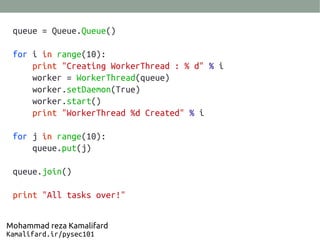
queue = Queue.Queue()
for i in range(10):
print "Creating WorkerThread : % d" % i
worker = WorkerThread(queue)
worker.setDaemon(True)
worker.start()
print "WorkerThread %d Created" % i
for j in range(10):
queue.put(j)
queue.join()
print "All tasks over!"
Mohammad reza Kamalifard
Kamalifard.ir/pysec101
Creating WorkerThread : 0
WorkerThread 0 Created
Creating WorkerThread : 1
In WorkerThread
WorkerThread 1 Created
Creating WorkerThread : 2
In WorkerThread
WorkerThread 2 Created
Creating WorkerThread : 3
In WorkerThread
WorkerThread 3 Created
Creating WorkerThread : 4
In WorkerThread
WorkerThread 4 Created
Creating WorkerThread : 5
In WorkerThread
WorkerThread 5 Created
Creating WorkerThread : 6
In WorkerThread
Ordered to sleep for 0 seconds
Finished sleeping for 0 seconds
Ordered to sleep for 1 seconds
Ordered to sleep for 2 seconds
Ordered to sleep for 3 seconds
...
Mohammad reza Kamalifard
Kamalifard.ir/pysec101
Ordered to sleep for 4 seconds
Ordered to sleep for 5 seconds
Ordered to sleep for 6 seconds
Ordered to sleep for 7 seconds
Ordered to sleep for 8 seconds
Ordered to sleep for 9 seconds
In WorkerThread
Finished sleeping for 1 seconds
Finished sleeping for 2 seconds
Finished sleeping for 3 seconds
Finished sleeping for 4 seconds
Finished sleeping for 5 seconds
Finished sleeping for 6 seconds
Finished sleeping for 7 seconds
Finished sleeping for 8 seconds
Finished sleeping for 9 seconds
All tasks over!
Mohammad reza Kamalifard
Kamalifard.ir/pysec101
This work is licensed under the Creative Commons
Attribution-NoDerivs 3.0 Unported License.
To view a copy of this license, visit http://creativecommons.org/licenses/by-nd/3.0/
Copyright 2013 Mohammad reza Kamalifard.
All rights reserved.

اسلاید ارائه اول جلسه ۱۰ کلاس پایتون برای هکر های قانونی

  • 1.
    Python for EthicalHackers Mohammad reza Kamalifard Kamalifard@datasec.ir
  • 2.
    Python Language Essentials Part5 : Multi-threaded Programming and Queue Mohammad reza Kamalifard Kamalifard.ir/pysec101
  • 3.
    Thread Running several threadsis similar to running several different programs concurrently, but with the following benefits: Multiple threads within a process share the same data space with the main thread and can therefore share information or communicate with each other more easily than if they were separate processes. Threads sometimes called light-weight processes and they do not require much memory overhead; they care cheaper than processes. Mohammad reza Kamalifard Kamalifard.ir/pysec101
  • 4.
    Start a newThread Startinga New Thread: To spawn another thread, you need to call following method available in thread module: thread.start_new_thread ( function, args[, kwargs] ) This method call enables a fast and efficient way to create new threads in both Linux and Windows. The method call returns immediately and the child thread starts and calls function with the passed list of agrs. When function returns, the thread terminates. Here, args is a tuple of arguments; use an empty tuple to call function without passing any arguments. kwargs is an optional dictionary of keyword arguments. Mohammad reza Kamalifard Kamalifard.ir/pysec101
  • 5.
    Start a newThread importthread import time # Define a function for the thread def print_time( threadName, delay): count = 0 while count < 5: time.sleep(delay) count += 1 print "%s: %s" % ( threadName, time.ctime(time.time()) ) # Create two threads as follows thread.start_new_thread( print_time, ("Thread-1", 2, ) ) thread.start_new_thread( print_time, ("Thread-2", 4, ) ) while True: pass Mohammad reza Kamalifard Kamalifard.ir/pysec101
  • 6.
    The Threading Module Thenewer threading module included with Python 2.4 provides much more powerful, high-level support for threads than the thread module discussed in the previous section. The threading module exposes all the methods of the thread module and provides some additional methods: threading.activeCount(): Returns the number of thread objects that are active. threading.currentThread(): Returns the number of thread objects in the caller's thread control. threading.enumerate(): Returns a list of all thread objects that are currently active. Mohammad reza Kamalifard Kamalifard.ir/pysec101
  • 7.
    The Threading Module Inaddition to the methods, the threading module has the Thread class that implements threading. The methods provided by the Thread class are as follows: run(): The run() method is the entry point for a thread. start(): The start() method starts a thread by calling the run method. join([time]): The join() waits for threads to terminate. isAlive(): The isAlive() method checks whether a thread is still executing. getName(): The getName() method returns the name of a thread. setName(): The setName() method sets the name of a thread. Mohammad reza Kamalifard Kamalifard.ir/pysec101
  • 8.
    Creating Thread usingThreading Module To implement a new thread using the threading module, you have to do the following: Define a new subclass of the Thread class. Override the __init__(self [,args]) method to add additional arguments. Then, override the run(self [,args]) method to implement what the thread should do when started. Once you have created the new Thread subclass, you can create an instance of it and then start a new thread by invoking the start(), which will in turn call run() method. Mohammad reza Kamalifard Kamalifard.ir/pysec101
  • 9.
    Multi-threaded Queue The Queuemodule allows you to create a new queue object that can hold a specific number of items. There are following methods to control the Queue: get(): The get() removes and returns an item from the queue. put(): The put adds item to a queue. qsize() : The qsize() returns the number of items that are currently in the queue. empty(): The empty( ) returns True if queue is empty; otherwise, False. full(): the full() returns True if queue is full; otherwise, False. Mohammad reza Kamalifard Kamalifard.ir/pysec101
  • 10.
    Create task queues Threadsreceive tasks Threads complete tasks and inform the queue All threads exit once queue is empty finally when all task executed the program exits Mohammad reza Kamalifard Kamalifard.ir/pysec101
  • 11.
    import threading import Queue importtime class WorkerThread(threading.Thread): def __init__(self, queue): threading.Thread.__init__(self) self.queue = queue def run(self): print "In WorkerThread" while True: counter = self.queue.get() print "Ordered to sleep for %d seconds" % counter time.sleep(counter) print "Finished sleeping for %d seconds" % counter self.queue.task_done() Mohammad reza Kamalifard Kamalifard.ir/pysec101
  • 12.
    queue = Queue.Queue() fori in range(10): print "Creating WorkerThread : % d" % i worker = WorkerThread(queue) worker.setDaemon(True) worker.start() print "WorkerThread %d Created" % i for j in range(10): queue.put(j) queue.join() print "All tasks over!" Mohammad reza Kamalifard Kamalifard.ir/pysec101
  • 13.
    Creating WorkerThread :0 WorkerThread 0 Created Creating WorkerThread : 1 In WorkerThread WorkerThread 1 Created Creating WorkerThread : 2 In WorkerThread WorkerThread 2 Created Creating WorkerThread : 3 In WorkerThread WorkerThread 3 Created Creating WorkerThread : 4 In WorkerThread WorkerThread 4 Created Creating WorkerThread : 5 In WorkerThread WorkerThread 5 Created Creating WorkerThread : 6 In WorkerThread Ordered to sleep for 0 seconds Finished sleeping for 0 seconds Ordered to sleep for 1 seconds Ordered to sleep for 2 seconds Ordered to sleep for 3 seconds ... Mohammad reza Kamalifard Kamalifard.ir/pysec101
  • 14.
    Ordered to sleepfor 4 seconds Ordered to sleep for 5 seconds Ordered to sleep for 6 seconds Ordered to sleep for 7 seconds Ordered to sleep for 8 seconds Ordered to sleep for 9 seconds In WorkerThread Finished sleeping for 1 seconds Finished sleeping for 2 seconds Finished sleeping for 3 seconds Finished sleeping for 4 seconds Finished sleeping for 5 seconds Finished sleeping for 6 seconds Finished sleeping for 7 seconds Finished sleeping for 8 seconds Finished sleeping for 9 seconds All tasks over! Mohammad reza Kamalifard Kamalifard.ir/pysec101
  • 15.
    This work islicensed under the Creative Commons Attribution-NoDerivs 3.0 Unported License. To view a copy of this license, visit http://creativecommons.org/licenses/by-nd/3.0/ Copyright 2013 Mohammad reza Kamalifard. All rights reserved.