Python for ethical hackers
Mohammad reza Kamalifard
kamalifard@datasec.ir
Python language essentials
Module 1:
Introduction to Python and Setting up an Environment
for Programing
Python a short History
• Created in 1989 by Huido Van Rossum (now he works for
•
•
•
•
•

Google in App Engine)
Python 2.x in 2000
Python 3.x in 2008
Python 3 is not backward compatible
2.x is the status quo
3.x future
Why Python ?
• Python is an easy to learn
• Powerful
• efficient high-level data structures
• write complex operations in fewer statements than in C, C++ or
•
•
•
•
•
•
•

Java. 
Object-oriented programming is a lot easier than in languages
like Java.
Clean syntax and code readability
Python programs are portable
Open Source
Cross-platform
Rich set of libraries
Large Number of open source tools
Cross-platform
• Unix/ Linux
• Mac OS X
• Windows
• Mobile Platforms – Android, IOS
• Embedded Systems
Major Implementations
• Cpython – reference implementation “Python”
• PyPy
• Jython – Python implementation in Java
• IronPython – Python implementation in C#
Why Python in InfoSec?
• Rapid prototyping – POC ( proof on concept )
• Extensive library support
• Tons of tools already written
• If you want to write POC very fast actually you need

language which is High level allows you to concentrate
more on business of the application rather than having to
worry about integrity details.
Python On different OS
• Linux :
– Pre-Loaded
• Windows:
–
–

Download python 2.7.5 from http://python.org/getit
Or Download and install Activestate Python
http://www.activestate.com/activepython

• Mac OS :
– Pre-Loaded
Python 2.7 or 3.X ?
• Python 3 is not backward compatible
• Most tools / Libraries still do not Support 3.x
• We use python 2.7 here in this course
Using the Python Interactive Interpreter
$ python
Python 2.7.3 (default, Apr 10 2013, 05:46:21)
[GCC 4.6.3] on linux2
Type "help", "copyright", "credits" or "license" for
more information.
>>>
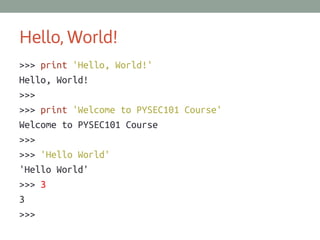
Hello, World!
>>> print 'Hello, World!'
Hello, World!
>>>
>>> print 'Welcome to PYSEC101 Course'
Welcome to PYSEC101 Course
>>>
>>> 'Hello World'
'Hello World'
>>> 3
3
>>>
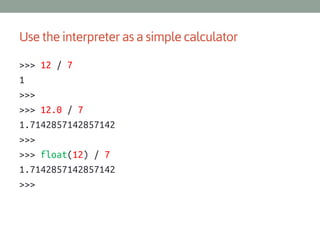
Use the interpreter as a simple calculator
>>> 12 / 7
1
>>>
>>> 12.0 / 7
1.7142857142857142
>>>
>>> float(12) / 7
1.7142857142857142
>>>
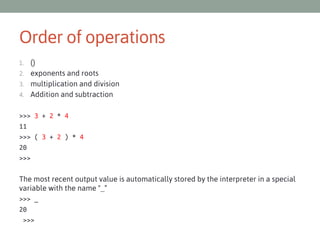
Order of operations
()
2. exponents and roots
3. multiplication and division
4. Addition and subtraction
1.

>>> 3 + 2 * 4
11
>>> ( 3 + 2 ) * 4
20
>>>
The most recent output value is automatically stored by the interpreter in a special
variable with the name "_“
>>> _
20
>>>
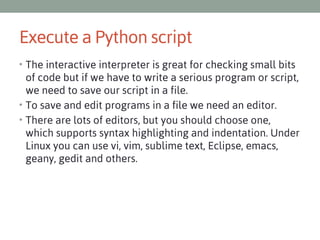
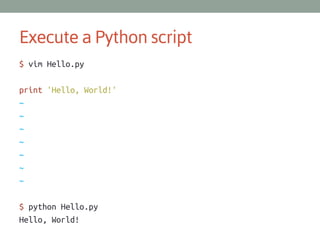
Execute a Python script
• The interactive interpreter is great for checking small bits

of code but if we have to write a serious program or script,
we need to save our script in a file.
• To save and edit programs in a file we need an editor.
• There are lots of editors, but you should choose one,
which supports syntax highlighting and indentation. Under
Linux you can use vi, vim, sublime text, Eclipse, emacs,
geany, gedit and others.
Execute a Python script
$ vim Hello.py
print 'Hello, World!'
~
~
~
~
~
~
~
$ python Hello.py
Hello, World!
References
SPSE securitytube training by Vivek Ramachandran
SANS Python for Pentesters (SEC573)
Violent python
Security Power Tools
python-course.eu
http://docs.python.org/2/reference/expressions.html
http://en.wikibooks.org/wiki/Python_Programming/Operators
http://en.wikipedia.org/wiki/Order_of_operations
http://www.python-course.eu/history_and_philosophy.php
http://www.python-course.eu/why_python.php
http://www.python-course.eu/interactive.php
This work is licensed under the Creative Commons Attribution-NoDerivs 3.0 Unported License.
To view a copy of this license, visit
http://creativecommons.org/licenses/by-nd/3.0/

Copyright 2013 Mohammad Reza Kamalifard
All rights reserved.
Go to Kamalifard.ir/pysec101 to Download Slides and Course martials .

جلسه اول پایتون برای هکر های قانونی دوره مقدماتی پاییز ۹۲

  • 1.
    Python for ethicalhackers Mohammad reza Kamalifard kamalifard@datasec.ir
  • 2.
    Python language essentials Module1: Introduction to Python and Setting up an Environment for Programing
  • 3.
    Python a shortHistory • Created in 1989 by Huido Van Rossum (now he works for • • • • • Google in App Engine) Python 2.x in 2000 Python 3.x in 2008 Python 3 is not backward compatible 2.x is the status quo 3.x future
  • 4.
    Why Python ? •Python is an easy to learn • Powerful • efficient high-level data structures • write complex operations in fewer statements than in C, C++ or • • • • • • • Java.  Object-oriented programming is a lot easier than in languages like Java. Clean syntax and code readability Python programs are portable Open Source Cross-platform Rich set of libraries Large Number of open source tools
  • 5.
    Cross-platform • Unix/ Linux •Mac OS X • Windows • Mobile Platforms – Android, IOS • Embedded Systems
  • 6.
    Major Implementations • Cpython– reference implementation “Python” • PyPy • Jython – Python implementation in Java • IronPython – Python implementation in C#
  • 7.
    Why Python inInfoSec? • Rapid prototyping – POC ( proof on concept ) • Extensive library support • Tons of tools already written • If you want to write POC very fast actually you need language which is High level allows you to concentrate more on business of the application rather than having to worry about integrity details.
  • 8.
    Python On differentOS • Linux : – Pre-Loaded • Windows: – – Download python 2.7.5 from http://python.org/getit Or Download and install Activestate Python http://www.activestate.com/activepython • Mac OS : – Pre-Loaded
  • 9.
    Python 2.7 or3.X ? • Python 3 is not backward compatible • Most tools / Libraries still do not Support 3.x • We use python 2.7 here in this course
  • 10.
    Using the PythonInteractive Interpreter $ python Python 2.7.3 (default, Apr 10 2013, 05:46:21) [GCC 4.6.3] on linux2 Type "help", "copyright", "credits" or "license" for more information. >>>
  • 11.
    Hello, World! >>> print'Hello, World!' Hello, World! >>> >>> print 'Welcome to PYSEC101 Course' Welcome to PYSEC101 Course >>> >>> 'Hello World' 'Hello World' >>> 3 3 >>>
  • 12.
    Use the interpreteras a simple calculator >>> 12 / 7 1 >>> >>> 12.0 / 7 1.7142857142857142 >>> >>> float(12) / 7 1.7142857142857142 >>>
  • 13.
    Order of operations () 2.exponents and roots 3. multiplication and division 4. Addition and subtraction 1. >>> 3 + 2 * 4 11 >>> ( 3 + 2 ) * 4 20 >>> The most recent output value is automatically stored by the interpreter in a special variable with the name "_“ >>> _ 20 >>>
  • 14.
    Execute a Pythonscript • The interactive interpreter is great for checking small bits of code but if we have to write a serious program or script, we need to save our script in a file. • To save and edit programs in a file we need an editor. • There are lots of editors, but you should choose one, which supports syntax highlighting and indentation. Under Linux you can use vi, vim, sublime text, Eclipse, emacs, geany, gedit and others.
  • 15.
    Execute a Pythonscript $ vim Hello.py print 'Hello, World!' ~ ~ ~ ~ ~ ~ ~ $ python Hello.py Hello, World!
  • 16.
    References SPSE securitytube trainingby Vivek Ramachandran SANS Python for Pentesters (SEC573) Violent python Security Power Tools python-course.eu http://docs.python.org/2/reference/expressions.html http://en.wikibooks.org/wiki/Python_Programming/Operators http://en.wikipedia.org/wiki/Order_of_operations http://www.python-course.eu/history_and_philosophy.php http://www.python-course.eu/why_python.php http://www.python-course.eu/interactive.php
  • 17.
    This work islicensed under the Creative Commons Attribution-NoDerivs 3.0 Unported License. To view a copy of this license, visit http://creativecommons.org/licenses/by-nd/3.0/ Copyright 2013 Mohammad Reza Kamalifard All rights reserved. Go to Kamalifard.ir/pysec101 to Download Slides and Course martials .